 MetaTrader 5
 Эксперты
 Индикаторы
 Библиотеки
 Утилиты
 Виджеты
 Правила
Смотри обучающее видео по маркету на YouTube
Как купить торгового робота или индикатор
Запусти робота на
виртуальном хостинге
виртуальном хостинге
Протестируй индикатор/робота перед покупкой
Хочешь зарабатывать в Маркете?
Как подать продукт, чтобы его покупали
Торговые утилиты для MetaTrader 4 - 16
 Ниже представлены торговые программы, упрощающие торговлю на форексе в MetaTrader 4. Наведите курсором на товар из списка ниже, чтобы прочесть описание и его предназначение.
Индикатор BOSSTESTER (Binary Option Super System Tester) представляет собой простейший тестер для торговой системы BOSS по бинарным опционам. Его задачей является построение линии баланса на исторических данных по ходу совершения сделок CALL и PUT торговой системой BOSS. Для работы тестера требуется не менее 50 баров в истории.
Входные параметры Initial Balance - первоначальный баланс. Investment Rate - инвестиционная ставка. Losses Cover Ratio - коэффициент покрытия убытков. Payout - выплата в
FREE

Discover our all-in-one monitoring and notifications EA for MetaTrader. Designed to ensure traders’ security and peace of mind, this unique EA offers a full range of advanced features that will allow you to stay informed and control your account activity, anytime and anywhere. Key Features : Continuous server monitoring: real-time notification on server availability and performance (Cpu, Ram, disk), connectivity, latency and more Advanced account management: live tracking of margin calls,
FREE

JVH Protection – Universal Prop Firm Risk Manager (MT4) Broker-Time Reset | Daily Max Loss | Overall Drawdown | Trailing Lock | Full Account Guard JVH Protection is a professional-grade equity protection system designed for serious traders using prop firms, automated strategies, or high-risk environments. This tool acts as a real-time risk firewall for your entire trading account. Key Features Full Account Protection Monitors all symbols Covers all magic numbers Works with manual trading
FREE

Этот скрипт предназначен для оценки весовых коэффициентов в различных оконных функциях. Индикатор, построенный на этих оконных функциях можно скачать https://www.mql5.com/ru/market/product/72160 Входные параметры: iPeriod – период индикатора. iPeriod >= 2 iCenter – индекс отсчета, на котором будет находиться центр оконной функции. По умолчанию этот параметр равен 0 – центр окна совпадает с центром индикатора. При 1 <= iCenter <= iPeriod центр оконной функции будет сдвинут, в результате чего изме
FREE

Для того, чтобы начинающим трейдерам было проще разобраться, я сделал информационную панель счета торговой платформы, которая не взимает никаких комиссий.
Прежде всего, вы должны понять платформу перед торговлей.
Котировки и спецификации товаров каждой платформы не совпадают с правилами торговли на счете.
Можно настроить цвет и размер панели, а при попытке нажатия панель может сдвинуться. Панель не будет оформлять заказ, загружайте ЭКСПЕРТОВ с уверенностью Если вы хотите обновить свой беспла
FREE

Msg2Line отправляет свободный текст и надписи из текстового поля в "LINE Messenger".
Если вы пишете линии, пометки или комментарии на графике, изображение будет отправлено.
Вы можете адресовать его себе или группе.
Очень полезный и простой инструмент.
- Отправка свободных сообщений
1. введите свободный текст в поле EDIT.
2. Нажмите кнопку ОТПРАВИТЬ.
- Отправка свободного сообщения + захват изображения
1. введите текст в поле EDIT. 2.
2. нажмите кнопку w/img.
- Отправка захваченного изображ
FREE

Название EA: MultiTrade+ButtonEA
Функция: Этот советник работает только на платформе MetaTrader4, и его функции:
- Автоматически открывайте ордера на покупку и продажу с помощью кнопок «Купить» и «Продать».
- Закройте все открытые заказы с помощью кнопки CloseAll.
- Определите количество заказов для открытия и размер лота через раздел ввода в настройках EA.
- Автоматически установите TakeProfit в первом порядке из 10 пипсов, а следующие заказы будут иметь TakeProfits на расстоянии 10 пункт
FREE

Titan Smart Layer Assistant Powerful Trading Assistant for Professional Trade Management Most trading robots try to replace the trader . Titan Smart Layer Assistant does the opposite. It is designed to empower traders , not replace them. Built for the MetaTrader 4 platform, Titan acts as a professional trading assistant that helps traders manage positions with precision, discipline, and structured execution. Instead of blindly opening trades, Titan focuses on what matters most: intelligent trade
FREE

Простой скрипт для анализа возможности получения прибыли по всему рынку по всем символам. Вы можете указать минимальную и максимальную прибыль в процентах и количество шагов для каждого периода. Скрипт найдет самые интересные символы в зависимости от вашей конфигурации.
Вы получите быстрый и актуальный анализ всего рынка, который поможет вам сделать правильный выбор сделок, вы больше никогда не упустите возможность.
FREE

Скрипт открывает 5 sell ордеров с 1 стоп лосом и 5 разных тейк профитов. И размещает 4 лимитных ордера (на продажу). По умолчанию установлены такие параметры: Стоп лосс для всех открытых ордеров - 120 пипс Тейк профит для 1 ордера (лот 0,1) - 30 пипс тейк профит для других 4 ордеров (лот 0,04) - 50, 90, 140, 200 пипсов.
Стоп лосс для лимитных ордеров - 135-140 пипс от текущей цены (в момент выставления ордеров). Дистанция каждого лимитного ордера - 20 пипсов. Размер лота с микро-мартингейлом -
FREE

OvertradeShield – Утилита EA для предотвращения овертрейдинга в дискреционной торговле Бывало ли у вас чувство сожаления после того, как вы совершили «еще одну сделку» в дискреционной торговле? OvertradeShield — это утилита EA, которая автоматически ограничивает и предупреждает новые входы на основе зафиксированной прибыли и убытков, поддерживая ваши торговые правила и дисциплину. Этот инструмент идеально подходит для трейдеров, которые хотят контролировать ежедневные результаты, избежать овертр
FREE

Это бесплатная версия, работает только на паре EURUSD. Если вам понравится этот продукт, приобретите полную версию советника (FXA Local Trade Copier Pro). FXA LTC — это копировщик сделок для терминала MetaTrader 4. Это отличный инструмент для копирования сделок с одного терминала MetaTrader 4 на несколько других, работающих на том же компьютере/VPS-сервере. Очень прост в настройке, содержит минимальные параметры, с которыми вы можете начать копировать сделки за минуты. FXA LTC также подходит дл
FREE

Price Alert EA for MT4 – Customizable Alert System with Intuitive Chart Interface The CFN Price Alerts EA is a powerful yet easy-to-use Expert Advisor designed for traders who want full control over price level alerts directly from their MT4 charts. No need to manually set alerts through MT4’s native system – this EA gives you an on-chart interface to quickly set, view, and remove price alerts with flexibility. Key Features: Set unlimited price alerts directly on your chart. Visual display
FREE

Этот скрипт для того, чтобы трейдер мог определиться со средней продолжительностью торговых сделок, при которой соотношение возможных прибыли и убытков будет оптимальным. Сначала давайте рассмотрим общий подход к определению оптимальной продолжительности торговых сделок. Введем следующие переменные: R – результат сделки; T – время, в течение которого сделка была открытой; W – время между закрытием предыдущей сделки и открытием следующей. Каждый трейдер стремится к тому, чтобы получить максимальн
FREE

Binary Options Receiver Free - это бесплатный инструмент для копирования через интернет сделок по бинарным опционам, совершаемых другими трейдерами, которые используют программу Remote Binary Options Copier . Прежде чем начнется копирование с помощью этой программы, поставщик сделок должен добавить бесплатную лицензию в список получателей. Это означает, что вы можете использовать этот бесплатный инструмент для копирования сделок по бинарным опционам по согласию поставщика, который предоставит ва
FREE

Please visit = https://www.mql5.com/en/market/product/186079 for slave EA
MT5 Version = https://www.mql5.com/en/market/product/186048 Free Demo Version = https://c.mql5.com/6/1028/COPYTRADE_BIN7D.zip User Manual : download here Best EA Trade Copier for MT4. EA Trade Copier is a powerful and reliable trade copying solution that transfers trades from one Master account to multiple Slave accounts in real time. Whether you manage multiple trading accounts, investor accounts, VPS terminals, or p
FREE

Это бесплатная версия продукта: https://www.mql5.com/ru/market/product/19928 Ограничения бесплатной версии: Копируются только сделки по EURUSD. Продукт позволяет копировать ордера из одного терминала MetaTrader 4 в другой, даже если они установлены на разных компьютерах.
Особенности Копирует сделки между терминалами MT4 с небольшой задержкой. Автоматически распознает префиксы символов. К одному ведущему счету (Master) могут подключаться несколько ведомых (Slave). Поддержка отложенных и рыночных
FREE

Всем привет, это очередная утилита, которую я написал специально для пользователей, использующих мой профиль с большим количеством экспертов и сетов ( https://www.mql5.com/ru/blogs/post/750711 ) . Эта утилита пригодится для работы с профилем, использующем сеточные стратегии (усреднение и мартингейл). Как мы знаем, такие стратегии периодически попадают в большую просадку и нужно иметь осторожность при открытии усредняющих позиций (не открывать слишком много). В моём профиле, я использую ограниче
FREE

EXTERNAL EA MANAGER - это программа, предназначенная для помощи в управлении торговлей. Если вы хотите, чтобы какой-либо советник прекратил торговлю в определенный момент, например в ПЯТНИЦУ вечером, и вы хотели бы сделать это удаленно и автоматически ... EXTERNAL EA MANAGER - программа для вас. Он деинициализирует весь терминал и все работающие советники. В процессе деинициализации есть возможность убить все сделки и открытые ордера. Вы можете использовать максимум 20 магических чисел.
FREE

This free light version is functionally limited with a maximum risk of 20 account-currency units per trade, a maximum lot size of 0.05, and a limited number of trading operations. RiskMaster Unified Panel (MT4) — On-Chart Risk and Execution Мгновенный размер лота от стоп-лосса — по любому символу. RiskMaster Unified Panel решает проблему #1 в быстрой дискреционной торговле: точное определение размера позиции за считанные секунды. Перетащите линии входа / SL / TP на график, → панель сразу пере
FREE
This Demo Version will only work with CHFJPY
For the full version :
For English go here: https://www.mql5.com/en/market/product/41117
For Spanish go here: https://www.mql5.com/en/market/product/41141
This EA does partial close to your positions every certain pips, and can move your Stop Loss to Break Even (Open Proce + 1 pip) when one of the partial close is made. The EA handles all trades of the chart symbol. It can be used with any pair or instrument on MT4. This EA will remember the sta
FREE

This Expert Advisor sends an email notification, generates an alert or outputs a message to the journal (depending on the settings) every time a new order is opened (buy, sell, limit, stop). It also sends a similar message about closure of orders. The EA can be useful for those who want to always be informed of which orders had been opened/closed on the account. Limitations: In this demo version, notifications are available only for the GBPCHF currency pair. To use notifications on all currency
FREE

Общие сведения Скрипт показывает информацию о торговом счете: Account - номер счета и тип (Real или Demo); Name - имя владельца счета; Company - название компании, предоставляющей доступ для торговли; Server - название торгового сервера; Connection State - состояние соединения; Trade Allowed - разрешена ли торговля на счете в данный момент; Balance - баланс счета; Equity - собственные средства; Credit - кредит; Profit - прибыль; Free Margin - свободные средства; Margin - залог; StopOut Level - у
FREE

Эксперт, сигнализирующий о пересечении ценой линий на графике. Обрабатываются линии двух типов: горизонтальная и трендовая. Количество линий ограничено. Параметры prefix of signal line – префикс наименований объектов (линий), обрабатываемых индикатором. При пустом параметре обрабатываются все объекты типов: горизонтальные и трендовые линии. price Mode – вариант цены, может быть bid или ask. timeout – таймаут сигнализации пересечения. number of repeats – лимит повторов сигнализации пересечения. n
FREE

Продукт является плагином для советника "Control adora" - торгового робота, который позволяет рассчитывать, устанавливать и управлять позициями на графике. При запуске на графике, управляемом советником Control adora, этот плагин устанавливает уровни входа в рынок. При срабатывании уровня на рынок отсылается ордер при условии, что у вас установлен режим StopCloseOnly (OCO в комментариях) = 1 установленный в Control adora (в противном случае индикатор направляет ордер на рынок, только когда цена
FREE

"TradeALot" - это плагин для советника Control-adora . Он позволяет выставлять запрограммированные ордера - без необходимости указывать имена ордеров в свойствах стрелок (например, bs, ss, bl, sl, sl1, sl2 и т.д.). Просто перетащите кнопку "Programmed Buys" или "Programmed Sells" в зону, где показываются свечи, и отпустите ее на том, уровне, где необходимо выставить ордер. TradeALot определит значение цены Bid в данной точке и самостоятельно выберет типа ордера - "Stop" или "Limit". Используя Tr
FREE

Данный индикатор является плагином для советника Controladora , с помощью которого можно задать определенную область. При закрытии свечи внутри этой области Controladora откроет сделку buy или sell. Для работы на графике с установленным советником Controladora необходимо добавить на него индикатор Act Inside. Затем добавьте на график прямоугольник и измените его размер так, чтобы он покрывал область, где закрывается свеча, чтобы отправить ордер на покупку или продажу. Переименуйте прямоугольник
FREE

Вы внутридневной трейдер или хотите закрывать открытые позиции в определенное время каждый день? Проблемы с часовым поясом? воспользуйтесь нашими инструментами и после указания времени мы закроем для вас заказ.
Как это использовать:
1) Просто вставьте наши инструменты в свой график.
2) Включить автоматическую торговлю
3) Дополнительные параметры введите ВРЕМЯЗАКРЫТЬ (время закрытия операций)
Если вам нужна дополнительная информация, не стесняйтесь обращаться к нам в частном порядке.
FREE

Это скрипт для MetaTrader 4. Он помогает создать сводку по всем сделкам на каждом символе.
Входные параметры Select Period: выбор периода, 7 вариантов. Они включают в себя: Last Month (последний месяц), This Month (текущий месяц), Last Week (последняя неделя), This Week (текущая неделя), Today (сегодня), All History (вся история) и Date Specified (указанная дата). Specify Starting Date: введите начальную дату, если выбрали значение "Date Specified" в параметре "Select Period". Specify Ending Da
FREE

Indicator Floating Highest Lowest предлагает интуитивно понятный и удобный способ слежения за плавающим максимумом (прибылью) и минимумом (убытком), которые принесут все сделки вместе взятые. Например, открыто 3 ордера, которые принесут 4.71$ плавающей прибыли при торговле по тренду. Позже, когда тренд будет направлен в противоположную сторону, эти 3 ордера принесут 30$ убытка, а через некоторое время тренд вернется, и плавающий убыток будет равен 5$. То есть, максимальное значение - $4.71, а ми
FREE

Скрипт предназначен для использования совместно с индикатором Market Patroller для создания списка символов на основе символов, доступных в окне "Обзор рынка" платформы MT4. Вы можете сократить список следующим образом: Оставить только пары с конкретными символами, например, все пары с EUR (EURXXX или XXXEUR). Исключить пары с конкретными символами. Например, если вы не хотите в данный момент работать с парами, содержащими GBP, вы можете исключить такие пары (GBPXXX или XXXGBP) из списка. Также
FREE

Величина спреда - важный показатель при расчете торговых коэффициентов прибыли. Информация о спреде особенно важна для краткосрочных трейдеров, в частности для скальпинга. Утилита отображает стоимость спреда всех форекс-валют (включая XAU и XAG) в платформе на разных типах счетов (USD, EUR и т.д.).
Расчет и код См. статьи (на английском и китайском): THE TRADE COST OF FOREX CURRENCY Part1 THE TRADE COST OF FOREX CURRENCY Part2 THE TRADE COST OF FOREX CURRENCY Part3 THE TRADE COST OF FOREX CURRE
FREE

Скрипт анализирует историю котировок и дает рекомендации по минимальному депозиту. В расчетах учитывается вариативность цен и среднее квадратичное отклонение. Также учитываются и маржинальные требования по инструменту. Результат работы скрипта - минимальный рекомендуемый депозит для торговли по данной валютной паре.
FREE

Индикатор ZZ Snake, это небольшая утилита для развлечения и не имеет никакой пользы для трейдинга. Сделана на индикаторе ZigZag, поэтому с параметрами разобраться будет несложно. Если установить ее на график, то можно увидеть змея-монстра, который движется по экрану, изменяя в движении размеры головы и туловища. Просто подключите его к графику и пусть себе ползет. Осторожно, он может укусить! ) P.S. Для более динамичного движения змея рекомендуется запускать его в тестере стратегий.
FREE

Панель для терминала МТ4, предназначена для помощи трейдеру быстро установить отложенные ордера на пробой предыдущего бара. Утилита сама рассчитывает лот ордера по заданной цене стоп лосса и процента максимального убытка. Так же на панели есть кнопка перевода в безубыток. При нажатии стоп лосс открытой позиции переводится на цену открытия ордера. Мониторинг работы советника, а также другие мои разработки можно посмотреть по адресу https://www.mql5.com/ru/users/vkprofit/seller#products
FREE
Новая версия игры "Змейка".
Добавлена настройку удаленности цели (по вертикали+горизонтали), что значительно оживляет игру.
Змейка движется фоном, по разметке сетки.
Управление:
Ctrl - пауза , W - вверх, А - влево, S - вниз, D - вправо.
Во входящих параметрах можно задать время в миллисекундах между движениями.
Змейка увеличивается на одно деление при достижении цели, и так до тех пор, пока не займет собой все поле.
В комментарии выводится размер поля и размер змейки.
FREE

Garfield Equity Loss Closer is an expert advisor who will stay in control of the equity / float of the account, when the negative float reaches the amount defined from the inputs, he will close all existing orders.
Only one input, it is the negative amount in the currency of your account that you must reach to start closing all positions.
Its use is recommended for those expert advisors who use a volume increase system, either hedging (recovery zone) or martingale since sometimes without real
FREE

Martingala Assistance, as its name says ... It is an assistant, an expert advisor that monitors all the orders for the asset in which it has been placed, no matter if that order was by some other expert advisor or by the trader placed on the Manually, he will start his work after each order that is negative.
See more products on: https://www.mql5.com/en/users/joaquinmetayer/seller .
FREE

Информирование пользователя о величине текущего спрэда. Простой и удобный информатор. Расположить можно в любом месте графика (настраивается во входных параметрах). Входные параметры: - цвет текста - размер текста - стиль текста - привязка к углу графика - отступ от точки привязки по горизонтали - отступ от точки привязки по вертикали - включение (отключение) функции "Показывать как фон" Всем удачной торговли!
FREE
This indicator is to be used in bot connectors for automation of Pct Multi indicator entries.
How to use: Configure the bot connector with the following information: Indicator name: pctmultibot Call buffer: 0 Put buffer: 1
Do not add this indicator to the chart, just configure it in the bot connector!
Pct Multi indicator:
https://www.mql5.com/en/market/product/73054
FREE
Your trading life will be easier with the Forex Control Panel. This control panel, which has many features, is very easy and simple to use.
With this control panel, you will have 3 different ea features. You can learn how to use it from the special video I prepared for you.
You can buy this product, whose normal price is $125, at a much cheaper price than its current discounted price.
You can also try all its features in the strategy test.
A pdf file explaining its detailed features will be
FREE
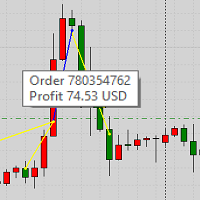
Этот продукт отображает на графике закрытые сделки из истории и текущие открытые сделки. Продукт имеет много визуальных настроек, а также настройки фильтрации отображаемых сделок, что позволяет анализировать эффективность работы советников и/или торговых стратегий. Фильтровать можно по комментариям или по magic-числу советника. Без использования данного продукта как Вы ещё увидите свою торговлю, поймете её эффективность?
FREE

### Program Overview
**RemoteBatchClose EA** is an automated closing tool designed for forex traders, aimed at assisting users in managing open positions when they are away from their computers. By automatically monitoring specified pending order prices and currency pairs, this program can execute closing operations when conditions are met, thereby reducing the user's operational burden and ensuring effective implementation of trading strategies. Its primary purpose is to address the inconveni
FREE
Утилита Order Info Box предназначена для удобства контроля за установленными ордерами. При наличии ордеров утилита строит графические информермеры для каждого ордера, с указанием
- типа ордера (направления позиции);
- объема ордера;
- прибыли (если ордер находится в рынке);
- опционально магика ордера;
- опционально комментария ордера.
Кроме того, утилита строит информеры для ТейкПрофитов и СтопЛоссов ордеров, с указанием профита или убытка, который будет при исполнении этого ТейкПрофита или С
FREE

Индикатор Week7D помогает трейдерам определить день недели на ценовом графике. Он просто помечает каждый период или каждую свечу днем недели в начале нового торгового дня. Это позволяет трейдерам наблюдать, как цены движутся в любой день.
Индикатор Week7D имеет несколько параметров настройки, которые трейдеры могут использовать для изменения визуального представления индикатора.
Переменная “BarCount” изменяет количество дней, в течение которых индикатор будет обозначать день недели в каждый д
FREE

CloseProfit - э то утилита, созданная для автоматизации процесса установки стоп-лосса и закрытия ордеров при достижении определенного процента прибыли.
Утилита также имеет две кнопки Buy и Sell на графике для открытия ордеров.
Утилита может использоваться для закрытия ордеров, открытых другими советниками, со стоп-лоссом или процентом от увеличения депозита. Для этого вам необходимо установить в настройках магический номер, который совпадает с тем, который установлен в советнике при открытии
FREE

VisualTicks_EA is an Expert Advisor dedicated to the VisualTicks chart.
Works ONLY on the VisualTicks chart.
Is a tool that lets you open and close transactions directly on the VisualTicks chart.
There is only one parameter in EA settings:
magic - next EA number. If you use more than one VisualTicks_EA on MT4, you must enter a different magic number.
After starting VisualTicks_EA, the following buttons will appear on the chart:
Open BUY - opens one BUY transaction of a specified lot size.
Cl
FREE

Calendar File Converter
This script adapts the csv economic calendar file downloaded from the myfxbook.com portal for use by the Economic Calendar Viewer indicator. This indicator displays on the MT4 chart data about the upcoming current economic event and displays its data. It also notifies you with a sound before the upcoming event time. The read file should be named: - calendar_statement.csv The temporary intermediate file is named: - calendar_statement2.csv The output file is named: - Cale
FREE
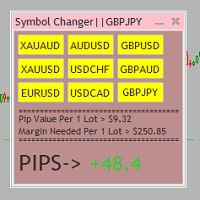
Tired of opening a new chart and applying a template for each Currency pair? So am I. That's why I created an indicator which gives you the option to switch between charts for the first 9 currencies in the Market Watch. In addition to changing between top 9 currencies, the value per 1 lot, the margin required and the amount of pips for any trade you have open for that currency pair are also displayed. Best of all, the colors can be changed!!!
FREE
Данный скрипт открывает несколько ордеров по текущей цене. Не забудьте включить кнопку Разрешить советнику торговать", иначе скрипт не сработает. При запуске в появившемся окне выбираем: Вход на Покупку или продажу; Количество ордеров(по-умолчанию 2, ограничения в количестве не выставлено! Будьте внимательны); Размеры Тейкпрофита и Стоплосса по 5-ти знаку(по-умолчанию 500 пипсов); Размер лота, по-умлочанию минималный для валютных пар 0,01(на других инструментах не использовался); Коэффициент от
FREE

Utility for know all informations and settings of account where the platform is connected The informations that you can know are for example:
- The difference from server time and time of your PC
- The limit orders that you can place at market
- The credit that you have
- The stopout mode of your broker
- The exact name of company of your broker
and other informations
FREE

Script to calculate equity and balance at a specific date and time.
This script makes up for a lack of MetaTrader account history, that does not show how the balance and equity changes in time.
Balance calculation includes closed orders only.
Equity calculation includes orders closed before and orders that are still open at the specified time.
Example: date and time set to 2020/07/06 00:00. If I had a Buy 1 lot EURUSD position opened at price 1.12470 on the 2020/07/02, the program would ca
FREE

非常好用的工具8888888888888888888888888888888888888888888888888888888888888888888888888888888888888888888888888888888888888888888888888888888888888888888888888888888888888888888888888888888888888888888888888888888888888888888888888888888888888888888888888888888888888888888888888888888888888888888888888888888888888888
FREE

Script risk management, which calculates for you the potential profit, possible loss, risk percentage, on the entire account and for each instrument. Shows where stop-losses and take-profits are not set.
Each line summarizes the number of open transactions for a specific instrument and calculates the percentage of loss from the total deposit. Beyond the line, the final calculation of the balance is summarized, if all transactions are triggered by stop loss; Potential loss, as the sum of all st
FREE

Current Order Take Profit this indicator shows settled level of Take profit current opened order. If order Take Profit will be changed it will be shown on screen immediately. The same with pips left to get so as to close the position. If the price will drop beneeth the open order price it will change the color of pips digits left to gain. That is usefull when you change Take profit level by drag the price line using mouse to new level na wykresie.
FREE

Account Cash Status This indicator shows actual account balance and equity. Can be placed in any position on chart even in subwindow. Account Balance is displayed in gray color. When there is no opened position the account equity is displayed in dark gray color. When there is opened position and equity value is lower than balance value the color is changed for red. When there is opened position and equity value outperforms balance value the color is changed for lime. Colors may be set freely by
FREE

That indicator shows on chart actual amount of lots currently opened position and Take Profit pips numnber and pips left to get. All objects can be placed at any place of chart by user choice. Objects text can be set by user also by writing new text in indicator's parameters window. Each object color can ve set to any color from the palette of colors delivered by MT4 editor.
FREE

Good EA to help to earn money easily. (Full Version)
Strategy:
MA - A moving average (MA) is a stock indicator that is commonly used in technical analysis. The reason for calculating the moving average of a stock is to help smooth out the price data over a specified period of time by creating a constantly updated average price.
BB - Bollinger Bands work as an oscillator measurer. It indicates whether the market has high or low volatility, as well as overbought or oversold conditions. The m
FREE

This utility is a graphical shell for other Expert Advisors that do not have their own graphical shell or whose graphical shell you do not like. Just run the utility on a free chart of any currency pair, specify in the input parameters the "Magic Number" of the advisor to which you want to connect the utility, and a graphical shell will appear on the graph, containing information about the traded currency pairs, current positions and trading results of your advisor.
If you like this utility, ta
FREE

Stop Out Monitor will provide information on how many pips your account will stop out for each currency pair.
With this Stop out info, it is hoped that forex trader can maintain the health of their account and be able to take the necessary actions when a stop out will occur and look for prevention so that a stop out or margin call does not occur. So far, we have only provided standard information from Metatrader in the form of free margin and margin level in percentage , where this info
FREE

This is an expert advisor that works more like an indicator.
Its functions are the following: - Print the balance and equity in Arial font size 40 (cannot be changed) - Change chart background and candle colors depending on the close of the previous candle and the current price level.
Now... what is this for or what can I use it for? Good. Personally I use it to put it as the main chart while in other charts I leave other expert advisors working, what I care to see is the balance and equity..
FREE

Tired of losing and never winning? It has never crossed your mind that if you did everything backwards you would always win, but when you see the orders, or accept that "you put an operation on the contrary" you can't do it right?
Here is the solution if you are an expert in losing like me.
A panel of buttons... when you press buy it opens a sell and when you press sell it opens a buy.
Clever right? Let's see if that's how we become profitable!
You can download more of my products here: htt
FREE
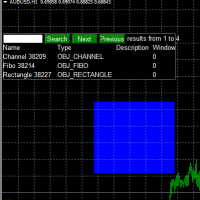
Use this software to browse through all objects within the chart and look at them comfortably. Also, you can look at the list of global variables and search and delete them . The same you can do with charts and indicators. You can search in objects names and object descriptions to find the object you are interested in. This is definitely an improvement to what is available in Mt4. You type what you are interested in , then press Search button. You can move to next and previous search results. No
FREE

This program calculates the average opening price for sell and buy positions separately. Program allows you to modify the stop loss value to the calculated breakeven price, this value could also be modified by a user-defined integer value in points. All you have to do is press the button. You can also choose Logs_Display_Enable input value if you need to get some additional, useful informations. Enjoy using !!!
FREE
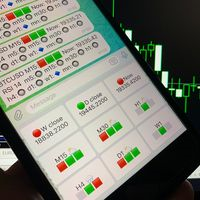
Telegram Candle Map Barometer. I wanted to create an informer that would show in the direction of the candle shadows where the price is moving. When I made the first timeframe, I realized that by combining several, I get an excellent breakout entry indicator. You need to create a Telegram bot for getting an API. Copy main ex4 file to Experts folder and use with settings. Download and enjoy, even receiving signals from MetaTrader, this is true when trading on any exchange. What we have inside: Mi
FREE
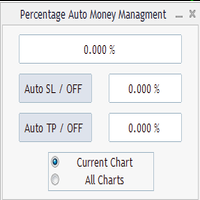
Percentage Auto MM sends automatic orders to close all positions immediately after reaching percentage SL/TP target, set by the User . Orders will be sent if the market is open and the SL / TP application buttons are pressed ( they can be used separately or together ) . It could be applied for current chart/all charts, depending on selected option. It works independently of SL and TP order settings for individual positions. SWAP, Commision can be also included ( look at input options ).
Atte
FREE

FXO PRICE ACTION LEVEL NOTIFICATIONS
Notes:
1. .ex4 must be loaded in EA folder (not indicator folder).
2. Activate MT4 application notifications by Tools/options/enable push notification.
3. Drag Overlapped Horizontal lines to desired levels at start.
This is an Indicator file, it will not take trades by itself.
For any query Support: admin@forexmarket.one
Copyright: www.forexmarket.one
FREE

Простая и полезная утилита для нанесения меток на открытые сделки. При запуске скрипта он ищет все открытые сделки и наносит метки на время и цену открытия сделки. Сделки в лонг обозначаются синим цветом, сделки в шорт обозначаются красным цветом. Есть два варианта нанесения меток: - с учетом текущего спрэда (по Ask) - без учета текущего спрэда (по Bid) Входных параметров нет. Всем профита!
FREE

[LueYingEA]
掠影EA-简介:
掠影EA分为多个系列,不同系列之间由后缀字母区分.
[LueYingC] 掠影C:非自动助手类型工具EA-MT4版.
[LueYingX] 掠影X:多组件集成,强大云端数据库版EA-MT4版.
[LueYingM] 掠影M:多组件集成,强大云端数据库版EA-MT5版.
------------------------------
[LueYingC]
掠影C-使用:
操作防护:安全模式需要确认,急速模式操作立即执行.
做单模式:掠影C独立模式下的订单,自主管理不被掠影X识别.
掠影C联控模式下,同组订单可被掠影X管理同时在C上操作也.
可主动管理X版订单.
订单组别:修改后仅对指定组别进行操作.
手数:现价每单固定手数,挂单每单基础手数,
单数:订单数量.
挂单间隔:批量挂单每单间隔.
FREE

Important!!! Auto Trading must be activated! If you need to act quickly and all positions need to be closed or deleted. You drag this tool onto the chart where all open and pending orders are closed and deleted. When it has finished closing and deleting, it counts 20 ticks and the Expert Advisor automatically uninstalls itself from the chart.
Best regards and happy trading
FREE
MetaTrader Маркет предлагает каждому разработчику торговых программ простую и удобную площадку для их продажи.
Мы поможем вам с оформлением и подскажем, как подготовить описание продукта для Маркета. Все продаваемые через Маркет программы защищаются дополнительным шифрованием и могут запускаться только на компьютере покупателя. Незаконное копирование исключено.

Вы упускаете торговые возможности:
- Бесплатные приложения для трейдинга
- 8 000+ сигналов для копирования
- Экономические новости для анализа финансовых рынков
Регистрация
Вход
Вы принимаете политику сайта и условия использования
Если у вас нет учетной записи, зарегистрируйтесь