 MetaTrader 5
 Experts
 Indicateurs
 Scripts
 Bibliothèque
 Stockage
Rejoignez notre page de fans

Failed Breakout Detector - indicateur pour MetaTrader 5

- Vues:
- 121
- Publié:
-
 Vous manquez des opportunités de trading :
- Applications de trading gratuites
- Plus de 8 000 signaux à copier
- Actualités économiques pour explorer les marchés financiers
Inscription Se connecterVous acceptez la politique du site Web et les conditions d'utilisation
Si vous n'avez pas de compte, veuillez vous inscrire -
 Besoin d'un robot ou d'un indicateur basé sur ce code ? Commandez-le sur Freelance
Aller sur Freelance
Besoin d'un robot ou d'un indicateur basé sur ce code ? Commandez-le sur Freelance
Aller sur Freelance
Failed Breakout Detector marks the breakouts of the recent trading range and, more important, the breakouts that fail. It is a small price action tool: it does not predict anything, it only shows where the traders who chased a breakout got trapped.
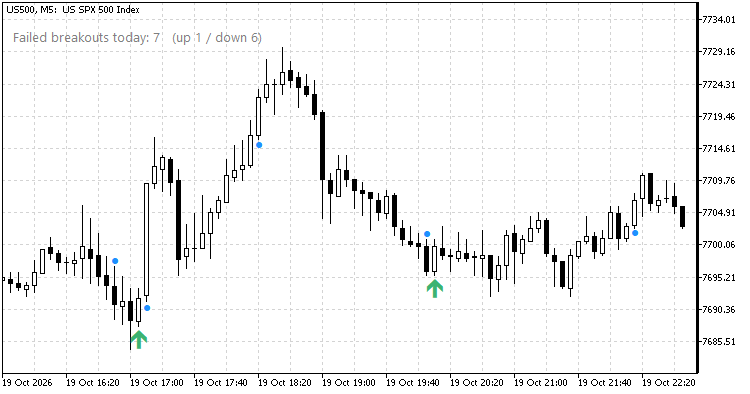
US500 M5: a failed breakout down (green arrow) at 17:00, the trapped sellers fuel the rally that follows. Blue dots mark the breakout bars.
How it reads the chart
- The range is the highest high and the lowest low of the last N bars (default 12).
- A bar that closes outside that range, by at least a small ATR-based buffer, is a breakout. It is marked with a small blue dot.
- If one of the next K bars (default 3) closes back inside the range, the breakout has failed. A failed breakout up is marked with a red arrow above the bar, a failed breakout down with a green arrow below the bar.
- If price holds outside the range for K bars, the breakout is confirmed and nothing more is drawn.
- A label in the chart corner counts the failed breakouts of the current day (up / down).
Why failed breakouts matter
Traders who bought a breakout up and then see a bar close back inside the range are trapped. They have to get out, and their selling often starts a move the other way. The same holds for a failed breakout down. On a range day the failed breakouts are the places to fade the edges; on a trend day they are rare, which is a useful piece of information on its own.
Everything is calculated on closed bars only, so nothing repaints. The range is filtered by its height (between 0.5 and 4 ATR by default), so very tight and very wide ranges are ignored. Only one breakout is tracked at a time: the next breakout is looked for once the previous one has failed or has been confirmed.
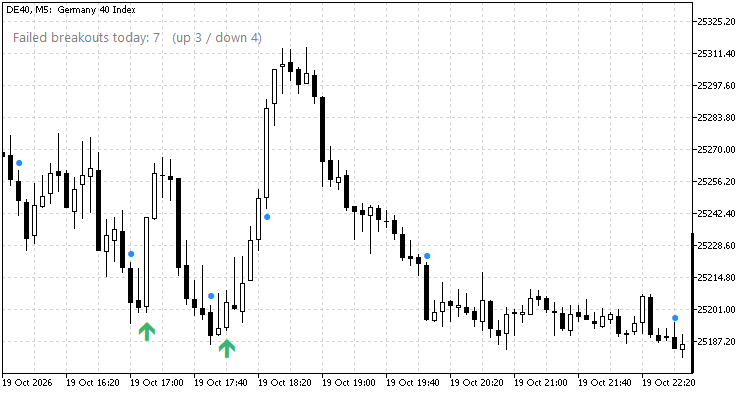
DE40 M5: two failed breakouts down (17:00 and 17:50) at the low of the afternoon, then the rally to the day high. The label counts the failed breakouts of the day.
Input parameters
- Bars that form the range (12)
- Bars in which the breakout must hold or it has failed (3)
- ATR period (14), used to filter the range height
- Minimum / maximum range height, in ATR (0.5 / 4.0)
- Close must be this far beyond the range, in ATR (0.1)
- Show the breakout dots (true)
- Show the "failed breakouts today" label (true), its corner, X / Y offset, font size and colour
- Alerts on a failed breakout: pop-up, push notification, sound (all off by default)
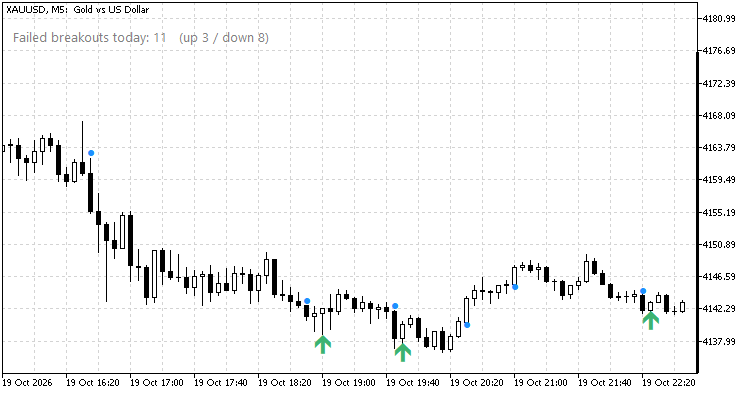
XAUUSD M5: three failed breakouts down on a slow slide, each one followed by a bounce.
Buffers (for an Expert Advisor via iCustom; the value is 0 where there is no signal)
- 0 – breakout up (price of the dot), 1 – breakout down
- 2 – failed breakout up (bearish), 3 – failed breakout down (bullish)
- 4 – signal: +1 failed breakout down (bullish), -1 failed breakout up (bearish), 0 nothing
- 5 – number of failed breakouts on the bar's day, so far
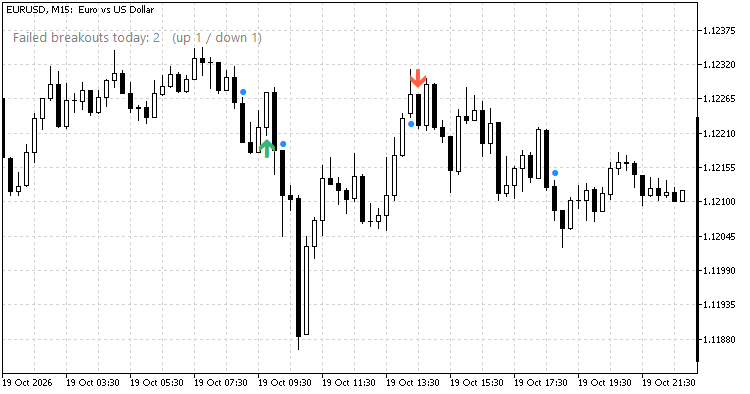
EURUSD M15: works on forex too. One failed breakout down (09:30) and one failed breakout up (13:30, red arrow), which was followed by the sell-off.
Notes
- Works on any symbol and timeframe. It was written for intraday index trading on M5 (DAX, US500).
- The screenshots were taken on 19 October 2026 in the black-on-white chart scheme.
- The failed-breakout logic is one of the building blocks of the author's Market State Reader indicator.
 Prop Firm Guard - daily loss and max drawdown protection
Closes all trades and blocks new ones when your prop firm daily loss or maximum drawdown limit is reached.
 Risk of Ruin: how often your account blows up at a chosen risk per trade
Reads your closed trades, converts each to an R-multiple and simulates many future runs at a chosen risk per trade. Reports the probability of hitting a drawdown floor, the probability of ending profitable, the median ending balance and the 95% range. Read-only.
 XlsxWriter: Excel .xlsx files from MQL5 without DLL
An include file that writes real Excel workbooks (.xlsx) from MQL5 without DLLs: several sheets, numbers, text and real Excel dates, a frozen bold header and filters. Example script: the account deals and the daily results to Excel.
Order Blocks and Breaker Blocks (SMC) - no repaint, with mitigation and alerts
Marks the order block behind each break of market structure (the last opposite candle before the move), tracks when it is used and turns failed blocks into breaker blocks. No repaint. Alerts and buffers for EAs.