 MetaTrader 5
 Experts
 Indicateurs
 Scripts
 Bibliothèque
 Stockage
Rejoignez notre page de fans

Tick Audit - check real tick history and backtest quality month by month - script pour MetaTrader 5

- Vues:
- 966
- Note:
- Publié:
- Mise à jour:
-
 Vous manquez des opportunités de trading :
- Applications de trading gratuites
- Plus de 8 000 signaux à copier
- Actualités économiques pour explorer les marchés financiers
Inscription Se connecterVous acceptez la politique du site Web et les conditions d'utilisation
Si vous n'avez pas de compte, veuillez vous inscrire -
 Besoin d'un robot ou d'un indicateur basé sur ce code ? Commandez-le sur Freelance
Aller sur Freelance
Besoin d'un robot ou d'un indicateur basé sur ce code ? Commandez-le sur Freelance
Aller sur Freelance

"Why is my backtest showing 0% history quality?" is one of the most repeated questions on this forum, and the answers are always the same words: it depends on your broker, do not test further back than your tick data goes. Both true. Neither of them tells you where your tick data actually goes back to.
That is all this script does. It asks the terminal, month by month, and prints the answer before you configure the tester rather than after.
The problem it is for
The tester will happily run over a period that has no real ticks. It does not stop, it does not warn you, it draws a curve. Behind that curve, the ticks were generated from M1 bars.
Generated ticks move in a straight line inside each bar. Nothing spikes, nothing gaps, the spread never widens. The strategies that survive on that and die on real ticks are the well known ones: grids, martingales, anything scalping a few points, anything with a stop close to the entry.
The dangerous month is not the empty one. It is the month that has bars but no ticks, because that is the one that still produces a result.
What it prints
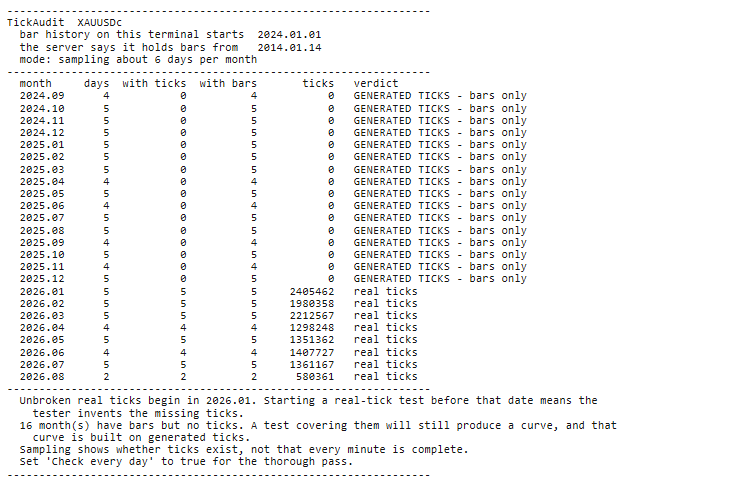
One line per month, with a verdict: real ticks, partial - holes in the ticks, GENERATED TICKS - bars only, or nothing at all. The screenshot shows a real run on gold, where every month from September 2024 to December 2025 has bars and zero ticks, and real ticks only begin in January 2026.
The last two lines are what most people came for: the month where unbroken real ticks begin, and how many months in the range would force the tester to invent ticks.
Inputs
- Months back - how far to audit.
- Check every day - the thorough pass. Off by default because it is slow.
- Sample days - days sampled per month when not doing a full scan.
- Wait seconds - how long to let the terminal download tick history before starting.
- Write CSV - also save the month table to MQL5\Files.
What it does not claim
Sampling tells you whether ticks exist in a month. It does not prove that every minute of that month is complete. For that, turn on the full scan, which checks every day it finds data for. It is slower, and worth doing once before a serious test.
A day is counted only when it carries bars or ticks, so the script never assumes a five day week. That is what lets it read crypto correctly, where Saturday and Sunday trade normally, and instruments with their own holiday calendars. Months where the terminal holds nothing at all are printed as such rather than left out, because a gap in a table reads as an oversight.
If the symbol is not in Market Watch the script adds it itself. Days are server time. It places no orders and changes nothing.
How to run it
- Copy TickAudit.mq5 into MQL5\Scripts inside your terminal's data folder. In MetaTrader, File then Open Data Folder takes you there.
- Open it in MetaEditor and press F7. It should report 0 errors and 0 warnings.
- Back in the terminal press Ctrl+N for the Navigator, open Scripts, and drag TickAudit onto the chart of the symbol you want to audit. The chart's timeframe does not matter.
- The inputs dialog appears. The defaults audit twenty-four months by sampling six days from each, which takes a minute or two. Press OK.
- Read the table in Toolbox, Experts tab.
Run it on the symbol you actually intend to test rather than a similar one. Tick history is stored per symbol, so gold having ticks tells you nothing about EURUSD, and XAUUSD tells you nothing about XAUUSDm on the same account.
On a symbol with a lot of tick history the first run can take several minutes. Asking for a month of ticks makes the terminal download that month before it answers, and a request already in flight cannot be interrupted, so the script says this before it starts. A month it marks as bars-only on that first pass may simply not have finished downloading. On a heavy symbol run it a second time: if the verdict changes, the terminal fetched the ticks in between; if it stays the same, the broker does not have them. Later runs are quick because the cache is warm.
How to use the result
Run it first. Take the date where unbroken real ticks begin, set your test start on or after it, and select "Every tick based on real ticks". If that leaves you too little history to test on, that is a real finding too - it means the confident number you were about to produce was never available to you.
 Trade Guardian - stop loss watchdog and drawdown limiter that re-arms
A safety EA that watches every open position on the chart symbol: it reports any position left without a stop loss, optionally attaches an ATR-based stop, and enforces a daily and a total drawdown limit that re-arms after a cooldown.
CalendarExport
This Expert Advisor is that missing bridge. Attach it to any chart and it periodically writes the calendar to a CSV file in `MQL5\Files`, where anything outside the terminal can read it.
 Advanced Harmonic Scanner
The Advanced Harmonic & RSI Reversal Scanner solves both problems. By combining precise Fibonacci geometry (to find the location of a reversal) with an RSI exhaustion filter (to time the exact moment of the reversal), this script prevents you from catching falling knives
GridCapitalCalculator
Everyone running a grid asks: is my account big enough? The usual answer - the loss at the last grid level - is the wrong number. What ends the account is the margin level reaching the broker's stop-out, while the chain is still open and still looks recoverable. This EA computes the real figure, then counts how often a move that large has already happened on the symbol's own M1 history. Three mistakes it fixes, all erring in the reassuring direction: a chain of N legs floats at step x N(N-1)/2, not step x N (at 10 legs, 45 steps of loss, not 10); open positions also lock up margin while they float; and stop-out is a percentage, not zero - at 50%, losing half the equity is enough. "You need 86 dollars of room" is an abstraction. "A move that size happened 71 times in 100 days, one every 1.4" is a decision. Set InpEquity to a size you do not have yet to see what the configuration would really need. Strictly read-only: it never opens, closes or modifies a position.