Voir comment télécharger gratuitement des robots de trading
Retrouvez-nous sur Facebook !
Rejoignez notre page de fans
Un script intéressant ?
Poster un lien vers celui-ci -
laisser les autres l'évaluer
Vous avez aimé le script ? Essayez-le dans le terminal MetaTrader 5
Indicateurs

Quantora Symbol Information Dashboard MT5 - Professional Symbol and Trading Specifications Panel - indicateur pour MetaTrader 5

Vues:
82
Publié:
MQL5 Freelance Besoin d'un robot ou d'un indicateur basé sur ce code ? Commandez-le sur Freelance Aller sur Freelance
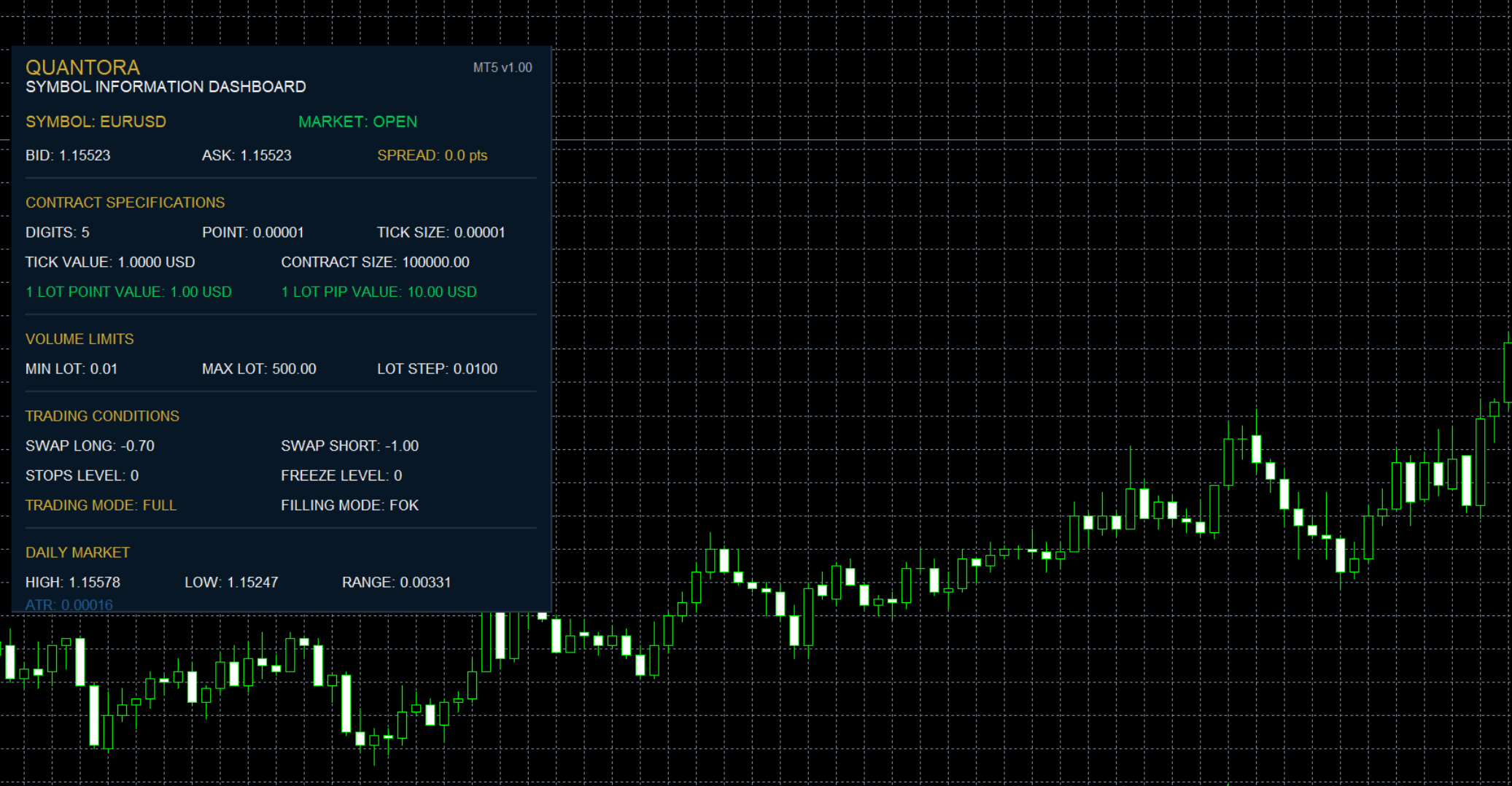

Quantora Symbol Information Dashboard MT5 is a professional real-time symbol and trading specifications indicator designed for MetaTrader 5.

The indicator collects important information directly from the broker and displays it in a clean Quantora dashboard.

Instead of repeatedly opening the MetaTrader 5 symbol specification window, traders can monitor essential information such as Bid, Ask, Spread, Point Size, Tick Size, Tick Value, Contract Size, Lot Limits, Swap Rates, Stops Level, Trading Mode, Daily Range and ATR directly from the chart.

The dashboard can monitor the current chart symbol or a custom symbol selected by the user.

Main Features

  • Real-time Bid price
  • Real-time Ask price
  • Current Spread in points
  • Market Open / Closed status
  • Symbol Digits
  • Point Size
  • Tick Size
  • Tick Value
  • Contract Size
  • Estimated 1 Lot Point Value
  • Estimated 1 Lot Pip Value
  • Minimum Lot
  • Maximum Lot
  • Lot Step
  • Swap Long
  • Swap Short
  • Stops Level
  • Freeze Level
  • Trading Mode
  • Filling Mode
  • Daily High
  • Daily Low
  • Daily Range
  • Current ATR
  • Account Currency
  • Account Leverage
  • Current Symbol mode
  • Custom Symbol mode
  • Automatic real-time updates
  • Professional Quantora dashboard
  • Low CPU usage
  • Works on all chart timeframes
  • Free and open-source MQ5 code

Live Market Information

The dashboard continuously monitors the selected trading instrument.

Example:

                                                    SYMBOL              XAUUSD
MARKET                OPEN

BID                 3368.42
ASK                 3368.58
SPREAD           16.0 points

Bid and Ask values are retrieved directly from the selected symbol's current tick data.

Spread is calculated in broker points.

Contract Specifications

The indicator displays important contract information provided by the broker.

                                                    DIGITS                    2
POINT                   0.01
TICK SIZE               0.01
TICK VALUE          1.00 USD
CONTRACT SIZE         100.00

These values can differ significantly between Forex, metals, indices, cryptocurrencies, CFDs and brokers.

For this reason, the dashboard reads the specifications directly from MetaTrader 5.

Point and Pip Value

The dashboard also estimates the monetary value of a price movement for 1.00 lot.

Displayed values include:

                                                    1 LOT POINT VALUE
1 LOT PIP VALUE

The calculation uses the broker-reported:

                                                    Tick Size
Tick Value
Point Size
Symbol Digits

For 3-digit and 5-digit symbols, the dashboard uses the conventional 10-point pip interpretation.

For other digit configurations, the symbol point size is used as the reference.

These values should be treated as informational estimates because symbol calculation models and broker specifications may vary.

Volume Information

Important trading-volume limits are displayed directly on the dashboard.

                                                    MIN LOT          0.01
MAX LOT        100.00
LOT STEP         0.01

This allows traders to quickly identify the minimum and maximum permitted order volume and the valid lot increment for the selected instrument.

Swap Information

The dashboard displays the broker-reported swap values for both trade directions.

                                                    SWAP LONG       -32.50
SWAP SHORT       18.20

Swap values are displayed exactly according to the symbol information supplied by MetaTrader 5.

Their monetary interpretation depends on the broker's swap calculation mode and symbol specifications.

Stops and Freeze Levels

The indicator retrieves:

                                                    STOPS LEVEL
FREEZE LEVEL

These values are useful when developing or testing Expert Advisors because brokers may impose minimum distances or modification restrictions for trading operations.

Example:

                                                    STOPS LEVEL       0
FREEZE LEVEL      0

Values are displayed in broker points.

Trading Mode

The current symbol trading mode is automatically detected.

Possible conditions include:

                                                    FULL
LONG ONLY
SHORT ONLY
CLOSE ONLY
DISABLED

This provides a quick indication of the operations currently permitted for the selected instrument.

Filling Mode

The dashboard also reads the broker-supported order filling configuration.

Depending on the symbol, the panel may display modes such as:

                                                    FOK
IOC
BOC

or supported combinations where applicable.

Daily Market Information

The current daily candle is analyzed to display:

                                                    DAILY HIGH
DAILY LOW
DAILY RANGE
CURRENT ATR

For example:

                                                    HIGH          3382.60
LOW           3344.15
RANGE           38.45
ATR              4.82

Daily Range is calculated as:

                                                    Daily High - Daily Low

This provides a quick overview of the current day's price movement.

ATR

The indicator includes an ATR calculation with a default period of:

                                                    ATR Period = 14

ATR is calculated using the current chart timeframe.

The ATR period can be changed from the indicator inputs.

Current or Custom Symbol

By default, the dashboard monitors the symbol of the chart where the indicator is attached.

Users can also disable:

                                                    Use Current Symbol

and specify a custom instrument.

For example:

                                                    Use Current Symbol = false
Custom Symbol      = XAUUSD

The exact broker symbol name should be used, including suffixes or prefixes where applicable.

Market Status

The dashboard provides an informational:

                                                    MARKET: OPEN

or

                                                    MARKET: CLOSED

status.

The status is determined using the symbol's trading mode and the recency of received tick data.

Because broker trading schedules and tick availability can vary, this should be considered a practical monitoring indication rather than an official exchange-session calendar.

Automatic Updates

The dashboard automatically refreshes its information using a timer.

Default:

                                                    Update Interval = 1 second

The update interval can be adjusted from the indicator inputs.

Installation

Place:

Quantora_Symbol_Information_Dashboard_MT5.mq5

inside:

MQL5 → Indicators

Compile the source file using MetaEditor.

Then attach Quantora Symbol Information Dashboard MT5 to any MetaTrader 5 chart.

The dashboard will automatically retrieve available broker and symbol information.

Important Note

Symbol specifications can vary between brokers and account types.

Values such as:

  • Tick Value
  • Contract Size
  • Swap
  • Minimum Lot
  • Maximum Lot
  • Stops Level
  • Filling Mode

are obtained from the information supplied by the connected MetaTrader 5 broker/server.

Point and pip monetary values are informational calculations based on the reported Tick Size and Tick Value.

ATR depends on the current chart timeframe and available price history.

The indicator does not open, modify or close positions and does not generate BUY or SELL signals.

It is designed for market information and trading analysis purposes only.

Product Information

Version: 1.00
Platform: MetaTrader 5
Program Type: Indicator
Category: Trading Utilities / Symbol Information
License: Free / Open Source

Developed by QUANTORA

Professional MetaTrader 5 Trading Tools, Indicators and Expert Advisors.

More Professional Quantora Trading Products

Explore Quantora's professional MetaTrader 5 Expert Advisors, premium indicators and trading tools on the official MQL5 Market:

View All Quantora Products on MQL5 Market →

Quantora Trading Session Monitor MT5 - Professional Market Session and Activity Monitor Quantora Trading Session Monitor MT5 - Professional Market Session and Activity Monitor

Professional open-source Trading Session Monitor for MetaTrader 5. Tracks Sydney, Tokyo, London and New York sessions, overlaps, countdowns, spread, ATR and real-time market activity.

Quantora Account Health Monitor MT5 - Professional Account Health and Risk Monitor Quantora Account Health Monitor MT5 - Professional Account Health and Risk Monitor

Professional open-source Account Health Monitor for MetaTrader 5. Monitors balance, equity, margin, drawdown, exposure and trading conditions with a real-time 0-100 Account Health Score.

Quantora Trade Statistics Dashboard MT5 - Professional Trading Performance Analytics Quantora Trade Statistics Dashboard MT5 - Professional Trading Performance Analytics

Professional open-source Trade Statistics Dashboard for MetaTrader 5. Analyzes trading history with win rate, profit factor, reward/risk, streaks, BUY/SELL performance, lot statistics and floating P/L.

Quantora Drawdown Monitor MT5 - Professional Account Risk and Drawdown Dashboard Quantora Drawdown Monitor MT5 - Professional Account Risk and Drawdown Dashboard

Professional open-source Drawdown Monitor for MetaTrader 5. Tracks current, daily and peak-equity drawdown, floating P/L, margin levels and configurable account risk conditions in real time.