 MetaTrader 5
 Experts
 Indicateurs
 Scripts
 Bibliothèque
 Stockage
Rejoignez notre page de fans

PlayDOOM - expert pour MetaTrader 5

Gmail: ayanminhasshayar@gmail.com
- Vues:
- 3833
- Note:
- Publié:
- Mise à jour:
-
 Vous manquez des opportunités de trading :
- Applications de trading gratuites
- Plus de 8 000 signaux à copier
- Actualités économiques pour explorer les marchés financiers
Inscription Se connecterVous acceptez la politique du site Web et les conditions d'utilisation
Si vous n'avez pas de compte, veuillez vous inscrire -
 Besoin d'un robot ou d'un indicateur basé sur ce code ? Commandez-le sur Freelance
Aller sur Freelance
Besoin d'un robot ou d'un indicateur basé sur ce code ? Commandez-le sur Freelance
Aller sur Freelance
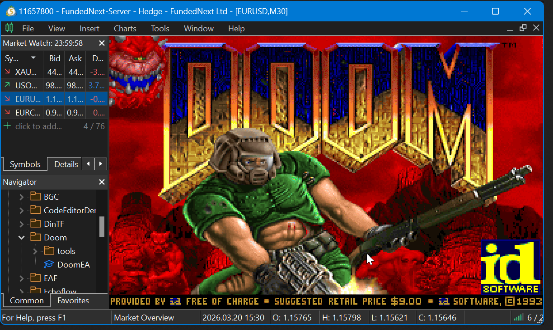
This Expert Advisor runs the original DOOM (1993) inside MetaTrader 5's chart window. The game renders directly onto the chart using ObjectCreate with a bitmap label and ResourceCreate, while keyboard input is captured via OnChartEvent and forwarded to the DOOM engine running inside a custom DLL.
IMPORTANT — Read Before Use: The DoomEA.mq5 file alone will NOT run the game. You must download the MQL5.zip file attached to this publication. This zip contains the precompiled DLL (doomlib.dll), the DOOM shareware WAD file (doom1.wad), the full DLL source code, and build instructions. Without these files properly deployed, the EA will fail to initialize.
How It Works
The project has two components. The first is a Windows DLL that wraps the PureDOOM engine — a single-header, zero-dependency, pure C source port of DOOM designed to run on any platform. The DLL runs the game loop on a background thread, maintains a double-buffered framebuffer, and exposes simple exported functions for initialization, framebuffer retrieval, and key input. The second component is the MQL5 Expert Advisor, which calls the DLL every ~33ms via EventSetMillisecondTimer, copies the DOOM framebuffer (320x200 ARGB pixels) into a bitmap resource on the chart, and forwards keyboard events from the chart to the engine.
Since MQL5 does not provide CHARTEVENT_KEYUP events, key releases are detected by polling GetAsyncKeyState from user32.dll on each timer tick — a well-known workaround in the MQL5 community. The game runs at a smooth ~30 FPS, which matches DOOM's original 35hz tick rate closely.
Setup Instructions
Follow these steps carefully to get DOOM running on your chart:
- Download MQL5.zip from the files attached to this publication.
- Extract the zip. Inside you will find: Libraries\doomlib.dll, Experts\Doom\doom1.wad and the "For Devs" source code folder. Ignore this folder if you are not a developer.
- Copy doomlib.dll to your terminal's MQL5\Libraries\ folder.
- Create a folder called Doom inside MQL5\Experts\ and copy doom1.wad into it.
- Compile DoomEA.mq5 in MetaEditor.
- Attach the EA to any chart. In the EA settings dialog, check "Allow DLL imports".
- The DOOM title screen should appear on the chart. Press Enter to start a new game.
DLL Imports Required: This EA requires DLL imports to be enabled. The DLL is open source — full C source code and CMakeLists.txt build configuration are included in MQL5.zip so you can inspect and compile the DLL yourself if you prefer not to use the precompiled binary. Building requires CMake and a C compiler (Visual Studio or MinGW).
Controls
| Key | Action |
|---|---|
| W | Move forward |
| S | Move backward |
| A | Strafe left |
| D | Strafe right |
| Left / Right Arrow | Turn |
| Ctrl | Fire weapon |
| E | Open doors / Use |
| Shift | Run |
| 1-7 | Select weapon |
| Tab | Automap |
| Escape | Menu |
| Enter | Confirm / Menu select |
Technical Details
- Engine: PureDOOM — a single-header C port of the original DOOM source code (id Software, 1993). No external dependencies.
- Rendering: The DLL provides a 320x200 ARGB framebuffer each frame. The EA writes it to a chart bitmap object via ResourceCreate with COLOR_FORMAT_ARGB_NORMALIZE.
- Threading: The DOOM game loop runs on a dedicated background thread inside the DLL. Double buffering with CRITICAL_SECTION synchronization ensures the EA can safely read the framebuffer at any time.
- Input: Keyboard events are captured in OnChartEvent (key-down) and polled via GetAsyncKeyState from user32.dll (key-up). A ring buffer inside the DLL queues input events for the game thread.
- Game data: Uses doom1.wad, the freely distributable shareware version (Episode 1: Knee-Deep in the Dead, 9 levels).
Files
Reminder: You MUST download MQL5.zip below. The EA requires doomlib.dll in your Libraries folder and doom1.wad in your Experts\Doom folder. Without these, the EA will not function. The full DLL source code is included for transparency.
| File name | Description |
|---|---|
| MQL5.zip | REQUIRED. Contains doomlib.dll, doom1.wad, and full DLL source code (doomlib.c, PureDOOM.h, CMakeLists.txt) |
| DoomEA.mq5 | The Expert Advisor source code + Instructions. Handles rendering, input, and DLL communication. Will not function without the files from MQL5.zip. |
 SMC Fair Value Gap (FVG) Auto-Detector
A clean, lightweight, and non-repainting indicator that automatically detects and draws Smart Money Concepts (SMC) Fair Value Gaps (FVG) directly on your chart across any timeframe.
MACD Tradingview version
The standard MACD on MT5 platform seem to be not enough so I code this version by copying from the pinescript.
Stealth Trade Manager (Hidden SL/TP and Spread Protector)
A professional trade management utility that completely hides your Stop Loss and Take Profit levels from brokers. It features a Spread Protector to prevent virtual stop-outs during news events or daily rollovers.
CRT Indicator(MTF) : Explorer
Multi-timeframe CRT Indicator(Explorer) that detects higher timeframe setups and projects CRH/CRL levels onto lower timeframe charts using Fibonacci objects for clear, real-time context.