 MetaTrader 5
 Experts
 Indicateurs
 Scripts
 Bibliothèque
 Stockage
Rejoignez notre page de fans

PropGuard MT5 Daily Loss and Max Drawdown Dead-Line Visualizer (Dashboard and Line) - indicateur pour MetaTrader 5

I turn your trading setup into an MT5 bot. Send your rules as text, a screenshot, an authorized TradingView script or EA here on MQL5. You get a free demo build first: the Prop Rule Guard or your own setup on demo.
- Vues:
- 5420
- Note:
- Publié:
- Mise à jour:
-
 Vous manquez des opportunités de trading :
- Applications de trading gratuites
- Plus de 8 000 signaux à copier
- Actualités économiques pour explorer les marchés financiers
Inscription Se connecterVous acceptez la politique du site Web et les conditions d'utilisation
Si vous n'avez pas de compte, veuillez vous inscrire -
 Besoin d'un robot ou d'un indicateur basé sur ce code ? Commandez-le sur Freelance
Aller sur Freelance
Besoin d'un robot ou d'un indicateur basé sur ce code ? Commandez-le sur Freelance
Aller sur Freelance
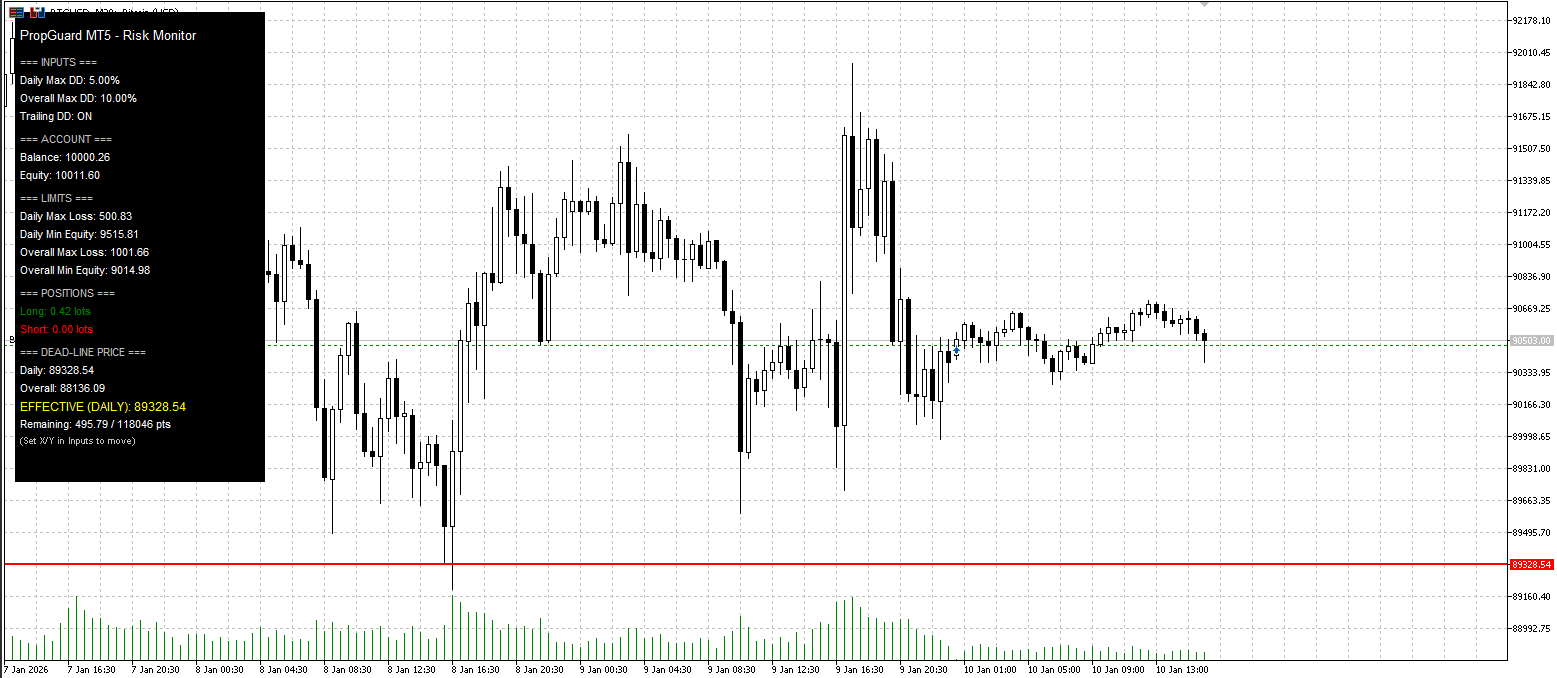
Overview
PropGuard MT5 is a chart-window indicator designed for traders who must respect strict prop-firm risk rules (Daily Loss Limit and Overall Max Drawdown). Instead of watching numbers in the terminal, PropGuard converts your risk limits into a clear, visual price level on the chart — the Dead-Line.
When price reaches the Dead-Line (based on your current exposure), your account would reach the configured drawdown boundary. This helps you make faster decisions, reduce emotional trading, and avoid rule violations.
Core Concept: The “Dead-Line”
Prop firms typically define loss limits in currency or percentage terms (daily and overall). PropGuard translates these limits into a dynamic chart level:
-
If you are net long, the Dead-Line is the price below the current market where your allowed loss is exhausted.
-
If you are net short, the Dead-Line is the price above the current market where your allowed loss is exhausted.
This line updates in real time and reflects:
-
Current equity
-
Current open positions on the chart symbol
-
The symbol’s tick value / tick size (multi-asset compatible)
What the Indicator Displays
1) Effective Dead-Line (Main Line)
PropGuard always draws the most restrictive limit as a single “effective” Dead-Line:
-
DAILY or OVERALL (whichever is closer to the current price / stricter)
2) Optional Separate Lines
If enabled, you can additionally display:
-
Daily Dead-Line
-
Overall Dead-Line
3) On-Chart Dashboard Panel
A compact panel shows:
-
Balance and Equity
-
Daily / Overall maximum allowed loss
-
Daily / Overall minimum equity levels
-
Long lots / Short lots (on this symbol)
-
Daily and Overall Dead-Line prices
-
Effective rule (DAILY / OVERALL)
-
Remaining buffer in currency and points, with optional warning highlight
Trailing Drawdown Mode (Prop-Style)
PropGuard supports both common drawdown models:
Trailing Drawdown ON
-
Daily reference: daily peak equity
-
Overall reference: overall peak equity
-
The Dead-Line can move as you reach new equity highs (risk line “trails”)
Trailing Drawdown OFF
-
Daily reference: start-of-day balance (see Notes below)
-
Overall reference: Start Capital (manual input)
-
Dead-Line is based on fixed reference values
Safety Handling (Edge Cases)
PropGuard is designed to behave safely and transparently:
-
No open positions on the symbol
→ Lines are hidden, dashboard shows “No Positions”. -
Hedged / near-zero net sensitivity (net exposure effectively neutral)
→ Lines are hidden, dashboard shows “Hedged (No dead-line)”. -
Limit already violated
→ Dashboard shows “VIOLATED!” and remaining buffer becomes negative.
Inputs (Quick Guide)
-
Daily Max DD (%) — Daily loss limit in percent
-
Overall Max DD (%) — Maximum drawdown limit in percent
-
Trailing Drawdown Mode — Peak-equity trailing ON/OFF
-
Account Start Capital — Used when trailing is OFF (overall reference)
-
Show Daily & Overall Lines Separately — Show both limits or only the effective line
-
Dashboard Corner / X Offset / Y Offset — Panel placement
-
Line Colors / Width — Visual customization
-
Warning Threshold (%) — Highlight remaining buffer when close to violation
Notes and Important Limitations (Read Before Use)
-
Symbol-specific logic: The Dead-Line is calculated from positions on the current chart symbol only.
If you trade multiple symbols, attach PropGuard to each relevant chart. -
Start-of-day balance (non-trailing mode): In version 1.00 the “start-of-day balance” is currently approximated (as noted in code comments). If you require a strict broker-day baseline derived from history, this should be implemented as an enhancement.
-
Visualization tool: PropGuard helps you visualize risk boundaries, but it does not execute trades, close positions, or enforce rules automatically.
Who This Is For
-
Prop-firm traders who need to respect daily loss and max drawdown rules
-
Traders who want a visual risk boundary instead of constantly watching equity numbers
-
Multi-asset traders (FX, indices, metals, crypto CFDs) who want a universal sensitivity approach
 MT5 Telegram Trade Notifier (Bot API) — Deal Alerts
Utility MT5 EA that sends BUY/SELL deal notifications to Telegram via Bot API (WebRequest)
 Uniformity Factor Script
The script provides a quick estimation of an exponent/power factor for transformation of variable-length price increments into uniform distibution, that makes them a "random walk". The estimated value characterizes current symbol as more profitable when using in a particular trading strategy.
Viral (1M+ views) 4 Hour Range Strategy coded and tested
This EA is intended to test a popular trading strategy. My own backtest shows that this strategy does not work as it was intended
Wick Rejection Scanner Dashboard (Multi-Symbol / Multi-TF)
Scan multiple symbols and timeframes for wick-based rejection candles and display the latest signals in a clean on-chart dashboard with strength scoring, signal age, optional markers, and alerts.