 MetaTrader 5
 Experts
 Indicateurs
 Scripts
 Bibliothèque
 Stockage
Voir comment télécharger gratuitement des robots de trading
Retrouvez-nous sur Telegram !
Rejoignez notre page de fans
Rejoignez notre page de fans
Vous avez aimé le script ? Essayez-le dans le terminal MetaTrader 5

iCrosshair - Real-Time Candle Metrics on Hover - indicateur pour MetaTrader 4

- Vues:
- 51062
- Note:
- Publié:
- Mise à jour:
-
 Vous manquez des opportunités de trading :
- Applications de trading gratuites
- Plus de 8 000 signaux à copier
- Actualités économiques pour explorer les marchés financiers
Inscription Se connecterVous acceptez la politique du site Web et les conditions d'utilisation
Si vous n'avez pas de compte, veuillez vous inscrire -
 Besoin d'un robot ou d'un indicateur basé sur ce code ? Commandez-le sur Freelance
Aller sur Freelance
Besoin d'un robot ou d'un indicateur basé sur ce code ? Commandez-le sur Freelance
Aller sur Freelance
iCrosshair - Real-Time Candle Metrics on Hover
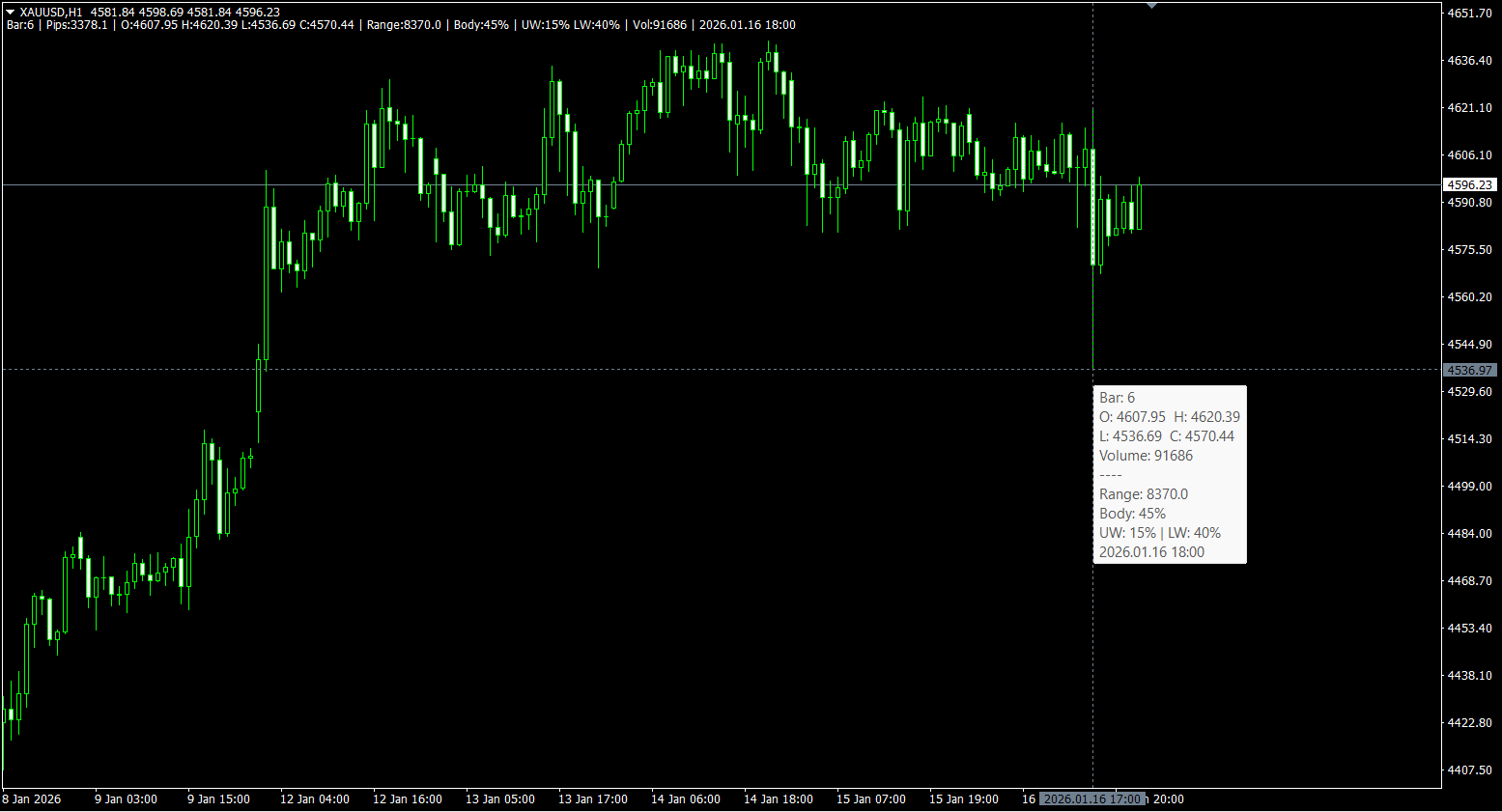
Interactive crosshair indicator with real-time candle analytics displayed in a single-line info bar. Press 'T' or click the lines to freeze/unfreeze.
Also available for MT5
What's New in v2.0
| Feature | v1.x (2015-2016) | v2.0 (2026) |
|---|---|---|
| Toggle Mode | Click only | ✅ Click + 'T' key |
| Comment Format | bar / pips / price | ✅ Full analytics line |
| Range Display | ❌ None | ✅ Total candle size |
| Wick Display | Absolute (pips) | ✅ Percentage of Range |
| Body% | ❌ None | ✅ Body as % of Range |
| Close Time | ❌ None | ✅ Full date & time |
| Symbol Support | Forex only | ✅ All asset classes |
| Tooltip Fields | All or nothing | ✅ Customizable |
| Line Smoothness | Basic | ✅ Two-tier updates |
Features
- Keyboard Shortcut - Press 'T' to toggle tracking mode instantly
- Smooth Movement - Lines update immediately without lag
- Freezable Lines - Use as Support/Resistance references
- Universal Support - Forex (pips), Metals, Indices, Crypto (points)
Info Bar Format
Bar:5 | Pips:12.3 | O:1.0850 H:1.0875 L:1.0820 C:1.0860 | Range:55 | Body:40% | UW:25% LW:35% | Vol:1234 | 2026.01.15 14:00
| Metric | Description |
|---|---|
| Bar | Bar index from current (0 = current bar) |
| Pips | Distance from cursor to bar's close price |
| O/H/L/C | OHLC prices (compact format) |
| Range | Total candle size in pips/points |
| Body% | Body as percentage of Range |
| UW%/LW% | Upper/Lower Wick as percentage of Range |
| Vol | Tick volume for the bar |
| Close Time | Date and time of candle close |
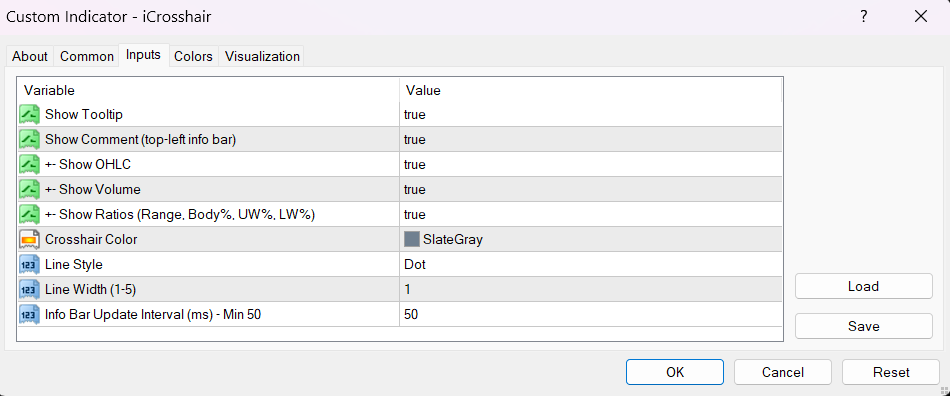
Parameters
Display Options
- ShowTooltip (true) - Show/hide tooltip on hover
- ShowComment (true) - Show/hide the info bar
- Show_OHLC (true) - Include O/H/L/C prices
- Show_Volume (true) - Include tick volume
- Show_Ratios (true) - Include Range, Body%, UW%, LW%
Visual Settings
- LineColor (SlateGray) - Crosshair line color
- LineStyle (Dot) - Line style
- LineWidth (1) - Line thickness (1-5)
Performance
- InfoUpdateInterval (50ms) - Info bar update frequency
How to Use
- Add indicator to any chart
- Hover over any candle to see instant analytics
- Press 'T' or click lines to freeze/unfreeze
- Frozen lines can be used as S/R references
Measure Distance
- Position the crosshair at point A
- Press 'T' to freeze
- Click anywhere on the chart (point B)
- Read: Bars: X / Pips: X / Price: X
Changelog v2.0
- Complete rewrite of original iCrosshair v1.x
- Added keyboard shortcut 'T' for toggle
- Added compact info bar with Range, Body%, UW%, LW%
- Added Close Time display
- Added universal symbol support
- Optimized with two-tier update strategy
- Namespaced object names to prevent conflicts
Author
QEMA percentage
QEMA is the Quadruple Exponential Moving Average. With this small change you can modify the percentage of the quadruple correction respect to the normal EMA.
Renko Indicator
RenkoLiveChart_v600 version 6 indicator converted from RenkoLiveChart_v600 version 6 Expert Advisor.
 Example of SAR Automated - with Advanced Money Management
This example has been built using SAR (Stop And Reverse) indicator with Advanced Money Management function.
i-Monday_Sig
Entry and exit signals by the "Monday" system.