
⚙ TikiPip EA – Full Input Settings
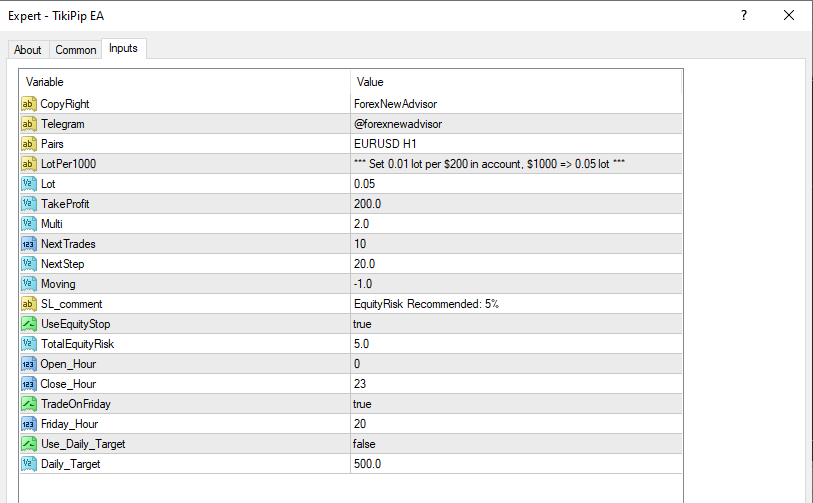
🔁 Pairs: EURUSD H1
🕒 The EA is optimized exclusively for EURUSD on the H1 timeframe.
💰 Lot:
This is the fixed lot size for the first trade in each cycle. We recommend increasing it by 0.01 for every $200 in balance to maintain proportional exposure and optimal operation of the EA.
📌 Suggested ratio:
🎯 TakeProfit: 200.0
Default take profit in pips per trade. Balanced for the H1 timeframe — not too tight, not too ambitious. 🧠 The EA can dynamically adjust TP depending on market conditions.
➕ Multi: 2.0
This parameter controls how the EA manages its entry cycles when the price moves against the initial position. It uses an adaptive logic that adjusts trade positioning intelligently to improve exit opportunities while maintaining a strong internal risk structure.
🔁 NextTrades:
Maximum trades allowed per cycle is 10, but it takes 4 or 5 trading depending on the balance (because of Equity Risk Management).
The EA controls exposure based on internal logic, but this is the upper limit per trading cycle.
↔ NextStep: 20.0
Minimum distance in pips between entries. Avoids over-clustering and improves average entry quality.
🧠 Moving: -1.0
With this value of -1 the lot will be increased only in the 3rd trade, this is a value that should NEVER EVER be modified.
🛡 UseEquityStop: true
Your capital safety net. When enabled, the EA will immediately close all trades if equity falls below the allowed risk.
📉 TotalEquityRisk: 5.0
The max percentage of your account that the EA can risk in a cycle. Calculated based on lot size, Multi logic, and volatility filters — 5% is the sweet spot for low drawdown with consistent growth.
⏰ Open_Hour / Close_Hour: 0 – 23
Defines the EA’s daily trading window (broker time). This setup allows the EA to trade 24/5. You can customize it for specific sessions, like:
📆 TradeOnFriday / Friday_Hour: true / 20
Enables Friday trading but stops placing new trades after 20:00 broker time — great for avoiding weekend gaps.
🎯 Use_Daily_Target / Daily_Target: false / 500.0
When activated, the EA will stop trading for the day once it reaches the defined profit (e.g., $500). Ideal for traders who want to lock in daily goals.
✅ Summary
- TikiPip EA is designed to work in perfect sync across all settings:
I'll be waiting for you in the channel,