Trebuchet Bracket Engine

Trebuchet Bracket Engine is a MetaTrader 4 Expert Advisor for daily range-expansion breakouts. At the anchor (the day open by default) it measures the recent N-day range, brackets the anchor with a buy stop above and a sell stop below at K x range, puts the stop loss at the anchor and closes everything at the day exit. At most one trade per side per day; no grid, martingale, averaging or overnight holding (unless you switch the day exit off).

Quick Start

  1. Attach the EA to one chart of the symbol (any timeframe; the logic uses daily bars and the clock) and enable AutoTrading plus "Allow live trading".
  2. Keep the defaults first: 4-day Dual Thrust range, triggers at 0.50 x range, stop at the anchor, entry cutoff 21:00 and day exit 22:00 server time, 1 % risk.
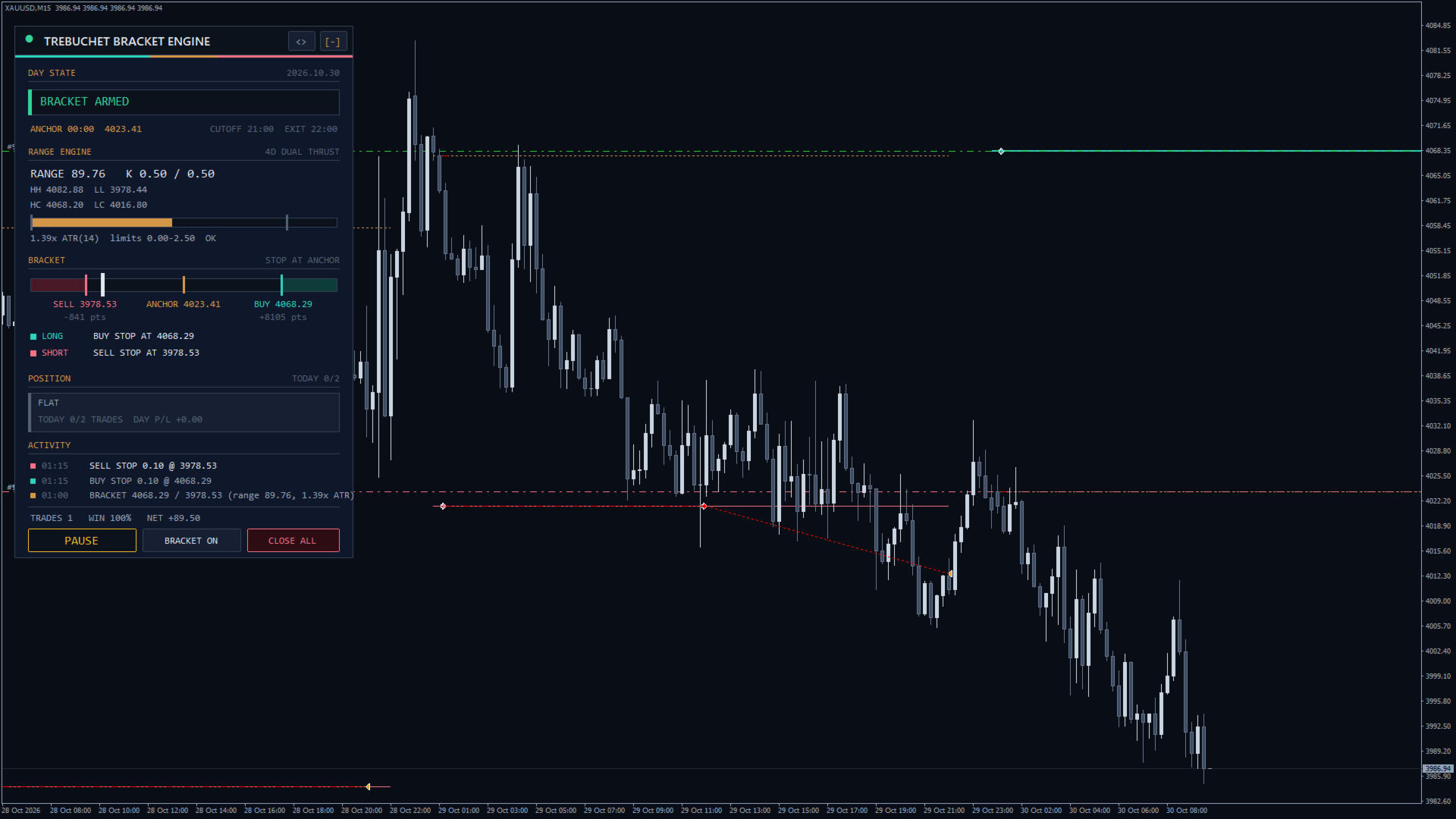
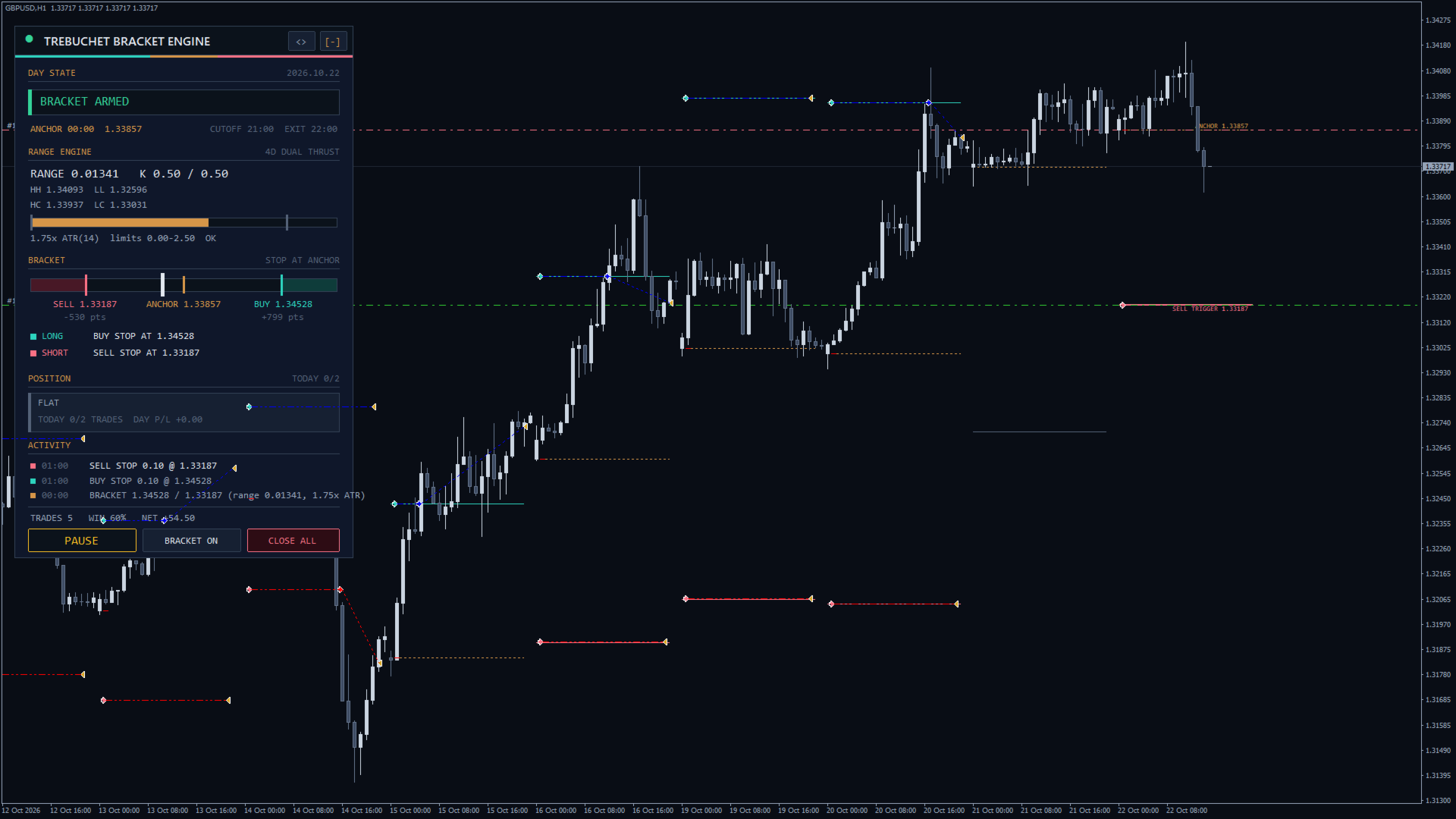
  3. After the anchor the panel shows BRACKET ARMED and two pending orders appear: a buy stop and a sell stop.
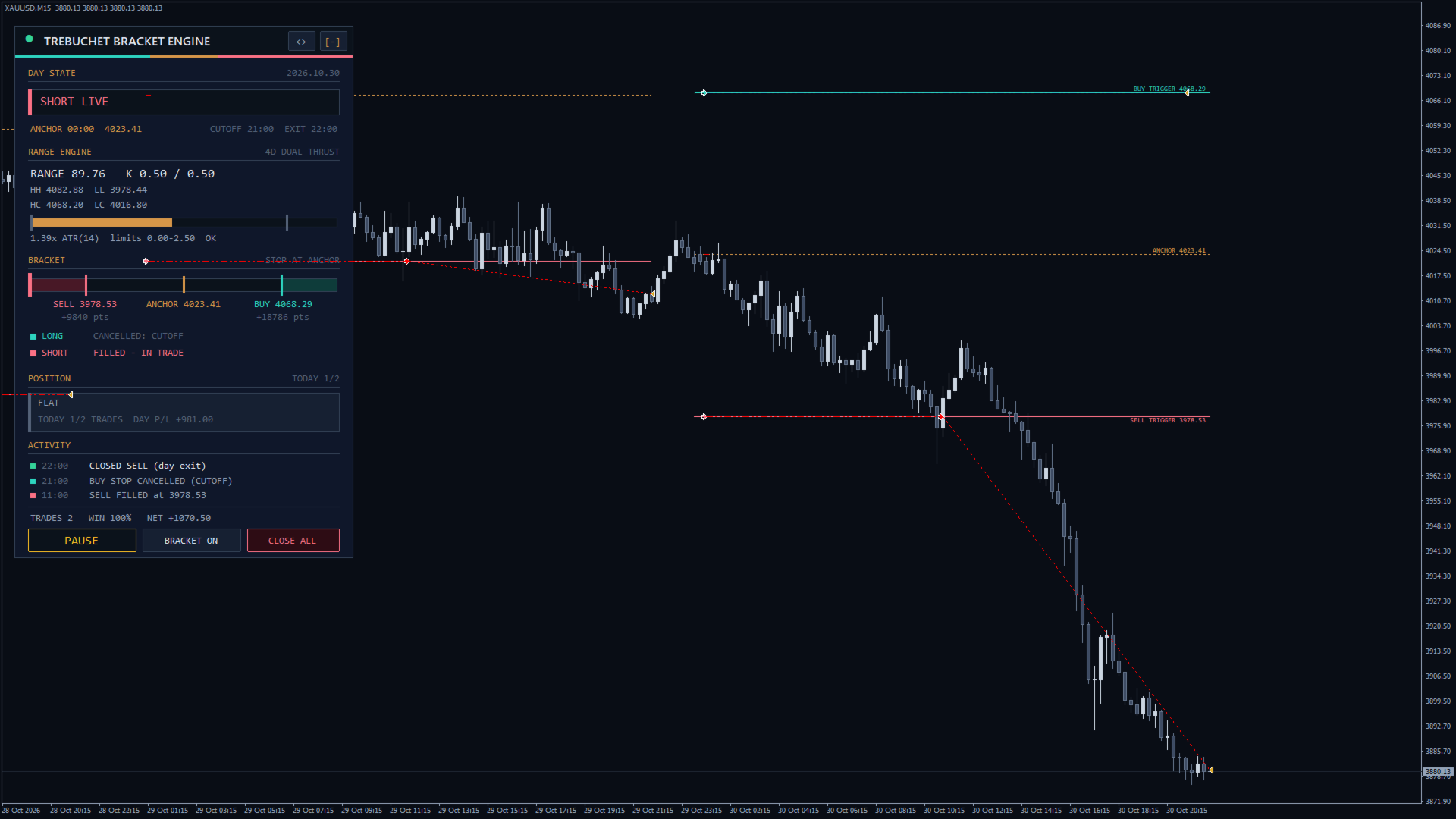
  4. Check: a visual Strategy Tester run on XAUUSD M15 over two weeks draws every bracket and trade.
  5. Push alerts: set your MetaQuotes ID (Tools > Options > Notifications) and Push Notifications = true.

How It Trades

Range: Range Basis Dual Thrust (max of HH-LC, HC-LL) uses the N completed days before today (Range Lookback): HH/LL are their highest high and lowest low, HC/LC their highest and lowest close, range = the larger of HH-LC and HC-LL. Average daily range = mean high-low of those days; Previous day range = yesterday's high-low.

Anchor: at Anchor Time the anchor price is fixed. 00:00 uses the daily open (the first tick of the server day). Another time uses the open of the first bar at or after it.

Triggers: buy trigger = anchor + Buy Trigger Distance x range, sell trigger = anchor - Sell Trigger Distance x range. If range / daily ATR (Daily ATR Period) is below Minimum Range or above Maximum Range there is no bracket that day (RANGE TOO NARROW / RANGE TOO WIDE).

Entry Orders:

  • Pending stop orders: a buy stop and a sell stop are placed right after the anchor. If a trigger is closer than the broker stop level, that side is watched by the EA instead and entered at market (VIRTUAL).
  • Market order on touch: no pending orders; the EA buys when Ask reaches the buy trigger and sells when Bid reaches the sell trigger (skipped while the spread exceeds Max Spread for Market Entries).

A side whose trigger was already passed when the bracket is set (for example after a restart) is MISSED and never chased. Each side trades at most once per day, and Max Trades per Day caps the total. Cancel the Opposite Order on Fill deletes the other side when one fills.

Stop Loss Placement:

  • At the anchor: the stop sits at the anchor price.
  • At the opposite trigger (stop and reverse): the long stop sits at the sell trigger and the short stop at the buy trigger, so a failed breakout can flip into the other side.
  • Range fraction from entry: entry minus (plus for sells) Stop Distance for Range Fraction x range.

Stops are widened to the broker minimum when needed.

Exits: Take Profit sets a target at that R multiple of the stop distance (0 = no target). Breakeven Trigger moves the stop to the entry once the trade has gained that many R. At Entry Cutoff all pending orders are deleted; at Day Exit Time every position of the EA is closed, and a position from an earlier server day is closed at once (empty = hold overnight). Closes, deletes and stop changes are sent only outside the freeze distance and inside the trading session, otherwise retried.

Lot Sizing: Fixed lots trades Fixed Lots. Risk % of balance: lots = balance x Risk per Trade / 100 / loss per lot at the stop, rounded down to the lot step and capped by Max Lots. Below the broker minimum the minimum lot is used, so small accounts, or gold with wide daily ranges, may risk more than the set percent. Free margin is checked before each order (NO MARGIN).

Recommended: XAUUSD and GBPUSD. Low-volatility pairs such as EURUSD gave weak results with the defaults. Times are broker server time (designed for GMT+2/+3 servers). Worth optimizing: Range Lookback, both trigger distances, Stop Loss Placement, Day Exit Time and Maximum Range.

Panel Controls

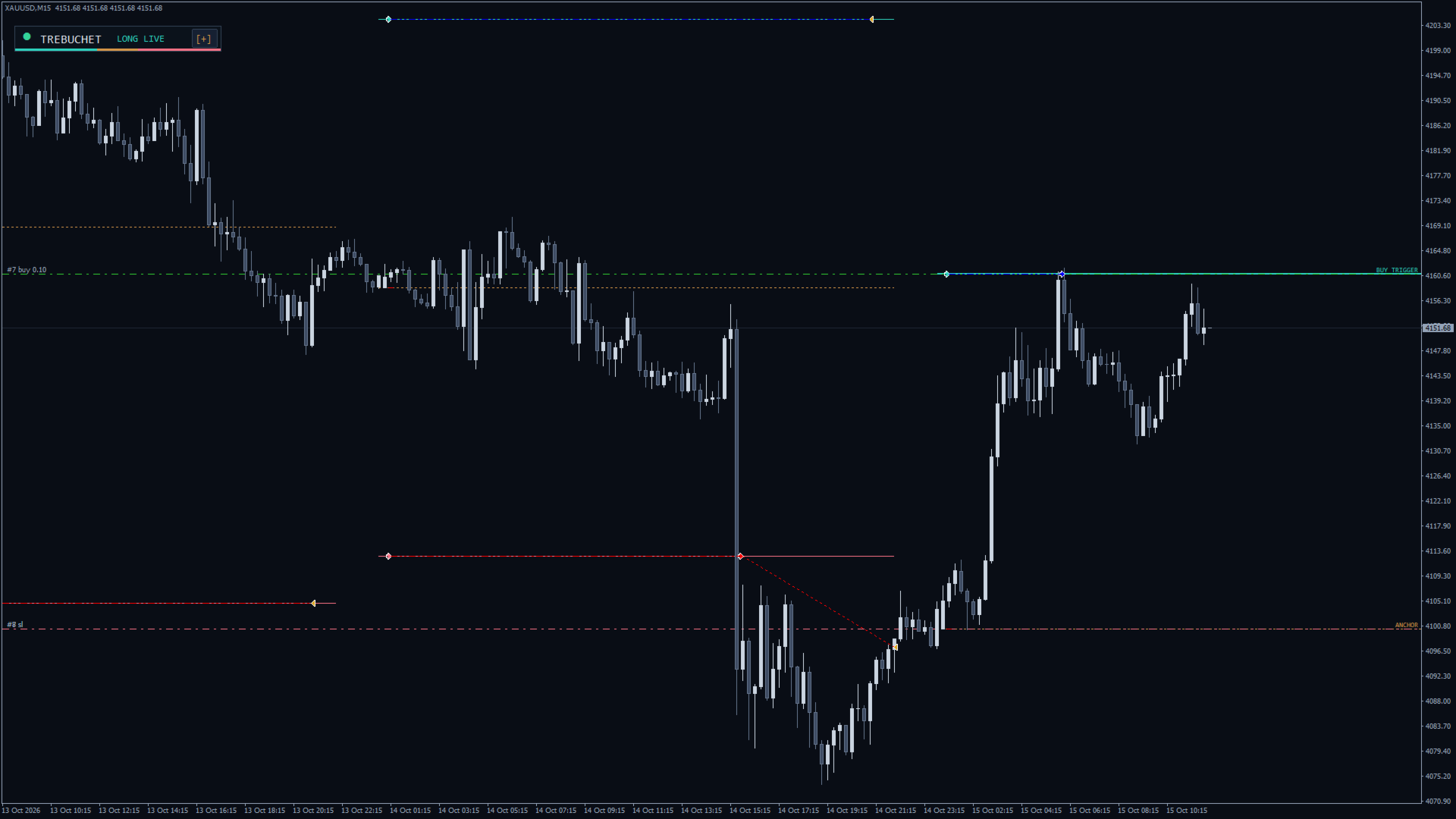
  • [-] / [+]: collapse to a pill (TREBUCHET plus the state) or expand.
  • <>: move the panel to the next chart corner.
  • PAUSE / RESUME: PAUSE deletes the pending orders and blocks new entries (open positions stay managed); RESUME re-places today's bracket if it is still valid. Saved in a global variable, so it survives restarts.
  • BRACKET ON / BRACKET OFF: show or hide the chart lines.
  • CLOSE ALL: the first click shows CONFIRM?, a second click within 4 seconds closes every position and deletes every pending order of this EA on the symbol.

Collapse, corner and bracket lines return to the inputs when the EA is re-attached.

Panel Readouts

  • Header LED: green while the bracket is armed or a trade is live, amber when paused, grey otherwise.
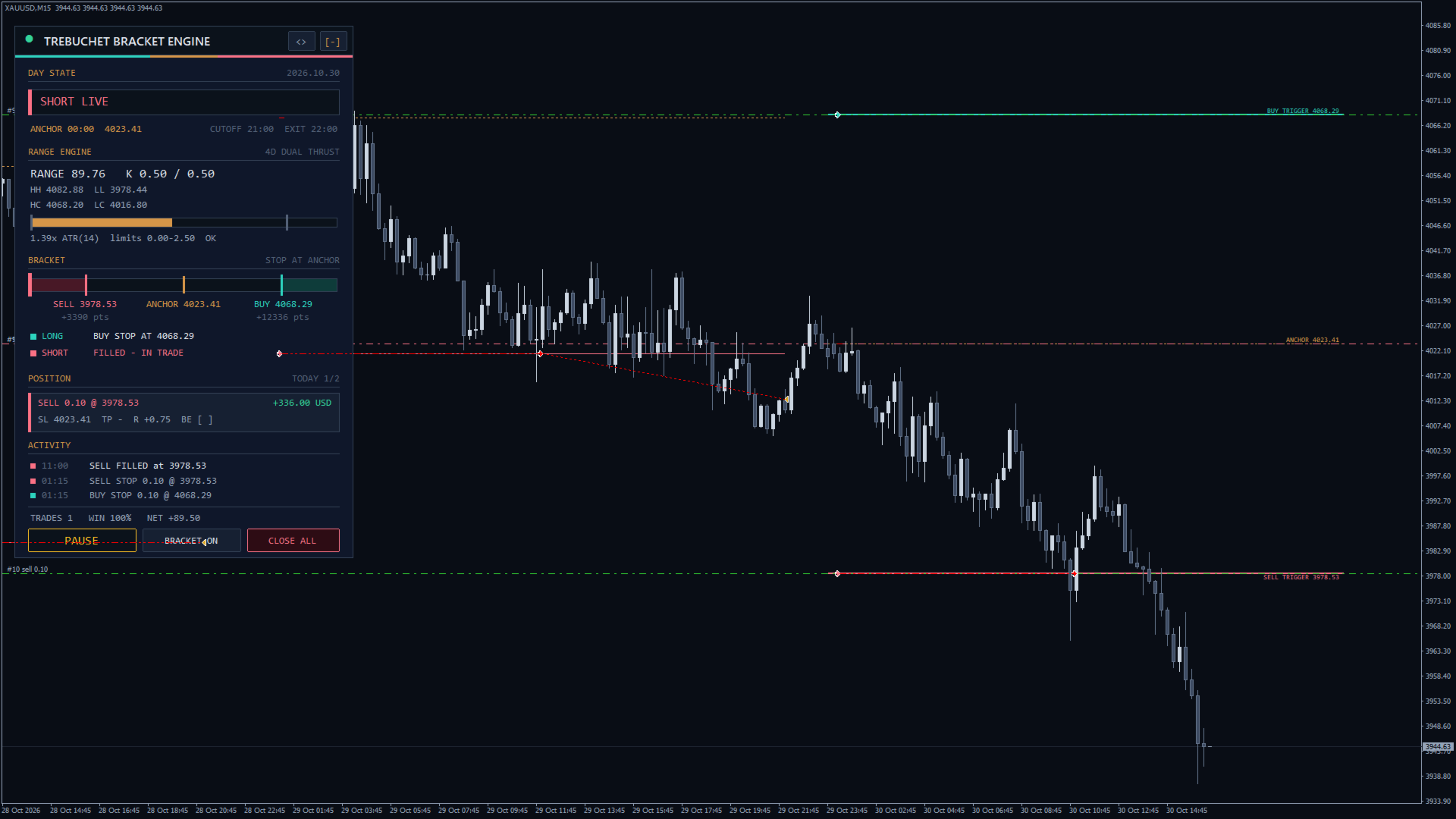
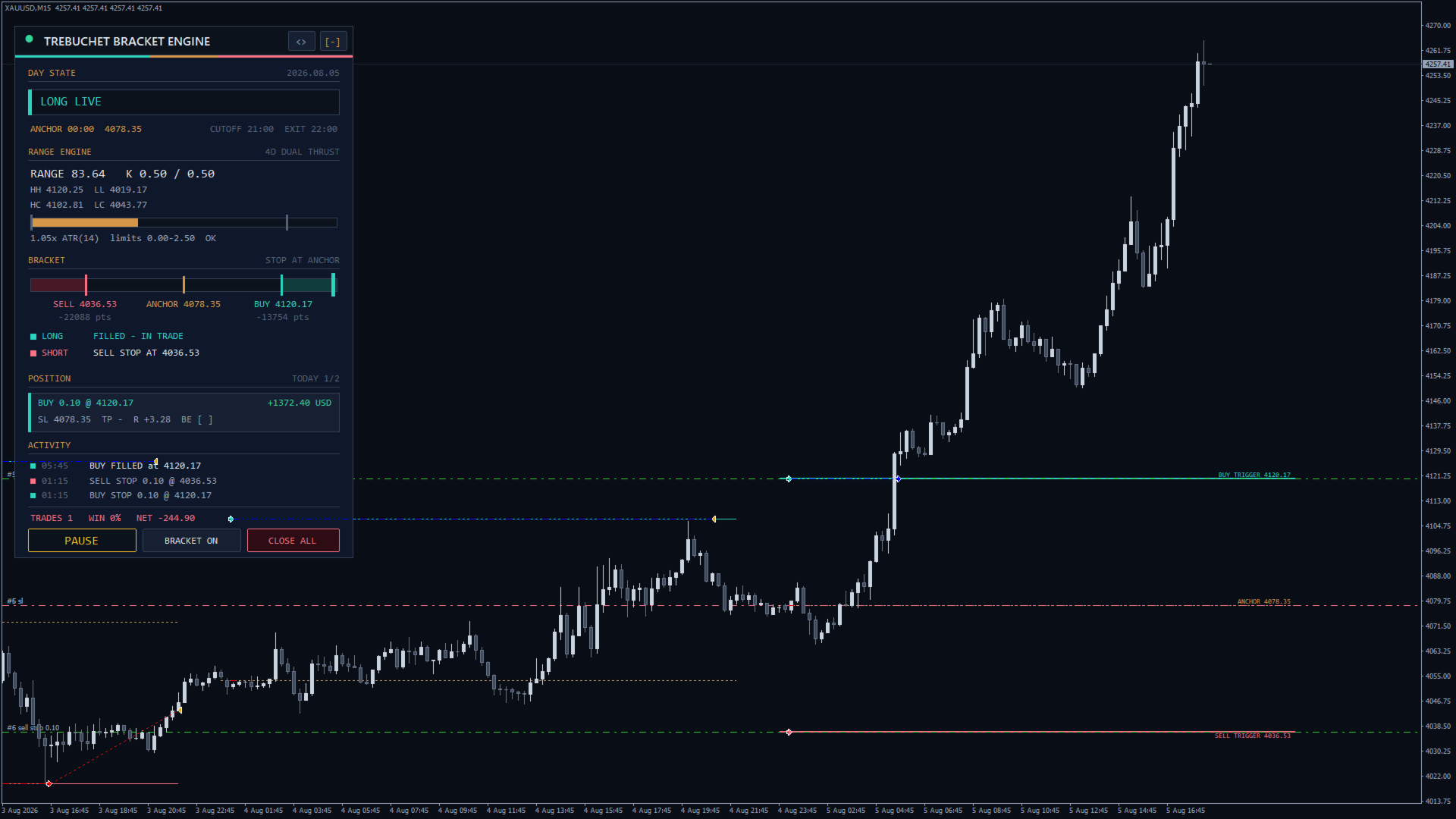
  • DAY STATE: badge WAITING FOR ANCHOR, BRACKET ARMED, LONG LIVE, SHORT LIVE, PAUSED, DAY QUOTA USED, DAY DONE (after the cutoff), BRACKET SPENT (both sides used), RANGE TOO NARROW, RANGE TOO WIDE or NO DAILY HISTORY; date; ANCHOR time and price; CUTOFF and EXIT times.
  • RANGE ENGINE: lookback and basis; RANGE value with both trigger distances K; HH, LL, HC, LC; a meter of range / ATR from 0 to 3 with ticks at both limits; the ratio, the limits and OK or the reason.
  • BRACKET: gauge with the sell trigger (coral), the anchor (bronze) and the buy trigger (teal); the marker shows Bid and turns teal or coral beyond a trigger. Below: SELL, ANCHOR and BUY prices and the distance to each trigger in points. Right caption: STOP AT ANCHOR, STOP+REVERSE or STOP x.xxR, and the target in R.
  • Side lines LONG and SHORT: READY, BUY STOP AT / SELL STOP AT price, WATCHING price (VIRTUAL), FILLED - IN TRADE, TRADED TODAY, MISSED: PRICE ALREADY BEYOND, SKIPPED: NO MARGIN or ORDER FAILED, CANCELLED: OCO, CUTOFF, QUOTA, PAUSED, MANUAL or NEW DAY, NO BRACKET TODAY.
  • POSITION: FLAT, or side, lots, entry and floating profit; SL, TP, R and BE ([x] once the stop is at breakeven). When flat: TODAY trades / maximum and DAY P/L, or NEW ENTRIES PAUSED.
  • ACTIVITY: the last three events with time: BRACKET, NO BRACKET, BUY STOP / SELL STOP placed, BUY FILLED / SELL FILLED, STOP CANCELLED, MISSED, SKIPPED, ORDER FAILED, BREAKEVEN, CLOSED (day exit, previous day, manual), CLOSE ALL, PAUSED by user, RESUMED by user.
  • Deck line: TRADES, WIN percent and NET closed profit of this EA on the symbol.

Chart Overlays

From the anchor to the day exit: a teal BUY TRIGGER line, a coral SELL TRIGGER line and a dotted bronze ANCHOR line, labelled for today; Past Days Drawn on Chart earlier brackets in thinner lines (grey when filtered). Shown on chart timeframes up to H4.

Alerts

Pop-up Alerts and Push Notifications fire when the bracket is set at the anchor, on each fill and on each close. Not in the Strategy Tester.

Side Effects

  • Global variable TBE_PAUSE_<symbol>_<magic> = 1 while paused.
  • Chart objects prefixed TBE_P_ (panel) and TBE_Z_ (overlays), removed with the EA. One-second timer. No files, no DLLs.
bool paused = GlobalVariableCheck("TBE_PAUSE_XAUUSD_26110901"); 

Input Parameters

Range Engine

  • Range Lookback (4 days), Range Basis (Dual Thrust (max of HH-LC, HC-LL); or Average daily range, Previous day range).
  • Buy Trigger Distance (0.50) and Sell Trigger Distance (0.50): x range.
  • Daily ATR Period (14 days), Minimum Range (0.0 x ATR, 0 = off), Maximum Range (2.5 x ATR, 0 = off).

Schedule

  • Anchor Time (00:00 = day open), Entry Cutoff (21:00), Day Exit Time (22:00, empty = off): server time, anchor before cutoff, cutoff not after the exit.

Orders and Exits

  • Entry Orders (Pending stop orders; or Market order on touch).
  • Stop Loss Placement (At the anchor; At the opposite trigger (stop and reverse); Range fraction from entry), Stop Distance for Range Fraction (0.30 x range).
  • Take Profit (0.0 R = day exit only), Breakeven Trigger (0.0 R = off).
  • Max Trades per Day (2), Cancel the Opposite Order on Fill (false).

Money Management

  • Lot Sizing (Risk % of balance; or Fixed lots), Fixed Lots (0.10), Risk per Trade (1.0 %), Max Lots (5.0).
  • Max Spread for Market Entries (0 points = off).

Execution

  • Magic Number (26110901, one per chart on the same symbol), Max Slippage (30 points), Order Comment (Trebuchet).

Display and Alerts

  • Show Panel (true), Draw Bracket Levels (true), Past Days Drawn on Chart (5), Start Collapsed (false), Panel Scale (1.0, 0.5-2.5).
  • Pop-up Alerts (true), Push Notifications (false).

Typical Setups

  1. Classic daily bracket (XAUUSD, GBPUSD): defaults.
  2. Stop and reverse: Stop Loss Placement = At the opposite trigger (stop and reverse), Max Trades per Day 2.
  3. London bracket: Anchor Time 08:00, Entry Cutoff 16:00, Day Exit Time 21:00, Range Basis = Average daily range, both trigger distances 0.40.
  4. Target and protect: Take Profit 2.0, Breakeven Trigger 1.0, Cancel the Opposite Order on Fill true.

Notes

  • After a restart the bracket is rebuilt from daily bars; existing orders keep their sides and a passed trigger is never chased.
  • Pending orders never survive into a new day.
  • An empty Day Exit Time is accepted only together with a Take Profit above 0; otherwise a trade could only close at its stop.
  • The Strategy Tester uses the same rules; panel and lines appear only in visual mode. Test on a demo account first.

Risk Disclaimer

Trading forex and CFDs on margin carries a high risk of loss. Past or simulated results do not guarantee future results. This EA does not promise profit; use only capital you can afford to lose.
More from author
EA Budak Ubat MT5
Syarief Azman Bin Rosli
EA Budak Ubat MT5 is an automated grid-trading Expert Advisor designed for MetaTrader 5. It combines technical trend analysis, dynamic volatility scaling, and multi-layered risk management to trade ranging and trending market conditions. Optimized for the M5 timeframe on major forex pairs and metals (XAUUSD / Gold). ### Key Features • 4 Selectable Analysis Methods:   1. Classic Candle: Directional momentum from candle patterns.   2. SMA20: 20-period Simple Moving Average crossover.   3. Allig
EA Budak Ubat
Syarief Azman Bin Rosli
4 (3)
Download Trial EA Budak Ubat Channel Limited Time Price! The price will increase by 10 USD after every 10 purchases! How it works When the EA is active, it will analyze the chart based on the Execution Mode parameter. If there are no existing positions on the chart, the EA will enter a trade based on the parameter. If the trend is bullish, it will enter a buy trade and if it is bearish it will enter a sell trade. And it will also set a Stop loss order at a certain distance from the opened trad
Indi RBO
Syarief Azman Bin Rosli
Input: Range Start Time : The starting time of the range creation Range End Time : The ending time of range creation Trade End Time : The time where the line of range zone high/low will be extended to Minimum Size : The minimum size of the range in point Maximum Size : The maximum size of the range in point If the range size is between the minimum and maximum, indicator will print the 1st color (blue).
Apex Flow Reversion
Syarief Azman Bin Rosli
# Apex Flow Reversion MT4 Apex Flow Reversion is an automated trading system developed for MetaTrader 4 that executes an intraday statistical mean-reversion strategy. The system monitors price deviation from a dynamic Volume-Weighted Average Price benchmark and identifies exhaustion points using standard deviation bands, Relative Strength Index momentum filtration, and Average True Range volatility constraints. ## Strategy Overview The algorithm computes a rolling intraday VWAP curve weighte
Vortex Confluence Radar
Syarief Azman Bin Rosli
Vortex Confluence Radar MT4 Vortex Confluence Radar is a multi-oscillator confluence scoring engine developed natively for MetaTrader 4. It fuses three distinct technical oscillators—Relative Vigor Index (RVI), Commodity Channel Index (CCI), and Williams % Percent Range (WPR)—into a unified momentum histogram with a smoothed signal line and automated crossover alert signals. Understanding the Indicator Architecture The indicator operates in a separate sub-window and renders several distinct visu
Kinetix Speed Commander
Syarief Azman Bin Rosli
Kinetix Speed Commander MT4 Kinetix Speed Commander   is an institutional-grade, on-chart one-click trade execution cockpit, dynamic position sizing calculator, and risk-to-reward order management terminal engineered natively for MetaTrader 4. Built specifically for proprietary trading firm challengers, fast-paced scalpers, and systematic day traders, Kinetix Speed Commander eliminates manual calculation delays, human execution errors, and over-leveraged risk exposure. Operating via a high-perfo
Prism Candle Forge
Syarief Azman Bin Rosli
Prism Candle Forge — Candlestick Pattern Recognition Engine for MT4 Prism Candle Forge is a native MQL4 library that detects and validates 20+ Japanese candlestick patterns using ATR-weighted geometric analysis. It provides pattern identification, directional confidence scoring, candle morphology classification, and trend context validation — all through 8 exported functions callable from any Expert Advisor, Indicator, or Script. Zero DLLs, zero external dependencies, pure MQL4 computation. Dist
Sigma Squeeze Reactor
Syarief Azman Bin Rosli
Sigma Squeeze Reactor Bollinger-Keltner Volatility Squeeze Breakout Expert Advisor Sigma Squeeze Reactor is an intelligent breakout Expert Advisor for MetaTrader 4 that identifies and trades explosive volatility expansion moves. It detects when Bollinger Bands contract inside Keltner Channels (the classic volatility squeeze) and executes precise entries when the compression releases, confirmed by momentum oscillator direction. The EA is engineered with a   Dual-Engine Breakout Architecture   tha
Fulcrum Value Profile
Syarief Azman Bin Rosli
Fulcrum Value Profile is a MetaTrader 4 indicator that builds a tick-volume profile for every session, marks its Point of Control (POC) and value area, draws the developing POC/VAH/VAL as lines, tracks naked POCs and flags two value-area setups on closed bars: re-entry into the prior value area (80% rule) and acceptance outside it (breakout). It never opens, modifies or closes trades. Quick Start Attach the indicator to an M5, M15 or M30 chart. Keep Profile Period = Daily session, or choose Cust
Filament Tripline Console
Syarief Azman Bin Rosli
Filament Tripline Console turns your own horizontal lines and trendlines into armed triplines. When price touches a line, or a bar closes beyond it, the tripline fires its action: an alert, a market BUY or SELL with automatic lot size, stop loss and take profit, or an EXIT that closes positions. It never trades on its own analysis; it only acts on lines you arm. Quick Start Attach the utility to any chart. For BUY, SELL and EXIT actions enable Algo Trading in the toolbar and Allow live trading o
Tectonic Structure Engine
Syarief Azman Bin Rosli
An MQL4 library that maps market structure for your EA, indicator or script: confirmed swings labelled HH, HL, LH, LL, EQH and EQL, break of structure (BOS), change of character (CHoCH), liquidity sweeps, order blocks and fair value gaps with fill tracking, and the position of price in the dealing range. It reads closed bars only and never repaints. It does not trade, draw or alert. You receive the compiled Tectonic_Structure_Engine.ex4; this page is the full API reference. Quick Start Copy Tect
Recoil Retrace Engine
Syarief Azman Bin Rosli
Recoil Retrace Engine is a MetaTrader 4 Expert Advisor that trades the pullback after a strong move. It finds an impulse leg that ran from a confirmed swing by a multiple of ATR, waits for price to recoil into a retracement pocket (default 38.2-61.8 %), enters in the direction of the leg, takes a partial at the leg extreme and runs the rest to an extension target. One position at a time per symbol and magic number; no grid, martingale, averaging or hedging. Quick Start Attach the EA to one chart
Gnomon Diurnal Cone
Syarief Azman Bin Rosli
Overview Gnomon Diurnal Cone shows how far price normally travels from the day open by each time of day. For every intraday slot it takes the last N complete days and draws the median excursion above and below the open (core cone) and a chosen percentile (outer cone). Today's cone is fixed at the day open from completed days only, so it never repaints, and it is projected to the end of the day. A range budget compares today's range with the median full-day range, and two closed-bar signals flag
Ephemeris Trade Calendar
Syarief Azman Bin Rosli
Ephemeris Trade Calendar - your account history as a monthly profit calendar (MT4) Ephemeris Trade Calendar turns your MetaTrader 4 history into a monthly profit calendar on the chart. Every closed trade lands on its day: cells are shaded by result, show win and loss counts and add up into weekly totals. A lower deck switches between statistics, an edge map (P/L by entry weekday and hour plus a closed-trade equity curve) and a day ledger, and a TODAY meter follows your daily target and loss limi
Meridian Session Clock
Syarief Azman Bin Rosli
An MQL4 time library: DST-correct conversions between UTC and 12 world time zones, a model of your broker's server clock (auto-detected from price history), the Sydney, Tokyo, London and New York sessions plus your own, with open state, start and end times and OHLC range, the FX trading day and the weekend. Unlike TimeGMT(), it gives the same answers in the Strategy Tester as live. It never trades, draws or writes files. You receive the compiled Meridian_Session_Clock.ex4; this page is the compl
Spectra Trend Ribbon
Syarief Azman Bin Rosli
Spectra Trend Ribbon is a multi-tier trend direction and volatility expansion indicator developed natively for MetaTrader 5. It combines an adaptive smoothed central trend baseline with dynamic volatility envelope bands and automated momentum breakout signals. Understanding the Visual Signals: 1. Central Adaptive Baseline (Color Line) - Green Color: Indicates that the market price is trading above the baseline and the baseline slope is positive, representing an active bullish trend regime. -
Aegis Risk Sentinel
Syarief Azman Bin Rosli
Aegis Risk Sentinel MT5 Aegis Risk Sentinel   is an institutional-grade, real-time equity protection and risk management utility developed natively for MetaTrader 5. Engineered for proprietary trading firm challengers, professional fund managers, and retail day traders, Aegis enforces mathematical discipline on your trading account, preventing catastrophic drawdowns, emotional revenge trading, and over-leveraged margin calls. The utility features an ultra-responsive on-chart Head-Up Display (HUD
Stratos Momentum Engine
Syarief Azman Bin Rosli
Stratos Momentum Engine MT5 Stratos Momentum Engine is a fully automated multi-timeframe momentum breakout trading system designed for MetaTrader 5. The Expert Advisor combines structural trend identification on the higher timeframe (H1) with precision momentum timing and breakout confirmation on the lower timeframe (M15). The system utilizes mathematical least-squares linear regression slope to define primary directional bias, Stochastic oscillator dynamics to identify optimal entry points with
Nexus Quant Matrix
Syarief Azman Bin Rosli
Nexus Quant Matrix — Quantitative Computing Engine for MT5 Nexus Quant Matrix is a high-performance quantitative library built natively in MQL5. It delivers institutional-grade Kalman filtering, Cornish-Fisher VaR, Expected Shortfall (CVaR), Kelly Criterion sizing, margin-protected lot calculation, and Pearson correlation directly into your Expert Advisors — zero DLLs, zero external dependencies. Distributed as a compiled binary (Nexus_Quant_Matrix.ex5). This description is your complete API ref
Quasar Regime Cloud
Syarief Azman Bin Rosli
Quasar Regime Cloud is a market regime indicator for MetaTrader 5. It measures whether price is currently trending or chopping, then shows the result directly on the chart through a fractal-adaptive cloud. Signals are only produced while the market is classified as trending, which filters out many of the false crossovers that occur in sideways conditions. How It Works 1. Fractal Dimension Estimate For every bar the indicator estimates the fractal dimension (D) of price over a configurable window
Isobar Event Shield
Syarief Azman Bin Rosli
Isobar Event Shield protects your trades from economic news in MetaTrader 5. It reads the terminal's built-in economic calendar, counts down to every release that affects your symbols and, shortly before each release, applies the protection you choose to the positions and pending orders that you or your other Expert Advisors already have. It never opens trades of its own. Quick Start Attach the utility to one chart (one copy per terminal) and enable Algo Trading in the terminal toolbar. The bas
Riptide Sweep Reclaimer
Syarief Azman Bin Rosli
Riptide Sweep Reclaimer is a MetaTrader 5 Expert Advisor that trades liquidity sweeps of a quiet-session range: it measures the high and low of a window you choose (default 00:00-08:00 server time), waits for the next session to push through one side and fades the move once a candle closes back inside, targeting the midpoint and the opposite side. One position at a time on the chart symbol; no grid, martingale or averaging. Quick Start Attach the EA to one chart of the symbol (any timeframe; th
Turnstile Order Gateway
Syarief Azman Bin Rosli
An MQL5 library between your Expert Advisor and OrderSend. Each request passes 9 gates (connection, Algo Trading, symbol mode, session, order-type flags, volume, stops, margin, OrderCheck) before sending. Closes and modifications blocked by the freeze level, a closed session or a lost connection are queued and sent later. It never trades on its own. You receive the compiled Turnstile_Order_Gateway.ex5; this page is the full API reference. Quick Start Copy Turnstile_Order_Gateway.ex5 to MQL5/Libr
Counterpoint Divergence Matrix is a MetaTrader 5 indicator that finds divergence between price swings and momentum. It marks regular divergence (price makes a new extreme, the oscillator does not) and hidden divergence (the reverse), keeps only clean ones with a line-of-sight check, and scores each signal by how many of five oscillators agree: RSI, MACD, Stochastic, CCI and Momentum. Signals appear once the newest swing is confirmed and never repaint. It does not trade. Quick Start Attach it to
Cascade Exit Conductor
Syarief Azman Bin Rosli
Cascade Exit Conductor is a position-management utility for MetaTrader 5. It watches the trades you already have open - placed by hand or by any Expert Advisor - and runs their exits for you: it locks a breakeven stop, banks profit in a staged partial-exit cascade, trails the runner with an ATR or fixed distance, and can close a position after a maximum holding time. It is operated from a compact on-chart cockpit with one-click controls. It never opens trades of its own and it does not predict d
Ziggurat Pivot Engine
Syarief Azman Bin Rosli
Ziggurat Pivot Engine is a MetaTrader 5 Expert Advisor for the Camarilla tiers of the previous day. It fades rejections of the inner tier (H3/L3) back toward the prior close and follows confirmed closes through the outer tier (H4/L4). A day-regime matrix decides each day which setups may trade, based on how wide the previous day was. One position at a time per symbol and magic number, closed at the day exit; no grid, martingale, averaging or hedging. Quick Start Attach the EA to one chart of the
Orrery Cycle Toolkit
Syarief Azman Bin Rosli
An MQL5 library that measures the dominant market cycle of any symbol and timeframe: period in bars, phase, a sine / lead sine pair whose crossings mark cycle turns, cycle or trend mode, amplitude, trendline, spectrum, adaptive indicator lengths and a projection of the current cycle. It only reads price history: it never trades, draws or writes files. You receive the compiled Orrery_Cycle_Toolkit.ex5; this page is the complete API reference. Quick Start Copy Orrery_Cycle_Toolkit.ex5 to MQL5/Libr
Filter:
No reviews
Reply to review