Simple Panel MT5

  • Utilities
  • Joas Da Silva Veiga
    Joas Da Silva Veiga
    Hello, I am from Brazil. I develop my own MT5 tools and indicators independently, based on my needs and my day trading studies. I am new here on MQL5 and I share tools and indicators that I personally use and develop, some free and others paid. If you can help me continue my work by purchasing one
  • Version: 1.0

Order Ticket, Trading Panel, Risk Management, Manual Trading, Order Management, Fast Execution,  execution panel for MetaTrader 5


Simple Panel MT5

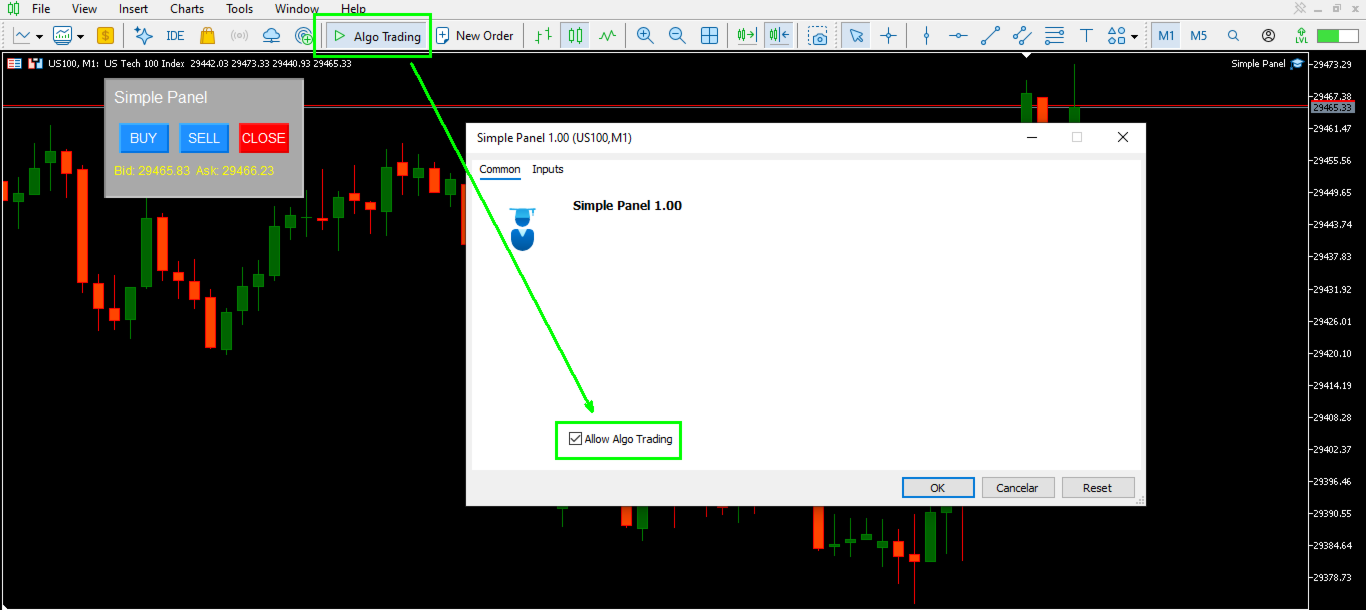
Simple Panel is a lightweight trading panel for MetaTrader 5 that lets you execute market orders and manage open positions directly from your chart.

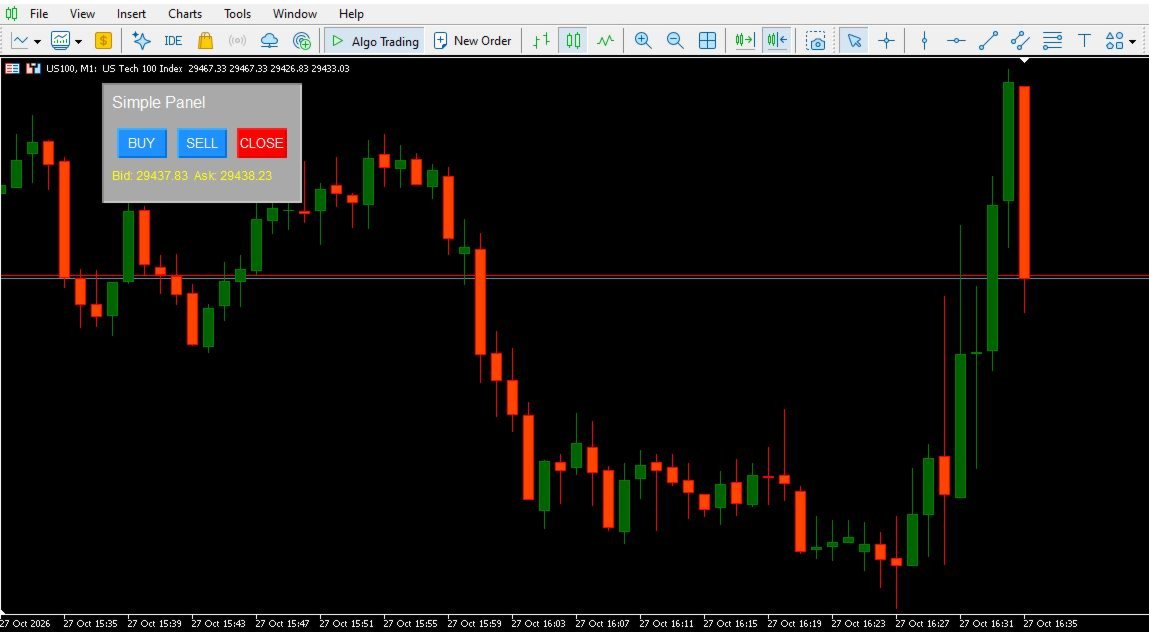
Designed for simplicity and convenience, the panel provides BUY, SELL, and CLOSE buttons in a compact interface, helping you access essential trading actions without navigating through multiple trading windows.

Key Features

One-Click Trading Panel

Place market buy and sell orders directly from the chart using the dedicated BUY and SELL buttons.

Close Positions by Symbol

The CLOSE button attempts to close all open positions for the current chart symbol, making it easier to manage symbol-specific exposure from one interface.

Adjustable Lot Size

Set your preferred trading volume through the input parameter before using the panel.

Live Bid and Ask Prices

Monitor the current Bid and Ask prices displayed directly on the panel.

Draggable Interface

Move the panel around the chart by dragging it with your mouse. Its position is saved and restored when the panel is initialized again.

Compact Design

The panel features a simple layout with clearly separated BUY, SELL, and CLOSE buttons, keeping essential trading controls accessible while you analyze the chart.

How It Works

  1. Attach Simple Panel to a chart in MetaTrader 5.

  2. Set the desired lot size in the indicator's input settings.

  3. Click BUY to submit a market buy order or SELL to submit a market sell order for the current chart symbol.

  4. Click CLOSE to attempt to close all open positions for that symbol.

  5. Drag the panel to your preferred chart location.

Important Information

Simple Panel is a trading utility, not an automated trading strategy. It does not generate trading signals or determine market direction.

The BUY and SELL buttons submit market orders using the configured lot size. The CLOSE button attempts to close all open positions for the current chart symbol, regardless of their direction or opening method.

Trading operations are subject to broker execution conditions, available margin, market availability, and the trading permissions configured in MetaTrader 5.

Always verify your trading volume and account settings before placing orders.

Compatibility

Platform: MetaTrader 5

Type: Chart-based trading panel

Trading actions: Market Buy, Market Sell, and Close Positions by Current Symbol.
More from author
QuantumTrade Panel
Joas Da Silva Veiga
5 (2)
trend,trend analysis,trend following,signals,alerts,trading panel,dashboard,market context,scalping,day trading,intraday,swing trading,non repaint,no repainting,risk management,risk reward,support resistance,supply demand,buy sell pressure,forex,crypto,multi timeframe The panel is an advanced market-reading tool that transforms price and volume data into clear signals of trend, buying/selling pressure, and objective trade projections — all centralized in a single panel directly on the chart. It
FREE
Trading Panel Prime
Joas Da Silva Veiga
Trading Panel,Manual Trading,Trade Manager,Risk Management,Order Management,Order Execution,Order Control,Trailing Stop,Fast Trading,One Click Trading Important For JoPanel Prime to work correctly, you must enable the "Algo Trading" option in MetaTrader 5. Without this option enabled, the panel will not operate. JoPanel Prime is a professional manual trading panel for MetaTrader 5. It was developed to execute orders and manage positions quickly and efficiently, replacing the standard MT5 inte
FREE
Dual Clock Pro
Joas Da Silva Veiga
clock,  Server Time, Local Time, MT5 Clock, Clock Indicator, Digital Clock DualClockPro - Local and Server Clock for MetaTrader 5 DualClockPro is a visual clock indicator for MetaTrader 5 that displays local computer time and trading server time directly on the chart. It also supports displaying the corresponding dates, helping traders monitor time differences between their local environment and the broker's server. The panel has a compact design and customizable settings, allowing users to ada
FREE
Order Ticket, Trading Panel, Risk Management, Manual Trading, Trailing Stop, Order Management, Fast Execution — JoOrderTrade Pro — execution panel for MetaTrader 5 JoOrderTrade Pro is a complete graphical panel for manual trade execution and advanced risk management for MetaTrader 5. It replaces the platform's native trading windows with a clean, responsive, and performance-optimized interface, providing greater precision and control during trading operations. The product is not an automated t
RSI Trend Color
Joas Da Silva Veiga
RSI Color Candles , Color Candles , Colored Candles Indicator , RSI Color , Visual Trend , Candle Coloring ,  Chart Visual Indicator What it does RSI Trend Color is an intelligent visual indicator that transforms RSI readings into colors directly on the candlestick chart. It automatically colors candles: Blue : RSI in oversold area Orange : RSI in overbought area White : RSI in neutral area Additional features: Sound and visual alerts when RSI reaches important levels Pullback alerts (when RSI
FREE
top finder, bottom finder, market structure, price action, trend reversal, trend continuation, support resistance, swing high, swing low, frequency analysis, price projection, breakout detection, pullback trading, swing trading, market turning points EXPERIMENTAL VERSION – UNDER ACTIVE DEVELOPMENT Smart Top Bottom Finder is a market structure and frequency analysis indicator designed to identify potential tops and bottoms based on recurring price movement patterns. The indicator does not rely
FREE
trend,trend indicator,momentum,oscillator,histogram,trend oscillator,market flow,trend strength,bullish,bearish,trend confirmation,macd histogram,trend analysis The Trend Flow Oscillator is a market flow and momentum indicator designed to help traders identify the strength and direction of price movements with clarity, simplicity, and fast visual interpretation. It is especially effective on the 5-minute timeframe (M5), where flow changes occur more frequently. Features Identifies changes and
FREE
Trend Zone Force
Joas Da Silva Veiga
5 (1)
trend, pullback, trend indicator, volatility, atr, moving average, ema, momentum, oscillator, order flow, delta, trend trading, scalping, day trading, swing trading, price action, market flow This indicator was developed for trend analysis, pullback identification, and objective market context reading. It combines moving averages and volatility to create dynamic zones and provide a clear interpretation of price direction. The goal is to help traders operate in alignment with the dominant market
trend indicator, momentum indicator, market flow indicator, dynamic bands, MT5 indicator, scalping indicator, day trading indicator, swing trading indicator, percent distance, no repaint, real time alerts, multi timeframe, momentum histogram, EMA trend, trend strength TrendBands Momentum Ultra is a trend and flow indicator designed to help traders visualize market direction, movement strength, and the distance of price from the trend. The indicator uses two internal exponential moving averages.
Quantum Pulse Force
Joas Da Silva Veiga
trend indicator, market flow, momentum indicator, price action, forex indicator, buy sell signals, reversal indicator, volatility indicator, trading signals, MT5 indicator, technical analysis, scalping indicator, smart money, market strength, algorithmic trading Quantum Pulse Force is a technical indicator for MetaTrader 5 designed to analyze price movement acceleration, identify phases of trend and sideways movement, and highlight relevant market points based on multiple quantitative filters.
mt5 indicator, momentum indicator, trend indicator, scalping strategy, buy sell signals, technical analysis, oscillator indicator, support resistance, price action, breakout trading, forex strategy, swing trading, pattern recognition, market momentum, trading signals What is MasterForce Pattern Panel MasterForce Pattern Panel is an advanced tool for MetaTrader 5 that transforms raw market data into actionable buy and sell pattern insights. The tool monitors four essential dimensions of price be
Market Sentry
Joas Da Silva Veiga
Market Analysis, Market Structure, Price Action, Trend Analysis, Bullish, Bearish, Range Market, Directional Bias, Market Dashboard, Trading Dashboard, Trend Detection, Market Scanner, Market Context, Breakout Analysis, Consolidation Analysis, Trend Filter, Technical Analysis, Real Time Analysis This indicator analyzes price behavior in real time and classifies market conditions into Bullish , Bearish , Range , and Neutral scenarios. Price is continuously evaluated relative to a dynamic referen
FREE
RSI Indicator, RSI Signals, Buy Sell Signals, Trend Indicator, Momentum Indicator, Overbought Oversold, Reversal Indicator, Trading Signals, Forex Indicator, MT5 Indicator, Double Top, Double Bottom, Trend Filter, Technical Analysis, Trading Alerts RSI Zone Memory Reactive – RSI Signals and Market Structure An RSI indicator for identifying momentum shifts, repeated RSI extremes, and potential reversal areas in MetaTrader 5. Overview RSI Zone Memory Reactive is a technical analysis indicator fo
Price Pressure Book
Joas Da Silva Veiga
Time and Sales, Time and Sales Indicator, Tape Reading, Pressure Book, Buy Sell Pressure, Tick Analysis, Market Pressure, Tick Data, Price Movement Analysis, Tick Strength, Momentum Analysis, Buy Sell Movement, Movement Sequences, Real-Time Tick Monitor, Trading Dashboard, Points Analysis, Customizable Alerts, MT5 Indicator Pressure Book - Tick Analysis and Buy/Sell Pressure Indicator for MT5 Pressure Book is a MetaTrader 5 indicator designed to monitor tick-based price movements and display es
Flow Pressure Histogram, Market Flow Indicator, Probability Indicator, Trend Detection, Ranging Detection, Multi-Filter Indicator, Volatility Thermometer, Pattern Recognition, Breakout Alert, Momentum Indicator, Market Pressure, Buy Sell Pressure, Signal Indicator, MT5 Indicator, Forex Indicator Flow Pressure Histogram The Multi-Layer Market Flow Indicator for MT5 Flow Pressure Histogram is an advanced technical indicator that visualizes real-time buying and selling pressure as a color-coded h
Precision Histogram Trend MT5 is a customizable trend histogram indicator for MetaTrader 5, designed to display positive and negative histogram values and visualize changes in momentum direction. Precision Histogram Trend MT5 Precision Histogram Trend MT5 is a customizable histogram indicator for MetaTrader 5 that displays positive and negative values around a central zero line. Its color-coded bars provide a visual representation of changes in histogram direction and magnitude. The indicator
Apex Signal Pro MT5
Joas Da Silva Veiga
reversal, entry, signal, momentum, non-repaint, precision, alerts, filtered-signals Apex Signal Pro Overview Apex Signal Pro is a technical indicator designed to identify potential reversal points on any chart. It combines momentum analysis with multiple confirmation filters to reduce noise and highlight relevant price reversal conditions. The indicator supports different symbols and timeframes. Confirmed signals are displayed as fixed chart markers, while developing conditions can be indicated
Trend and momentum signals with VWAP-based price analysis, clear entry, stop loss and take profit projections, and configurable alerts for scalping and day trading. Trend Pulse Signal Pro Trend Pulse Signal Pro is a technical indicator for MetaTrader 5 that generates buy and sell signals using a multi-factor model. It is designed for traders seeking a structured approach to signal analysis, with projected entry, stop, and target levels displayed directly on the chart. The indicator does not us
Filter:
No reviews
Reply to review