Aurum Kinetics
- Experts
- Version: 1.0
- Activations: 5

Aurum Kinetics is a fully automated Expert Advisor for gold (XAUUSD) on the 15-minute chart. It trades breakouts of the recent price range in the direction of the prevailing market regime, and it scales every exit level to current market volatility rather than using fixed distances.
The Expert Advisor does not use grid, martingale, averaging or hedging. Every position is opened with a real stop loss attached at the moment of entry.
HOW IT WORKS
The Expert Advisor combines four elements.
Regime filter. A 30-period exponential moving average defines which side of the market may be traded. Long positions are only considered while price holds above this average, short positions only while price holds below it. The average must also be moving, not flat, before any entry is allowed. This keeps the Expert Advisor out of directionless markets, where breakout entries perform poorly.
Momentum entries. The Expert Advisor measures the high and low of the recent range and places a pending stop order beyond the relevant extreme, in the permitted direction. The order is refreshed as the range develops and is cancelled when it is no longer valid. The Expert Advisor therefore enters only when price actually moves through the level, not on prediction.
Volatility-adaptive exits. The stop loss, the trailing stop, the break-even trigger and the trailing activation level are all calculated from the Average True Range at the time of the trade. In an active market these distances widen; in a quiet market they contract. This is the core idea of the Expert Advisor. A fixed stop distance forces a trade to risk the same amount whether the market is offering a large move or a small one, which is the situation this design is intended to avoid.
Cost and session control. The Expert Advisor stands down outside the configured trading session, over the weekend gap, and when the spread is wide either in absolute terms or relative to current volatility. Gold spreads widen considerably around the daily rollover, and entering at those moments carries an avoidable cost.
WHAT THIS EXPERT ADVISOR DOES NOT DO
No grid of orders.
No martingale or any increase of lot size after a loss.
No averaging into losing positions.
No hedging of opposing positions.
No trading without a stop loss.
No hidden or virtual stops. All stops are placed on the server.
No pop-up windows, chart advertising or external links during operation.
TRADING REQUIREMENTS
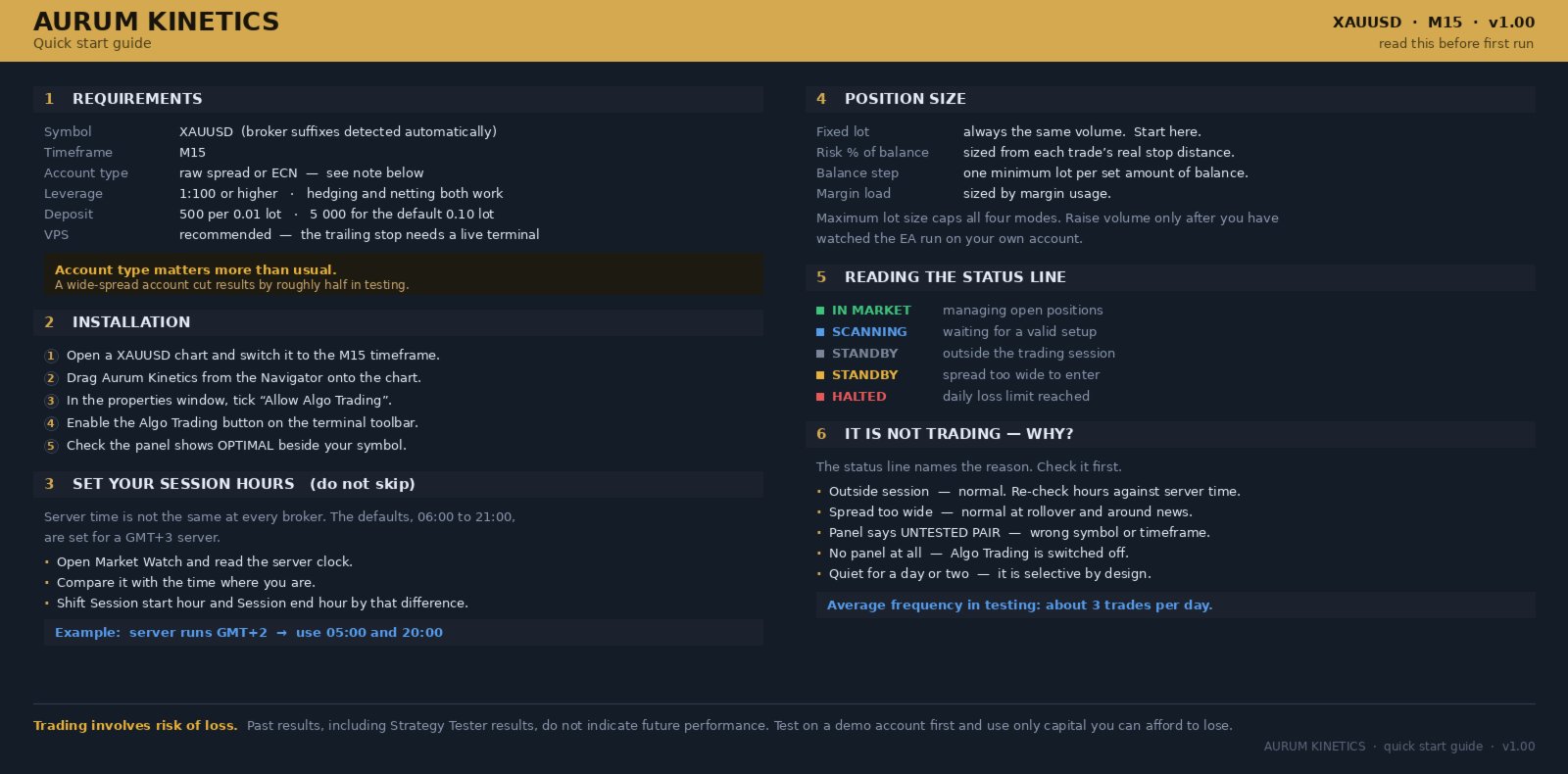
Symbol: XAUUSD, or the equivalent gold symbol offered by your broker.
Timeframe: M15.
Account type: raw spread or ECN account. Please read the note on spread below.
Hedging or netting: both are supported.
Leverage: 1:100 or higher is recommended.
Minimum deposit: 500 units of account currency at 0.01 lots. 5000 is suggested for the default 0.10 lot setting.
Virtual hosting: recommended. The Expert Advisor manages positions continuously and should not be interrupted.
Broker symbol suffixes such as XAUUSD.r or XAUUSDm are detected automatically.
A NOTE ON SPREAD AND ACCOUNT TYPE
This Expert Advisor holds positions for a short time and takes a moderate number of trades. Spread therefore forms a meaningful part of its total cost, and the account type matters more than it does for a long-term system.
In testing, the same settings over the same period produced a noticeably weaker result on a wide-spread account than on a raw spread account. The difference appeared almost entirely in the proportion of winning trades, while the average size of wins and losses stayed close to unchanged.
A raw spread or ECN account with commission is recommended. A commission-free account with a wide spread is usually the more expensive option for a system of this type.
INPUT PARAMETERS
The strategy settings are fixed inside the Expert Advisor and are not adjustable. The parameters below control money management, risk and presentation only. This is intentional. The strategy values were selected through testing and exposing them would only allow the balance between them to be broken.
Money management
Position size mode. Choose between a fixed lot size, a percentage of balance risked per trade, one minimum lot per fixed amount of balance, or sizing by margin load.
Fixed lots. The lot size used in fixed lot mode.
Risk per trade, percent of balance. Used in risk percent mode. The lot size is calculated from the actual stop distance of each trade, so risk stays consistent as volatility changes.
Balance per minimum lot. Used in balance step mode.
Maximum lot size. An absolute ceiling applied to every calculation.
Risk control
Maximum simultaneous positions.
Maximum spread to trade, in points. Set to zero to disable.
Maximum spread as a percentage of Average True Range. This adapts to your broker and to market conditions. Set to zero to disable.
Daily equity stop, percent. The Expert Advisor stops opening new trades for the remainder of the day once this loss is reached. Set to zero to disable.
Trading session, in broker server time
Restrict trading hours. Enable or disable the session filter.
Session start hour and session end hour. Broker server time varies. If your broker's server time differs from the one used during testing, adjust these two values accordingly.
Skip Sunday session.
Stop early on Friday.
Identification
Magic number. Change this if you run more than one Expert Advisor on the same account.
Order comment.
Display
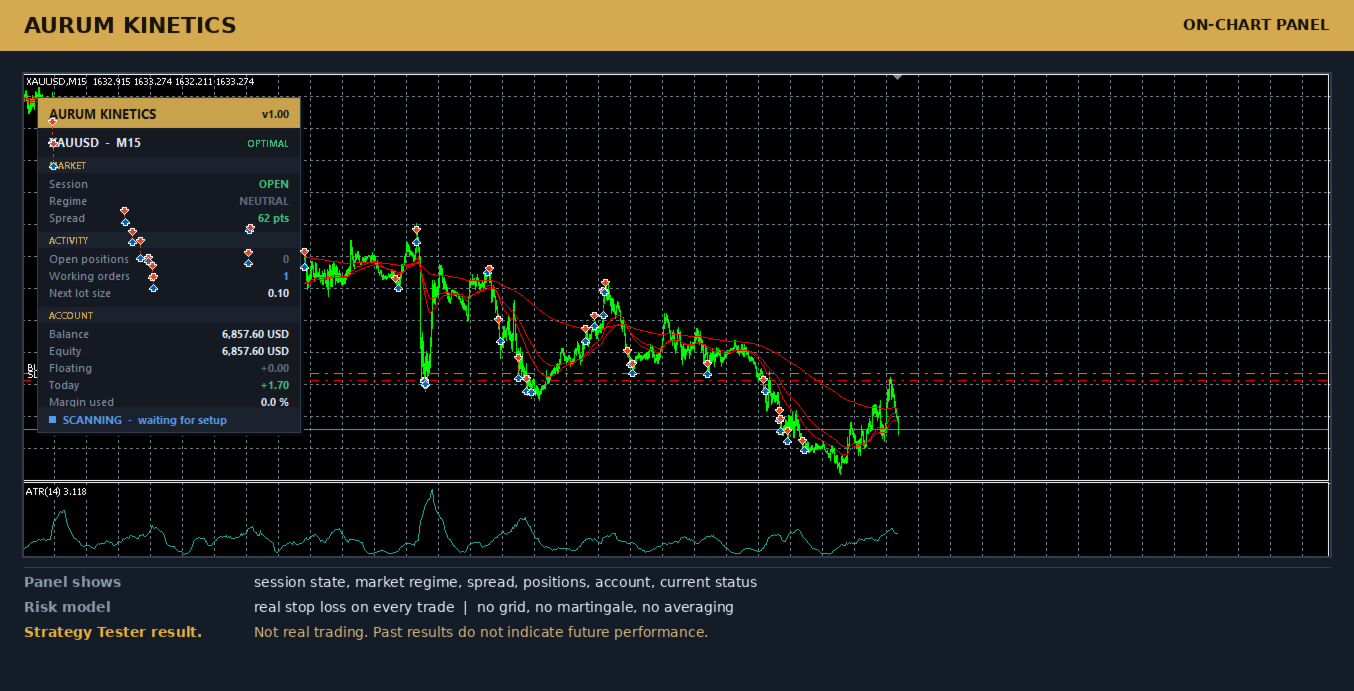
Show information panel. Displays session state, market regime, spread, open positions, account figures and current status on the chart.
Draw working levels on chart.
TEST RESULTS
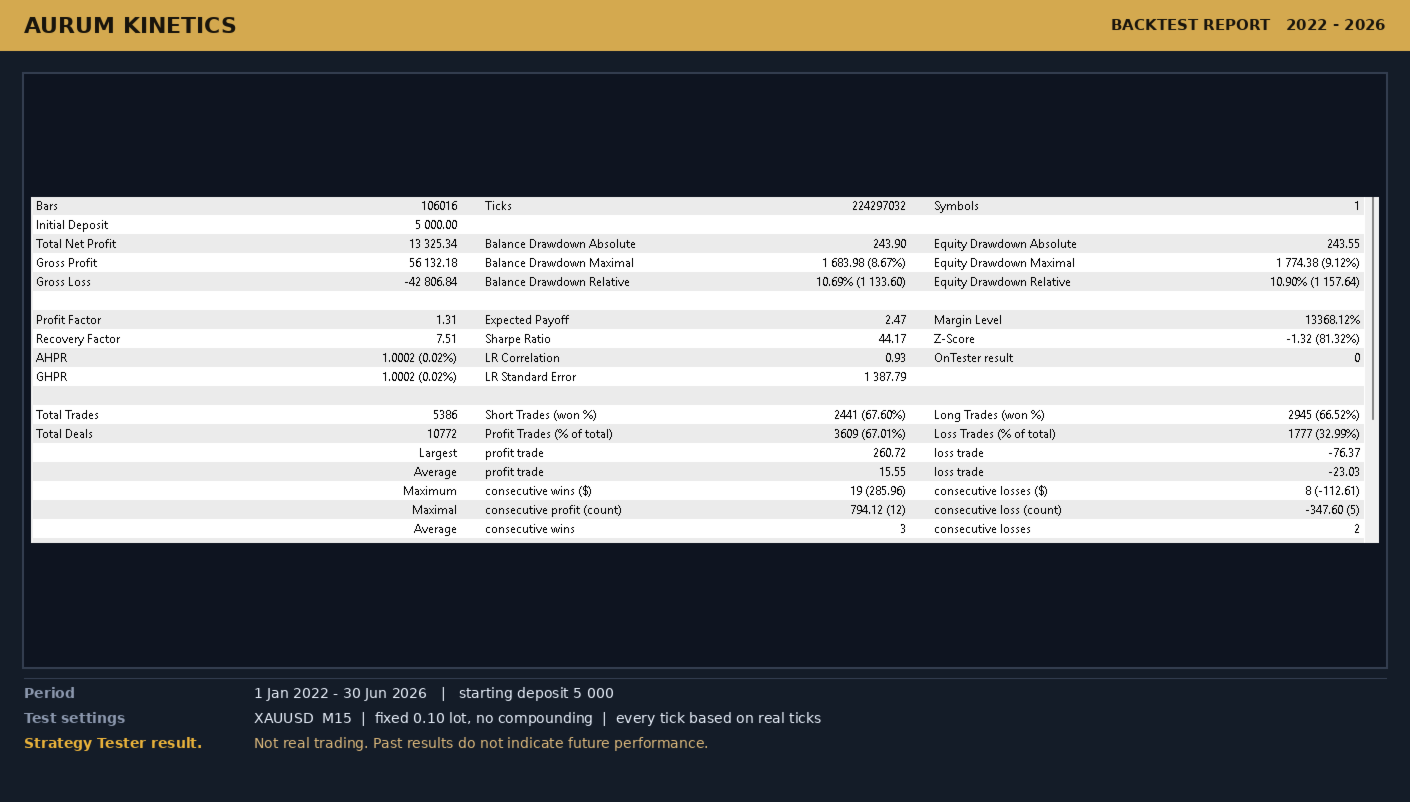
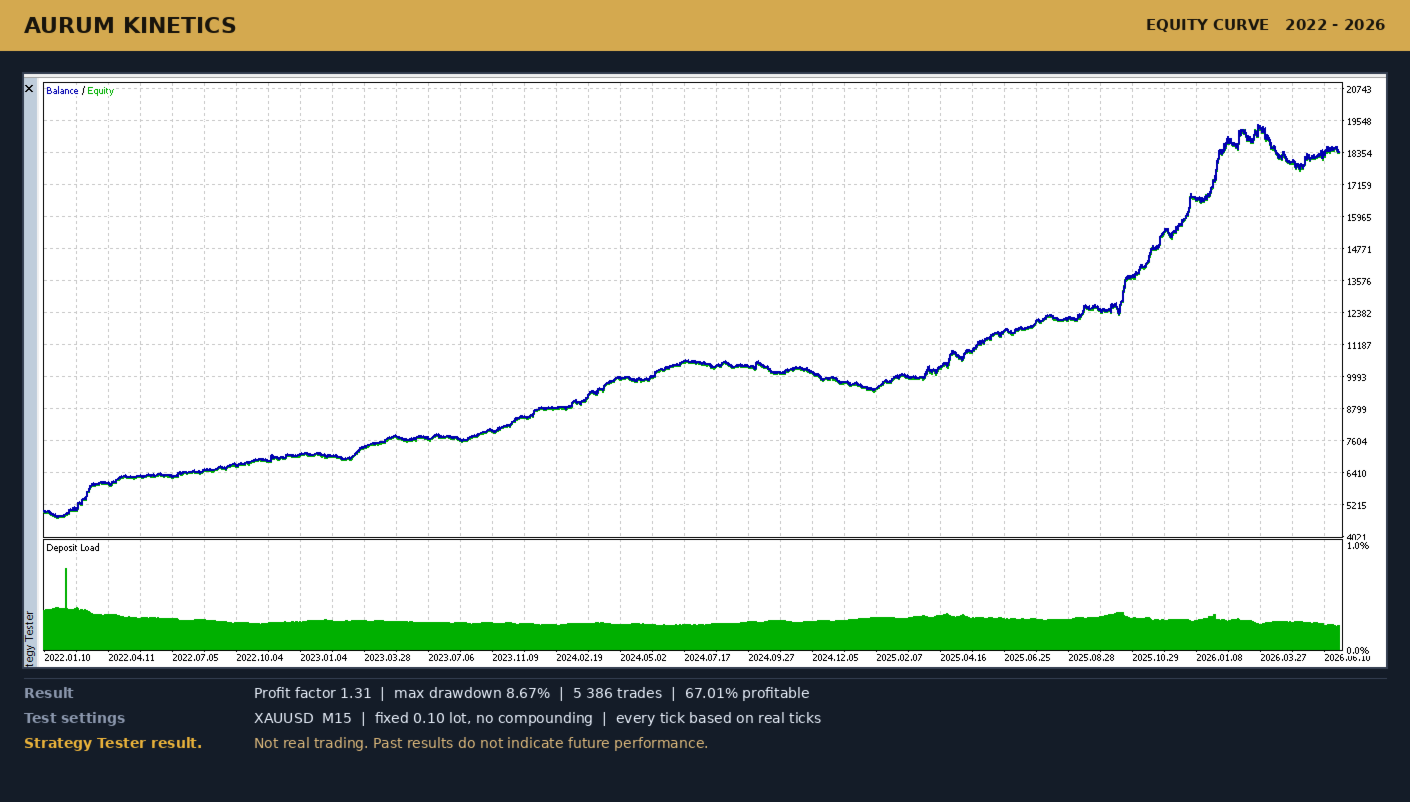
The figures below are Strategy Tester results. They are not results of real trading and should not be read as an indication of future performance.
Test period: 1 January 2022 to 30 June 2026.
Symbol and timeframe: XAUUSD, M15.
Starting deposit: 5000.
Position size: fixed 0.10 lots, without compounding.
Modelling: every tick based on real ticks.
On a raw spread account the test produced a profit factor of 1.32, a maximum balance drawdown of 8.5 percent and approximately 5450 trades, with 67 percent of trades closing in profit.
The same settings and the same period were then tested on a second, independent broker with a wider spread. That test produced a profit factor of 1.15, a maximum balance drawdown of 16.3 percent and approximately 5650 trades, with 62 percent of trades closing in profit.
Both tests were profitable overall. Results were not evenly distributed across the years. On the raw spread account every calendar year in the test period closed positive. On the wide spread account one calendar year closed slightly negative. One strong year contributed roughly half of the total result in both tests.
Please run the free demo version in the Strategy Tester on your own broker's data before purchasing. Spread, commission, execution and price history differ between brokers, and your results will differ from those above.
GETTING STARTED
1. Open a XAUUSD chart on the M15 timeframe.
2. Attach Aurum Kinetics to the chart.
3. Enable algorithmic trading in the terminal and in the Expert Advisor properties.
4. Confirm that the information panel shows your symbol and timeframe as suitable.
5. Check the session hours against your broker's server time and adjust if required.
6. Begin with the default fixed lot size, or with a low risk percentage, and increase only after you have observed the Expert Advisor on your own account.
FREQUENTLY ASKED QUESTIONS
Which symbol and timeframe should I use?
XAUUSD on M15. The Expert Advisor was designed and tested on this combination. It will run on other symbols and timeframes, but the internal settings are calibrated for gold volatility on the 15-minute chart, and behaviour elsewhere is untested. The panel will indicate when the chart is not the intended one.
Does it use martingale, grid or averaging?
No. Lot size never increases after a loss. Only one position is opened per signal, and every position carries a stop loss placed on the server.
What deposit do I need?
This depends on the lot size you choose. As a guide, 500 units of account currency for 0.01 lots. The default setting of 0.10 lots was tested with a starting deposit of 5000.
Do I need a virtual hosting service?
It is recommended. The Expert Advisor manages its trailing stop continuously, and a disconnected terminal cannot do this. A stop loss remains active on the broker's server whether the terminal is running or not.
Why is the Expert Advisor not opening any trades?
Check the status line at the bottom of the information panel. It states the reason directly: outside the trading session, spread too wide, daily loss limit reached, or waiting for a valid setup. The Expert Advisor is selective by design and does not trade every day.
Can I run it on several charts at once?
It is designed for a single gold chart. If you run more than one instance on the same account, give each one a different magic number.
Why can I not adjust the strategy settings?
The entry logic, the exit distances and the filters were selected together through testing. Changing one of them in isolation breaks the balance between them. The settings that are safe and necessary for you to control, which are money management, risk limits and session hours, are all available.
How do I set the session hours for my broker?
Broker server time is not the same everywhere. Open the Market Watch window and compare the server time with your own. Then shift the session start and end hours by the difference.
Does it trade during news releases?
There is no separate news filter. The spread filter provides indirect protection, because spreads widen sharply around major releases and the Expert Advisor will stand down. If you prefer to avoid news entirely, disable algorithmic trading manually before a release.
Will my results match the test figures?
No. Your broker's spread, commission, execution speed and price history all differ. Test the demo version on your own account conditions first.
Which account currency is supported?
Any. Lot sizes in risk percent mode are calculated using the symbol's own tick value, so the calculation is correct regardless of account currency.
RISK WARNING
Trading involves risk of loss. Past results, including results obtained in the Strategy Tester, do not indicate or guarantee future performance. No trading system can avoid losing periods, and this Expert Advisor experienced drawdowns during the test period described above. Use only capital you can afford to lose. Test on a demo account before trading a live account, and choose a lot size appropriate to your account and your own tolerance for risk. You are responsible for the decision to use this Expert Advisor and for the settings you apply.