MetaTrader 5 Platform Update Build 6140: AI Assistant and Web Terminal Improvements
Bug report:
MT5 Build 6104-6120
Can not remove custom symbol.
Step:
1. Create some custom symbol group and symbols;
2. Open 'Symbols' window, right click on 'Custom' label
3. Choice "Remove Symbol Group", but do nothing
Bug report:
MT5 Build 6104-6120
Can not remove custom symbol.
Step:
1. Create some custom symbol group and symbols;
2. Open 'Symbols' window, right click on 'Custom' label
3. Choice "Remove Symbol Group", but do nothing
Hello.
I would like to inform you that after the update
- any actions on the control panel (visual control panels on the chart) have a double click - any click on any button is always a double action.
At the same time, on a normal schedule everything is ok.
Does this mean that Strategy Tester now receives events as on a real chart?
I just want to know, does Strategy Tester really receive chart events now? (yes its working :-) )
Will this be the case in the future?
This will determine whether to remove the current support for tester strategies in the form of reading button states or not?

- 2026.08.24
- www.mql5.com
v6140 bug. Most recent position closed is hidden or not available immediately in Toolbox History. To see most recent position closed, user has has to force a selected date or "Entire History" then select "Today". Then the users last position closed will show.
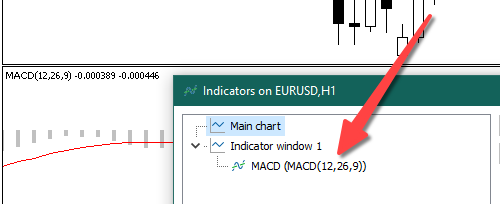
In the Indicator List, INDICATOR_SHORTNAME is added in parentheses after the file name. It looks quite bulky and cluttered. I don't know if it has always been like this.
The screenshot shows MQL5\Indicators\Examples\MACD.ex5. Build 6140.

- Free trading apps
- Over 8,000 signals for copying
- Economic news for exploring financial markets
You agree to website policy and terms of use
An updated version of the MetaTrader 5 platform will be released on Friday, August 21, 2026.
The main highlight of this release is the expanded capabilities of the AI Assistant. We have added support for a wide range of new LLM providers, including Alibaba, Atomic Chat, Bitdeer AI, Cerebras, z.ai, and others. You can now choose from an even broader choice of models and pick the one best suited to a particular task, whether it involves market analysis, coding, or developing trading applications. We have also optimized MCP Tools and added the ability to stop the Strategy Tester directly through an AI agent.
Another major focus of the update is the web terminal. We have improved chart scaling and controls, refined mouse interaction and symbol switching, and fixed issues with the Depth of Market. These changes make working with charts more accurate and convenient, especially when actively analyzing the market.
We are also continuing our comprehensive analysis and code audit of all platform components. We are addressing identified issues and implementing numerous internal improvements aimed at further enhancing the stability, reliability, and overall quality of MetaTrader 5.
MetaTrader 5 Client Terminal
To connect a provider, open the settings and enter the corresponding API keys:
MetaTrader 5 Web Terminal
The update will be delivered through the Live Update system.