MetaTrader 5 Beta Build 5955: MCP and Agentic AI support
Critical bug in Build 5955-5956
Input variable with ushort type missed high 8-bits!
For example, ushort 5000 becomes 136.
#property  script_show_inputs

input ushort Test_ushort = 5000;
input short Test_short = 5000;

//+------------------------------------------------------------------+
//| Script program start function                                    |
//+------------------------------------------------------------------+
void OnStart()
  {
   printf("Input: Test_ushort = %d, Test_short = %d, ", Test_ushort, Test_short);

   ushort test_ushort = 5000;
   short test_short = 5000;

   printf("Local: test_ushort = %d, test_short = %d, ", test_ushort, test_short);
  }
/* Result:
Input: Test_ushort = 136, Test_short = 5000,
Local: test_ushort = 5000, test_short = 5000,
//*/
From this build, the canvas text rendering (Textout function) has been improve in terms of quality and speed, mainly when working with transparency.
class CRender
 {
private:
  uint32_t           m_image[];
  uint32_t           m_width;
  uint32_t           m_height;
  string             m_name;
  string             m_rc_name;
  string             m_obj_name;
  int32_t            m_obj_x;
  int32_t            m_obj_y;
  ENUM_COLOR_FORMAT  m_fmt_color;
  bool               m_new_render;

  uint64_t           m_min_T0;
  uint64_t           m_max_T0;
  uint64_t           m_min_T1;
  uint64_t           m_max_T1;

  uint64_t           m_last_T0;
  uint64_t           m_last_T1;

public:

                     CRender(void): m_min_T0(ULONG_MAX),m_max_T0(0),m_min_T1(ULONG_MAX),m_max_T1(0)
   {
   }

                    ~CRender(void)
   {
    if(m_rc_name.Length())
     {
      //ResourceFree(m_rc_name);
      m_rc_name=NULL;
     }
    if(m_obj_name.Length())
     {
      ObjectDelete(0,m_obj_name);
      m_obj_name=NULL;
     }
   }

  bool               Initialize(string name,bool use_new_render,int32_t x,int32_t y,uint32_t width,uint32_t height,ENUM_COLOR_FORMAT fmt_color)
   {
    m_name=name;
    m_rc_name="::"+(string)ChartID()+name;
    m_width=width;
    m_height=height;
    m_fmt_color=fmt_color;
    m_new_render=use_new_render;

    m_obj_name=name;
    m_obj_x=x;
    m_obj_y=y;

    ::ArrayResize(m_image,width*height);
    ::ResourceCreate(m_rc_name,m_image,width,height,0,0,width,fmt_color);
    ::ObjectCreate(0,m_obj_name,OBJ_BITMAP_LABEL,0,0,0);
    ::ObjectSetInteger(0,m_obj_name,OBJPROP_XDISTANCE,m_obj_x);
    ::ObjectSetInteger(0,m_obj_name,OBJPROP_YDISTANCE,m_obj_y);
    ::ObjectSetString(0,m_obj_name,OBJPROP_BMPFILE,0,m_rc_name);
    ::ChartRedraw(0);

    return(true);
   }

  void               OutText(string text,int32_t x,int32_t y,uint32_t anchor,color clr,uint8_t alpha,string font_name,int32_t font_size,int32_t font_ori)
   {
    ::TextSetFont(font_name,font_size,FW_EXTRABOLD,font_ori);
    uint32_t text_clr=m_fmt_color==COLOR_FORMAT_ARGB_RAW ? ColorToPRGB(clr,alpha) : ColorToARGB(clr,alpha);
    TextOut(text,x,y,anchor,m_image,m_width,m_height,text_clr,m_fmt_color);
   }

  struct RenderResult
   {
    uint64_t          T0;
    uint64_t          T1;
   };

  void               Render(void)
   {
      //::ArrayInitialize(m_image,~0);
    color bc=(color)ChartGetInteger(0,CHART_COLOR_BACKGROUND);
    uint32_t bg_clr=m_fmt_color==COLOR_FORMAT_ARGB_RAW ? ColorToPRGB(bc,255) : ColorToARGB(bc,255);
    ::ArrayInitialize(m_image,bg_clr);

    uint64_t T0=GetMicrosecondCount();

    ::MQLSetInteger(MQL_TEXTOUTRENDER,m_new_render ? 1 : 0);

    const string text_str=StringFormat("#@ %i - %s @#",TerminalInfoInteger(TERMINAL_BUILD),m_name);
    const uint8_t al[]= {5,40,80,120,160,200,240,255};

    int32_t font_size=-250;
    uint32_t step = 20;

    for(uint32_t an=0; an<al.Size(); an++)
     {
      OutText(text_str,m_width/2,step+m_height*an/al.Size(),TA_CENTER|TA_VCENTER,clrRed,al[an],"Arial",font_size,0);
      OutText(text_str,step+m_width*an/al.Size(),m_height/2,TA_CENTER|TA_VCENTER,clrGreen,al[an],"Arial",font_size,900);
     }

    OutText(text_str,m_width/2,m_height/2,TA_CENTER|TA_VCENTER,clrBlue,  0x80,"Arial",font_size,450);
    OutText(text_str,m_width/2,m_height/2,TA_CENTER|TA_VCENTER,clrYellow,0x80,"Arial",font_size,1350);

    uint64_t T1=GetMicrosecondCount();

    ::ResourceCreate(m_rc_name,m_image,m_width,m_height,0,0,m_width,m_fmt_color);

    uint64_t T2=GetMicrosecondCount();

    ::ChartRedraw(0);

    T0=T1-T0;
    T1=T2-T1;

    if(m_max_T0<T0)
      m_max_T0=T0;
    if(m_min_T0>T0)
      m_min_T0=T0;

    if(m_max_T1<T1)
      m_max_T1=T1;
    if(m_min_T1>T1)
      m_min_T1=T1;

    m_last_T0=T0;
    m_last_T1=T1;
   }

  string             Name(void)   const { return(m_name);   }
  uint64_t           min_T0(void) const { return(m_min_T0); }
  uint64_t           max_T0(void) const { return(m_max_T0); }
  uint64_t           min_T1(void) const { return(m_min_T1); }
  uint64_t           max_T1(void) const { return(m_max_T1); }

  uint64_t           last_T0(void) const { return(m_last_T0); }
  uint64_t           last_T1(void) const { return(m_last_T1); }
 };
//+------------------------------------------------------------------+
//|                                                                  |
//+------------------------------------------------------------------+
class CTest
 {
private:

  CRender            old_render_prgb;
  CRender            new_render_prgb;
  CRender            old_render_argb;
  CRender            new_render_argb;
  CRender            old_render_xrgb;
  CRender            new_render_xrgb;

  CRender*           m_renders[6];

public:

                     CTest(void)
   {
    uint32_t col =3;
    uint32_t raw =2;
    uint32_t s =5;
    uint32_t x =5;
    uint32_t y =200;
    uint32_t cw=uint32_t(ChartGetInteger(0,CHART_WIDTH_IN_PIXELS)-3*s-x)/col ;
    uint32_t ch=uint32_t(ChartGetInteger(0,CHART_HEIGHT_IN_PIXELS,0)-y-raw*s)/raw;

    old_render_prgb.Initialize("OLD_PRGB",false,x,          y,cw,ch,COLOR_FORMAT_ARGB_RAW);
    old_render_argb.Initialize("OLD_ARGB",false,x+ cw+s,    y,cw,ch,COLOR_FORMAT_ARGB_NORMALIZE);
    old_render_xrgb.Initialize("OLD_XRGB",false,x+ (cw+s)*(col-1),y,cw,ch,COLOR_FORMAT_XRGB_NOALPHA);

    new_render_prgb.Initialize("NEW_PRGB",true,x+ 0,       y+ch+s,cw,ch,COLOR_FORMAT_ARGB_RAW);
    new_render_argb.Initialize("NEW_ARGB",true,x+ cw+s,    y+ch+s,cw,ch,COLOR_FORMAT_ARGB_NORMALIZE);
    new_render_xrgb.Initialize("NEW_XRGB",true,x+ (cw+s)*(col-1),y+ch+s,cw,ch,COLOR_FORMAT_XRGB_NOALPHA);

    m_renders[0]=&old_render_prgb;
    m_renders[1]=&old_render_argb;
    m_renders[2]=&old_render_xrgb;
    m_renders[3]=&new_render_prgb;
    m_renders[4]=&new_render_argb;
    m_renders[5]=&new_render_xrgb;

   }
                    ~CTest(void) { Comment(""); }
  void               Run(void)
   {
    //--- render images
    for(uint32_t i=0; i<m_renders.Size(); ++i)
      m_renders[i].Render();
    //--- collect and show render info
    string res="=============================\r\n";

    for(uint32_t i=0; i<m_renders.Size(); ++i)
     {
      CRender* R=m_renders[i];
      res+=StringFormat("'%s': T0=%5llu, T1=%4llu, MIN=%5llu, MAX=%5llu\r\n",R.Name(),R.last_T0(),R.last_T1(),R.min_T0(),R.max_T0());
     }

    res+="=============================";
    Comment(res);
   }
 };

//+------------------------------------------------------------------+
//| Script program start function                                    |
//+------------------------------------------------------------------+
void OnStart(void)
 {
  CTest test;

  for(; !IsStopped(); Sleep(10))
    test.Run();

 }
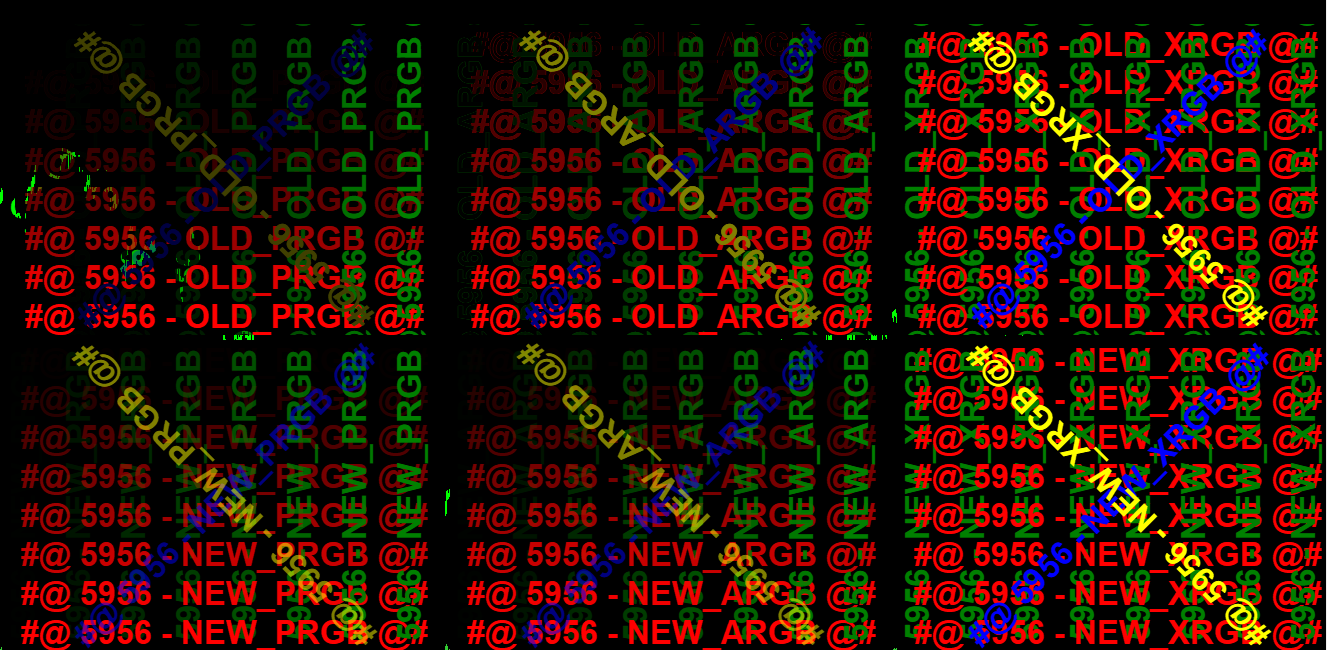
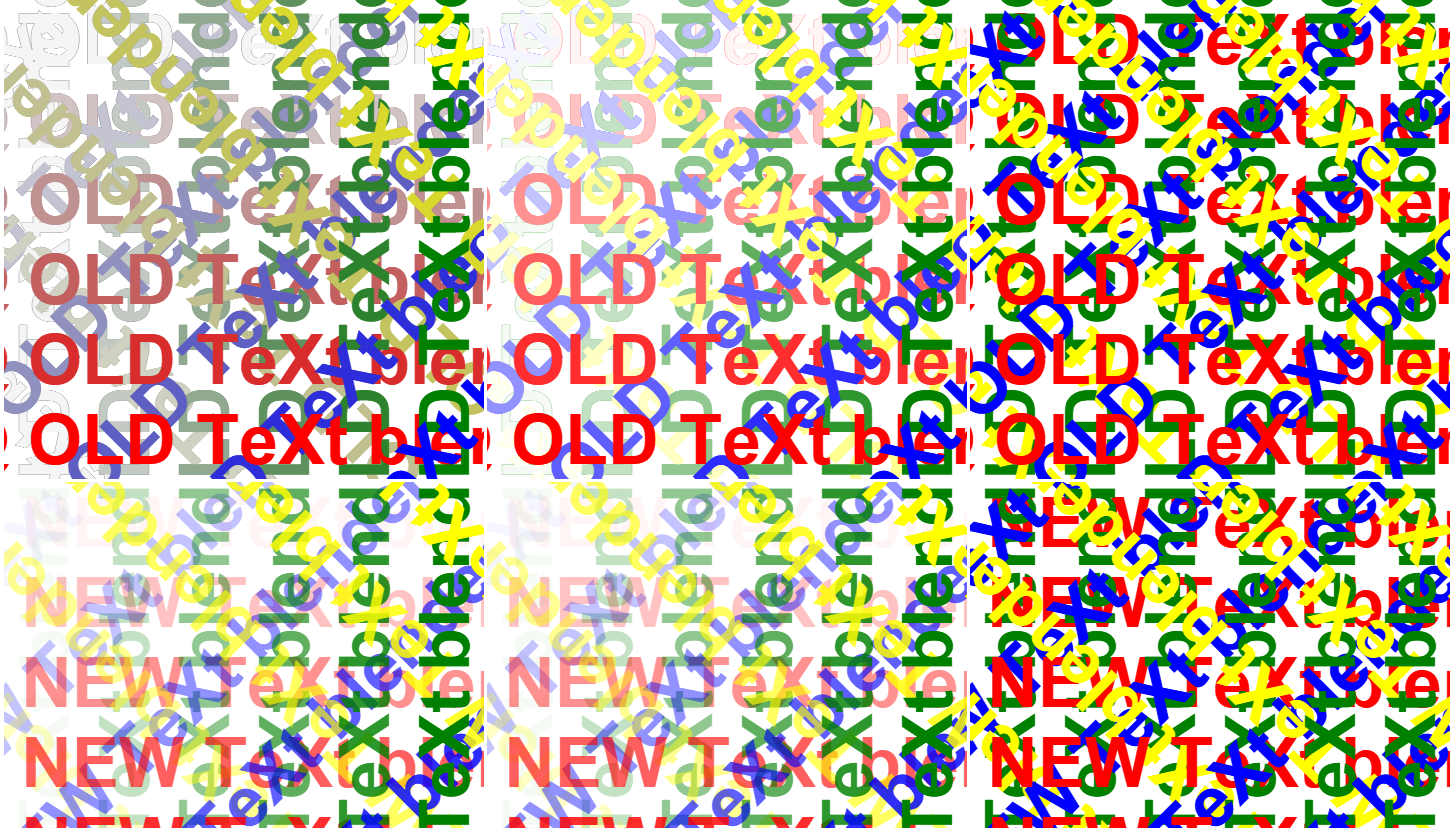
On a white background.
Holy @#$%ing @#$%! Chart analyzing agentic AI built into MT5 is awesome.
My only concern is... What is the data sharing policy for the MQL5.community assistant, please?
Holy @#$%ing @#$%! Chart analyzing agentic AI built into MT5 is awesome.
My only concern is... What is the data sharing policy for the MQL5.community assistant, please?
By using MQL5 Lite / MQL5 Premium we do not save/share your data.
When you choose external LLM providers everything depends on their conditions.
More technical details: https://www.mql5.com/ru/forum/511815
Use integrated translator, please.

- 2026.06.26
- www.mql5.com
Build 5956. MQL5.communitiy.
Doesn't seem to differentiate between points and big points on 2 digit XAUUSD pricing.
Relevant code:
input int FixedStopBigPoints = 50;
baseDigits = int(SymbolInfoInteger(BaseSymbol, SYMBOL_DIGITS));
   switch(baseDigits)
     {
      case 1:
        pointMultiplier = 10;
        break;
      case 2:
        pointMultiplier = 100;
        break;
      case 3:
        pointMultiplier = 1000;
        break;
      case 4:
        pointMultiplier = 10000;
        break;
      case 5:
        pointMultiplier = 100000;
        break;
     }
stopLoss = NormalizeDouble(Close[1] + FixedStopBigPoints * pointMultiplier * point, _Digits);
7. 📐 Stop Loss Too Tight Relative to Renko Size
- Renko brick = 500 points
- Stop loss = 50 points (default FixedStopBigPoints=50 × 100 multiplier × 0.01 point = 50 price units)
- The stop is 1/10th of one brick's width
Correct info:
50 x 100 = 5000 points. On 2 digit XAUUSD pricing, that's 50 big points (ahead of the decimal).
Edit: I received an mql5.com Community login notification originating from NL, Amsterdam following signing into mql5.Community assistant in MT5. I'm in the States. Is this normal?
- Free trading apps
- Over 8,000 signals for copying
- Economic news for exploring financial markets
You agree to website policy and terms of use
We're introducing a new beta version of MetaTrader 5 with built-in support for the Model Context Protocol (MCP) and agentic AI. These new capabilities are now available in both the client terminal and MetaEditor, and we invite all users to participate in the public beta.
How to Get the New Version
To update to the AI-enabled beta, connect to the MetaQuotes-Demo server: use an existing demo account or create a new one. If the server is not listed in your platform, enter access.metatrader5.com in the account opening dialog and click 'Find your company'.
What Is MCP?
The Model Context Protocol (MCP) is an open standard that enables applications to communicate with AI agents. Unlike traditional chatbots, AI agents can independently complete complex tasks by breaking them down into a sequence of actions and using the capabilities of connected applications.
With built-in MCP support, MetaTrader 5 becomes a fully featured source of market data and trading functionality for modern AI agents. They can access market information, analyze charts, work with the trading environment, and perform required operations through the standard MCP interface.
In addition to the built-in AI assistant, you can also connect external systems that support MCP, including OpenAI Codex, Claude Code, and other compatible solutions.
No Configuration Required
To start using AI features, simply sign in to your MQL5.community account. After updating, the platform automatically configures everything you need: MQL5.community is selected as the default AI provider, and the required API key is added automatically.
If you prefer, you can use your own API keys for OpenAI, Anthropic, Gemini, DeepSeek, Ollama, or other supported providers, and select your preferred model directly in the terminal settings.
Your AI settings are automatically synchronized between the trading terminal and MetaEditor.
AI Assistant in MetaTrader 5
The built-in AI Assistant helps you analyze markets. It can explain current market conditions for a symbol, review your open positions, analyze your trading history, answer questions about financial instruments, and provide context on recent market events.
Example prompts:
Important: AI-generated responses are provided for informational purposes only and do not constitute investment advice. Use them as an additional analytical tool and always make trading decisions based on your own judgment.
AI Assistant in MetaEditor
The AI Assistant in MetaEditor is now a full-featured development assistant. It can:
Launch the assistant from the File menu, the toolbar, or the Navigator context menu. Then simply describe your task in natural language.
Example prompts:
The more detailed your request, the more accurate and useful the generated results will be.
Your conversation history is available in the Chats tab of the Navigator.
Join the Beta Testing
The integration of MCP and agentic AI introduces an entirely new way to interact with the trading platform. We will continue to expand these capabilities and invite traders and MQL5 developers to help us test them.
Try the new features, share your feedback, and help us make AI-powered tools in MetaTrader 5 even more capable, intuitive, and effective.