Questions from Beginners MQL5 MT5 MetaTrader 5 - page 1585

You are missing trading opportunities:
- Free trading apps
- Over 8,000 signals for copying
- Economic news for exploring financial markets
Registration
Log in
You agree to website policy and terms of use
If you do not have an account, please register
Now it is listed as obsolete. Are commissions not displayed in MT5 terminal?
Is it possible to get data about the commission, which is withdrawn by the broker?
Now it is listed as obsolete. Are commissions not displayed in MT5 terminal?
Is it possible to get data about the commission, which is withdrawn by the broker?
just delete it, in MT5 it is calculated by closing, i.e. from history.
editor also gave a warning about it, search showed that it has not worked for 8 years already.Dumb question.
In the new version of the editor from 1 June, the toolbar is on the left.
Can it somehow be moved upwards, as in the old versions. And more familiar and convenient. I just couldn't find how to do it....
I have the navigator in the terminal itself, the market overview is displayed on the right side and I can't fix the windows on the left side as it was before.
Now it is listed as obsolete. Are commissions not displayed in MT5 terminal?
Is it possible to get data about the commission, which is withdrawn by the broker?
Now only with the help of
Or use this library
https://www.mql5.com/ru/blogs/post/755007
In my terminal navigator, the market overview is displayed on the right side and there is no way to fix the windows on the left side as it was before.
If the terminal - there are two ways -
1. -
Forum on trading, automated trading systems and testing trading strategies.
MT5 view settings
Alain Verleyen, 21.10.2017 18:25
I had a similar problem, solved it as follows:
2. The second way is the easier way -
post #36473 and post #36474
Forum on trading, automated trading systems and testing of trading strategies
Errors, bugs, questions
Sergey Golubev, 2025.05.30 19:31
Yes, now I understand - you need to drag the navigator (or market overview) to one of the arrows, and a darkened field will be shown - where it will be inserted if you press the mouse -
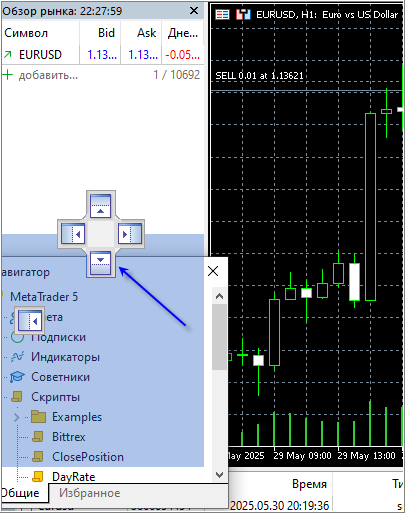
With MetaEditor - about the same thing.I just didn't understand it at once.
======================
MetaEditor - post #128
2. The second way is the easier way.
Yes, it works now, thank you.
Now it's only with the help
Or use this library
https://www.mql5.com/ru/blogs/post/755007
Alas, this is not it.
I have a mode of closing profitable positions with swap and commission taken into account. And history is not interesting, I need data on active positions.
But I forgot about the commission. No, so no.
Alas, this is not it.
I have a mode of closing profitable positions taking into account swap and commission. I am not interested in history, I need data on active positions.
But I forgot about the commission. No, so no.
You don't understand. A position is opened by a trade, which immediately becomes history. If you take commission for entry, then you can find out the commission from the history of the deal that opened the position.
If the commission is taken for exit, then there is only one option, and that is only if you know in advance what commission you have. Simply subtract it from the profit of the open position.
Good day to all
Question from an absolute dummy
Some time ago I downloaded MT5, connected to the broker, started to try on a demo account.
It happened that I didn't connect for a week.
Three days ago I started to connect, restored my password and MT5 started to demand payment for services. (How can I add a screenshot here?).
I started to figure it out. It turned out that on the service/settings/community tab all the ticks (calendar, market, signals, articles, library, VPS, Pyton integration) were set to active by default. Apparently, some (which ones?) of them were paid, which I did not know.
The attempt to pay (it is not clear for what) did not lead to anything, as the platform platform does not accept MIR cards (in any case, I did not succeed).
The question is actually classical: What to do? I don't want to start a Webmani wallet for the sake of one payment. Paid services were imposed.
What do you advise?
I started to figure it out. It turned out that on the service/settings/community tab all the ticks (calendar, market, signals, articles, library, VPS, Pyton integration) were set to active by default. Apparently, some (which ones?) of them were paid, which I did not know.
Attempting to pay for them (it's not clear what for) did not lead to anything, as the platform does not accept MIR cards (in any case, I did not succeed).
The question is actually classical: What to do? I don't want to start a Webmani wallet for the sake of one payment. Paid services were imposed.
What do you advise?