Discussion of article "MetaTrader 5 on Linux" - page 36

You are missing trading opportunities:
- Free trading apps
- Over 8,000 signals for copying
- Economic news for exploring financial markets
Registration
Log in
You agree to website policy and terms of use
If you do not have an account, please register
Hi, Victor. I’m also using Ubuntu 26.04, with the latest version of Wine-11.12 Staging. I’ve tried both webview2.exe and MicrosoftEdgeWebView2RuntimeInstallerX64.exe… but I still can’t see the ‘Market’ window or log in to MQL5. I’ve installed corefonts and a few other fonts, but I still can’t get it to work. Do you have any tips on how to get this working?
I couldn’t get it to work either; I’ve tried loads of things, but it didn’t work, so I’ve given up on it. To install indicators here, the only way I can do it is via the source code.
It’s a lot of effort for very little, guys! Just install it on a Windows VM and be happy!
Until there’s a native MT5 version for Linux, we’ll always have problems.
It’s too much effort for nothing, lads! Just install it on a Windows virtual machine and be happy!
Until there’s a native version of MT5 for Linux, we’ll always have problems.
There’s nothing good about a virtual machine! It’s a right faff to copy and paste code, and switch between terminal and browser windows, for example. My Wine 11.11 (Windows 11) works fine with the latest versions of the terminal.
I’m using Arch Linux + Bottles + Flatpak
By the way, that’s the only thing that worked in the latest Ubuntu… it’s a bit of a mess… needs a couple of components…
In short, it’s a nightmare – I’ve spent a day in the AI trying out various dependencies and components. It’s glitching for me in BOTTLES and isn’t working properly – the input field isn’t clickable in the AI Assistant… it won’t accept Russian text… It’s a complete mess
MetaQuotes, please provide a clear answer regarding the required components and dependencies, along with their versions for macOS and Linux , so that WebView2 and the AI Assistant work correctly in MetaEditor. This isn’t funny anymore
Please update the MT5 installation guide for Linux here : https://www.metatrader5.com/ru. It’s out of date with broken repositories, and people are racking their brains trying to figure out what to do… And even after going through all the circles of hell, the AI Assistant still doesn’t work on Linux in version 10, following your instructions.
You’ve handed out both the DMG files and the Linux installation guides to brokers, claiming the platform works on these systems – but in reality, it’s just a makeshift Wine emulator without full functionality… If you’re positioning your platform for Wine, then put together a proper Windows image and components in a bottle with a working web interface and AI Assistant… It’s been a bit of a shambles for 15 years now – why not just sit down and develop a native MT5 platform for Linux and macOS?
In Wine, there’s a load of zombie processes from the MetaEditor, and MT5 always hangs, even if you close it properly… Wine skins, Wine servers… it’s just rubbish
MetaEditor build 6159, Ubuntu 26.04, the AI Assistant isn’t working.
On Bottles (Wine 11.0): when opening the AI Assistant, WebView2 always crashes with error 0x80070578 – Invalid window handle (less frequently 0x800700AA – Resource in use). I have checked and ruled out the following: GPU/sandbox flags, virtual desktops, Windows version (10/11), and the WebView2 version itself (152.x and 109.x) — the issue occurs in all cases.
On the official installation via mt5ubuntu.sh (Wine 10.0): this error does not occur, but the AI engine (ProgramData\MetaQuotes\ML\goose.exe) does not download automatically — it displays the message ‘ai engine executable not found (code=-2, win32=0)’. After manually adding the engine files, the AI Assistant panel stops rendering altogether and causes MetaEditor to crash completely.
Conclusion: AI Assistant currently cannot be run on Linux by any means.
I’m not sure — get in touch with the Wine developers and try building at least a custom Wine build tailored to your needs with the correct dependencies… I can’t see any other way out…
MetaEditor build 6159, Ubuntu 26.04, the AI Assistant isn’t working.
On Bottles (Wine 11.0): when opening the AI Assistant, WebView2 always crashes with error 0x80070578 – Invalid window handle (less frequently 0x800700AA – Resource in use). I have checked and ruled out the following: GPU/sandbox flags, virtual desktops, Windows version (10/11), and the WebView2 version itself (152.x and 109.x) — the issue occurs in all cases.
On the official installation via mt5ubuntu.sh (Wine 10.0): this error does not occur, but the AI engine (ProgramData\MetaQuotes\ML\goose.exe) does not download automatically — it displays the message ‘ai engine executable not found (code=-2, win32=0)’. After manually adding the engine files, the AI Assistant panel stops rendering altogether and causes MetaEditor to crash completely.
Conclusion: AI Assistant currently cannot be run on Linux by any means.
I’m not sure — get in touch with the Wine developers and try building at least a custom Wine build tailored to your needs with the correct dependencies… I can’t see any other way out…
If you are using Bottles, using it are your own risk.
I am not aware of any mt5ubuntu.sh official installation, where did you find it ? The official installation for Linux is mt5linux.sh from this article https://www.mql5.com/en/articles/625
Wine 10.0 is not supported by MetaQuotes, you need to use 11.x (excluding 11.0).
I have Ubuntu 26.04 and MT5, I will check the AI Assistant and keep you posted.
Conclusion: AI Assistant currently cannot be launched on Linux by any means.
This is actually incorrect:
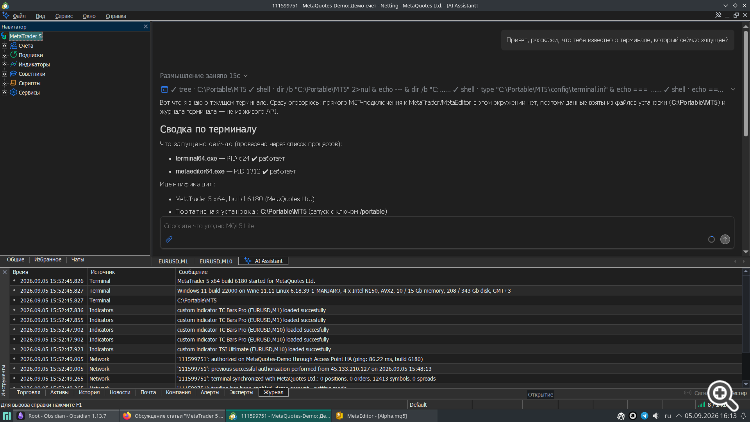
I’m running Manjaro Linux 26.1 (KDE) + Q4Wine 1.4.2 (Wine GUI), which installed Wine 11.11 in the standard Wine prefix, in Windows 11 mode. I tried Bottles (but not via Flatpak, as it’s a faff to create shortcuts in the applications menu with that; I used the binary from the standard repository whilst it was available – when it disappeared, I switched to the current configuration). As for Wine GUIs, I’ve tried WineGUI (but it’s no longer in the repository), PlayOnLinux (rubbish) and Q4Wine (this is the one I’d recommend).
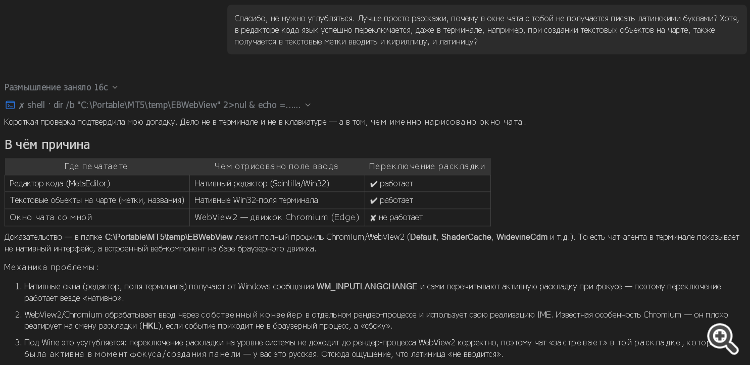
Added:
I’ve noticed, however, that the language doesn’t switch in the assistant tab, i.e. I can’t type in Latin script. Here’s what it says about this:
As I’m using the AI via a browser (Qwen), I won’t be fiddling around with this, but the issue has come to light.