Discussion of article "MetaTrader 5 on Linux" - page 38

You are missing trading opportunities:
- Free trading apps
- Over 8,000 signals for copying
- Economic news for exploring financial markets
Registration
Log in
You agree to website policy and terms of use
If you do not have an account, please register
The number of reports may indicate that the problem is genuine and affects several users, but this in itself does not prove that it is widespread or that it affects the majority of Ubuntu users.
The instructions on your official website for downloading MT5 are outdated and don’t work at all. That’s why we’re looking for workarounds to install MT5 using other emulators and methods. Yet you keep insisting that this doesn’t affect the majority of Ubuntu users… just like it doesn’t affect Mac users :)) It’s exactly the same problem there. Following your instructions on how to install the AI Assistant on a Mac platform or any broker’s DMG file (using the Wine emulator as a workaround) doesn’t provide a fully functional WebView2… that’s ridiculous. It’s absolutely laughable. Next you’ll be saying this isn’t a problem because the vast majority should be on Windows. The level of your reasoning is simply endearing
There are solutions – you need to start a new thread or discuss here what actually works on Ubuntu, and package it into a working installer that includes MT5 – either pre-installed or deliverable – with the correct hardcoded Wine settings, dependencies and components, rather than providing a SH file that stops working and broken repositoriesand broken ones. You did this for the macOS DMG for brokerage software, where MT5 and Wine were already hardcoded inside. But I’ll say it again: there’s the same issue with WebView2 there – you haven’t resolved it. Just as MyFXBook claimed that their robot and DLL wouldn’t work in Wine – although I found a way round it; there were four components missing:
And myfxbookEA now works on both macOS and Linux
If you use Bottles, you do so at your own risk.
I’m not aware of any official mt5ubuntu.sh installer – where did you find it? The official installer for Linux is mt5linux.sh from this article : https://www.mql5.com/en/articles/625
Wine 10.0 is not supported by MetaQuotes; you need to use version 11.x (excluding 11.0).
I’m running Ubuntu 26.04 and MT5; I’ll test the AI Assistant and let you know the results.
1) I think you need to make a video showing how you install MT5 on Ubuntu following MetaQuotes’ instructions… even if it works, record a video of you opening the Market and the AI Assistant in MT5 on Ubuntu, and how it runs poorly and freezes with crashes…
2) And you’ll have personal proof that the problem is widespread and affects all Linux users.
3) Stop twisting my words – I wasn’t talking specifically about you; I was referring to the official responses from representatives on this forum. I don’t know whether you’re one of them or not. If you are one of them, then this is addressed to you too
4) Send the video to the support team; that way, you’ll also understand what the problem is and how to solve it
5) mt5linux.sh doesn’t work; the repository specified there is broken, and before installing it on a clean Linux system, you need to install a whole lot of other things as well... Ultimately, it doesn’t work, and you’ll need to spend half an hour using standard Wine to figure out for yourself how to get MT5 running on Linux
6) Web-based trading is unworkable on Linux and macOS.
7) P.S. Why bother with the web version in the first place if the platform is positioned for emulators?
As for macOS 27, I checked the latest PKG from MetaQuotes:
1) The AI assistant worked perfectly when called up directly in MT5 via the button
2) However, in MetaEditor, error 2026.09.29 03:17:35.602 still occurs: WebView2 could not find WebView2 Runtime
And there’s an error with the Editor as well
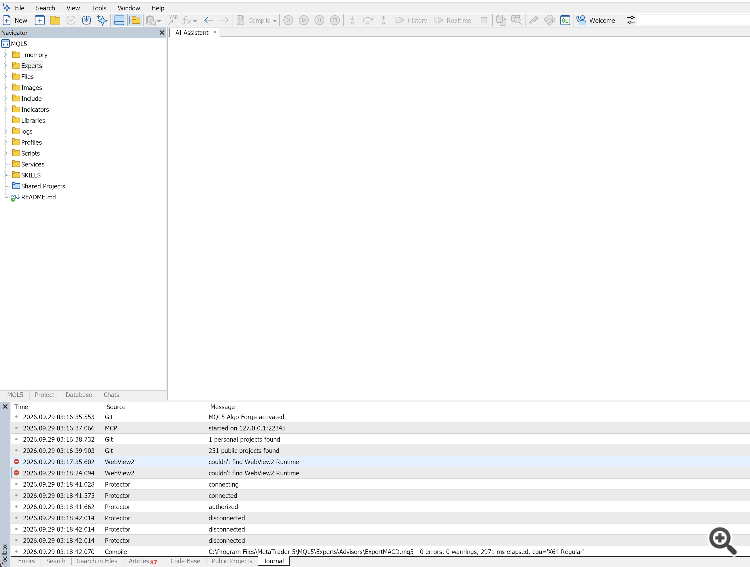
Even the Market works
What I’m getting at is – perhaps you could also build a package for Linux with the same correct dependencies?
To add to the above, on macOS, WebView will only work in the terminal or only in the Editor – depending on which one was launched first. I’m trying to fix
macOS (MetaTrader 5.app), build 6230: The AI assistant in MetaEditor says ‘couldn’t find WebView2 Runtime’. I’ve found the cause and a workaround. I used the official macOS pkg from MetaQuotes
Environment: MetaTrader 5 x64 build 6230, official MetaTrader 5.app, Wine 11.1, macOS (Darwin 27.0), Apple Silicon. The Terminal is launched from /portable, MetaEditor from /portable/language:English.
Symptom: The Assistant and Market work in the terminal. The Assistant does not open in MetaEditor; the log shows:
What was found.
A workaround that works: run MetaEditor with a separate data folder via the WEBVIEW2_USER_DATA_FOLDER variable (Wine passes this from macOS to the Windows process):
export WINEPREFIX="$HOME/Library/Application Support/net.metaquotes.wine.metatrader5" export WEBVIEW2_USER_DATA_FOLDER='C:\Program Files\MetaTrader 5\temp\EBWebView-MetaEditor' "/Applications/MetaTrader 5.app/Contents/SharedSupport/wine/bin/wine" \ "C:\Program Files\MetaTrader 5\MetaEditor64.exe" /portable
So the assistant works simultaneously in both the terminal and the editor. However, if you open the editor via the IDE / F4 button from the terminal, the conflict reoccurs.
In my view, here’s how you can fix this:
Linux update – webView2 and the AI assistant are working, though there are some freezes, and I had to write a script to fix the keyboard layout switching issue
P.S.: What a mess...
The issue with WebView2/Wine does indeed exist; no one has denied this. However, you have not proven that it affects all Ubuntu users, or even the majority of them. A few reports suggest that some users have encountered this problem. However, they do not prove that it is a widespread failure. The same applies to the claim that the official instructions ‘do not work at all’.
So, does the official guide for Linux actually work or not? Or should we make a video? Is the failure widespread or not? I wonder how many times it’ll take for people to get it
As for Alain: he clearly stated that the official script is mt5linux.sh, not mt5ubuntu.sh. You then posted mt5linux.sh and said: ‘Here you go, the script from MetaQuotes’. Yes, Karl… that’s exactly what Alain has just told you.
And what’s this:
Read
Well, if nothing else, all this back-and-forth has at least helped turn "it doesn’t work at all" into a properly documented, specific issue. 🙂