 MetaTrader 5
 Experts
 Indicators
 Scripts
 Libraries
 Storage
Join our fan page

Larry Williams XGBoost Onnx - expert for MetaTrader 5

- Views:
- 8352
- Rating:
- Published:
- Updated:
-
 You are missing trading opportunities:
- Free trading apps
- Over 8,000 signals for copying
- Economic news for exploring financial markets
Registration Log inYou agree to website policy and terms of use
If you do not have an account, please register -
 Need a robot or indicator based on this code? Order it on Freelance
Go to Freelance
Need a robot or indicator based on this code? Order it on Freelance
Go to Freelance
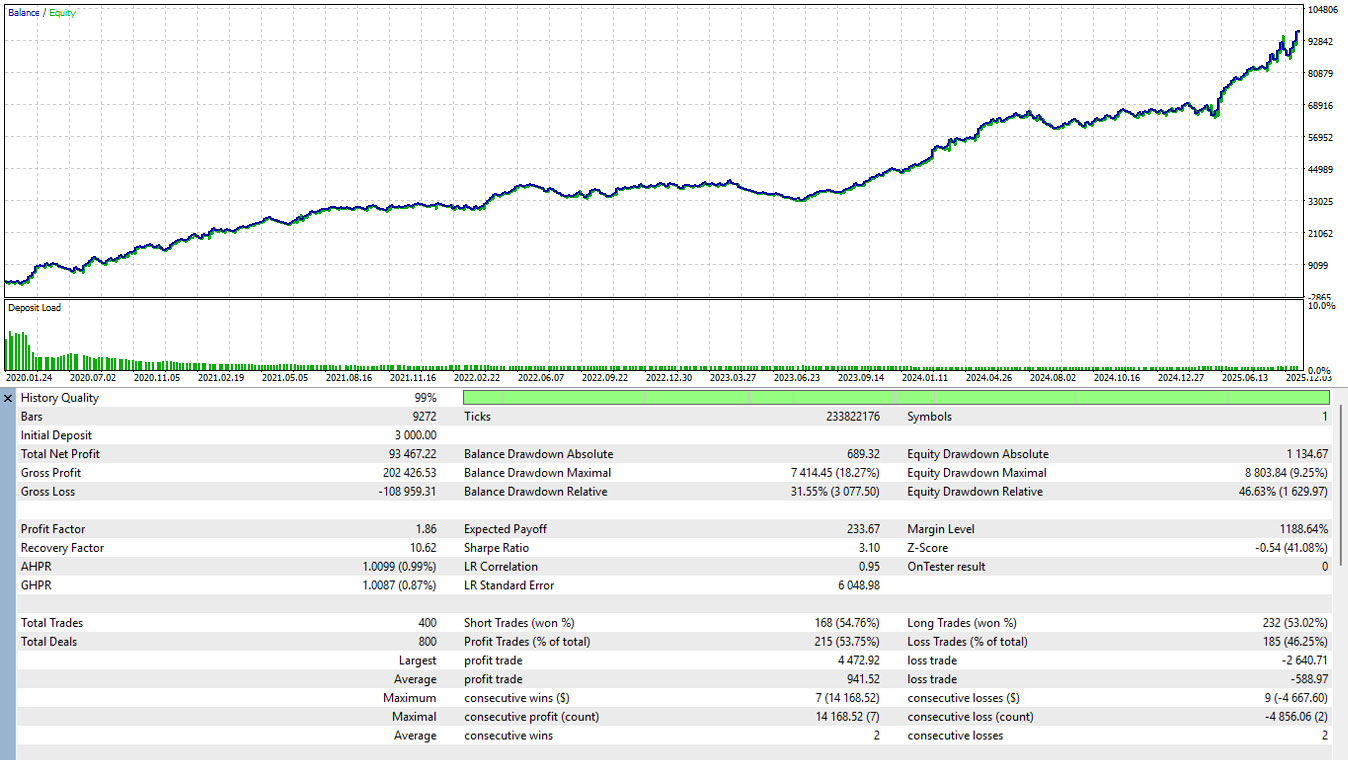
Backtest XAUUSD Time Frame H4 Date Range 24/01/2020 - 03/12/2025
📋 User Manual: Larry Williams AI-Filtered EA
This Expert Advisor (EA) combines the classical Larry Williams Outside Bar strategy with an Artificial Intelligence (ONNX) filter. It uses mechanical price action to find setups and AI to predict the probability of a successful trade.
1. File Preparation (Crucial)
For the EA to initialize correctly, you must place your pre-trained machine learning model in the correct directory:
-
Filename: larry_model.onnx (or the name specified in the inputs).
-
Path: MQL5 > Files > larry_model.onnx
-
Requirement: The EA will fail to start ( INIT_FAILED ) if the file is missing from this folder.
2. Input Parameters
| Parameter | Description |
| InpMagic | Unique ID for the EA to manage its own trades without interfering with others. |
| InpLotSize | The volume of the position to be opened (e.g., 0.5 lots). |
| InpRR | Risk/Reward Ratio. If set to 1.5, the Take Profit will be 1.5x the distance of the Stop Loss. |
| InpModelName | The exact name of your ONNX file in the Files folder. |
| InpThreshold | AI Confidence level (0.0 to 1.0). The EA will only trade if the AI probability is higher than this value (e.g., 0.6 = 60%). |
| InpAtrPeriod | Period for the Average True Range (ATR) used as one of the AI data features. |
3. Trading Logic & Strategy
Phase 1: Mechanical Detection
At the opening of every new bar, the EA checks for an Outside Bar (the current candle's High is higher than the previous, and the Low is lower than the previous).
-
Bullish Signal: Price closes above the previous bar's High.
-
Bearish Signal: Price closes below the previous bar's Low.
Phase 2: AI Validation
If an Outside Bar is detected, the EA extracts 10 Data Features (Body size, Relative Range, ATR, Volume change, Day of the week, Hour, etc.) and sends them to the larry_model.onnx model.
-
The EA executes a BUY if the AI probability for Class 1 (Buy) > InpThreshold .
-
The EA executes a SELL if the AI probability for Class 2 (Sell) > InpThreshold .
Phase 3: Trade Management
-
Stop Loss (SL): Placed at the Low (for Buy) or High (for Sell) of the signal candle.
-
Take Profit (TP): Calculated automatically based on the InpRR ratio.
-
Frequency: The EA only allows one open position at a time.
4. Technical Requirements for the ONNX Model
If you are training the model in Python (Scikit-Learn, PyTorch, etc.), ensure the output matches the EA requirements:
-
Input Shape: {1, 10} (10 features).
-
Output Node 0: Predicted Label (Long).
-
Output Node 1: Probabilities (Float array of 3 classes: [Neutral, Buy, Sell]).
-
Feature Order: The data must be fed in the exact order defined in the CalculateFeatures function (Body Size, Rel Range, Bull/Bear flag, ATR, Rel ATR, Day, Hour, Vol Change, Prev Direction).
5. How to Deploy & Training self
-
unzip larry_william.zip
-
run command pip install -r requirements.txt
-
open metatrader 5 first
-
run python download_csv_metatrader5.py
-
run python train_larry_williams.py
-
run python convert_onnx_larry.py
 iCrosshair - Real-Time Candle Metrics on Hover
Hover over any candle to see what MT5 doesn't show: Range size, Body percentage, Wick ratios. Smart, fast, and customizable.
Risk calculator for MT 5
The indicator calculates your risk as a percentage and gives you the lot size that is acceptable for your risk. You only need to specify the risk in per cent and the stop size in pips.
Log
Multi-Mode Logarithmic Transform Indicator.
RiskSizer Panel Lite MT5 - Risk Percent Lot Calculator With One Click Buy Sell
RiskSizer Panel Lite is a simple MT5 trading panel that calculates an estimated lot size based on your risk percent. Drag two chart lines to set SL/TP, then use one-click BUY/SELL for fast manual execution.