 MetaTrader 5
 Experts
 지표
지표
 스크립트
스크립트
 라이브러리
라이브러리
 보관함
보관함
당사 팬 페이지에 가입하십시오

Larry Williams XGBoost Onnx - MetaTrader 5용 expert

- 조회수:
- 179
- 평가:
- 게시됨:
- 업데이트됨:
-
 이 코드를 기반으로 한 로봇이나 지표가 필요하신가요? 프리랜스로 주문하세요
프리랜스로 이동
이 코드를 기반으로 한 로봇이나 지표가 필요하신가요? 프리랜스로 주문하세요
프리랜스로 이동

백테스트 XAUUSD 기간 H4 날짜 범위 24/01/2020 - 03/12/2025
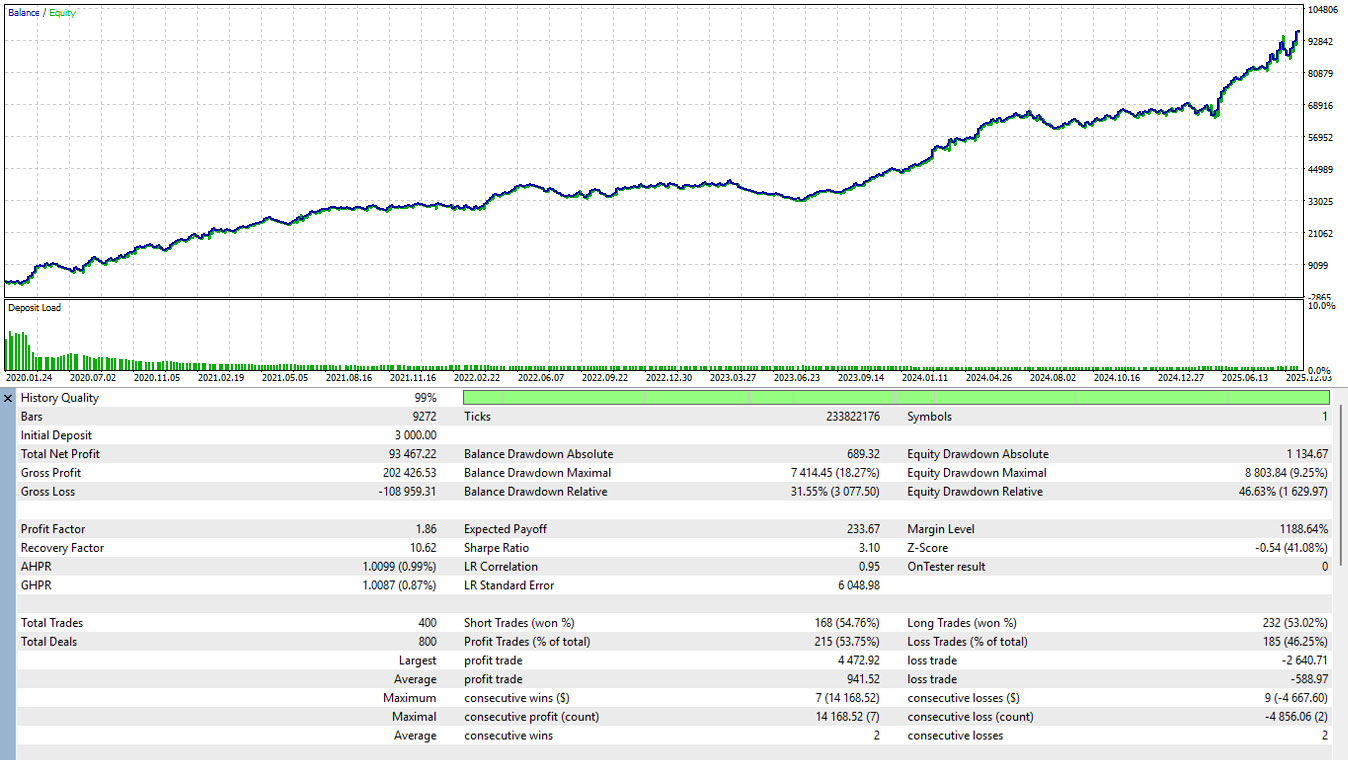
📋 사용자 설명서: 래리 윌리엄스 AI 필터링 EA
이 EA는 고전적인 래리 윌리엄스 아웃사이드 바 전략에 인공 지능(ONNX ) 필터를결합한 EA(Expert Advisor) 입니다. 기계적인 시세 움직임을 이용해 세팅을 찾고 AI를 이용해 거래 성공 확률을 예측합니다.
1. 파일 준비 (중요)
EA를 올바르게 초기화하려면 사전 학습된 머신러닝 모델을 올바른 디렉토리에 배치해야 합니다:
-
파일명: larry_model.onnx (또는 입력에 지정된 이름).
-
경로: MQL5 > 파일 > larry_model.onnx
-
요구 사항: 이 폴더에 파일이 없으면 EA가 시작에 실패합니다( INIT_FAILED ).
2. 입력 파라미터
| 파라미터 | 설명 |
| InpMagic | EA가 다른 사람의 간섭 없이 자체 거래를 관리할 수 있는 고유 ID입니다. |
| InpLotSize | 개설할 포지션의 거래량(예: 0.5랏)입니다. |
| InpRR | 위험/보상 비율. 1.5로 설정하면 테이크프로핏은 스톱로스 거리의 1.5배가 됩니다. |
| Inp모델명 | 파일 폴더에 있는 ONNX 파일의 정확한 이름입니다. |
| InpThreshold | AI 신뢰도 수준(0.0~1.0). EA는 AI 확률이 이 값보다 높을 때만 거래합니다(예: 0.6 = 60%). |
| InpAtr기간 | AI 데이터 기능 중 하나로 사용되는 평균진정범위(ATR)의 기간입니다. |
3. 트레이딩 로직 및 전략
1단계: 기계적 감지
모든 새 막대가 열릴 때 EA는 외부 막대 (현재 캔들의 고점이 이전보다 높고 저점이 이전보다 낮은 상태)를 확인합니다.
-
상승 신호: 가격이 이전 바의 고점 위에서 마감합니다.
-
하락 신호: 가격이 이전 바의 저점 아래로 마감합니다.
2단계: AI 검증
외부 바가 감지되면 EA는 10가지 데이터 특징 (몸체 크기, 상대적 범위, ATR, 거래량 변화, 요일, 시간 등)을 추출하여 larry_model.onnx 모델로 전송합니다.
-
EA는 클래스 1(매수)에 대한 AI 확률이 InpThreshold 를 초과하면 매수를 실행합니다.
-
클래스 2(매도)에 대한 AI 확률이 InpThreshold 를 초과하면 EA는 SELL을 실행합니다.
3단계: 거래 관리
-
스톱로스(SL): 신호 캔들의 저점(매수용) 또는 고점(매도용)에 설정합니다.
-
테이크프로핏(TP): InpRR 비율에 따라 자동으로 계산됩니다.
-
빈도: EA는 한 번에 하나의 오픈 포지션만 허용합니다.
4. ONNX 모델의 기술 요구 사항
Python(Scikit-Learn, PyTorch 등)으로 모델을 트레이닝하는 경우 출력이 EA 요건과 일치하는지 확인하세요:
-
입력 모양: {1, 10}(10개의 특징).
-
출력 노드 0: 예측 레이블(긴).
-
출력 노드 1: 확률(3개 클래스의 플로트 배열: [중립, 매수, 매도]).
-
특징 순서: 데이터는 CalculateFeatures 함수에 정의된 정확한 순서대로 입력해야 합니다(몸체 크기, 상대적 범위, 상승/하락 플래그, ATR, 상대적 ATR, 일, 시간, 볼륨 변화, 사전 방향).
5. 셀프 배포 및 트레이닝 방법
-
larry_william.zip 압축을 풉니다.
-
명령 실행 pip 설치 -r 요구사항.txt
-
메타트레이더 5를 먼저 엽니다.
-
파이썬 다운로드_csv_metatrader5.py 실행
-
파이썬 train_larry_williams.py 실행
-
파이썬 convert_onnx_larry.py 실행
MetaQuotes Ltd에서 영어로 번역함.
원본 코드: https://www.mql5.com/en/code/68424
 WPR for Overbought and Oversold
Overbought and oversold indicators aim to determine where the price may experience a reversal.
 n백분율로 로트 계산
위험 비율에 따른 로트 계산 기능
ICE (Impulse Confirmation Engine)
ICE Pro v1.0: Momentum Intelligence System. ICE isn't just a static indicator-based EA (Expert Advisor). It's an Adaptive Trading engine that uses volatility (ATR) and volume profiles as primary filters to determine which price movements are "True Impulses" and which are simply "Market Noise."
n주문 마감
포지션 청산 및 주문 삭제 기능