 MetaTrader 5
 Sistemi Esperti
 Indicatori
 Script
 Librerie
 Archiviazione
Unisciti alla nostra fan page

Larry Williams XGBoost Onnx - sistema esperto per MetaTrader 5

- Visualizzazioni:
- 270
- Valutazioni:
- Pubblicato:
- Aggiornato:
-
 Ti stai perdendo delle opportunità di trading:
- App di trading gratuite
- Oltre 8.000 segnali per il copy trading
- Notizie economiche per esplorare i mercati finanziari
Registrazione AccediAccetti la politica del sito e le condizioni d’uso
Se non hai un account, registrati -
 Hai bisogno di un robot o indicatore basato su questo codice? Ordinalo su Freelance
Vai a Freelance
Hai bisogno di un robot o indicatore basato su questo codice? Ordinalo su Freelance
Vai a Freelance
Backtest XAUUSD Time Frame H4 Intervallo di date 24/01/2020 - 03/12/2025
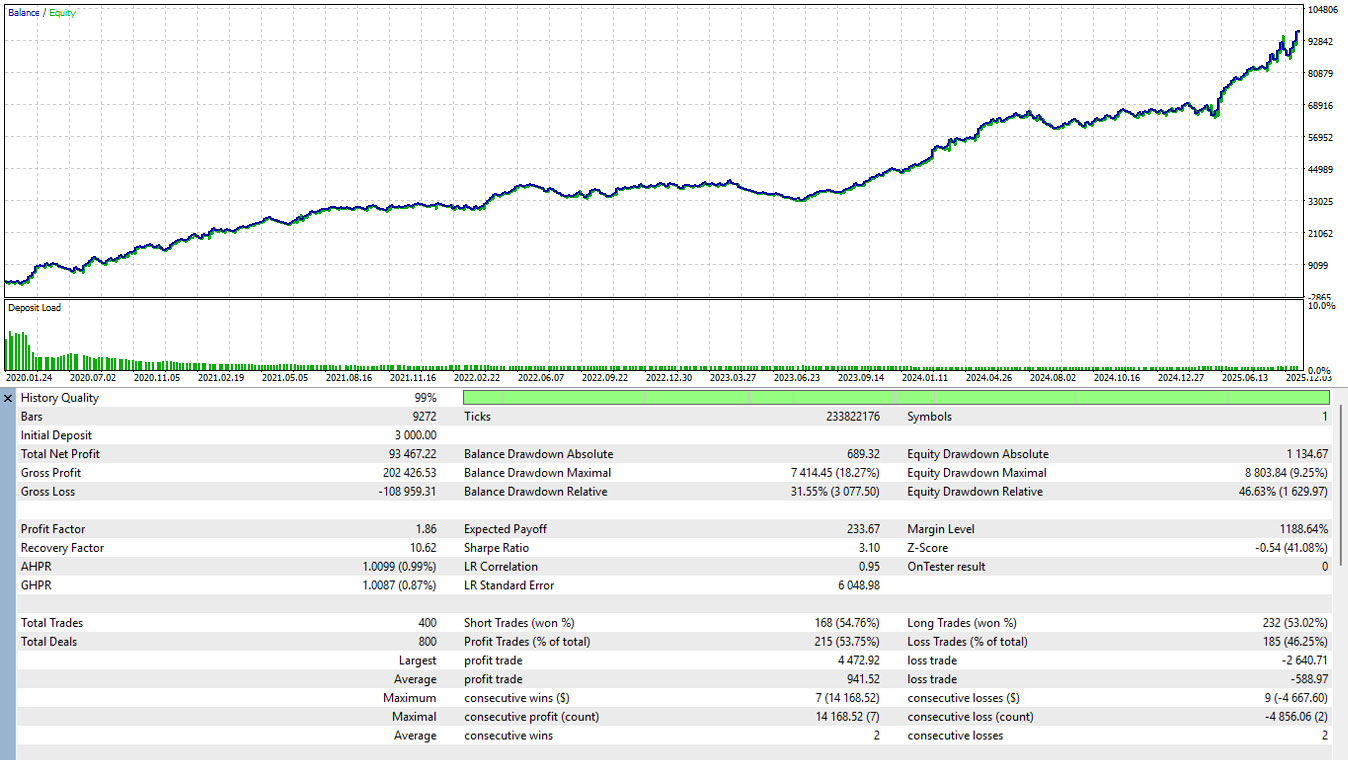
📋 Manuale d'uso: EA filtrato da Larry Williams AI
Questo Expert Advisor (EA) combina la classica strategia Larry Williams Outside Bar con un filtro diintelligenza artificiale (ONNX). Utilizza l'azione meccanica dei prezzi per trovare i setup e l'intelligenza artificiale per prevedere la probabilità di successo dell'operazione.
1. Preparazione del file (fondamentale)
Affinché l'EA si inizializzi correttamente, è necessario posizionare il modello di apprendimento automatico pre-addestrato nella directory corretta:
-
Nome del file: larry_model.onnx (o il nome specificato negli input).
-
Percorso: MQL5 > File > larry_model.onnx
-
Requisito: L'EA non si avvierà ( INIT_FAILED ) se il file non è presente in questa cartella.
2. Parametri di ingresso
| Parametro | Descrizione |
| InpMagic | ID univoco che consente all'EA di gestire le proprie operazioni senza interferire con le altre. |
| InpLotSize | Il volume della posizione da aprire (ad esempio, 0,5 lotti). |
| InpRR | Rapporto rischio/rendimento. Se impostato su 1,5, il Take Profit sarà pari a 1,5 volte la distanza dello Stop Loss. |
| InpModelName | Il nome esatto del file ONNX nella cartella Files. |
| Soglia Inp | Livello di fiducia dell'IA (da 0,0 a 1,0). L'EA opererà solo se la probabilità AI è superiore a questo valore (ad esempio, 0,6 = 60%). |
| InpAtrPeriodo | Periodo per l'Average True Range (ATR) utilizzato come una delle caratteristiche dei dati AI. |
3. Logica e strategia di trading
Fase 1: Rilevamento meccanico
All'apertura di ogni nuova barra, l'EA verifica la presenza di una barra esterna (il massimo della candela corrente è superiore al precedente e il minimo è inferiore al precedente).
-
Segnale rialzista: Il prezzo chiude sopra il massimo della barra precedente.
-
Segnale ribassista: Il prezzo chiude al di sotto del minimo della barra precedente.
Fase 2: convalida dell'AI
Se viene rilevata una barra esterna, l'EA estrae 10 caratteristiche dei dati (dimensione del corpo, intervallo relativo, ATR, variazione del volume, giorno della settimana, ora, ecc.
-
L'EA esegue un BUY se la probabilità AI per la classe 1 (Buy) > InpThreshold.
-
L'EA esegue un SELL se la probabilità AI per la Classe 2 (Sell) > InpThreshold .
Fase 3: Gestione del trade
-
Stop Loss (SL): Posizionato in corrispondenza del minimo (per gli acquisti) o del massimo (per le vendite) della candela del segnale.
-
Take Profit (TP): Calcolato automaticamente in base al rapporto InpRR.
-
Frequenza: L'EA consente solo una posizione aperta alla volta.
4. Requisiti tecnici per il modello ONNX
Se si addestra il modello in Python (Scikit-Learn, PyTorch, ecc.), assicurarsi che l'output corrisponda ai requisiti dell'EA:
-
Forma in ingresso: {1, 10} (10 caratteristiche).
-
Nodo di uscita 0: etichetta prevista (lunga).
-
Nodo di output 1: Probabilità (array float di 3 classi: [Neutral, Buy, Sell]).
-
Ordine delle caratteristiche: I dati devono essere inseriti nell'ordine esatto definito nella funzione CalculateFeatures (Body Size, Rel Range, Bull/Bear flag, ATR, Rel ATR, Day, Hour, Vol Change, Prev Direction).
5. Come distribuire e allenarsi
-
decomprimere larry_william.zip
-
eseguire il comando pip install -r requirements.txt
-
aprire prima metatrader 5
-
eseguire python download_csv_metatrader5.py
-
eseguire python train_larry_williams.py
-
eseguire python convertire_onnx_larry.py
Tradotto dall’inglese da MetaQuotes Ltd.
Codice originale https://www.mql5.com/en/code/68424
 WPR for Overbought and Oversold
Overbought and oversold indicators aim to determine where the price may experience a reversal.
 nCalcolo del lotto per percentuale
Funzione di calcolo del lotto in base alla percentuale di rischio
ICE (Impulse Confirmation Engine)
ICE Pro v1.0: Momentum Intelligence System. ICE isn't just a static indicator-based EA (Expert Advisor). It's an Adaptive Trading engine that uses volatility (ATR) and volume profiles as primary filters to determine which price movements are "True Impulses" and which are simply "Market Noise."
nChiudere gli ordini
Funzione di chiusura delle posizioni e di cancellazione degli ordini