 MetaTrader 5
 Experts
 Indicators
 Scripts
 Libraries
 Storage
Join our fan page

Simple Expert Advisor based on WPR, Bollinger Bands and ATR indicators - expert for MetaTrader 5

------------------------------------------------
Reliable, high quality. Help you check your strategy in StrategyTester, offer options to increase profitability. I write as a tester, and for demo and live trading.
- Views:
- 6709
- Rating:
- Published:
- Updated:
-
 You are missing trading opportunities:
- Free trading apps
- Over 8,000 signals for copying
- Economic news for exploring financial markets
Registration Log inYou agree to website policy and terms of use
If you do not have an account, please register -
 Need a robot or indicator based on this code? Order it on Freelance
Go to Freelance
Need a robot or indicator based on this code? Order it on Freelance
Go to Freelance
ExpWPRBB Expert Advisor implements a simple trading strategy based on the signals of two indicators: Williams' Percent Range (WPR) and Bollinger Bands (BB). A position is opened only when the signals of both indicators coincide:
- Buy: WPR exits the oversold zone and the bar opening price is below the average BB line.
- Sell: WPR is coming out of the overbought zone and the bar opening price is above the average BB line.
The width of Bollinger Bands and ATR value are used to calculate Stop Loss and Take Profit levels. The Expert Advisor supports work only on hedging accounts. Additionally, it has a non-trading mode, where you can only put signal labels - to control signals in the visual mode of the strategy tester.
Input parameters:
WPR (Williams' Percent Range)
- InpPeriodWPR - WPR calculation period. Number of bars for calculating the indicator value;
- InpOverboughtWPR - WPR overbought level. The value above which it is considered that the market is overbought (usually from -20 to 0);
- InpOversoldWPR - WPR oversold level. The value below which the market is considered oversold (usually from -80 to -100).
BB (Bollinger Bands)
- InpPeriodBB - Bollinger Bands calculation period. The number of bars for calculating the bands;
- InpDeviationBB - Deviation of Bollinger Bands. Standard deviation multiplier for calculating the width of the bands;
- InpShiftBB - Bollinger BandsShift . Indicator shift relative to the current bar;
- InpPriceBB - Bollinger Bands calculation price. Type of price used for calculation.
ATR (Average True Range)
- InpPeriodATR - ATR calculation period. The number of bars for calculating the average true range.
Trading
- InpSignalsOnly - Do not trade, only set signal labels. If true, the Expert Advisor does not open trades, but only displays signals on the chart;
- InpVolume - Position volume. Lot size for opening a deal;
- InpDeviation - Slippage (in points). Maximum allowable price deviation when executing an order;
- InpMagic - Magic number. A unique identifier of EA positions for tracking them;
- InpStopLoss - Stop loss (in points). Stop loss level. 0 - is not set, -1 - is calculated as half of the Bollinger Bands width;
- InpTakeProfit - Take profit (in pips). Take Profit level. 0 - not set, -1 - calculated by ATR value;
- InpSLMltp - Multiplier of Stop loss size, if Stop loss == -1. Allows increasing or decreasing the automatically calculated Stop Loss;
- InpTPMltp - Multiplier of Take profit size, if Take profit == -1. Allows increasing or decreasing the automatically calculated Take Profit.
The default values for the input parameters of the Expert Advisor are optimised for testing on the H4 chart period.
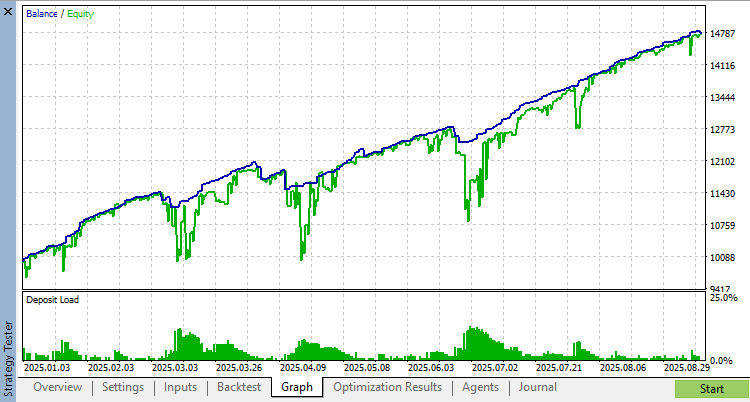
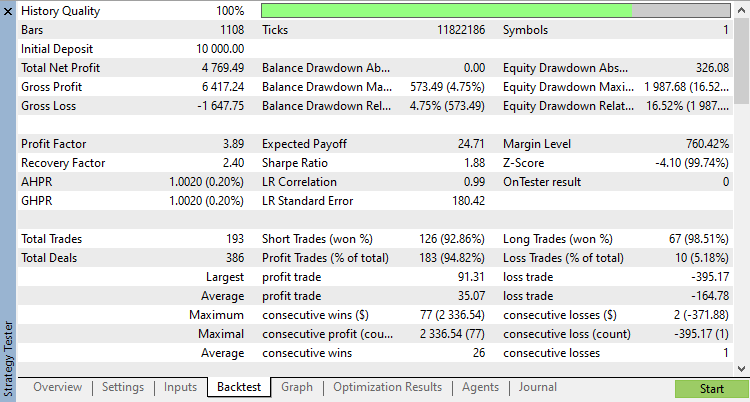
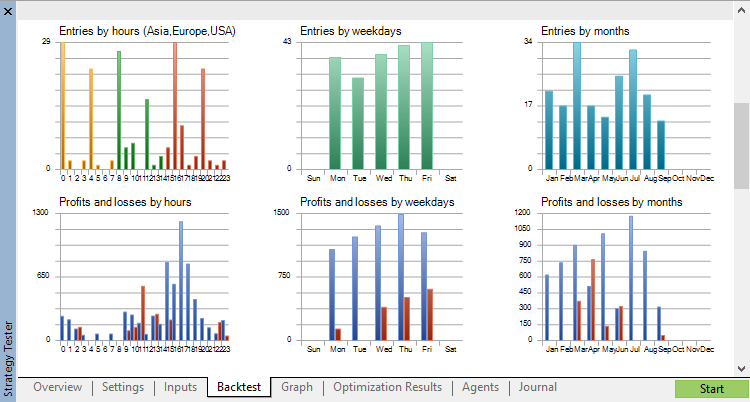
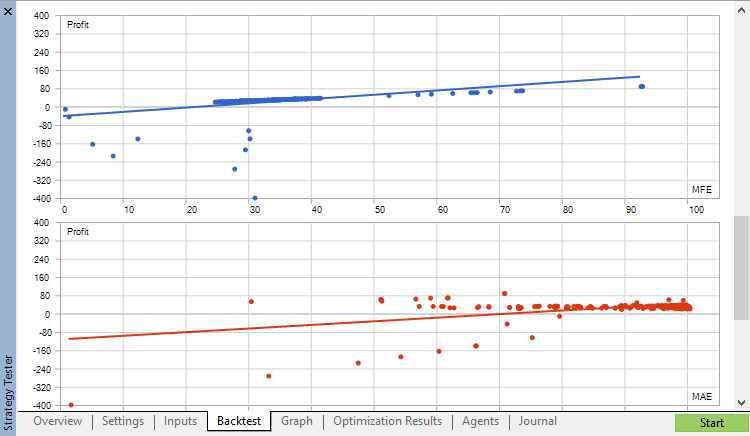
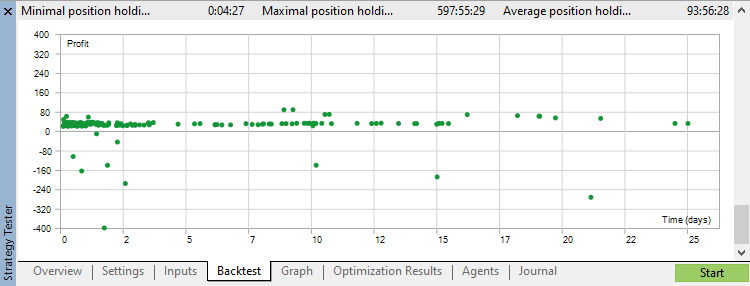
Test result in "All ticks" mode for the last year on H4 with default parameters:
Translated from Russian by MetaQuotes Ltd.
Original code: https://www.mql5.com/ru/code/63916
 Bollinger Bands Squeeze
It signals a period of low market volatility that is about to end, foreshadowing a significant price move.
 ConvertServerTime
Function to convert server time from one broker's time zone to another.
Real time market intelligence
The Master Intelligence EA analyzes market data through 8+ modules, each providing unique insights.
ExpPinBar - Expert Advisor for Pin Bar Price Action patterns
Expert Advisor based on iPinBar Pin Bar Finder + several different trailing indicators