TrendCue Gold includes two ready-made presets for FTMO challenges, one for the 2-Step and one for the 1-Step. They switch on the EA's built-in prop-firm protection, which monitors your equity and is designed to halt trading at protective floors set inside FTMO's loss limits.
Setup takes a few minutes. You load the preset, enter one value, the original size of your FTMO account, and confirm that the protection is active.
TrendCue Gold is not affiliated with or endorsed by FTMO. The presets reduce the risk of breaching FTMO's loss limits, but they cannot guarantee that a limit is never breached or that a challenge is passed.
1. Choose your preset
| Setting | FTMO 2-Step | FTMO 1-Step |
|---|---|---|
| Preset file | 04_FTMO_2Step.set | 05_FTMO_1Step.set |
| FTMO maximum daily loss | 5% | 3% |
| TrendCue Gold daily floor | 4% | 2% |
| FTMO maximum loss | 10%, static | 10%, trailing (end of day) |
| TrendCue Gold overall floor | 8%, static | 9%, trailing |
| Safety buffer: daily / overall | 1 / 2 percentage points | 1 / 1 percentage point |
| Target risk per trade, per strategy | 0.50% | 0.50% |
| Minimum-lot risk cap | 1.0% of equity | 1.0% of equity |
| Initial balance in the file | 0: you enter your account size | 0: you enter your account size |
The daily and overall loss allowances are calculated as percentages of your initial account balance. Trade risk is calculated from equity. The buffer is the room between TrendCue Gold's floor and FTMO's limit. It is intended to reduce the risk of a breach caused by slippage, gaps or fast market moves, but cannot guarantee that equity stays above FTMO's limit.
Both presets also:
- trade all four strategies;
- trade the broker's minimum lot only while it risks at most 1.0% of equity;
- open no new trades after Friday 21:00 server time. Open positions stay open over the weekend unless you enable the weekend close.
Download: The ZIP with all nine presets is available: Download all 9 trading presets.
2. Load the preset
- In MetaTrader 5, choose File → Open Data Folder, open MQL5 → Presets and copy the two .set files there.
- Use an MT5 hedging account. Open an XAUUSD M15 chart (or your broker's gold symbol) and drag TrendCue Gold onto it. Use one chart per account.
- In the properties window, click the Inputs tab, click Load, and choose 04_FTMO_2Step.set or 05_FTMO_1Step.set .
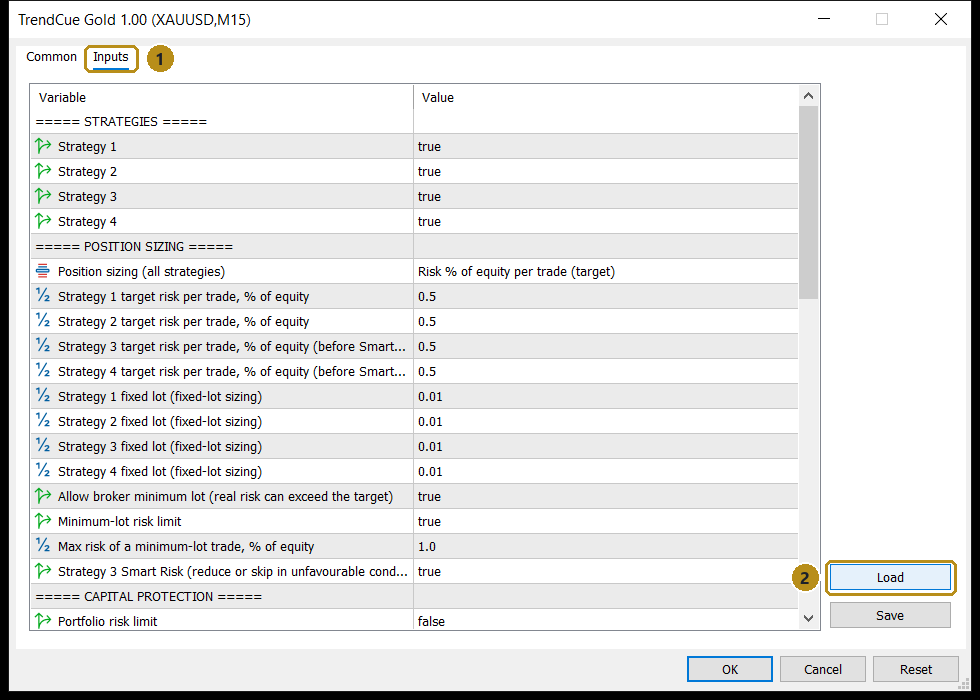
Inputs tab (1) and the Load button (2) in the TrendCue Gold properties window
Scroll to PROP-FIRM LIMITS (OPTIONAL). You should see these values:
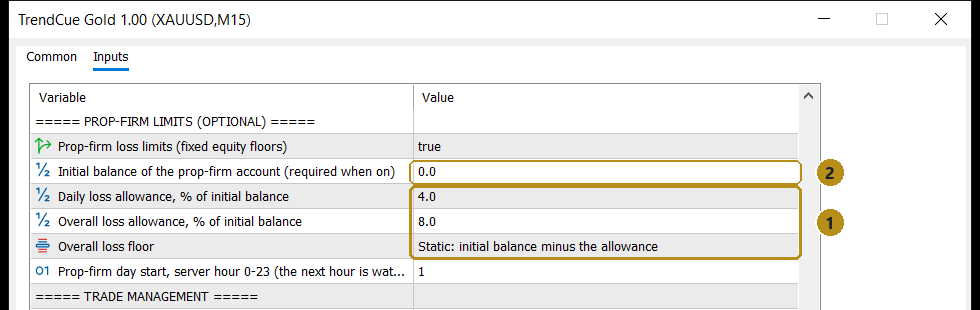
FTMO 2-Step preset loaded: daily 4.0%, overall 8.0%, static floor (1). The initial balance is still 0.0 (2).
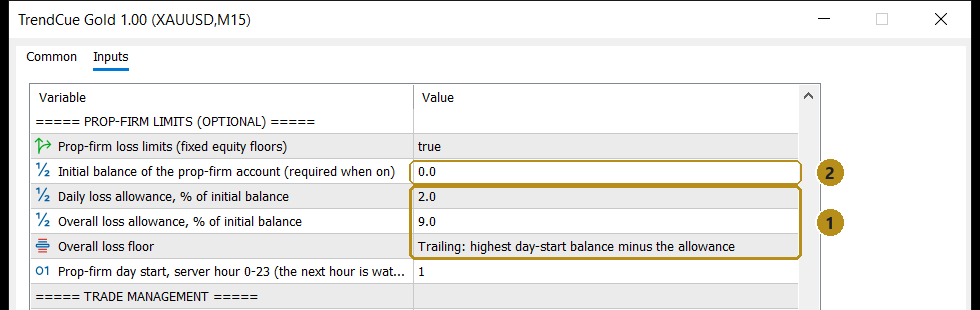
FTMO 1-Step preset loaded: daily 2.0%, overall 9.0%, trailing floor (1). The initial balance is still 0.0 (2).
| Setting in the Inputs window | 2-Step | 1-Step | Meaning |
|---|---|---|---|
| Prop-firm loss limits (fixed equity floors) | true | true | Switches the protection on |
| Initial balance of the prop-firm account | your size | your size | The base of both floors (section 3) |
| Daily loss allowance, % of initial balance | 4.0 | 2.0 | How far equity may fall below the day's starting balance |
| Overall loss allowance, % of initial balance | 8.0 | 9.0 | How far equity may fall in total |
| Overall loss floor | Static | Trailing | Fixed (2-Step), or following your highest day-start balance (1-Step) |
| Prop-firm day start, server hour | 1 | 1 | When the prop-firm day begins (section 6) |
Leave these values as loaded. If you change them, always stay below your firm's limits.
3. Enter your original account size
This is the one value you must enter. Double-click the value next to Initial balance of the prop-firm account (required when on), type the account size you bought, and press Enter.
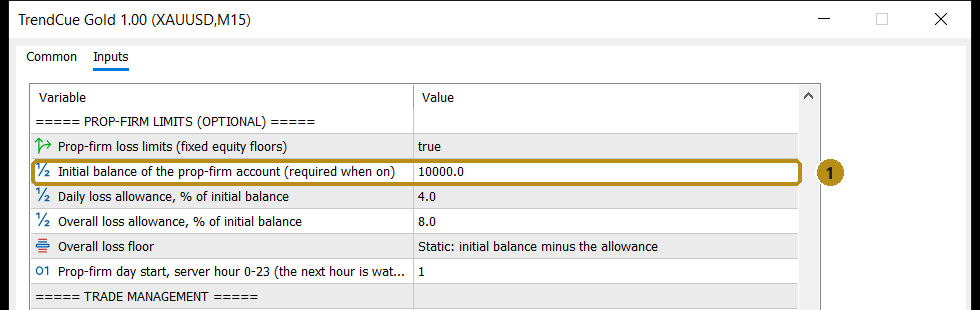
Enter the original account size, here 10000 for a USD 10,000 account (1)
| FTMO account | Enter |
|---|---|
| USD 10,000 | 10000 |
| USD 25,000 | 25000 |
| USD 50,000 | 50000 |
| USD 100,000 | 100000 |
Enter the original size even when your balance has changed. For example, a USD 25,000 account that now shows USD 24,000 still needs 25000. FTMO measures its limits from the initial balance, and today's balance already contains your profits and losses.
Two safety checks catch a wrong value:
- Left at 0: the EA does not start, and the Experts journal shows Input settings: enter the initial balance of the prop-firm account while the prop-firm limits are on.
- Far too high (your balance is below 60% of the value entered, for example 100000 on a USD 10,000 account): the EA does not start and asks you to check the value.
4. Allow Algo Trading
- On the Common tab, tick Allow Algo Trading and click OK.
- In the MetaTrader 5 toolbar, switch on Algo Trading. The button turns green.
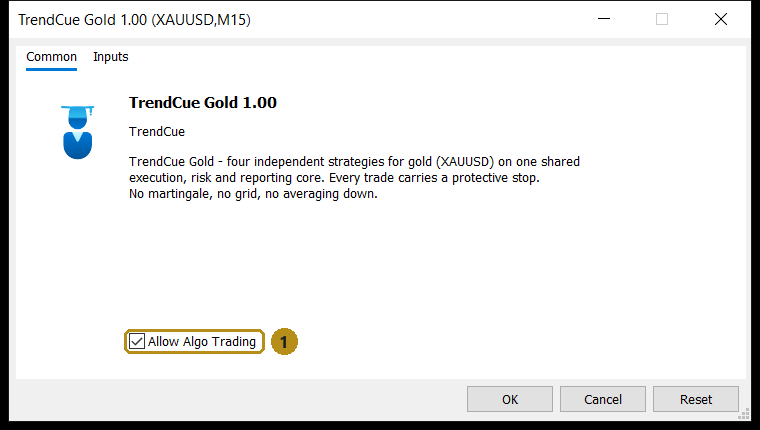
Common tab: tick Allow Algo Trading (1)
5. Confirm that the protection is active
Dashboard. The panel at the top left of the chart shows:
- the status TRADING, your balance and your equity. WEEKEND PAUSE between Friday 21:00 and the weekly open is normal;
- the status of each strategy: ON, ARMED, LONG or SHORT;
- Min lot limit 1.0% in the footer;
- Prop-firm floors: daily … | overall … in the last footer line. Compare these two values with your FTMO limits.
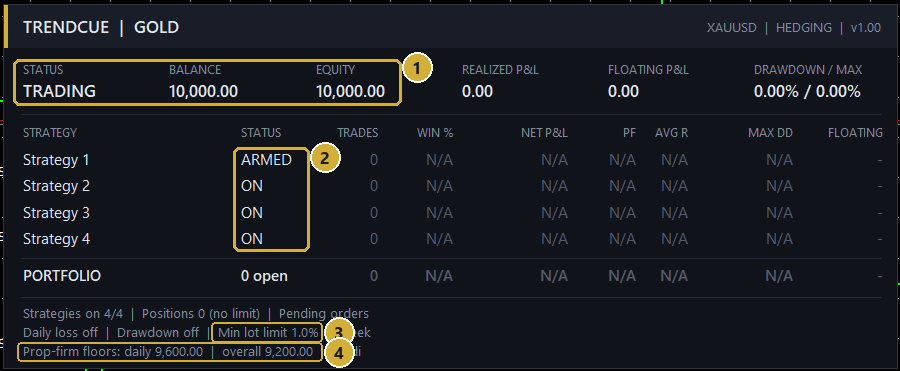
TrendCue Gold dashboard with the FTMO 2-Step preset on a USD 10,000 account: daily floor 9,600, overall floor 9,200 (MT5 Strategy Tester)
Experts journal. Open Toolbox → Experts. When the EA starts, it writes one line that begins with Prop-firm limits:. The line shows the initial balance you entered and both floors in money.

Toolbox → Experts: the Prop-firm limits line of each preset on a USD 10,000 account
The complete lines for a USD 10,000 account read:
- 2-Step: Prop-firm limits: initial balance 10000.00 USD, prop-firm day from 01:00 or 02:00 server time (the stricter applies). Daily floor 9600.00 (day start balance 10000.00 minus 4.00% of the initial balance), overall floor 9200.00 (initial balance minus 8.00%), binding floor 9600.00.
- 1-Step: Prop-firm limits: initial balance 10000.00 USD, prop-firm day from 01:00 or 02:00 server time (the stricter applies). Daily floor 9800.00 (day start balance 10000.00 minus 2.00% of the initial balance), overall floor 9100.00 (highest day-start balance 10000.00 minus 9.00% of the initial balance), binding floor 9800.00.
If your own line shows your account size and the floors you expect, the setup is complete.
6. How the protection works
- Equity, not balance. TrendCue Gold measures equity, so open profit and loss counts, as at FTMO.
- Daily floor. At the start of each prop-firm day, the EA takes the balance and sets the daily floor below it: 4% (2-Step) or 2% (1-Step) of the initial balance.
- Overall floor, 2-Step. Fixed at the initial balance minus 8%.
- Overall floor, 1-Step. The highest balance at the start of any prop-firm day, minus 9% of the initial balance. It never moves down, and intraday equity peaks do not move it up. This is the same principle as FTMO's end-of-day trailing limit.
- Before every entry. The EA refuses a new trade if its stop, together with every open stop and pending order, could take equity below a floor. Near a floor, the journal shows order blocked: prop-firm floor… : the floor is being protected.
- When equity reaches a floor. The EA closes its own positions, cancels its pending orders and blocks new entries. After the daily floor, entries resume on the next prop-firm day. After the overall floor, they stay blocked until you change the prop-firm settings.
- Day start. FTMO's day begins at midnight CE(S)T. On FTMO's MetaTrader 5 server, this is 01:00 server time for most of the year and 02:00 for a few weeks around the daylight-saving changes (March and late October). The presets watch both hours and apply the stricter one, so a daily halt can last up to one hour longer than FTMO's day. With another firm, or on a server with a different clock, set Prop-firm day start to the server hour of your firm's daily reset.
- Restarts. Your inputs stay saved with the chart. After a terminal or VPS restart, the EA rebuilds the floors from your account history and keeps an active halt. This follows from the EA's source code; it has not yet been verified in a live restart test.
Your limits in money
| Account | Preset | TrendCue Gold daily floor | TrendCue Gold overall floor | FTMO daily limit | FTMO maximum loss |
|---|---|---|---|---|---|
| 10,000 | 2-Step | day-start balance − 400 | 9,200 | day-start balance − 500 | 9,000 |
| 25,000 | 2-Step | day-start balance − 1,000 | 23,000 | day-start balance − 1,250 | 22,500 |
| 50,000 | 2-Step | day-start balance − 2,000 | 46,000 | day-start balance − 2,500 | 45,000 |
| 100,000 | 2-Step | day-start balance − 4,000 | 92,000 | day-start balance − 5,000 | 90,000 |
| 10,000 | 1-Step | day-start balance − 200 | highest day-start balance − 900 | day-start balance − 300 | highest day-start balance − 1,000 |
| 25,000 | 1-Step | day-start balance − 500 | highest day-start balance − 2,250 | day-start balance − 750 | highest day-start balance − 2,500 |
| 50,000 | 1-Step | day-start balance − 1,000 | highest day-start balance − 4,500 | day-start balance − 1,500 | highest day-start balance − 5,000 |
| 100,000 | 1-Step | day-start balance − 2,000 | highest day-start balance − 9,000 | day-start balance − 3,000 | highest day-start balance − 10,000 |
For FTMO, the day-start balance is the balance at midnight CE(S)T. The trailing floors start from the initial balance and only move up: on a USD 10,000 1-Step account, TrendCue Gold's overall floor starts at 9,100 and FTMO's at 9,000.
The buffers in money:
- 2-Step: 1% of the initial balance on the daily floor and 2% on the overall floor, for example USD 100 and USD 200 on a USD 10,000 account.
- 1-Step: 1% on both floors, for example USD 100 each on a USD 10,000 account.
7. What remains your responsibility
- Gaps and slippage. A fast market or a weekend gap can carry equity past a floor before the positions are closed. The buffers reduce this risk; they cannot remove it.
- News. TrendCue Gold has no news filter. On a Standard FTMO Account, the funded stage, FTMO restricts order execution from 2 minutes before to 2 minutes after selected news releases, including stops, targets and pending orders. The Challenge, the Verification and Swing accounts are exempt.
- Market breaks. On a Standard FTMO Account, FTMO also restricts holding positions through market breaks longer than 2 hours, such as weekends. Set Weekend: close EA positions at the Friday cut-off to true for the weekend, and handle holiday closures yourself.
- Account type. The 1-Step is offered with the Standard account type only. For the 2-Step, FTMO also offers the Swing type, which has neither restriction but a lower maximum leverage. For TrendCue Gold, the 2-Step with the Swing account type is the recommended choice.
- 1-Step Consistency rule. The EA does not track it. For orders from 12 October 2026, your best day must not exceed 50% of your total closed profit. Older accounts keep the Best Day Rule: 50% of the positive days' profit. Missing it is not a breach: you keep trading until it is met.
- Profit target and trading days. The EA keeps trading after you reach a target. When the target is reached, disable Algo Trading to prevent new EA entries, then manually cancel outstanding pending orders and close remaining positions. Confirm the final result and all other objectives in your FTMO dashboard. The 2-Step also requires at least 4 trading days.
- Inactivity. FTMO may end an account after 30 days without a trade. Near a trailing floor, the EA can stay without new trades for a long time (section 8).
- When FTMO resets your limits, for example after a reward on a 1-Step FTMO Account, compare the floors shown by the EA with FTMO's figures before you continue.
Always check FTMO's current rules before you start; they change from time to time.
8. Troubleshooting
| What you see | Why | What to do |
|---|---|---|
| The EA does not start; the journal says "enter the initial balance…" | The initial balance is still 0 | Enter your original account size (section 3) |
| The journal says "…below 60% of the initial balance…" | The value entered is far too high | Check the number, for example 10000, not 100000 |
| The floors look wrong | Today's balance was entered instead of the original size | Enter the original size |
| order blocked: prop-firm floor… | The room above a floor is smaller than the risk of the next trade | Normal near a floor: the floor is being protected. On the 1-Step trailing floor, this can last a long time after a drawdown. A lower risk per trade gives more room, but never less than the risk of one minimum-lot trade |
| The status shows TRADING OFF | Algo Trading is off | Section 4 |
| No trades for a day or two | Each strategy waits for its own conditions | Normal; the journal explains every skipped entry |
| The EA runs on two charts or two computers | Duplicate copies | Run one copy per account, on one computer |
9. Frequently asked questions
Do I need a different preset for each account size? No. Use the same preset and enter your own account size.
Does this guarantee that I pass? No. The floors protect against breaching FTMO's loss limits. They do not create profits, and a gap can exceed a floor.
Can I use the presets with other prop firms? Yes. Set the allowances, the floor type and the day start to that firm's rules, always below its limits.
What about small accounts? The FTMO presets skip any trade whose minimum lot, usually 0.01, would risk more than 1% of equity. On a small account, this can mean fewer trades.
10. How these presets were checked
- Source code: the floor calculations, the halts and the two input checks were verified in the EA's source code.
- Strategy Tester: the 2-Step preset was run on XAUUSD real ticks from January 2022 to November 2026 on USD 10,000 and USD 25,000 accounts. The 1-Step preset with its 9% overall allowance was run on a USD 10,000 account in several historical periods. In these runs, the EA calculated the floors as described and refused entries that could breach them. Separate runs confirmed that it refuses to start with an initial balance of 0 or with a value far above the account balance.
- MetaTrader 5: the screenshots in this guide show the released EA with both presets on a USD 10,000 demo account, and a Strategy Tester run for the dashboard.
- Not yet verified: live trading with these presets, and a live restart test.
A backtest describes past behaviour; it does not promise future results.
11. Downloads
- TrendCue Gold on the MQL5 Market: https://www.mql5.com/en/market/product/211636
- User manual (PDF in a ZIP): Download the user manual
- All nine presets: Download all 9 trading presets
Trading gold with leverage carries a high level of risk. Test on a demo account first. FTMO is a trademark of its owner; TrendCue Gold is not affiliated with or endorsed by FTMO.