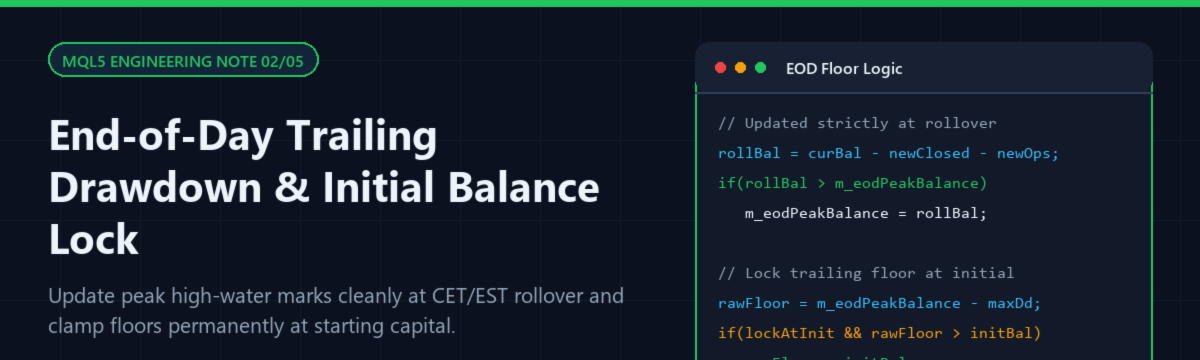
How End-of-Day (EOD) Trailing Drawdown Actually Works in MQL5 (And How to Code a Balance-Locking High-Water Mark)

Traders transitioning from classic two-step rules to modern single-step or trailing drawdown evaluations often confuse intraday trailing equity with End-of-Day (EOD) trailing balance. Coding the wrong formula in an automated protector causes premature liquidations during winning pullbacks—or leaves the floor completely unmoved after profitable sessions close.
Let us examine the exact state transitions required to compute an accurate, account-scoped EOD trailing floor in MQL5 that works seamlessly across terminal restarts and broker midnight resets.
Static vs Intraday Trailing vs End-of-Day (EOD) Trailing
- Static Max Loss: The invalidation floor stays anchored permanently at InitialBalance * (1 - MaxLossPct / 100) . On a $100,000 account with 10% static max loss, the floor remains $90,000 whether balance grows to $104,000 or $115,000.
- Intraday Equity Trailing: Every temporary unrealized equity peak during a winning trade immediately pulls the trailing stop closer—meaning an open +$3,000 float that retraces back to breakeven consumes $3,000 of your overall loss buffer.
- End-of-Day (EOD) Trailing Balance: Intraday floating peaks do not raise the floor. Instead, once per trading day—at the configured reset rollover timestamp (such as 00:00 Europe/Prague CET/CEST or 00:00 America/New_York EST/EDT)—the high-water mark checks closed end-of-day balance, updates m_eodPeakBalance , and moves the trailing floor upward.
Many modern single-step profiles also enforce an Initial Balance Lock: once the EOD trailing floor climbs back up to starting balance ($100,000), it locks there permanently and stops trailing upward as you continue growing the account.
Numeric Walkthrough ($100,000 Account, 6% EOD Trailing, Lock at Initial Balance)
- Day 1 (Start): Intraday peak equity $101,800 | Balance at rollover reset $101,200 → m_eodPeakBalance = $101,200 | Max Floor = $95,200 (101,200 - 6,000). Notice intraday $101,800 does not raise the floor before reset!
- Day 2 (Loss Day): Balance at reset $100,400 → m_eodPeakBalance stays $101,200 | Floor stays $95,200 (never moves down).
- Day 3 (Strong Rally): Balance at reset $106,800 → m_eodPeakBalance = $106,800 | rawFloor = $100,800 , clamped cleanly to $100,000!
- Day 4 (Continuation): Balance $110,500 → Floor remains locked cleanly at $100,000.
Handling Rollover Transitions Safely in MQL5
- Store m_dayKey (YYYYMMDD in the configured target reset timezone), m_dayStartBalance , m_dayStartEquity , m_eodPeakBalance , and m_totalExternalBalanceOps inside an account-scoped .ini state file ( PropShield_State_<ACCOUNT_LOGIN>.ini ) inside MQL5Files .
- Whenever curDayKey != m_dayKey :
- Calculate closed P&L and balance operations after the new rollover timestamp ( newTodayClosed , newTodayBalOps ).
- Recover true balance at rollover:
double rolloverBalance = curBal - newTodayClosed - newTodayBalOps;
double prevClosedEquityApprox = rolloverBalance - prevExternalBalanceOps;
if(prevClosedEquityApprox > m_eodPeakBalance)
   m_eodPeakBalance = prevClosedEquityApprox;
Computing Live Shield vs Hard Breach Floors
double maxLossMoney       = m_initialBalance * (cfg.maxLossLimitPct / 100.0);
double maxLossShieldMoney = m_initialBalance * (cfg.maxLossShieldTriggerPct / 100.0);

if(cfg.maxDdType == MAX_DD_STATIC)
{
   snap.maxLossFloor = m_initialBalance - maxLossMoney;
}
else
{
   double rawFloor = MathMax(m_eodPeakBalance, m_initialBalance) - maxLossMoney;
   if(cfg.lockTrailingAtInitial && rawFloor > m_initialBalance)
      rawFloor = m_initialBalance;
   snap.maxLossFloor = rawFloor;
}

double shieldCushion        = MathMax(0.0, maxLossMoney - maxLossShieldMoney);
snap.maxLossShieldFloor     = snap.maxLossFloor + shieldCushion;
snap.maxLossShieldBufferRem = MathMax(0.0, curEq - snap.maxLossShieldFloor);
snap.maxLossHardBufferRem   = MathMax(0.0, curEq - snap.maxLossFloor);
Why Separate State Files Matter
Prefixing tester files separately ( PropShield_Tester_<login>.ini ) and live files by login ( PropShield_State_<login>.ini ) plus validating savedLogin == curLogin && savedServer == curServer on Init() prevents cross-account state contamination when switching logins in MT5.
Monitor or Protect Automatically
Both utilities in our pure-MQL5 Market toolkit include full Static and EOD Trailing support with balance-lock logic and DST-accurate rollovers:
- Prop Rule Live Monitor MT5 (Free Utility) — Plots Max Floor (EOD Trail) vs Static, live remaining buffer, high-water peak persistence, and daily reset countdown on one chart.
- Prop Rule Shield and Risk Panel MT5 (Pro Utility) — Automatically flattens account-wide exposure and locks trading when your Daily Shield or Max-Loss Shield cushion is reached, before hard invalidation occurs.
In Part 3, we walk through the 50% Best-Day Consistency rule—showing the exact formula that raises profit targets after oversized winning days and how pre-cap clipping prevents target inflation.


