How to Set Up the Forex Factory News Filter in MetaTrader 5 (MT5)

How to Set Up the Forex Factory News Filter in MetaTrader 5 (MT5)
This guide explains how to configure the Forex Factory News Calendar URL in MetaTrader 5 so that an Expert Advisor (EA), such as Kings Eye, can access economic news data and apply its News Filter.
The Forex Factory calendar feed helps the EA identify important economic events, allowing it to avoid opening new trades around major news releases.
Step 1 – Open MetaTrader 5 Settings
Open your MetaTrader 5 platform.
Click Tools in the top menu.
Select Options.
Navigate to the Expert Advisors tab.
Step 2 – Enable WebRequest
Inside the Expert Advisors settings:
Find Allow WebRequest for listed URL.
Check the box to enable it.
You will now be able to add an external website to the permitted URL list.
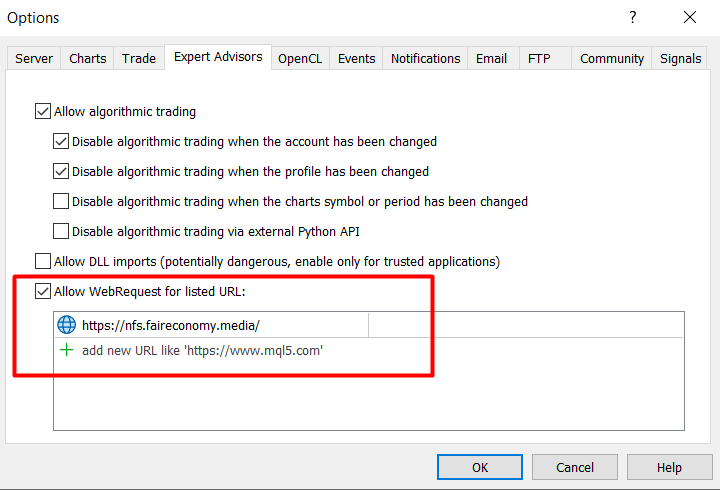
Step 3 – Add the Forex Factory URL
Under the WebRequest permission list:
Click the Add (+) button or select an empty row.
Copy and paste the following URL:
This permission allows an EA to communicate with an external website using the MQL5 WebRequest function.
https://nfs.faireconomy.media/
Step 4 – Save the Settings
Click OK to save your settings.
Your MetaTrader 5 platform is now authorized to communicate with the Forex Factory news server.
You do not need to restart MT5 in most cases.