Trade Controller

5

Trade Controller provides multiple methods to protect and maximize your profits. This powerful weapon helps you to set the protect and trailing-stop rules on your trade automatically in many effective methods. Once it is set and turned on, you don't need to monitor your orders anymore, the software will keep watching and control your orders with your predefined rules.

It's designed to support multi-protection and trailing strategy: Protect by break-even, protect by percentage, protect by pip, protect by account value, trailing by distance, trailing by indicators, etc.

This tool is the controller part originating from Auto Trade Driver: https://www.mql5.com/en/market/product/4217

Note: Demo version for testing can be found here: https://www.mql5.com/en/market/product/5407


Features

  • 4 main control panels: Protection, Trailing Stop, Partial Close and Shortcut. Each panel features various options.
  • Allow to apply multi-protection and trailing-stop rules at once by running it on multiple charts (on "First Come, First Served" basis).
  • Control all orders on all symbols with one tool in single chart, no need to attach tool to every chart.
  • Real-time control panel.
  • Restore previous settings after shutdown or power-off.


Protection Control Panel

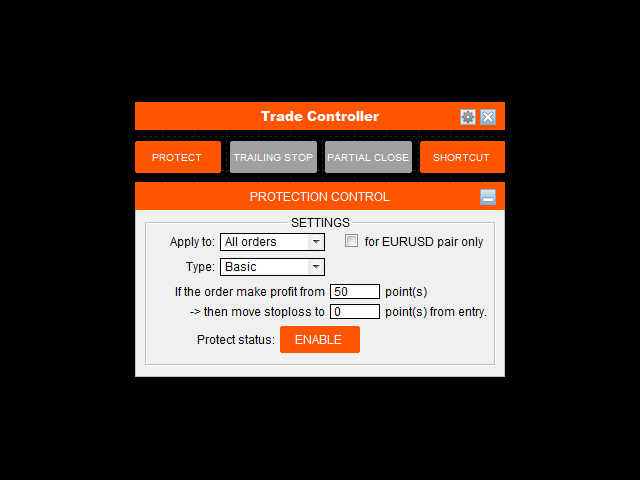
  • Apply to: Choose which kind of orders will be protected, there are some options: All orders, Buy orders, Sell orders, Custom ticket order, Custom magic number order, Account value.
  • For current pair check box: Check this box if you only want to apply protection on selected orders (by Apply to) for current pair only.
  • Type: Protection type that will be applied.
    • Basic: When order make profit at X points, then stop loss will be moved to Y points from EP.
    • Profit/Loss distance: Set a fixed distance at which selected orders will be closed.
    • Profit/Loss percent: Set a fixed profit/loss percentage at which selected orders will be closed.
    • Profit/Loss amount: Set a fixed amount of money at which selected orders will be closed.
    • Drawdown/Growth %: Set a fixed entire account drawdown/growth percent at which all opening orders will be closed.
    • Drawdown/Growth $: Set a fixed entire account drawdown/growth amount at which all opening orders will be closed.
  • Protect status button: Enable/Disable Protection by clicking on this button. Protection takes effect in real-time with its current settings and Protection status immediately. If you want to view other settings without taking effect, just disable Protection before change.


Trailing-Stop Control Panel

  • Apply to: Choose which kind of orders will be stop trailed, there are some options: All orders, Buy orders, Sell orders, Custom ticket order, Custom magic number order.
  • For current pair check box: Check this box if you only want to apply trailing on selected orders (by Apply to) for current pair only.
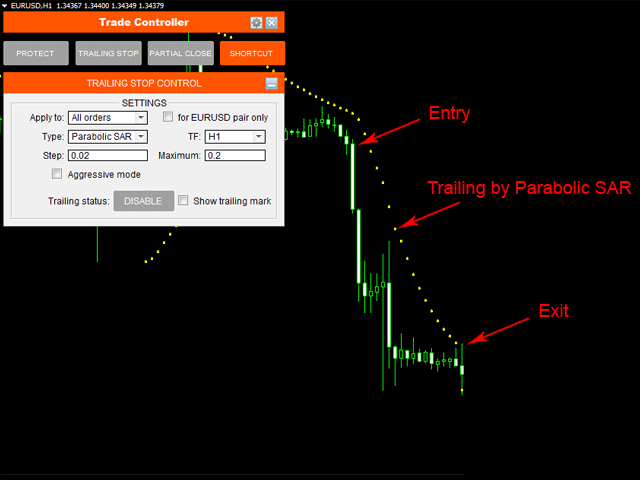
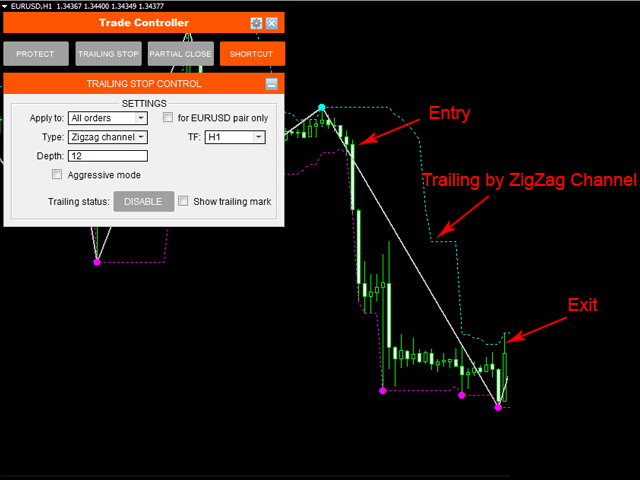
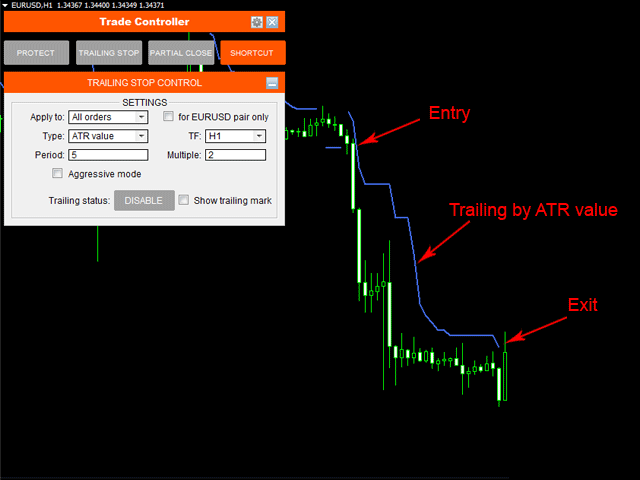
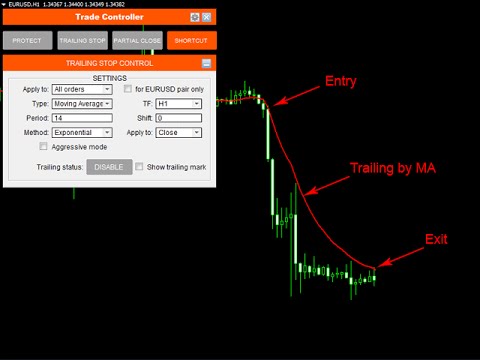
  • Type: Trailing-stop method that will be applied. There are 5 methods:
    • Fixed distance: This is like common trailing method that MT4 provide. But it's even better since you can set a distance smaller than Stop/Limit level, that means Stop/Limit level set by broker is skipped now.
    • Moving Average: Moving average can be used in many ways for trailing stops. MA trailing is a pretty fast to lock profits. Trailing with MA High/Low is also a good idea.
    • Parabolic SAR: Using PSAR is a safe way to trailing. It's a long runner if you catch a trend.
    • Zigzag channel: Zigzag channel is made from the boundary of zigzag swing points. Like PSAR, Zigzag channel is a "slower but longer" trailing.
    • ATR value: Average True Range (ATR) determine the average volatility of price at the meantime. So, trailing based on its value is favorite choice of many traders.
  • Aggressive mode: Check this box if you want to trail stops from the order's opening based on price value (original stop loss distance may be reduced step by step). Unchecking this box will make trailing-stop to take effect only when trailing-point makes profit only.
  • Show trailing mark: Checking this box will show the indicator mark on the chart that reflect the selected trailing method.
  • Trailing status button: Enable/Disable Trailing by clicking on this button. Trailing takes effect in real-time with its current settings and Trailing status immediately. If you want to view other settings without taking effect, just disable Trailing before change.


Partial Close Control Panel

  • Apply to: Choose which kind of orders will be partially closed, there are some options: All orders, Buy orders, Sell orders, Custom ticket order, Custom magic number order.
  • For current pair check box: Check this box if you only want to apply partial close on selected orders (by Apply to) for current pair only.
  • 1st Close: Choose X percent of order's volume to be closed for the first time whenever the order makes profit of A points from EP.
  • 2nd Close: Choose Y percent of order's volume to be closed for the second time whenever the order continues to make profit of B points from EP.
  • 3rd Close: The rest volume of order will be closed whenever it continues to make profit of C points from EP.
  • Partial close status button: Enable/Disable Partial close by clicking on this button. Partial close takes effect in real-time with its current settings and Partial close status immediately.

Shortcut Control Panel

  • For current pair check box: Check this box if you only want to apply the shortcut command for the current pair only.
  • Close: This shortcut is used to perform close command on selected opening orders: All orders, Buy orders, Sell orders, Winning orders (Profit+Commission>0), Losing orders (Profit+Commission<0).
  • Delete: This shortcut is used to perform delete command on selected pending orders: All (pending) orders, All Buy Stop, All Sell Stop, All Buy Limit, All Sell Limit.
  • Remove Stoploss: This shortcut is used to remove stop loss from selected orders: All orders, Buy orders, Sell orders, Winning orders, Losing orders, Pending orders.


Trade Statistic Panel

  • To view trade statistic panel, just go to Setting menu --> Show trade statistic. This panel helps you to overview your account statistics in the mean time, which includes Buy orders, Sell orders, Winning orders, Losing orders, Total potential SL and Total potential TP.
  • To move this panel, just click on Move icon on the right and place the panel wherever you want on chart.
评分 4
Felixu
740
Felixu 2017.04.26 12:53 
 

Brilliant!! Helpful in retrieving a bad situation as in a current case with large floating drawdown. Not exactly sure how it manages but churns out successive winning trades without a single loss, helping to shore up my accounts till the drawdown is reversed.

Amaury Canario Junior
377
Amaury Canario Junior 2014.11.16 19:16 
 

It´s a great tool. I use it combined with my custom indicators and it fits perfectly all my requirements !

推荐产品
Grid Averaging Pro  is a combination of Grid Trading and Cost Averaging with sophisticated algorithm and build-in Hedging to protect your account drawdown. Once your initial trade moves into negative territory, the recovery mechanism will kick in and place consecutive market orders in the same direction, all of which will be closed with a combined profit or approximately break even. Product Links Fully  Description in English   :  [USER GUIDE ENGLISH] - GRID AVERAGING PRO (MT4/MT5) Fully  Descr
Magic Grid
Aliaksandr Charkes
4.54 (28)
Magic Grid is an indicator-free advisor that uses a grid strategy. The strategy is based on automatic reopening of grid pending orders, after closing their market positions (by Take-Profit, Stop-Loss or manually). Pending orders are placed with a specified step from the initial prices, which can be entered manually or generated automatically ( one time at the beginning of the trade ). The robot can trade on any time frame, on any currency pair, on several currency pairs, and on any number of di
FREE
SynapseTrader EA
Ruben Villarreal Barajas
The Expert Advisor (SynapseTrader EA) made by the company ProfitFXBot is designed to trade the Forex market specifically on GBP/USD, using smart strategies to generate consistent profits. This bot must be turned on at 8:00 PM (New York time) and manually turned off at 5:00 AM (UTC-5), the bot must be placed in temporality M1. During these hours, the bot makes decisions based on market analysis, with optimized logic to trade efficiently and maximize profit opportunities. The bot will only be act
The Infinity EA MT4
Abhimanyu Hans
3.68 (31)
ChatGPT Turbo 人工智能驱动技术 Infinity EA 是一款专为 GBPUSD 和 XAUUSD 设计的高级交易专家顾问。它专注于安全性、持续回报和无限盈利能力。与许多其他依赖高风险策略(如马丁格尔或网格交易)的 EA 不同。Infinity EA 采用基于神经网络的规范、有利可图的剥头皮策略,该神经网络嵌入机器学习、数据分析 AI 技术,由最新的 ChatGPT 版本提供,可让您的整体交易体验卓越不凡。 加入我们拥有超过 6000 名成员的 MQL5 社区, 与其他交易者建立联系。及时了解最新的产品更新、提示和独家内容。 MT5 版本 如何设置 Infinity EA 特征 Infinity EA 利用人工智能驱动的剥头皮策略。 该 EA 与 ChatGPT-4 Turbo 集成,可进行实时数据分析。 Infinity EA 利用机器学习不断从市场数据中学习。 风险管理是 Infinity EA 的核心,具有固定止损和获利设置等功能,可以保护资本并锁定利润。 该 EA 还进行高级蜡烛图分析,以识别高质量的交易条目。 Infinity EA 与道具公司完全兼容。 促销
Gyroscopes
Nadiya Mirosh
Gyroscope        professional forex expert   (for EURUSD, GBPUSD, USDJPY, AUDUSD, USDCHF, EURGBP, EURJPY, NZDUSD, USDCAD, EURCHF, AUDJPY, CADJPY pairs)   alyzing the market using the Elliot Wave Index. Elliott wave theory is the interpretation of processes in financial markets through a system of visual models (waves) on price charts. The author of the theory, Ralph Elliott, identified eight variants of alternating waves (of which five are in the trend and three are against the trend). The mov
Wavy Grid EA
HUSEYIN CETINEL
Wavy Grid EA – MetaTrader 4 高级网格智能交易系统 Wavy Grid EA是一款专为MetaTrader 4平台开发的自动化网格交易系统,它基于价格波动的波浪特性。该智能交易系统旨在分析市场短期和中期价格波动,使用户能够分阶段建仓,并在预设的风险范围内管理这些仓位。 这款智能交易系统完全自动运行,无需人工干预。所有交易的开仓、管理和平仓流程均按照预设的算法规则执行。用户只需根据自身风险承受能力设定相应的参数即可。 战略方法和交易逻辑 波浪网格EA算法依赖于价格的自然波动行为,而非试图预测趋势。市场上涨和下跌过程中出现的回调和震荡构成了该系统决策机制的基础。 智能交易系统会在价格达到特定水平时逐步建立买入或卖出仓位。已开仓位并非单独评估,而是作为一个整体进行评估。其目标是根据所有未平仓位的总体结果实现可控平仓。 这种方法旨在从价格走势的整体行为中获利,而不是依赖于单笔交易的结果。 网格结构和位置管理 Wavy Grid EA采用用户可调的网格间距。网格结构可配置为固定或灵活。仓位会根据设定范围内的价格波动逐步建立。 在职位管理过程中: 系统会检查未平仓交易数
| Fully-automated Smart Money Concept (ICT) inspired trading solution with multi-strategy capabilities | Built by a grid trader >> for grid traders.  This is MT4 version, click  here  for  Blue CARA MT5  (settings and logics are same in both versions)     Real monitoring signal  -->  Cara Gold Intro Blue CARA EA   ('CARA') - short for  C omprehensive  A lgorithmic R esponsive A dvisor is a next-gen  multi-currency    multi-timeframe  EA base on the widely known (and perhapse most popular) Inn
Smart Funded Hft
Barbaros Bulent Kortarla
4.7 (67)
解锁您的交易潜力,使用智能资金化HFT EA! 无需VPS/无需设置文件/享受即插即用/请查看下方的简易设置视频 限时促销价格 我很兴奋地分享我的交易秘密——智能资金化EA。我已经用完美的成功率征服了数百个挑战,现在轮到您提升您的交易游戏了! 此EA旨在通过允许使用其服务的道具公司的HFT挑战。如果挑战不允许使用HFT/资金账户/实盘账户,请不要使用它。 智能资金化HFT EA的独特之处: 挑战掌控: 在几乎所有HFT挑战中经过验证的成功,确保了100%的成功率。它不仅仅是一个工具;它是一个经过验证的强大工具。 极致简约: 无需陷入复杂的设置或VPS设置。加载它,调整手数大小,然后点击运行按钮——极致简约。 为什么分享?时间宝贵,挑战可能真的令人头疼。由于我不能再承担更多的挑战,我想,为什么不分享财富呢?所以我们来到了这里。 独家限时租赁选项:限时抓住机会在MQL5市场以促销价格租赁智能资金化EA。在您的挑战中测试它,体验它的魔力。 购买它:准备承诺?购买智能资金化EA,将您的交易提升到新的水平。在成功的挑战后请留下真实的评论。 评论激励:对于买家,这里有一个特别的待遇。留下评论后,如
Gold Crazy EA MT4
Nguyen Nghiem Duy
Gold Crazy EA   is an Expert Advisor designed specifically for trading Gold H1/ EU M15. It use some indicators to find the good Entry. And you can set SL or you can DCA if you want. It can be an Scalping or an Grid/ Martingale depend yours setting. This EA can Auto lot by Balance, set risk per trade. You also can set TP/ SL for earch trade or for basket of trade. - RSI_PERIOD - if = -1, then the default strategy works, if >0, then the RSI strategy works - MAX_ORDERS - to trade with only 1 order,
Goal Time
Mourad Ezzaki
GOAL TIME is an expert advisor based on the notion of time, it studies the change of price according to time, and it finally detects the best time to execute a good order. The EA is based on an indicator that draws a price curve in relation to time, this curve is deduced by an algorithm that analyzes old data. Then, the EA exploits the generated curve and executes the correct order. In case of incorrect choice, the EA has the mission to limit the losses. After a thorough study of this strategy o
H4 GBPUSD Trend Scalper is a trend signal scalper The EA trades according to the trend strategy using original built-in indicator for opening and closing orders. The external inputs for limiting trading on Fridays and Mondays are available. The purpose of the strategy is to use the current trend with the most benefit. According to the results of testing and working on demo and real accounts, the best results achieved by using the Н4 timeframe on the GBP/USD pair Works on MetaTrader 4 Build 971+
Ksm: Smart Solution for Automated Forex Trading Ksm is a tool designed for automating Forex trading, using modern methods of time-series data analysis to work with multiple currency pairs across different timeframes. Key Features and Benefits Multi-currency support : Ksm enables trading across multiple currency pairs, helping traders adapt their strategies to various market conditions. New currency pairs can be easily added. Time-series data analysis : Utilizing advanced algorithms, Ksm analyzes
GAlpha
Evgenii Tarkov
A high-frequency analytical tool designed specifically for trading in gold (XAU/USD). It combines modern market analysis techniques, machine learning, and an adaptive risk management strategy to maximize profits in the highly volatile environment typical of the precious metals market. Key Features: Adaptive Volatility-oriented strategy: The operation of an automated correction device (stop loss, take profit) is controlled by a fluid environment using the ATR (Average True Range) indicator. H
Magic EA MT4
Kyra Nickaline Watson-gordon
3 (1)
Magic EA is an Expert Advisor based on Scalping, Elliot Waves and with filters such as RSI, Stochastic and 3 other strategies managed and decided with the robot smartly. Large number of inputs and settings are tested and optimized and embedded in the program thus inputs are limited and very simple. Using EA doesn't need any professional information or Forex Trading Knowledge. EA can trade on all symbols and all time frames, using special and unique strategies developed by the author. The EA wo
Mk R
Can Pei Pu
MK_R It is based on contrary patterns for EURUSD.  Basically, it will entry using the condition of 1 buy wave and 6 sell wave of Granville's law. The EA does not use indicators, grid, martingale, arbitrage.  The EA has been proven to be profitable in the six months of 2020 and is particularly suitable for the current EURUSD market since mid-December 2020. Monitoring: https://www.mql5.com/en/signals/789229 Timeframe is M5. EA needs M1 chart,M5 chart,M15 Chart,H1 chart,H4 chart. Maxium Spread

Salva System Free
Pavel Komarovsky
4 (3)
Salva EA Free is an advanced and fully automated system, which passes backtesting since 2005. The basis of this strategy is the price chart itself, trading is performed based on the price movement range. Dynamic algorithms and filters are used for taking profit or closing trades. Built-in reworked system for filtering market entries and exits: Checking the trading direction using integrated trend indicators. Checking the channel range for the minimum and maximum values. Checking for the price ex
FREE
Limit Order Assistant EA This Expert Advisors will help us to put multiple stop order with single one click. This is an EA which can assist our first Order. ex. if we do instant Order Buy then EA will place multiple Buy Limit Pending Order  if we do Sell Order then it will place muliple Sell Limit It also can set up Multiply in Lot size every position.  Main Feature 1. Put Multiple Limit Order 2. Specify how much stop orders will make 3. Set distance from current price 4. Set distance for each
Bar Boss
Iurii Tokman
5 (1)
Bar Boss   Expert   Advisor 使用 FletBoxPush 指标来分析市场并确定交易信号。该指标内置于“EA 交易”中,不需要在图表上额外安装。交易发生在定义为平台边界的水平上。使用损失限制。 顾问设置说明 TimeFrames - 图表周期,指标设置 颜色 - 定义为平面的价格区域的颜色,为指标设置 矩形 - 显示定义为平坦的价格区域,为指标设置 手数 - 起始交易量 MagicNumber - 订单的幻数 Count_LOSS - 连续亏损交易的数量,之后将设置为零利润(退出为零) FlatPips - 以点为单位确定平台,设置指标 FlatBars - 用于确定平面的柱数限制,为指标设置 MinBarsClosedOutside - 收盘价固定在特定平面水平之上/之下的柱数 CoefficientLot - 亏损后后续交易手数的乘数 CoefficientTakeProfit - 根据确定的平台的通道宽度计算的利润乘数 PercentLoss - 损失百分比,如果顾问带来的总损失低于此值,交易停止,该值必须设置为负数,例如:-33.3 顾问如何工作
Reef Scalper
Charles Crete
Reef Scalper   is an aggressive scalping EA. It primarily uses the   Bollinger Bands and the Parabolic SAR indicator , which quickly detects small trend changes over short timeframes. The bot places pending orders to react swiftly when taking profits. Its recovery method relies on a grid system with an optional martingale , and it can open up to 15 recovery positions with a lot size multiplier . Using a tick counter , the bot is not sensitive to spread . It aims for quick profits , preferably se
Gold Glider
Biswarup Banerjee
Product Name: Gold Glider Overview: Gold Glider is a sophisticated Expert Advisor designed for trading gold. It utilizes a specific combination of 5 different moving averages to determine the long-term, mid-term, and short-term trends, allowing it to place buy and sell trades with precision. Unlike traditional stop loss methods, Gold Glider employs a unique grid pattern strategy to exit losing positions. The EA's grid trading strategy is designed to enhance profitability while minimizing the nee
Mr Banker
Sindhu Bairavim
4.39 (18)
Live Signal - Gopher I Strategy Mr Banker Expert Advisor has live track records / history with low drawdown. EA uses Gopher I  strategy and will open pending orders every day around New York session.  EA works based on advanced price movement and support resistance strategies.  Only 4 Copies Left At $180 Price will keep increasing for this strategy. Description Mr Banker EA is a p ure strategy based  automatic trading robot specially designed and developed to trade USDJPY pair using MT4 Techno
King Scalper
Le Dang Nguyen Hoang Vu
King Scalper  is a smart ea that uses the Zigzag indicator to find out sensitivity situation of market price. with this point,  King Scalper EA  automatically create trend line that market movement reacted in this point. with zigzag find the highest and lowest price (support and resistance) and with this point EA trend line. it changes and updates automatically ... if price touches this line expert decide to act with it. BUY or SEll depended on the market situation. you can manage your time that
Monster Gold
Tran Thanh Tuyen
I  am glad to welcome you on the page of my product.  Monster Gold   is a fully automated EA designed to trade   GOLD . It is based on machine learning cluster analysis and genetic algorithms. EA contains self-adaptive market algorithm, which uses price action patterns and standard trading indicators.  Expert showed stable results on XAUUSD in 2011-2022 period. No dangerous methods of money managment used.  Suitable for any broker conditions.  If you do not have experience using EA, you can use
Griddy Calm EA
Mikhail Kornilov
5 copies are left for $149. The next price is $189. Griddy Calm EA uses the classical strategy of open orders in trend direction at the best price. At trend turning it implements the soft averaging grid. Big dynamic step, small lot multiplier and equity stop loss makes the grid strategy safe enough for long term trading. The key feature of the EA is an algorithm of partial closing which uses small rollbacks of price to gradually close bad trades. Moreover, this strategy is absolutely universal
How the EA works (simple explanation) Trades on   M5   timeframe Uses   H1 timeframe   to analyze global market context Analyzes   2 or 3 timeframes simultaneously On each timeframe: Checks price position relative to one or two Moving Averages Evaluates MA angle and distance between price and MA Entry logic is based on   trend + volatility conditions , not on random signals The full algorithm is illustrated in the screenshots. Recommended usage Symbol:   EURUSD Timeframe:   M5 Trading
Richestcousin EA
Vicent Osman Kiboye
INSTAGRAM Billionaire: @richestcousin PIONEER OF ZOOM BILLIONAIRES EA THE ONLY PROFITABLE TRADING ROBOT. To trade without withdrawals is Scamming. Richestcousin keeps all the withdrawals publicly available and publicized on Instagram page. The trades are fr His very own Robot software. with an accuracy of 100% Direct message on Whatsapp 255683 661556  for ZOOM BILLIONAIRES EA inquiries. ABOUT Richestcousin is a self made Acclaimed forex Billionaire with an unmatched abilities in discerni
Golden Magic
Tran Thanh Tuyen
3 (1)
Golden Magic is an Expert Advisor designed specifically for trading gold.  The Expert Advisor does not use aggressive and dangerous trading methods and therefore is as stable as possible when using certain settings. For safe and the most stable trading, you should always use SL. With its unique filtering algorithm for false market entry signals, Golden Magic recognizes the best possible entry point to generate potentially more profit.  Expert showed stable results on XAUUSD in 2011-2020 period
SMC Trade Manager
Gustavo Jose Gonzalez Rubi
5 (2)
介绍智能资金概念交易管理器——专为寻求市场专业优势的交易者设计的终极工具。无论您是ICT/Smart Money Concepts/手动交易者,我们的软件都专门为您构建,以便在实时中轻松自动化您的交易并管理风险。 使用智能资金概念交易管理器,您可以轻松自信地执行智能资金概念或机构交易设置。我们强大的工具运行在MetaTrader 4平台上(我们目前正在开发MT5版本),并提供一系列功能,以适应您独特的交易风格和目标。 智能资金概念交易管理器通过自动化风险管理和其他关键参数,包括止损、获利和使用我们的专有分形对称策略进行缩量测量,简化了您的交易体验。您可以自定义设置以适应您特定的交易和风险配置文件,算法将自动调整以适应您的账户规模。或者,您可以使用我们优化的默认设置以实现最大效率,确保您“先付给交易者 ;)”。 我们的系统适合初学者使用,易于使用,但足够灵活,以适应有经验的机构交易者的需求。然而,我们强烈建议您在演示账户上熟悉该工具并测试您的策略,然后再在实盘账户上执行。 通过使用智能资金概念交易管理器,您可以节省时间、减轻压力并增加利润。以纪律、自信和一致性交易-立即获取智能资金概念
FREE
YPY Check Your Broker is a universal multifunctional software complex which uses primary tick data. It allows traders to perform comparative analysis of the trading conditions and execution quality, identify abnormal BID prices outside the indicative quotes. It also reflects the facts of redrawing bars in the terminal, spread extension, controls the leverage stop out level values, speed of execution and server connection breaks, maintains a detailed statistics on the slippages. The YPY Check You
This EA will help you to automatically put stop loss and take profit for all your orders. Stop loss point and take profit points can be selected in the tab of the input parameters. You can specify three symbols with SL and TP values (you can see symbol1 , symbol2 ... in the input tab below). The EA performs checks. If a new order with symbol1 appears, it puts SL and TP with stoploss1 and takeprofit1 values (in points). If a new order with symbol2 appears, it puts SL and TP with stoploss2 and tak
该产品的买家也购买
欢迎来到 Trade Manager EA——这是一个终极风险管理工具,旨在使交易变得更直观、精准和高效。它不仅仅是一个下单工具,而是一个用于无缝交易计划、仓位管理和风险控制的全面解决方案。不论您是新手交易员、资深交易员,还是需要快速执行的剥头皮交易员,Trade Manager EA 都可以满足您的需求,适用于外汇、指数、大宗商品、加密货币等各种市场。 借助 Trade Manager EA,复杂的计算已成过去。只需分析市场,在图表上用水平线标记入场、止损和止盈,设置您的风险水平,Trade Manager 就会立即计算出理想的头寸规模,并实时显示以点、账户货币计价的止损和止盈。每笔交易都得以轻松管理。 主要功能: 头寸规模计算器 :根据定义的风险瞬间确定交易规模。 简单的交易计划 :在图表上用可拖动的水平线直接计划交易,设置入场、止损和止盈。 实时显示 SL 和 TP :以账户货币、点或分显示止损和止盈,便于分析。 高级保护工具 盈亏平衡选项 : 基本盈亏平衡 :当您的交易达到设定水平时自动保护利润。 多级盈亏平衡 :设置多达 4 个级别以逐步保护利润。 尾随止损选项 : 基本尾随
TradePanel MT4
Alfiya Fazylova
4.85 (92)
交易面板是一款多功能交易助手。该应用包含超过50种手动交易功能,并允许您自动执行大多数交易任务。 在购买之前,您可以在演示账户上测试演示版本。下载用于演示账户的试用版应用程序: https://www.mql5.com/zh/blogs/post/762579 。 完整说明 这里 。 贸易. 只需单击一下即可执行交易操作: 打開掛單和頭寸,並自動計算風險。 一鍵打開多個訂單和頭寸。 打開訂單網格。 按組別關閉掛單和頭寸。 反轉頭寸方向(關閉買入>打開賣出,關閉賣出>打開買入)。 鎖定頭寸(通過開啟缺少的頭寸,使買入和賣出頭寸的數量相等)。 一鍵部分關閉所有頭寸。 將所有頭寸的止盈和止損設置在同一價格水平。 將所有頭寸的止損設置在盈虧平衡水平。 開倉時,可使用以下功能: 在多個訂單或倉位之間分配計算出的數量(在單擊一次時開啟多個訂單和倉位)。 在開啟訂單前在圖表上可視化交易水平。 僅在當前點差不超過設定值時才開啟倉位。 止盈和止損之間的自動比例。 虛擬止損和止盈。 自動將止損和止盈的大小增加為當前點差的大小。 基於ATR指標讀數計算止盈和止損。 設置掛單的到期日期。 為掛單設置追蹤(掛單
Copy Cat More Trade Copier MT4 (复制猫MT4) 不仅仅是一个简单的本地交易复制工具;它是一个为当今交易挑战而设计的完整风险管理与执行框架。从 prop firm 挑战到个人账户管理,它都能通过强大的执行力、资本保护、灵活配置以及先进的交易处理来适应各种情况。 该复制器同时支持 Master(发送端) 和 Slave(接收端) 模式,能够实时同步市价单与挂单、交易修改、部分平仓以及 Close By 操作。它兼容模拟账户与真实账户,支持交易或投资者密码,并通过持久交易记忆系统(Persistent Trade Memory)确保即使 EA、终端或 VPS 重启后也能恢复。可同时管理多个 Master 与 Slave,并通过前缀/后缀自动调整或自定义符号映射来处理跨平台或跨经纪商差异。 使用手册/设置: Copy Cat Trading Copier 使用手册 Copy Cat More MT5: https://www.mql5.com/en/market/product/139088 加入频道: https://www.mql5.com/en/cha
ManHedger MT4
Peter Mueller
5 (1)
THIS EA IS A SEMI-AUTO EA, IT NEEDS USER INPUT. Manual & Test Version Please TEST this product before   BUYING  and watch my video about it. Contact me for user support or bug reports, or if you want the MT5 version! MT5 Version I do not guarantee any profits or financial success using this EA. With this Expert Advisor, you can: Implement your own   Zone Recovery   strategy to capitalize on trending markets. Create   Grid   trading strategies, to profit from ranging markets. Place orders easil
交易特惠 – 40% 折扣 高级交易管理器 – 终极一体化解决方案,助您更快、更智能、更安全地进行手动交易。 使用 NextGen Trade Manager AI 革新您的手动交易体验。这款专业的图表面板将即时执行、可视化交易计划和强大的风险管理功能整合到一个直观易用的工具中。无需离开图表,即可比以往更快地执行订单、管理风险并保护利润。完美满足所有希望提升交易精准度和效率的交易者的需求。 在 MT4 策略测试器中无风险测试 下载演示版本,解锁模拟交易功能。这是在安全模拟的环境中练习执行、测试风险管理规则和完善策略的理想方式,让您在实盘交易前做好充分准备。 如需完整的用户手册和分步指南,请访问: https://www.mql5.com/en/blogs/post/764217 主要优势: 快速交易:一键执行订单、设置止损和平仓。 更智能的风险管理:根据固定风险、账户余额或净值自动调整手数。轻松验证止损是否符合经纪商规则。 内置保护:自动设置盈亏平衡点、启用追踪止损,并使用部分平仓来锁定利润并最大限度地降低风险。 避免代价高昂的错误:市价单和平仓功能的安全确认确保
The product will copy all telegram signal to MT4   ( which you are member  ) , also it can work as remote copier.  Easy to set up, copy order instant, can work with almost signal formats, image signal, s upport to translate other language to English Work with all type of channel or group, even channel have "Restrict Saving Content", work with  multi channel, multi MT5 Work as remote copier: with signal have ticket number, it will copy exactly via ticket number. Support to backtest signal. How to
MT4 至 Telegram 信号提供者 是一款易用、可完全自定义的工具,它使发送信号到 Telegram 成为可能,将您的账户变成信号提供者。 消息的格式 可以完全自定义! 但是,为了简便使用,您也可以选择一个预设模板,并能够启用或禁用消息的特定部分。 [ 演示 ]  [ 手册 ] [ MT5 版本 ] [ Discord 版本 ] [ Telegram 频道 ]  New: [ Telegram To MT5 ] 设置 可通过 用户指南 获取逐步说明。 无需了解 Telegram API;开发者提供所需的一切。 主要特性 自定义发送给订阅者的订单详情的能力 您可以创建分层订阅模型,例如铜牌、银牌、金牌。金牌订阅可获得所有信号等。 按订单号、符号或备注过滤订单 包括执行订单的图表的屏幕截图 在发送的屏幕截图上绘制已关闭的订单,以便额外验证 推迟发送新订单消息的可能性,以便在发送前对位置进行调整 订单详情的全透明度: 新的市场订单 *附带屏幕截图 订单修改(止损、获利点) 已关闭订单 *附带屏幕截图 部分关闭订单 ** 新的挂起订单 修改的挂起订单(进场价格) 挂起订单激活(
Crystal Trade Manager PRO – 高级 MT4 风险与交易控制系统 免费版: https://www.mql5.com/en/market/product/150632 概述 Crystal Trade Manager PRO(CTM)是一款为 MetaTrader 4 打造的完整专业级风险管理与交易控制工具。 它专为需要严格执行、稳定风险保护和智能自动化的交易者而设计。 系统可全面管理风险、保护账户权益、执行每日限制、自动设置 SL/TP,并提供专业级的一键式快速交易面板。 非常适合参与 prop firm 挑战、日内交易、剥头皮交易以及专业资金管理的交易者。 同时提供完整的 MT5 版本。 核心亮点功能 1. 高级风险与回撤保护 支持每日回撤限制 1%–70% 。 一旦达到回撤上限,系统将立即平掉 所有仓位 。 可选:突破后自动删除 所有挂单 。 每日锁仓模式:当天达到限制后阻止新下单,次日自动恢复。 完全符合各大 prop firm 的规则与要求。 2. 日内盈利与亏损目标自动化 可设置每日 盈利目标 与 亏损限制 (账户货币,例如 USD)。 达到任何目
Live Forex Signals 专为现场信号交易而设计   https://live-forex-signals.com/en   和  https://foresignal.com/en . Live Forex Signals for MetaTrader 5  https://www.mql5.com/ru/market/product/81448 参数 如果您已订阅网站,则用户名和密码live-forex-signals.com/foresignal.com ,然后您应该使用您的凭据填写这些参数;如果没有订阅,则将字段留空; 评论对正在开启的交易的评论 风险风险作为交易存款的百分比,如果风险=0,则使用价值地段 固定交易量 使用获利使用从网站获利 UseStopLoss从网站使用止损 FrequencySignalUpdateInMinute顾问访问网站的频率 交易的最大点差交易的最大允许点差,如果点差较高,则设置的挂单被取消 使用追踪止损 TrailingStop跟踪止损的值以点为单位 为了使实时外汇信号正常工作,您需要放置网站地址 https://live-fore
The product will copy all  Discord  signal   to MT4   ( which you are member  ) , also it can work as remote copier.  Easy to set up. Work with almost signal formats, support to translate other language to English Work with multi channel, multi MT4. Work with Image signal. Copy order instant, auto detect symbol. Work as remote copier: with signal have ticket number, it will copy exactly via ticket number. How to setup and guide: Let read all details about setup and download Discord To MetaTrader
这是一个可视化的交易面板,可帮助您轻松进行交易管理,避免人为错误并增强交易活动。它结合了易于使用的视觉界面以及完善的风险和位置管理方法。 [ 安装指南 | 更新指南 | 故障排除 | 常见问题 | 所有产品 ] 易于使用 从图表轻松交易 精确的风险管理交易,无忧 保本是重中之重 让利润不受您的关注 尽快享受无风险交易 所有已开通交易的自动追踪止损 交易开始后立即设置初始止损 进行交易后,EA将执行以下任务: 初始止损/获利被自动放置 它会尽快锁定自由行(可选) 它将止损首次移动到盈亏平衡点(可选) 它使用您所需的方法跟踪止损,直到止损为止 其他很酷的功能是: 出色的终端活动报告 单一但功能强大的尾随止损方法 干净的图表界面 没有输入参数 我进行交易后会怎样? 这是您进行交易后EA的操作: 它放置初始止损并获利订单。 尽快搭便车并确保保本。默认情况下,这是通过在达到盈亏平衡点时关闭50%的交易来完成的,默认情况下为5点。这意味着,如果您日后被淘汰,您将一无所获(可选)。 盈亏平衡后,跟踪止损开始运行。 它跟踪止损,直到止损为止,让利润运行。 尾随止损如何运作? 追踪止损表示为所管
MT4 to Discord Signal Provider 是一款用户友好、完全可定制的工具,专为直接向 Discord 发送交易信号而设计。这个工具将您的交易账户转变为一个高效的信号提供者。 自定义消息格式以适应您的风格!为了方便使用,您可以从预先设计的模板中选择,并决定包括或排除哪些消息元素。 [ 演示 ] [ 手册 ] [ MT5 版本 ] [ Telegram 版本 ]  New: [ Telegram To MT5 ] 设置 遵循我们详细的 用户指南 进行简单设置。 不需要预先了解 Discord API;我们提供所有必要工具。 主要特性 为订阅者更新自定义订单详情。 实施分层订阅模型,如铜牌、银牌、金牌,每一层都提供不同级别的信号访问。 附加执行订单的图表截图。 在这些截图上显示已关闭的订单,以增加清晰度。 提供延迟发送新订单消息的选项,以便在发送前进行最后调整。 透明和详细的订单信息: 带截图的新市场订单。 订单修改(止损、获利)。 已关闭和部分关闭的订单。 新的和修改的挂起订单。 挂起订单的激活和删除。 关于历史订单的详细报告。 每个订单的可定制评论。 注意: *
Smart Channel M4
Vahidreza Heidar Gholami
The trend in the market can be predicted using trend lines but the problem is you don’t know where exactly the price is going to touch the trend line where you can put your pending orders on. Smart Channel Expert Advisor makes it possible to put an advanced channel around the price data, which can be configured to handle placing orders, opening and closing positions, managing risk per trade, spread, slippage, and trailing stop-loss and take-profit automatically. Features Money Management (Calcul
Riskless Pyramid
Snapdragon Systems Ltd
5 (1)
Introduction This powerful MT4 trade mangement EA offers a way potentially to aggressively multiply trade profits in a riskfree manner. Once a trade has been entered with a defined stoploss and take profit target then the EA will add three pyramid add-on trades in order to increase the overall level of profit. The user sets the total combined profit target to be gained if everything works out. This can be specified either as a multiple of the original trade profit or as a total dollar amount. Fo
Ultimate MT4 to Telegram (UMT) sends controlled trades (via symbol, magic, comment) to your telegram channel. It sends open and closed trades, including pending orders and TP/SL modifications, along with chart screenshots, to any telegram channel. Additionally, you can send trade reports of open trades and summary profit/pip reports for day, week, or month. You can customize the design of the trade actions or reports with variables and emoticons.  A beautiful panel allows you to visualize all t
Rocket FX Trading Manager PRO Note: Once you download the manager, message me for the background files The Ultimate All-in-One Trade Management Solution for MetaTrader 4 Version:   4.5 |   Platform:   MetaTrader 4 |   Category:   Utility / Trade Manager   Overview Rocket Fx Trading Manager v4.5 is a comprehensive, all-in-one trade management system designed to transform your trading experience. This powerful utility combines   intelligent position sizing ,   multi-target order placement
Comprehensive on chart trade panel with the unique ability to be controllable from mobile as well. Plus has a library of downloadable configuration, e.g. exit rules, extra panel buttons, pending order setup and more. Please see our product video. Works with all symbols not just currency pairs. Features On chart panel plus controllable from free app for Windows, iPhone and Android Built-in script engine with library of downloadable configuration, e.g. add 'Close All Trades in Profit' button, exit
Custom Alerts AIO:多市场智能监控,一键启动,无需设置 概述 Custom Alerts AIO 是一款“开箱即用”的高级市场扫描工具,无需额外安装任何其他指标或进行复杂设置。它内置了 Stein Investments 的所有核心指标(FX Power、FX Volume、FX Dynamic、FX Levels 和 IX Power),可帮助您轻松监控所有主要资产类别,如外汇、黄金、指数和加密货币。如果您的经纪商支持股票,您也可以手动添加个股进行监控。 1. 为什么选择 Custom Alerts AIO? 无需额外购买任何指标 • 所有关键指标均已内置,开箱即用。 • 专注于实时预警,不包含任何图形元素,性能高效,界面简洁。 全面覆盖所有主要市场 • 支持监控外汇、金属、加密货币和指数市场。 • 无需手动输入任何交易品种,只需在设置中勾选资产类别即可启用。 • 股票并不属于默认类别,如有需要可手动通过参数输入添加。 高效、专业、便捷 • 无需图表模板和手动加载,适合自动化或远程交易环境。 • 非常适合 VPS 上长期运行,或作为后台市场预警工具使用。 2
Custom Alerts:监控多个市场,绝不错过关键交易信号 概述 Custom Alerts 是一款动态工具,专为希望集中监控多个交易品种潜在机会的交易者设计。通过整合我们旗舰工具(如 FX Power、FX Volume、FX Dynamic、FX Levels 和 IX Power)提供的数据, Custom Alerts 可自动通知您关键的市场变化,无需频繁切换图表,也不会错过交易良机。现在,它支持您的经纪商提供的所有资产类别,只需在设置中选择相应的资产类别即可,无需手动输入任何品种名称。 1. 为什么 Custom Alerts 对交易者非常有帮助 一体化市场监控 • Custom Alerts 收集并整合来自外汇、贵金属、加密货币、指数,甚至(若经纪商支持)股票市场的信号。 • 无需频繁切换图表,一切通知集中呈现。 根据策略定制提醒 • 精准设置提醒条件。无论是追踪成交量激增、强度突破,还是极端价格波动, Custom Alerts 都能确保您不会错过任何关键信号。 • 可与 Stein Investments 工具无缝集成,助您更深入分析与优化交易决策。 节省时
EchoTrade Telegram to MT4 Copier
Perpetual Chinemerem Vincent
5 (2)
EchoTrade Telegram to MT5 Copier Seamless, Instant, and Reliable Signal Copying - Direct from Telegram to MetaTrader 4! The product does not run in the strategy tester but you can get free trial version   here  for testing before purchase. Tired of manually executing trades from Telegram signals? EchoTrade automates the process, instantly copying trades from any Telegram channel or group directly into your MT5 account—accurately, efficiently, and without delay. Key Features: Universal Compatib
Ultimate Extractor - Professional Trading Analytics for MT4 Ultimate Extractor transforms your MetaTrader 4 trading history into actionable insights with comprehensive analytics, interactive charts, and real-time performance tracking. Ability to combine multiple accounts and MT4 and MT5 into a single dashboard. What It Does Automatically analyzes your MT4 trading history across all Expert Advisors and generates detailed HTML reports with interactive visualizations. Tracks live performance metric
Trade Manager MT4 DaneTrades
Levi Dane Benjamin
4.09 (11)
交易管理器可帮助您快速进入和退出交易,同时自动计算风险。 包括帮助您防止过度交易、报复性交易和情绪化交易的功能。 交易可以自动管理,账户绩效指标可以在图表中可视化。 这些功能使该面板成为所有手动交易者的理想选择,并有助于增强 MetaTrader 4 平台。多语言支持。 MT5版本  |  用户指南+演示 交易经理在策略测试器中不起作用。 如需演示,请参阅用户指南 风险管理 根据%或$自动调整风险 可选择使用固定手数或根据交易量和点自动计算手数 使用 RR、点数或价格设置盈亏平衡止损 追踪止损设置 最大每日损失百分比,在达到目标时自动平仓所有交易。 保护账户免遭过多提款并阻止您过度交易 最大每日损失(以美元为单位)在达到目标时自动关闭所有交易。 保护账户免遭过多提款并阻止您过度交易 一键实现所有交易的盈亏平衡 自动计算从手机/电话发送的交易的风险 OCO 在设置中可用 交易和头寸管理 通过设置每月、每周、每天、每小时或每分钟的最大交易次数,停止过度交易和报复性交易。 高级挂单管理。 调整何时关闭挂单的规则 追踪挂单 支持市价订单和挂单 每日最大利润目标(以美元为单位)以确保头寸并停止
Averaging Helper
Sergey Batudayev
5 (2)
平均助手——这种交易辅助工具将使用两种技术帮助您平均之前无利可图的头寸: 标准平均 对冲,随后根据趋势开仓 该实用程序能够 一次性筛选出多个不同方向的未平仓头寸,包括买入和卖出头寸。例如,您建了一个卖出仓位和一个买入仓位,但两个仓位均未盈利,或者一个仓位亏损,一个仓位盈利但盈利不足,您想对这两个仓位进行平均,以便平仓——我的“平均助手”实用程序可以帮助您。 平均助手实用程序 - 允许您自动计算下一个仓位的规模、下单价格、平均仓位和平仓的方向以及您指定的获利规模。 该实用程序还允许您使用“买入”和“卖出”按钮开仓。您只需指定所需的止盈大小和起始手数即可。实用程序本身将以最初指定的止盈价或平均价平仓,并会尝试以平均价平仓,同时考虑您为平均系列设置的止盈。 事实上,对于那些接受并理解平均线逻辑,同时又了解其风险的人来说,这款工具将是一个非常实用的助手。在 95% 的情况下,这项技术将帮助您全自动平仓并获利。 要开始工作,只需将实用程序拖到图表上,设置平均的 TP 大小并单击“开始平均”按钮,实用程序将尝试通过单个获利来关闭图表上所有未平仓交易。 使用此实用程序时,您初始开仓的交易量不应过大
一旦您確定了要進行交易的關鍵區域,就會自動交易支撐和阻力或供需區域。該 EA 允許您只需單擊即可繪製買入和賣出區域,然後將它們準確地放置在您預期價格轉向的位置。然後,EA 會監控這些區域,並根據您為這些區域指定的價格行為自動進行交易。一旦進行初始交易,EA 就會在您放置的相反區域(即目標區域)獲利。然後,您有兩種選擇,要么關閉交易並繪製新的區域進入,要么獲利退出並立即反向反向交易,創建「始終在」的市場風格策略。 包含輸入和策略的完整手冊位於: https://www.mql5.com/en/blogs/post/760256 該 EA 專為在市場上不使用固定或硬止損的頭寸交易者或美元成本平均交易策略而設計。相反,它的目的是透過在下一個可用支撐或阻力區域以相同方向進行新交易來縮小不正確的交易,並調整您在市場中頭寸的平​​均價格。如果需要的話,還有備用退出標準,形式為每筆交易的最大損失金額或基於時間的退出。 只需按下按鈕即可繪製準備放置在感興趣等級的區域。 關閉按鈕和關閉最舊的按鈕可退出所有交易,或僅退出舊交易(如果它們跌幅過大而無法立即調整您的平均頭寸)。 適用於任何時間範圍內的
With this Expert Advisor, you can seamlessly integrate various channel, arrow, and reversal indicators. It offers the flexibility to use all popular channel trading strategies, while also providing powerful tools to customize your trading conditions and risk management system.   The Expert Advisor opens orders when the price crosses the channel boundaries. Multiple crossing conditions are available for customization: Price touches boundary on re-entry into the channel Price touches boundary on
EasyInsight AIO MT4
Alain Verleyen
4 (2)
EASY Insight AIO – 全能智能交易一站式解决方案 概述 想象一下,您可以在几秒钟内扫描整个市场——外汇、黄金、加密货币、指数,甚至股票——无需手动筛选图表、繁琐安装或配置指标。 EASY Insight AIO 是您专为 AI 交易打造的即装即用数据导出工具。它将整个市场快照一次性输出为简洁的 CSV 文件,直接支持 ChatGPT、Claude、Gemini、Perplexity 等各类 AI 平台的即时分析。 无需窗口切换,无需图表叠加,也没有任何杂乱。只需纯净、结构化的数据自动导出,让您专注于基于数据的高效决策,无需再盯盘耗时。 为什么选择 EASY Insight AIO? 真正的一体化 • 无需设置,无需安装指标,无图表叠加。只需安装、运行并导出——就是这么简单。 多资产全覆盖 • 扫描分析外汇、金属、加密货币、指数、股票——您的券商所能提供的一切市场。 AI 专属数据导出 • 高度结构化、针对 AI 优化的 CSV 文件,直接适配主流智能工具和平台。 完整导出内容: • 三个可选周期的货币强度分析 • 净多头头寸变化体现市场情绪 • 成交量变化、
Unlimited Trade Copier Pro is a tool to copy trade remotely to multiple MT4, MT5 and cTrader accounts at different computers/locations over internet. This is an ideal solution for you if you are a signal provider and want to copy your trades to other receivers globally on your own rules. One provider can copy trades to multiple receivers and one receiver can get trade from multiple providers as well. The provider can even set the subscription expiry for each receiver, so that receiver will not b
欢迎使用 信号分析大师  使用教程视频 功能介绍:  本工具可以将MT4信号或者MT5信号的交易记录复盘到MT4图表上,方便直接观察信号的交易状况,从而了解信号的策略,比如可以比较容易看出是马丁策略,还是网格策略,还是早盘头皮策略,是否一次一单,或者带加仓等。 从而更好分析账号的安全性,稳定性等。 使用方法: 1.下载工具后,将它拖入MT4图表中(当成专家来使用,也就是方Experts目录里)。 2.到MQL5信号里面去下载信号 历史记录。 3.将下载好的历史记录文件粘贴到 MT4 文件->打开数据文件夹->MQL4->Files文件夹里面,并复制下文件的名字。 4.点击MT4上工具的笑脸图标,将复制文件名复制到  FIleName那一栏。 5.选择SignalType,默认MT4 信号复盘,如果是MT5信号复盘,请选择MT5_Signal. 6.点击确定,即可看到相应品种的交易记录状况。 7.如果需要切换查看品种的交易记录,可以直接将新的品种拖入已经加载了工具的图表上。
Ultimate No Nonsense FX Backtester - You can Run Forward Test Simulation with this tool! Do Not Download the Demo Here, Please Read Below! Step by Step Manual Guide PDF for this backtester PDF List of Commands(Shortcuts) for this backtester Ultimate NNFX Backtester is a powerful utility tool that significantly reduces the length of backtesting process for NNFX followers.  As well as for Forex traders that operates their entries and exits at the close of a candle and manage the risk using ATR.
Strategy Builder offers an incredible amount of functionality. It combines a trade panel with configurable automation (covert indicators into an EA), real-time statistics (profit & draw down) plus automatic optimization of SL, TP/exit, trading hours, indicator inputs. Multiple indicators can be combined into an single alert/trade signal and can include custom indicators, even if just have ex4 file or purchased from Market. The system is easily configured via a CONFIG button and associated pop-up
作者的更多信息
Auto Trade Copier 被设计成多的MT5账户/端子,绝对精度之间复制交易。 有了这个工具,你可以充当要么提供商(源)或接收(目的地) 。每一个交易行为将由提供商克隆到接收器,没有延迟。 以下是亮点功能:     在一个工具提供商或接收器之间转换角色。     一个供应商可以交易复制到多个接收者的账户。     绝对兼容MT5的顺序/位置管理规则,该规则允许与调整容积为每个符号只有一个位置。     自动识别和同步代理之间的符号后缀。     允许高达5特殊符号的设置(即: GOLD - > XAUUSD ,等等) 。     多lotsize设置选项。     允许过滤的订单类型将被复制。     关断端子或电源关闭后恢复以前的设置和状态。     实时控制面板。     使用方便,界面友好。 用法: - 安装工具提供的MT5终端,并选择角色“提供者” ,然后启用它。 - 安装工具接收的MT5终端,并选择角色的“接收器” ,输入提供商的帐号,然后启用它(你可以有很多接收者的帐户,只要你想) 。 设置和参数:      特殊符号设置(菜单) : 配置高达5对特殊
Unlimited Trade Copier Pro MT5 is a tool to copy trade remotely to multiple MT4, MT5 and cTrader accounts at different computers/locations over internet. This is an ideal solution for you if you are a signal provider and want to copy your trades to other receivers globally on your own rules. One provider can copy trades to multiple receivers and one receiver can get trade from multiple providers as well. The provider can even set the subscription expiry for each receiver, so that receiver will n
Auto Trade Driver is an automatic powerful tool (run as Expert Advisor) that helps you to manage risk and control orders and maximize your profit in multi-protect/trailing-stop rules. This tool is very useful for both scalpers and trend followers. It not only calculates the trade risk exactly, but also protects and maximizes your profits in real-time. With this tool, the only thing you have to do is to enter trade by your own strategy, then it will auto-drive your position with exit strategy you
Trade Copier Pro MT5 is a tool to copy trade remotely to multiple MT4, MT5 and cTradfer accounts at different computers/locations over internet. This is an ideal solution for you if you are a signal provider and want to copy your trades to other receivers globally on your own rules. One provider can copy trades to multiple receivers and one receiver can get trade from multiple providers as well. The provider can even set the subscription expiry for each receiver, so that receiver will not be abl
Unlimited Trade Copier Pro is a tool to copy trade remotely to multiple MT4, MT5 and cTrader accounts at different computers/locations over internet. This is an ideal solution for you if you are a signal provider and want to copy your trades to other receivers globally on your own rules. One provider can copy trades to multiple receivers and one receiver can get trade from multiple providers as well. The provider can even set the subscription expiry for each receiver, so that receiver will not b
Trade Copier Pro
Vu Trung Kien
4.57 (14)
Trade Copier Pro 是一个强大的工具,多账户之间进行远程复制的贸易超过互联网不同的位置。这是一个信号提供商的理想解决方案,谁想要与全球范围内对自己规则的人分享他的贸易。一个供应商的交易可以复制到多接收器和一个接收器可以得到贸易额从多供应商也是如此。 供应商和接收器可与供电内置的数据库管理系统来管理他的合作伙伴名单。 这个工具允许全局配置模式(copy过来互联网)和本地模式(在同一台PC/服务器内复制)之间进行选择。 要求: MetaTrader4的4.00版构建670或以上。 参考: 如果你只需要在本地复制与更低的价格,你可以检查Auto Trade Copier在: https://www.mql5.com/en/market/product/4676 以下是亮点功能:     在一个工具提供商或接收器之间转换角色。     一个供应商的交易可以复制到多接收器和一个接收器可以从多个供应商收到交易。     供应/接收器可通过供电数据库管理系统,而无需额外的工具管理自己的接收器/供应商名单(添加,删除,编辑,启用/禁用)。     全球模式(copy过来互联网)和本
My Money Manager like a risk controller, which places your trades with the exact volume that meets your desired stop loss risk percentage. It can also help you to preview your EP/SL/TP levels before placing an order by dragging these levels directly on a chart, and keep reporting about them during the position opening. With this tool, you will feel more comfortable when deciding to open orders, as well as forecasting your profit/loss with your orders. Placing orders is a very precise and profess
Trade Receiver Free MT5
Vu Trung Kien
4.08 (13)
Trade Receiver Free is a free tool to copy trades/signals from multiple MT4/MT5 accounts. The provider account must use copier EA to send the signal. This version can be used on MT5 accounts only. For MT4 accounts, you must use Trade Receiver Free . Reference: - For MT4 receiver, please download Trade Receiver Free . - For MT5 receiver, please download Trade Receiver Free MT5 . - For cTrader receiver, please download Trade Receiver Free cTrader . - If you only need copy from MT4 account to u
FREE
News Loader Pro
Vu Trung Kien
4.2 (5)
新闻加载机专业版 是一款从若干在线数据源获取实时的详细信息,并自动更新财经新闻的工具。它采用了独特的技术,加载来自流行外汇交易网站的数据详情。在即将发布新闻时,发送提示到您的移动终端或邮箱。此外,它也在图表上标记新闻发布点,用于进一步查验和研究。 在外汇交易中,新闻可以说是推动市场的重要因素之一。关注新闻可以帮助您更好地做出交易决策, 如果您是新闻交易者, 更能助您进行正确的交易。 利用这款工具,整个新闻中心现在就可以加载到您的 MT4。 演示版: 由于这不是一个交易机器人, 您需要下载单独的演示版本: https://www.mql5.com/zh/market/product/5897 参考: 高级版的新闻操盘手专业版, 可以自动进行新闻交易, 它在此提供: https://www.mql5.com/zh/market/product/5558 注: 您必须添加数据源的 URL, 选项 -> 智能程序 -> '允许 WebRequest 访问列出的 URL', 以便新闻加载机能够从数据源加载新闻数据。 请调整您的计算机时钟,以便新闻装载机可依据正确的定时器运行。 突出特点 支持
Auto Trade Copier
Vu Trung Kien
4.76 (84)
自动交易复制器旨在以 100% 的准确度在多个 MT4/MT5 账户/终端之间复制交易。提供商和接收方账户必须位于同一台 PC/VPS 上。使用此工具,您可以将交易复制到同一台 PC/VPS 上的接收方账户。所有交易操作都将从提供商复制到接收方,不会有任何延迟。此版本仅适用于 MT4 账户。对于 MT5 账户,您必须使用 MT5 的自动交易复制器。参考: 参考: 对于 MT4 接收器,请下载“Trade Receiver Free” 这里 . 对于 MT5 接收器,请下载“Trade Receiver Free MT5”  这里 . 对于同一台 PC/VPS 上的 MT5 提供商,请检查“Auto Trade Copier MT5” 这里 . 如果您需要通过互联网在不同的 PC/VPS 上进行账户复制,请查看“Trade Copier Pro” 这里 . 如果您需要通过互联网在不同的 PC/VPS 账户之间进行复制,且接收方数量不限,请查看“无限交易复制器专业版” 这里 . 以下是重点功能 在 MT4 和 MT5 账户之间复制。 一个提供商可以将交易复制到多个接收者的账户。 一个提
Currency Power Meter
Vu Trung Kien
4.67 (15)
Currency Power Meter shows the power of major currencies against each other. The indicator shows the relative strength of currency/pair at the current moment in a period of time (H4, daily, weekly, monthly). It is useful for day traders, swing traders and position traders with suitable period options. Currency power is the true reason of market trend: The strongest currency against the weakest currency will combine into a most trending pair. As we know, trend makes money and all traders love tre
Trade Receiver Free is a free tool to copy trades/signals from multiple MT4/MT5 accounts. The provider account must use copier EA to send the signal. This version can be used on MT4 accounts only. For MT5 accounts, you must use Trade Receiver Free for MT5 . Reference: - For MT4 receiver, please download Trade Receiver Free . - For MT5 receiver, please download Trade Receiver Free MT5 . - For cTrader receiver, please download Trade Receiver Free cTrader . - If you only need copy from MT4 acco
FREE
Binary Options Receiver Free is a free tool to copy binary options trades from other traders at different locations over internet, who use Remote Binary Options Copier to send. To start copying via this tool, provider must add a free license in his list first. That means you can use this free tool to copy binary options trades from a provider, who authorized you to do so and issued a free license. Reference : If you need both sending and receiving features, please check Remote Binary Options Cop
FREE
Auto Trade Driver
Vu Trung Kien
4.6 (15)
自动交易驾驶员 是一款强力工具 (作为 EA 运行),帮助您管理风险,控制订单,以及通过多重保护/尾随停止规则来最大化您的盈利。 此工具对于剥头皮和趋势跟随交易者都很有用。它不仅计算交易的准确风险,而且还可以实时地保护并最大限度地提高您的利润。 拥有这个工具,您所要做的唯一一件事就是根据您自己的策略入场交易,它会按照您选择的出场策略自动驱动您的持仓。 用于测试的演示版在此下载: https://www.mql5.com/zh/market/product/4660 自动交易驾驶员结合了两种工具: 我的资金经理: https://www.mql5.com/zh/market/product/5398 交易控制器: https://www.mql5.com/zh/market/product/5405 以下是主要功能: 1. 下单面板 这个面板用来计算您能够接受的风险范围内的交易量。您可以选择指定的余额百分比作为入场价和止损,即您可承受的亏损点数 (包括佣金), 此工具将自动计算所需交易量。 之后, 您只需在 BUY, SELL, 或 PLACE ORDER (挂单) 按钮上点击一次,
Trade Report Pro
Vu Trung Kien
3.5 (2)
交易报告专业版 是一款支持自动和手动创建帐户交易历史专业图形报告的 EA。它还可以在您的帐户余额发生变化时发送通知到您的移动终端或电子邮件。 报告保存为 HTML 和 CSV 格式, 如同在 MT4 内部打开快速摘要报告窗口。 注意: 用于测试的演示版本可在此下载: https://www.mql5.com/zh/market/product/5054 。 以下是突出功能: 完整、专业的统计报告,它比 MT4 的内置报告更佳 (更多统计报告)。 自动实时报告,因此您可以帐户帐单持续更新。 在您的帐户余额发生变化时发送通知到移动终端或电子邮件。 实时上载图形报告文件 (作为 index.html) 至您的网站。因此您可以通过网站查看或共享您的报告。 报告在单一 HTML 文件里包含余额的图形图表。 报告保存为 HTML 和 CSV 两种格式。 在报告里剔除挂单,使报告更清洁,更容易跟踪。 可以手动导出全部或自定义区间的历史报告。 手动导出全部/单个/符号组的报告。 除了导出完整报告至 HTML/CSV 文件,还在 MT4 之内打开快速摘要报告以便即刻查看。 用法: 安装 交易报告专业版
My Money Manager
Vu Trung Kien
5 (5)
我的资金管理 像是一个风险控制器, 它用符合您期望的亏损风险的确定交易量下单。 它也可以帮助您在下单之前预览您的入场/止损/止盈价位,只需在图表上拖拽这些价位即可,并在持仓期间持续报告。 拥有此工具, 您在决定开单时感觉更舒适, 而且可以预测您的订单的盈利/亏损。现在,下单将是十分精确和专业的工作。 此工具是从自动交易驱动器 https://www.mql5.com/zh/market/product/4217 中分离出来的资金管理部分。 注: 用于测试的演示版可在此找到: https://www.mql5.com/zh/market/product/5400 突出特点 计算精确的交易量以符合您期望的亏损风险 (余额 %), 包括经纪商收取的佣金费用。 允许在图表上直接拖拽入场/止损/止盈价位,可以在下单前预览。 提供所有订单类型的一键交易。 开单之后持续报告止损/止盈价位的评估。 实时控制面板。 停机或断电后恢复之前的设置。 设置参数 Commission Setting (Menu): 设置您的经纪商如何收取每手交易的佣金。它对于计算符合您的亏损风险期望的所需交易量很重要。 C
News Trader Pro
Vu Trung Kien
4.38 (16)
新闻操盘手专业版 是一个独特的机器人,让您使用您预先定义的策略进行消息交易。它从几个流行的外汇网站加载的每条消息的片断。您可以选择任何消息和预设的策略进行交易,之后新闻操盘手专业版根据选定的策略,在新闻来临时自动进行交易。 新闻发布给出了赚点数的机会,因为在那个时刻,价格通常有大动作。现在,利用这款工具,新闻交易变得比以往任何时候更容易,更灵活,更令人兴奋。不要等待,不要错失,不要再迷惑了。每周只需针对重要新闻设置一次,这个工具将完全按照您的计划进行精准交易。 演示版: 由于这不是一个自动交易机器人 (它是半自动), 您需要下载单独的演示版本: https://www.mql5.com/zh/market/product/5931 参考: 如果您只需要加载新闻 (无需交易), 您可以购买新闻加载机专业版: https://www.mql5.com/zh/market/product/5463 功能 包括所有 新闻加载机专业版 的功能 (查看详情)。 针对每条新闻构建您自己的策略,具有非常灵活的参数。 支持五种高级策略,带有大量控制参数 (止损, 止盈, 尾随, 网格间隔, 手数缩放,
Binary Options Trading Pad is a very useful tool for trading binary options on the MT4 platform. No need to setup plugins outside MT4 anymore. This is a simple and convenient panel right on MT4 chart. Demo: For testing purpose, please download the free demo version here: https://www.mql5.com/en/market/product/9981 Features One-click trading buttons on the panel. Trade multi-binary option symbols in one panel. Auto recognize all binary options symbols. Show order flow with expiration progress. Mo

Binary Options Copier Local is an EA that allows to copy binary options trades between MT4 accounts on the same computer. With this copier, you can act as either a provider (source) or a receiver (destination). All binary options trades will be copied from the provider to the receiver with no delay. Demo : Demo version for testing can be downloaded at: https://www.mql5.com/en/market/product/10047 Reference : If you need to copy between different computers over Internet, please check Binary Optio
Binary Options Copier Remote is an EA that allows to copy binary options trades between MT4 accounts at different computers. This is an ideal solution for signal provider, who want to share his trade with the others globally on his own rules. Provider can give free bonus license to 10 receivers. That means those 10 receivers can copy from provider by using Binary Options Receiver Free (no cost). From 11th one, receiver have to buy Binary Options Receiver Pro (paid version) in order to copy from
Unlimited Binary Options Copier Remote is a powerful tool to copy binary options trades remotely between multiple accounts at different locations over internet. This is an ideal solution for signal provider, who want to share his binary options trades with the others globally on his own rules. One provider can copy trades to unlimited receivers and one receiver can get trade from unlimited providers as well. The provider can set the subscription expiry for each receiver, so that receiver will no
This robot works hard silently and trades while you are sleeping. That is why it is called Forex Night Trader . The Forex Night Trader only trades when the market has low volatility at night, so it is not affected by sharp price swings on the market. This robot can trade multiple pairs at the same time on a single chart. It was backtested and optimized using real ticks with 99.9% quality. Its backtest passed the hardest periods of the market over 6 years (from 2010). Features Fully automated tr

Super Custom Indicator allows you to design trading signals on your own without coding knowledge. You just need to input the trading rules and it will scan multiple symbols at multiple time frames to find the signals for you in real-time as well as in history chart. Real-time signals will be sent to your mobile and email also. The indicator can calculate and analyze every technical indicators, even custom indicators, with complex operations to give the signal exactly. Normally, it is hard for yo

Currency Power Meter 显示了主要货币对彼此的力量。该指标显示货币/对当前时刻在一段时间内的相对强度(每天,每周,每月)。它是日间交易,波段交易和适期期权头寸交易者有用。 货币的权力是市场走势的真正原因:对最弱货币最强的货币将结合成一个最趋势对。我们知道,趋势使得货币和所有的交易者喜欢趋势。 你 有没有问过自己,为什么有些行业似乎有一个良好的信号,但仍然会失败?原因是你只看到个别的信号在您喜欢的一双,但没有对所有的人,这是更好地做出决定货 币权力的忽视。因此,这一指标显示哪些货币是最强的,哪些是最薄弱的,因此最趋势对。它也让你知道哪些货币(因而对)是中性的,你应该避免进行交易了。 突出特点:     实时和主要货币的视觉存在对他人的权力。     每日,每周,每月:分析周期之间切换。     提示信息时,货币或对改变它的电源。     通知发送到移动和电子邮件时货币或对改变它的电源。     选择字号以适应你的屏幕分辨率。 注: 指标可能需要一段时间来分析和安排货币细胞在第一次加载新的时间表,所以请等待,直到它完成。 用户指南:     指标得出的主要货币表中
Trade Controller provides multiple methods to protect and maximize your profits. This powerful weapon helps you to set the protect and trailing-stop rules on your trade automatically in many effective methods. Once it is set and turned on, you don't need to monitor your orders anymore, the software will keep watching and control your orders with your predefined rules. It's designed to support multi-protection and trailing strategy: Protect by break-even, protect by percentage, protect by pip, pr
News Loader Pro is a tool that automatically updates every economic news in real time with detailed information from several online data sources. It uses the unique technology to load data with full details from popular Forex websites. An alert will be sent to your mobile/email before an upcoming news release. Moreover, it also marks the news release points on the chart for further review and research. In Forex trading, news is one of the important factors that move the market. Sticking with ne
News Trader Pro is a unique robot that allows you to trade the news by your predefined strategy. It loads every piece of news from several popular Forex websites. You can choose any news and preset the strategy to trade it, and then News Trader Pro will trade that news by selected strategy automatically when the news comes. News release gives opportunity to have pips since the price usually has big move at that time. Now, with this tool, trading news becomes easier, more flexible and more exciti
This robot works hard silently and trades while you are sleeping. That is why it is called Forex Night Trader . The Forex Night Trader only trades when the market has low volatility at night, so it is not affected by sharp price swings on the market. This robot can trade multiple pairs at the same time on a single chart. It was backtested and optimized using real ticks with 99.9% quality. Its backtest passed the hardest periods of the market over 6 years (from 2010). Features Fully automated tr

筛选:
Fernando Martinez Lopez
233
Fernando Martinez Lopez 2019.05.27 14:35 
 

用户没有留下任何评级信息

Felixu
740
Felixu 2017.04.26 12:53 
 

Brilliant!! Helpful in retrieving a bad situation as in a current case with large floating drawdown. Not exactly sure how it manages but churns out successive winning trades without a single loss, helping to shore up my accounts till the drawdown is reversed.

Amaury Canario Junior
377
Amaury Canario Junior 2014.11.16 19:16 
 

It´s a great tool. I use it combined with my custom indicators and it fits perfectly all my requirements !

Maurice Kunen
1198
Maurice Kunen 2014.10.14 12:59 
 

用户没有留下任何评级信息

回复评论