NasaRich Trade Pad

NasaRich Trade Pad - one-click trade panel with risk-based lot size

NasaRich Trade Pad is a game-pad style trading panel for MetaTrader 5.
You place the stop loss on the chart, enter the money you are willing to risk,
and the panel calculates the lot size for you. Take profit follows your Risk:Reward.

MAIN FEATURES
- Risk in money: type your risk (e.g. 100 USD), the lot is calculated from the SL distance
- START = SL line, B = BUY, S = SELL (only the side that matches the SL is active)
- Take profit by Risk:Reward (default 1:3), adjustable live
- Market and pending orders: drag the entry line away from the price for Buy/Sell Limit or Stop
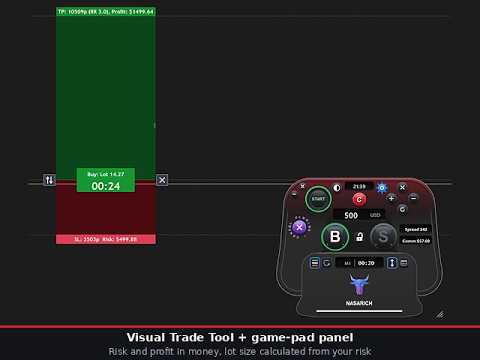
- Visual Trade Tool: green TP zone and red SL zone with profit / risk shown in money,
  drag the tool to place a pending order, click the order box to trade
- Real order lines with labels: Entry P/L, SL "Risk -xx USD", TP "Profit +xx USD";
  drag SL / TP / pending entry directly on the chart to modify the order
- Manage Trades window: all positions and pending orders, tick rows,
  Close / 50% / 80% partial close, close a single trade with one click
- Close all, cancel pending orders, spread and commission display
- Real-time clock and candle countdown
- Dark / Light / Auto theme, resizable panel, in-chart settings window
- Sounds use MetaTrader 5's own sound files

NOTES
- The panel draws its own Bid/Ask lines and order lines under the panel
  so they do not cover the buttons. The terminal's own lines are restored
  when the panel is removed. Both can be switched off in the settings.
- In the Strategy Tester the panel opens small demo trades so the testing
  shows trading activity. On a live chart it only trades when you click.

This product is a trading tool. It does not trade automatically and
does not guarantee any profit. Test on a demo account first.
推荐产品
HedgeSafe Trade Assistant 一款以风险控制为核心的 MetaTrader 5 手动交易面板。 HedgeSafe 可帮助您在点击 BUY 或 SELL 之前,直接在图表上准备、验证和管理交易。 HedgeSafe 不是信号服务、行情预测工具、AI 机器人或自动交易策略。它不会替您选择交易方向,也不承诺盈利。每项交易决定均由交易者本人负责。 主要功能 按账户余额百分比或账户货币中的固定金额计算手数。 按点数或价格规划 Stop Loss;按点数、价格或 R 倍数规划 Take Profit。 实时预览风险金额、潜在收益、手数和风险回报比。 图表上的 Entry、Stop Loss 和 Take Profit 线与面板数值同步。 分别显示 BUY 与 SELL 的就绪状态,并在执行前进行方向相关的最终检查。 验证最小/最大交易量、交易量步长、tick size、tick value、stops level 和 freeze level。 检查市场可用性、品种交易模式、点差、允许偏差及 filling mode。 识别 hedging 与 netting 账户,并说明
Trade Copilot - 黄金(XAUUSD)及任意品种的半自动风险管理面板 Trade Copilot 是一款半自动交易面板,专为希望拥有EA纪律性、同时保留自主入场控制权的手动交易者设计。您决定方向和价位,面板自动计算风险仓位、设置止损、管理止盈并保护交易。 主要功能 - 基于风险的手数计算 - 可选择风险百分比、风险金额或固定手数;面板根据止损距离自动计算仓位大小 - 3种止损模式 - ATR倍数、固定点数或固定美元距离 - 一键市价单与挂单 (立即买入/卖出、挂单买入/卖出),入场/止损/止盈线可拖动调整 - 网格交易 - 在价格区间内按钟形曲线分布手数放置一系列挂单(并非马丁格尔 - 手数由距中心的距离决定,亏损时绝不加倍) - 多重止盈 (最多4级) - 可拖动止盈线,分别位于主目标距离的20/40/60/80%处;每个级别部分平仓,应用后视觉上锁定 - 自动保本 (+点差) - 将止损移至真正的保本位,并计入当前点差,避免小幅亏损离场 - 4种自动移动止损模式 - 固定步长、ATR距离、前一根K线高低点、或移动平均线 - 风险防护 (Risk Guard)
Hisoka Trade Panel — v6.91 Description: Hisoka Trade Panel is a comprehensive on-chart trade management Expert Advisor for MetaTrader 5. It places a draggable, collapsible panel directly on your chart and lets you manage open positions — break-even locks, trailing stops, partial closes, and SL/TP modification — with one click. All risk math is dollar-based, so the same "BE 5$" button locks $5 of profit consistently across XAUUSD, BTCUSD, EURUSD or any other instrument, regardless of contract siz
一个 EA 顶十几个工具:交易助手、风险管理和 17 个指标集成在一个面板里。放到图表上,一切尽在掌握。   首发价:前 20 份仅 $49 ,之后 $99 。五折优惠,仅限现在。   一键交易 手数按账户风险百分比自动计算 —— 告别计算器。任意周期的分形止损或手动止损,按 R:R 设置止盈, TP1/TP2/TP3 分批平仓,一键保本,波段追踪。挂单?点一下图表 ——Entry/SL/TP 已就位。日回撤限制会在该停手时锁定交易。支持快捷键。所有功能在可视化测试器中完整可用 —— 用历史数据打磨策略。   17 个指标 —— 全部多周期(最多同时 10 个周期) • 交易时段 —— 亚洲 / 伦敦 / 纽约区间盒、延伸枢轴、区间 VWAP 和斐波那契:一张图看清全天结构 • 订单块 ——10 个周期同时自动识别,触碰后变色或删除 —— 区域始终新鲜 • FVG—— 带中线的缺口,自我管理:触碰变色,破坏消失 • 通道 —— 按波段自动构建的平行通道,始终最新 • 斐波那契 —— 周期自动斐波那契, 31 个可选水平,扩展和嵌套网格 • 趋势线 —— 基于波段,带 HH/HL/LH/
多个EA共用一个账户时,MetaTrader只显示一个余额。一个默默亏损的EA可以在盈利EA的身后藏上好几个月,等账户缩水时您才发现。 Halberd Portfolio Monitor 按魔术号把每个EA单独列成一行 :交易次数、胜率、盈利因子、净结果、回撤、持仓和健康状态。风险视图显示某个策略是仍在正常范围内,还是已开始失效;当账户越过您设定的界限时,它还能提醒您。 把它挂到该账户的任意图表上即可。它读取已有的历史记录,第一批结果立刻就会出现。 本程序不会开仓、修改或平仓。它只读取您自己账户的历史和当前持仓,数据不会离开终端。 每个策略显示的内容 交易数、胜率和盈利因子。 净结果、最大回撤,以及从自身高点算起的当前回撤(基于已平仓交易,账户货币)。 最近时段(默认 30 天)的结果。 当前持仓及其浮动盈亏。 该策略的小型资金曲线。 整个账户的合计行。 交易按开仓订单的魔术号分组,因此您手动平掉的仓位仍计入开仓的 EA。手动交易(魔术号 0)单独一行。也可以按魔术号加品种、或仅按品种分组,并为每个魔术号设置易读的名称。 健康状态 每个策略有一个状态,问题一目了然: ALERT :当前
ZoneStrike
Amir Nejatbakhsh
ZoneStrike Trading Assistant is a manual trading panel for MetaTrader. You decide when and where to trade; ZoneStrike handles the position sizing, the order placement and the trade management, and draws the market structure you are reading straight onto the chart. **** It is not an automated robot. It never opens a trade on its own — every entry is yours. PLAN THE TRADE ON THE CHART Press Buy, Sell, Pending Buy or Pending Sell and the trade appears on the chart before it is live: an entry lin
Prop Calculator Assistant  告别因计算失误而导致的外盘自营 (Prop Firm) 爆仓。让助手为您把控风险。 Prop Calculator Assistant 是一款专为正在参加挑战赛(如 FTMO,s 等)或管理资管账户的交易员设计的终极交易管理面板。它取代了繁琐的心算和手动拖拽订单,通过精准的视觉化界面,确保您的每一笔交易都严格遵守纪律。 这不是一个猜测市场的自动交易机器人。这是一个为追求极致精准的交易员打造的专业 操纵台 (Cockpit) 。您负责寻找机会,助手负责计算手数、下单并自动管理出场。 ️ 为什么自营交易员需要它? 告别手数计算失误: 仅需在图表上拖动 入场线 (Entry) 、 止损线 (SL) 和 止盈线 (TP) ,面板会立即根据您的风险偏好(例如 1.0% 或 $100)计算出精确手数。 守护每日亏损限额: 内置的 每日亏损防护器 (Daily Loss Protector) 实时跟踪净值。一旦触及每日亏损限额,助手会自动锁定“买入/卖出”按钮,从物理层面杜绝情绪化的报复性交易。 自动化的交易管理: 一旦入场,助手将接管后续操
Recovery Manager Panel MT5 is a manual order management panel for traders who want to manage open positions directly from the chart in a clearer and more organized way. This tool is not a signal robot. It does not predict market direction, generate entry signals, or trade automatically based on market forecasts. Instead, it helps traders work with positions that are already open. You can calculate possible recovery lot sizes, view estimated target levels on the chart, and use available floating
CosmiCLab FIBO
Kirils Subins
CosmiCLab SMC FIBO CosmiCLab SMC FIBO is a professional trading indicator designed for traders who use Smart Money Concepts (SMC), market structure analysis and Fibonacci retracement levels. The indicator automatically detects market swings and builds Fibonacci levels based on the latest impulse movement. It also identifies market structure changes such as BOS (Break of Structure) and CHOCH (Change of Character), helping traders understand the current market direction. CosmiCLab SMC FIBO also pr
Global Stop Loss and Take Profit Manager Drag Lines Auto Apply Already using my free Global Stop Loss and Take Profit Setter? This is the always on version. Instead of setting levels once, you drag two lines on the chart and every manual position on that symbol — plus every new one you open — instantly inherits the Stop Loss and Take Profit. No clicking into each order. No forgetting a stop. Global Stop Loss and Target Manager is a drag-and-drop risk tool for manual traders on MetaTrader 5. Pu
TradeManager Control Suite Manual trading with structured planning and controlled risk TradeManager Control Suite is a comprehensive trading panel for MetaTrader 5. It helps you prepare trades directly on the chart, calculate position size, place orders and manage open positions according to a plan defined in advance. You remain responsible for every entry. The application does not trade independently and does not use an automated trading strategy. It performs the calculations, sends the orde
Equity Sculper EA
Christopher Calmerin
Put your trading profits to work. Equity Sculptor EA is an MT5 trade-management tool that uses new closed profits to gradually reduce losing positions across your account. Account-wide management: All symbols and magic numbers, including manual trades. Two funding modes: Rescue Wallet or Legacy Balance. Flexible settings: Customize profit allocation, trim size and trade selection. Clear dashboard: View your funds, performance and configurations. Persistent tracking: Saved accounting continues af
DDKiller Pro
Njaratahiry Michael Randrianiaina
Stop Blowing Your Account. Once and For All. DDKiller Pro is the MT5 risk guardian that runs silently on your chart and shuts down trading the moment you hit a limit — whether you're grinding a prop firm challenge or managing your own CFD account. The problem every trader knows: You set your rules. You break them anyway. One revenge trade. One overleveraged position. One session that erases a month of gains. DDKiller Pro removes that decision from your hands entirely. What it does: The second yo
TradeOS 是一个装在 MetaTrader 5 图表上的面板。它按你设定的风险算出手数,帮你下单,按你写的规则照看这笔单子,盯着你的 Prop 账户限额和财经日历。收工之后,它告诉你当初那个计划最后变成了什么样。 方向和入场点由你自己定。TradeOS 不发信号,也不替你交易。 为什么还要再来一个面板 手数计算器谁都有。真正的差别,是在订单送到服务器之后才开始的。 TradeOS 会把你当初做的计划记下来,事后再拿去和实际发生的事对照。入场偏了多少,止损最后落在了哪里,滑点吃掉多少,实际成交了多少手。这些都按你的交易模式、品种和时段拆开看。结果往往不太好受:策略本身没问题,是执行把它吃掉了。 还有一件事,别的面板一般不做。TradeOS 会盯着你自己的行为。亏损三分钟后又进场、手数比平时大、当天第五笔单子,这些都会被标出来,统计里能看到这类交易到底让你付了多少钱。你也可以打开亏损后的强制冷静期,或者连亏几笔之后直接锁住。 计划和入场 建一个计划,选 BUY 还是 SELL,选 MARKET 还是 PENDING。入场、止损、止盈可以直接在图上拖,也可以在标签的价格框里敲进准确价格
RRtoolBox
David Ruiz Moreno
RRtoolbox - Professional Tools: Risk:Reward Trading Tool (SL/TP Horizontals + Pending orders + Diagonals), Alerts set on trend lines (for alerts on diagonal levels), SelfManagement (BE, partials...), close/cancelling by time, Statistics, Info and trading on chart. One-Click Trading with Visual Risk:Reward Management RRtoolbox is a comprehensive trading panel that combines one-click order execution,  statistics and  powerful visual Risk:Reward tools, alerts set with trendlines, on chart butt
EA SB8 Panel Trade
Juan Manuel Bernal Martin
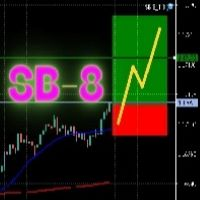
SB-8 – Manual Trading Panel with Fixed Risk & TradingView-Style Visualization for MT5 SB-8 is an advanced manual trading panel for MetaTrader 5 , designed to execute trades visually, quickly and without calculations . It is especially built for traders coming from TradingView , who often find MT5 confusing when it comes to risk management and trade visualization. With SB-8, you don’t calculate lot size, percentages or risk . You simply move the Stop Loss line , and the panel handles everything a
Open Risk Budget Cap enforces a total open stop-loss risk budget across your account. It does not choose direction and does not open discretionary trades on a live chart. Attach it to one chart; the symbol and timeframe do not matter. What it measures Every open position and every pending order is priced to its stop-loss in account currency using OrderCalcProfit. Positions or orders without a stop-loss are counted and shown on the panel as "without stop-loss". They are excluded from the budget
Tarnix Evenlock
AL MOOSAWI ABDULLAH JAFFER BAQER
A BREAKEVEN STOP THAT STILL LOSES THE COMMISSION IS NOT BREAKEVEN. TARNIX EVENLOCK LOCKS THE REAL ONE. Tarnix Evenlock is a breakeven lock for MetaTrader 5 that counts what the trade really costs. When a position in scope, opened by hand or by another Expert Advisor, has moved in its favour by the trigger you choose (N x ATR, stored the moment the trade is first seen, or a fixed number of points), its stop loss is moved to the entry plus a buffer that pays the spread cushion, the round-turn comm
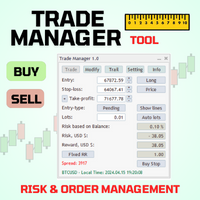
Product introduction : Trade Manager Tool for MT5 Trade Manager Tool will help trader calculate almost exactly the risk based on your account automatically. Along with that, there are features to support capital preservation with Trailing Stop, BreakEven, Risk Limit such as Daily Limit Profit/Loss,etc.. helps you avoid overtrading.In particular, the panel is simply designed with many interactive buttons inside the panel and outside the chart to help trader interact more easily.These features re
Account Monitor Pro — Your Ultimate Trade Statistics Hub Account Monitor Pro is a professional information dashboard designed for traders who combine Expert Advisors (EAs) and manual trading. The indicator separates statistics in real-time based on your Magic Number, allowing you to clearly see who is driving the profit: the algorithm or yourself. Key Features: Split Monitoring: Instant separation of "Robot" positions (by Magic Number) and "Manual" trades. Multi-language Support: 11 languages in
FREE
GOLD TRACK — MT5 Gold Track is a technical analysis indicator designed primarily for XAUUSD / GOLD trading on MetaTrader 5. It combines multiple market conditions into a structured signal system, helping traders identify potential bullish and bearish setups without relying on a single indicator. Key Features EMA Trend Analysis RSI Momentum Confirmation ️ ATR Volatility Analysis ️ Candle Confirmation ️ H1 Multi-Timeframe Confirmation Market Structure Analysis Liquidity Anal
Virgilio is a multifunction control panel consisting of several panels, each of which performs one of the most useful functions used by traders. Its aesthetic is unique, designed to blend into any working environment and offer a user experience that makes work even more enjoyable. Its operativity is simple and intuitive, developed with attention to details to be as userfriendly as possible. Its main panel displays all the basic account and chart data. The first panel offers the user the possib
Trade Panel Pro — MetaTrader 5 专业风险管理与订单执行终端 Trade Panel Pro 是一款先进的一体化 MetaTrader 5 交易与风险管理工具。它专为活跃日内交易者和专业人士打造,将精准的风险计算与极速的订单执行完美结合,助您保护资本,并轻松管理多目标交易。 主要优势与核心功能 自动手数计算: 告别繁琐的手动计算!面板可根据您设定的美元风险金额和止损距离,瞬间计算出精准的入场手数。 ️ 完全交互式视觉线条(杀手级功能): 告别盲目输入数字。直接在图表上拖动入场线 (EP)、止损线 (SL) 和止盈线 (TP) 来管理交易。当您移动线条时,所有风险指标、手数大小和潜在盈利都会实时动态重算! 全面多语言支持: 面板界面自动适配您的语言环境。支持 11 种全球主流语言,确保交易体验舒适便捷。 内置 ATR 波动率仪表盘 通过图表左下角紧凑整洁的 ATR 数据面板,随时掌握市场脉搏: ATR (5D / 12D): 显示当前的波动率数值。您可以根据自己的交易风格,在面板设置中自由切换 ATR 计算周期(5 天或 12 天)。
Forget about enabling templates when you launch the window. Auto Template Master Service  is a professional utility tool that runs as a system service in MetaTrader 5, and it will do it for you. Unlike traditional indicators or expert advisors (EAs), the program runs in the background of the entire terminal and doesn't require you to add it to each window individually. As soon as you open a new chart of any instrument (Forex, Stocks, Crypto), the service immediately detects the new window and a
Trade Assistant MT5 Pro – One Click Trading Panel | Auto Lot Size | Risk Management Tool Short Description Trade Assistant MT5 Pro is a professional trading utility for MetaTrader 5 that allows traders to execute trades with one click, manage risk automatically, and improve trading accuracy using advanced tools like ATR stop loss, risk reward ratios, breakeven, and trailing stop. Full Description Trade Assistant MT5 Pro is a powerful manual trading panel designed for traders who want speed, prec
Trading Manager — 执行和管理交易的面板,风险始终清晰可见 Trading Manager 是一款手动交易助手,在图表上的一个面板中完成整个交易流程。您选择方向和风险,设置止损和止盈,面板会计算手数,并在发送订单之前显示止损处的亏损和目标处的盈利。之后,您可以在同一张表格中管理一个或多个持仓。何时交易、朝哪个方向交易由您决定:它不生成信号,也不预测市场。 功能一览 根据风险计算手数。 风险可设为余额的 %、净值的 %、金额或固定手数。手数根据到止损的距离以及您的经纪商提供的品种数据计算,并按最小手数和手数步长进行调整。如果低于最小手数,您可以选择阻止该订单,或使用最小手数并查看由此产生的风险。 发送前即可看到风险。 止损处的亏损和止盈处的盈利(以金额和 % 表示)、收益风险比、保证金和点差;当点差相对于止损过高时会发出警告。发送前还会进行最后一次检查:如果风险上升超过 10 % 或手数增加,订单将不会发送。 在图表上规划。 可用鼠标拖动的入场线、止损线和止盈线,带有标签以及风险和收益区域。止损和止盈可按距离或按价格设置;止盈还可按收益风险比设置。 市价单和挂单。 市价买
SL Based TP Multiplier
Muhammad Hassan Muhammad Ahmad Atiyah
Smart TP by Risk Ratio MT5 脚本 – 根据止损计算止盈 概述 Smart TP by Risk Ratio 是一款 MetaTrader 5 脚本,根据开仓价与止损的距离,乘以用户定义的系数(R-Multiple)计算止盈水平。 脚本 每次执行一次 ,可应用于当前图表品种或账户所有已开仓位。 不开仓,计算需要已有止损。 功能 TP计算: 根据止损距离和比例系数设置止盈(例如 1:2, 1:3)。 交易品种: 应用于当前图表或所有开仓品种。 达到目标立即关闭: 可选择,如果当前价格已超过目标立即关闭仓位。 输入参数 Ratio Multiplier: 风险距离倍数。 Apply To All Symbols (true/false): 是否应用于所有仓位。 Close If Reached (true/false): 当前价格超过目标时关闭仓位。 重要说明 必须在仓位上设置止损。 仅脚本,不是EA。 不开仓,不管理其他订单。
Breakevan Utility
Jose Luis Thenier Villa
BreakEvan Utility  Is a simple tool in a panel with this utilities: This utility will draw a Golden Line in the chart applied showing the breakeven price, considering all the positions opened for that specific symbol. Also the information panel shows: Balance Breakeven Price for that chart Force Breakeven (for that symbol) as ON/OFF Force Breakeven Global (takes into account all trades opened) as ON/OFF Total Lots opened for Symbol Total Lots opened Global And two buttons: Force Breakeven: Whe
Forge Trade Manager MT5
Julio Paulo Dias Da Costa
Forge Trade Manager manages your open MT5 positions, so you do not have to watch every trade. Break-even: at X points of profit, moves the stop loss to entry plus a buffer (once per position). Trailing stop: starts at X points, with your distance and step; the stop only moves in your favour. Partial close: at X points, closes a percentage of the position once, respecting your broker's lot rules. Basket profit protection (optional, off by default): closes everything in scope at a profit target in
One4Allassistant: Your All-in-One Manual Trading Assistant for MT5 Version 2.2 Trade faster, manage risk clearly, and keep your whole chart under control from one clean, draggable panel. ::What you get:: One-click trading: Set your lot size, enter your target profit and stop loss in USD, and press BUY or SELL. TP and SL are calculated for you. Pending order ladders: Buy Limit, Sell Limit, Buy Stop and Sell Stop panels let you place many orders at once. Set the start offset, TP, SL, order count
该产品的买家也购买
Trade Assistant MT5
Evgeniy Kravchenko
4.43 (216)
它有助于计算每笔交易的风险,容易安装新的订单,具有部分关闭功能的订单管理, 7 种类型的追踪止损和其他有用的功能。   附加材料和说明 安装说明   -   应用程序说明 线条功能  - 在图表上显示开仓线、止损线、止盈线。 有了这个功能,就可以很容易地设置一个新的订单,并在开仓前看到它的附加特性。   风险管理  - 风险计算功能在考虑到设定的风险和止损单的大小的情况下,计算新订单的成交量。它允许你设置任何大小的止损,同时观察设定的风险。 批量计算按钮 - 启用 / 禁用风险计算。 在 " 风险 " 一栏中设置必要的风险值,从 0 到 100 的百分比或存款的货币。 在 " 设置 " 选项卡上选择风险计算的变量: $ 货币, % 余额, % 资产, % 自由保证金, % 自定义, %AB 前一天, %AB 前一周, %AB 前一个月。   R/TP 和 R/SL - 设置止盈和止损的关系。 这允许你设置相对于损失的利润大小。 例如, 1 : 1 - 这决定了 TP = SL 的大小。 2 : 1 - 这意味着 TP 是 SL 的两倍。 RR - 它禁用比率。   订单管理 该面板支
Telegram to MT5 Multi-Channel Copier   可将您 Telegram 和 Discord 频道中的交易信号自动复制到 MetaTrader 5。无需机器人、无需浏览器扩展、无需手动复制。信号一到 Telegram 或 Discord,EA 几秒内就在您的终端开仓。 在复制某个频道之前,内置回测器还能告诉您该频道在您的账户上会有怎样的表现。 产品包含两个组件:一个监听您 Telegram 频道的 Windows 应用程序,以及在 MT5 终端执行信号的本 EA。同时提供 MT4 版本   点此 . 购买前先试用:   应用程序可免费下载。连接您自己的频道,查看每条信号的读取结果。Backtest 选项卡和实际交易需要已购买或已租用的 EA。本页面的免费演示版只能在策略测试器中运行,而策略测试器无法读取 Telegram 和 Discord。 设置指南与应用下载:   https://www.mql5.com/zh/blogs/post/779480 了解如何 回测任何 Telegram 信号频道 。 当前价格将来会上调。 工作原理 应用通过您自己的 Te
Farmed Hedge Yield Farming | All Markets (Manual - Hybrid - Semi/Automated EA) VERIFIED TRADING RESULTS - Farmed Hedge Yield Axi Copy:  https://www.mql5.com/en/signals/2356376 - Farmed Hedge Yield Exn Copy:   https://www.mql5.com/en/signals/2356404 - Farmed Hedge Yield V Copy:  https://www.mql5.com/en/signals/2357156 IMPORTANT NOTICE: FarmedHedge is a MANUAL-FOCUSED TRADING UTILITY ,not a fully automated EA. Results shown on this Signal include manual trades and overall strategic management.
TradePanel MT5
Alfiya Fazylova
4.89 (176)
交易面板是一款多功能交易助手。该应用包含超过50种手动交易功能,并允许您自动执行大多数交易任务。 应用程序说明 : https://www.mql5.com/zh/blogs/post/761102 用于模拟账户的应用程序试用版: https://www.mql5.com/zh/blogs/post/762579 如何安装应用程序: https://www.mql5.com/zh/blogs/post/762580 如何在可视化模式下测试应用程序: https://www.mql5.com/zh/blogs/post/770278 如何在VPS MetaTrader上安装应用程序: https://www.mql5.com/zh/blogs/post/770196 贸易. 只需单击一下即可执行交易操作: 打開掛單和頭寸,並自動計算風險。 一鍵打開多個訂單和頭寸。 打開訂單網格。 按組別關閉掛單和頭寸。 反轉頭寸方向(關閉買入>打開賣出,關閉賣出>打開買入)。 鎖定頭寸(通過開啟缺少的頭寸,使買入和賣出頭寸的數量相等)。 一鍵部分關閉所有頭寸。 將所有頭寸的止盈和止損設置在同一價格水平。
EA Overfitter
Stephen J Martret
5 (5)
回测看起来很漂亮。但它明天、下周、下个月还能继续赚钱吗? EA Overfitter 让您的 EA 在 100 段它从未见过的价格历史上重新运行。一个分数告诉您这个优势是否真实。 回测告诉您的,是 EA 在某一段价格历史上的表现——那段恰好发生过的历史。您无法从中判断,这个结果有多少来自策略本身,又有多少只是那一条特定路径带来的。 EA Overfitter 回答的正是这个问题。它构建最多 100 段您的 EA 从未交易过的合成价格历史,让策略在全部这些历史上重新运行,并展示它所产生的完整结果区间。您得到的不再是一条幸运或不幸路径上的单个数字,而是一幅真实的图景:策略在陌生数据上多久能赚钱、典型结果是什么样(而不是最好的那一次),以及您的回测离它有多远。 这些世界是由您自己的近期历史重建而成,因此这不是预测——任何从历史数据出发的检验都不可能是预测。它告诉您的是:这个优势是否依赖于价格的某一种特定排列,以及回测数字距离典型结果有多远。在投入资金之前,这才是值得回答的问题。 三个步骤 1. 构建。在图表上选择时间区间和世界数量,然后按 Build。EA Overfitter 会
AI Agent Supervisor is NOT an Expert Advisor. AI Agent Supervisor   is a   multi-agent AI risk & portfolio supervisor   that watches every EA on your account and intervenes in real time.  WANT AN AI PORTFOLIO MANAGER WATCHING YOUR FLEET 24/7?   Run your fleet on the same brokers I do:   IC MARKETS , IC TRADING   .  Unlike the centralized stock market, Forex has no single, unified price feed.  Every broker sources liquidity from different providers, creating unique data streams. The Supervisor r
================================================================================ POC BREAKOUT - V20.72. Full Professional Grade Toolkit ================================================================================ POC Breakout is a full MetaTrader 5 trading dashboard for discretionary traders who want breakout signals, Point of Control (POC) context, volume profiles, order flow, market structure, news, alerts, and advanced trade planning in one professional workspace. Attached directly to you
News Trade EA MT5
Konstantin Kulikov
4.55 (11)
在此向大家介绍一款我本人使用多年的机器人。该产品支持半自动和全自动交易模式。 >>> Chat <<< 本程序包含基于经济日历新闻的灵活交易设置功能。不支持策略测试器检验。仅可进行实际操作。 下載最新的設定檔: https://www.mql5.com/en/blogs/post/747929 訊號監控: https://www.mql5.com/en/signals/author/test-standart 请参考博客中各类参数说明自行实现个性化设置   : https://www.mql5.com/en/blogs/post/748545   。 主要默认设置说明 单一图表英镑/GBP(英镑美元/GBPUSD、欧元英镑/EURGBP、英镑日元/GBPJPY、英镑加拿大元/GBPCAD、英镑澳大利亚元/GBPAUD、英镑瑞士法郎/GBPCHF)货币对操作。英镑/GBP是波动性最大的货币,能够为用户顺利完成交易提供更多机会。 Use_Symbols_from_Line = true; Symbols_Line = GBPUSD, EURGBP, GBPJPY, GBPCAD, GB
EA Auditor
Stephen J Martret
5 (7)
EA Auditor is an independent analysis tool for traders evaluating Expert Advisors and trading signals on MetaTrader 5. It audits backtest reports, reviews posted developer signals, and cross-verifies the two against each other to help traders assess strategies before committing capital. The MQL5 market offers a wide range of Expert Advisors from many developers, with varying approaches, quality, and transparency. EA Auditor provides a consistent, data-driven framework for reviewing them, answer
Power Candles Strategy Scanner:自我优化的多品种交易设置扫描器 一个风吹草动就提醒的扫描器,只会让您学会忽略它。一根K线收盘时行情一热闹,提醒接连不断,您真正要做的那个交易设置就被淹没在噪音里。 Power Candles Strategy Scanner 在您 Market Watch 中的每个品种上运行自我优化的 Power Candles 引擎,只针对通过您自己筛选条件的内容发出提醒:最后一根已收盘K线的强度、交易设置的盈亏比、实时点差,以及您交易的资产类别。一旦某个品种进入您的列表,扫描器就会通知您。被您筛掉的一切保持安静,同一根K线收盘的所有命中合并成一条消息送达。 购买前先看看面板和每一个筛选条件。 截图、完整功能导览以及与 Power Candles 的配合流程: stein.investments/products/power-candles-scanner 本工具属于 Stein Investments 生态系统:18 款以上工具,外加 Max,您的一对一 AI 交易导师。  全天候在线,深入了解每一个指标,在您需要把事情想清楚的那一刻
下一次更新 — 版本 2.52 即将推出![全新功能] 准备迎接 4 项重大新功能,全面提升您的市场分析能力与交易流程! 我们将通过 4 项全新功能,进一步提升市场分析水平,满足您的交易需求。现为您介绍: 1. TRADE OVERVIEW DASHBOARD 2. CONFLUENCE AT ZONE 3. STRONG & WEAK HIGH/LOW 4. OTE 1. TRADE OVERVIEW DASHBOARD 一个帮助您更轻松地了解整体市场状况的仪表盘,为您的交易决策提供参考指引,帮助您系统地分析市场并规划交易,所有信息尽在一个屏幕中。 多时间周期市场概览(Multi-Timeframe Market Overview) 更清晰地了解市场方向与价格结构 快速查看市场状况 为系统化市场分析和入场规划提供指引。 2. CONFLUENCE AT ZONE 当价格进入关键区域时……您将了解有多少项支持因素相互吻合。 关键区域是交易决策至关重要的地方。但仅仅是价格进入某个区域还不够。此功能可帮助您在入场交易前,识别相互吻合的因素,包括信号及其他相关因素,从而进行更全面的分析,并
REVDEN AI Desk:依托 REVDEN 的市场背景,在与您自己的 AI 的一场对话中管理您的交易 设想一下,在一场对话中管理您的全部交易。 REVDEN AI Desk 将这一切带入 MetaTrader 5:您询问自己的 AI 如何解读市场,它依据 REVDEN 对您所交易品种的完整背景信息作答,包括这些品种的状态、风险状况和即将到来的数据发布。它的提案附带入场、止损、目标和风险,您从中批准合适的提案。您的规则也以同样的方式修改:写下需要改变的内容,您的 AI 就会为您起草新的规则手册,采用与否由您决定。围绕这场对话,整个市场呈现在同一个屏幕上。 查看交易台和设置指南。 每个界面、每项设置,以及与您自己的 AI 共同迈出的第一步: stein.investments/products/revden-ai-desk 与您的 AI 进行一场对话,用一个屏幕纵览市场,两者共享同一个数据基础。  用您自己的话: 就在图表旁边,询问市场、某个品种或某项提案。  依托 REVDEN 的背景信息: 您的 AI 读取您所选每个品种的状态、风险状况、即将到来的数据发布,以及您的持仓和您的规
Zentriq Trade Manager
Mark Frederick Siebert
Experience trading without friction. Zentriq Trade Manager is a modern, high-performance trade management utility engineered with a high-DPI canvas interface, anticipatory workflow design, and an integrated Macroeconomic News Filter. Designed for discretionary traders, scalpers, and prop firm traders who demand speed, precision, zero-clutter ergonomics, and automated news event protection. User Manual Get the most out of Zentriq Trade Manager with the complete user manual: Complete User Manual:
Unlimited Trade Copier Pro MT5 is a tool to copy trade remotely to multiple MT4, MT5 and cTrader accounts at different computers/locations over internet. This is an ideal solution for you if you are a signal provider and want to copy your trades to other receivers globally on your own rules. One provider can copy trades to multiple receivers and one receiver can get trade from multiple providers as well. The provider can even set the subscription expiry for each receiver, so that receiver will n
GRat Crypto
Ivan Titov
4.5 (2)
Trade on crypto exchanges in MT5 with no limits! GRat_Crypto is a tool for manual and automated trading , including ANY available EA, ANY  cryptocurrency  on most popular crypto exchanges in the familiar MT5 environment 24/7. Features 1. ALL instruments of the 9 most popular crypto exchanges are available: Binance, BingX, Bybit, Coinbase, CoinEx, Kraken,   KuCoin, MEXC and OKX . 2. The ability to place ANY type of order available in MT5, both market and pending, to modify orders and positions,
RETAILBERG FOOTPRINT CHART PRO — Order-Flow Workspace for MetaTrader 5 Version 7.00  |  Professional System  |  31 tools  |  One chart A full 150-page illustrated User Manual is included. Please read the full manual to understand this feature packed footprint chart elements and ui. https://www.mql5.com/en/blogs/post/777982 DEMO / STRATEGY TESTER — PLEASE READ FIRST
Trade Indicator Assistant   is a powerful MT5 utility designed to turn indicators into automated trading systems. Its main feature is the ability to automatically detect an indicator’s   BUY and SELL signal buffers , without requiring you to know the buffer numbers, search through indicator settings, or modify the indicator source code. Bonus Indicator:   After purchasing Trade Indicator Assistant, contact me to receive   Trade Signal Pro   completely free as a bonus indicator. [Download Demo V
Strategy Builder offers an incredible amount of functionality. It combines a trade panel with configurable automation (covert indicators into an EA), real-time statistics (profit & draw down) plus automatic optimization of SL, TP/exit, trading hours, indicator inputs. Multiple indicators can be combined into an single alert/trade signal and can include custom indicators, even if just have ex4 file or purchased from Market. The system is easily configured via a CONFIG button and associated pop-u
Bots Builder Pro MT5
Andrey Barinov
4.17 (6)
This is exactly what the name says. Visual strategy builder . One of a kind. Turn your trading strategies and ideas into Expert Advisors without writing single line of code. Generate mql source code files with a few clicks and get your fully functional Expert Advisors, which are ready for live execution, strategy tester and cloud optimization. There are very few options for those who have no programming skills and can not create their trading solutions in the MQL language. Now, with Bots Builde
发现信号很好,但提供商的信号太小?您需要更大的持仓量,但终端设置太差?信号手数管理器将通过所需交易量的重复订单来增加提供商的头寸交易量。 只需设置手数大小和用于复制订单的信号名称即可。 Signal Lot Manager 是一个批量乘数实用程序,用于在您的终端上复制订单。来源可以选择任何顾问、手动交易、单独的交易信号。它具有广泛的功能、简单的设置以及高速度和可靠性。 Signal Lot Manager 安装和输入指南 如果您想获取有关 EA 的通知,请将我们的 URL 添加到 MT4/MT5 终端(参见屏幕截图)。 MT4版本     https://www.mql5.com/en/market/product/34864 MT5版本     https://www.mql5.com/en/market/product/41610 一般输入: 信号标题:信号的名称(您可以从信号顺序注释中复制它)。 最大限度。滑点:开仓交易可接受的最大滑点。因此,如果当前价格超过最高价格。与信号订单的入场价格相比的滑点距离,交易不会被复制。这对于防止复制交易出现不必要的滑点非常有用,特别是在高波动
Gamma Edge Pro MT5 — GexBot Classic API Integration Gamma Edge Pro brings institutional-grade Gamma Exposure (GEX) data directly onto your MetaTrader 5 chart — the same data used by professional options traders to anticipate price magnets, hedging flows, and dealer positioning. Powered by the GexBot Classic API, this indicator automatically maps options market data from US-listed instruments onto any MT5 CFD instrument — Forex pairs, Gold, indices, and more — with intelligent price conversion bu
The Patch
Mian Rameez Ali
The Patch It never opens a trade. It walks behind the ones that did. Every open position, every pending order — checked twice a second for the one thing that's easy to forget: a stop, a target. Found bare, it doesn't ask. It writes the missing number in, measured in points from wherever the position began, and moves on to the next. No strategy, no opinion on direction. Just the quiet assumption that nothing should ever sit on the market unprotected — not because someone decided it shouldn't,
Elliott Wave Helper
Siarhei Vashchylka
4.93 (14)
Elliott Wave Helper is a panel for constructing wave analysis. Manual (Be sure to read before purchasing) | Version for MT4 Advantages 1. Constructing wave analysis and wave structure in a few clicks 2. Availability of all wave analysis patterns, including triangles and combinations 3. All nine wave display styles, including a special circle font 4. Change colors and display styles of wave groups directly from the chart 5. Binding all elements to a set timeframe or timeframes 6. A template syste
Auto DCA EA
Truong Giang Hoang
5 (1)
All new interface and function Add telegram notify (you have to get Telegram bot API and chat ID). With this ea, you can earn 10-40% even more profit/month! 1. This EA is used to automatically take profit or DCA your orders on MT5 according to the parameters you set. You can enter first order on your phone or MT5 terminal on your computer and it automatically take profit or DCA your orders. 2. Enter buy/sell limit-stop price * Buy limit price/ Sell limit price/ Buy stop price/ Sell stop price:
YuClusters
Yury Kulikov
4.93 (43)
Attention: You can view the program operation in the free version  YuClusters DEMO .  YuClusters is a professional market analysis system. The trader has unique opportunities to analyze the flow of orders, trade volumes, price movements using various charts, profiles, indicators, and graphical objects. YuClusters operates on data based on Time&Sales or ticks information, depending on what is available in the quotes of a financial instrument. YuClusters allows you to build graphs by combining da
MT5 Trading Deck
Manuel Michiels
5 (2)
One button. One trade. MT5 Trading Deck is a hotkey trading panel for MetaTrader 5 that turns the platform into a keyboard-driven execution cockpit. Stop loss, take profit and lot size are pre-calculated for every key; the moment you press, a market order is live on the broker. A complete technical user manual is attached in the product Comments section. It documents every input parameter, the full hotkey map, the recommended Stream Deck XL layout, and the advanced workflows for Pre-Limit orders
Floor Watch
Syed Tauqeer Hussain Shah
Floor Watch One number, watched every thirty seconds: how far equity has fallen since the day began — or since its highest point, if it's told to trail the peak instead of the open. Cross the line and it doesn't argue. Every open position closes, every pending order vanishes, and anything that slips through afterward gets shut the moment it appears. Not asked. Removed. The floor holds until the clock turns 5 AM Pakistan time — then, and only then, does the day start over. One rule. No except
FUTURES ORDERFLOW FOOTPRINT CHART Professional OrderFlow EA for MetaTrader 5 Version 1.01| Professional tool for real traders | Institutional-Grade Visualization STRATEGY TESTER USERS - PLEASE SELECT EVERY REAL TICK WHEN TESTING AND YOU HAVE DOWNLOADED HISTORICAL DATA. IF YOU SEE A WAITING SCREEN AND IT IS NOT DOWNLOADING, IT MEANS YOU HAVE LOW HISTORICAL DATA. TRY 1 MIN AND 5 MIN FIRST ON 1 DAY DATA. ONE DAY DATA SHOULD BE THE NEWEST AND MOST CURRENT DATE. PLEASE WAIT UNTIL THE MARKET HAS ROL
The product will copy all  Discord  signal   to MT5   ( which you are member  ) , also it can work as remote copier.  Easy to set up. Work with almost signal formats, support to translate other language to English Work with multi channel, multi MT5. Work with Image signal. Copy order instant, auto detect symbol. Work as remote copier: with signal have ticket number, it will copy exactly via ticket number. How to setup and guide: Let read all details about setup and download Discord To MetaTrader
EasyInsight AIO MT5
Alain Verleyen
4.92 (12)
EASY Insight AIO – 全能智能交易一站式解决方案 概述 想象一下,您可以在几秒钟内扫描整个市场——外汇、黄金、加密货币、指数,甚至股票——无需手动筛选图表、繁琐安装或配置指标。 EASY Insight AIO 是您专为 AI 交易打造的即装即用数据导出工具。它将整个市场快照一次性输出为简洁的 CSV 文件,直接支持 ChatGPT、Claude、Gemini、Perplexity 等各类 AI 平台的即时分析。 无需窗口切换,无需图表叠加,也没有任何杂乱。只需纯净、结构化的数据自动导出,让您专注于基于数据的高效决策,无需再盯盘耗时。 为什么选择 EASY Insight AIO? 真正的一体化 • 无需设置,无需安装指标,无图表叠加。只需安装、运行并导出——就是这么简单。 多资产全覆盖 • 扫描分析外汇、金属、加密货币、指数、股票——您的券商所能提供的一切市场。 AI 专属数据导出 • 高度结构化、针对 AI 优化的 CSV 文件,直接适配主流智能工具和平台。 完整导出内容: • 三个可选周期的货币强度分析 • 净多头头寸变化体现市场情绪 • 成交量变化、
筛选:
无评论
回复评论