Pending Order Grid MT4

The Pending Order Grid is a multi-symbol multi-timeframe script that enables multi-strategy implementation based on pending order grids. 

General Description 

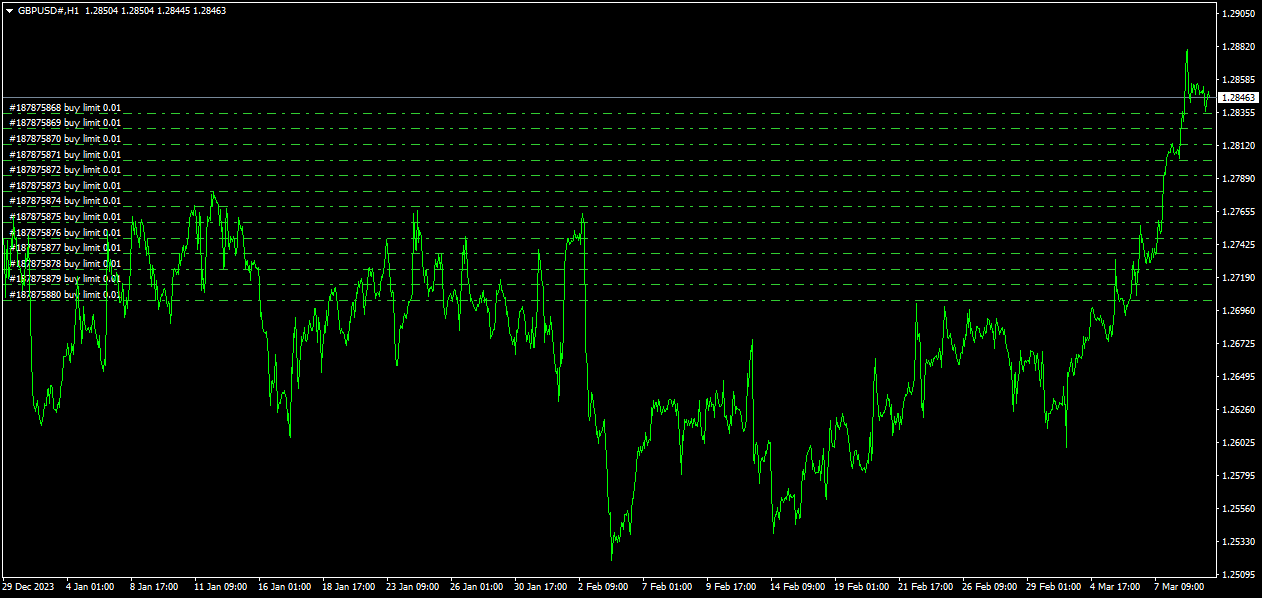
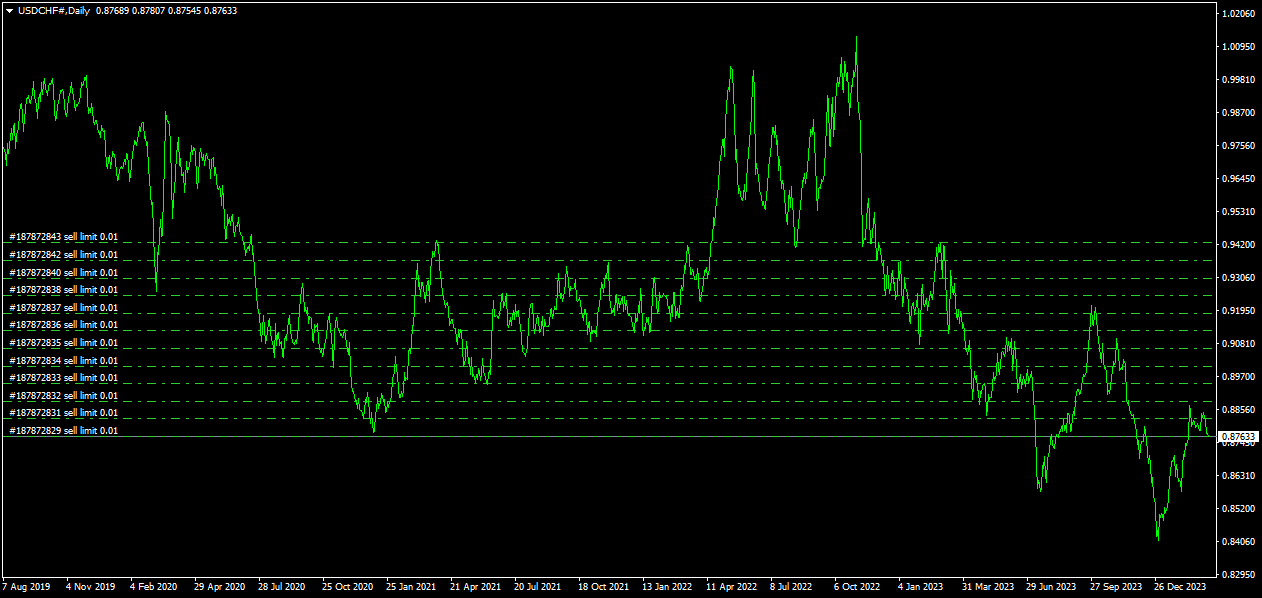
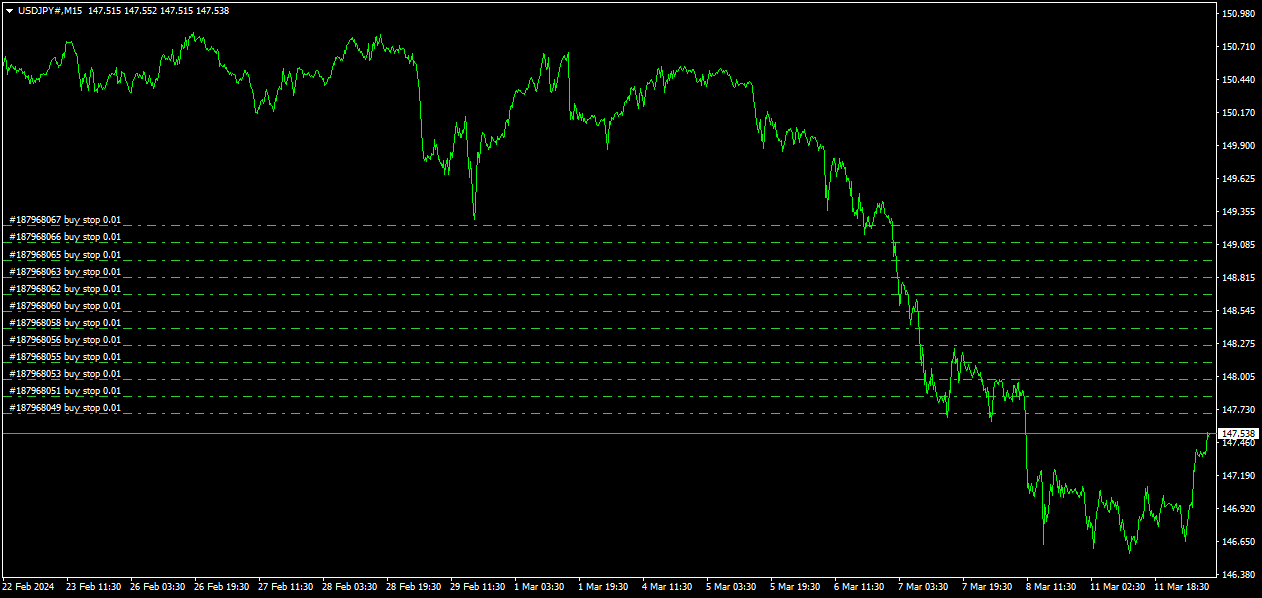
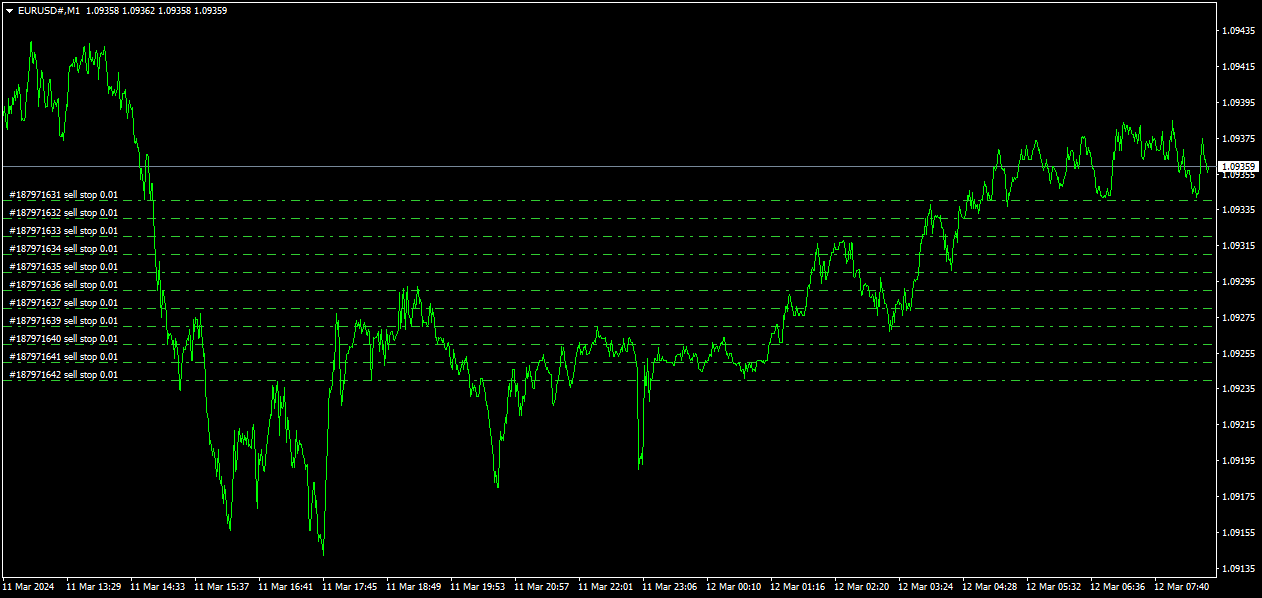
The Pending Order Grid allows the performing of a user-defined strategy through the creation of pending order grids. The script places pending orders of a given type (Buy Limit, Sell Limit, Buy Stop, or Sell Stop) at equidistant price levels to form each grid. The beginning and finish of every grid are defined by the Start Price and Stop Price input parameters, respectively. The user might set up different grids to exist simultaneously – it's only needed to execute the script multiple times at the chart window(s) of the intended symbol(s). 

Risk Management 

The volume used to place a pending order is chosen between a fixed and a variable lot size, available through the Volume and Free Margin % input parameters, respectively. If there isn't enough money in the account for the chosen volume, a request for placing the order is still sent to the trade server. The purpose is to allow the corresponding position opening if the free margin increases enough until the target price is reached. This increase could be due to an account deposit or position profit between the placing and triggering of the pending order. 

Input Parameters 

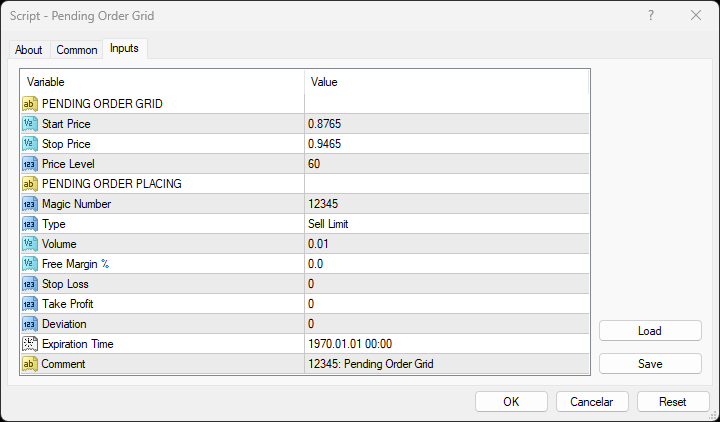
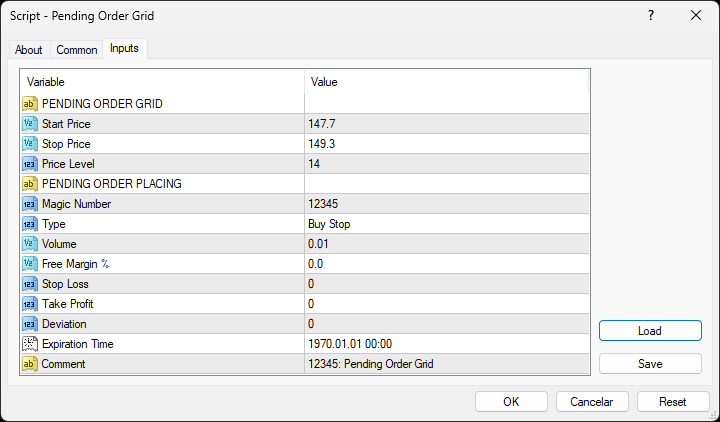
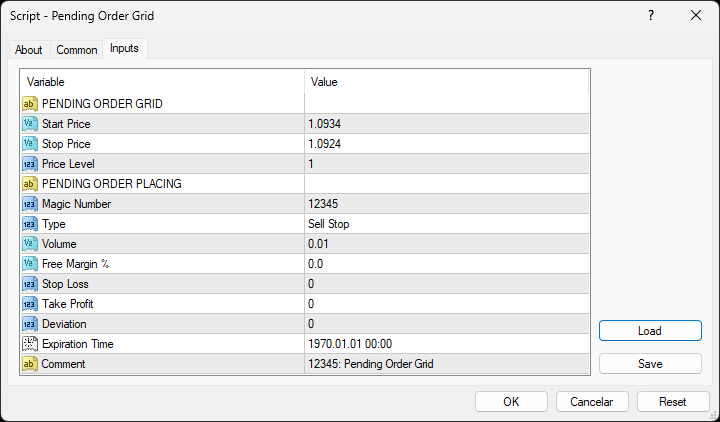
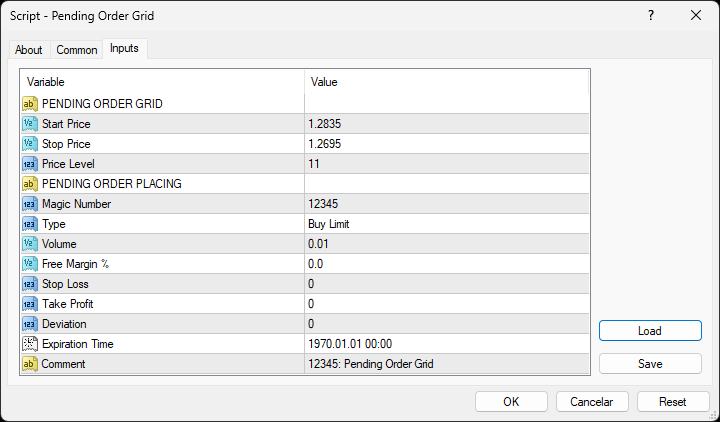
PENDING ORDER GRID 

  • Start Price: Price used to define the grid’s start. 
  • Stop Price: Price used to define the grid’s stop. 
  • Price Level: Distance used between pending orders of the same type (pips). 

PENDING ORDER PLACING 

  • Magic Number: Script’s identifier. 
  • Type: Pending order type used to form the grid. 
  • Volume: Lot size per deal (lots). 
  • Free Margin %: Percentage of account free margin used to calculate the lot size per deal (%). 
  • Stop Loss: Distance from the pending order's target price for placing a Stop Loss (pips). 
  • Take Profit: Distance from the pending order's target price for placing a Take Profit (pips). 
  • Deviation: Maximum allowed slippage from the requested price (pips). 
  • Expiration Time: Order validity period. 
  • Comment: Text message displayed in the Trade or Account History tabs of the Terminal window and Objects list after placing a pending order (it only allows 31 characters).

Some of the available parameters accept values that lead to particular options. 

  • Price Level: A null value means that the target price is constant for all pending orders. 
  • Volume: A value lower than the minimum allowed volume by the broker is converted in this last. A value higher than the maximum available volume by the free margin is converted in this last. 
  • Free Margin %: A value whose volume doesn’t reach the minimum allowed volume by the broker is converted in this last. A value whose volume exceeds the maximum available volume by the free margin is converted in this last. 
  • Stop Loss or Take Profit: A null value means the parameter’s inactive function. Any value between 0 and the Stop Level is converted in this last. 

The input parameters that define the start and stop of the grid must obey a few rules. 

  • Both the limits of the grid must be selected: Start Price and Stop Price. 
  • Buy Limit or Sell Stop orders grid: The Start Price cannot exceed the Ask/Bid price minus the Stop Level, respectively. The Stop Price cannot exceed the Start Price. 
  • Sell Limit or Buy Stop orders grid: The Start Price must equate/exceed the Bid/Ask price plus the Stop Level, respectively. The Stop Price must equate/exceed the Start Price. 

Displayed Information 

The script possesses a vast number of messages to inform the user about errors and conditions changes that might occur during its execution. The messages are shown through the Alert function (by a pop-up window), its content includes: 

  1. The warning that an input parameter has been incorrectly set. 
  2. The info that the account doesn't have enough money for the chosen volume (see the Risk Management section above). 
  3. The info that the number of permitted orders by the broker has been reached. 
  4. The Trade Server Return Codes description. 
  5. The symbol’s quotes (immediately) before the trade request’s formation, followed by the symbol’s quotes (immediately) after the trade server’s decision. 

Note: Some elements of the list are displayed simultaneously (in the same text line): 4 and 5. 

Observations 

During high activity periods, the trade servers decision on whether a trade request is executed or rejected may suffer significant delays. Some data used in the request sent to the server might become incorrect, leading to the order’s rejection. When the server is evaluating a request and the symbol's quotes are updated, three cases might occur: 

  1. Pending order placing – the pending order’s target price becomes an incorrect distance. 
  2. Position opening/modifying – the position’s Stop Loss or Take Profit intended level becomes an incorrect distance. 
  3. Position modifying – the position’s Stop Loss or Take Profit previous level takes to its closing. 

The symbol’s quotes mentioned in the fifth element of the list in the Displayed Information section are especially useful here (since firsts usually differ from lasts). A careful analysis of these quotes, knowing the implication that certain quote changes have on the request’s evaluation, permits understanding the reason when these cases occur. To avoid the request’s rejection by the trade server due to “invalid stops” (cases 1 and 2), the prices/levels used should exceed the symbol’s Stop Level by a few pips. 

A Buy/Sell position is opened at the Ask/Bid price and closed at the Bid/Ask price. Since the position’s stop orders (Stop Loss and Take Profit) are triggered at this last price, in a pending order, they are calculated from the order's target price -/+ the current spread (Ask - Bid), respectively. 

When placing a pending order, the validity period can’t be less than 10 minutes. During a grid creation, the script doesn’t place pending orders if the current time exceeds the Expiration Time minus 10 minutes (when the validity period is previously selected). 

Conclusion 

The Pending Order Grid is a helpful and efficient tool regarding the manual creation of pending order grids, especially when the grids consist of a significant number of orders, enabling a simple and intuitive setting of the grids to form. 

推荐产品
Multi Currency Closer EA What is this program for: Multi Currency Closer EA is an Expert Advisor equipped with a complicated algorithm that is designed to close the basket of orders always with profit. Let's imagine that we trade many instruments, with different position sizes, maybe we also use machines that place a large number of orders. After some time, it turns out that we no longer control the situation and we do not know how to effectively reduce the share of our money in the market. In s
Pending Order Grid EA MT4
Francisco Manuel Vicente Berardo
The Pending Order Grid is a multi-symbol multi-timeframe Expert Advisor that enables multi-strategy implementation based on pending order grids.  General Description   The Pending Order Grid allows the performing of a user-defined strategy through the creation of pending order grids. The Expert Advisor places pending orders of a given type (Buy Limit, Sell Limit, Buy Stop, or Sell Stop) at equidistant price levels to form each grid. The user might set up different grids to exist simultaneously
TradeWise EA is a compact yet powerful tool loaded with robust features. It offers a 30-trades compounding challenge , Risk-Management, Performance Tracking, Break-Even Calculation, Automated SR Zones, Trailing Stop-loss by ATR or PIPS, Automatic Risk-to Reward Ratio based on Stop-loss, Easy Order Adjustments, Calculates Total Stop Loss and Take Profit, Automatic buy and sell orders on manually placed SR Zones, and more. These features are designed to cater to both scalpers and long-term traders
Forex Juggernaut
Joel Protusada
F O R E X  J U G G E R N A U T  A highly powerful Expert Advisor even if used only with one currency pair, GBPJPY. The system structure is focused on the precision of the order entries and safety.   The EA is suitable and recommended for newbies.        V E R Y  I M P O R T A N T   This Expert Advisor can not run with any EAs in the same account. As part of the money management plan, it calculates and monitors the  Margin Level %  and assumes that all open trades are cre
Purple Monkey
Md Anawar Hossain
Purple Monkey EA: Advanced Grid Trading System Overview: Purple Monkey EA is a sophisticated grid trading system that has been successfully operating on live accounts for several years. Unlike conventional systems that are tailored to historical data, this EA is engineered to capitalize on existing market inefficiencies. It goes beyond a mere "hit and miss" approach, leveraging real market mechanics to generate consistent profits. Supported Currency Pairs: AUDCAD AUDNZD NZDCAD Recommended Timef
Goldenjob
Mohsen Ajalloueian
Характеристики советника Валютные пары: GBPUSD, USDJPY, GBPCAD, GBPCHF, EURGBP, EURCHF, USDCAD, USDCHF Таймфрейм:   M 15 Время работы: азиатская сессия Рекомендуемые брокеры:   ECN   брокеры ,   Icmarkets . Множество тестов и реальных торгов по стратегии показывают, что оптимальный вариант оставлять – $ 3000 на 0.01 лот для одной пары.   Блок основных настроек « General   Settings » включает в себя: Set   Name   – название пресета; Magic   Number   – уникальный номер, применяющийся для идентифи
Griddy Calm EA
Mikhail Kornilov
5 copies are left for $149. The next price is $189. Griddy Calm EA uses the classical strategy of open orders in trend direction at the best price. At trend turning it implements the soft averaging grid. Big dynamic step, small lot multiplier and equity stop loss makes the grid strategy safe enough for long term trading. The key feature of the EA is an algorithm of partial closing which uses small rollbacks of price to gradually close bad trades. Moreover, this strategy is absolutely universal
金字塔法是一种通过使用成功交易的未实现利润作为新交易的保证金来增加头寸规模的方法。该智能交易系统将在没有您干预的情况下对您的交易进行金字塔式处理。 [ 安装指南 | 更新指南 | 故障排除 | 常见问题 | 所有产品 ] 轻松地将您成功的交易金字塔 充分利用您的盈利交易 完全可配置的金字塔行为 金字塔与时间框架无关 适用于 ECN/非 ECN 经纪商和 2-3-4-5 数字 在回测中进行随机交易 支持双向交易 用法相当简单: 将 EA 加载到图表 选择交易数量、间隔和金字塔行为 在输入中输入止损和获利(作为余额的百分比) 手动进行初始交易 让 EA 处理剩下的事情 输入 将“EA 交易”加载到任何图表时,您将看到一组选项作为输入参数,按块分组。 金字塔行为 此参数指示 EA 如何处理金字塔交易的手数:手数可以与原始交易相同,每增加一笔交易减少一半或每增加一笔交易增加一倍。 金字塔行动 当您认为合适时,使用此参数关闭交易。 交易量 此参数控制 EA 可以堆积多少笔交易。 初始手数 第一笔交易的手数。 EA 仅在测试器中随机交易。在实时交易中,您必须随机进行第一笔交易。 止损和
Andromeda MT4 by Oakbot
Kulanan Chavalparit
Andromeda 2021  is a high profit algorithm with more than 160% profitable trades in 9 months historical backtest (initial deposit 1000 USD). It usually opens multiple trades per week and closes them mostly within 1-3 days. Andromeda 2021 is combination of EMA, Grid and Martingale algorithm. If you do not like Martingale algorithm, you can change the value of Martingale to 1. Recommended Broker :  www.icmarkets.com Trades The Group of Trade has a fixed Take Profit about 10 pips or 100 dollars an
SignalFxPro EA
Md Mainul Islam
Note: Multi-pair trading systems EA are the reason why strategy tester trading results are not displayed. SignalFxPro EA - Advanced Multi-Currency Breakout Trading System Forex SignalFxPro EA is a sophisticated automated trading system based on the proven SignalFxPro EA methodology. This advanced EA monitors multiple currency pairs simultaneously and executes breakout trades with precision. Featuring a comprehensive dashboard, one-click trading, and intelligent profit management, it's designed
Golden Flow MT4
Abdul Jalil Mridah Jalil
Promotional offer for today,  The next price will be 299 USD . Final price will be 999 USD.                         Live Signal Info         Symbol  : XAUUSD Timeframe  : M30 Minimum deposit  : 300  USD Compatible with ANY broker      :YES (Supports 2 or 3 digit brokers. Any GMT time.) IMPORTANT: If you feel any problems, please don't hesitate to get in touch with E--mail . ( https://www.mql5.com/en/users/abduljalilmridah Recommendations: Currency Pair:   XAUUSD Timeframe: M15 Minimum Deposi
BDLionEA
Syed Rahim Uddin Ahmed
BDLionEA – The Lion of the Forex Market Version: 1.00 Author: BDRahim Creation Date: 22 August 2025 Take control of the market with BDLionEA , a powerful and adaptive trading Expert Advisor built for traders who demand consistency, precision, and growth. Inspired by the lion’s strength and strategy, this EA is designed to dominate every market condition with smart trade management and fully automated execution. Key Features Smart Candle-Based Trading Logic – Automatically detects bullish a
Mr Beast Cross Distance
Luis Mariano Vazquez Marcos
MR BEAST 3 MA CROSS DISTANCE RECOMENDED EUR USD TIMEFRAME H1 Este robot de trading de Forex ha sido desarrollado por MRBEAST como una herramienta para facilitar el trading intradía. Tenga en cuenta que el uso de este robot implica ciertos riesgos y no garantiza ganancias consistentes en el mercado de divisas. El robot de trading se basa en algoritmos y estrategias que he diseñado, los cuales se han creado utilizando mi conocimiento y experiencia en el campo del trading. Sin embargo, el rendimien
SignalFxPro Algo EA — Multi-Symbol SuperTrend Robot with ATR TP/SL, Step-Lock Trailing, Risk % Sizing & Optional Martingale (MT4) SignalFxPro Auto EA is a professional MT4 Expert Advisor that automates your trading with a clean, rules-based system built around SuperTrend + MA filters . It scans all MarketWatch symbols on your chosen timeframe, auto-enters on fresh signals, manages ATR-based Take Profit/Stop Loss , and applies smart step-locking (BE at TP1, lock at TP2, lock at TP3). Position siz
SignalFxPro Gold Bear EA is a fully automated multi-pair trading system designed for professional traders who seek precision, safety, and scalability in the forex market. Built with institutional-grade coding standards, this EA combines candlestick breakout detection, martingale loss recovery, and trailing profit optimization into one powerful package. Key Features Multi-Pair Trading – Runs on all instruments in your MT4 Market Watch, with independent risk and martingale tracking per symbol
The DYJ GlobalForexTradeWarCandleShape strategy: it is provided with one combined built-in indicators: DYJ CandleShape   in order to determine the signals and has different inputs for Short and Long positions in order to improve its precision. The DYJ CandleShape  contains 80 shapes, such as MORNING STAR, DOJI STAR, HARAMI CROSS,INVERT HAMMER,ENGULFING..... Most trading strategies put their emphasis on finding out when to enter the market. Whether it’s technical or fundamental, everyone is looki
Hello Dear Trader, Today Im Telling You About The "Golden Scalp System V1 " Metatrader4 Golden Scalp System Scalper with EMA   This is a  Scalper strategy   based on ( Exponential moving average) EMA . Time frame: H1 Pair: EUR/USD, GBP/USD,AUD/USD XAU/USD Platform Mt4   Indicators for Scalper with Ema: 300  EMA (Exponential Moving Average) ; 500 EMA (Expontial Moving Average); Stochastic   (5,3,3)   Long Entry 1) 300  EMA   > 500  EMA . 2) Find significant levels of support. 3) Wait for the c
Vetal Hoot EURJPY
Sayan Vandenhout
VETAL HOOTEA USES THE TREND WAVE INDICATOR AND IT CAN IDENTIFY THE BEGINNING AND THE END OF A NEW WAVE TREND MOVEMENT. AS AN OSCILLATOR, THE INDICATOR IDENTIFIES THE OVERBOUGHT AND OVERSOLD ZONES. IT WORKS GREAT TO CATCH THE SHORT TERM PRICE REVERSALS AND USES A MARTINGALE STRATEGY TO CLOSE ALL TRADES IN PROFIT. USE DEFAULT SETTINGS ON H1 OR HIGHER TIME FRAME ON ANY PAIR FOR MORE ACCURATE TRADES WHY THIS EA : Smart entries calculated by 4 great strategies The EA can be run on even a $20000 acco
EA 按时打开和关闭新订单。它可用于通过创建任务列表来实现任何复杂性的交易场景。   完成任务有两种选择 任务在指定的日期和时间执行 - 它执行一次并从列表中删除。 任务在指定的星期几和时间重复执行 - 重复的任务不会从列表中删除。   面板设置 Symbol   - 选择交易功能的交易品种。 Time   - 交易函数执行的日期和时间。输入格式:日期和时间“yyyy.mm.dd hh:mi:ss”或时间“hh:mi:ss”。 Trade   - 贸易功能列表。 Lot - 交易量。 Price   - 挂单的开盘价。 Stop Loss - 以点为单位设置止损订单的距离。 0 - 禁用。 Take Profit - 以点为单位放置止盈订单的距离。 0 - 禁用。 Repeat - 按星期几重复。 Add - 添加到列表中。   交易功能: Buy, Buy Stop, Buy Limit, Sell, Sell Stop, Sell Limit.   关闭功能 Close Buy - 关闭所有买入交易。 Close Sell - 关闭所有卖出交易。 Close Buy/Sell -
FxWorldGodfather
Afjal Hussain Swapan
Product Overview Smart Grid Hedging EA is an advanced algorithmic trading system that combines   trend filtering ,   grid trading , and   hedging strategies   to create a robust automated trading solution. This Expert Advisor is designed for forex and commodity markets with special optimization for gold (XAUUSD) trading.   Core Features Dual Engine System Engine A : Specialized for buy (long) positions with independent magic number Engine B : Specialized for sell (short) positions with indepen
Turbo Fix
Ivan Simonika
Turbo Fix - the adviser uses a number of indicators to search for signals to enter. It works in fully automatic mode! Use default settings. Unlike alternative developments, this bot can simultaneously trade on both buy and sell. This is a significant advantage in real work because it makes it possible to achieve significantly better results due to increased capitalization. The bot works like a scalpel with sharp price movements, or uses series closures by averaging the overall position. Turbo F
Managing Trades With Moving Average EA : Many Traders like using Moving Averages for trend confirmation , and timing Entry and Exits . ​ With Semi- Automatic Moving Average EA we provide effective way to manage open trades as per your Moving average strategy and uses MA as trailing stop loss.  ​ EA considers only closing price of candle therefore avoids stop outs caused by sudden  price fluctuations and helps to stay in trend longer.  ​ You can decide which MA to use and various settings of MA 
FX28 Trader
Tsvetan Tsvetanov
5 (1)
介绍FX28 Trader Dashboard – 您的终极交易管理工具 通过FX28 Trader Dashboard,解锁您交易体验的全部潜力,这是一款全面而直观的交易管理工具,旨在将您的外汇交易提升到新的水平。无论您是经验丰富的交易员还是刚刚开始您的金融之旅,这个强大的工具旨在简化您的交易活动并提高您的决策过程。 主要特点: 用户友好界面: FX28 Trader Dashboard拥有用户友好的界面,适应各个层次的交易员。通过几次点击轻松导航各种功能和工具,确保您只需轻松几下就完全掌控了交易。 实时市场数据: 利用实时市场数据源,始终保持领先地位,为您提供有关货币对、趋势和市场波动的最新信息。做出明智的决策,充满信心地执行交易。 高级交易分析: 通过高级分析深入了解您的交易绩效。跟踪交易历史,分析趋势,并识别模式,以优化您的策略和改善您的结果。 风险管理工具: 用我们强大的风险管理工具保护您的投资。轻松设置止损和获利订单,自定义仓位大小,并轻松实施风险收益比,确保自律和受控的交易方法。 多时间框架分析: FX28 Trader Dashboard允许您同时分析不同时间框架的市
SwS Mt4
Marta Gonzalez
SwS Scalping whit Stocastic:  It is a scalping system that uses the stocastic signal as a reference to enter the market. It is a very aggressive system so it needs volatile pairs with little spread. The system detects turning points and operates small market corrections. All orders have a stoploss. And it has a virtual trailing. This system is suitable for small accounts and can be used with only  $ 10 0 . You can download the demo and test it yourself.   Very stable growth curve as resu
This PRICE ACTION  trading EA is best for low risk steady growth. The EA has ability to smartly increase and decrease risk percent per trade  to maximize the gain. No INDICATORS are used of any kind. There is NO HEDGING or MARTINGALE. This Ea is fully set and forget based, but if you want you can also manually move your stop and profit target and can also close the trades whenever you want, it will not affect the EA algorithm. If You are new to robot trading, run with default settings. NOTE:
Parabolic SAR Auto Trader EA
Mohammad Khairy Abdul Ghany
Parabolic SAR Auto Trader EA v1.0 is a fully automated trading system for MetaTrader 4 based on the popular Parabolic SAR indicator, designed to follow market trends and capture momentum movements efficiently. This Expert Advisor automatically detects trend reversals using Parabolic SAR signals and executes trades with built-in risk management and trailing stop functionality. Key Features: Fully automated Parabolic SAR trading system Trend-following strategy using SAR reversal signals Fixe
Mass Force 1 EA
Valentin Carrera Calzada
Robot that takes advantage of small trend sections. How it works : Trend swing trading with the following entry and exit rules. Input : Combination of weighted moving averages and stochastic. Output : Force Index and simple moving average. Especially recommended for Forex, in daily timeframe (D1) and 4 hours (H4), for the following pairs: GBPUSD EURCHF EURJPY USDCHF USDJPY
AXIOM Prop Guard MT4
Miguel Angel Leon Yanez
AXIOM Prop Guard is the essential safety tool for every prop firm and funded account trader. It monitors your Daily Drawdown and Maximum Drawdown in real time and automatically closes all open positions and pending orders the moment your account approaches the firm's risk limits — protecting your funded account before a single rule can be broken. Whether you are trading XAUUSD, Forex pairs, Indices, or Crypto, AXIOM Prop Guard works silently in the background on any chart and any symbol. No t
Virtual Trailing and Closing Profit by parts U Trail and Close Part is a fully automated Expert Advisor for managing trades. The following functions are used in the Expert Advisor: Calculation of risk in a position StopLoss - used for calculation of risk in a trade. LotFixedUse - only a fixed lot is used. LotFixed - fixed lot size. RiskMM - percentage of risk in the position. The function is active if the fixed lot is disabled. Partial profit taking PartialOn - enable partial closure (true) b
Gold Boss
Mohammad Habibulla Bahar
Gold Boss 1.0 – 终极外汇交易专家顾问 使用 Gold Boss 1.0 解锁自动交易的力量,这是一款尖端外汇专家顾问,旨在最大化您在 XAUUSD 市场上的利润。凭借精确的算法和智能风险管理,这款 EA 是您实现持续高效交易的关键。 主要功能和要求: 最低余额要求:100 美元(建议:500 美元以上,以实现更安全的交易) 市场兼容性:专为 XAUUSD(黄金)设计 MT4 兼容性:仅适用于 MT4 标准账户 精准交易:需要 7 位 XAUUSD 定价(例如 1234.567) 24/7 全天候运行:EA 必须连续运行才能获得最佳性能   Must be Run on M1 Time Frame 使用 Gold Boss 1.0 掌控您的交易之旅 - 一款智能、强大且可靠的黄金交易者 EA。 FAQ – Gold Boss EA 1. Do I need a VPS to run this EA?   Answer:   Since Gold Boss EA needs to run   24/7   for un
该产品的买家也购买
欢迎来到 Trade Manager EA——这是一个终极风险管理工具,旨在使交易变得更直观、精准和高效。它不仅仅是一个下单工具,而是一个用于无缝交易计划、仓位管理和风险控制的全面解决方案。不论您是新手交易员、资深交易员,还是需要快速执行的剥头皮交易员,Trade Manager EA 都可以满足您的需求,适用于外汇、指数、大宗商品、加密货币等各种市场。 借助 Trade Manager EA,复杂的计算已成过去。只需分析市场,在图表上用水平线标记入场、止损和止盈,设置您的风险水平,Trade Manager 就会立即计算出理想的头寸规模,并实时显示以点、账户货币计价的止损和止盈。每笔交易都得以轻松管理。 主要功能: 头寸规模计算器 :根据定义的风险瞬间确定交易规模。 简单的交易计划 :在图表上用可拖动的水平线直接计划交易,设置入场、止损和止盈。 实时显示 SL 和 TP :以账户货币、点或分显示止损和止盈,便于分析。 高级保护工具 盈亏平衡选项 : 基本盈亏平衡 :当您的交易达到设定水平时自动保护利润。 多级盈亏平衡 :设置多达 4 个级别以逐步保护利润。 尾随止损选项 : 基本尾随
Trade Assistant MT4
Evgeniy Kravchenko
4.43 (196)
它有助于计算每笔交易的风险,容易安装新的订单,具有部分关闭功能的订单管理, 7 种类型的追踪止损和其他有用的功能。 附加材料和说明 安装说明 - 应用程序说明 - 模拟账户应用程序的试用版 线条功能  - 在图表上显示开仓线、止损线、止盈线。 有了这个功能,就可以很容易地设置一个新的订单,并在开仓前看到它的附加特性。   风险管理  - 风险计算功能在考虑到设定的风险和止损单的大小的情况下,计算新订单的成交量。它允许你设置任何大小的止损,同时观察设定的风险。 批量计算按钮 - 启用 / 禁用风险计算。 在 " 风险 " 一栏中设置必要的风险值,从 0 到 100 的百分比或存款的货币。 在 " 设置 " 选项卡上选择风险计算的变量: $ 货币, % 余额, % 资产, % 自由保证金, % 自定义, %AB 前一天, %AB 前一周, %AB 前一个月。   R/TP 和 R/SL - 设置止盈和止损的关系。 这允许你设置相对于损失的利润大小。 例如, 1 : 1 - 这决定了 TP = SL 的大小。 2 : 1 - 这意味着 TP 是 SL 的两倍。 RR - 它禁用比率。  
Local Trade Copier EA MT4
Juvenille Emperor Limited
4.96 (110)
通过 Local Trade Copier EA MT4 获得非常快速的交易复制体验。它的简单1分钟设置,使您可以在同一台Windows计算机或Windows VPS上在多个MetaTrader终端之间复制交易,具有闪电般快速的复制速度,低于0.5秒。 无论您是初学者还是专业交易者, Local Trade Copier EA MT4 都提供了广泛的选项,可根据您的特定需求进行自定义。对于任何希望增加利润潜力的人来说,这都是终极解决方案。 今天就尝试一下,看看为什么它是市场上最快、最简单的贸易复印机! 提示: 您可以在您的模拟账户中下载并试用 Local Trade Copier EA MT4 模拟版: 这里 将下载的免费演示文件粘贴到您的 MT4 >> 文件 >> 打开数据文件夹 >> MQL4 >> 专家文件夹并重新启动您的终端。  免费演示版本每次可在 4 小时内发挥全部功能,仅限演示帐户。 要重置试用期,请转至 MT4 >> 工具 >> 全局变量 >> Control + A >> 删除。 请仅在非关键模拟账户上执行此操作,不要在挑战道具公司账户中执行此操作。 如果您无法在
Telegram to MT4 Coppy
Sergey Batudayev
4 (10)
Telegram 到 MT4: 终极信号复制解决方案 使用 Telegram 转 MT4 简化您的交易流程,这款先进的实用程序旨在将交易信号直接从 Telegram 频道和聊天复制到您的 MetaTrader 4 平台,无需 DLL 文件。这款强大的解决方案确保信号执行的无缝衔接,拥有无与伦比的精度和丰富的自定义选项,从而节省您的时间并提高您的效率。 [ Instructions and DEMO ] 主要特点 直接 Telegram API 集成 通过电话号码和安全码进行身份验证。 使用用户友好的 EXE 桥轻松获取和管理聊天 ID。 添加、删除和刷新多个频道/聊天以同时复制信号。 使用高级过滤器进行信号解析 跳过包含自定义例外词(例如“报告”、“摘要”)的不需要的信号。 支持灵活的 SL 和 TP 格式:价格、点数或点数。 当信号指定点而不是价格时自动计算入场点。 订单定制和灵活性 使用多种模式定制订单规模:固定手数、动态手数(% 风险)或特定符号手数。 使用信号数据或自定义参数调整 SL/TP。 配置滑点、挂单到期和重试设置以实现完美执行。 综合符号管理 排除特定符号或匹配自定义
Copy Cat More Trade Copier MT4 (复制猫MT4) 不仅仅是一个简单的本地交易复制工具;它是一个为当今交易挑战而设计的完整风险管理与执行框架。从 prop firm 挑战到个人账户管理,它都能通过强大的执行力、资本保护、灵活配置以及先进的交易处理来适应各种情况。 该复制器同时支持 Master(发送端) 和 Slave(接收端) 模式,能够实时同步市价单与挂单、交易修改、部分平仓以及 Close By 操作。它兼容模拟账户与真实账户,支持交易或投资者密码,并通过持久交易记忆系统(Persistent Trade Memory)确保即使 EA、终端或 VPS 重启后也能恢复。可同时管理多个 Master 与 Slave,并通过前缀/后缀自动调整或自定义符号映射来处理跨平台或跨经纪商差异。 使用手册/设置: Copy Cat Trading Copier 使用手册 Copy Cat More MT5: https://www.mql5.com/en/market/product/139088 加入频道: https://www.mql5.com/en/cha
RS Trade Copier - 超快 本地跟单系统,配备 真正的 图形界面。别再手动输入账号了。告别200多个晦涩的参数设置。 一款可靠且灵活的工具,用于在 MT4 和 MT5 多个终端之间复制交易操作。适合专业交易员、信号服务商以及个人投资者使用。能够以高精度和低延迟将一个或多个信号源(Provider)的 交易操作同步 到一个或多个接收端(Client)。支持简单自动配置和高级手动设置。不会干扰手动或其他 EA 开的订单。完全 在 MT4 本地运行 ,无需第三方服务器。 RS Trade Copier 与其他解决方案的对比 RS Trade Copier 其他解决方案 设置 可视化分步向导。 设置大约需要 1 分钟。 200 多个晦涩的输入参数。 设置大约需要 20 分钟。 速度 异步交易操作。* 批量平仓 50 个头寸仅需 ~1 秒。 缓慢的顺序执行。 批量平仓 50 个头寸需要约 25 秒。 界面 真正的图形界面,支持 11 种语言的工具提示。 无需手册即可上手。 EA 属性中“输入参数”选项卡下的长长参数列表。 需要阅读所有文档。 批量操作 完全支持。 接收端上的批量平仓
Exp COPYLOT CLIENT for MT4
Vladislav Andruschenko
4.69 (65)
MetaTrader 4 专业交易复制器 快速、专业、可靠的 MetaTrader 4 交易复制器。 COPYLOT 可在 MetaTrader 4 与 MetaTrader 5 终端之间复制外汇交易,并为不同账户类型和交易场景提供灵活的同步方案。 COPYLOT MT4 版本支持: MetaTrader 4 → MetaTrader 4 MetaTrader 5 Hedge → MetaTrader 4 MetaTrader 5 Netting → MetaTrader 4   MT5 版本 完整说明 + DEMO + PDF 如何购买 如何安装 如何获取日志文件 如何测试与优化 Expforex 的全部产品 您也可以使用 MetaTrader 5 版本,在 MetaTrader 5 → MetaTrader 5 和 MetaTrader 4 → MetaTrader 5 之间进行复制: COPYLOT CLIENT for MT5 COPYLOT 是一款专业级交易复制器,可稳定运行于 2、3 甚至 10 个终端之间。 支持从模拟账户和投资者密码账户进行复制 可同时运行在多个终端上
Custom Alerts AIO:多市场智能监控,一键启动,无需设置 概述 Custom Alerts AIO 是一款“开箱即用”的高级市场扫描工具,无需额外安装任何其他指标或进行复杂设置。它内置了 Stein Investments 的所有核心指标(FX Power、FX Volume、FX Dynamic、FX Levels 和 IX Power),可帮助您轻松监控所有主要资产类别,如外汇、黄金、指数和加密货币。如果您的经纪商支持股票,您也可以手动添加个股进行监控。 1. 为什么选择 Custom Alerts AIO? 无需额外购买任何指标 • 所有关键指标均已内置,开箱即用。 • 专注于实时预警,不包含任何图形元素,性能高效,界面简洁。 全面覆盖所有主要市场 • 支持监控外汇、金属、加密货币和指数市场。 • 无需手动输入任何交易品种,只需在设置中勾选资产类别即可启用。 • 股票并不属于默认类别,如有需要可手动通过参数输入添加。 高效、专业、便捷 • 无需图表模板和手动加载,适合自动化或远程交易环境。 • 非常适合 VPS 上长期运行,或作为后台市场预警工具使用。 2
Trade Dashboard MT4
Fatemeh Ameri
4.96 (53)
疲于复杂的订单下达和手动计算?Trade Dashboard 是您的解决方案。凭借其用户友好的界面,订单下达变得轻而易举,只需点击一下,您就可以开设交易、设置止损和止盈水平、管理交易手数,并计算风险回报比,让您只需专注于您的策略。告别手动计算,使用 Trade Dashboard 简化您的交易体验。 立即下载演示版本 。 您可以在这里找到仪表盘功能和特性的详细信息 。 加入 Telegram 频道 。 购买后请给我发消息以获取支持。如果您需要添加更多功能,可以在产品的评论区留下您的想法,我愿意听取任何建议,希望您能在使用我的产品时获得最佳体验 。 这是 MT5 版本。 风险管理:使用 Trade Dashboard,可以将您的风险设置为账户余额或权益的百分比,或将风险设置为总金额。在图表上直观地定义您的止损,让工具准确计算每个货币对的适当手数。该工具还可以根据您期望的风险回报比自动设置止盈水平。它甚至可以在手数计算中涵盖佣金和点差费用。此外,您的止损和止盈可以转变为虚拟水平,隐藏于经纪商。通过 Trade Dashboard 的高级风险管理功能,掌控风险,保护您的资本。 交易线
TradePanel MT4
Alfiya Fazylova
4.84 (95)
交易面板是一款多功能交易助手。该应用包含超过50种手动交易功能,并允许您自动执行大多数交易任务。 在购买之前,您可以在演示账户上测试演示版本。下载用于演示账户的试用版应用程序: https://www.mql5.com/zh/blogs/post/762579 。 完整说明 这里 。 贸易. 只需单击一下即可执行交易操作: 打開掛單和頭寸,並自動計算風險。 一鍵打開多個訂單和頭寸。 打開訂單網格。 按組別關閉掛單和頭寸。 反轉頭寸方向(關閉買入>打開賣出,關閉賣出>打開買入)。 鎖定頭寸(通過開啟缺少的頭寸,使買入和賣出頭寸的數量相等)。 一鍵部分關閉所有頭寸。 將所有頭寸的止盈和止損設置在同一價格水平。 將所有頭寸的止損設置在盈虧平衡水平。 開倉時,可使用以下功能: 在多個訂單或倉位之間分配計算出的數量(在單擊一次時開啟多個訂單和倉位)。 在開啟訂單前在圖表上可視化交易水平。 僅在當前點差不超過設定值時才開啟倉位。 止盈和止損之間的自動比例。 虛擬止損和止盈。 自動將止損和止盈的大小增加為當前點差的大小。 基於ATR指標讀數計算止盈和止損。 設置掛單的到期日期。 為掛單設置追蹤(掛單
Trade copier MT4
Alfiya Fazylova
4.58 (33)
Trade Copier 是一种专业实用程序,旨在复制和同步交易账户之间的交易。 复制发生从供应商的帐户/终端到收件人的帐户/终端,安装在同一台计算机或 vps 上。 促销活动 - 如果您已经购买了“Trade copier MT5”,您可以免费获取“Trade copier MT4”(用于 MT4 > MT5 和 MT4 < MT5 的复制)。欲了解更多详细条款,请通过私人消息与我们联系! 在购买之前,您可以在演示帐户上测试演示版本。 演示 这里 。 完整说明 这里 。 主要功能和优点: 支持复制MT4>MT4、MT4>MT5、MT5>MT4,包括МТ5 netting账户。 供应商和收件人模式在同一产品中实现。 简单直观的界面,允许您直接从图表中实时控制复制。 连接中断或终端重新启动时不会丢失设置和位置。 允许您选择要复制的符号,也可以替换接收者的符号,例如 EURUSD> USDJPY。 支持回拷贝。 能够仅复制某些订单。 允许您设置开仓交易价格的最大差异和最大时间延迟。 正确复制部分订单关闭的执行。 计算复制手数的几种方法。 同步止盈和止损。有几种方法可以计算它们的位置。 支持
The product will copy all telegram signal to MT4   ( which you are member  ) , also it can work as remote copier.  Easy to set up, copy order instant, can work with almost signal formats, image signal, s upport to translate other language to English Work with all type of channel or group, even channel have "Restrict Saving Content", work with  multi channel, multi MT5 Work as remote copier: with signal have ticket number, it will copy exactly via ticket number. Support to backtest signal. How to
Telegram to MT4 Multi-Channel Copier 自动将您 Telegram 频道中的交易信号直接复制到 MetaTrader 4。无需机器人、无需浏览器扩展、无需手动复制。您在 Telegram 上收到信号,EA 会在几秒钟内在您的终端打开交易。 产品包含两个组件:一个监听 Telegram 频道的 Windows 应用程序,以及在您的 MT4 终端上执行信号的 EA。也提供 MT5 版本。 安装指南和应用程序下载: https://www.mql5.com/en/blogs/post/768988 工作原理 Windows 应用程序使用您自己的 API 凭据连接到 Telegram — 不是机器人。这意味着它可以读取您订阅的任何频道、群组或论坛主题,包括私人和 VIP 频道。当检测到信号时,它会解析并发送给 EA。EA 根据您的经纪商解析品种名称,根据您的风险设置计算手数,并打开交易。 整个过程是自动的。您不需要坐在电脑前。 打开应用程序并登录 Telegram(仅首次需要)。 选择您想要监听的频道或主题。 按 Start。EA 负责其余工作。 支持的信号格
Risk/Reward Tool是一款专业级EA(智能交易系统),旨在彻底改变您在MetaTrader 4中规划、可视化和执行交易的方式。无论您是重视精确风险管理的自主交易者,还是需要直观测试交易设置的策略开发者,这款工具都能在一个优雅直观的界面中提供您所需的一切。 与基础的仓位计算器不同,Risk/Reward Tool将可视化交易规划与即时执行功能、实时盈亏监控和全面的交易管理功能相结合。该工具与MT4策略测试器完全兼容,让您能够练习交易策略并完善方法,无需冒真实资金的风险。 完整使用手册请访问: https://www.mql5.com/en/blogs/post/766244 MT5 version:  https://www.mql5.com/en/market/product/158601 主要功能 可视化交易规划 可拖拽调整的入场、止损和止盈线 随交易参数调整实时更新的彩色风险/收益区域 基于ATR的自动止损计算,实现波动率调整的仓位管理 可配置的风险收益比,带可视化显示 支持市价单和挂单(限价单/止损单),根据入场线位置自动判断 智能仓位计算 以账户余额百分比或固定金
Unlimited Trade Copier Pro is a tool to copy trade remotely to multiple MT4, MT5 and cTrader accounts at different computers/locations over internet. This is an ideal solution for you if you are a signal provider and want to copy your trades to other receivers globally on your own rules. One provider can copy trades to multiple receivers and one receiver can get trade from multiple providers as well. The provider can even set the subscription expiry for each receiver, so that receiver will not b
AW Grids Maker
AW Trading Software Limited
4.33 (3)
AW网格生成器   用于根据挂单构建网格交易。该工具功能通用,设置灵活,界面直观。程序可根据必要的步长,利用持仓量倍数,根据止损单和限价单构建交易网络。 MT5 版本 -> 点击此处 / 问题解决 -> 点击此处 优势 使用所有类型的待处理订单。 配置简单灵活。 设计精良且功能齐全的配电盘。 一个精心设计的信息模块 工作特点: 适用于金字塔式拉锯战、经典平均法拉锯战或马丁格尔拉锯战。 自动开启网格、跟踪订单和关闭网格。 它既可以是交易系统的组成部分,也可以是独立的策略。 构建各种类型订单的网络,并可调整距离和交易量增长系数。 面板详细描述: 交易者可以使用“Open_Buy”按钮开设挂单买入限价单和买入止损单。 要开立待处理的卖出止损单和卖出限价单,请使用“Open_Sell”按钮。 买入限价单的挂单价格低于当前价格,而卖出限价单的挂单价格高于当前市场价格。当交易者预期价格将从某个特定水平反转时,就会使用这些订单。当达到指定的挂单价格时,交易将以不低于所要求价格的价格执行。 买入止损单设置在当前价格上方,而卖出止损单设置在当前市场价格下方。它最常用于突破交易策略。当价格达到指定价格
CloseIfProfitorLoss with Trailing
Vladislav Andruschenko
4.87 (31)
Close If Profit or Loss with Trailing for MetaTrader 4 — 按总盈利或总亏损自动平仓 这是一款适用于 MetaTrader 4 的实用型交易管理工具。当总盈利或总亏损达到您设置的水平时,EA 可以自动关闭选定的持仓。 Expert Advisor 会监控当前交易,计算浮动盈亏,并可使用利润跟踪功能,帮助交易者比手动操作更快地管理风险和锁定结果。 MetaTrader 4 仍然被大量手动交易者、剥头皮交易者、网格交易者和 EA 用户使用。但 MT4 本身没有一个方便的内置工具,可以按一组订单的总结果来自动平仓。这个工具正是为了解决这个问题。 Close If Profit or Loss with Trailing 可用于手动交易,也可以与其他 Expert Advisors、网格系统、加仓策略、恢复策略和多品种交易一起使用。您设置规则,EA 负责监控结果,并在条件达到时执行平仓。 MT5 版本 | 完整说明 + DEMO + PDF | 如何购买 | 如何安装 | 如何获取日志文件 | Expforex 的所有产品 为什么 MT4
MT4 to Discord Signal Provider 是一款用户友好、完全可定制的工具,专为直接向 Discord 发送交易信号而设计。这个工具将您的交易账户转变为一个高效的信号提供者。 自定义消息格式以适应您的风格!为了方便使用,您可以从预先设计的模板中选择,并决定包括或排除哪些消息元素。 [ 演示 ] [ 手册 ] [ MT5 版本 ] [ Telegram 版本 ]  New: [ Telegram To MT5 ] 设置 遵循我们详细的 用户指南 进行简单设置。 不需要预先了解 Discord API;我们提供所有必要工具。 主要特性 为订阅者更新自定义订单详情。 实施分层订阅模型,如铜牌、银牌、金牌,每一层都提供不同级别的信号访问。 附加执行订单的图表截图。 在这些截图上显示已关闭的订单,以增加清晰度。 提供延迟发送新订单消息的选项,以便在发送前进行最后调整。 透明和详细的订单信息: 带截图的新市场订单。 订单修改(止损、获利)。 已关闭和部分关闭的订单。 新的和修改的挂起订单。 挂起订单的激活和删除。 关于历史订单的详细报告。 每个订单的可定制评论。 注意: *
VirtualTradePad PRO SE MT4 — MetaTrader 4 高级交易面板和图表工作区 VirtualTradePad PRO SE 是一款适用于 MetaTrader 4 的专业交易面板和交易管理工作区。它帮助交易者通过一个基于图表的界面,更快速地开仓、管理、保护、平仓和分析交易。 该产品专为需要的不只是简单按钮集合的活跃手动交易者而创建。PRO SE 将一键执行、挂单、持仓控制、部分平仓、篮子利润/亏损逻辑、加仓均价层级、ATM 规则、信号监控、市场信息、策略测试器流程和面向 VPS 的准备整合到一个结构化工作区中。 MT5 版本 | 完整说明和截图 | 如何购买 | 如何安装 | 如何获取日志文件 | 如何测试与优化 | Expforex 的所有产品 为什么交易者会选择这套面板 图表一键交易 ,并支持键盘快速操作 快速完成开仓、平仓、修改、反转、锁仓与部分平仓 深度控制仓位、挂单、总利润与风控逻辑 自动参数计算,减少手动输入与重复劳动 相对于普通手动交易的优势 一个工作区替代多个窗口 — 交易执行、持仓控制、风险信息和管理工具都保留在图表上。 更快处理交易
The News Filter
Leolouiski Gan
5 (25)
这个产品在新闻时间过滤所有的专家顾问和手动图表,因此您不必担心突然的价格波动会破坏您的手动交易设置或其他专家顾问输入的交易。此产品还带有完整的订单管理系统,可在任何新闻发布前处理您的持仓和挂单。一旦您购买了 The News Filter ,您将不再需要依赖以后的专家顾问内置的新闻过滤器,因为这个产品可以从此过滤它们所有。 新闻选择 新闻来源于Forex Factory的经济日历。 选择可以基于任何一种货币,如USD,EUR,GBP,JPY,AUD,CAD,CHF,NZD和CNY等。 选择也可以基于关键识别,例如Non-Farm (NFP),FOMC,CPI等。 能够选择新闻影响级别的筛选,从低、中、到高影响。 自动模式只选择与图表相关的新闻。 新闻来源每小时自动刷新,以确保最新的新闻数据。 为每个新闻影响级别提供单独的输入,以确定您要过滤掉的新闻发布前后的分钟数。 订单管理选项 在新闻发布前关闭未平仓头寸的选项,并在新闻发布后恢复它们。 在新闻发布前删除挂单的选项,并在新闻发布后恢复它们。 在新闻发布前移除止损和止盈水平的选项,并在新闻发布后恢复它们。 在新闻发布前移动止损和止盈
Smart Channel M4
Vahidreza Heidar Gholami
The trend in the market can be predicted using trend lines but the problem is you don’t know where exactly the price is going to touch the trend line where you can put your pending orders on. Smart Channel Expert Advisor makes it possible to put an advanced channel around the price data, which can be configured to handle placing orders, opening and closing positions, managing risk per trade, spread, slippage, and trailing stop-loss and take-profit automatically. Features Money Management (Calcul
ManHedger MT4
Peter Mueller
5 (2)
THIS EA IS A SEMI-AUTO EA, IT NEEDS USER INPUT. Manual & Test Version Please TEST this product before   BUYING  and watch my video about it. Contact me for user support or bug reports, or if you want the MT5 version! MT5 Version I do not guarantee any profits or financial success using this EA. With this Expert Advisor, you can: Implement your own   Zone Recovery   strategy to capitalize on trending markets. Create   Grid   trading strategies, to profit from ranging markets. Place orders easil
Trading History MT4
Siarhei Vashchylka
5 (9)
Trading History - A program for trading and money management on the history of quotes in stratagy tester. It can work with pending and immediate orders, and is equipped with trailing stop, breakeven and take profit functions. Very good for training and testing different strategies. Manual (Be sure to read before purchasing) Advantages 1. Allows you to test any trading strategy in the shortest possible time 2. An excellent simulator for trading training. You can gain months of trading experience
秒级图表 (Seconds Chart) - 一款专为 MetaTrader 4 设计的独特工具,用于创建秒级时间框架的图表。 通过 秒级图表 ,您可以构建以秒为单位的时间框架图表,获得标准分钟或小时图表无法提供的极致灵活性和分析精度。例如,时间框架 S15 表示每根蜡烛图持续15秒。您可以使用任何指标、智能交易系统和脚本,操作方式与标准图表同样便捷。 与标准工具不同, 秒级图表 让您能够在超短时间框架下进行高精度交易,无延迟干扰。 您可能还需要 RS Trade Copier - 超快的本地跟单系统,配备完整的图形界面。设置仅需约1分钟,无需手动输入账号。支持MT4与MT5之间的任意组合复制。 秒级图表的优势 支持 1至900秒 的时间框架图表。 即时加载 历史数据,通过从MT5终端导入Tick数据库。 要导入tick数据,首先需要在MT5终端中启动 Tick Database 工具。 数据实时更新, 无延迟或滞后 。 可同时创建 多个秒级图表 。 秒级图表的理想应用场景 剥头皮交易 和高频交易。 精确的入场和出场时机。 在短时间框架下测试交易策略。 时间框架设置 默认设置包含以下时
News Filter EA: Advanced Algo Trading Assistant News Filter EA is an advanced algo trading assistant designed to enhance your trading experience. By using the   News Filter EA , you can integrate a Forex economic news filter into your existing expert advisor, even if you do not have access to its source code. In addition to the news filter, you can also specify   trading days   and   hours   for your expert. The News Filter EA also includes   risk management   and   equity protection   features
Coppy Master MT4
Sergey Batudayev
4 (3)
Coppy Master MT4     是一款适用于 MetaTrader 4 和 MetaTrader 5 终端的交易复制工具。它支持双向复制: 从 MT4 到 MT5,从 MT5 到 MT4,以及同类型账户之间的 MT4 到 MT4。 为了正常工作,所有终端必须在同一台 PC 或 VPS 上运行。 [ Instruction  and Demo ]  如需复制到 MetaTrader 4,需另行购买 —       Coppy Master MT5       - 是必须的。 主要特点: 复印模式 支持主账户和接收账户角色。灵活设置发送和接收交易。 订单管理 复制市价单和挂单。支持同步平仓、部分平仓、交易逆转以及止损/获利修改。 符号处理 支持前缀和后缀。允许排除或包含特定符号,并为资产分配自定义名称。 风险控制与限额 每日交易限额、最大亏损限制以及停止复制的余额水平阈值。 批量设置 固定手数、风险百分比、手数乘数。可选择拒绝未设置止损或止盈的交易。 信号检查 检测重复交易,限制每个符号的交易数量,并验证订单类型以避免冲突。 时间过滤器 用于定义允许交易复制的时间段
MT4 至 Telegram 信号提供者 是一款易用、可完全自定义的工具,它使发送信号到 Telegram 成为可能,将您的账户变成信号提供者。 消息的格式 可以完全自定义! 但是,为了简便使用,您也可以选择一个预设模板,并能够启用或禁用消息的特定部分。 [ 演示 ]  [ 手册 ] [ MT5 版本 ] [ Discord 版本 ] [ Telegram 频道 ]  New: [ Telegram To MT5 ] 设置 可通过 用户指南 获取逐步说明。 无需了解 Telegram API;开发者提供所需的一切。 主要特性 自定义发送给订阅者的订单详情的能力 您可以创建分层订阅模型,例如铜牌、银牌、金牌。金牌订阅可获得所有信号等。 按订单号、符号或备注过滤订单 包括执行订单的图表的屏幕截图 在发送的屏幕截图上绘制已关闭的订单,以便额外验证 推迟发送新订单消息的可能性,以便在发送前对位置进行调整 订单详情的全透明度: 新的市场订单 *附带屏幕截图 订单修改(止损、获利点) 已关闭订单 *附带屏幕截图 部分关闭订单 ** 新的挂起订单 修改的挂起订单(进场价格) 挂起订单激活(
使用我们先进的 Telegram Bridge EA 提升您的交易信号 是时候用专业且视觉吸引人的实时交易更新来吸引您的受众了。 联系我获取试用版并查看演示频道! 我们在用户友好的功能上进行了大量投资,为客户和提供商创造了独特的体验。  SIGNAL BRIDGE 能够为所有业务场景提供 100% 跟单友好信号,甚至可以绕过其他 EA 无法处理的 Metatrader 逻辑! 我们的 Telegram Bridge EA 自动将信号、图表快照和详细的绩效报告直接发送到您的 Telegram 群组——无需您动手。 查看 功能输入详细说明手册! 主要功能和优势  全面的交易数据 决定每条消息中显示的内容:从点数、入场价、止损、止盈、手数,甚至风险和盈亏比。为您的关注者提供完全透明度。 发送新订单、更新止损/止盈、从设置中自定义盈亏平衡,发送 100% 跟单友好的部分平仓  超精美图表附件功能 包含每笔交易的截图,显示您的入场点、止损/止盈和整体市场背景。完美构建每次更新的信任度和清晰度。 选择图表模板、自定义交易颜色、决定缩放级别  决定附加位置:所有交易、仅挂单、仅市价单、部分平
Exp SafetyLock PRO
Vladislav Andruschenko
4.57 (28)
SAFETYLOCK for MetaTrader 4 是一款高级交易保护工具,可在市场突然反转时自动放置反向安全订单,从而保护已开仓位。 一旦交易者或 Expert Advisor (EA) 开立仓位, SAFETYLOCK for MT4 就会在相反方向创建对应的挂单(Buy Stop 或 Sell Stop)。 如果市场朝着原始交易的不利方向运行,该挂单将被触发并形成保护锁仓,帮助交易者控制回撤,更高效地组织恢复逻辑。 该 Expert Advisor 允许您灵活管理仓位:关闭原始交易、对已激活的安全仓位进行追踪、以更大的手数扩展锁仓,或根据市场条件组合多种安全管理方案。 SAFETYLOCK for MT4 还支持动态移动挂单价格,使保护结构能够实时跟随市场,并在价格走势变化时保持有效。 使用 SAFETYLOCK 升级您的 MetaTrader 4 保护逻辑——这是一款面向 2026 的高级解决方案,可实现更智能的锁仓、更清晰的恢复管理以及更强的交易控制。 Exp5 SafetyLock PRO for MT5 完整说明 +DEMO +PDF 如何购买    如何安装 如何
RedFox Copier Pro
Rui Manh Tien
4.7 (10)
Time saving and fast execution Whether you’re traveling or sleeping, always know that Telegram To Mt4 performs the trades for you. In other words, Our   Telegram MT4 Signal Trader  will analyze the trading signals you receive on your selected Telegram channels and execute them to your Telegram to MT4 account. Reduce The Risk Telegram To Mt4   defines the whole experience of copying signals from   Telegram signal copier to mt4 platforms. Users not only can follow all instructions from the signa
作者的更多信息
Multiple Position Opening MT5
Francisco Manuel Vicente Berardo
1 (1)
The Multiple Position Opening is a multi-symbol multi-timeframe script used to open simultaneously various positions.  Risk Management   The volume used to open a position is chosen between a fixed and a variable lot size, available through the Volume and Free Margin % input parameters, respectively. If there isn't enough money in the account for the chosen volume, this is reduced to the highest possible value (corresponding to free margin). If this reduction leads to a correct volume (if the
Pending Order Grid MT5
Francisco Manuel Vicente Berardo
The Pending Order Grid is a multi-symbol multi-timeframe script that enables multi-strategy implementation based on pending order grids.  General Description   The Pending Order Grid allows the performing of a user-defined strategy through the creation of pending order grids. The script places pending orders of a given type (Buy Limit, Sell Limit, Buy Stop, or Sell Stop) at equidistant price levels to form each grid. The beginning and finish of every grid are defined by the Start Price and Sto
Tick Data Record MT5
Francisco Manuel Vicente Berardo
The Tick Data Record is a multi-symbol multi-timeframe Expert Advisor that records tick data for later graphical representation and analysis.  General Description  The Tick Data Record offers a(n) alternative/complement to the online/offline price charts displayed through the MT4/MT5 platform. The Expert Advisor permits to write and save the current/history values of Time, Bid, Ask, Spread, Last and Volume to a text file (“.txt”). The idea is to copy/open the obtained register to/in a spreadshe

FREE
Position Selective Close MT5
Francisco Manuel Vicente Berardo
The Position Selective Close is a multi-symbol multi-timeframe script used to close simultaneously various positions.  General Description   The Position Selective Close   possesses   three operation modes (Intersection,   Union   and All) that control the way   as   four position features (symbol, magic number,   type   and profit) are used. The modes, available through the Selection Mode input parameter, relate to the features, available through the “Select by Feature” and “Feature” input pa
FREE
Tick Data Record MT4
Francisco Manuel Vicente Berardo
The Tick Data Record is a multi-symbol multi-timeframe Expert Advisor that records tick data for later graphical representation and analysis.  General Description   The Tick Data Record offers a(n) alternative/complement to the online/offline price charts displayed through the MT4/MT5 platform. The Expert Advisor   permits   to write and save the current/history values of Time, Bid, Ask, Spread, Last and Volume to a text file (“.txt”). The idea is to copy/open the obtained register to/in a spr

FREE
Scientific Calculator MT5
Francisco Manuel Vicente Berardo
The Scientific Calculator is a script designed to compute science, engineering and mathematics expressions.  General Description   The expression to calculate must obey syntax rules and precedence order, being constituted by the following elements:   Integer and real numbers.  Mathematical operators for addition (+), subtraction (-), multiplication (*), division (/) and exponentiation (^).  Mathematical and trigonometric functions .  Curved parentheses (()) to define the precedence and contain
FREE
Order Selective Delete MT5
Francisco Manuel Vicente Berardo
The Order Selective Delete is a multi-symbol multi-timeframe script used to delete simultaneously various pending orders.  General Description   The Order Selective Delete   possesses   three operation modes (Intersection,   Union   and All) that control the way   as   three pending order features (symbol, magic   number   and type) are used. The modes, available through the Selection Mode input parameter, relate to the features, available through the “Select by Feature” and “Feature” input pa
FREE
Order Selective Delete MT4
Francisco Manuel Vicente Berardo
The Order Selective Delete is a multi-symbol multi-timeframe script used to delete simultaneously various pending orders.  General Description   The Order Selective Delete   possesses   three operation modes (Intersection,   Union   and All) that control the way   as   three pending order features (symbol, magic   number   and type) are used. The modes, available through the Selection Mode input parameter, relate to the features, available through the “Select by Feature” and “Feature” input pa
FREE
Position Selective Close MT4
Francisco Manuel Vicente Berardo
The Position Selective Close is a multi-symbol multi-timeframe script used to close simultaneously various positions.  General Description   The Position Selective Close   possesses   three operation modes (Intersection,   Union   and All) that control the way   as   four position features (symbol, magic number,   type   and profit) are used. The modes, available through the Selection Mode input parameter, relate to the features, available through the “Select by Feature” and “Feature” input pa
FREE
Environment State Info Print MT5
Francisco Manuel Vicente Berardo
The Environment State Info Print is a script to display the constants that describe the current runtime environment of a MQL5 program.  General Description   The constants are divided into four groups in the   Environment State section of the MQL5 documentation and each group is divided into enumerations/subgroups (with designations  “Integer”, “Double” or “String”). The script displays constants in two ways: a single constant or all group constants. The constants are obtained by selecting the


FREE
Environment State Info Print MT4
Francisco Manuel Vicente Berardo
The Environment State Info Print is a script to display the constants that describe the current runtime environment of a MQL4 program.  General Description   The constants are divided into four groups in the Environment State section of the MQL4  documentation and each group is divided into enumerations/subgroups (with designations “ Market Info”, “Integer”, “Double” or “String”). The script displays constants in two ways: a single constant or all group constants. The constants are obtained by
FREE
Scientific Calculator MT4
Francisco Manuel Vicente Berardo
The Scientific Calculator is a script designed to compute science, engineering and mathematics expressions.   General Description   The expression to calculate must obey syntax rules and precedence order, being constituted by the following elements:   Integer and real numbers.   Mathematical operators for addition (+), subtraction (-), multiplication (*), division (/) and exponentiation (^).   Mathematical and trigonometric functions .   Curved parentheses (()) to define the precedence and co
FREE
Double Trailing Stop MT4
Francisco Manuel Vicente Berardo
The Double Trailing Stop is a multi-symbol multi-timeframe Expert Advisor that allows the Stop Loss and Take Profit trailing of positions.  General Description   The Double Trailing Stop’s purpose is to secure profit and minimize losses of the opened positions. The Expert Advisor places stop orders (Stop Loss or Take Profit) at the Trailing Stop distance from the market price when the symbol's quote reaches/overcomes the Trailing Start distance from the position’s opening price (a single-time
Multiple Position Opening MT4
Francisco Manuel Vicente Berardo
The Multiple Position Opening is a multi-symbol multi-timeframe script used to open simultaneously various positions.  Risk Management   The volume used to open a position is chosen between a fixed and a variable lot size, available through the Volume and Free Margin % input parameters, respectively. If there isn't enough money in the account for the chosen volume, this is reduced to the highest possible value (corresponding to free margin). If this reduction leads to a correct volume (if the
Pending Order Grid EA MT4
Francisco Manuel Vicente Berardo
The Pending Order Grid is a multi-symbol multi-timeframe Expert Advisor that enables multi-strategy implementation based on pending order grids.  General Description   The Pending Order Grid allows the performing of a user-defined strategy through the creation of pending order grids. The Expert Advisor places pending orders of a given type (Buy Limit, Sell Limit, Buy Stop, or Sell Stop) at equidistant price levels to form each grid. The user might set up different grids to exist simultaneously
Double Trailing Stop MT5
Francisco Manuel Vicente Berardo
The Double Trailing Stop is a multi-symbol multi-timeframe Expert Advisor that allows the Stop Loss and Take Profit trailing of positions.  General Description   The Double Trailing Stop’s purpose is to secure profit and minimize losses of the opened positions. The Expert Advisor places stop orders (Stop Loss or Take Profit) at the Trailing Stop distance from the market price when the symbol's quote reaches/overcomes the Trailing Start distance from the position’s opening price (a single-time
Pending Order Grid EA MT5
Francisco Manuel Vicente Berardo
The Pending Order Grid is a multi-symbol multi-timeframe Expert Advisor that enables multi-strategy implementation based on pending order grids.  General Description   The Pending Order Grid allows the performing of a user-defined strategy through the creation of pending order grids. The Expert Advisor places pending orders of a given type (Buy Limit, Sell Limit, Buy Stop, or Sell Stop) at equidistant price levels to form each grid. The user might set up different grids to exist simultaneously
筛选:
无评论
回复评论