 MetaTrader 5
 专家
 指标
 程序库
 实用工具
 窗口小部件
 规则
适用于MetaTrader 5的EA交易和指标 - 184
 使用EA交易和指标,使外汇交易获得更多盈利。EA交易可使您自动开启和关闭交易,而指标将帮助您更准确地预测市场行为。
该页面提供MetaTrader 5应用程序的目录。

MNFM Trade Splitter MT5 lets you review one trade plan and place three pending orders with separate take-profit levels. All three orders share the same entry price and stop loss. Choose Buy Stop, Sell Stop, Buy Limit or Sell Limit. Set the stop loss and take profits as prices or distances in broker points.
Enter the total lot size and review the volume and take-profit price for each order. Volume is allocated according to the broker’s minimum volume and volume step. The default Magic Number is
FREE

MNFM Closure lets you review and close existing positions or cancel pending orders from one chart panel. It executes only after you confirm a preview.
Getting started 1. Attach the utility to a chart. Enable automated trading and allow trading for this utility if you want it to execute confirmed closures. 2. Choose a closure action. Review the tickets, direction, lots and estimated net. Use Include to adjust the selection where available. 3. Confirm the displayed plan or cancel. After execution
FREE

Account Guardian
Prop-firm accounts are often lost on a single difficult day rather than on a poor strategy. A fast move during news, a trade left open while you are away, or one more trade after a losing morning can take you past the daily loss rule, and the account is closed.
I made Account Guardian to enforce that rule for me automatically.
You attach it to one chart and enter your rules. It watches your whole account: every symbol, your manual trades and trades from other Expert Advisors
FREE

Most blown accounts don't come from not knowing the rules. They come from breaking them in the moment. Seven Sins is there for that moment.
It watches your MetaTrader 5 account. When you break one of your own rules, a "sin card" appears on your charts: what you did, which rule it broke, and a dry one-liner. If one trade breaks several rules, they appear together on one card, with one sound. Get through a whole trading day without a sin and your clean-day streak goes up by one. One sin resets i
FREE

Prop Trade Manager Starter Panel is a free one-click order panel for MetaTrader 5. You choose how much to risk and how far the stop loss is, and it calculates the lot size for you. Press Buy or Sell and the order goes out with stop loss and take profit already set. It works on any symbol: forex, gold, indices and crypto. WHAT IT DOES - Order panel on the chart with Buy and Sell buttons. - Lot size calculated from your risk % (of the balance) and your stop loss distance in points, using the tick
FREE

Aura Lot Calculator – know your exact position size in one second.
Stop guessing your lot size. Set your risk, place your stop loss, and Aura Lot Calculator instantly shows the correct lot – so every trade risks exactly what you planned, nothing more.
HOW IT WORKS - Choose your risk: % of balance or a fixed money amount (one click to switch) - Enter your stop loss in points – or turn on the SL Line and simply drag it on the chart - The calculator detects BUY or SELL automatically from the lin
FREE

Your account health deserves a live dashboard — not a number buried in the terminal corner.
Equity & Balance Monitor displays your real-time equity, balance, margin usage, drawdown, and growth metrics directly inside your chart window. No extra windows. No switching screens.
FEATURES: — Live equity and balance display on chart — Real-time margin and free margin tracking — Drawdown monitoring — Historical growth indicators — Always visible — updates on every tick — Clean dashboard layout — Cus
FREE

Two numbers define whether your entry is clean or expensive: the spread, and the time left on the current candle.
Candle Timer & Spread Monitor tracks both in real time, displayed as a single compact label directly on your chart.
See the current spread widen during session transitions. Know when you're entering in the last seconds of a candle. Place it in any corner of your chart.
FEATURES: — Live spread display (in points) — Countdown timer to next candle close (MM:SS) — Updates every secon
FREE

Phoenix Vision v2.1: Professional Description Phoenix Vision is a high-performance Heads-Up Display (HUD) and Algorithmic Pattern Scanner for MetaTrader 5. It is engineered to condense complex price action into a single, draggable command centre, providing traders with an "X-ray" view of market sentiment. Key User Benefits Draggable Intelligence: The HUD can be moved anywhere, ensuring your main price action area remains clear while keeping vital data in sight. Automated Pattern Detection: Scan
FREE
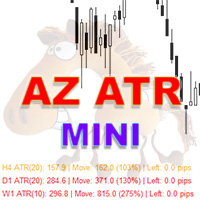
AZ Mini ATR Indicator
By popular demand, I've created a miniature version of the ATR indicator. In addition to its basic functions, such as calculating the average ATR based on specified parameters, it can change the color of a text bar depending on how far the price has already moved. If the price has moved more than 110% of its average ATR, the bar turns red; if it has moved less than 80%, the bar is green. The colors and parameters that influence the color change are configurable. This feat
FREE

The Teamtrader Channel Stop indicator allows you to determine the current trend. If the Teamtrader Channel Stop indicator line has moved below the price and turned blue, then you should open deals for an increase. If the Teamtrader Channel Stop indicator line has appeared above the price and turned red, then you should open deals for a decrease: The indicator is suitable for any time frames, but it needs to be supplemented with filtering indicators, since by itself it is late and does not have
FREE
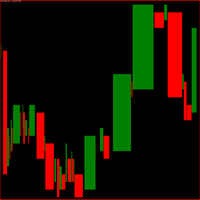
Indicador gerado a partir do tempo e da força da compra e da venda.
Quanto maior o número do parâmetro spread menos entradas será padrões pode-se ver, use para menos trades, ideal para não tomar muitos stops.
Quanto menor o número do parâmetro spread mais entradas com padrões, use para fazer scalp, operações curtas, maior probabilidade de stops. Observe o gráfico pelos menos uma semana antes de iniciar as operações. Quando começar faça somente uma operação por dia durante uma semana. vá aument
FREE

candlestick time it a useful indicator ,it help to keep you alert with the candlestick time ,how far to be completed at the chosen period , it help to keep you patience which is a biggest thing that holds trades down ,try it to improve you way of trading. it work on any broker any time frame and any symbol. you can customize the color on input. it can work on multiple timeframe. Thank you !
FREE
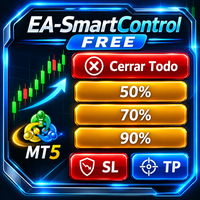
SmartControl Panel Inteligente de Gestión de Operaciones para MetaTrader 5 SmartControl es un Asesor Experto (EA) gratuito diseñado para simplificar y agilizar la gestión manual de posiciones abiertas en MetaTrader 5. Su interfaz intuitiva mediante botones permite ejecutar acciones clave con un solo clic, ayudando al trader a proteger beneficios, reducir exposición al riesgo y administrar operaciones de forma rápida y eficiente. Características principales Cierre total de posiciones •Cierra
FREE

Custom Trade Panel is a trading panel for all traders that you customise to suit your own style. Choose anywhere from 1 to 12 buttons, assign each one to any of fourteen functions, and arrange them in whichever layout fits how you trade.
Every trade is sized from the risk you choose. Set a percent of your equity, a fixed amount, or a fixed lot size, add your stop loss, and the panel works out the lot size for you.
All fourteen functions:
Open trades:
- Buy Market
- Sell Market
- Buy Stop
-
FREE
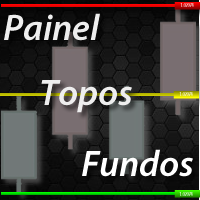
PANEL OF TOPOS AND HISTORICAL BACKGROUNDS This is a panel that does not open orders only manages all Symbols and calculates the tops and bottoms and presents the calculation in relation to the top and bottom in 5 Years, 2 Months and 1 Week.
It is ideal for filtering the pairs that are in the good regions to operate. You can filter the range and choose whether to consider the body or shadow of the candle in the monthly. Good luck...
FREE

Are you having trouble with too many events in the economic calendar? This reduces to the minimum number you need. You can filter by country code importance any key words and you can receive alerts before the set time of the event. ++++++++++++++ If country code is blank, display available code on the expert tab. You need to turn off the automatic calendar update setting in MT5. Any sound file of .wav format in Sounds directory. The length of keyword characters is limited by MT5.
FREE
エントリー前に確認できるチェックリストを作成しました。 以下のコードを参照してMT5用に作成しました。
Strategy Checklist - indicator for MetaTrader 4 https://www.mql5.com/en/code/18877
機能: チェックリスト20個まで入力できます。 表示位置 (左上 、 右上 、 左下 、 右下) の 指定 が可能 になります。 フォントサイズ の 変更が可能 になります。 チェックリストの幅を変更できます。 ドラッグ&ドロップでチェックリストを移動できます。
インストール方法: ファイル->データフォルダーを開く->MQL5フォルダー->Indicatorsフォルダー 配下にex5ファイルを置いてMT5を再起動してください。 チェックリストはマニュアルで入力が必要になります。入力後 保存しておいてください。 テンプレートで保存しておくと容易にチャートに適用できます。
FREE

Most lot size calculators assume one pip is worth ten dollars. That assumption is wrong on gold, wrong on indices, wrong on JPY crosses, and wrong on every account not denominated in USD - which is to say, wrong exactly where oversizing hurts. This one asks your server instead. It reads the tick value, tick size, point size, volume step and margin requirements actually published for the symbol on your chart, so the number it gives you is the number your account will accept. How it works Attach i
FREE
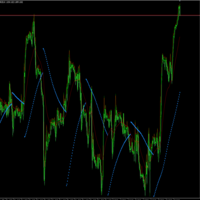
La idea de este indicador es la siguiente: reemplazar los precios High, Low del indicador SAR por los valores del indicador Moving Average. Al final tendremos la siguiente imagen:
Es decir, el indicador SAR cambia su dirección después de tocar el indicador Moving Average.
Parámetros de entrada SAR: Step - parámetro "Step" del indicador SAR; SAR: Maximum - parámetro "Maximum" del indicador SAR; MA: Period - parámetro "período de promediación" del indicador MA; MA: Shift - parámetro "des
FREE

Goal Tracker & Risk Guard Goal Tracker & Risk Guard is a professional on-chart dashboard and psychological assistant designed for every trader. It helps you maintain strict trading discipline, hit your profit targets, and protect your account from severe drawdowns and overtrading. Stop relying on emotions and let this indicator keep your risk in check! Key Features: Profit Targets: Set your custom Daily, Weekly, and Monthly profit targets (in %). The panel tracks your closed trades and fills a g
FREE

Equity Watch Pro shows your MetaTrader 4 and MetaTrader 5 accounts in an Android app: equity, open profit and loss, today's result, floating drawdown, and whether each terminal is still sending data. You can check accounts that run on a VPS without opening a remote desktop session. This Expert Advisor runs on one chart in each terminal and sends the account figures to the app. It does not trade. It only sends data, never receives instructions, and has no access to your trading password. What the
FREE

Risk Mirror 是一个只读的 MetaTrader 5 面板,用于资金账户和个人账户。它跟踪您的账户和持仓,为您完成风险运算:每日亏损限额、每日盈利目标、浮动回撤、最大回撤以及每笔交易的仓位大小,然后将结果显示在您的图表上。它不下单,不修改订单,也不平仓。 为什么"只读"模式很重要 许多资金账户计划限制或禁止会下单的EA。Risk Mirror 不会违反此类规则,因为它根本没有下单代码。它读取您的账户状态并显示出来。这是一个面板,不是交易机器人。如果您需要能自动平仓的工具,那属于另一类产品。 它显示的内容 剩余的每日亏损限额(金额和百分比) 今天距离每日盈利目标还有多远 浮动盈亏与浮动回撤 账户历史最大回撤 按您设定的风险百分比计算的建议仓位大小 公司每日重置时间与您本地时间的对比 内置仓位大小计算器 输入您愿意承担风险的金额或余额百分比,Risk Mirror 会为当前品种和止损距离计算手数。无需电子表格,无需手动计算点数,也无需在行情变化时临时演算。 适合谁使用 处于评估或挑战阶段、需要随时看到每日亏损限额的交易者 在交易时段中跟踪回撤限额的资金账户持有者 希望在个人账户上
FREE

SimPHash is a free script that automatically generates ultra-fast conversion functions from a string to a value: it can be a simple type (integer, double, ulong, etc.) or an index into your own array or struct when the value you need is more complex. Instead of using a HashMap, a linear array with a search, or an endless chain of if / switch, SimPHash builds a Perfect Hash table at design time: a function that resolves each known key in a handful of arithmetic operations and a single array acces
FREE

Symbol Spec Inspector shows the real trading conditions of the chart symbol in one compact panel. Your broker's specification window hides most of these values, and some of them change during the day. The panel updates every second. What you see Live spread in points and in price, plus the maximum spread seen since the panel was attached Stops level and freeze level (highlighted when they are not zero) Value of one point for 1.0 lot and the cost of the current spread for 1.0 lot, in your account
FREE

MT5 Hammer Pattern Detector: Your guide to more profitable operations
Tired of searching for the best trading opportunities? Our innovative indicator gives you a competitive advantage by automatically identifying hammer patterns on your charts. Known for its high probability of success, the hammer pattern has been a fundamental tool in the arsenal of experienced traders for decades. Our indicator, designed to accurately detect this key pattern, will allow you to:
Identify trend reversals earl
FREE

Session & Spread HUD A lightweight display utility that places a real-time information panel in the top-right corner of any chart. No trading logic, no alerts — just clean, always-visible data while you trade. What It Shows The HUD displays four pieces of information, updated on every tick: Session — The currently active trading session based on your broker's server time. Automatically identifies Asia, London, New York, and the London/NY overlap. Displays "Closed" outside all sessions. Spread —
FREE

Common Folder Copier copies trades between MetaTrader 5 terminals running on the same computer or VPS. It is one EA with two modes: Master on the source account and Slave on each receiving account. They talk through a small file in the terminals' shared Common\Files folder, so no internet service, DLL or account password is needed. What it does Master : writes the open positions of its account several times per second. Slave : opens the positions that are missing, keeps SL, TP and volume in sync
FREE

One Click Trade Manager MT5 Key Features One Click Buy & Sell Close All Orders Close Profit Orders Close Loss Orders Break Even One Click Trailing Stop Live Balance Display Live Equity Display Live Profit Display Spread Display Fast Order Execution Easy-to-Use Trading Panel Supports All MT5 Brokers Optimized for Gold, Forex, Indices, and Crypto Benefits Faster trade execution Better risk management Simple and professional interface Perfect for scalpers, intraday traders, and swing traders Save t
FREE

Tranad Margin Lot Calculator Tranad Margin Lot Calculator is a MetaTrader 5 utility designed to calculate trading lot sizes based on a selected percentage of account funds and the margin requirements of your broker. The calculator displays the results directly on a compact, movable chart panel. Explore More Premium Trading Tools by TRANAD LABS Discover our complete collection of professional Expert Advisors, trading indicators, and MetaTrader 5 utilities. Explore advanced trading solutions desig
FREE

Backtest Report Compare puts several Strategy Tester reports side by side on one HTML page: growth and drawdown curves on one chart, the main statistics in one table, the correlation of their daily results, monthly returns and results by weekday and hour. Use it to choose between Expert Advisors, between settings of one Expert Advisor, or to see which strategies lose on the same days. How To Use In the Strategy Tester, after each test: right click on the Backtest tab > Report > save it as HTML i
FREE

SC-Copier Master is the core component of the SC-Copier system. It is installed on MetaTrader 5 of the Master account and communicates with SC-Copier Slave , installed on a second MT5 client running on the same computer or VPS. This allows Master account trades to be replicated on the Slave account through a setup that is simple to configure and easy to monitor. The Master monitors positions opened on the source account and sends the Receiver every opening, closing, partial closing, and Stop Los
FREE

️ AutoProtect R13: Your Intelligent Trade Guardian Tired of manual management and emotional exits? AutoProtect R13 is a professional-grade utility designed to automate your risk management. This tool ensures your account stays protected 24/7. WHAT’S NEW IN V1.1 Optimized Execution: Faster processing for high-volatility market conditions. New User Interface: Professional GUI Dialog panel (replacing basic chart comments). Smart Break-Even+: Move Stop Loss to entry plus a small profit buffer
FREE

The Position Selective Close is a multi-symbol multi-timeframe script used to close simultaneously various positions. General Description
The Position Selective Close possesses three operation modes (Intersection, Union and All) that control the way as four position features (symbol, magic number, type and profit) are used. The modes, available through the Selection Mode input parameter, relate to the features, available through the “Select by Feature” and “Feature” input pa
FREE

Burst Trade Utility – Multi-Position Manager & One-Click Execution Burst Trade Utility is a powerful, fast, and intuitive assistant designed for MetaTrader 5 to simplify your daily trading. If you follow copy trading channels, signal groups, or scale into positions, this utility will completely transform your execution speed. Stop wasting time opening multiple orders manually. With a single click, you can open, manage, and close multiple positions simultaneously on any financial instrument.
FREE

Trading Panel Pro Trading Panel Pro is a professional MetaTrader 5 trading panel designed to help traders open and manage positions faster with precision and ease . Execute Buy/Sell orders , place pending orders , and manage trades directly from the chart using a clean, modern, and minimal interface — reducing unnecessary clicks and improving execution speed during fast-moving markets. Built for traders who value speed, simplicity, and efficient trade execution . Features:
Fast trade executio
FREE

Smart Trade Manager EA – Simple, Visual, and Risk-Based Trading Take control of your trades with ease!
This free Expert Advisor is designed for traders who want a fast, intuitive, and risk-based way to manage entries directly from the chart. Risk-Based Position Sizing – Just set your preferred % risk in the EA settings, and lot size is calculated automatically.
One-Click Trading – Place trades instantly with two simple buttons: BUY or SELL .
Interactive SL & TP Lines – Drag and drop stop-
FREE
保护您的账户免于强制平仓(Stop Out)。当保证金比例变低时,EA 会先提醒您,然后从亏损最大的持仓开始逐笔平仓,直到保证金比例恢复到安全水平。 免费,只需一个图表,适用于手动交易和任何智能交易系统(EA)。 当保证金比例跌到经纪商的 Stop Out 水平时,经纪商会替您平仓,在最糟糕的时刻,按它自己的顺序。Margin Level Protector 会更早行动,在您选择的水平上,并且只平掉必要的部分。 工作原理 将 EA 加载到任意一个图表上,设置两个水平:警告水平(例如 300 %)和平仓水平(例如 150 %)。 它每秒读取账户的保证金比例:净值 / 已用保证金 x 100。 SAFE - 高于警告水平时,什么都不做。 WARNING - 低于警告水平时,您会收到一次提醒。只有在保证金比例恢复之后才会再次提醒。 PROTECTING - 低于平仓水平时,它每秒平掉一笔持仓(默认先平亏损最大的)。每次平仓后保证金比例上升,一旦回到平仓水平之上就立即停止。 功能 警告水平 和 平仓水平 ,以 % 设置(0 = 关闭) 平仓顺序 :先平亏损最大的、先平手数最大的,或一次全部平仓
FREE

该工具可在设定的时间间隔(例如每根K线收盘时)自动截取 MT5 多个图表的画面,并将其发送至 Telegram 和 Discord。若需实现基于特定时间间隔(如 15 分钟 K 线收盘)的自动更新,建议搭配另一款专用指标使用;该指标会自动触发截图,并通过本工具发送到您的 Telegram/Discord 频道、群组或私聊窗口。
链接: https://www.mql5.com/en/market/product/183072
提供 Telegram 和 Discord 实时演示——请通过个人资料中的消息功能联系我。
利用此指标,您可以按预设频率自动将图表截图发送到移动端群组。
若不搭配相关指标,KS Smart Info Panel 将无法实现向 Telegram/Discord 群组自动发送图表截图的功能。
KS Smart Info Panel EA 工具是一款专为需要可靠、自动图表截图功能的交易者设计的 MetaTrader 5 实用程序。
核心功能:
自动截取 MT5 终端中已打开的多个图表画面
即时发送至 Telegram(群组、频道或私聊)及 Discord
FREE

您有機會擺脫日常交易,在短時間內投入魔法世界。我向您介紹遊戲 - 紙牌技巧。在 mql 語言中,您不僅可以創建 EA、指標、腳本,還可以創建這樣的小遊戲。 我不僅是交易員和程序員,而且我還喜歡在空閒時間展示紙牌技巧,因為它發生了,我決定將我最喜歡的技巧之一數字化。這並不容易,因為焦點包含很多精神主義。 訣竅是由一副不尋常的紙牌展示的。這些是“俄羅斯風格”的優秀紙卡。這副撲克牌與穿著服裝的人物,重複了 1903 年 2 月在冬宮舉行的宮廷舞會參與者的服裝。 1911 年,德國紙牌遊戲工廠 Dondorf(美因河畔法蘭克福)開發了紙牌草圖。國王、女士和傑克的衣服都是按照 17 世紀的風格製作的; ace - 被古代俄羅斯武器和盔甲包圍的盾牌圖像。這些卡片本身是在聖彼得堡的亞歷山大工廠印刷的,它們的發行時間恰逢慶祝羅曼諾夫王朝 300 週年。
FREE

UEX Reader - 智能交易系统
基于 UEX 指标的全自动交易 EA。
https://www.mql5.com/en/market/product/152936
UEX Reader 提供两种灵活的交易策略:
常规策略和均价策略。
交易仓位可以单独执行,也可以
根据 UEX 指标识别的市场方向同时执行。
尽管 UEX Reader 基于指标运行,但仍可在 MT5 测试器中进行测试。
- - - - - - - - - - - - - - - - - - - - - - - - - - - - - - - - - - - - - - - - - - - - -
UEX Reader 智能交易系统使用步骤: https://www.mql5.com/en/market/product/166805/comments PDF document :
https://c.mql5.com/31/1830/UEX_Reader_ExpertAdvisor.zip
- - - - - - - - - - - - - - - - - - - - - - - - -
FREE

Fastest Trades Copier is the fastest and most lightweight trade copier between MT5 accounts available on the market. Running entirely through the MT5 Common Folder — no DLLs, no external servers, no internet dependency — it copies your trades between two terminals on the same VPS or PC with near-zero latency, polling every 500ms with minimal CPU footprint. Key Features: Ultra-fast local copy via MT5 Common Folder Configurable symbol name translation between brokers (e.g. USDJPY.sc → USDJPY)
FREE

专家顾问允许您模拟由另一位专家执行并保存在csv文件中的事务的执行。 这对于在另一台服务器上检查交易策略的结果很有用。
使用另一个程序,例如,帐户历史导出器将帐户上的交易历史导出为所需格式的csv文件,或将程序代码从专家历史导出器连接到您的专家以导出历史。
在文件的开头应该有这样一行:
DATE,TICKET,TYPE,SYMBOL,VOLUME,ENTRY,PRICE,STOPLOSS,TAKEPROFIT,PROFIT,COMMISSION,FEE,SWAP,MAGIC, COMMENT
它可能不是从文件的一开始就找到的,也就是说,任何其他信息都可能在它之前。
在它们之后和文件的末尾,有一行以逗号分隔的字段值用于一个事务。 行中字段的值:
DATE - date in the format YYYY.MM .DD HH:MM:SS TICKET - transaction ticket (integer) TYPE - transaction type from ENUM_DEAL_TYPE (integer) SYMBOL - trading instrumen
FREE
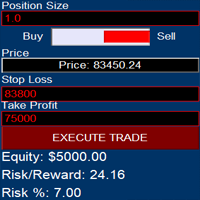
The SmartTrader Panel is a powerful and intuitive trading panel designed to streamline trade execution and risk management in MetaTrader. With its sleek and user-friendly interface, traders can quickly manage their positions, calculate risk metrics, and execute trades with precision. Key Features: One-Click Trading: Easily place Buy or Sell orders with a single click.
Risk Management: Automatically calculates risk percentage, risk-reward ratio, and potential profit/loss.
Customizable Trad
FREE

Risk Guardian Lite - Institutional Risk Monitor MT5 Are you trading blind? Most traders fail because they don't know their real-time exposure. Risk Guardian Lite is a high-performance monitoring tool designed for institutional traders who demand precision without visual clutter. Why choose Risk Guardian Lite? Unlike generic monitors, this version focuses on the "Golden Triad" of profitability: Net Profit, Real Exposure, and Efficiency Ratio (R:R). Elite Features: ️ Capital at Risk Monito
FREE
MSP_Bridge 是一款免费工具,可将 AI Grok 4 连接到 RiskKILLER AI Navigator ,这是一个基于人工智能的多时间框架 市场方向与策略助手 。
该捆绑包将帮助您获得 机构级别的洞察力,提供适合您交易风格的、由人工智能驱动的趋势、情绪和宏观分析。
RiskKILLER AI Navigator [ MT5 - MT4 ]
交易表现的关键在于像专业人士一样理解市场。这正是 RiskKILLER_AI Navigator 所提供的: 获得机构级别的洞察力,利用AI驱动的趋势、情绪和宏观分析, 这些在MQL5中无法获得 ,并根据您的交易风格量身定制。
核心优势 跨多个时间框架和资产的实时市场方向 人工智能驱动的宏观指标、新闻和情绪分析 根据您的交易风格(手动或自动)量身定制的建议 与 RiskKILLER_AI 智能交易系统 (EA) 直接协同
只需下载并按照以下说明操作即可。
如有困难,我们随时为您提供帮助,只需发送私信即可。
FREE

Salah Guard Prayer times, Hijri calendar, and optional trade protection for Muslim traders — calculated entirely inside MetaTrader 5. Salah Guard is a MetaTrader 5 utility designed for Muslim traders. It combines daily prayer time calculation, an integrated Hijri calendar, and an optional Trade Guard system that helps you manage your trading activity around prayer times. Trading can be demanding, and it is easy to lose track of time when watching the markets. Salah Guard provides timely reminder
FREE

️ Drawdown Protection – Manual Trading Blocker (MT5) Protect Your Account from Manual Trading Mistakes Drawdown Protection – Manual Trading Blocker is an Expert Advisor designed exclusively for MetaTrader 5 to strictly control daily drawdown caused by manual trading . Once the predefined daily maximum drawdown is reached, this EA automatically blocks all new manual trades , helping traders avoid emotional decisions and revenge trading. ️ How It Works The EA continuously monitors the accoun
FREE

Stop Guessing Your Lot Size. Trade With Defined Risk. Order Management Script is a FREE risk-management utility that automatically calculates your lot size, Entry, Stop Loss, and Take Profit based on your predefined trading rules. No manual position-size calculations.
No repeated SL/TP calculations.
Just define your risk and trading setup. KEY FEATURES Automatic Lot Size Calculation
Calculate the correct position size using: • Fixed monetary risk
• Percentage of account equity Multip
FREE

This robot sends Telegram notifications based on the coloring rules of PLATINUM Candle indicator. Example message for selling assets: [SPX][M15] PLATINUM TO SELL 11:45. Example message for buying assets : [EURUSD][M15] PLATINUM TO BUY 11:45 AM.
Before enable Telegram notifications you need to create a Telegram bot, get the bot API Key and also get your personal Telegram chatId. It's not possible to send messages to groups or channels. You can only send messages to your user chatId. You should
FREE

How to Read GoldenLock GoldenLock is designed to make the current account-risk state easy to understand from one dashboard. The dashboard allows you to monitor important account information such as:
Current Equity Today P/L Daily Drawdown Maximum Drawdown Peak Equity Equity Giveback Current Protection Status
The Warning, Critical and Locked states make it easier to see how close the account is to the limits you have configured. GoldenLock monitors the risk. Your trading strategy remains separat
FREE

Copy Trade PRO - Slave EA (FREE with Master EA) Receive Trades Automatically from Your Master Account Copy Trade PRO - Slave EA is a professional trade receiver designed for MetaTrader 5. It automatically mirrors trades from the Copy Trade PRO Master EA with fast execution, intelligent symbol matching, and flexible risk management. Telegram Support Link : @GoldBotXSupport Need help or have questions? Contact me on WhatsApp: https://wa.me/447378910922
This Slave EA is complete
FREE

HB Trading Bot – Professional Risk & Trade Management for MT5 HB Trading Bot is a professional risk management and trade management Expert Advisor designed for MetaTrader 5 .
It does not open trades . Instead, it manages already opened positions with strict, rule-based logic to help traders protect their capital and remove emotional decision-making from trading. Most trading losses are caused by psychology, not poor analysis. HB Trading Bot was built to solve this problem by enforcing discipline
FREE
SympleAssist is a smart risk & trade panel for MetaTrader 5.
It does not generate signals or “magic entries”. It helps you execute your own strategy with strict risk control: Set your account size (COUNT) . Set your Stop Loss price . Type how many USD you want to risk . SympleAssist calculates the lot size , draws the SL line on the chart and gives you one-click BUY / SELL / CLOSE .
Main Features Risk per trade in USD You type the risk in USD, SympleAssist calculates the position size based on
FREE

LATTICE VISION
THE MOST ADVANCED ORDER-NETWORK ANALYSIS TOOL ON MQL5.
Not a claim. A position backed by published, independently testable fidelity data.
Discover with Lattice Vision. Deploy with Lattice Command. One engine. Two instruments. One continuous workflow.
Lattice Vision is the original level-trading analysis tool — Grid Trading 2.0, engineered properly. When you find a configuration in Vision, the matching live engine produces the same trades. Eighteen test configurations coveri
FREE

The Equity Curve indicator is a simple and helpful tool that shows the development of the equity curve in real time. For precision measurement, it should be used in a separate window with a period of M1.
Main features The indicator shows the development of the equity curve in real time. High precision on the minute chart. High-speed calculation. Available for MT4 and MT5. Please visit the Equity Curve indicator product page for the input and output parameters settings.
FREE

TradeVista Pro — Professional Trade & Risk Management Panel TradeVista Pro is a professional all-in-one trade execution and position management panel for MetaTrader 5 , designed for traders who want faster order management, precise risk control, and a cleaner way to manage open positions directly from the chart. Instead of constantly switching between the MT5 Trade tab, order windows, and chart controls, TradeVista Pro brings essential trading-management functions together in one intuitive inter
FREE

Forex Inspector Broker X-Ray See exactly what your broker charges, and how it compares, in one clean panel on your chart. ForexInspector Broker X-Ray reads your live account conditions and shows them in a professional tabbed panel: real spread, true cost per lot (spread plus commission), swaps in money, leverage, margin, execution type, stop-out, ping and a 0 to 10 broker score. It also shows how your broker ranks against the community on forexinspector.com. 100% FREE • It never trades • It
FREE

CapGuard Risk Manager Protect your capital, pass Prop Firm challenges, and eliminate emotional trading with CapGuard Risk Manager. Whether you are an algorithmic trader running multiple EAs, a manual trader struggling with discipline, or a Prop Firm challenger needing strict risk controls, CapGuard Risk Manager is your ultimate safety net. This professional utility runs on a single chart but protects your entire MT5 account. It continuously monitors your equity, open positions, and server stab
FREE

概述
RealCost Spread Guard 是一款用于 MetaTrader 5 的点差监控工具。它不交易、不修改订单,也不会把数据发送到外部服务器。它会采样当前图表的点差,显示实时和历史点差统计,在点差超过用户设置的阈值时发出提醒,并可选择写入本地 CSV 文件,便于之后复盘。
该工具适合在手动进场、剥头皮策略、网格系统、跟单系统或任何对点差波动敏感的 EA 运行前使用。
典型使用场景
- 检查某个品种在交易时段内的点差是否稳定。 - 手动进场前观察点差变化。 - 运行 EA 或跟单系统前查看点差条件。 - 对比不同市场时段的点差变化。 - 将点差采样导出到 CSV,用于交易日志或之后复盘。
主要功能
- 显示当前图表点差,单位为 points。 - 统计平均点差、p95 点差和最大点差。 - 可配置点差提醒阈值。 - 弹窗提醒和可选手机推送。 - 可配置写入间隔的本地 CSV 导出。 - 紧凑的图表面板。 - 不执行交易动作。 - 不使用 DLL,不使用 WebRequest,不连接外部服务。
不包含的功能
- 不交易。 - 不修改持仓或订单。 - 不提供买入
FREE

EA REMOTE COPIER Copy Your Trades Across Different VPS — Fast, Secure & Reliable EA Remote Copier is a professional Expert Advisor designed to automatically copy trading activity between different VPS, trading accounts, and locations through the Internet . It is suitable for traders, money managers, signal providers, and anyone who needs to synchronize trades across multiple accounts efficiently.
Please download Slave EA here = https://www.mql5.com/en/market/product/190756
User Manual : do
FREE

在一张图表上查看整月交易情况。 miK Account Report 将您的整个图表变成简洁的账户月历视图。每个单元格代表一天,每一行代表一周(从周一开始),让您一眼掌握整月的交易活动。 每日显示内容 交易手数(开仓量) 当日盈亏 入金 出金 仅显示发生变化的数值,使每个单元格保持简洁易读。数字带千位分隔符并右对齐,便于快速浏览。 月度汇总面板 — 四个分区,提供完整的月度概览: 资金流动 — 入金、出金、净额 交易量与成本 — 总手数、佣金、库存费 交易统计 — 总交易数、胜率、净利润 质量指标 — 盈利因子、平均盈利、平均亏损 便捷导航 — 使用图表上的 ‹ › 按钮浏览任意月份,或用 TODAY 按钮返回当前月。当前月份自动刷新。 简洁专业的设计 深海军蓝主题,Consolas 字体 加载时自动清理图表(隐藏网格、价格线和一键交易面板),移除指标后完全恢复 高亮显示当天日期 标题栏显示经纪商、账户名称、账户号码和货币 完全可自定义 — 所有设置按清晰分组排列。可调整字体名称与大小,以及报告中的每一种颜色(标签、盈利、亏损、入金、出金、标题和背景),匹配您的风格。 说明 仅适用于当
FREE

Account Info Utility is a free script for quick analysis of trading conditions for the current account and symbol.
It displays: - account information, balance, equity, margin, free margin and floating profit; - symbol trade restrictions, current price and trade mode; - minimum/maximum lot, lot step, real margin per 1 lot and maximum available lot; - point value for 0.01, 0.10 and 1.00 lots; - long/short swaps; - daily ATR(14) in pips and the value of that range for different lots; - trading se
FREE

Key Features Smart Profit/Loss Management Set your target profit in your deposit currency (USD, EUR, etc.) Define maximum acceptable loss to protect your capital Automatic calculation includes floating profit, swap, and commission Flexible Position Filtering Symbol Filter: Close only trades on the current chart symbol or all symbols Magic Number Filter: 0 = Close only manual trades (no magic number) -1 = Close all trades regardless of magic number Custom number = Close only trades with speci
FREE

ActiveSnap 是一款专门为MetaTrader 5平台设计的智能吸附指标,它通过创建多个参考线并为用户拖动的对象提供"磁吸"效果,极大提高了技术分析的精确度和操作效率。
在MT5价差交易中的作用 1. 点差补偿交易 价差计算 :指标自动计算当前点差并加到价格上 真实成本考虑 :帮助交易者考虑到交易的实际成本(点差) 精确入场 :确保止损/止盈设置已包含点差因素 核心功能 1. 智能吸附系统 自动吸附 :当您拖动图表上的水平线时,指标会自动将其"吸附"到预设的关键价格位置 多类型吸附线 :提供三种不同类型的吸附参考线 精确控制 :可自定义吸附距离、位置偏移量和透明度 2. 三种吸附线类型 高价吸附线 位置 :每根K线的最高价 + 当前点差 + N个最小变动价格 用途 :识别阻力位、做空入场点 参数控制 : HighTickOffset 可调整N的值 低价吸附线 位置 :每根K线的最低价 + 当前点差 - N个最小变动价格 用途 :识别支撑位、做多入场点 参数控制 : LowTickOffset 可调整N的值 最低价吸附线 位置 :每
FREE
Quickview The Quickview indicator instantly highlights asset variations, delivering crystal-clear market insights at a glance. Effortlessly track multiple assets with visual simplicity, enabling quicker, smarter, and more confident trading decisions daily. ️ Key Features Real-Time Asset Tracking: Instantly monitor multiple assets simultaneously, never missing a critical market move. Flexible and Intuitive Display: Personalize your view, displaying assets exactly as you want—clear, concise, c
FREE

HCS MarketWatch is a free, read-only MetaTrader 5 indicator that displays current spread, ATR, and spread relative to ATR in one compact chart panel.
The Spread/ATR ratio provides context for current spread relative to recent market movement.
The panel displays:
• Latest terminal Bid/Ask spread in points • MT5 ATR in points • Spread/ATR percentage • LEVEL: LOW, MEDIUM, or HIGH • Average spread during the current indicator run • Maximum spread during the current indicator run
The ATR timefra
FREE

простой копировщик сделок между двух терминалов MT5, настраивается только коэффициент копирования на слейв части. мастер часть вешаете на любой новый график на терминал откуда нужно копировать сделки, а слейв часть вешаете на любой график в терминале в который нужно копировать «Программное обеспечение предоставляется по принципу "как есть" (As Is). Разработчик не дает никаких гарантий, явных или подразумеваемых, в отношении работоспособности программы, ее соответствия ожиданиям пользователя или
FREE

Ghost Trail Pro is an intelligent Expert Advisor for MetaTrader 5 that manages the complete lifecycle of a gold (XAUUSD) trade. From detecting the setup and alerting your phone, to opening the trade, protecting profits and closing positions in stages, Ghost Trail Pro does the heavy lifting so you don't have to.
Built for gold traders and scalpers who want disciplined trade management, partial closes and profit protection, whether you are at your screen or away from it. Let it enter automaticall
FREE

TBC...#property copyright "Phoenix Trading Copyright 2026, MetaQuotes Ltd." #property link " https://www.phoenixautrading.com/ " #property version "1.0"// Current version of the Expert Advisor #property icon "Phoenix.ico" #property description "At Phoenix Trading, we specialize in the engineering of high-precision MQL5 Expert Advisors," #property description "designed to transform market volatility into consistent opportunities. Our EAs are built for the modern trader, comb
FREE
MetaTrader市场是一个简单方便的网站,在这里开发者可以出售自己的交易应用程序。
我们将帮助您发布您的产品,并向您解释如何为市场准备您的产品描述。市场上所有的应用程序都是加密保护并且只能在买家的电脑上运行。非法拷贝是不可能的。
