Trend Viewer Pro MT5
- Göstergeler
- Sürüm: 1.7
- Güncellendi: 13 Kasım 2026
- Etkinleştirmeler: 15

EVERY MARKET YOU FOLLOW, ALL YOUR TIMEFRAMES, ON ONE TABLE
If you follow the trend on more than one timeframe, checking every market chart by chart is slow, and it is easy to miss one.
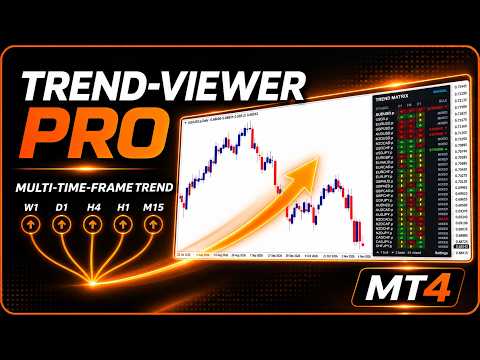
Trend Viewer Pro reads it for you. For every market on your list it shows the trend on up to three timeframes of your choosing, in one table on any chart, and sums each market up in a single word: **STRONG**, **BULL**, **BEAR** or **MIXED**.
Every reading is Cycle Finder Pro's. A high is confirmed when two later bars each take out the low beneath it, a low when two take out the high above, and the trend comes from the four most recent confirmed points. Bars far larger than Average
True Range are news, not structure, and are handled separately. Each tile shows the trend Cycle Finder Pro shows on a newly loaded MetaTrader 5 chart of that market and timeframe, with its default settings. The engine is built in: Cycle Finder Pro does not need to be installed.
---
THE TABLE
**The chart you are on** — its market always sits in the top row, on a lighter band, so you see where the chart in front of you stands without looking for it. If it is on your list it keeps its place there too, so the list never reorders itself.
**One tile per timeframe** — a green triangle for an uptrend, red for a downtrend, yellow for no trend. An hourglass means there is no reading: the history is still loading, is too short to read, or the market is not in Market Watch. Hover over a tile to see its market, timeframe and trend. Click it to open that market's chart on that timeframe, or bring an open one forward.
**Your list** — chosen in Settings from every symbol in your Market Watch, whatever your broker offers: forex, indices, metals, commodities, crypto. **Add** puts the chart's market on your list with one click; hover over a row and **Del** takes it off. With Trend Viewer Pro on several charts, a change made on one of them (markets, timeframes, Auto or Manual) is taken up by the others.
**The footer** — your list counted by bias: bull (STRONG up or BULL), bear (STRONG down or BEAR) and mixed. A market still showing an hourglass is not counted yet.
**Room on the chart** — in a right-hand corner, Trend Viewer Pro widens the chart's shift (the space to the right of the newest bar) just enough for the table, up to half the chart's width, so the newest candles stay clear of it. It never makes the shift narrower than your chart had, and puts the chart's own shift back when you remove the indicator, unless you have changed it yourself since.
---
THE BIAS COLUMN
- **STRONG ▲ / STRONG ▼** — every timeframe trending the same way, up or down.
- **BULL** — the higher timeframes in an uptrend, the lowest at No trend.
- **BEAR** — the higher timeframes in a downtrend, the lowest at No trend.
- **MIXED** — anything else.
With H1, H4 and D1: No trend / Up / Up is **BULL** — H4 and D1 are up and only H1 is not. Up / Up / No trend is **MIXED**, because the daily is not trending. With a single timeframe the bias is STRONG when it trends and MIXED when it does not.
The bias summarises the tiles beside it. It is a reading of the structure so far, not a forecast or a trade signal.
---
AUTO AND MANUAL
**Manual** lists every market you chose, whatever it reads.
**Auto** lists only the STRONG ones — all up or all down — and a market drops out when that changes. The chart's own market stays in the top row either way, and the footer still counts your whole list. "reading..." means markets are still being read; "none lined up" means none of them is STRONG at the moment.
---
AS SMALL AS YOU LIKE
Hide the trend columns for a table of names and bias, or hide the bias for names and tiles (the footer counts go with the bias). One font size scales the whole table, high-DPI screens included. Put it in any corner of the chart, on a background colour of your choice or on none.
---
ALERTS
MetaTrader pop-up, e-mail and push to the MetaTrader mobile app, each switched on or off, and separately for up, down and no trend.
- **Manual:** when a timeframe of a market on your list changes trend.
- **Auto:** when a market lines up, or drops out (the no-trend switch covers drop-outs).
E-mail and push use MetaTrader's own e-mail and notification settings; Trend Viewer Pro sends a test message when it starts with them on.
---
SETTINGS
**In the table's Settings window:** your markets, up to three timeframes (any of M1, M5, M15, M30, H1, H4, D1, W1 and MN1; H1, H4 and D1 by default), and Auto or Manual. Save, and the table redraws at once; the choice is saved, and Trend Viewer Pro takes it up on your other charts and on every chart you add it to.
**In the indicator's inputs:**
- **Timer interval** — how often the table refreshes, in milliseconds. Default 5000 (5 seconds).
- **ATR multiplier** — the oversized-bar threshold. Default 2.2, as in Cycle Finder Pro.
- **Bar limit** — bars read for each market and timeframe. Default 150, measured to give the same reading as 1,000 bars in every one of 36,622 tests (28 currency pairs, M1 to MN). 0 reads everything available.
- **Trend Up / Down / Sideways Color** — the triangles and the tiles.
- **Trend Text Color** — the title and the market names. **Trend Button Color** — the text of the buttons.
- **Font Size** — the size of the whole table. Default 10.
- **Trend Corner** — the corner of the chart the table sits in. Default lower right.
- **Box Background Color** — the table's background, or None for no box.
- **Show the trend columns / Show the bias column** — switch either off for a smaller table.
- **Alerts** — terminal alerts, e-mail and push (terminal alerts on by default), and which trend changes should raise one.
- **Print why a tile is not read** — off by default; on, it writes to the Experts log why a tile is waiting for its history, and each change it makes to the chart's shift.
---
HOW TO USE IT
1. **Choose up to three timeframes** in Settings: H1, H4 and D1 unless you change them.
2. **Choose your markets** there too, or add the chart you are on with **Add**.
3. **Use Auto** to list only the markets trending one way on every timeframe, or **Manual** to see them all.
4. **Click a tile** to open that market on that timeframe, and see the structure behind the reading there with Cycle Finder Pro.
---
REQUIREMENTS
MetaTrader 5. Works with any symbol in Market Watch. Uses the Webdings and Wingdings fonts that come with Windows. Use one copy per chart. Places no trades and reads no account data.
---
FOR EXISTING USERS:
- **Remove the indicator from the chart and add it again** after updating (or restart MetaTrader), so that the chart runs the new version.
- **One set of settings for every chart.** Your markets, timeframes and Auto or Manual are shared: a change made on one chart is taken up by Trend Viewer Pro on the others.
- **Up to three timeframes now** (it was nine). Your markets and timeframes carry over; if more than three timeframes were saved, Trend Viewer Pro starts with H1, H4 and D1.
- **The readings follow Cycle Finder Pro's current rules.** The ATR multiplier default is 2.2 (it was 3), the same as Cycle Finder Pro; the bar limit default is 150 (it was 200); the font size default is 10 (it was 12).
- **Add and Del work as before.** Auto and Manual (in Settings), the bias column and the alerts are new.
---
WHAT'S NEW IN 1.7
- A new table: one tile per timeframe, a bias column (STRONG, BULL, BEAR, MIXED) and a count of bull, bear and mixed markets. The chart's own market is always the top row.
- Auto shows only the markets that are STRONG; Manual shows them all.
- The trend columns or the bias column can be hidden for a smaller table.
- Alerts on trend changes: terminal, e-mail and push.
- Up to three timeframes; H1, H4 and D1 by default.
- The trends are read with Cycle Finder Pro's current rules, including its handling of news bars that trade through a cycle point, and its ATR multiplier of 2.2.
- In a right-hand corner the chart's shift is widened just enough for the table.
- Your markets, timeframes and Auto or Manual are shared by every chart.
- A market is read again only when its prices have moved, and the trends already read are carried over when the chart's symbol or timeframe is changed.