TrendLine PRO MT5
75 USD
Demo indirildi:
4 497
Yayınlandı:
26 Eylül 2019
Mevcut sürüm:
4.1
Uygun bir robot bulamadınız mı?
Freelance üzerinden kendi
robotunuzu sipariş edin
Freelance'e git
Freelance üzerinden kendi
robotunuzu sipariş edin
Bir alım-satım robotu veya gösterge nasıl satın alınır?
Uzman Danışmanınızı
sanal sunucuda çalıştırın
sanal sunucuda çalıştırın
Satın almadan önce göstergeyi/alım-satım robotunu test edin
Mağazada kazanç sağlamak ister misiniz?
Satış için bir ürün nasıl sunulur?

Alım-satım fırsatlarını kaçırıyorsunuz:
- Ücretsiz alım-satım uygulamaları
- İşlem kopyalama için 8.000'den fazla sinyal
- Finansal piyasaları keşfetmek için ekonomik haberler
Kayıt
Giriş yap
Web sitesi politikasını ve kullanım şartlarını kabul edersiniz
Hesabınız yoksa, lütfen kaydolun
Every week you share sets in a group and it's great! We help each other make the INFINITY project useful.
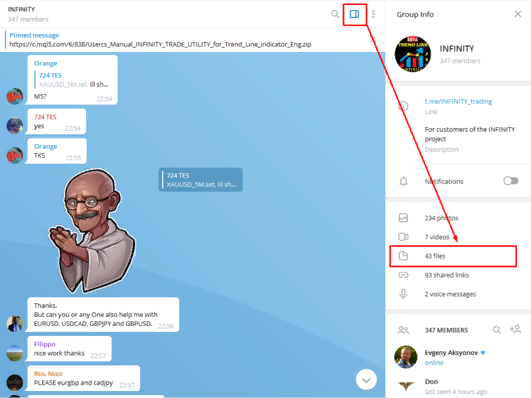
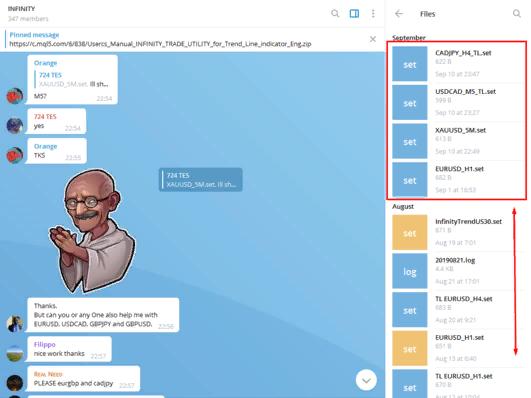
All your set files and recommendations are easy to find, for this open the side window of our group in TM-messenger and select the files folder:
1)
2)
3)
Be sure to check other users' sets on a demo before use on a real.
Daily forecast (26.09) EURUSD_H4:
(Caution: Daily forecasts may have opposite recommendations)TL: KEEP the SELL (TP1+221)
My set-files and template in the trading chat team:
https://t.me/INFINITY_trading
Daily forecast (27.09) EURUSD_H4:
TL: KEEP the SELL (TP1+221, TP2+553)
(Caution: Daily forecasts may have opposite recommendations)
My set-files and template in the trading chat team:
https://t.me/INFINITY_trading
https://www.mql5.com/en/market/product/33083
https://www.mql5.com/en/market/product/43022
https://www.mql5.com/en/market/product/44401
https://www.mql5.com/en/market/product/43696
https://www.mql5.com/en/market/product/41528
https://www.mql5.com/en/market/product/40577
https://www.mql5.com/en/market/product/43694
---------------------------------------------------------------
BUY FOR LESS:
https://www.mql5.com/en/market/product/36087
https://www.mql5.com/en/market/product/43090
https://www.mql5.com/en/market/product/35484
https://www.mql5.com/en/market/product/40565
I bought it, put it on the chart, but it doesn't work, it doesn't take the indicator. how to solve?
Hello. To use the TL indicator you should download history bars for each pairs what you use.
and how I do it?
and how I do it?
Hi. You need download history bars in your mt5.
I just installed the indicator and still trying to study it. Looks promising, but i need to know how to optimise the settings, for maximum results. Hoe do i get the set files into my MT5 platform? What are the optimal settings for the H1 timeframe?
Join our team trading group: https://t.me/INFINITY_trading
Using set fils you can trade all tools: FX, CFD, Metals, Index, Futures
Tizot's dally result. Good job!
Amjad's trading with TrendLine PRO. Well done!
Join our trading team: https://t.me/INFINITY_trading
Members share trading experience in the INFINITY chat.
TrendLine PRO mt4: https://www.mql5.com/en/market/product/36087
TrendLine PRO mt5: https://www.mql5.com/en/market/product/42399
TradeUtility EA: https://www.mql5.com/en/market/product/38101
Join us! 😍
Hello Evgenii ,
I bought the TL indicator and would like to receive the HTF_Histogram indicator with an individual unlimited key. My MQL5 user is rsmacedo. I also sent an email. Wait.
Great work. Congratulations!!! Tks,
Use Up&Dn PRO trend indicator with TrendLine PRO to get better entry signal:
Up&Dn PRO trend (mt5): https://www.mql5.com/en/market/product/45542
Up&Dn PRO trend (mt4): https://www.mql5.com/en/market/product/45423
Well done, Dmitry!
TradeUtility EA (mt5): https://www.mql5.com/en/market/product/47954
Hello, Byrnesy2186.
To receive the indicator signal continuously for 24 hours, you need to have a permanent Internet connection on your computer or VPS.
However, if you don't plan to trade at night, you can turn off your computer.
The strongest signals come from 9: 00 to 19: 00 (GMT+2).
Don't forget to use Take Profit and Stop Loss.
You can also use the TradingUtility to trade in automatic or semi-automatic mode.
Read more here: https://www.mql5.com/en/market/product/47954
To get control on US30 you need open all symbols in the MarketWatch
BR
Hello, Byrnesy2186.
To receive the indicator signal continuously for 24 hours, you need to have a permanent Internet connection on your computer or VPS.
However, if you don't plan to trade at night, you can turn off your computer.
The strongest signals come from 9: 00 to 19: 00 (GMT+2).
Don't forget to use Take Profit and Stop Loss.
You can also use the TradingUtility to trade in automatic or semi-automatic mode.
Read more here: https://www.mql5.com/en/market/product/47954
To get control on US30 you need open all symbols in the MarketWatch
BR
Evgenii,
Thanks for the quick reply. My time zone is EST and i do plan on trading up to approx 7PM EST. does this mean the indicator wont work for me? This is my first purchase of an indicator so im brand new to how this all works.
ive added US30 to my chart, its what i trade mostly, i am getting another error: TrendLine PRO MT5 (US30m,M1) Attempting to launch indicator ...
do you know what this means?
Evgenii,
Thanks for the quick reply. My time zone is EST and i do plan on trading up to approx 7PM EST. does this mean the indicator wont work for me? This is my first purchase of an indicator so im brand new to how this all works.
ive added US30 to my chart, its what i trade mostly, i am getting another error: TrendLine PRO MT5 (US30m,M1) Attempting to launch indicator ...
do you know what this means?
Configure the indicator in such a way as to get the maximum result.
If your time zone doesn't allow you to take the best deals, be sure to use automatic trading.
If you have any technical questions, please contact me via email: profitcamp@mail.ru or TM chat: https://t.me/INFINITY_trading
Also you can find a lot of set files other members in the INFINITY group
Best.
Hey. I like the indicator a lot. Could you please give us an option to remove the entry and trend arrows so that all we see is the trend line itself? Thanks.
Hey. I like the indicator a lot. Could you please give us an option to remove the entry and trend arrows so that all we see is the trend line itself? Thanks.
Hello. Sorry for delay
You can set the Show lines parameters on the false position
Also you can switch off the Panel and Scanner
BR