Max Blue Breakout
- Uzmanlar
- Sürüm: 1.0
- Etkinleştirmeler: 5

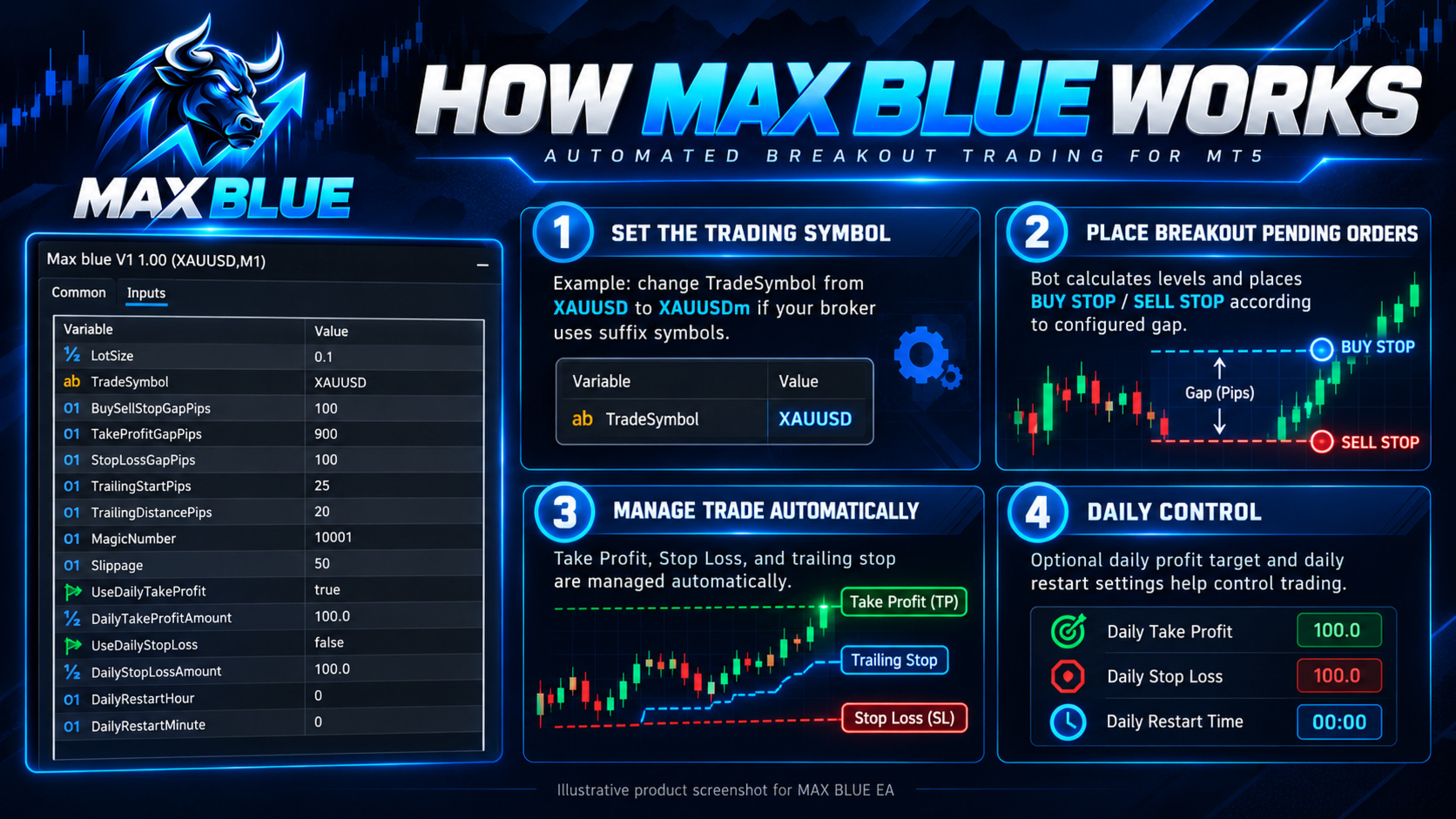
MAX BLUE is an automated trading Expert Advisor developed for MetaTrader 5. The system uses configurable pending-order breakout levels, take-profit and stop-loss management, and trailing-stop functionality to automate trade execution.
MAX BLUE is primarily configured for gold trading (XAUUSD). Users can change the trading symbol in the Expert Advisor settings to match the exact instrument name provided by their broker.
1. Trading Strategy
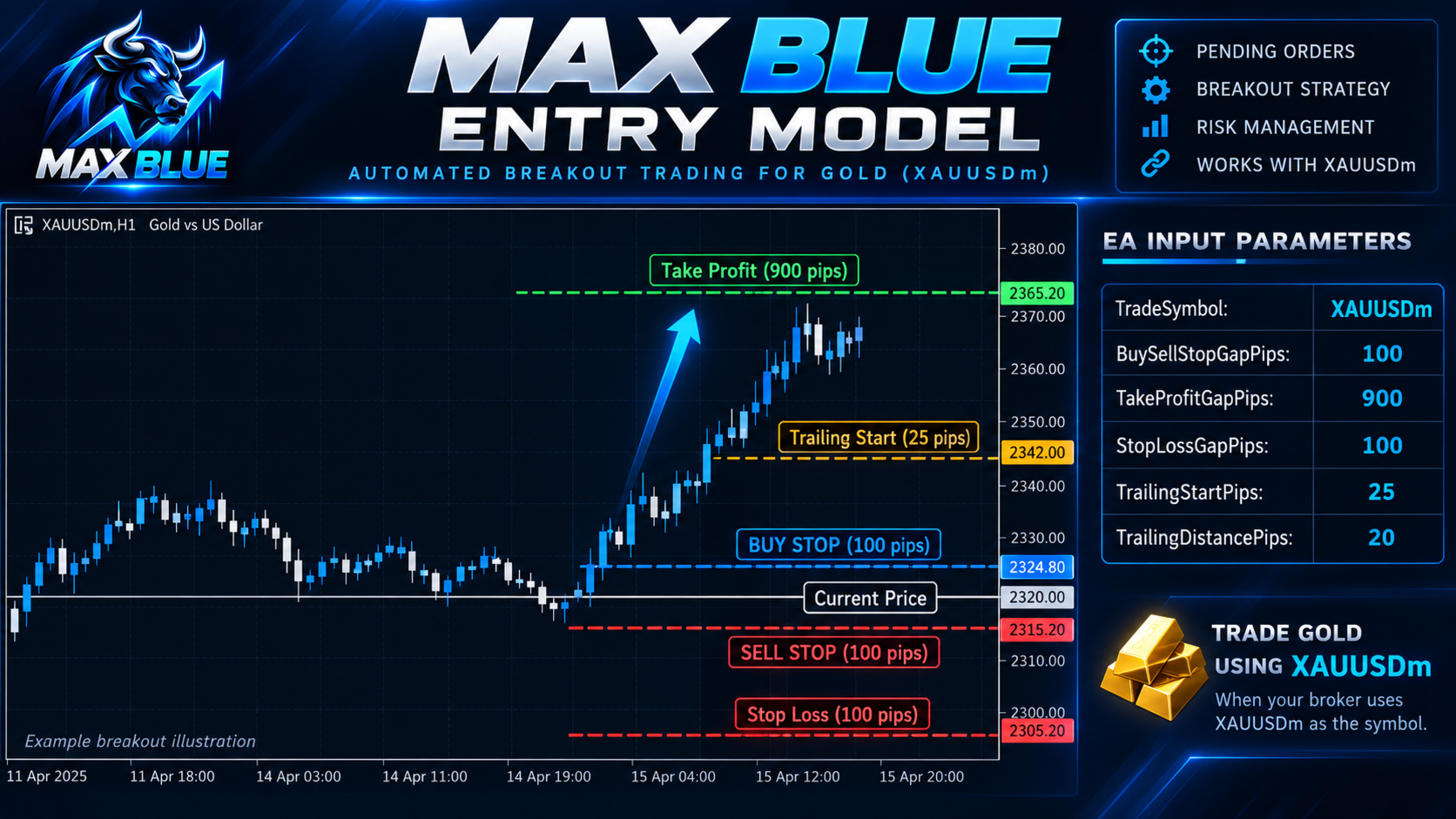
MAX BLUE follows a price-level breakout trading approach.
The Expert Advisor uses configurable entry distances to manage breakout trading levels and execute trades according to its internal trading rules.
Main Features:
-
Automated trading using pending stop orders.
-
Configurable BUY and SELL entry distance.
-
Adjustable trade lot size.
-
Take Profit and Stop Loss settings.
-
Trailing Stop management.
-
Daily profit target control.
-
Optional daily loss limit.
-
Daily restart time configuration.
-
Custom trading symbol selection.
-
Magic Number for identifying EA trades.
-
Configurable slippage tolerance.
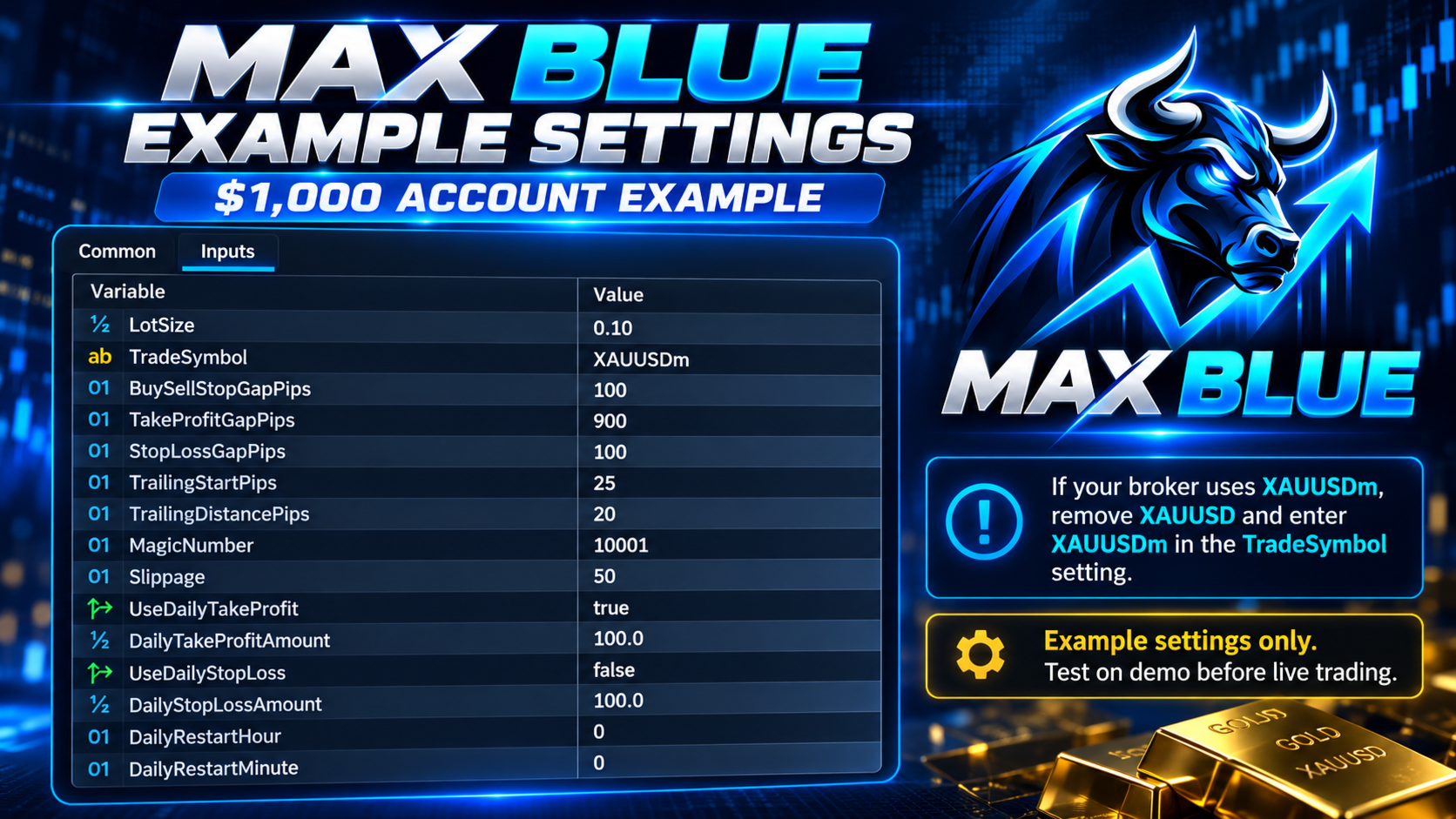
2. Example Settings for a $1,000 Account
The following settings are an illustrative configuration taken from MAX BLUE V1. They are not a guarantee of performance or a confirmed low-risk preset.
| Input Parameter | Example Value |
|---|---|
| LotSize | 0.10 |
| TradeSymbol | XAUUSD |
| BuySellStopGapPips | 100 |
| TakeProfitGapPips | 900 |
| StopLossGapPips | 100 |
| TrailingStartPips | 25 |
| TrailingDistancePips | 20 |
| MagicNumber | 10001 |
| Slippage | 50 |
| UseDailyTakeProfit | true |
| DailyTakeProfitAmount | 100.0 |
| UseDailyStopLoss | false |
| DailyStopLossAmount | 100.0 |
| DailyRestartHour | 0 |
| DailyRestartMinute | 0 |
Important: A 0.10 lot size can represent substantial exposure on gold for a $1,000 account. The $100 daily profit target is only a configured threshold, not an expected or guaranteed return.
3. Trading Symbol Configuration
MAX BLUE includes a customizable trading symbol input called TradeSymbol.
Users must enter the exact symbol name provided by their broker.
Example 1 – Standard Gold Symbol
If your broker uses XAUUSD:
TradeSymbol = XAUUSD
Example 2 – Gold Symbol with Suffix
If your broker uses XAUUSDm:
TradeSymbol = XAUUSDm
Remove the existing XAUUSD value from the TradeSymbol field and replace it with XAUUSDm.
Example 3 – Other Broker Symbol Formats
Some brokers may use:
-
XAUUSD
-
XAUUSDm
-
XAUUSD.a
-
GOLD
Choose the exact available symbol name from MetaTrader 5 Market Watch.
How to Change the Symbol:
-
Open MetaTrader 5.
-
Open the chart of the instrument you want to trade.
-
Attach MAX BLUE Expert Advisor to the chart.
-
Open the Inputs tab.
-
Find the TradeSymbol parameter.
-
Delete the existing symbol name.
-
Enter your broker's exact symbol name.
-
Click OK and enable Algo Trading.
For example, when trading XAUUSDm, use an XAUUSDm chart and set TradeSymbol to XAUUSDm.
Confirm that the selected instrument is supported by the EA and that trading is permitted by the broker. Test the configuration before live execution.
4. Input Parameters Explained
LotSize
Controls the trading volume for each order.
TradeSymbol
Specifies the instrument used by the Expert Advisor.
BuySellStopGapPips
Sets the configured distance used for pending breakout entry levels.
TakeProfitGapPips
Controls the Take Profit distance.
StopLossGapPips
Controls the Stop Loss distance.
TrailingStartPips
Specifies the favorable price movement required before trailing-stop management begins.
TrailingDistancePips
Specifies the configured trailing-stop distance.
MagicNumber
A unique identifier used by the Expert Advisor to distinguish its trades.
Slippage
Controls the configured execution-deviation tolerance where applicable.
UseDailyTakeProfit
Enables or disables the daily profit target function.
DailyTakeProfitAmount
Specifies the daily profit threshold in account-currency units. When the account currency is USD, a value of 100 represents $100.
UseDailyStopLoss
Enables or disables the daily loss protection function.
DailyStopLossAmount
Specifies the configured daily loss threshold. This parameter is inactive when UseDailyStopLoss is false.
DailyRestartHour
Sets the hour used by the EA's daily restart configuration.
DailyRestartMinute
Sets the minute used by the EA's daily restart configuration.
The exact reset clock and behavior depend on the EA implementation.
5. Take Profit, Stop Loss and Trailing Stop
MAX BLUE includes configurable trade-exit management.
The Take Profit and Stop Loss distances can be adjusted through the Inputs tab.
The trailing-stop function uses two settings:
-
TrailingStartPips determines when trailing management begins.
-
TrailingDistancePips determines the configured trailing distance.
All pip-distance settings should be checked carefully because the interpretation of gold pips, points and tick sizes may differ between brokers and EA implementations.
6. Daily Trading Controls
MAX BLUE provides optional daily trading limits.
Daily Profit Target
When UseDailyTakeProfit is enabled, the EA monitors the configured daily profit threshold according to its programmed logic.
Daily Stop Loss
When UseDailyStopLoss is enabled, the EA applies its configured daily loss protection logic.
Daily Restart
DailyRestartHour and DailyRestartMinute configure the EA's daily restart time.
Before using daily limits on a live account, verify how the EA calculates daily profit and loss, and whether it closes positions, cancels pending orders or only prevents new entries.
7. Installation Instructions
-
Install MAX BLUE through MetaTrader 5.
-
Open the intended trading instrument chart.
-
Attach MAX BLUE to the chart.
-
Open the Expert Advisor Inputs tab.
-
Select the correct TradeSymbol.
-
Configure the lot size, breakout distance, Take Profit and Stop Loss.
-
Configure trailing-stop and daily risk settings.
-
Enable Algo Trading.
-
Check the Experts and Journal tabs for any execution errors.
Use the MetaTrader 5 Strategy Tester and a demo account to evaluate the selected settings before using real funds.
8. Trading Risk Disclosure
Trading gold and other leveraged instruments involves significant financial risk.
A $1,000 account balance does not guarantee that the example settings are suitable or that sufficient margin will be available.
A 0.10 lot position may create substantial losses during volatile market conditions.
When UseDailyStopLoss is false, the optional daily loss limit is disabled.
Pending orders, stop-loss orders and trailing stops may be subject to slippage, spreads, gaps and broker execution restrictions.
Daily profit targets are configuration limits, not guaranteed trading profits.
Past performance does not guarantee future results.
9. Product Support
For installation assistance, parameter configuration questions and technical support, please use the MQL5 product comments section or the MQL5 messaging system.
MAX BLUE – Automated Breakout Trading for MetaTrader 5.