Minty Scalper
- Uzmanlar
- Sürüm: 8.21

A trend breakout scalper for XAUUSD (gold). Four breakout strategies decide on every M5 bar and trade only with the hourly trend. Winners run with a trailing stop; losers are cut at a fixed stop. Pure logic: no AI, no grid, no martingale. Two settings.
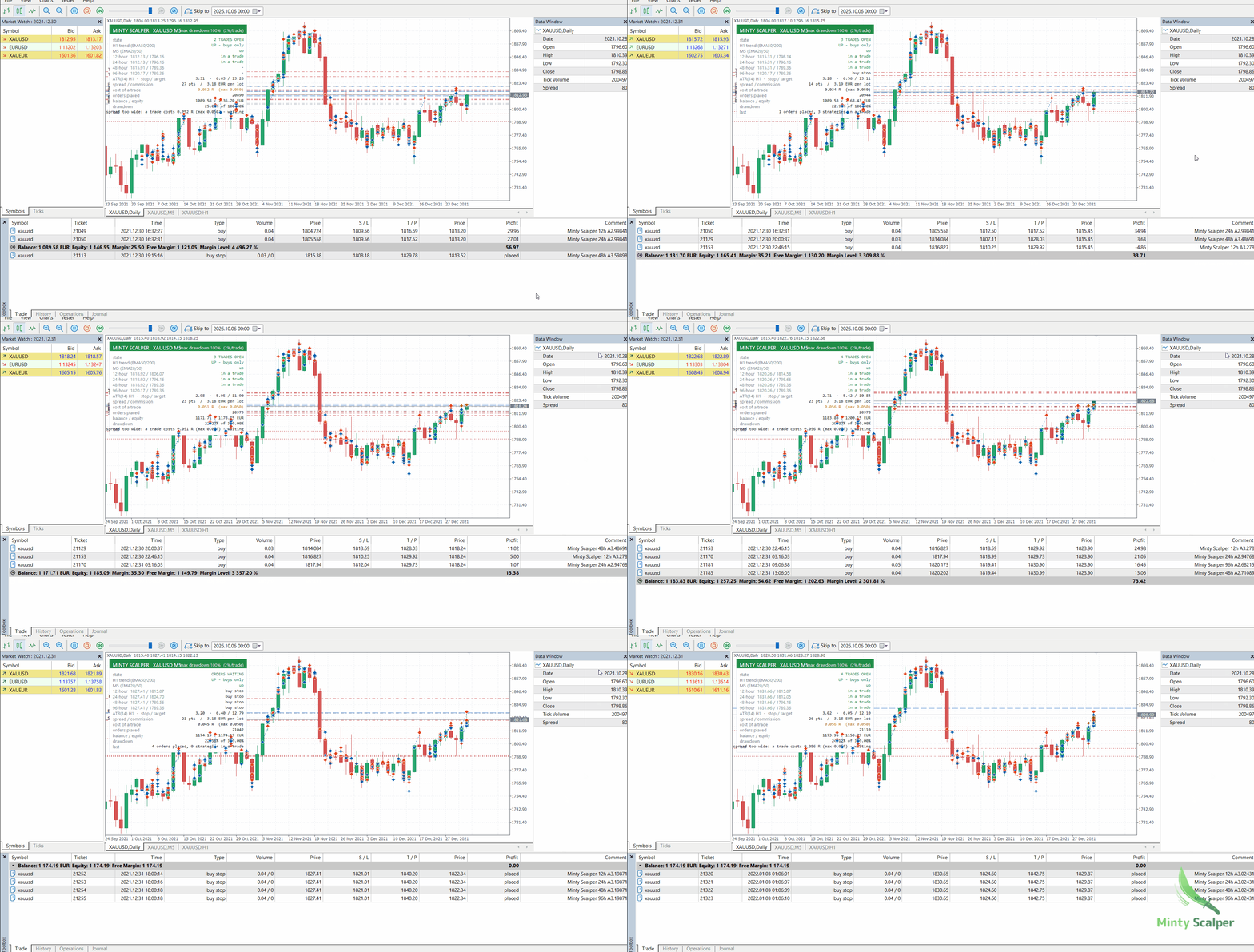
Minty Scalper watches gold's 12-, 24-, 48- and 96-hour highs and lows. When the hourly trend is up and the 5-minute chart agrees, it waits with a Buy Stop at each level. When the trend is down, it waits with a Sell Stop at each low. When gold breaks through a level, that strategy is in a trade:
- a stop loss and take profit are sized on gold's current hourly volatility;
- once the trade is in profit, a trailing stop follows the price;
- every trade is closed within 16 hours, and before the weekend.
Gold only. Minty Scalper is built and tested for XAUUSD only. It needs a low-spread account (ECN / raw). Before every order it checks what the trade will cost and waits when the spread is too wide.
Why it is built this way
Before building Minty Scalper we tested the classic M1–M5 gold scalps on 14 years of broker minute data:
- moving-average pullbacks;
- Bollinger and z-score fades;
- short-range breakouts;
- big-candle momentum.
After the spread, none of them made money. Their profit per trade was smaller than the cost of the trade.
We also tested "quick small profits": closing trades at a small target. They won more often, up to 79% of trades. But the losses that remained were larger than all the small wins together, and the equity line became less smooth.
What held up was trading breakouts in the direction of the hourly trend and letting winners run. Windows shorter than 12 hours did not beat the spread, so Minty Scalper uses the 12-, 24-, 48- and 96-hour levels. The 5-minute chart is used for timing: the entry orders are renewed on every M5 bar, and a trade is only opened when the M5 trend agrees with the hourly trend.
How it trades
| Rule | |
|---|---|
| Direction | EMA50 above EMA200 on H1 = buys only. Below = sells only. |
| Timing | The M5 trend must agree: EMA20 above EMA50 for buys, below for sells. |
| Entries | After every closed M5 bar, each free strategy places a Buy Stop at its high (uptrend) or a Sell Stop at its low (downtrend). The order lives for one M5 bar and is then renewed at the current level. |
| Strategies | 12-, 24-, 48- and 96-hour high/low. Each holds at most one trade, so up to four trades can be open. |
| Stop loss | 2 × ATR(14) on H1 |
| Take profit | 4 × ATR(14) on H1 |
| Trailing stop | Once a trade is 1 × ATR in profit, the stop follows 1.5 × ATR behind the best price. |
| Time exit | After 16 hours, and on Friday from 23:45 server time |
| No new orders | Friday from 20:00 server time, weekends, and while the spread is too wide |
| Cost check | Spread + slippage + commission must be at most 5% of the stop distance. |
What to expect
- About 15–18 trades a week. A typical trade lasts about 4 hours.
- About half the trades win. The average win (+0.78 R) is larger than the average loss (−0.61 R). R is the amount risked on a trade.
- Losing streaks are normal. The edge per trade is small and adds up over many trades. Judge Minty Scalper over months, not days.
- Good years and quiet years. It earns most when gold trends strongly and moves a lot, as in 2025 and 2026. In quiet, sideways markets it can go flat for months.
Features
- Four breakout strategies with their own magic numbers (magic, magic + 1, magic + 2, magic + 3).
- Trend and timing filters on H1 and M5.
- Adaptive exits: stop loss, take profit and trailing stop all scale with gold's volatility.
- Automatic cost control.
- It learns your broker's commission from your own trade history.
- It adds the live spread and slippage.
- It only trades when the total is small compared with the risk.
- One risk setting: your maximum drawdown (see Settings).
- Drawdown protection.
- Trades get smaller once half of your limit is used.
- No trade can take the account past the limit.
- At the limit everything is closed and the EA stops.
- Daily pause: losing half of the limit in one day closes everything until the next day.
- Broker-safe order handling. It respects volume limits, pending-order limits, stop levels and freeze levels. Orders are checked against these limits before they are sent.
- Light chart theme and information panel. The chart switches to the Minty light theme, and your own colours come back when the EA is removed.
The panel
| Row | What it shows |
|---|---|
| State | Watching, orders waiting, how many trades are open, or halted |
| H1 trend | Up (buys only), down (sells only) or flat |
| M5 (EMA20/50) | Whether the 5-minute trend agrees with the hourly trend |
| 12 / 24 / 48 / 96-hour | Each strategy's high and low, and its state: buy stop, sell stop, in a trade, or waiting |
| ATR(14) H1 – stop / target | Current volatility and the stop and target distances a new trade would get |
| Spread / commission | The live spread and your commission per lot |
| Cost of a trade | Spread + slippage + commission as a share of the risk, and the maximum allowed |
| Orders placed | Number of orders placed since the EA was attached |
| Balance / equity | Your account balance and equity |
| Drawdown | How far equity is below its peak, compared with your maximum drawdown |
| Last | What the EA did last, or why it is waiting |
The breakout levels are also drawn on the chart. Dashed lines mark the side the trend allows; dotted lines mark the other side.
Getting started
- Open an XAUUSD chart (any timeframe; the EA always reads M5 and H1). If your broker names gold differently, such as XAUUSD.r or GOLD, use that symbol.
- Attach Minty Scalper and allow algorithmic trading.
- Choose your maximum drawdown. The default of 30% is a balanced start.
- Leave the terminal running, ideally on a VPS. Entry orders are renewed every five minutes.
On the first tick it loads the H1 and M5 history it needs. The panel shows "not enough history yet" until the history has loaded.
Recommendations
- Symbol: XAUUSD only.
- Account: a low-spread (ECN / raw) hedging account. Up to four trades can be open at once, and a hedging account keeps them separate.
- Minimum deposit: at today's gold volatility, a 0.01-lot trade risks about $30–40. That needs about $6,500 at the default 30% maximum drawdown, about $4,000 at 50%, and about $2,000 at 100%.
- Small accounts: lots can only change in steps of 0.01. On a small account, trades are rounded down and risk less than planned, so growth is slower than the backtest shows. A larger deposit or a cent account lets the sizing work as designed.
- Other EAs: Minty Scalper trades the same kind of gold breakouts as Minty Breakout. Use one of them on an account, or lower the maximum drawdown of both if you run them together.
Settings
| Setting | Default | Description |
|---|---|---|
| Maximum drawdown | 30% | How far your account may fall from its highest point, from 0.01% to 100%. It sets the trade size, the daily pause and the point where the EA stops. |
| Magic number | 61230001 | Identifies the EA's trades. The four strategies use this number and the next three. Change it only to run two copies on the same symbol. |
Everything else is fixed at the tested values or measured automatically.
How the maximum drawdown works
- Trade size: each trade risks 2% of your limit: 0.2% of equity at 10%, 0.6% at 30%, 1% at 50%, 2% at 100%. Commission is included, so a trade that hits its stop loses about that amount.
- Smaller trades in a drawdown: once half of the limit is used, new trades get smaller step by step, down to nothing at the limit.
- Never past the limit: a new trade may only risk what is left above the limit after all open stops.
- At the limit: all trades are closed and the EA stops. Remove it from the chart and attach it again to start fresh.
- Daily pause: losing half of the limit in one day closes everything until the next day.
- The peak is the highest equity since the EA was attached, and is remembered through restarts.
Choosing your maximum drawdown
| Maximum drawdown | Risk per trade | Who it suits |
|---|---|---|
| 10% | 0.2% | Careful, slow growth |
| 30% (default) | 0.6% | Balanced |
| 50% | 1.0% | Growth, with deep dips |
| 100% | 2.0% | Maximum growth; drawdowns can take most of the account |
The deposit load in the Strategy Tester is the margin in use, not the risk. It stays low even at 100%.
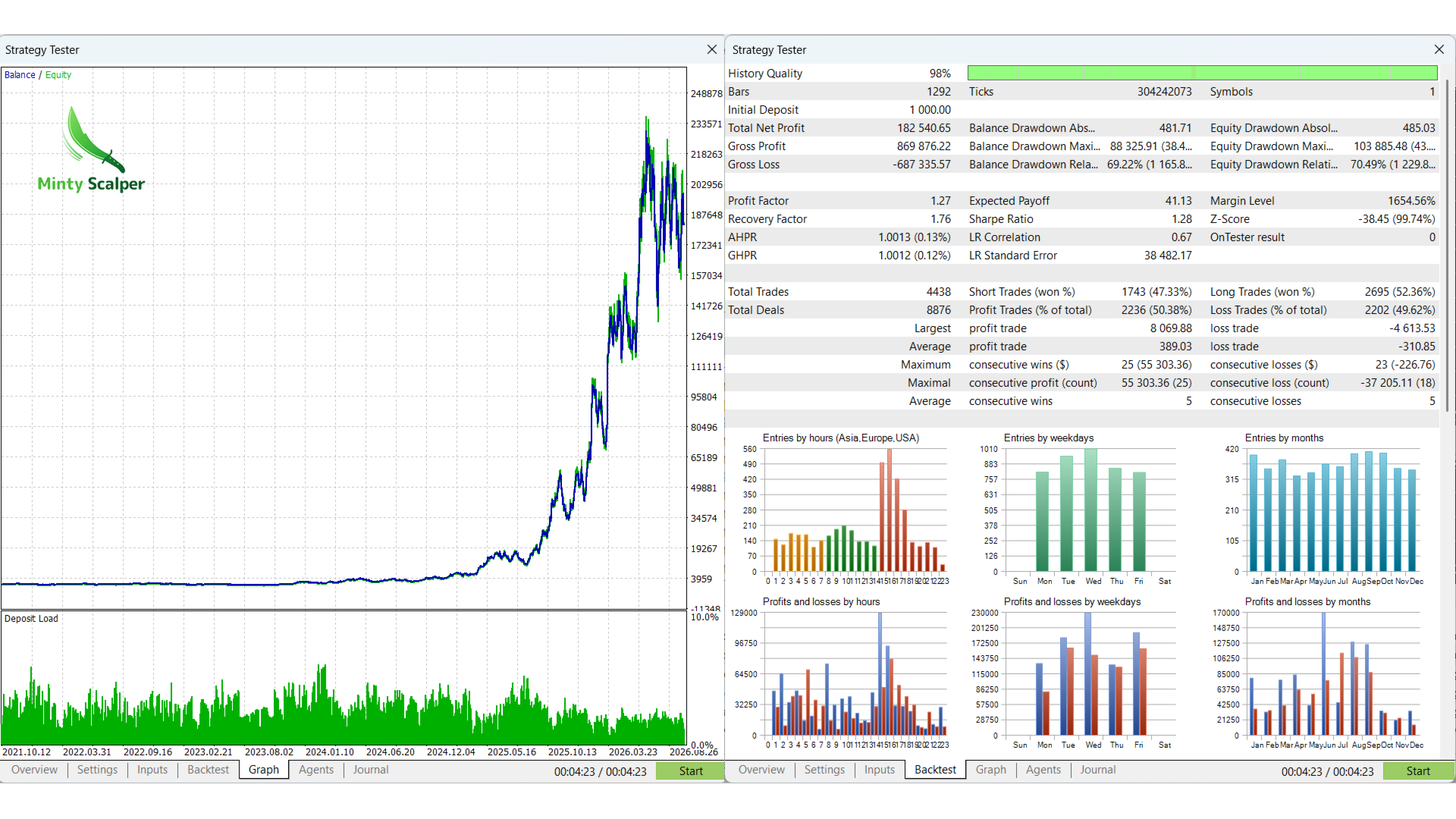
Backtest (XAUUSD, October 2021 – October 2026)
The backtest was simulated on broker M1 data with a cost of $0.20 per trade. Every trade was sized and limited as the EA does it.
| Maximum drawdown | 5 years | Worst drawdown | 2022 | 2023 | 2024 | 2025 | 2026 (to Oct) |
|---|---|---|---|---|---|---|---|
| 10% | ×1.9 | 9.7% | +9% | −1% | +6% | +38% | +18% |
| 30% (default) | ×6.4 | 29% | +25% | −1% | +23% | +152% | +59% |
| 50% | ×19.7 | 46% | +41% | +2% | +39% | +343% | +109% |
| 100% | ×179 | 79% | +63% | +6% | +71% | +1,409% | +267% |
- Trades: 4,587 in 5 years, 50% winners, profit factor 1.27.
- From 2013 at the default 30%: ×12.7, with a worst drawdown of 29%.
- Each setting uses most of its limit. Expect drawdowns close to the maximum drawdown you choose.
- Most of the growth came in 2025–2026, when gold trended strongly. 2023 was flat.
Testing it yourself
- Use "Every tick based on real ticks" on XAUUSD, any timeframe.
- Test several years, so that both quiet and trending periods are included.
- Use a deposit large enough for the setting you test (see Minimum deposit). On very small deposits the 0.01-lot rounding makes results weaker.
Frequently asked questions
Why is it not trading? The last row on the panel says why. The usual reasons:
- the H1 and M5 trends disagree;
- the spread is too wide;
- it is Friday evening or the weekend;
- the price has already closed at the level;
- the daily pause or the drawdown stop is active.
Why does it place and delete orders all the time? Each order lives for one M5 bar and is then renewed at the current level. This keeps every order exactly at its breakout level.
Can it open more than one trade? Yes, up to four: one for each strategy. Each has its own stop loss.
Does it use martingale, a grid or averaging? No. Every trade has its own stop loss, and losing trades are never added to.
Can I use it on other symbols? It is built and tested for gold only. Other symbols are not supported.
Risks
- Losses happen. About half of all trades are losers. The four strategies often trade the same move, so they tend to win and lose together. In the 5-year test, 10 or more losses in a row happened about 10 times a year, and the longest streak was 23 trades.
- Drawdowns. In testing, the worst drawdown came close to the maximum drawdown setting. Choose a limit you are comfortable losing.
- Price gaps (news, weekends) can jump past a stop and lose more than planned.
- Spreads and execution vary between brokers. Wider spreads mean fewer trades and lower results.
- Past and backtested results do not guarantee future returns. Trading involves risk; only trade money you can afford to lose.