
ALYAS Classic MACD
- Göstergeler
-
Salim Alyas Rasho
 I develop practical technical indicators for MetaTrader 5 under the ALYAS brand, with a focus on clear visualization, simplicity, and ease of use.
My goal is to create reliable and useful trading tools that help traders analyze the market with greater clarity and efficiency. - Sürüm: 1.0
ALYAS Classic MACD
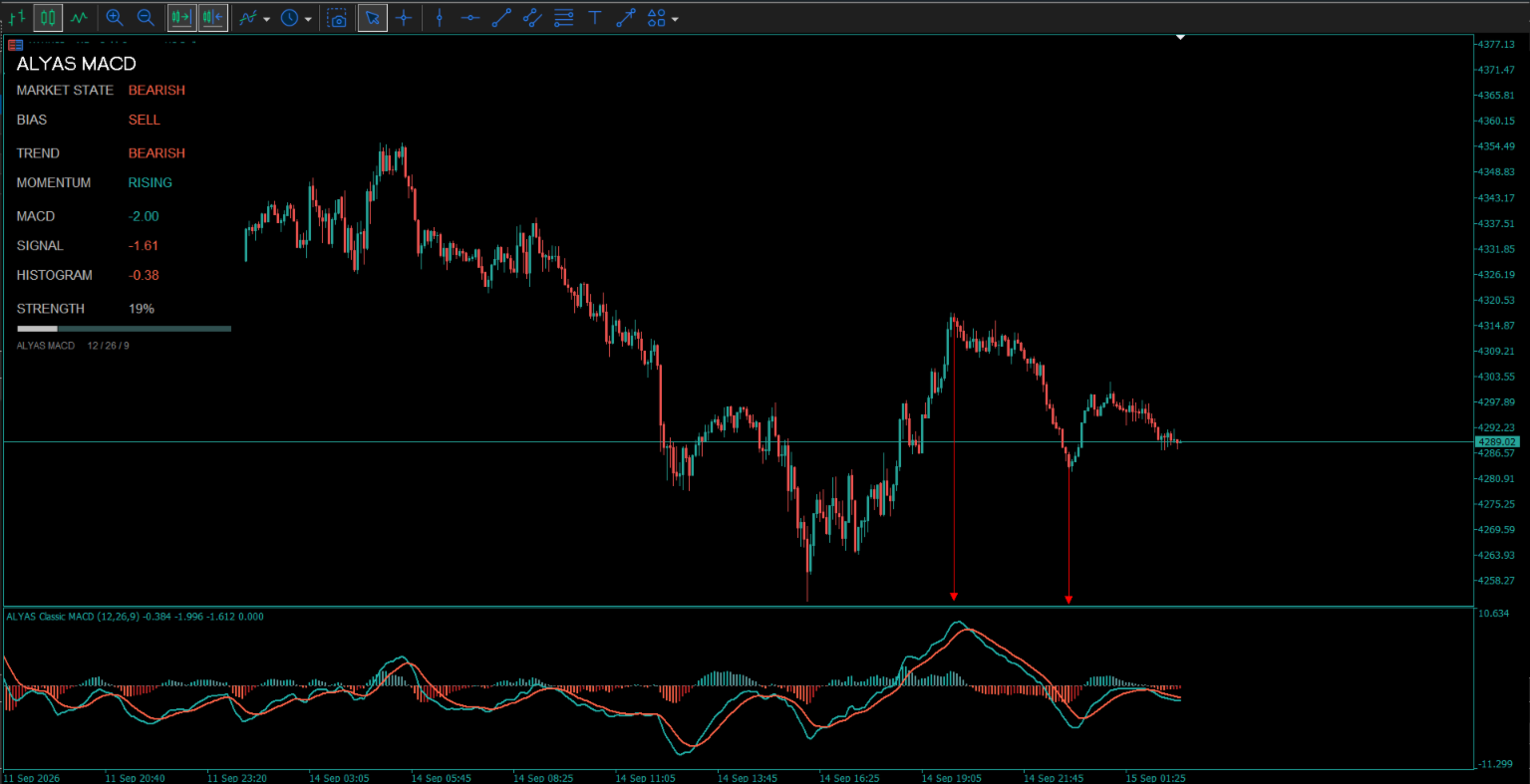
ALYAS Classic MACD is a MetaTrader 5 indicator based on the classic MACD calculation, presented with a color-coded histogram, MACD and Signal lines, a zero line, and an integrated information dashboard.
The indicator calculates MACD using configurable Fast EMA, Slow EMA, and Signal periods. The histogram uses four visual states based on its position relative to zero and its movement compared with the previous histogram value.
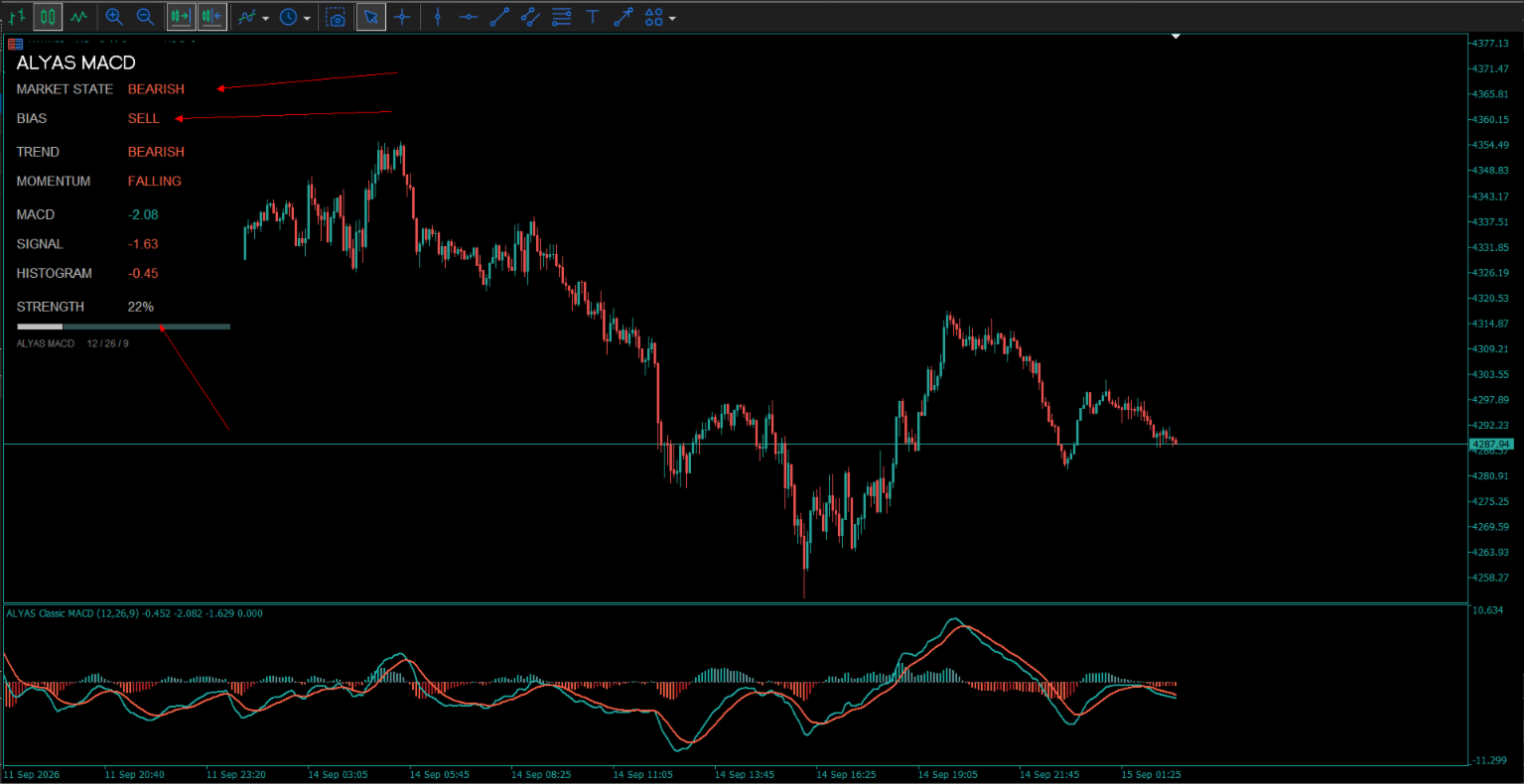
The optional dashboard provides a compact view of the current MACD conditions, including Market State, Bias, Trend, Momentum, MACD value, Signal value, Histogram value, and Strength.
MACD Display
The indicator displays:
* MACD line
* Signal line
* Zero reference line
* Four-state color-coded histogram
The histogram distinguishes between bullish and bearish conditions while also showing whether the histogram is increasing or decreasing.
Dashboard
The optional dashboard displays the current MACD information directly on the chart.
Market State is classified as:
* BULLISH when MACD, Signal, and Histogram are all above zero
* BEARISH when MACD, Signal, and Histogram are all below zero
* NEUTRAL otherwise
Bias displays:
* BUY when MACD, Signal, and Histogram are all above zero
* SELL when MACD, Signal, and Histogram are all below zero
* WAIT otherwise
Trend is determined from the MACD and Signal values:
* BULLISH when both are above zero
* BEARISH when both are below zero
* FLAT otherwise
Momentum compares the current histogram value with the previous histogram value:
* RISING when the current histogram is higher
* FALLING when the current histogram is lower
* NEUTRAL when the values are equal
The dashboard also displays the current MACD, Signal, and Histogram values.
Strength
The dashboard calculates a relative strength percentage from the absolute Histogram value compared with the absolute MACD value.
The resulting value is limited to a range from 0% to 100% and is displayed together with a visual strength bar.
Customization
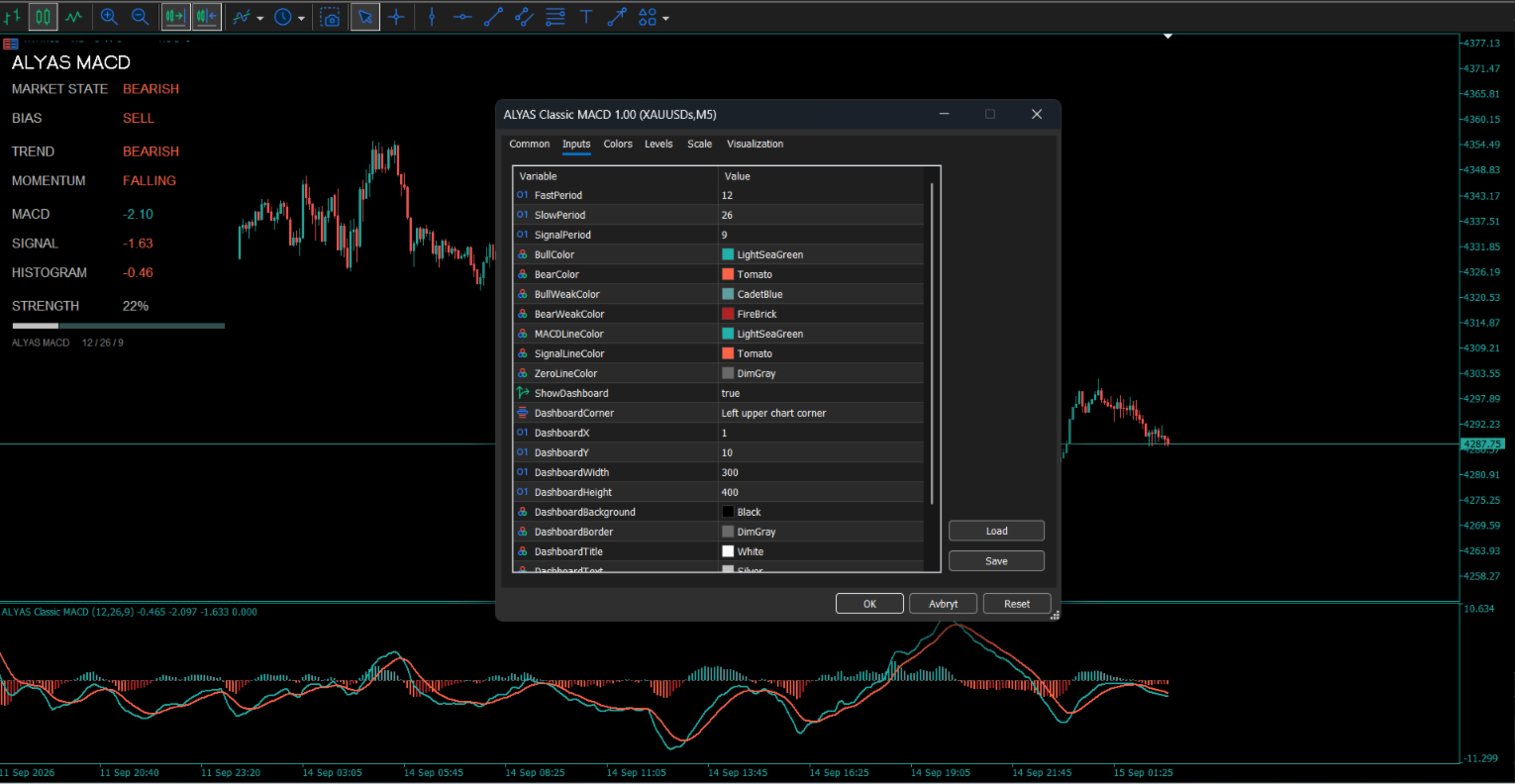
The indicator provides settings for MACD periods, histogram colors, MACD and Signal line colors, zero line color, dashboard visibility, dashboard position, dashboard size, and dashboard appearance.
The dashboard layout and font sizes are dynamically adjusted according to the selected dashboard dimensions.
ALYAS Classic MACD is an analytical display indicator. It does not execute trades or place orders.
Key Features.
* Classic MACD calculation
* Configurable Fast EMA period
* Configurable Slow EMA period
* Configurable Signal period
* MACD line
* Signal line
* Zero reference line
* Four-state color-coded histogram
* Bullish rising histogram state
* Bullish falling histogram state
* Bearish falling histogram state
* Bearish rising histogram state
* Optional integrated dashboard
* Market State classification
* BUY / SELL / WAIT Bias classification
* Bullish / Bearish / Flat Trend classification
* Rising / Falling / Neutral Momentum classification
* Current MACD value
* Current Signal value
* Current Histogram value
* Relative Strength percentage from 0% to 100%
* Visual Strength bar
* Adjustable dashboard position
* Adjustable dashboard width and height
* Customizable dashboard colors
* Dynamic dashboard font sizing
* Separate-window oscillator display
* No automatic trade execution
Inputs / Settings.
MACD Settings
FastPeriod = 12
SlowPeriod = 26
SignalPeriod = 9
Histogram Colors
BullColor = LightSeaGreen
BearColor = Tomato
BullWeakColor = CadetBlue
BearWeakColor = FireBrick
MACD Line Colors
MACDLineColor = LightSeaGreen
SignalLineColor = Tomato
ZeroLineColor = DimGray
Dashboard Settings
ShowDashboard = true
DashboardCorner = Left Upper
DashboardX = 1
DashboardY = 100
DashboardWidth = 300
DashboardHeight = 400
Dashboard Colors
DashboardBackground = Black
DashboardBorder = DimGray
DashboardTitle = White
DashboardText = Silver
DashboardValue = White
DashboardSeparator = DimGray




































Five stars for you and all the effort you put into this amazing work