AfterMathMT5
- Uzmanlar
-
Murodillo Eshkuvvatov
 Great time of the day All Great Traders !!
I am Murodillo Eshkuvvatov, and I have experienced in trading for 9 years, 7 years as a full-time trader !!
we have great value in the Forex market and Index market also
Gmail: sanityforex@gmail.com - Sürüm: 1.0
- Etkinleştirmeler: 5
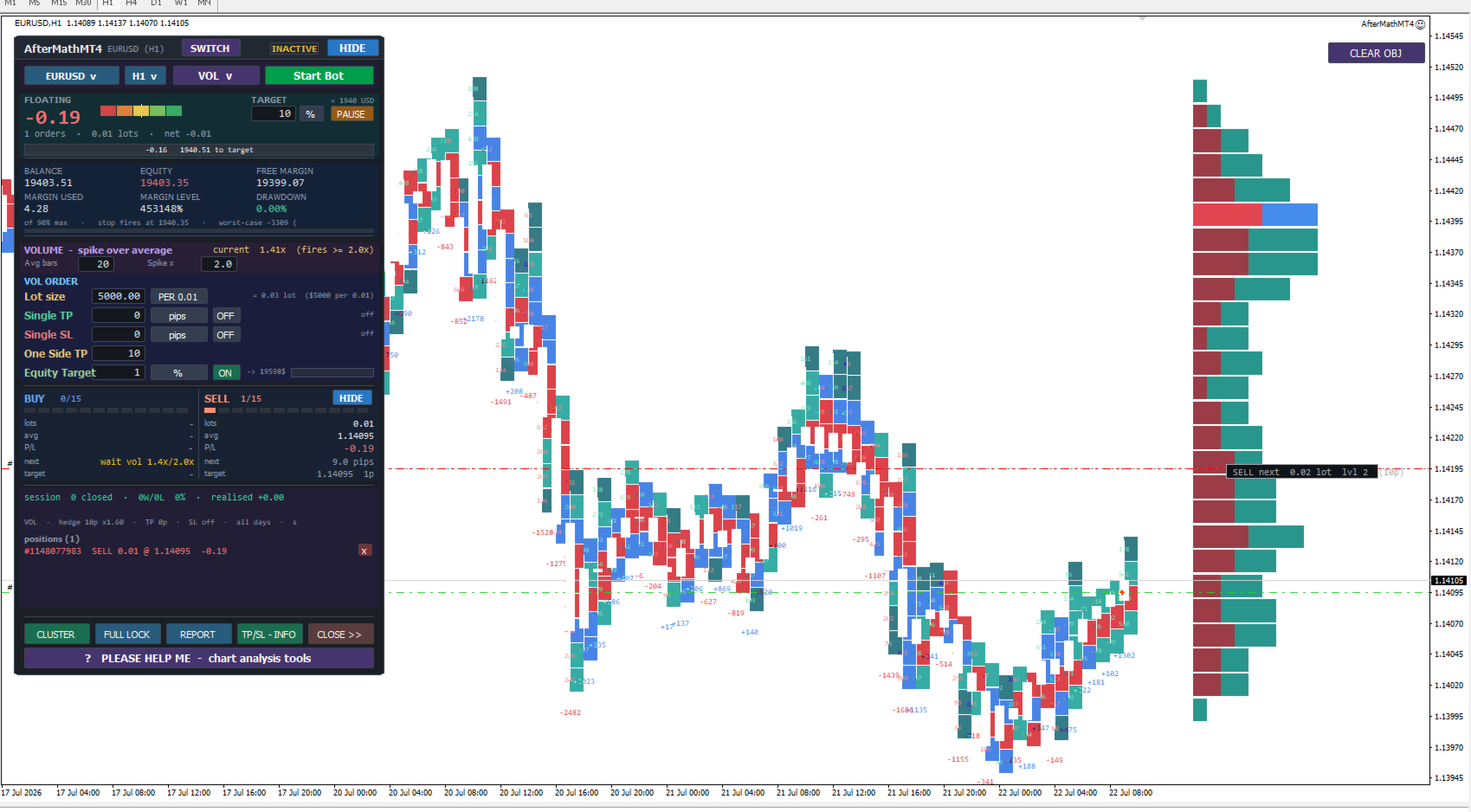
AfterMath - one panel, two ways to trade
Most tools make you choose: a robot that trades without you, or a manual
assistant that waits for you. AfterMath is both, and you pick which one on the
chart, not in the settings.
When you attach it, the panel asks a single question - AUTO TRADING or MANUAL
TRADING - and shows you only the controls for the mode you chose. A SWITCH
button in the header takes you back to that choice at any time, so the same
chart can run the robot in the morning and become your trading desk in the
afternoon. Your open positions are never touched when you switch.
=====================================================================
AUTO - the robot trades, you supervise
=====================================================================
A two-sided hedging grid. It opens a BUY and a SELL basket, ladders further
levels behind price at a fixed or ATR-adaptive distance, and closes on the exit
rule you choose. Everything is editable live on the panel - no F7, no restart.
Four entry strategies, chosen from a drop-down:
HEDGE opens both sides immediately, no signal filter
RSI starts a basket when RSI crosses your oversold / overbought band
VOL starts on a volume spike above the average of the last N bars
SDEV starts when price stretches past a standard-deviation band
Each strategy's parameters sit on the panel and can be changed while it runs.
The strategy only gates where a NEW basket may start - the ladder, recovery and
exit maths stay identical in every mode.
Exits, each independently on or off:
Single TP take profit per order
Single SL stop loss per order
One Side TP close a whole side on its own profit, then restart that side
Equity Target close everything each time account equity gains a rung
TARGET a session goal in money or percent, with STOP / LOOP / PAUSE
Live readouts show what the robot is waiting for. An empty side does not just
say "waiting" - it names the reason: outside trading hours, spread too wide,
news pause, hedge locked, total-lot cap reached, or "opening on next tick".
=====================================================================
MANUAL - you trade, the robot manages
=====================================================================
A floating trade panel you can drag anywhere on the chart, plus a full on-chart
trade manager.
- Market or pending orders. Pending orders are seeded at a safe distance from
price, then you drag the line where you want it. The buttons rename
themselves to BUY STOP / BUY LIMIT / SELL STOP / SELL LIMIT so you always
know what you are about to place.
- Live orders draw filled reward and risk zones on the chart. Drag the TP or
SL line and the order is modified with it; the panel values follow, and the
distance and money value are shown while you drag.
- Lot sizing: fixed lots, a balance-per-0.01 rule, or risk-based sizing from
your stop distance.
- Partial close at 25% / 50% / 75% of the basket.
- Break-even and trailing stop, in pips, money, percent of balance, or ATR.
- Auto grid: you open the first order by hand, and the EA ladders further
levels behind it on that side only, using the same step and multiplier
rules as the robot.
In manual mode the EA never opens a trade on its own. It only tends what you
opened - which is the point.
=====================================================================
Built to work on more than one instrument
=====================================================================
Stop distances are meaningless across markets: 40 pips is a normal EURUSD stop
and less than half a spread on gold. Every stop in AfterMath - take profit, stop
loss, one-side target, trailing - can be set in pips, money, percent of balance,
or ATR.
Set 2 ATR and it means the same thing on EURUSD, XAUUSD and crypto, because it
is measured from the instrument's own volatility. On attach, any stop still set
in pips that would land inside the instrument's noise is converted to ATR
automatically, and the reason is written to the log.
A MARKET and TIMEFRAME picker on the panel walks the same chart across your
whole Market Watch, so you can review every symbol from one place.
=====================================================================
Risk controls
=====================================================================
- Maximum ladder levels per side, asymmetric if you want
- Maximum total lots and minimum margin level
- Maximum basket age and maximum basket span in pips
- Equity stop with a drawdown percentage
- Daily profit and daily loss limits
- Trading hours, day-of-week filter and spread filter
- News pause and rollover-window pause
- Recovery hedge lock on a deep basket
- FULL LOCK and CLOSE ALL, including close-all-pairs with a confirmation
- A worst-case risk meter showing what a full ladder would cost
=====================================================================
Requirements and honest notes
=====================================================================
- Any broker, any symbol, any timeframe. The panel needs a live or demo
chart; MetaTrader disables chart buttons inside the Strategy Tester, so in
the tester the robot runs headless from the Inputs.
- MT5 ONLY: a HEDGING account is required for the two-sided grid. On a
NETTING account the broker merges opposite trades into one position, so
AfterMath detects this and runs a single-direction ladder instead - one
position at a time, managed by the same exits. It will not refuse to start.
- This is a grid and hedging system. Grids recover many small losses and can
give back a lot in one strong trend. Use the level cap, the equity stop and
the lot settings deliberately, and test on a demo account first with the
settings you intend to trade.
No martingale is forced on you - the lot multiplier is an input and can be set
to 1.0 for a flat ladder.