TCL Super Trend
- Göstergeler
- Sürüm: 1.2

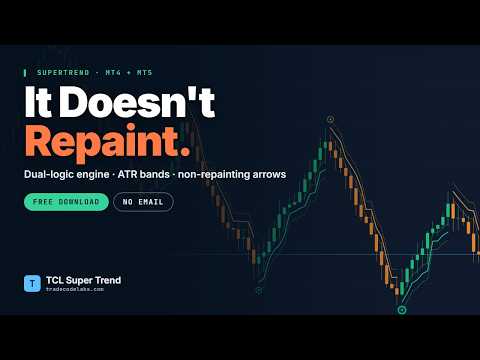
TCL Super Trend is a trend-following indicator for MetaTrader 4. It plots a SuperTrend line, ATR-adaptive volatility bands, trend-change arrows, and an on-chart dashboard panel.
HOW THE ENGINE WORKS
Most SuperTrend indicators use a single Average True Range (ATR) multiplier to place a line above or below price. TCL Super Trend uses a dual-logic state machine that tracks both the highest lows and the lowest highs within a configurable lookback window, called Amplitude.
A trend reversal is confirmed only when two conditions are met at the same time: the smoothed extremes cross the tracked boundary, and the bar closes beyond the previous bar's high or low. Requiring both conditions reduces false flips during choppy price action.
COMPONENTS
1. SuperTrend Line
The central trend line, calculated from the dual-logic engine. It changes color with trend direction.
2. ATR-Adaptive Volatility Bands
Envelopes that expand and contract with market volatility. In an uptrend, the lower band sits below price as a reference level. In a downtrend, the upper band sits above price. Band width is controlled by the ATR Period and ATR Band Multiplier inputs.
3. Trend-Change Arrows
A green arrow marks a confirmed bullish flip. An orange arrow marks a confirmed bearish flip. Arrow distance from the line scales with ATR so arrows stay visible across different volatility levels. Arrows are calculated on the closed bar and are not repainted.
4. Dashboard Panel
A collapsible on-chart panel showing trend direction, ATR value, and the current SuperTrend level. It can be placed in any chart corner or hidden entirely.
INPUTS
- Show Trend Lines — toggle the SuperTrend line (default true)
- Show Trend Bands — toggle the ATR bands (default true)
- Show Trend Change Arrows — toggle arrows (default true)
- Arrow Size — arrow icon size, 1 to 5 (default 2)
- Show Dashboard Panel — toggle the dashboard (default true)
- Dashboard Location — chart corner for the panel (default top-left)
- MA Calculation Method — Simple or Exponential Moving Average (default Simple)
- Lookback Period (Amplitude) — bars used for high and low detection (default 2)
- ATR Period — ATR lookback for band width (default 100)
- ATR Band Multiplier — ATR scaling for band width (default 0.5)
- Arrow Offset — arrow distance from the line as an ATR multiple (default 2.0)
- Popup Alert — enable MetaTrader popup alerts (default true)
- Sound Alert — enable sound on trend change (default true)
- Email Alert — enable email notifications (default false)
- Push Notification — enable mobile push alerts (default true)
SUGGESTED SETTINGS BY TIMEFRAME
- M1 to M5 — Amplitude 2, ATR Period 50, Multiplier 0.5
- M15 to M30 — Amplitude 3, ATR Period 100, Multiplier 0.7
- H1 — Amplitude 3, ATR Period 100, Multiplier 1.0
- H4 — Amplitude 5, ATR Period 100, Multiplier 1.5
- D1 — Amplitude 7, ATR Period 100, Multiplier 2.0
Lower Amplitude values make the indicator react faster. Higher values make it smoother and less prone to false flips.
COMPATIBILITY
The indicator works on MetaTrader 4. It is compatible with all instruments and all timeframes. Arrows are non-repainting after candle close.
INSTALLATION
1. Download the file from MQL5 Market
2. Restart MetaTrader if needed
3. Drag the indicator onto any chart
For questions about parameters or behavior, please use the Comments tab.