PropFolio Command Manager Pro

: PropFolio Command Manager Pro | The Ultimate Multi-Symbol Arrow Execution Terminal

Overview:

Stop staring at the charts waiting for your custom indicator arrows to appear. PropFolio Command Manager Pro is an institutional-grade, multi-symbol execution terminal that instantly automates your favorite custom indicator.

Simply type the name of your arrow indicator into the settings, and the Command Manager will scan up to 30 currency pairs, indices, or metals simultaneously. When your arrow fires, the EA verifies the trend using our proprietary "Sniper Strength" HTF algorithm, checks the live spread, and executes the trade with pixel-perfect structural risk management.

Featuring a stunning, draggable on-chart UI with state-preservation memory, smart asset-class risk splitting (separate sizing for FX vs. Metals/Indices), live spread monitoring, and full Telegram integration, this is the only trade manager you will ever need.

🔥 KEY FEATURES:

  • Universal Custom Arrow Engine: Automate almost any custom indicator. Just input the file name and the Buy/Sell buffer numbers. Choose between instant Intrabar execution or Confirmed Closed Bar execution.

  • Smart Asset Class Detection (Split Risk): Automatically detects if a symbol is Forex or a Metal/Index (like XAUUSD or US30). You can set completely separate fixed lot sizes or percentage risk profiles for FX vs. highly volatile Indices/Metals.

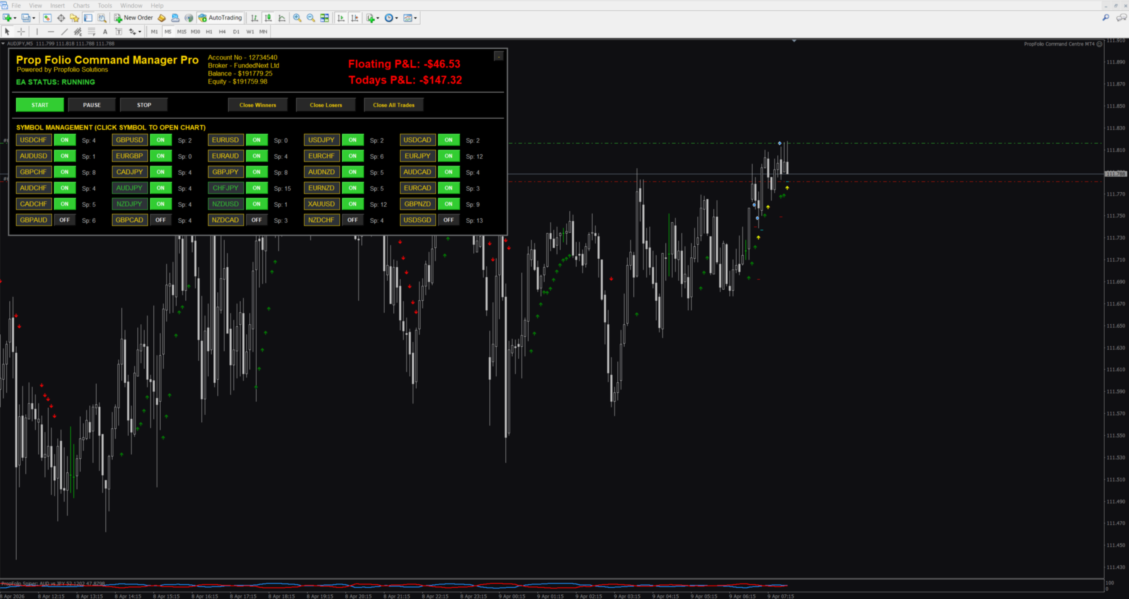
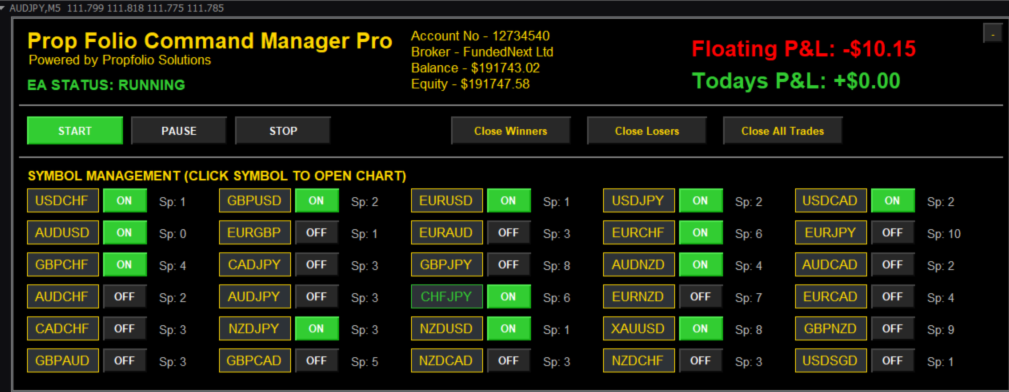
  • 30-Symbol Live Dashboard: Monitor and manage up to 30 custom symbols from a single chart. Click any symbol on the Z-Black dashboard to instantly switch your chart and inspect the setup.

  • State Preservation Memory: Unlike normal EAs that wipe your settings when you change timeframes, Command Manager Pro remembers your exact panel location, toggled pairs, and PAUSE/START state perfectly.

  • Live Spread Guard: A real-time spread monitor sits next to every pair. If the spread spikes above your custom limit, the text turns red and the EA automatically blocks entries to protect your account from rollover blowouts.

  • Advanced Institutional Filtering: * Sniper Strength HTF Guard: Automatically calculates Base vs. Quote currency strength on the Higher Timeframe to ensure you only trade in the direction of the true trend.

    • ADX Choppiness Filter: Blocks signals in dead, sideways markets.

  • Structural Stop Loss System: Stop getting wicked out! The EA automatically calculates your Stop Loss based on the High/Low of the previous 'X' candles, adding a dynamic ATR buffer to place your stop exactly where institutional liquidity rests.

  • Daily Equity Guard: Set your Daily Target ($) and Daily Max Loss ($). The EA tracks your floating and realized PnL. If a limit is hit, it closes all trades and halts trading for the day.

  • Premium Trade Management: Auto-Breakeven, structural Candle-by-Candle trailing stops, and manual "Close All Winners / Losers" dashboard buttons.

  • Telegram Session Summaries: Pushes instant entry/exit alerts to your phone, complete with Win Rate and Session PnL statistics.

⚙️ INPUT PARAMETERS BREAKDOWN:

1. Forex Execution & Risk

  • Custom Trade Comment: Identify your strategy in your broker history.

  • Fixed Lot vs % Risk: Choose fixed sizes or auto-compounding % risk based on your Stop Loss distance.

  • Structural SL (Candles): Number of past candles to scan for the absolute High/Low to place your Stop Loss.

  • SL ATR Multiplier: Adds a breathing buffer outside the structural wick.

  • Max Spread Allowed: Blocks trades if the spread exceeds this limit (Points).

2. Metals / Indices Execution & Risk

  • Metals/Indices Fixed Lot: Dedicated lot size specifically for XAUUSD, XAGUSD, US30, etc.

  • Metals/Indices Risk Pct: Dedicated percentage risk for volatile assets.

3. Custom Indicator Engine

  • Indicator Name: The exact filename of your custom arrow indicator (do not include .ex4 or .ex5 ).

  • Buy / Sell Buffers: The data buffer indexes that draw your arrows.

  • Signal Bar: Intrabar (Shift 0) or Closed Bar (Shift 1).

  • HTF Filter & ADX Minimum: Toggles for the built-in trend and chop guards.

4. Advanced Trade & Equity Management

  • Breakeven Target ($): Moves SL to entry when this floating profit is reached.

  • Candle Trail: Trails your stop loss structurally behind the last 'X' candles.

  • Daily Target / Loss ($): Hard equity stops for prop firm compliance.

5. Symbol Management

  • Auto Market Watch: Automatically loads the first 30 pairs from your Market Watch window, OR use comma-separated manual symbols (e.g., EURUSD, US30, XAUUSD).

(Note: The EA will load in a 'PAUSED' state by default to ensure your safety. Click the green 'START' button on the dashboard when you are ready to trade!)

Installation:-

====================================================================

PROPFOLIO COMMAND MANAGER PRO - SETUP & INSTALLATION GUIDE

Powered by Propfolio Solutions

====================================================================


Thank you for purchasing PropFolio Command Manager Pro! This guide will walk you through how to connect your custom arrow indicator to the EA.


--- STEP 1: INSTALLATION ---

1. Open your MetaTrader terminal.

2. Go to File -> Open Data Folder.

3. Navigate to MQL4 -> Experts, and paste the "Command Manager Pro.ex4" file here.

4. If you are using a custom arrow indicator, ensure it is placed in MQL4 -> Indicators.

5. Restart MetaTrader or right-click the Navigator panel and select "Refresh".


--- STEP 2: FINDING YOUR ARROW BUFFERS (CRUCIAL) ---

For the EA to read your custom indicator, you must tell it which "Buffers" (data lines) draw the Buy and Sell arrows.

1. Open a normal chart and attach your custom arrow indicator to it.

2. Right-click the chart -> Indicators List -> Select your indicator -> Click "Edit".

3. Go to the "Colors" tab.

4. You will see a list of colors numbered 0, 1, 2, 3, etc. 

5. Look at the numbers next to the colors that match your Buy and Sell arrows. 

   (Example: If your Buy Arrow is Blue on #0, and Sell Arrow is Red on #1, your Buy Buffer is 0, and Sell Buffer is 1).

6. Write these two numbers down.


--- STEP 3: ATTACHING THE EA ---

1. Open just ONE blank chart (e.g., EURUSD, M5 timeframe). 

   *Note: You only need ONE chart open. The EA manages up to 30 symbols from this single chart.*

2. Drag the Command Manager Pro EA onto the chart.


--- STEP 4: CONFIGURING THE INPUTS ---

In the EA properties box, scroll to the "--- Custom Arrow Engine ---" section:

1. InpIndiName: Type the EXACT filename of your indicator. (e.g., if your file is "SuperSniperV2.ex4", type SuperSniperV2. DO NOT type the .ex4).

2. InpBuyBuffer: Enter the Buy number you found in Step 2.

3. InpSellBuffer: Enter the Sell number you found in Step 2.


In the Risk Sections:

- Notice there are TWO risk sections. Ensure you set your preferred lot sizes or Risk % for Forex (Section 1) AND your preferred lot sizes or Risk % for Metals/Indices (Section 1.1).


--- STEP 5: STARTING THE EA ---

1. Click OK to load the EA. The dashboard will appear.

2. FOR YOUR SAFETY, the EA loads in a "PAUSED" state (Yellow Text). It will not take new trades yet.

3. Review your symbol list on the dashboard. Toggle any pairs ON or OFF.

4. When you are ready to trade, click the green "START" button on the dashboard. The status will change to "RUNNING", and the EA is now actively scanning for your arrows!


--- TIPS & TRICKS ---

- CLICK TO CHART: Click any symbol name (e.g., GBPUSD) on the dashboard grid. The chart will instantly change to that symbol so you can visually inspect the price action. Your dashboard settings will be perfectly preserved.

- SPREAD GUARD: If the live spread next to a pair turns RED, it means the spread is currently higher than your allowed limit. The EA will safely block any arrows on that pair until the spread drops.

Support: For any inquiries, please contact Propfolio Solutions.

====================================================================

Yazarın diğer ürünleri
Stop spending hours manually scanning charts. The Propfolio Trade Insight Engine is an institutional-grade analytical dashboard and auto-markup utility designed specifically for SMC, ICT, BTMM, and Prop Firm traders. This powerful engine monitors your entire Market Watch (or a custom list of pairs) simultaneously, instantly detecting high-probability setups and institutional footprints. When you spot a confluence on the dashboard, simply click a button, and the engine will instantly spawn a fres

Stop spending hours manually drawing boxes, lines, and killzones on your charts. The Propfolio ICT & SMC Advanced Markup is the ultimate all-in-one chart assistant for the modern institutional trader. Designed specifically for Smart Money Concepts (SMC), Inner Circle Trader (ICT), and BTMM methodologies, this indicator automatically maps out the entire institutional narrative on your chart in real-time. Whether you are trading a prop firm challenge or managing live capital, this tool keeps your
The Propfolio Master Suite is the ultimate all-in-one analytical workstation for professional traders. Combining the power of the Beat The Market Maker (BTMM) methodology, Smart Money Concepts (SND/Liquidity), and Advanced Volume Profile, this suite replaces a dozen different indicators with one heavily optimized, beautifully designed engine. Monitor up to 14 pairs simultaneously from a single chart, instantly identify market cycles, and seamlessly map institutional footprints with the click of
They say history repeats itself. What if you could prove it in real-time? The Propfolio Ghost Pattern is an advanced algorithmic pattern-matching engine. It empowers you to select any current price action structure on your chart and instantly scan thousands of historical candles to find the exact moment in the past where the market did the exact same thing. Once it finds the highest probability match, it projects the historical outcome into the future as "Ghost Candles"—giving you a highly calcu
Here is a highly professional, high-converting product description for the Propfolio Auto Gann Zones indicator. This highlights its mathematical precision, clean UI, and advanced auto-mitigation features. MQL5 Product Description Title: Propfolio Auto Gann Zones (MTF & Auto-Mitigating) Description: Gann Theory is one of the most powerful ways to identify market reversals, but drawing the zones manually across multiple timeframes is tedious, subjective, and clutters your charts. The Propfolio Aut
Stop constantly switching between timeframes to find the trend. The Propfolio MTF Trendline Confluence engine is designed for Smart Money (SMC) and Price Action traders who demand absolute precision. It automatically calculates, draws, and tracks structural swing points across three different timeframes simultaneously, projecting them all onto your current chart. By aligning your Execution Timeframe (e.g., M15), your Structure Timeframe (e.g., H1), and your Macro Timeframe (e.g., H4), this tool
Trading without strict risk management and psychological guardrails isn't trading—it's gambling. The PropFolio Professional Traders Suite is an all-in-one, institutional-grade execution panel and risk management dashboard. Built specifically for Prop Firm traders and serious retail traders, it replaces manual lot-size calculations, emotional trading, and messy chart management with a sleek, draggable on-chart Control Center. From visual drag-and-drop order placement to automated news embargoes a
Transform ANY custom arrow or signal indicator into a fully automated, prop-firm-passing machine. The Propfolio Universal EA is an institutional-grade trade execution and risk management system. Instead of staring at charts waiting for your favorite indicator to print a signal, simply plug its name into this EA. The system will read your indicator's buy/sell buffers and execute trades flawlessly, wrapping your account in a layer of professional risk management. Whether you trade breakouts, rever
Stop spending hours manually scanning charts. The Propfolio Trade Insight Engine is an institutional-grade analytical dashboard and auto-markup utility designed specifically for SMC, ICT, BTMM, and Prop Firm traders. This powerful engine monitors your entire Market Watch (or a custom list of pairs) simultaneously, instantly detecting high-probability setups and institutional footprints. When you spot a confluence on the dashboard, simply click a button, and the engine will instantly spawn a fres
Stop spending hours manually drawing boxes, lines, and killzones on your charts. The Propfolio ICT & SMC Advanced Markup is the ultimate all-in-one chart assistant for the modern institutional trader. Designed specifically for Smart Money Concepts (SMC), Inner Circle Trader (ICT), and BTMM methodologies, this indicator automatically maps out the entire institutional narrative on your chart in real-time. Whether you are trading a prop firm challenge or managing live capital, this tool keeps your
The Propfolio Master Suite is the ultimate all-in-one analytical workstation for professional traders. Combining the power of the Beat The Market Maker (BTMM) methodology, Smart Money Concepts (SND/Liquidity), and Advanced Volume Profile, this suite replaces a dozen different indicators with one heavily optimized, beautifully designed engine. Monitor up to 14 pairs simultaneously from a single chart, instantly identify market cycles, and seamlessly map institutional footprints with the click of
They say history repeats itself. What if you could prove it in real-time? The Propfolio Ghost Pattern is an advanced algorithmic pattern-matching engine. It empowers you to select any current price action structure on your chart and instantly scan thousands of historical candles to find the exact moment in the past where the market did the exact same thing. Once it finds the highest probability match, it projects the historical outcome into the future as "Ghost Candles"—giving you a highly calcu
Here is a highly professional, high-converting product description for the Propfolio Auto Gann Zones indicator. This highlights its mathematical precision, clean UI, and advanced auto-mitigation features. MQL5 Product Description Title: Propfolio Auto Gann Zones (MTF & Auto-Mitigating) Description: Gann Theory is one of the most powerful ways to identify market reversals, but drawing the zones manually across multiple timeframes is tedious, subjective, and clutters your charts. The Propfolio Aut
Stop constantly switching between timeframes to find the trend. The Propfolio MTF Trendline Confluence engine is designed for Smart Money (SMC) and Price Action traders who demand absolute precision. It automatically calculates, draws, and tracks structural swing points across three different timeframes simultaneously, projecting them all onto your current chart. By aligning your Execution Timeframe (e.g., M15), your Structure Timeframe (e.g., H1), and your Macro Timeframe (e.g., H4), this tool
Stop trading blind. In the world of Forex, successful trading isn't just about technical patterns—it's about trading the Strongest Currency against the Weakest Currency. The Propfolio Currency Matrix is a sophisticated real-time analytical dashboard that calculates the relative momentum of the 8 major global currencies (USD, EUR, GBP, JPY, AUD, CAD, CHF, NZD). By using a proprietary multi-timeframe ROC (Rate of Change) algorithm, it strips away the market noise to reveal where the real instituti
Stop guessing and start executing with precision. Learning complex trading methodologies takes years of screen time—until now. The Propfolio Strategy Mentor OS is an elite, on-chart analytical dashboard that acts as your live digital trading mentor. It doesn't just draw lines on your chart; it actively scans the market, identifies high-probability setups across 8 different institutional strategies , and tells you exactly what to look for in real-time via the Live Mentorship Terminal. Whether you
PropFolio Command Manager Pro | The Ultimate Multi-Symbol Arrow Execution Terminal Overview: Stop staring at the charts waiting for your custom indicator arrows to appear. PropFolio Command Manager Pro is an institutional-grade, multi-symbol execution terminal that instantly automates your favorite custom indicator. Simply type the name of your arrow indicator into the settings, and the Command Manager will scan up to 30 currency pairs, indices, or metals simultaneously. When your arrow fires,
Filtrele:
Değerlendirme yok
Değerlendirmeye yanıt