
GDXM Fractal PO3 Custom HTF
- Göstergeler
- Sürüm: 1.0

GDXM Fractal PO3 Custom HTF
Master the Narrative: Higher Timeframe Fractals at Your Fingertips
The GDXM Fractal PO3 Custom HTF is a professional-grade visualization tool designed specifically for Inner Circle Trader (ICT) and Smart Money Concept (SMC) practitioners. In the world of high-probability trading, understanding the Power of 3 (PO3)—Accumulation, Manipulation, and Distribution—across multiple timeframes is the key to building a winning market narrative.
Why Every ICT Trader Needs This
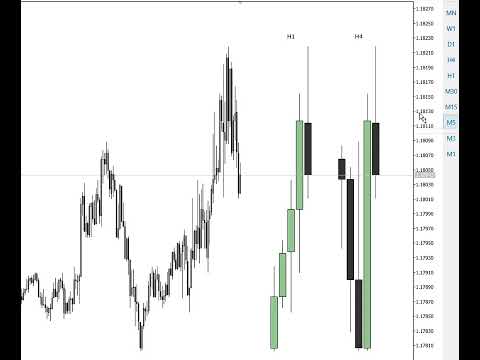
Market structure is fractal. Usually if you are entering on the 15 minute time frame, you would use the 4H time frame as your bias higher time frame. So you can set yout HTF to be displayed to the right of the main chart. Standard MetaTrader 5 time frames are limited to monthly chart. The GDXM Fractal PO3 breaks these barriers by allowing you to project custom and synthetic candles directly onto your current chart, enabling you to see the "Big Picture" without ever switching tabs.
Core Features & Technical Sophistication
1. Synthetic Aggregate Timeframes
While other indicators only show standard periods, our tool introduces Synthetic Aggregation.
-
Standard Mode (Aggregate "1"): Displays any native MT5 timeframe (D1, W1, MN1) as a side-car projection.
-
Synthetic Mode ("3", "6", "12"): Automatically calculates and builds Quarterly (3M), Semiannual (6M), and Annual (12M) candles. It uses advanced calendar logic to anchor prices correctly to the start of the financial cycles.
2. Advanced Visual Rendering
We don't just draw lines; we build fully customizable price action candles using high-performance graphical objects:
-
The Body & Borders: Each candle is rendered using OBJ_RECTANGLE with independent control over border colors ( InpBarUp/Down ) and internal fills ( InpBull/BearFill ).
-
The Wicks: Precision-engineered OBJ_TREND objects represent the highs and lows, essential for identifying liquidity sweeps and "Long Wick" manipulations.
-
Automatic Doji Detection: The indicator recognizes neutral price action and automatically switches to a Doji representation for clear technical reading.
3. Fully Dynamic Positioning (Offset & Spacing)
Maintain a clean workspace. You can control the InpOffsetBars to push the projections into the chart's empty space (the "future" area) so they never overlap your current price action. Adjust the InpBarSpacing and InpBodyWidthRatio to fit your visual preference perfectly.
4. Smart Labeling & Depth Control
-
Contextual Labels: Each fractal set is clearly labeled with its timeframe (e.g., "3MN", "D1") using the OBJ_TEXT function, anchored to the highest peak of the projection for easy identification.
-
Z-Order Synchronization: Built with a "Background Layer" logic ( OBJPROP_BACK ), ensuring the indicator sits behind your manual drawings (Fibonacci, Rectangles, Trendlines) without obstructing your analysis.
How to use it for PO3 Analysis
-
Select your HTF: Set the aggregate to "3" for the Quarterly cycle.
-
Identify the Fractal: Look at the HTF candle being formed. Is it currently in the "Manipulation" phase (the wick)?
-
Execute: Switch to your LTF (Lower Timeframe) to find entries in the direction of the HTF Distribution.
-
Use "InpUniqueID" to place multiple instances of this indicator on the same chart, separating them only by the distance "InpOffsetBars".
-
I recommend configuring your fractal and selecting the indicator display in the settings to show only on your current fractal time frame.
Example:
D1 HTF - display only on H1
H4 HTF - display only on M15
H1 HTF - display only on M5
Build your narrative. See the fractal. Master the PO3.
Professional support is included.












































Very useful.