Kumo zenith grid pro
- Эксперты
- Версия: 1.0
- Активации: 5

Ichimoku Precision Combined with Institutional Risk Management
💡 IDEAL FOR BEGINNERS AND LOW CAPITAL (CENT ACCOUNTS): Are you taking your first steps in the Forex market and working with a small budget? Kumo Zenith Grid Pro was designed with you in mind! When run on Cent (Micro) Accounts, this EA allows you to manage risk down to the millimeter with low initial deposits (equivalent to about $100 USD or less), helping you learn, test, and step up to real consistency without risking large sums of money. Pro Tip: Always test thoroughly on a Demo Account before risking real capital!
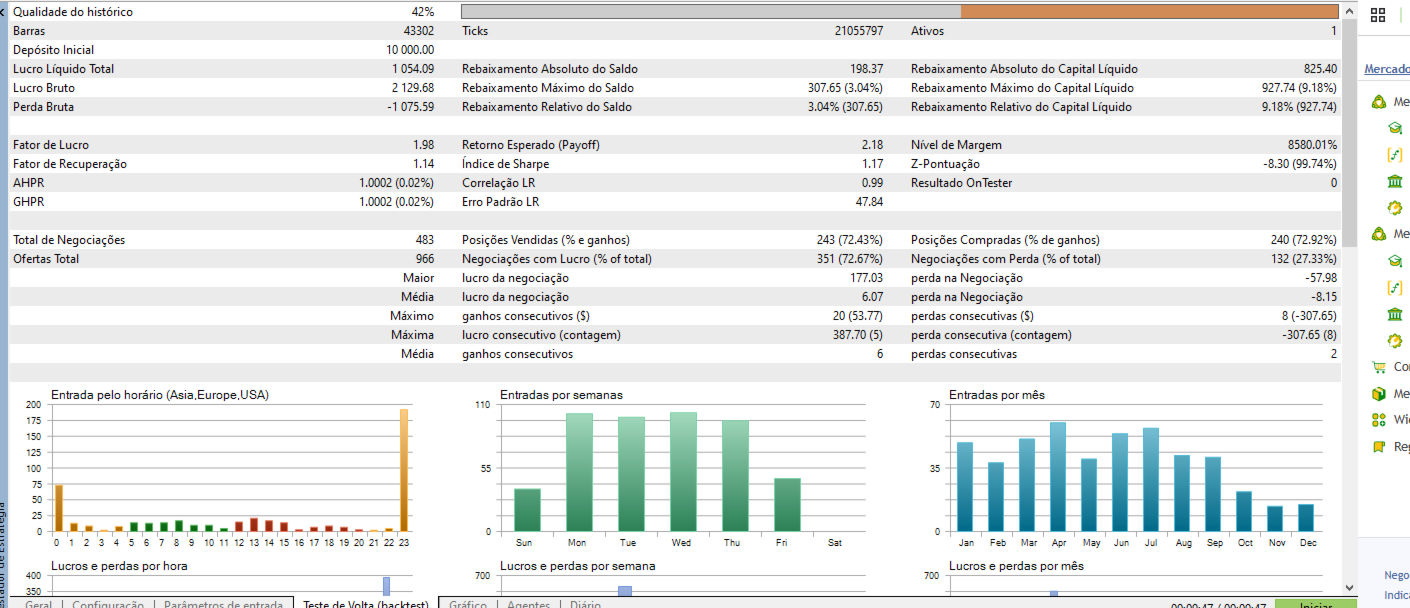
Kumo Zenith Grid Pro is a high-performance and highly flexible Expert Advisor (EA) designed for traders seeking consistency through advanced Grid and controlled Martingale strategies. It removes emotional decision-making by combining the classical directional precision of the Ichimoku Cloud with strict institutional filters (SMA 200 and dynamic ATR) to capture high-probability market mean reversions.
🌐 Operational Flexibility: Multiple Assets & Timeframes
Although factory-optimized for EURUSD on H1, Kumo Zenith Grid Pro is extremely versatile and can operate across various currency pairs (Forex), crypto assets, indices, or commodities, adapting smoothly to different risk profiles.
-
Multiple Timeframes: Can be configured from ultra-short-term charts (such as M1 or M15 for a more dynamic approach) to higher structural timeframes (such as H1 or H4 for added conservatism).
-
Important Note: We strongly recommend that any changes to assets, timeframes, or parameters are thoroughly tested and optimized on a Demo Account before risking real capital.
🌟 Exclusive Product Advantages
-
Professional Real-Time On-Chart HUD: Monitor your live Equity, daily profit, current drawdown, broker spread, and operational status directly on your chart.
-
Dynamic Volatility & Spread Filter: Protects your capital by blocking the opening of new order series if market volatility or spread exceeds your configured limits.
-
Risk Management for Hedging Accounts & Prop Firms: Features excessive drawdown protection and an equity Hard Stop system to shield your balance.
-
Absolute Session & Time Control: Configure exact trading days of the week and daily operating hours to avoid low-liquidity spikes or weekend gaps.
-
MQL5 Market Compliance: Fully optimized code that passes the rigorous execution and order-filling standards required by MetaQuotes.
📊 Official Setup Recommendations
-
Primary Recommended Asset: EURUSD. (Offers the best cyclical predictability and lowest market spread).
-
Recommended Timeframe: H1 (1 Hour). (Ideal for filtering market noise and securing clean Ichimoku signals).
-
Mandatory Account Type: HEDGING. (Netting accounts are incompatible with Grid strategies).
-
Recommended Account Type: Cent / Micro Account (Exness, RoboForex, etc.) to ensure your margin comfortably absorbs Grid expansion with a small balance.
-
Minimum Deposit: 10,000 cents ($100 USD equivalent) for a 0.01 starting lot.
⚙️ Detailed Input Parameters Guide
To make configuration effortless, here is a detailed breakdown of each parameter, how it affects the EA, and how to adjust it based on your profile and timeframe:
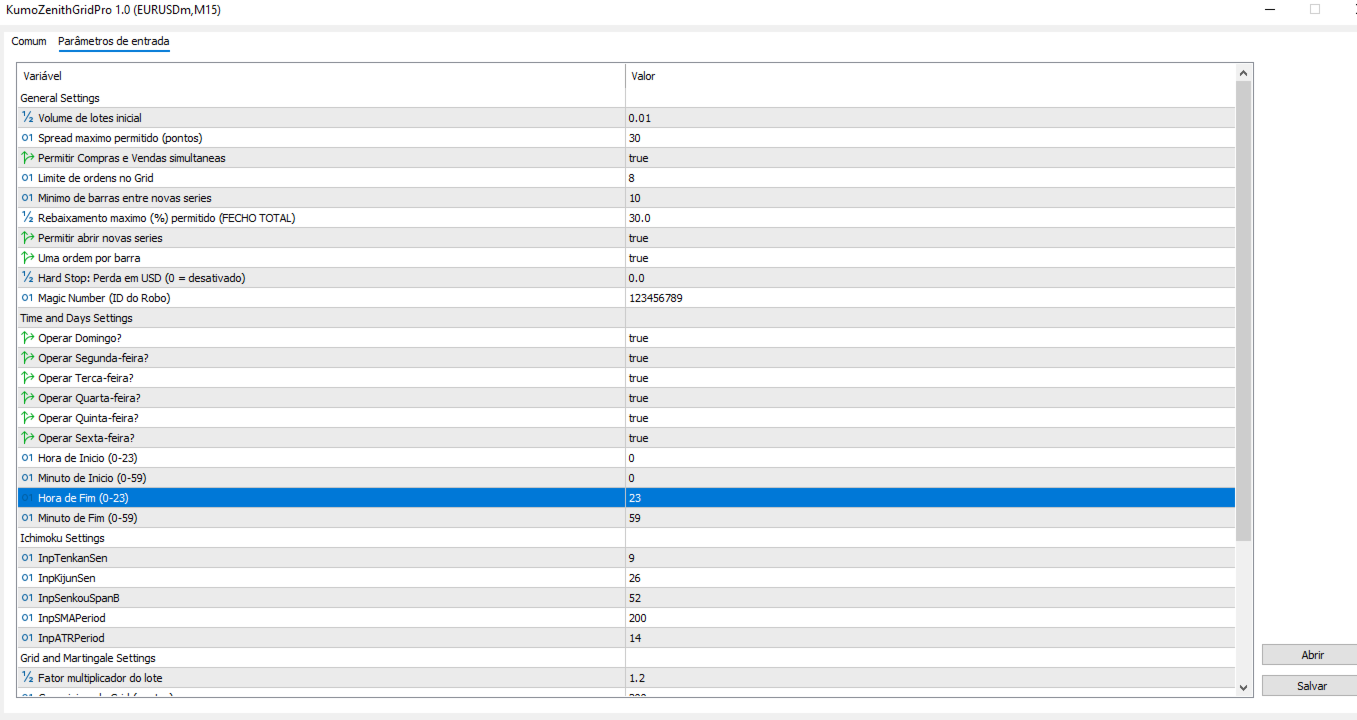
⚙️ General Settings
-
InpLotSize (Default: 0.01)
-
What it is: The lot size for the very first order of each grid cycle.
-
How it works: Acts as the base calculation for the entire EA. Larger lots increase profit potential but drastically elevate exposure risk.
-
How to adjust: Keep at 0.01 if you are starting with small accounts (especially on Cent Accounts). Only scale up if you have a robust capital base.
-
-
InpSpreadAllowed (Default: 30)
-
What it is: The maximum acceptable broker spread allowed to trade (in points). 30 points equals 3 pips on EURUSD.
-
How it works: The EA monitors spread in real-time. During major news events when spreads widen past this limit, the EA halts new entries to prevent costly slippage.
-
-
InpMaxTradeVolume (Default: 8)
-
What it is: The maximum number of orders/levels the EA is allowed to open in a single grid series.
-
How it works: If the market moves aggressively against your position, the EA will open a maximum of 8 orders before pausing further averaging and waiting for a reversal.
-
How to adjust: Lower timeframes (M1/M15) experience more noise and might require a slightly higher limit (e.g., 10), whereas H1/H4 run smoothly with 6 to 8 levels.
-
-
InpMaxDrawdownPercent (Default: 30.0)
-
What it is: The maximum floating drawdown limit in percentage terms.
-
How it works: If your account reaches a 30% floating loss, the EA triggers an emergency brake and closes all open positions to protect the remaining 70% of your equity.
-
⏱️ Time and Days Settings
-
Days of the Week (True/False)
-
What it is: Allows you to select which days the EA is authorized to open new series.
-
How to adjust: We recommend keeping Fridays enabled with caution and disabling Sundays (as Sunday market openings typically feature low liquidity and dangerous price gaps).
-
-
InpStartHour / InpEndHour (Default: 0 to 23)
-
What it is: The daily time window during which the EA is allowed to trade.
-
How to adjust: If you wish to avoid the volatile Asian session open or the New York close, you can restrict these hours to peak European/American liquidity windows (e.g., 08:00 to 18:00).
-
📈 Grid and Martingale Settings
-
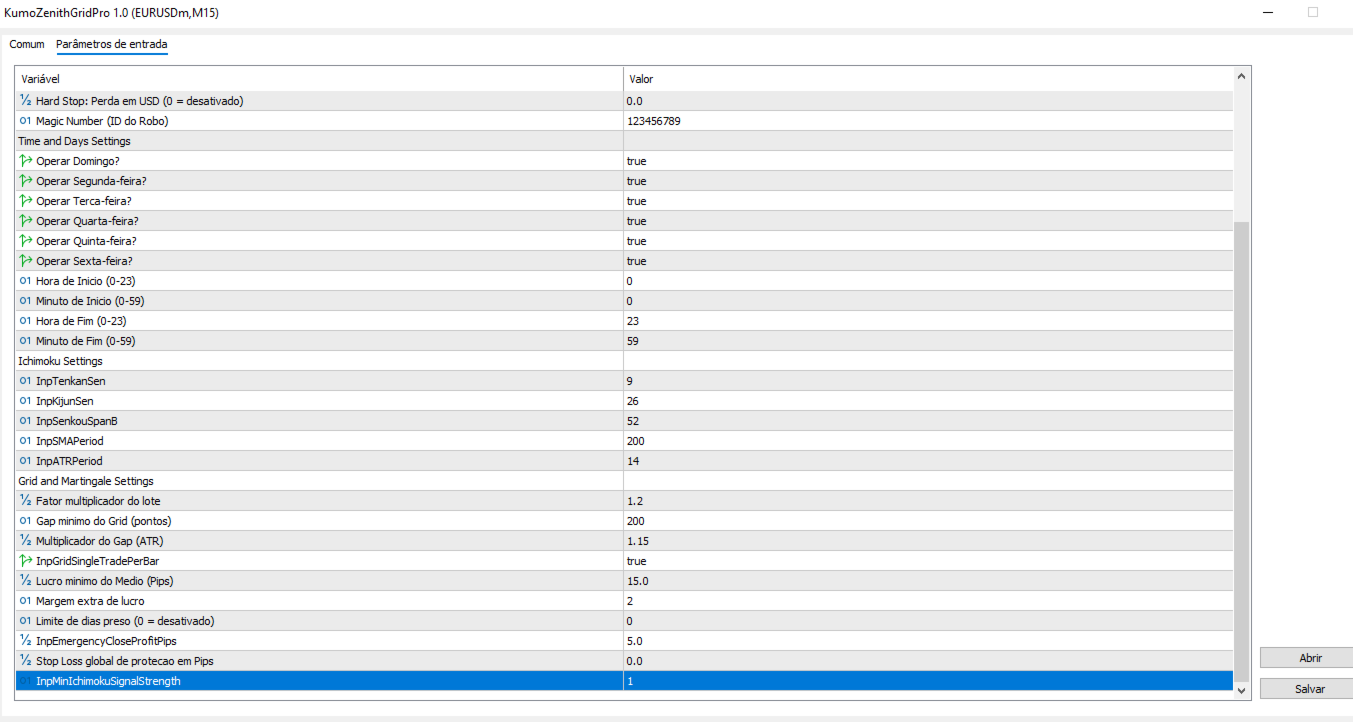
InpIncrementFactor (Default: 1.4)
-
What it is: The lot multiplier factor for each subsequent grid order.
-
How it works: If the first order is 0.01, the next one is multiplied by 1.4. A higher factor shifts your average break-even price faster during corrections, but increases risk exposure.
-
How to adjust: For conservative and beginner profiles, use between 1.2 and 1.3 . For moderate profiles, stick to 1.4 .
-
-
InpGridMinGap (Default: 150)
-
What it is: The mandatory minimum distance in points (15 pips) between one grid order and the next.
-
How it works: Determines the breathing room the market is given before the EA deploys a defensive averaging level.
-
How to adjust (Crucial for Timeframes): If trading fast M1 or M15 charts, price bounces tightly in short ranges, so you should increase this gap to 250 or 300 points. When trading on the recommended H1 timeframe, a 150 to 200 point gap is ideal since structural movements are cleaner.
-
-
InpMinProfitPips (Default: 15)
-
What it is: The net profit target (in pips) automatically calculated from the volume-weighted average price of all open orders in the series.
-
How it works: As soon as the market corrects enough to hit this profit target, the EA closes all orders in the cycle simultaneously, locks in the profit, and restarts the process.
-