
Gold PMG EA
- Эксперты
- Версия: 3.1
- Обновлено: 10 июня 2026
- Активации: 10

A modern MetaTrader 4 Expert Advisor built mainly for Gold trading, with structured pending-order entries, progressive position management, daily protection tools, and a clean on-chart dashboard.
Verified Live Results
Track the real-time performance of this Expert Advisor on a verified MQL5 signal account.
Recommendation:
TimeFrame: M5
Capital: $500 ($300 or less will work but aggressive)
Settings: Default settings for $500
Overview
GOLD PMG EA is designed for traders who want a practical and reliability-focused trading tool for Gold. It combines disciplined pending-order execution, controlled progressive grid behavior, optional dynamic spacing, and daily profit/loss protection.
The EA is intended to be attached to a 5-minute chart. The trend confirmation settings can remain on the higher timeframe filter, with H4 and MA 250 as the recommended default structure.
Strategy Description
GOLD PMG EA uses a protected trading model created for the behavior of Gold. The strategy looks for market direction, confirms the larger trend through a higher timeframe filter, and uses pending orders so entries are placed only at planned price areas.
When the market moves, the EA manages exposure in a progressive one-by-one structure. Grid distance can be fixed or adjusted automatically using volatility. This gives the system flexibility during calm and active Gold conditions without revealing the full internal logic of the trading model.
The goal is to provide a powerful and reliability-focused Gold EA with useful risk controls, clear chart information, and flexible settings for different broker environments.
Main Features
- Designed mainly for Gold / XAUUSD trading.
- Recommended chart timeframe is M5, also called 5 minutes.
- H4 trend filter with MA 250 default setting.
- Pending-order based entry structure.
- Progressive one-by-one position management.
- Optional ATR-based dynamic grid spacing.
- Daily profit target and daily loss limit in money or percent.
- Basket profit close option.
- Dashboard showing balance, equity, floating P/L, today P/L, current month P/L, and previous month P/L.
- Spread filter, lot normalization, margin checks, and safer order handling.
Recommended Use
Attach GOLD PMG EA to a Gold M5 chart. Broker symbol names can be different, for example XAUUSD, XAUUSDm, GOLD, GOLDmicro, or another broker-specific Gold name.
Leave the higher-timeframe trend filter on H4 and keep the default MA 250 filter unless you already have a tested personal setup. Start with a low lot size, run a Strategy Tester check, and forward test on demo before using a live account.
Input Parameters
Trading Settings
| Input | Meaning and usefulness |
|---|---|
| InpAllowNewTrades | Turns new entries on or off. Useful when you want the EA to stop opening fresh trades while still allowing management functions to remain available. |
| InpLotSize | Fixed lot size used for each EA order. This is one of the most important risk settings. |
| InpSlippage | Maximum accepted price slippage during order close or execution. Useful for controlling execution during fast Gold movement. |
| InpMagicNumber | Unique identification number for this EA's trades. Useful when running more than one EA or more than one chart. |
| InpMaxSpreadPips | Maximum allowed spread in pips before the EA opens new trades. Set to 0 to disable. Useful for avoiding entries during expensive market conditions. |
| InpMaxPositions | Maximum number of open and pending EA orders allowed at the same time. Useful for controlling grid exposure. |
Entry Signal Settings
| Input | Meaning and usefulness |
|---|---|
| InpFastMAPeriod | Fast moving-average period used by the entry model. Lower values react faster to price changes. |
| InpSlowMAPeriod | Slow moving-average period used by the entry model. Higher values make the signal more selective. |
| InpEntryOffsetPips | Distance in pips from current price to place the first pending order. Useful for avoiding immediate entries. |
| InpEntryMode | Chooses the first pending order style. Stop mode waits for continuation. Limit mode waits for pullback. |
Higher-Timeframe Trend Filter
| Input | Meaning and usefulness |
|---|---|
| InpUseTrendFilter | Enables or disables higher-timeframe trend confirmation. Useful for filtering trades against the larger market direction. |
| InpTrendTimeframe | Timeframe used for the trend filter. Recommended setting is H4, and this can be left unchanged for the standard Gold setup. |
| InpTrendMAPeriod | Moving-average period for the higher-timeframe filter. Recommended default is 250. |
| InpTrendMAMethod | Moving-average calculation method. Useful for adapting the filter to different trading styles. |
| InpTrendMAPrice | Applied price used by the trend MA, such as close price. Useful for adjusting how the filter reads market structure. |
Grid Settings
| Input | Meaning and usefulness |
|---|---|
| InpBaseGridStepPips | Base distance in pips between progressive grid levels when ATR spacing is not used. |
| InpUseATRForGrid | Uses ATR to calculate dynamic grid spacing. Useful for Gold because volatility can change quickly. |
| InpATRPeriod | ATR period used for dynamic spacing. Lower values react faster, while higher values smooth the spacing. |
| InpATRMultiplier | Multiplier applied to ATR. Higher values create wider grid spacing. |
| InpGridStepPipsMin | Minimum allowed grid step in pips. Useful as a safety floor when volatility becomes very low. |
| InpMaxPendingLifetimeMinutes | Deletes old pending orders after the selected time. Set to 0 to disable. Useful for keeping the chart clean and avoiding stale entries. |
Basket Close Settings
| Input | Meaning and usefulness |
|---|---|
| InpUseBasketTakeProfit | Enables closing all managed EA positions when the basket reaches the selected floating profit. |
| InpBasketCloseProfit | Basket profit target in account currency. Useful for closing a group of positions together. |
Daily Target Settings
| Input | Meaning and usefulness |
|---|---|
| InpUseDailyTargets | Enables daily profit and loss control. |
| InpDailyTargetsIncludeFloating | Includes floating P/L in daily target calculation. Useful when you want the EA to react to open trade performance, not only closed trades. |
| InpDailyProfitTargetMoney | Daily profit target in account currency. Set to 0 to disable. |
| InpDailyLossLimitMoney | Daily loss limit in account currency. Set to 0 to disable. |
| InpDailyProfitTargetPercent | Daily profit target as a percentage of account balance. Set to 0 to disable. |
| InpDailyLossLimitPercent | Daily loss limit as a percentage of account balance. Set to 0 to disable. |
| InpCloseOrdersOnDailyTarget | Closes managed positions and deletes managed pending orders when a daily target or limit is reached. |
| InpStopAfterDailyTarget | Stops new trading for the rest of the trading day after a daily target or limit is reached. |
Display Settings
| Input | Meaning and usefulness |
|---|---|
| InpShowDashboard | Shows or hides the on-chart dashboard. |
| InpDashboardCorner | Selects the chart corner used for the dashboard. |
| InpDashboardX | Horizontal dashboard position. |
| InpDashboardY | Vertical dashboard position. |
| InpDashboardBackColor | Dashboard background color. |
| InpDashboardTextColor | Default dashboard text color. |
| InpDashboardProfitColor | Color used for positive P/L values. |
| InpDashboardLossColor | Color used for negative P/L values. |
| InpShowPendingLabels | Shows or hides pending-order labels and price markers on the chart. |
| InpPendingLabelColor | Color used for pending-order labels and marker lines. |
After Purchase
After purchase, please send me a private message on MQL5.com with your broker name, Gold symbol name, account type, and preferred risk level. I can help you choose suitable starting settings for your trading environment.
Support is provided through the MQL5.com comments section or the MQL5.com private messaging system.
Important Notes
GOLD PMG EA is built for Gold, but every broker has different spreads, contract sizes, symbols, execution, and trading rules. Always test the EA with your own broker before live trading.
Grid-based systems can carry floating drawdown. Use conservative lot sizes and select daily targets that match your account balance and risk level.
Risk Disclaimer
Trading Forex, CFDs, and Gold involves risk. No Expert Advisor can guarantee profit or remove trading risk. Past performance, backtests, and demo results do not guarantee future results.
Use suitable lot sizes, test before live trading, and trade only with capital you can afford to risk.
GOLD PMG EA - Product description draft for MQL5.com listing.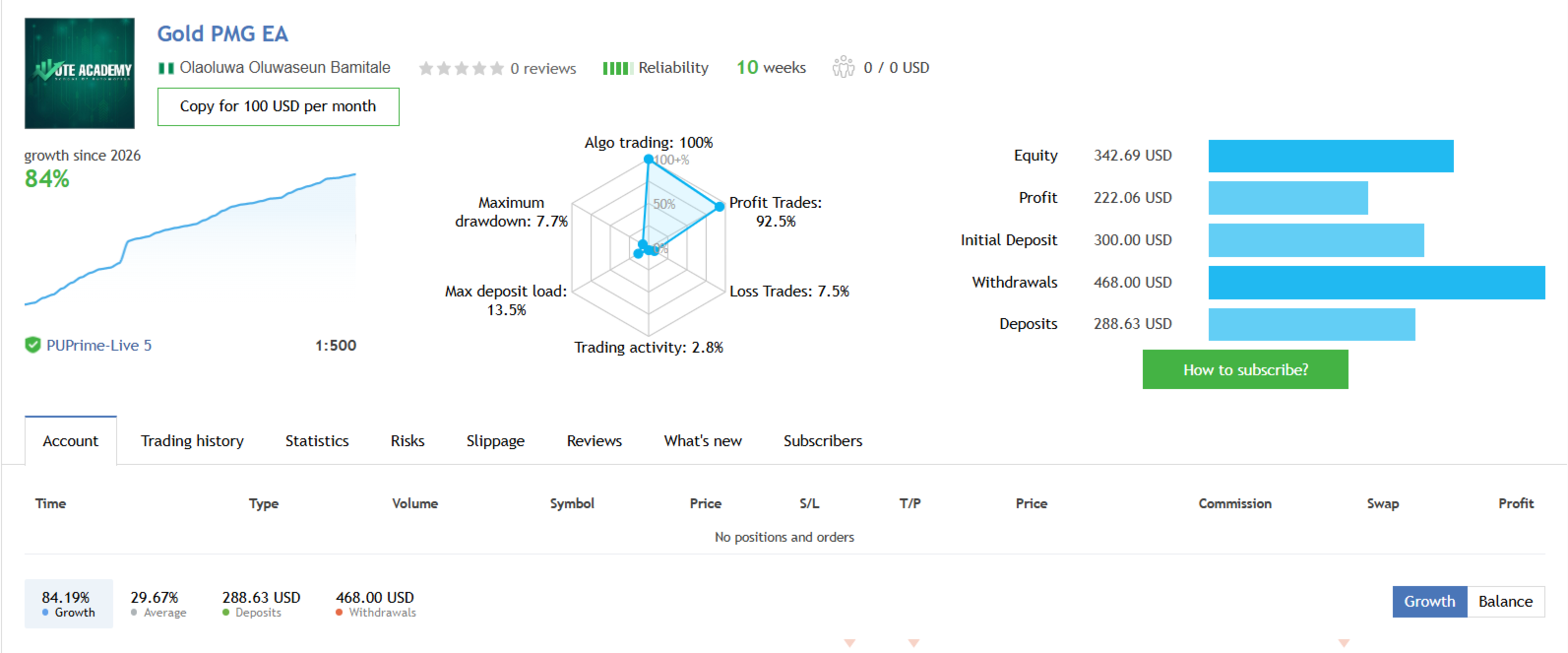























































Пользователь не оставил комментарий к оценке