Setting Up Telegram Notifications for the Samurai WIN Expert Advisor in MetaTrader 5

Why is this necessary and how does it work?
MT5 integration with Telegram opens new opportunities for traders to manage and monitor the market remotely. You'll be able to:
-
Receive instant notifications about the triggering of trading signals, opening and closing of trades, and the price reaching certain levels.
-
Monitor the work of advisors (Experts) 24/7, even without being at the computer.
-
Share important information with a private chat for traders or partners, automatically sending reports and chart screenshots.
This mechanism works according to a simple scheme: an MT5 advisor records an event (for example, the opening of a trade) → generates an HTTP request with a message → the request is sent to the Telegram server → the Telegram server delivers the message to your bot → the bot forwards it to the specified chat.
[MT5 Advisor] → [HTTP request] → [Telegram Server] → [Telegram Bot] → [Telegram Chat]
Step 1: Create a bot via @BotFather
- Find the official bot: In Telegram search, search for @BotFather (it should have a blue checkmark—it's an official, verified bot).
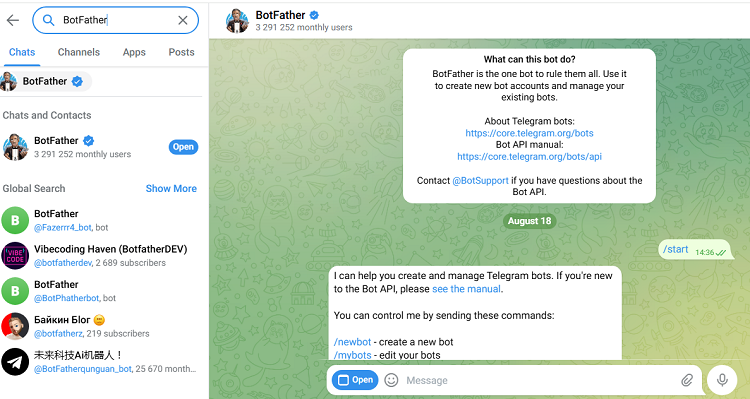
- Create a new bot: Start a chat with @BotFather and run the /start and /newbot commands.
- Name the bot: Following @BotFather's instructions, set:
- Name: The display name of your bot (e.g. Samurai WIN).
- Username: A unique name for the bot, which must end in ..._bot (e.g. Samurai_WIN_real_bot).
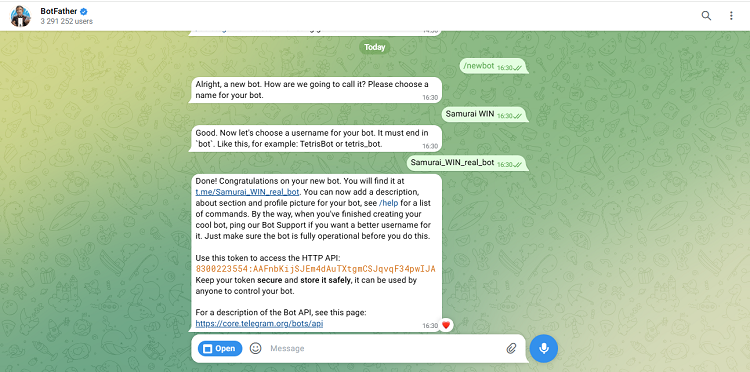
- Save the API token: Once successfully created, @BotFather will provide you with an API token (e.g., 8300223554:AAFnbKijSJEm4dAuTXtgmCSJqvqF34pwIJA). This token is the key to managing your bot. Keep it in a safe place.
Important: A token is confidential information, a kind of "password" for your bot. Don't share it with anyone. A malicious user who obtains the token will be able to send messages and control the bot on your behalf.
Step 2: Obtaining a Chat ID
In order for the bot to send messages specifically to you (or to a group), it needs a unique chat identifier - Chat ID .
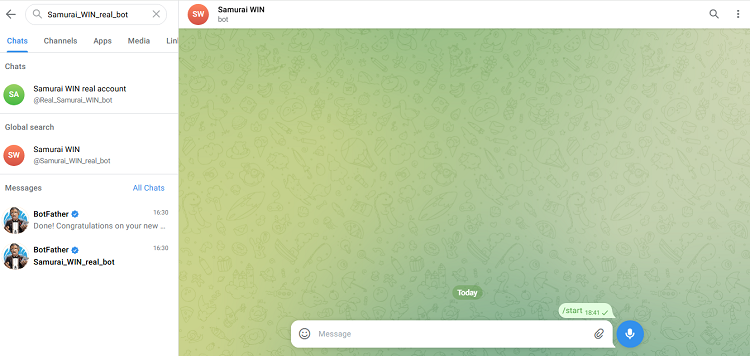
- Launch the bot: Find your bot in Telegram search by its username and launch it by clicking the START button or sending the /start command.
- Make an API request: To obtain the Chat ID, use the getUpdates method of the Telegram API. Paste the following URL into the browser address bar. https://api.telegram.org/bot {BOT_TOKEN}/getUpdates, replacing {BOT_TOKEN} with the token issued to you: 8300223554:AAFnbKijSJEm4dAuTXtgmCSJqvqF34pwIJA
Example:
Token: 8300223554:AAFnbKijSJEm4dAuTXtgmCSJqvqF34pwIJA
Address: https://api.telegram.org/bot8300223554:AAFnbKijSJEm4dAuTXtgmCSJqvqF34pwIJA/getUpdates  ;
If you want the bot to send messages not only to you, but also to a Telegram channel or group you created, you must first make the bot an administrator of this group and then send a message to this channel or group. If the channel was not created, the message should be sent to the bot.
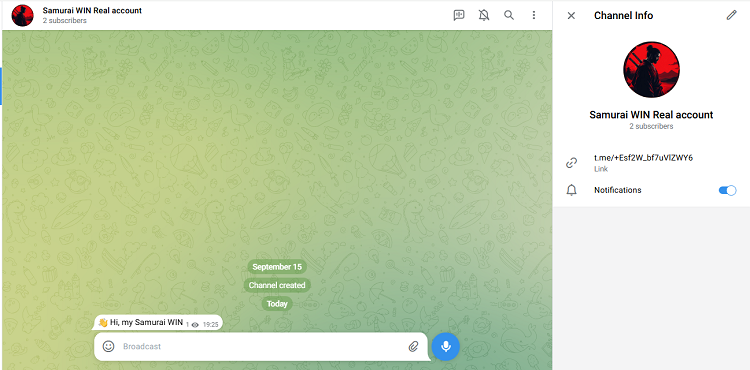
Next, using the resulting link, we follow it in the browser and get our Chat ID: -1003092366614, since this is a channel chat, it will have a minus sign, if the message is sent to the bot and then the link is launched, then the Chat ID will be without a minus sign.
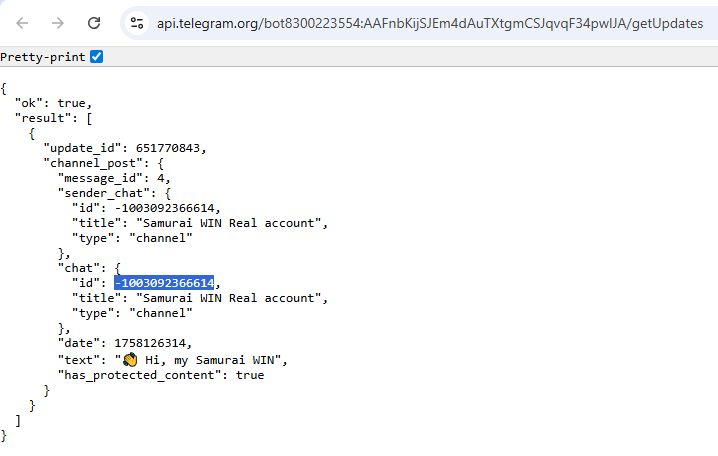
Note: If you received the following in response: {"ok":true,"result":[]} (empty result array) , this means the bot hasn't received any messages. Make sure you've messaged the bot or the chat and try your request again.
To further customize the integration with MQL5, we received two parameters:
- Bot API Token: Issued by @BotFather 8300223554:AAFnbKijSJEm4dAuTXtgmCSJqvqF34pwIJA
- Chat ID: Your personal or group ID -1003092366614
Now you can use this data in MQL5 code to program notifications from the trading platform directly to your Telegram chat.
Step 3: Enabling settings in MetaTrader 5
- Configure the terminal: In the terminal, go to the Service tab → Setting up → Advisors, in the line "Allow WebRequest for the following URLs:" check the box and add the Telegram API address - https://api.telegram.org
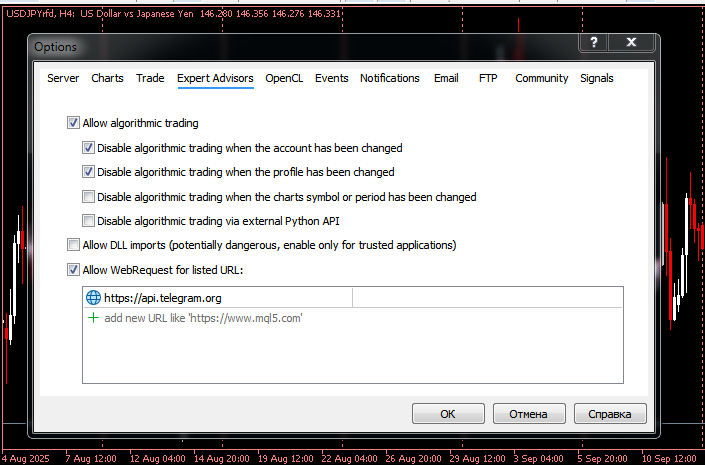
Safety: MetaTrader 5 prohibits arbitrary internet connections by default. Adding a URL https://api.telegram.org Whitelisting gives the platform permission to interact only with the official Telegram API, which is a safe practice.
- Set up the Samurai WIN advisor: In the advisor settings, find the parameters for Telegram:
-
Enable Telegram notifications — translate into position true.
-
Telegram bot token — paste your bot's API token issued by @BotFather. (8300223554:AAFnbKijSJEm4dAuTXtgmCSJqvqF34pwIJA)
-
Chat ID — Enter your personal or group ID. (-1003092366614)
-
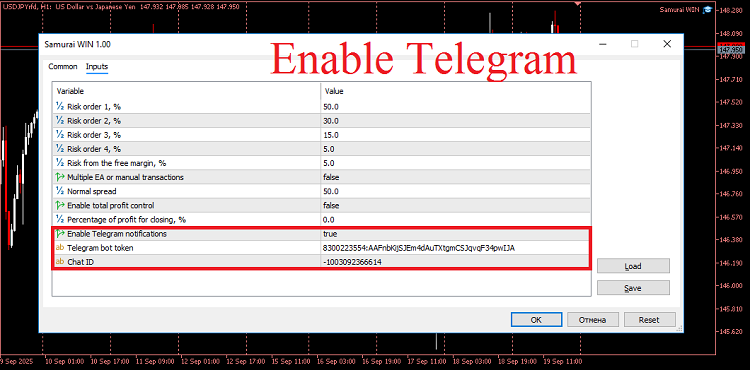
That's it! In just three steps, you've turned Telegram into a powerful extension for your trading terminal. No more constantly monitoring charts the market will send you important alerts.
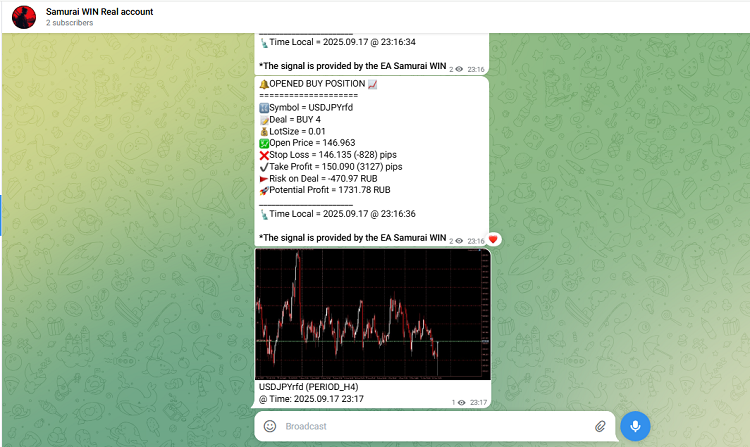
We've already received the first trade entry alerts from the Samurai WIN advisor, along with a chart screenshot!
We wish you profitable trades and timely notifications!