XAUrally
- Experts
-
Muh Akbar Yusuf
 MQL5 developer focused on Expert Advisors for XAUUSD (gold) on MetaTrader 5.
My trading robots use clear, rule-based logic with built-in account protection, and every release is tested in the MetaTrader 5 Strategy Tester before it is published. - Versão: 1.4
- Ativações: 10
XAUrally is a fully automated Expert Advisor for gold (XAUUSD) on MetaTrader 5. It runs three independent trading engines on a single M1 chart. Each engine has its own entry logic, its own exit rules and its own magic number, and every order sent by the EA is checked against the broker's trading conditions before it leaves the terminal.
Three gold engines on one chart, with account protection built in.
ENGINE 1 - BASKET (long only)
A grid basket engine that buys gold in four situations: at selected session hours when an oscillator filter confirms, on short pullbacks below a Bollinger band inside an M1 uptrend, on Bollinger rebounds on a 6-minute chart with trend-strength and volatility filters, and on strong morning momentum on a 12-minute chart. Only one basket is open at a time. All layers of a basket have the same lot (no martingale) and are added at fixed price steps, with a maximum of 10 layers. The basket is closed at a bar open when its profit per ounce reaches the target of the sub-strategy that opened it. A basket brake (loss in USD per 0.01 lot) and a maximum basket age limit every basket.
ENGINE 2 - BREAKOUT
Four modules place buy stop / sell stop orders at H1 swing levels with different swing sizes and holding times and manage open trades with a tight trailing stop. A fifth module trades the breakout of the Asian session range in the direction of the D1 trend and closes its positions at the end of the day. A regime switch keeps a shadow (virtual) record of every module and sends real orders only while the recent shadow results are positive.
ENGINE 3 - LEVEL
Buy stop / sell stop orders at a ladder of recent daily highs and lows. Each level is kept for a limited number of days and expires once price has touched it. Stop loss and take profit are set as a percentage of price, a trailing stop follows the trade, and at most one position is open at a time. A 30-day equity-curve filter switches the engine to shadow mode while its recent results are negative.
ACCOUNT PROTECTION
- Trade-idea guard: when the floating loss of all XAUrally positions in one direction reaches a set percentage of the balance (default 20%), that side is closed and new entries in that direction pause for a set number of minutes (default 60).
- Daily guard: when equity falls a set percentage from the start of the trading day (default 20%), all XAUrally positions and pending orders are closed and no new trades are opened until the next trading day.
- Basket brake and maximum basket age for the grid engine.
- Every order request is checked before it is sent: algo trading permission, trading session, symbol trading mode, volume limits and step, free margin, stop level and freeze level. Requests that the broker would reject are not sent.
ON-CHART PANEL
A compact panel in the upper left corner of the chart shows the EA status, balance, equity, closed profit of the current day and of the current month, win rate, the number of open positions and pending orders, and the floating profit of the EA's positions. The panel is shown on a live chart and in the visual mode of the Strategy Tester.
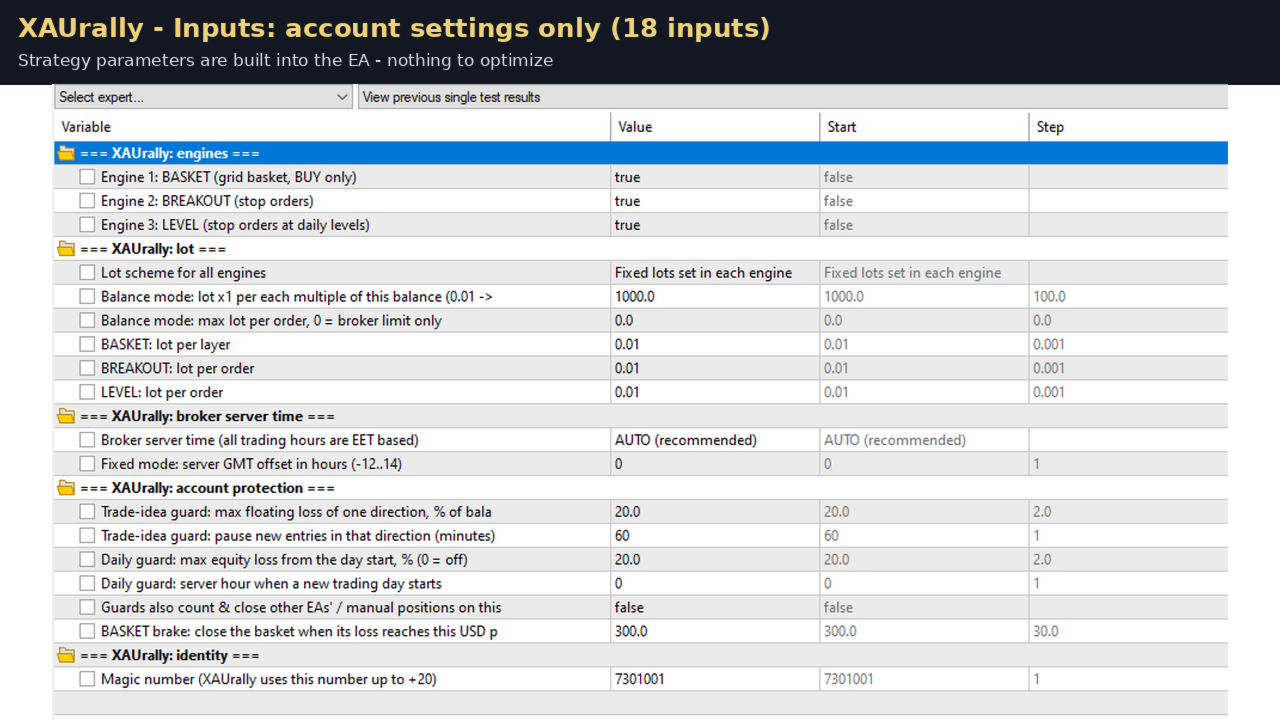
WHAT YOU SEE IN THE INPUTS
The inputs contain only account settings: which engines to run, the lot scheme and lot per engine, the broker server time, the account protection levels and the magic number. The strategy parameters are built into the EA and are the same in every copy, so the EA behaves exactly as tested. There is nothing to optimize.
REQUIREMENTS AND RECOMMENDATIONS
- Symbol: XAUUSD (any symbol name that contains XAU or GOLD, including names with a suffix). Timeframe: M1.
- Account type: HEDGING. On a netting account, or on a symbol that is not gold, XAUrally runs in limited mode: only the LEVEL engine trades.
- Default lots are 0.01 per order; the BASKET engine can hold up to 10 layers (0.10 lot). Minimum recommended balance for the default lots: 1,000 USD (medium risk); 2,000 USD or more for the same lots is lower risk. Leverage 1:100 or higher.
- Symbol volume step 0.01 (standard account). Cent accounts have not been tested.
- A low-spread broker and a VPS running 24/5 are recommended. The BASKET engine opens new layers only while the spread is at or below 1.00 USD per ounce.
- Broker server time: AUTO by default. All trading hours of the EA are based on EET time (GMT+2 / GMT+3 with European daylight saving). In live trading AUTO reads the offset between the broker time and the computer clock. In the Strategy Tester AUTO assumes an EET server; if your broker's server time is different, select "Fixed GMT offset" and enter the offset for the backtest.
- Attach XAUrally to one chart only per account. The same magic numbers on two charts would manage the same positions.
- Do not trade manually or run other EAs on the same symbol in the same account while XAUrally is running: the daily guard measures the equity of the whole account.
STARTING LIVE
The four BREAKOUT swing modules send real orders only after enough shadow trades have been recorded (without any history this takes several weeks). Every release of the EA contains a built-in switch history that is valid for 45 days after the release date, so a fresh installation can start right away. For the most recent history at any time, run a backtest on your broker's XAUUSD M1 chart ("Every tick based on real ticks") that ends on the current date, with the default inputs: at the end of the test XAUrally saves its switch history in the common files folder of the terminal, and the live EA loads it automatically when the data is not older than 14 days.
LOT SCHEME
- Fixed: every engine uses the lot set in the inputs.
- By balance: every engine lot is multiplied by the number of whole "lot step" amounts in the balance (default x1 per 1,000 USD: 0.01 at 1,000 USD, 0.02 at 2,000 USD, and so on), with an optional maximum lot per order. The balance scheme increases risk together with the balance.
TRY BEFORE YOU BUY
The one-month rental lets you run the full EA on your own account before deciding on the unlimited licence. The free demo in the Strategy Tester can be used for backtests at any time.
RISK WARNING
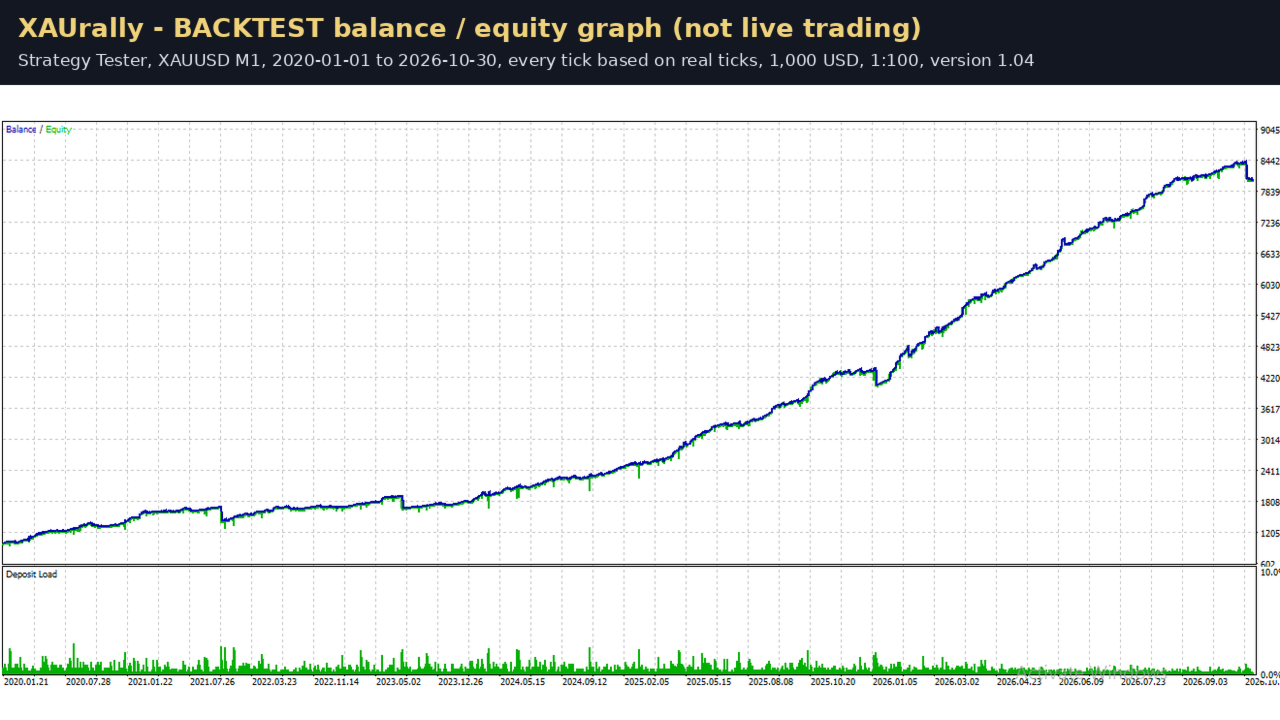
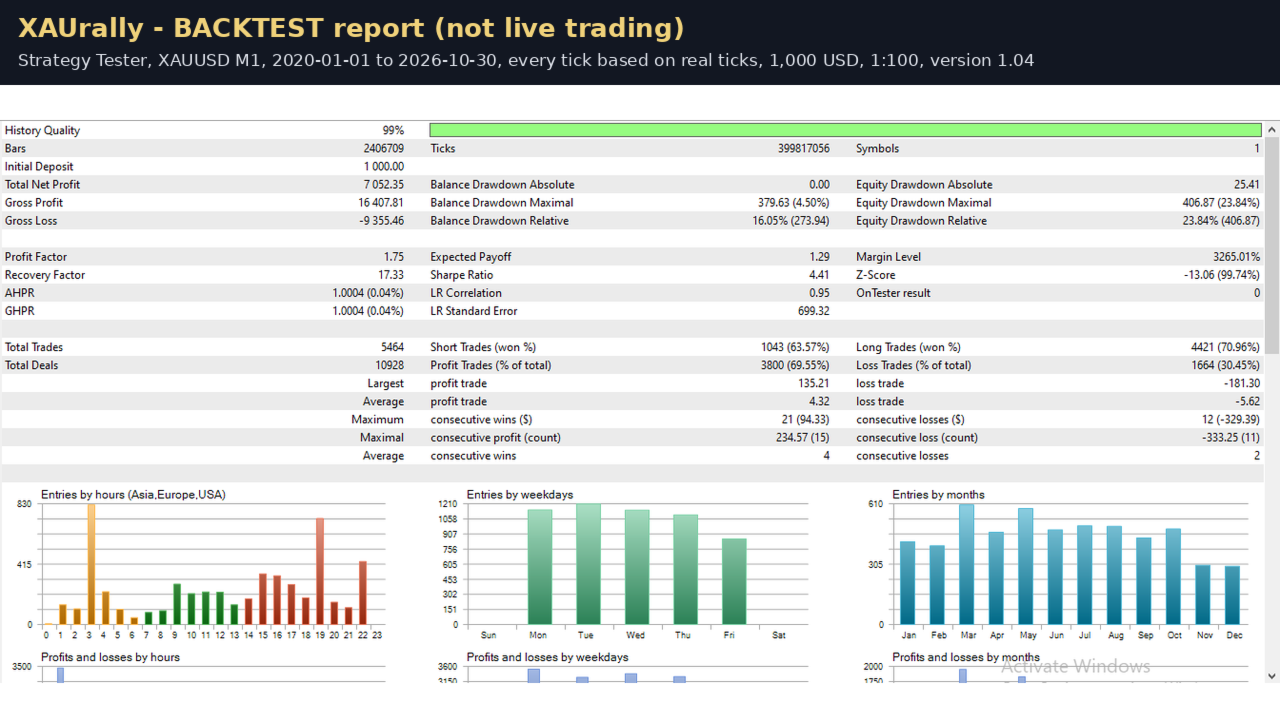
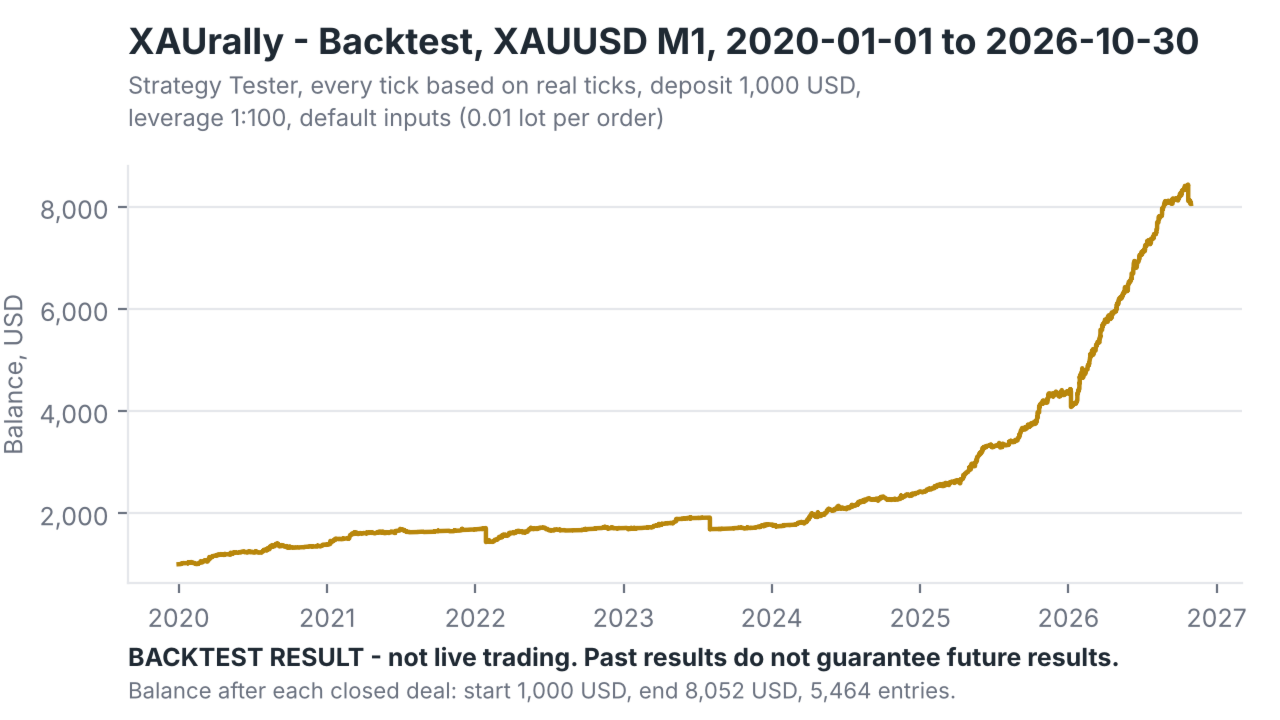
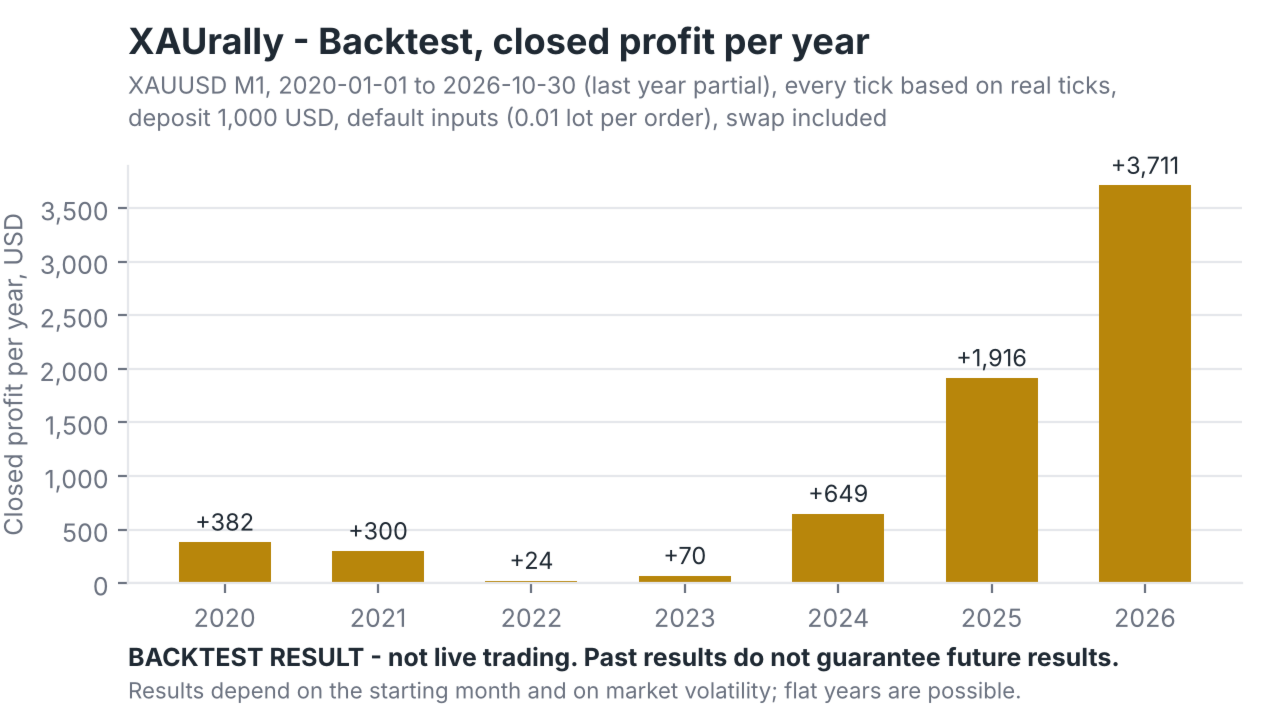
The BASKET engine uses a grid (averaging) method: it adds positions while the price moves against the basket, and a basket can be closed at a loss by the basket brake, the trade-idea guard or the daily guard. The guards cannot act while the market is closed, so a weekend gap can produce a larger loss than the set limits. Results of backtests and past trading do not guarantee future results. In backtests over several years, results depended strongly on the starting month: some 12-month periods ended with a loss, and calm, low-volatility markets produced losing months. Trading leveraged gold carries a high level of risk and can result in the loss of your deposit. Test XAUrally on a demo account first, start with the default settings, and only trade money you can afford to lose.
INPUTS
XAUrally: engines
- Engine 1: BASKET (grid basket, BUY only) - true/false. Runs the grid basket engine.
- Engine 2: BREAKOUT (stop orders) - true/false. Runs the four swing modules and the session-range module.
- Engine 3: LEVEL (stop orders at daily levels) - true/false. Runs the daily-level engine. At least one engine must be enabled.
XAUrally: lot
- Lot scheme for all engines - "Fixed lots set in each engine" or "Lots grow with balance (multiples)".
- Balance mode: lot x1 per each multiple of this balance - default 1000. With 0.01 in the engine lot, the EA trades 0.01 below 2,000 USD, 0.02 from 2,000 USD, 0.03 from 3,000 USD, and so on.
- Balance mode: max lot per order, 0 = broker limit only - optional cap for the balance scheme.
- BASKET: lot per layer - default 0.01. Every layer of a basket has this lot.
- BREAKOUT: lot per order - default 0.01, used by all five BREAKOUT modules.
- LEVEL: lot per order - default 0.01.
XAUrally: broker server time
- Broker server time (all trading hours are EET based) - AUTO (recommended), "Server time = EET", or "Fixed GMT offset".
- Fixed mode: server GMT offset in hours (-12..14) - used only with "Fixed GMT offset".
XAUrally: account protection
- Trade-idea guard: max floating loss of one direction, % of balance (0 = off) - default 20.
- Trade-idea guard: pause new entries in that direction (minutes) - default 60.
- Daily guard: max equity loss from the day start, % (0 = off) - default 20. The reference for the day is the higher of balance and equity at the start of the trading day.
- Daily guard: server hour when a new trading day starts - default 0.
- Guards also count & close other EAs' / manual positions on this symbol - default false. When true, positions of other magic numbers on the same symbol are included in the guard calculations and closed by the guards.
- BASKET brake: close the basket when its loss reaches this USD per 0.01 lot (0 = off) - default 300. The limit is scaled with the layer lot.
XAUrally: identity
- Magic number (XAUrally uses this number up to +20) - default 7301001. The EA uses this number and the next 20 numbers for its engines; change it only if another EA on the account uses the same range.
INSTALLATION
1. Open MetaTrader 5 and log in to a HEDGING account (demo first).
2. In the Navigator, under Market, find XAUrally and drag it onto an XAUUSD chart. Set the chart timeframe to M1.
3. In the Common tab of the EA window, allow algo trading (Allow Algo Trading / Allow live trading). Enable the "Algo Trading" button in the toolbar BEFORE the EA is attached, so that pending orders with expiration are accepted by the broker from the first moment.
4. Keep the default inputs for the first weeks. Check the EA status in the panel in the upper left corner of the chart: it shows "Active" when everything is in order, or the reason when trading is paused.
5. For 24/5 operation, use the MetaTrader VPS (Migrate) or another VPS. The EA needs no DLL and no internet access other than the trade server.
6. Optional: before going live, run a backtest that ends on the current date (see "Starting live" above) so that the BREAKOUT modules start with the latest switch history.
FAQ
Q: Which symbol and timeframe should I use?
A: XAUUSD on an M1 chart. Any symbol name that contains XAU or GOLD works, including names with a suffix. On other symbols the EA runs in limited mode (LEVEL engine only).
Q: Does XAUrally work on a netting account?
A: It runs, but only the LEVEL engine trades (one position at a time). The BASKET and BREAKOUT engines need a hedging account.
Q: How much capital do I need?
A: At least 1,000 USD for the default 0.01 lots (medium risk). 2,000 USD or more with the same lots is lower risk. With the balance lot scheme the lots grow with the balance, which increases the risk again.
Q: My broker's server time is not EET. What should I set?
A: Keep AUTO for live trading - the EA measures the offset itself. For backtests, choose "Fixed GMT offset" and enter your server's GMT offset, because the Strategy Tester does not provide the live offset.
Q: Why does a short backtest show fewer BREAKOUT trades?
A: The four swing modules start in shadow mode and send real orders only when enough shadow trades have been recorded (up to several weeks of data). Run backtests of at least 6-12 months to see the normal behaviour.
Q: Can I change the strategy parameters?
A: No. The inputs contain account settings only. The strategy parameters are fixed so that every copy behaves like the tested version.
Q: What happens when the daily guard triggers?
A: All XAUrally positions and pending orders are closed, the panel shows "Paused: daily guard", and the EA starts trading again at the next trading day (server hour set in the inputs). The state is saved, so a restart of the terminal does not reset it on the same day.
Q: Can I run two copies, or trade manually on the same symbol?
A: One chart per account. Manual trades or other EAs on the same symbol affect the account equity that the daily guard measures; set "Guards also count & close other positions" to true if you want them included, or keep other activity away from this symbol.
Q: Is XAUrally suitable for prop-firm challenges?
A: It is not designed for them. Prop-firm daily loss limits are usually much tighter than the default guards, and tighter guards cut baskets early.
Q: What about weekend gaps?
A: The guards work only while the market is open. A gap at the Monday open can exceed the set limits before the EA can react. Keep the recommended balance and consider closing baskets before high-impact events if you prefer.
Q: Does the EA need a VPS?
A: The EA has to run 24/5 for the baskets and pending orders to be managed. The MetaTrader VPS is suitable: no DLL, no external files are needed, and the built-in switch history is used when no local history file is present.
Q: How do I update to a new version?
A: Update in the terminal (Market tab). If a basket is open, the EA recognises it after the update. Keep algo trading enabled during the update.