Usd Jpy Trading Expert
- Experts
- Versão: 1.0
- Ativações: 5

Automatic trading with a fixed H4 signal timeframe
USD/JPY Trading Expert is an Expert Advisor for MetaTrader 5 that combines different trading approaches in one system. It can automatically execute entries, stop-loss adjustments and exits. The system was developed and historically tested for USD/JPY.
The signal timeframe is H4. This remains unchanged even if you display a different chart timeframe. New entries are scheduled between 08:00 and 20:00 broker time. Existing positions are also managed outside this entry window, provided the EA remains operational.
Key features· Automatic buy and sell orders based on predefined trading rules.
· Up to six open positions per trading instance, including positions in opposite directions.
· Entry requests include a stop-loss, with either a fixed take-profit or dynamic stop-loss management depending on the rules.
· Automatic position sizing based on account equity, risk profile and available broker specifications.
· Supported account currencies: EUR and USD only.
· Movable and collapsible information panels with light and dark themes.
· Display of operating status, broker and user time, and signal and execution information.
· Customizable historical setup display and optional notifications.
Position management and exitsEach entry request sent to the broker includes a specific stop-loss price. A dynamic stop-loss therefore does not mean that a position is intended to open without initial protection. The trading rules determine when the SL is adjusted and whether an additional fixed price target applies. Signals without a fixed take-profit use the predefined management rules for exits, such as a trailing SL or a time-based exit.
An MT5 hedging account is required so that positions can be held separately and, where applicable, in opposite directions. Netting accounts and account currencies other than EUR or USD are not supported. An entry may be skipped if trading requirements such as admissible price distances, minimum volume or available margin are not met.
Risk profiles and position sizingThe following risk profiles are available:
Conservative: 1%
Standard: 3% – default and recommended reference setting
Aggressive: 5%
Custom: above 0% up to and including 10%
The percentage represents the calculation budget for one trading instance, allocated across its signals. It is neither the risk per individual position nor a guaranteed limit on actual losses or account drawdown. Higher risk settings do not improve signal quality and can significantly increase losses and drawdown.
Position size is calculated using current account equity and the broker specifications available in MT5. Internal cost reserves allow for estimated fees; actual broker commissions are not read automatically. Spread, swap, slippage and differences in fees can change the actual exposure and costs. You must also account for other EAs and manual trades when planning risk across your account.
Attach the EA once to a USD/JPY chart on the intended trading account. Do not run another copy for the same account and symbol, including on a second computer or simultaneously on your local computer and a VPS. Other EAs and manual trades must be considered separately when planning total account risk.
Activation and operating statusOn first attachment, new entries are enabled by default if no saved pause state exists. The EA opens a position only when a regular signal occurs and trading requirements are met. Missed historical entries are not executed later.
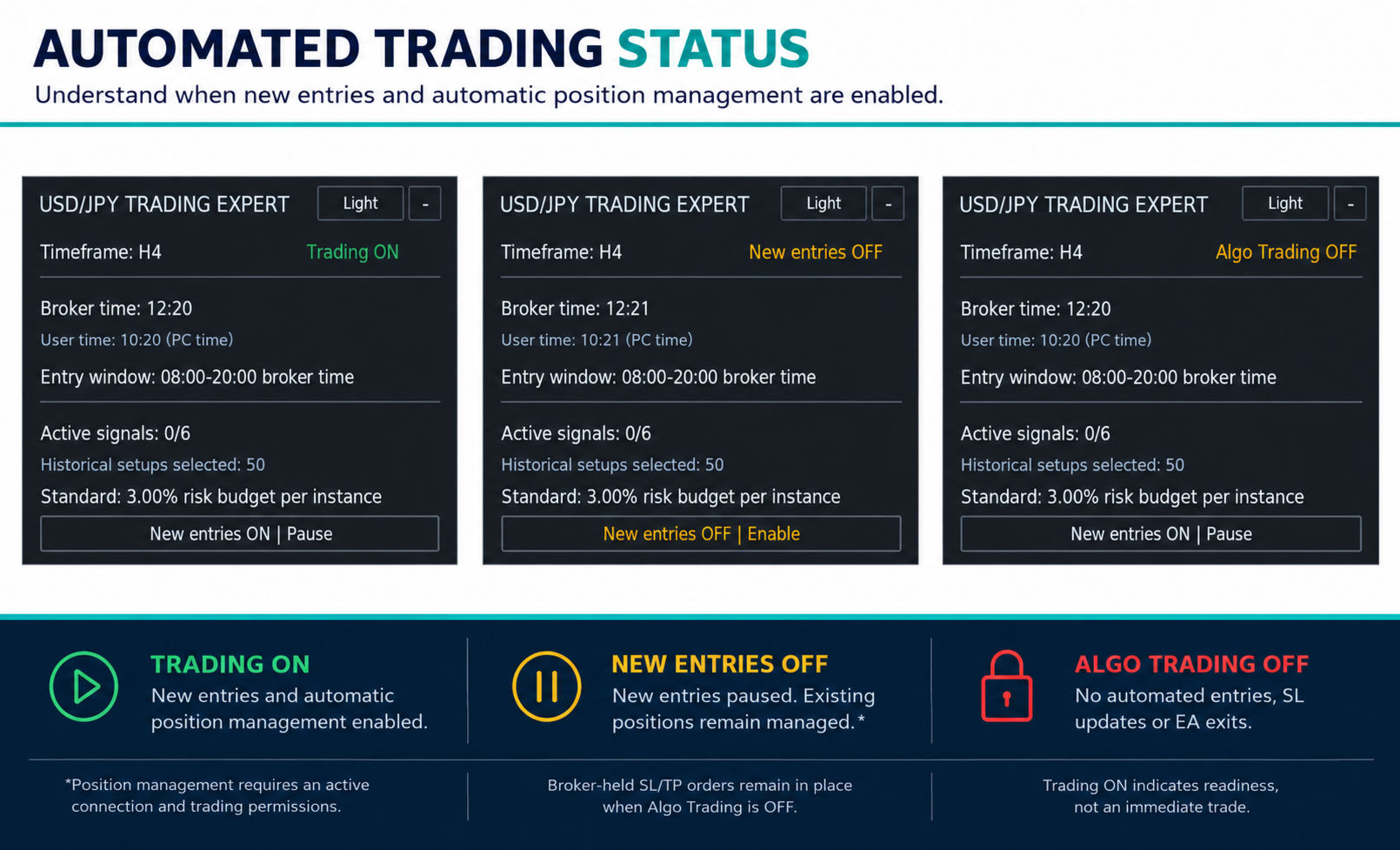
After setup, check the operating status next to “Timeframe: H4”. It must show “Trading ON” for new positions to be opened automatically. This indicates readiness to trade, not an immediate entry. When “New entries OFF” is displayed, new entries are paused; existing positions that have been matched correctly continue to be managed while the connection and required trading permissions are available.
The EA's new-entry control and MT5's Algo Trading permission serve different purposes:
· “New entries ON | Pause”: New entries are enabled. Click to pause them.
· “New entries OFF | Enable”: New entries are paused. Click to enable them again. Existing positions that can be matched reliably continue to be managed while the EA is operational.
· “Algo Trading OFF”: A required automated trading permission is missing. While it is missing, the EA cannot send trade orders or SL adjustments. Check the global MT5 button and the trading permission in the EA properties.
A saved entry pause persists after a normal terminal restart or chart timeframe change. After an account switch, new entries are paused and must be enabled manually if you want to resume new entries. MT5 may also disable its global Algo Trading permission when accounts are switched. The EA button does not replace this permission.
Continuous operation, restarts and account switchingFor automatic entries, dynamic SL adjustments and EA-triggered exits, MT5 must remain connected to the intended trading account. The EA must be running and automated trading must be permitted. SL and, where applicable, TP levels already confirmed by the broker generally remain in place during an interruption; execution is subject to broker and market conditions.
We recommend that you do not switch accounts in the executing terminal while associated positions remain open. Switching does not automatically close them. However, while another account is logged in, this EA cannot continue managing positions on the previous account: SL adjustments and EA-triggered exits are not performed there during that period.
After a restart or a return to the original account, management can resume once the saved state has been restored successfully and reconciled with the positions actually open. This requires available data, a connection and the necessary trading permissions. This also applies when “New entries OFF” is displayed. Missed executions are not replaced retrospectively; an exit that has become due can only be executed at the market price available at that time. After an interruption, check the operating status, actual positions and their protection.
We recommend a suitable VPS to reduce interruptions. Local operation is also possible if the computer remains switched on and MT5 remains operational. A VPS does not replace correct setup or monitoring of the operating status and does not guarantee uninterrupted execution. Test setup and recovery in your chosen environment on a demo account first.
Display and intended marketUser time can be displayed as computer time or using a custom UTC offset. This display does not change the entry window in broker time. The historical setup display shows rule-based setups and does not confirm actual account positions or executions.
The recommended and historically tested market is USD/JPY. A warning appears on other instruments. Their trading results have not been tested; with the appropriate permissions enabled, the EA can nevertheless submit trade orders on them.
Important informationWe expressly recommend testing the EA on a demo account before live trading. Displayed reference prices and calculated monetary amounts do not guarantee particular executions or results. Manual intervention may affect subsequent position management.
Historical tests do not guarantee future profits. Losses, consecutive losing trades, extended losing periods and losses exceeding the calculated budget are possible. You remain responsible for account selection, risk settings, trading permissions and ongoing operation.