Grid Alligator EA
- Experts
-
AL MOOSAWI ABDULLAH JAFFER BAQER
 To trade successfully we need to go through the proven path that others had gone and reached!
Here are 17 quotes from such successful investors:
1- Limit your size in any position so that fear does not become the prevailing instinct guiding your judgment.
Joe Vidich - Versão: 3.12
- Ativações: 5
- Alligator mouth row on the panel: OPEN UP, OPEN DOWN or SLEEPING, with the current mouth width and how many bars the state has held
- State isolation by symbol and magic number, plus a magic lock: two charts can never share or overwrite one memory
- Corrected margin check that sizes each new level against real free margin
- Stop-out conscious defaults: bounded ladder, capped lot, protective limits ready to use
- Run it in the Strategy Tester at no cost before you decide
Start with a no-cost test drive: open the MetaTrader 5 Strategy Tester, pick Grid Alligator EA, enable visual mode and press Start. You will see the mouth row change state, the ladder appear level by level and each banked closure land on the panel, all on your own broker's history.
Grid Alligator EA lets the classic Bill Williams Alligator tell it when the market has woken up, and only then begins a grid cycle. After that, a disciplined management engine spaces the levels by volatility, collects small net profits and pays down the oldest exposure in pieces, so a cycle can end without needing one dramatic reversal.
WHY THE ALLIGATOR
The Alligator is three smoothed, forward-shifted lines named Jaw, Teeth and Lips. When they are tangled together the animal is asleep and price tends to wander sideways. When they fan out in order, the mouth is open and the market has chosen a direction. Many grids open levels at any moment, including the worst one. This EA waits for the mouth to tell a clear story first, reads it only from closed bars, and treats it purely as the permission to start a cycle. Everything that happens after the first level is handled by the grid engine, not by the indicator.
WHAT VERSION 3.12 DELIVERS
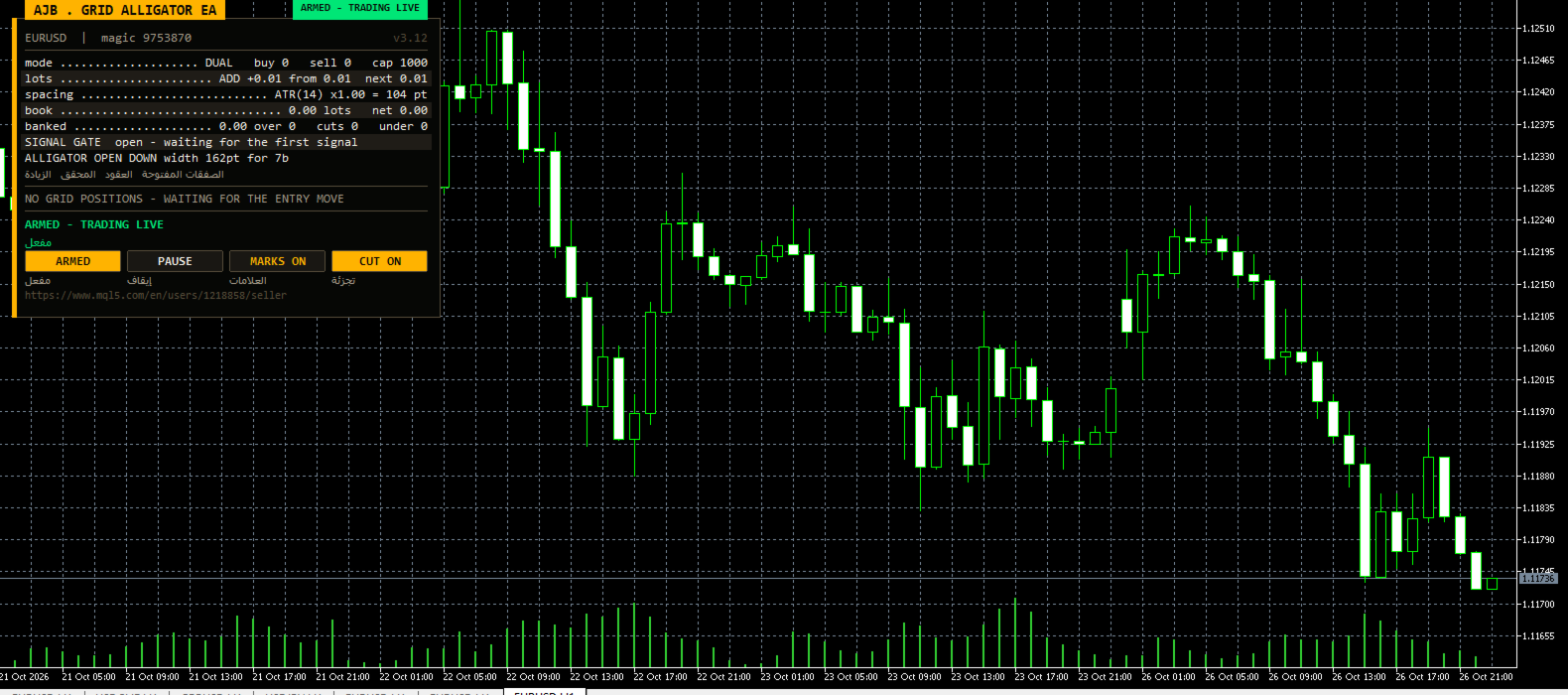
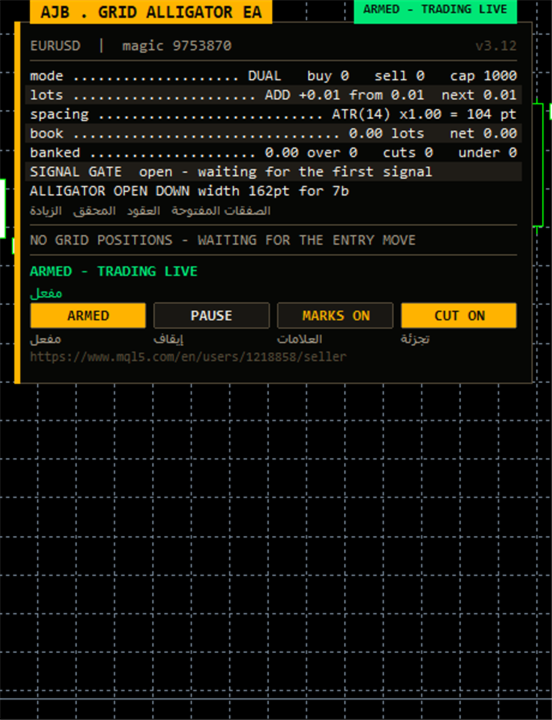
A live mouth reading. A dedicated panel row reports OPEN UP, OPEN DOWN or SLEEPING, the present width between the outer lines and the number of bars the current state has lasted. You can see at a glance whether the market is resting or moving, and why the EA is waiting or acting.
Separate memory for every copy. Counters, anchors, retry queues and plans are stored under a key built from the account, the symbol and the magic number. A magic lock stops a second chart from starting with a magic number already claimed by a running copy, so two charts can never end up feeding on the same state.
A margin check that tells the truth. Each new level is measured against the free margin actually available, with a buffer, instead of a hidden rule that refused perfectly valid orders on larger accounts.
Defaults chosen with stop-out in mind. The starting lot, the lot cap, the netting margin cap and the level limits ship at conservative values, so a first run does not need any tuning to stay inside sensible bounds.
HOW A CYCLE UNFOLDS
Phase 1 - Waking up. On the signal timeframe the EA watches for the mouth to open. A minimum number of bars between accepted signals (30 by default) prevents a nervous session from launching a string of cycles, and an accepted signal keeps its validity for a few bars while the remaining filters agree.
Phase 2 - Building the ladder. Levels are added as price travels away from the anchor. You can run buying and selling grids together, each with an independent anchor and counter, or keep to one side. The gap between levels follows ATR inside a floor and a ceiling, or a fixed distance in points; it can also be frozen at the cycle's first value.
Phase 3 - Banking. A scanner tests combinations of the oldest and newest orders on each side and closes a combination once its net result, after swap and commission, passes your target. When an old order is too large to close whole, target slicing trims part of it using profit that newer orders already hold. Each bounce chips away at the heaviest exposure.
Phase 4 - Protecting the book. A reopen guard refuses a closure that would only reopen the same level a moment later, which is how many grids quietly turn their balance into commission. Every closing deal is confirmed in the history, stubborn legs go to a retry queue, and a plan is dropped if positions changed between scanning and sending.
Phase 5 - Hedge cycle (optional, off by default). Keeps an equally sized buy and sell pair on a symbol of your choice and retires it in matching slices, paid for by a capped surcharge on closures the grid makes anyway. A timer confirms both legs remain equal and repairs a single leg if one is ever left alone.
READING THE PANEL
The panel displays the symbol, the magic number, a status badge (ARMED, SCAN ONLY or PAUSED), the grid mode, ATR spacing, lot step, banked profit, open lots and floating result, the next closing plan for each side with its own close button, the order list, and the new Alligator mouth row. Buttons let you arm or switch to scan only, pause or resume, toggle chart marks and toggle the slicing cutter. Drag it anywhere, minimise it, choose its corner, and add an optional Arabic line under each label. During a non-visual optimisation nothing is drawn, so tests run at full speed.
PROTECTION YOU SET YOURSELF
There is no stop loss and no automatic close-everything; protection works by refusing new levels when a limit is reached, never by liquidating at the worst price. All limits are visible inputs: levels per grid, orders per side, largest lot per order, minimum margin level, maximum floating loss as a percent of balance, maximum spread, and for netting accounts the margin of the combined position as a percent of equity. Lots stop growing at the level limit, so slicing can never push size beyond what you allowed. Scan only mode lets you watch every decision with zero orders sent.
STEP-BY-STEP SETUP
1. In MetaTrader 5 go to Tools, Options, Expert Advisors and enable algorithmic trading.
2. Run a visual Strategy Tester session on the symbol you plan to trade, with your broker's real spreads, and watch the mouth row and the ladder for a few weeks of history.
3. Open a live or demo chart; EURUSD H1 and XAUUSD H1 are easy places to begin.
4. Drag Grid Alligator EA from the Navigator onto the chart and tick Allow Algo Trading on the Common tab.
5. On the Inputs tab set RunMode to scan only, keep InitialLotSize at 0.01 with the additive ladder, and leave EnableHedgeCycle off.
6. Give each chart its own EAMagicNumber and HedgeMagicNumber; the magic lock will warn you if a number is already in use.
7. Consider setting MinMarginLevelPercent and MaxAccountRiskPercent to values that match your comfort before arming.
8. Watch the planned closures on the panel for a session, then press the arm button when the behaviour makes sense to you.
9. Review the panel daily: if the mouth row shows SLEEPING for long periods, that simply means no new cycle is being started.
ALL INPUTS, ONE BY ONE
Grid - how levels are opened
TradeMode: run buying and selling grids together, or a single direction.
GridSpacePoints: level gap in points when fixed spacing is selected (25).
GridSpaceMultiplier: stretches every following gap by this factor; 1.0 keeps them even.
MaxGridLevels: upper limit of levels in each grid.
UpDirectionIsBuy: when true, an upward signal arms the buying side.
EAMagicNumber: identifier of grid orders, part of the isolated memory key and protected by the magic lock.
GridOrderComment: text written on grid orders.
OneOrderPerBar: allows no more than one new level per candle.
Lot ladder
InitialLotSize: lot of the first level (0.01).
LotSizingMode: deeper levels grow by addition or by multiplication.
LotMultiplier: growth factor per level in multiplication mode (1.25).
LotAddStep: amount added per level in addition mode; 0 reuses the starting lot.
MaxOrderVolume: the biggest lot any single order may have (1.0).
UseAutoLot: links the starting lot to account balance.
AutoLotBaseBalance: balance that corresponds to the starting lot.
AutoLotAllowDecrease: lets the lot shrink below the start value after a drawdown.
ATR spacing
GridSpacingMode: fixed points or volatility based (ATR by default).
ATRTimeframe: chart period used to measure ATR.
ATRPeriod: number of bars in the ATR average.
ATRSpacingFactor: the gap equals ATR multiplied by this.
ATRBarShift: which bar supplies ATR; 1 means the latest finished bar.
ATRMinSpacingPts: smallest allowed gap in points; 0 disables.
ATRMaxSpacingPts: largest allowed gap in points; 0 disables.
ATRFreezeOnStart: holds the opening gap constant until the cycle ends.
Profit target
DesiredProfitPerClosure: base amount of money a closure should collect.
ProfitMultiplier: final factor from 1.00 to 2.00 applied to the target.
ProfitTargetMode: one flat amount, or an amount that scales with size and depth.
ProfitVolumePower: how much closing volume lifts a scaled target; 0 ignores it.
ProfitDepthBonus: extra target added for each further open level.
ProfitMaxMultiple: upper bound of a scaled target relative to the base.
ProfitMaxReachFraction: keeps the target achievable within part of one level gap.
Fragment scanner
UseMultiLegScan: checks groups of several orders before the simple pair.
MaxOldestLegs: how many of the oldest orders a group may contain.
MaxNewestLegs: how many of the newest orders a group may contain.
ScanPriority: rule for choosing between groups that all qualify.
NeverBankLessThanPair: a group must also beat the simple pair target.
RequireCloseVolumeExceedsTarget: newer volume must be larger than older volume.
MinCloseVolumeRatio: smallest accepted ratio of closing volume to target volume.
Target slicing - partial closes
EnableTargetSlicing: trims part of an old order when the whole lot is out of reach.
FragProfitWeightPower: how the required profit rises with the size of the closing lot.
FragMinSlicePercent: smallest trim as a percent of the targeted order.
FragAllowMultiCloser: lets several newer orders fund one trim together.
FragPreferFullClosure: chooses a complete closure whenever both options qualify.
Reopen guard
ReopenGuard: stops closures that would immediately reopen a level.
ReopenGuardCushion: required distance as a fraction of one level gap.
Account protection
MinMarginLevelPercent: no new levels below this margin level; 0 disables.
MaxAccountRiskPercent: no new levels when floating loss exceeds this percent of balance; 0 disables.
NetMaxMarginPercent: on netting accounts, caps the merged position's margin as a percent of equity (5).
MaxTotalOrders: hard ceiling on grid orders for each side.
Execution and verification
RunMode: begin armed or in scan only.
CloseSequence: order in which closing legs are sent.
MaxSlippagePoints: tolerated slippage in points.
MaxSpreadPoints: trading pauses above this spread.
MinSecondsBetweenClosures: waiting time between two closures on one side.
CloseAttemptsPerLeg: tries per leg before it moves to the retry queue.
VerifyTimeoutSeconds: how long a stuck leg keeps being checked.
DeferWhenMarketClosed: waits for the session to open rather than halting when quotes are absent.
MarketClosedRetrySeconds: interval between retries while the market refuses orders.
AutoResumeAfterSeconds: lifts a halt automatically after this time; 0 waits for the panel button.
AbortIfBookChanged: discards a plan if positions changed after the scan.
UseFullCommission: counts commission on both the opening and closing side.
CommissionPerLot: backup commission figure when history does not show one.
CloseOrderComment: text written on closing deals.
Hedge cycle
EnableHedgeCycle: switches the hedge cycle on.
HedgeSymbols: hedge symbols separated by commas; listing one twice gives it extra turns.
HedgeSymbolRotation: method for picking the next cycle's symbol.
HedgeMaxSymbolsInTester: limits the rotation during testing only.
HedgeCycleLots: size of each side of the balanced pair.
HedgeSliceLots: size removed from each side per slice.
HedgeFragmentBonus: extra charged above the cost of a slice.
HedgeBonusIsPercent: treats that extra as a percent of slice cost, or as money when false.
HedgeMaxSurcharge: money ceiling on the surcharge for one closure; 0 none.
HedgeMaxSurchargePercent: highest percent the hedge may add to any closure target.
HedgeMagicNumber: identifier for hedge legs; must differ from EAMagicNumber.
HedgeReopenOnFinish: starts a new cycle after one completes.
HedgeStartRequiresTrade: waits until the grid has a position before the first cycle.
HedgeIntegritySeconds: interval for checking that both legs match.
HedgeAutoRepair: fixes a lone leg automatically.
HedgeNakedAction: what that fix does.
HedgeMaxSpreadPoints: spread limit for hedge orders; 0 disables.
HedgeSlippagePoints: tolerated slippage on hedge orders.
HedgeAttemptsPerLeg: tries per hedge leg.
HedgeVerifyTimeout: checking time for a stuck hedge leg.
HedgeCommissionPerLot: backup commission for hedge costs.
HedgeOrderComment: text written on hedge deals.
Weekly cash day
WeeklyCashDay: blocks new cycles and slices around your withdrawal window.
CashDayOfWeek: the withdrawal day, 0 Sunday, 1 Monday and onward.
CashCutoffHour: server hour after which no slice is fired that day.
Panel and chart
ShowPanel: displays the panel.
PanelX: horizontal distance from the chart edge.
PanelY: vertical distance from the chart edge.
PanelFontSize: base text size.
ShowArabic: adds an Arabic line beneath each English label.
ShowChartMarks: draws levels and closing plans on the chart.
MaxTableRows: order rows listed for each grid.
PanelCorner: chart corner the panel attaches to.
Entry trigger
EntryTriggerMode: the Alligator signal, or an immediate first level.
SignalBarShift: bar checked for the signal; 1 is the latest finished bar.
SignalBarsDelay: bars that must pass between accepted signals (30).
SignalValidBars: number of bars a signal remains usable.
SignalAllowBuy: lets the signal arm buying cycles.
SignalAllowSell: lets the signal arm selling cycles.
SignalReverse: flips the signal direction.
Alligator signal
InpAlligatorTF: timeframe of the Alligator.
InpJawPeriod: Jaw length (13).
InpJawShift: Jaw forward shift (8).
InpTeethPeriod: Teeth length (8).
InpTeethShift: Teeth forward shift (5).
InpLipsPeriod: Lips length (5).
InpLipsShift: Lips forward shift (3).
InpAlligatorMethod: smoothing type of the three lines (SMMA).
InpAlligatorPrice: price the lines are built from (median).
InpShowSignalArrows: marks candles where a signal armed a cycle.
Debug
DebugMode: writes detailed messages to the journal for troubleshooting.
A REALISTIC VIEW
A grid is a way of managing a position, not a forecast. Grid Alligator EA is selective about when a cycle starts and then works to keep cycles short and old orders shrinking, but a long one-way trend can still build a deep book. Size your lots for the worst trend you can imagine on your symbol, test on your broker's data, and let the Strategy Tester show you how the EA behaves before you trade real money. Any symbol and timeframe; no DLLs and no extra files required.
If Grid Alligator EA proves useful in your trading, a review describing your real experience, good or bad, will help other traders make an informed choice.