Global Session Trading
- Experts
-
Gayakvad Hansaben Sumanbhai
 Desenvolvedora de Sistemas de Trading Algorítmico | Especialista em MetaTrader 5
Olá e boas-vindas ao meu perfil! Sou uma desenvolvedora dedicada ao trading algorítmico, especializada na criação de utilitários de alta performance e soluções automatizadas para o MetaTrader 5 (MT5). - Versão: 1.0
- Ativações: 20
Global Session Trading
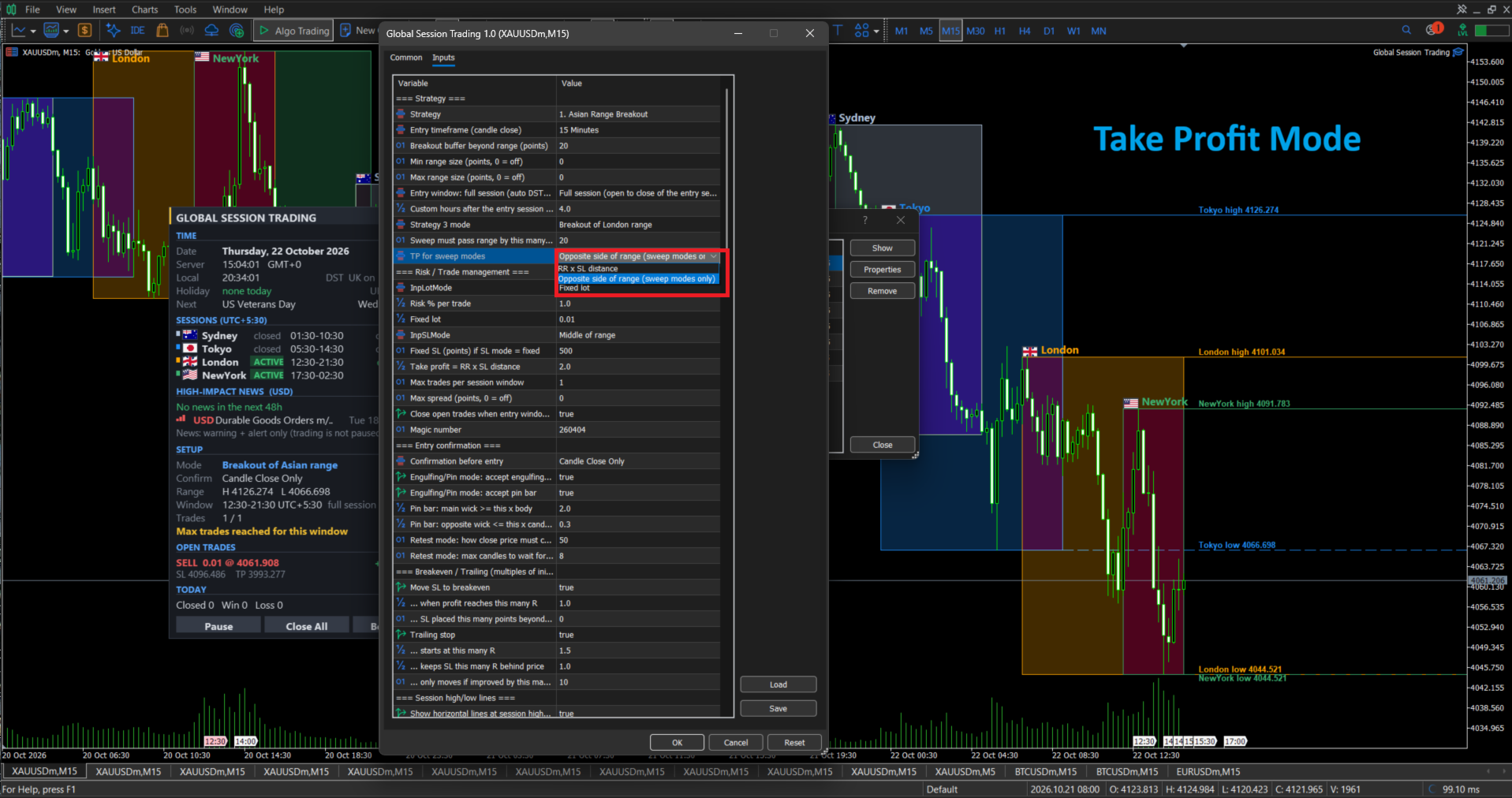
Global Session Trading is an MT5 Expert Advisor that trades the Asian, London and New York sessions. It works out the session times for you, including daylight saving changes, and shows everything on a live dashboard.
Advantages
- Clear rules. It trades the high and low of a session, with one entry window per day and a limit of one trade per window by default.
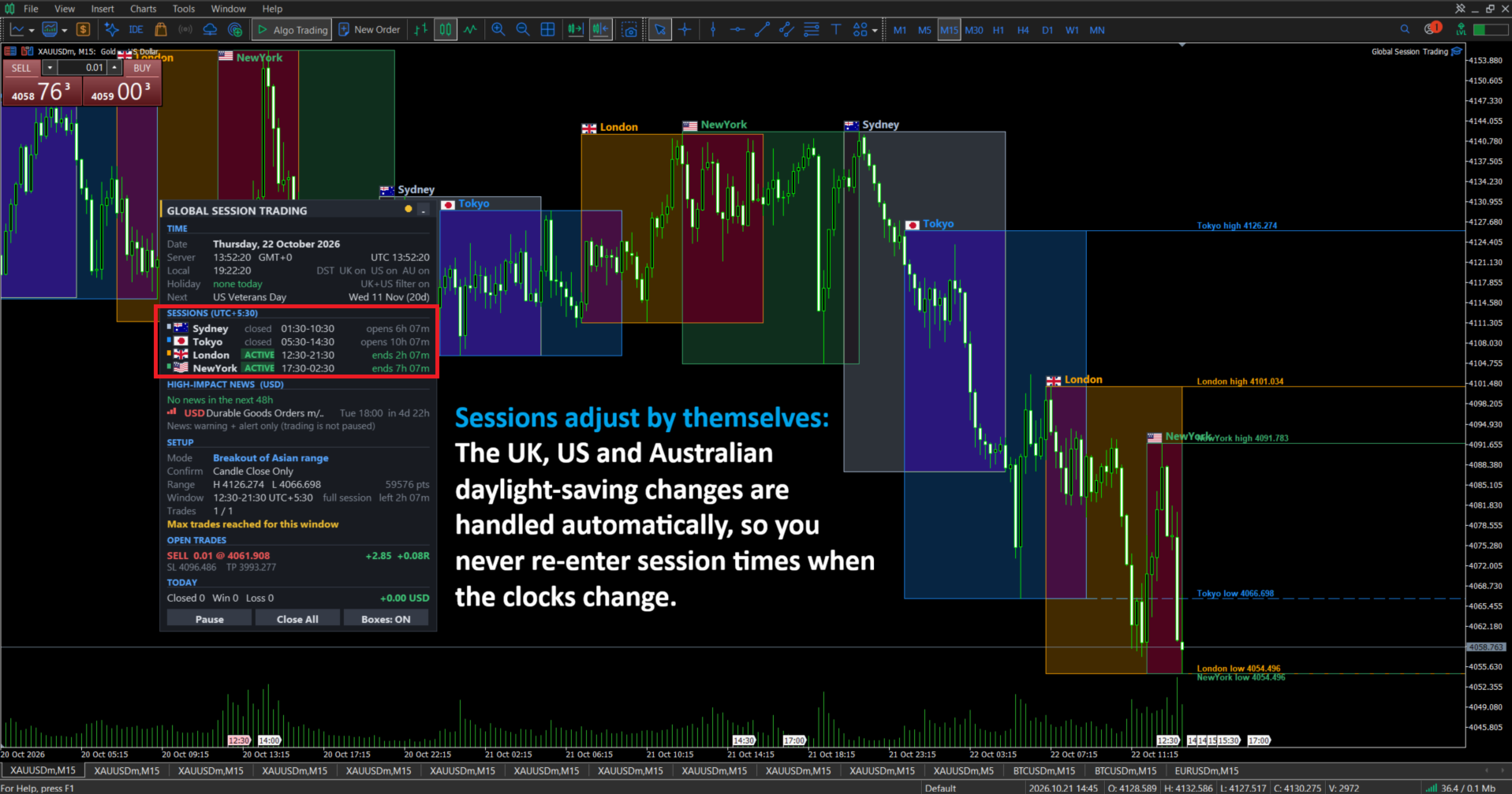
- Sessions adjust by themselves. The UK, US and Australian daylight-saving changes are handled automatically, so you never re-enter session times when the clocks change.
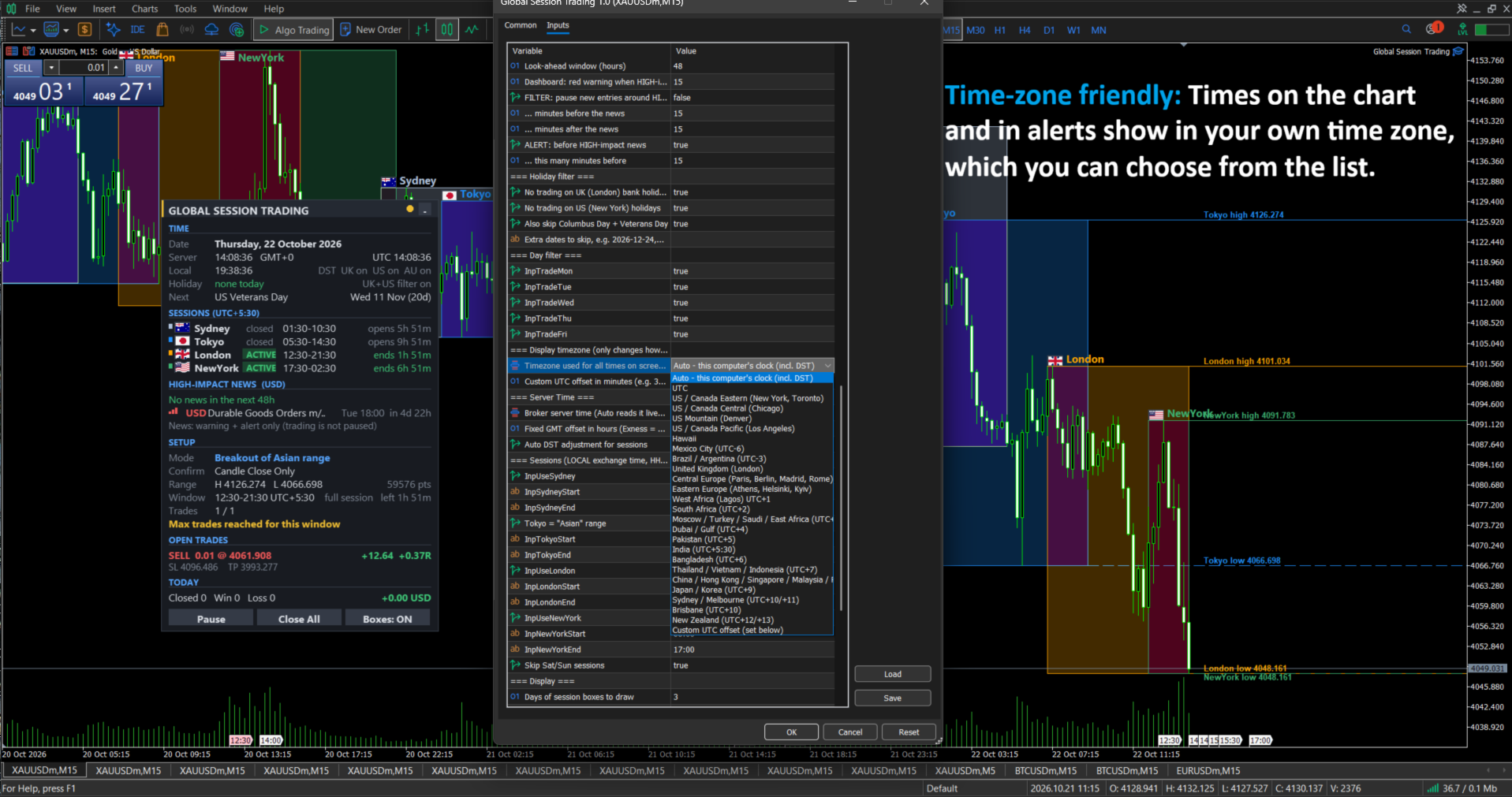
- Time-zone friendly. Times on the chart and in alerts show in your own time zone, which you can choose from the list.
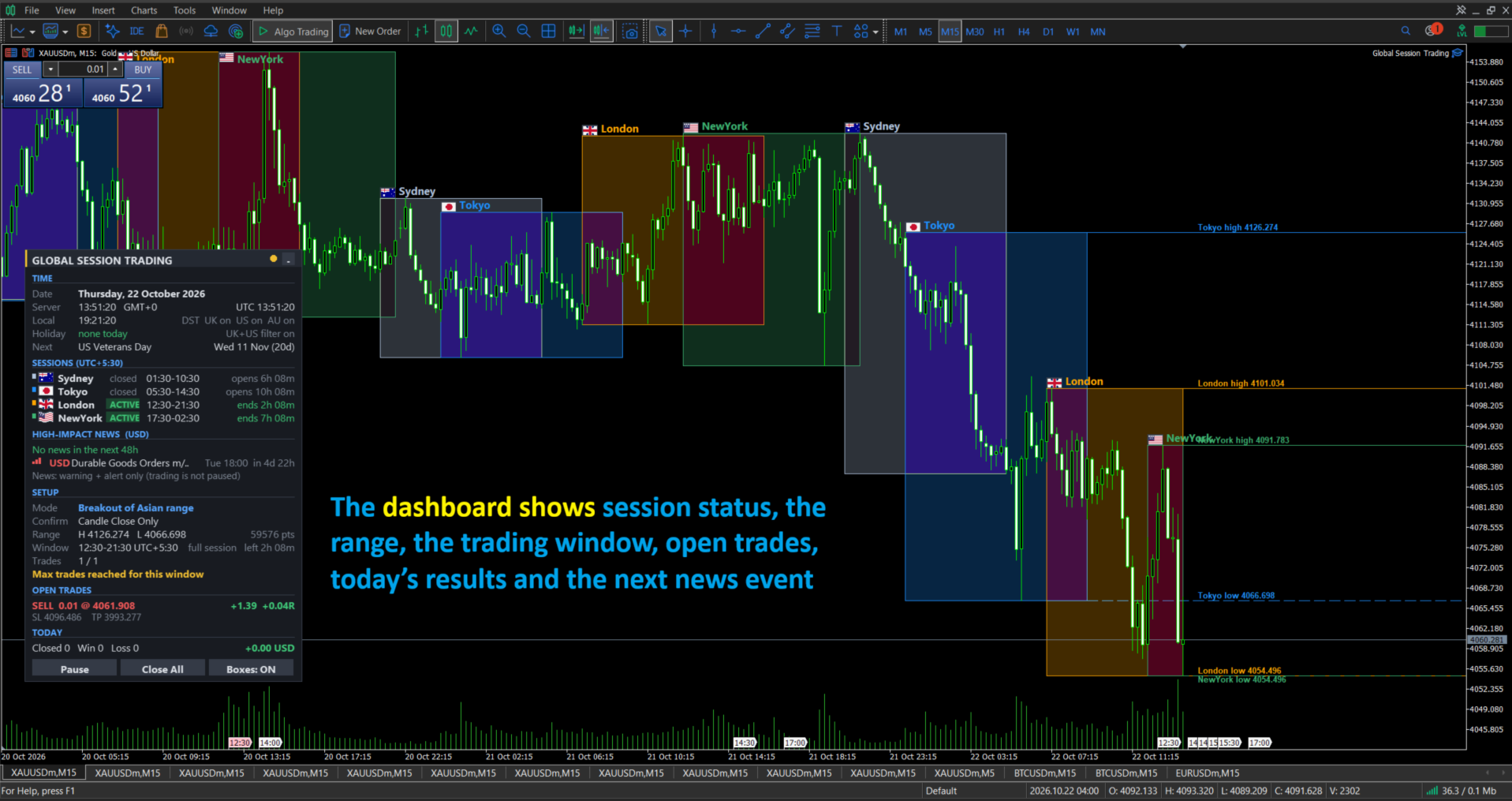
- Everything visible at a glance. The dashboard shows session status, the range, the trading window, open trades, today’s results and the next news event.
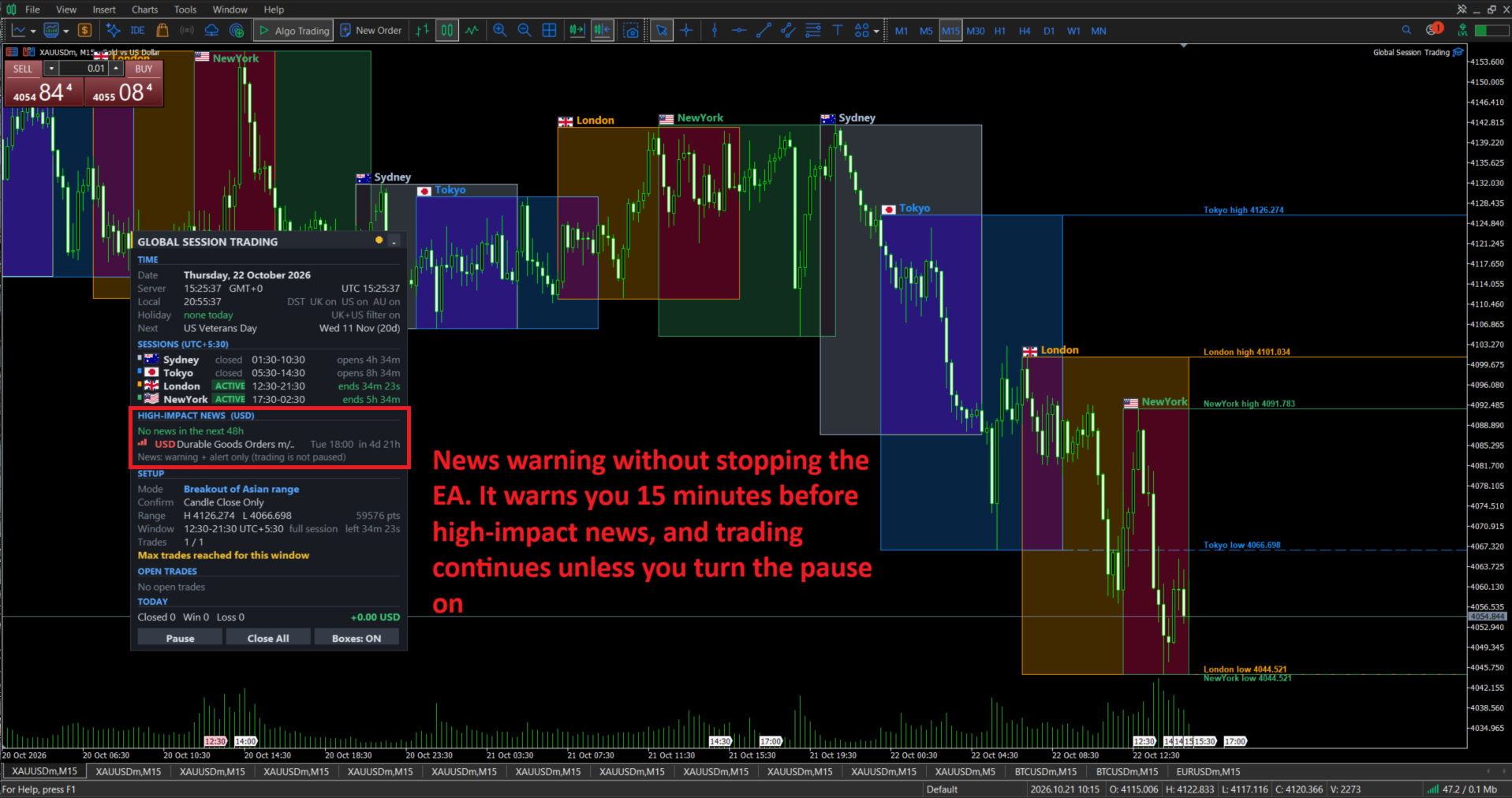
- News warning without stopping the EA. It warns you 15 minutes before high-impact news, and trading continues unless you turn the pause on.
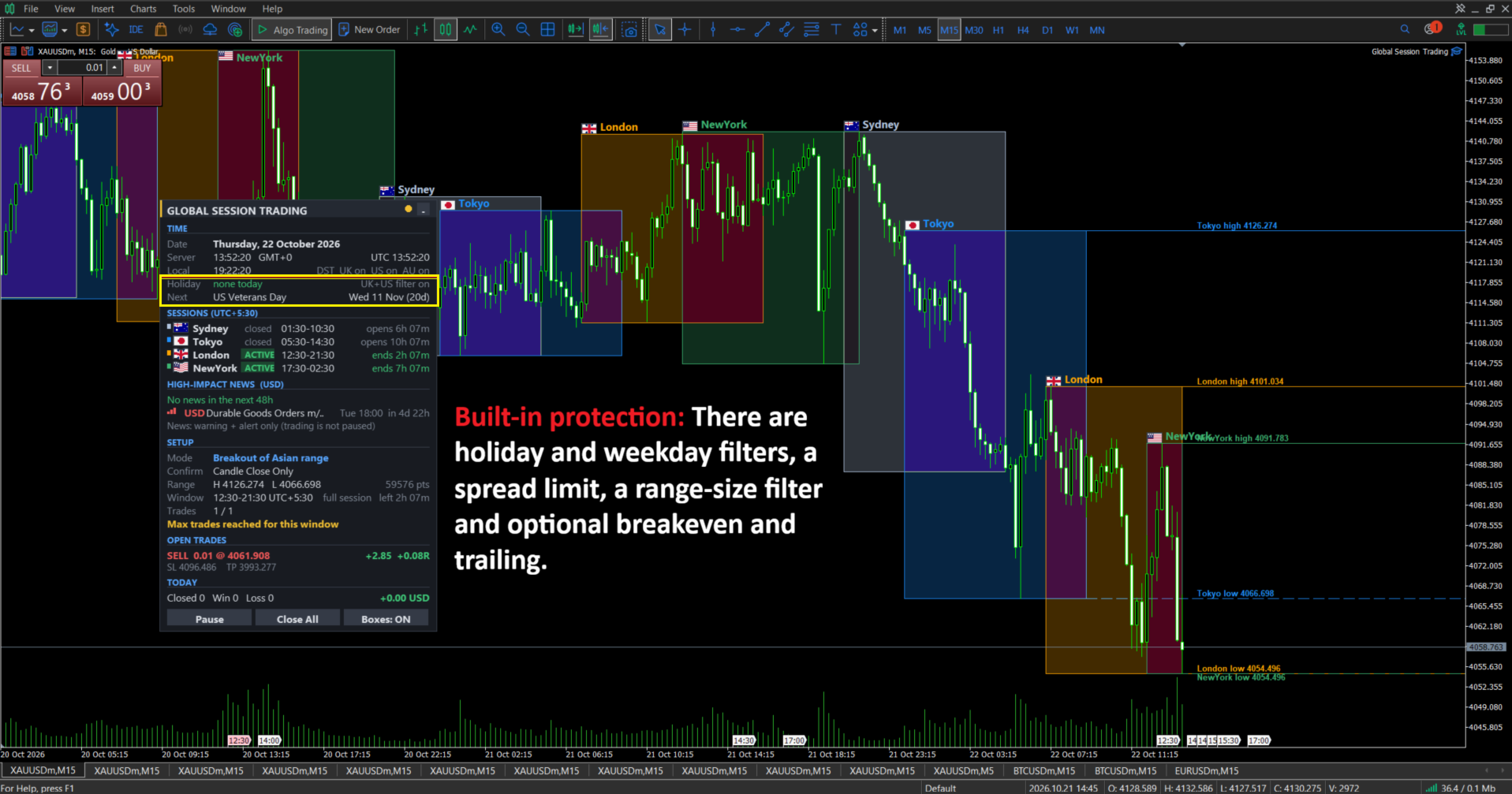
- Built-in protection. There are holiday and weekday filters, a spread limit, a range-size filter and optional breakeven and trailing.
- Adjustable for different markets. The sessions, the entry confirmation and the risk settings are all input
Features
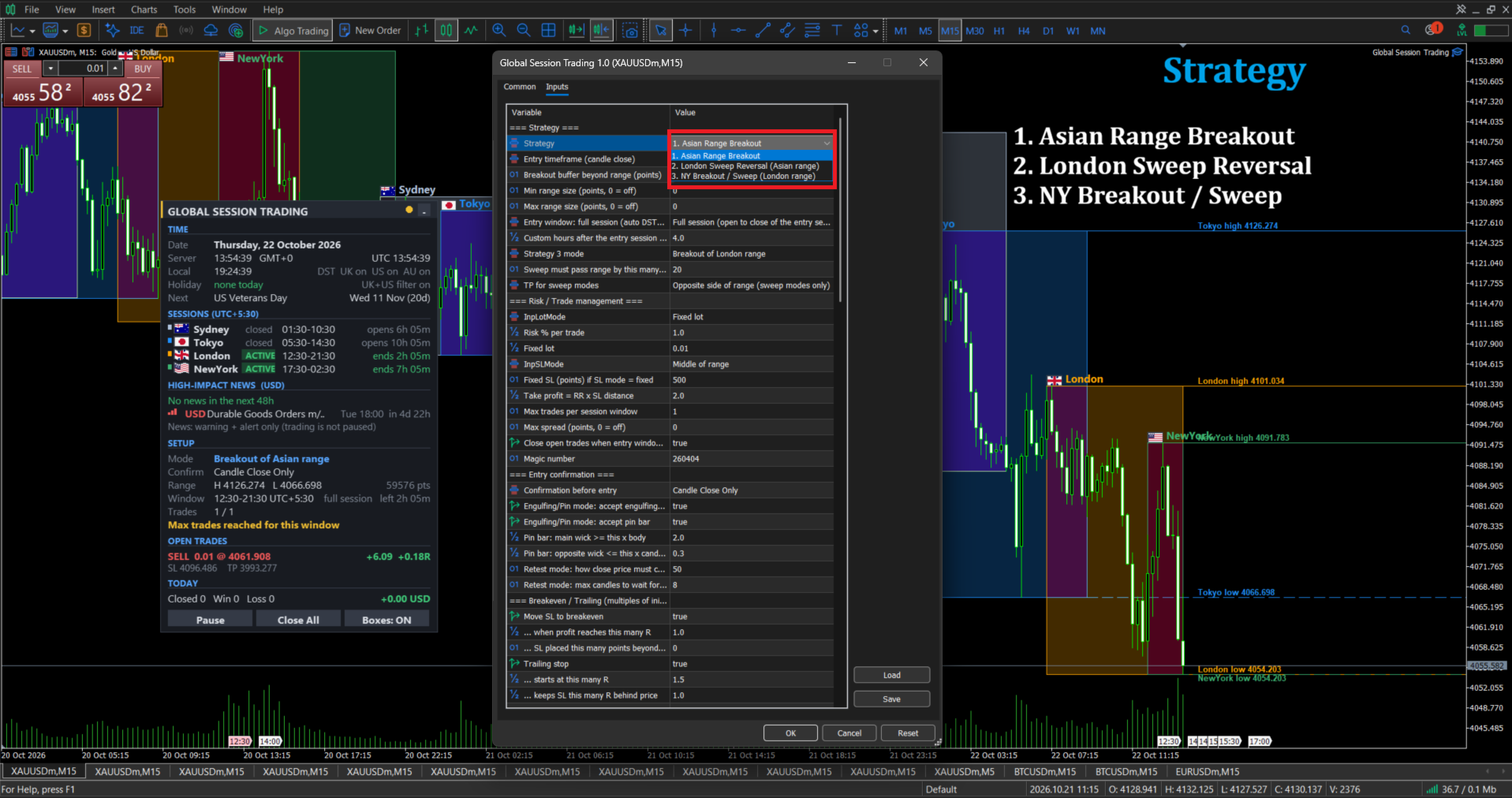
1. Three strategies (choose one per chart)
Strategy Range it builds When it trades What it does 1. Asian Range Breakout Tokyo open to London open London session Trades a candle that closes beyond the range 2. London Sweep Reversal Tokyo open to London open London session Waits for price to poke out of the range and close back inside, then trades the reversal 3. NY Breakout / Sweep London open to New York open New York session Same two ideas, using the London range, with a mode setting to pick breakout or sweep
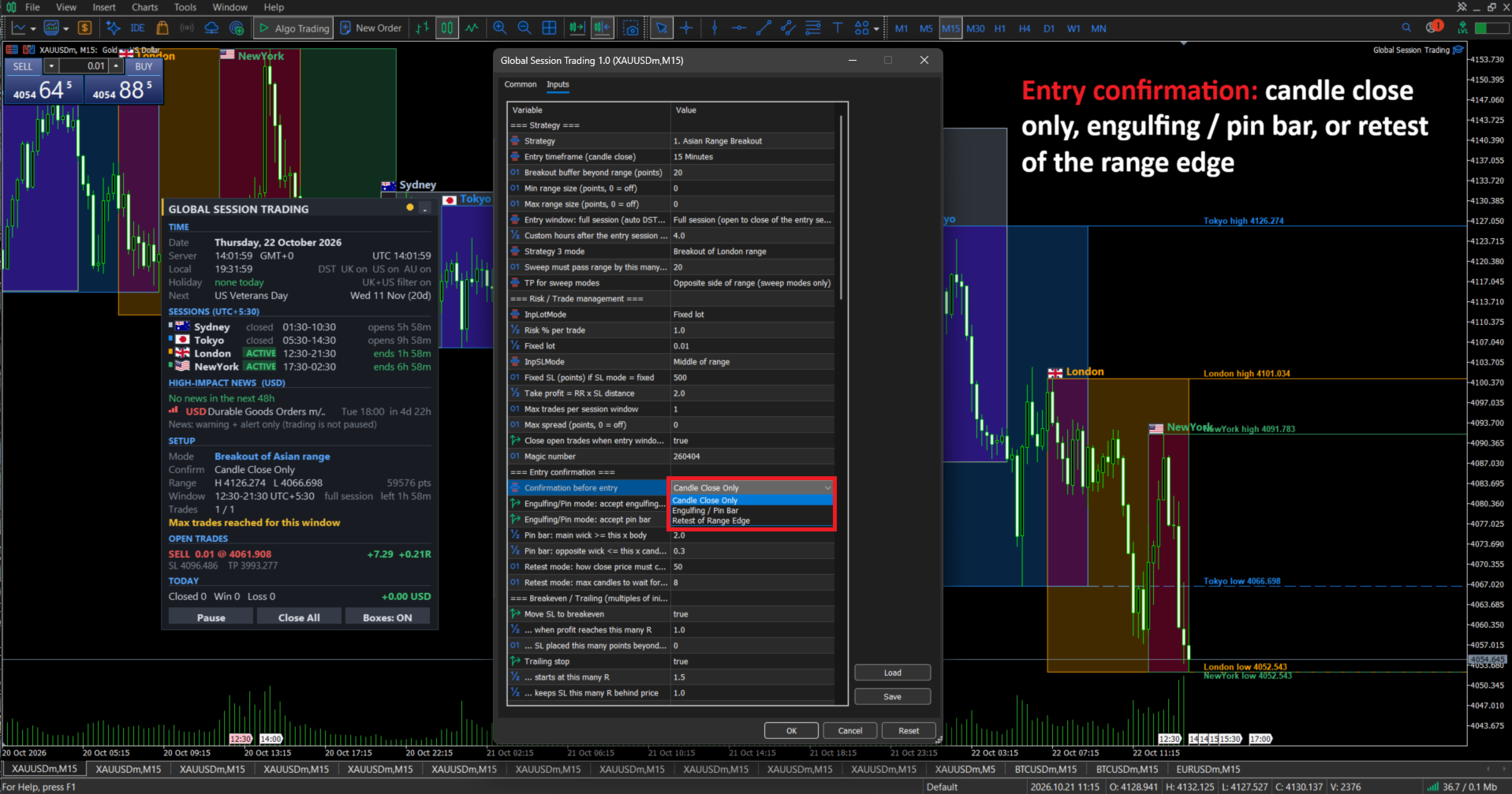
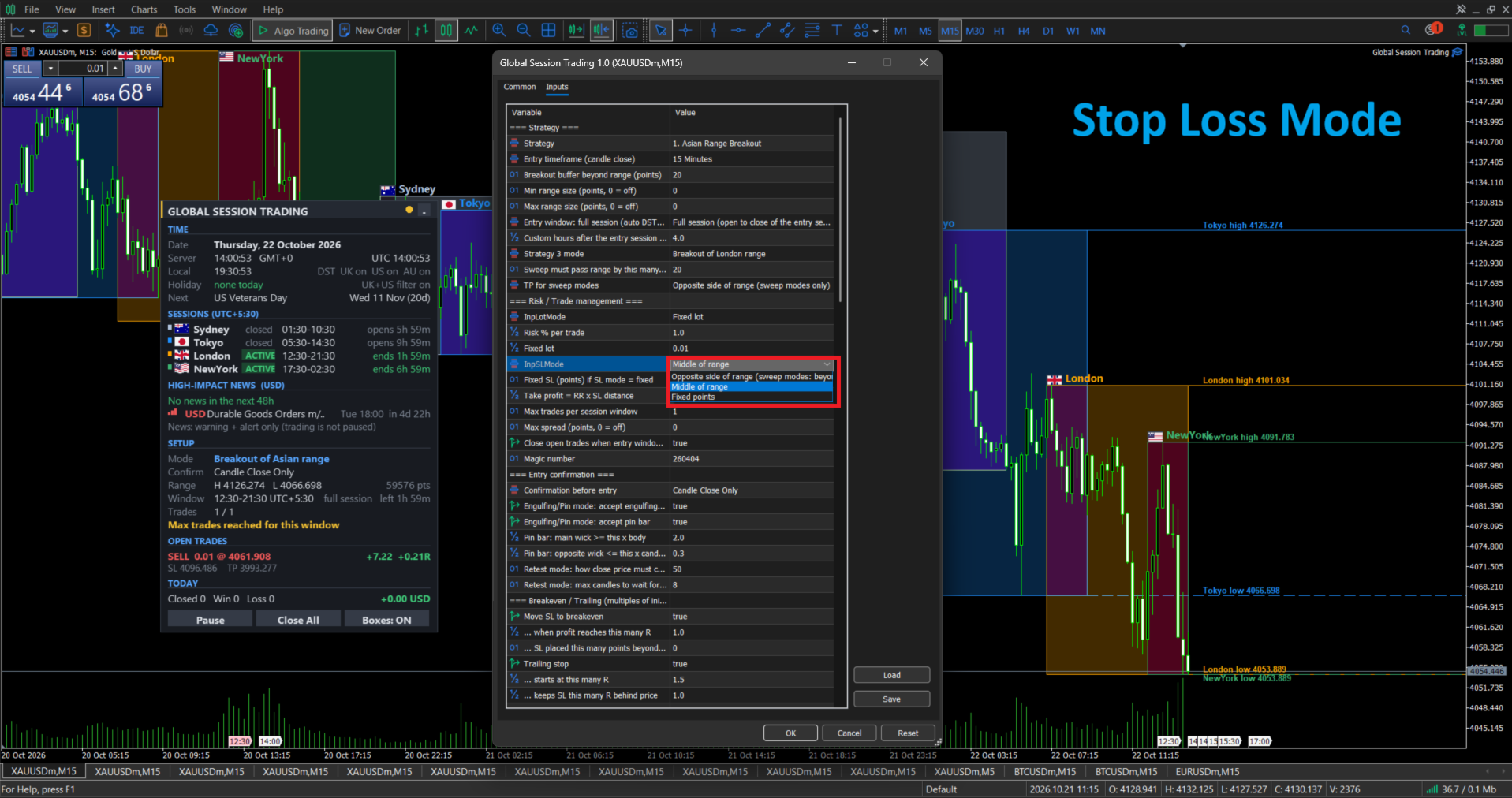
2. Entry confirmation: candle close only, engulfing / pin bar, or retest of the range edge.3. Trade management: fixed lot or risk percent, three stop-loss modes, take profit by risk-reward or at the opposite range edge, breakeven, trailing stop, and automatic closing at the end of the window.
4. Session tools on the chart: coloured session boxes with country flags, session high and low lines with price labels, and labels that shrink to fit as you zoom.
5. News (MT5 economic calendar): it lists the next high-impact events for the symbol’s currencies, with a countdown, a red warning and a popup alert. An optional filter can pause new entries around news.
6. Alerts: popup, phone push and email for session starts, holidays, daylight-saving changes, news and the London breakout.
Notes: the news calendar does not work in the Strategy Tester, so backtests ignore news. Trading involves risk, and results depend on market conditions and your settings.
Input parameters
Strategy
Parameter Default Description InpStrategy Asian Range Breakout Which of the three strategies to trade InpEntryTF M15 Timeframe whose candle close is used for entries InpBreakoutBufferPts 20 Extra points beyond the range that price must close past InpMinRangePts / InpMaxRangePts 0 / 0 Skip the day if the range is smaller or larger than this (0 = off) InpWindowMode Full session Full session (open to close, auto daylight saving) or custom hours InpTradeWindowHours 4.0 Hours after the session opens, used only in custom mode InpNYMode Breakout For strategy 3: breakout of the London range, or sweep reversal InpSweepBufferPts 20 How far price must pass the range to count as a sweep InpSweepTPMode Range opposite Take profit for sweep trades: opposite side of the range or risk-reward
Risk and trade management
Parameter Default Description InpLotMode Fixed lot Fixed lot or risk percent of balance InpRiskPercent 1.0 Percent of balance risked per trade (risk mode) InpFixedLot 0.01 Lot size in fixed mode InpSLMode Middle of range Stop loss at the opposite range edge (beyond the sweep extreme in sweep modes), the middle of the range, or a fixed number of points InpFixedSLPts 500 Stop-loss distance in fixed mode InpRR 2.0 Take profit as a multiple of the stop-loss distance InpMaxTradesPerDay 1 Maximum trades per entry window InpMaxSpreadPts 0 Skip entries when spread is above this (0 = off) InpForceCloseAtWindowEnd true Close open trades when the window ends InpMagic 260404 Magic number. Use a different one on each chart
Entry confirmation
Parameter Default Description InpConfirmMode Candle close only Candle close only, engulfing / pin bar, or retest of the range edge InpUseEngulf / InpUsePinBar true / true Which patterns count in engulfing / pin bar mode InpPinWickRatio 2.0 Pin bar: the main wick must be at least this many times the body InpPinOppWickMax 0.30 Pin bar: the opposite wick may be at most this share of the candle InpRetestTolPts 50 Retest mode: how close price must come back to the range edge InpRetestMaxBars 8 Retest mode: how many candles to wait for the retest
Breakeven and trailing (in multiples of the trade’s initial risk, R)
Parameter Default Description InpUseBE true Move the stop to breakeven InpBETriggerRR 1.0 Profit, in R, at which breakeven moves InpBEOffsetPts 0 Points beyond the entry price for the new stop InpUseTrail true Use a trailing stop InpTrailStartRR 1.5 Profit, in R, at which trailing starts InpTrailDistRR 1.0 How far behind price the stop trails, in R InpTrailStepPts 10 The stop only moves if it improves by this many points
Session high/low lines
Parameter Default Description InpShowLevels true Draw lines at session highs and lows InpLevelDays 1 Days shown (1 = today, up to 5) InpLevelSydney / InpLevelTokyo / InpLevelLondon / InpLevelNewYork false / true / true / true Which sessions get lines InpLevelLabels true Show price labels on the lines
News (MT5 economic calendar)
Parameter Default Description InpShowNews true Show upcoming news on the dashboard InpNewsImpact High only List high impact only, or medium and high InpNewsCurrencies empty Currencies to watch (for example USD,EUR). Empty means automatic from the symbol InpNewsRows 3 How many events to list (1 to 5) InpNewsHours 48 How far ahead to look, in hours InpNewsWarnMinutes 15 Red warning this many minutes before high-impact news InpNewsPauseEntries false Pause new entries around news. Off means warning and alert only InpNewsBlockBefore / InpNewsBlockAfter 15 / 15 Minutes before and after news when entries pause (only if the pause is on) InpAlertNews true Alert before high-impact news InpAlertNewsMin 15 How many minutes before the alert fires
Alerts
Parameter Default Description InpAlertLondonStart / InpAlertNYStart false / false Alert when London / New York opens InpAlertLondonBreak false Alert when London closes above or below the Tokyo range InpAlertHoliday true Alert on a holiday day InpAlertDST true Alert when UK, US or Australian daylight saving changes InpAlertPopup / InpAlertPush / InpAlertEmail true / false / false How alerts are delivered (push and email need setup in MetaTrader)
Holiday and day filters
Parameter Default Description InpAvoidUKHolidays / InpAvoidUSHolidays true / true No trading on UK or US holidays InpUSIncludeColumbusVeterans true Also skip Columbus Day and Veterans Day InpCustomHolidays empty Extra dates to skip, for example 2026-12-24,2027-01-01 InpTradeMon to InpTradeFri all true Turn individual weekdays on or off
Time settings
Parameter Default Description InpDisplayTZ Auto Time zone shown on screen and in alerts (your computer’s clock, UTC or a list of regions) InpCustomTZMinutes 0 Custom UTC offset in minutes, for example 330 for UTC+5:30 InpServerMode Auto How broker server time is read. Use Fixed in the Strategy Tester InpFixedGMTOffset 0 Fixed broker offset in hours (Exness is 0) InpAutoDST true Adjust session times for daylight saving automatically
Sessions (exchange local time, HH:MM)
Parameter Default Description InpUseSydney / InpSydneyStart / InpSydneyEnd true / 07:00 / 16:00 Sydney session InpUseTokyo / InpTokyoStart / InpTokyoEnd true / 09:00 / 18:00 Tokyo session (the Asian range) InpUseLondon / InpLondonStart / InpLondonEnd true / 08:00 / 17:00 London session InpUseNewYork / InpNewYorkStart / InpNewYorkEnd true / 08:00 / 17:00 New York session InpSkipWeekends true Ignore Saturday and Sunday
Display
Parameter Default Description InpDaysBack 3 Days of session boxes drawn on the chart InpFillBoxes / InpFillStrength true / 26 Soft tint inside the boxes, and how strong it is InpShowPanel true Show the dashboard InpChartFlags / InpAnimateFlags true / true Country flags on the chart labels, and a gentle ripple on active sessions in the dashboard InpPanelX / InpPanelY 20 / 30 First position of the dashboard (you can then drag it) InpPanelScale 115 Dashboard and label text size in percent (80 to 160) InpPanelWidth 440 Dashboard width in pixels (380 to 700) InpAutoFitLabels / InpLabelMinPt true / 7 Shrink chart session labels to fit when zoomed out, down to this size InpClrSydney / InpClrTokyo / InpClrLondon / InpClrNewYork preset colours Colour of each session