Gold Session Pulse EA MT5
- Experts
- Versão: 1.0
- Ativações: 10

Gold Session Pulse EA MT5
Gold momentum, filtered by session timing.
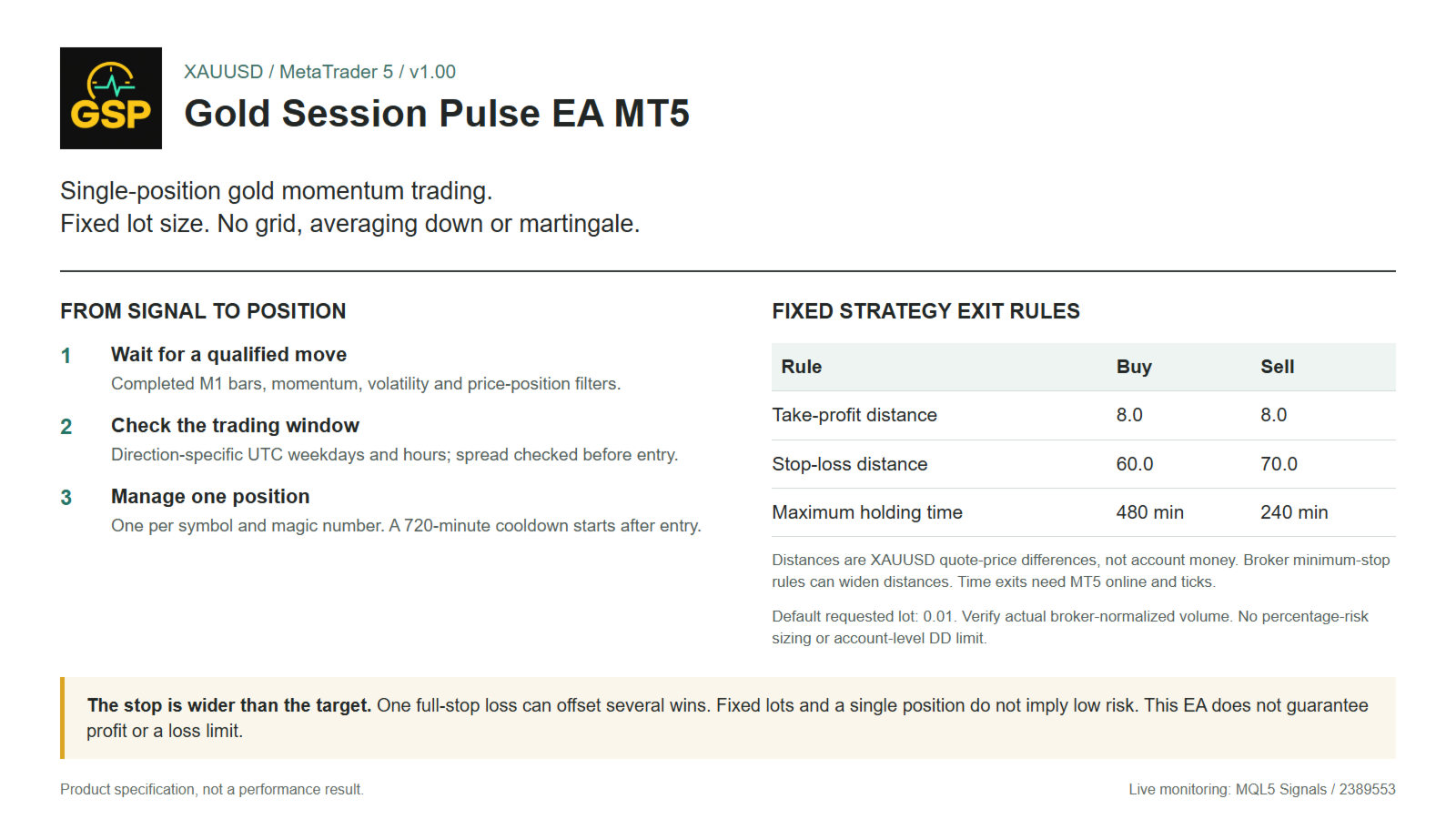
Gold Session Pulse is an automated XAUUSD strategy for MetaTrader 5. A price move alone is not enough: the EA also checks its predefined UTC trading window, volatility conditions and entry filters. It waits for the setup, opens one strategy position and manages that trade with defined exit rules.
- Selective entries: Completed M1 bars, direction-specific weekdays and trading windows, with a spread check before entry.
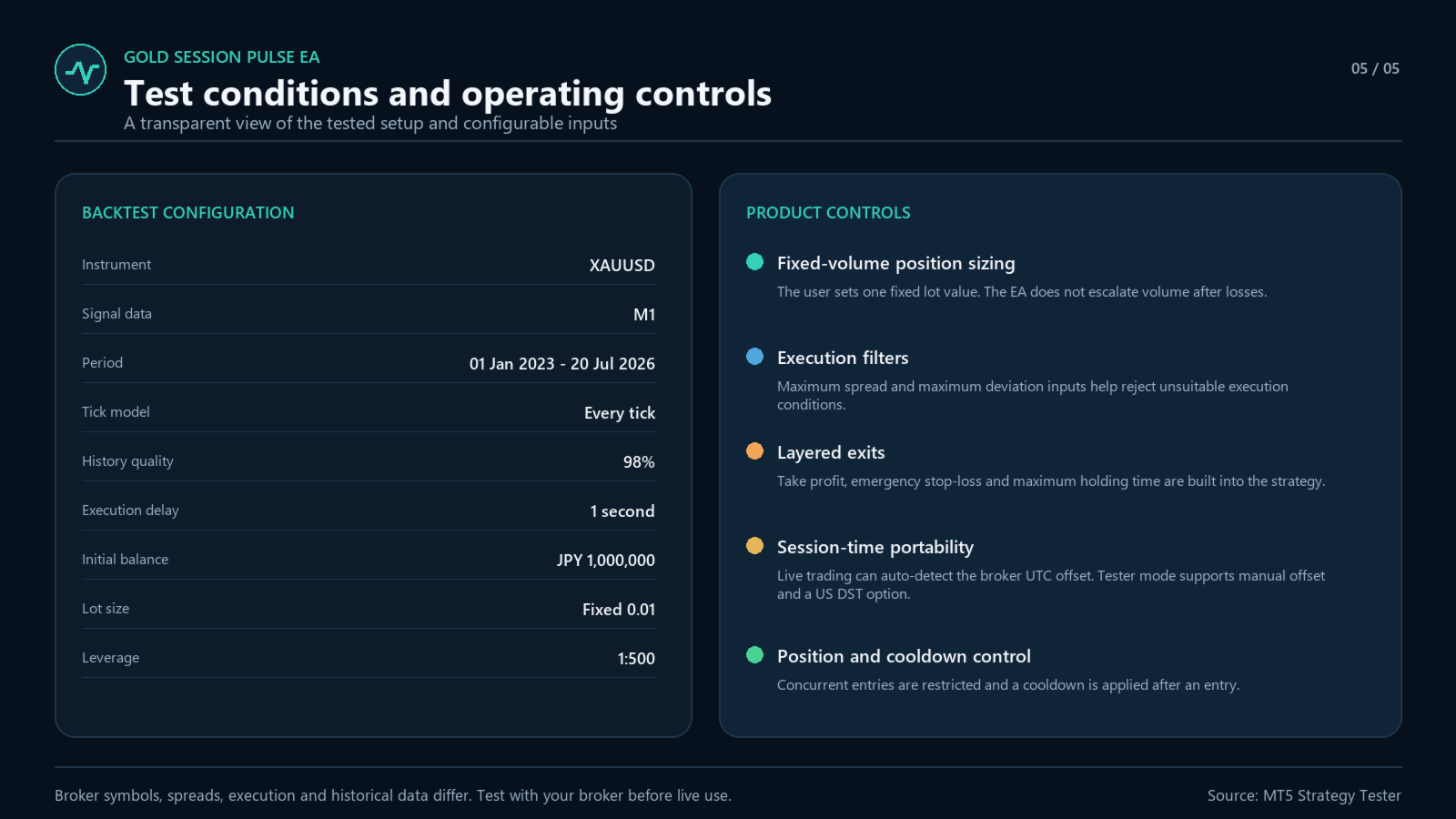
- Position-by-position management: One position per symbol and magic number. Fixed lot sizing, with no grid, averaging down, martingale or automatic lot increase after a loss.
- A defined configuration: The entry and exit logic is built into version 1.00. Your main choices are lot size, trade direction, execution settings and broker time, rather than a large set of strategy thresholds.
Check the live account before you buy
View Gold Session Pulse EA's live trading on MQL5. A dedicated real MT5 account has been monitored since 3 September 2026. Inspect its trading history, drawdown and quiet periods alongside the historical test below.
The live track record is still short and does not establish future profitability. Broker data, spreads, contract specifications and execution can produce different trades and results on your account.
Who this EA is for
For traders who want a gold-focused, rule-based EA with fixed position size and a defined entry process, and who are comfortable waiting for setups. It is not designed for daily trade quotas, loss-recovery baskets or automatic compounding. The wider stop-loss profile below is an important part of the purchase decision.
What qualifies an entry?
Buy and sell entries use separate rules. Directional price movement, volatility and recent price position must meet their conditions on completed M1 bars, within the direction's weekday and UTC window. The strategy does not use a news-calendar filter, neural networks or external trading signals. Trade frequency depends on market conditions; a trade every day is not promised.
Signal thresholds, schedules and exit rules are fixed internally in version 1.00. You can load the defaults without optimizing strategy thresholds, but a test with your own broker data and specifications is still essential.
Position management and risk
| Rule | Buy | Sell |
|---|---|---|
| Take-profit price distance | 8.0 | 8.0 |
| Stop-loss price distance | 60.0 | 70.0 |
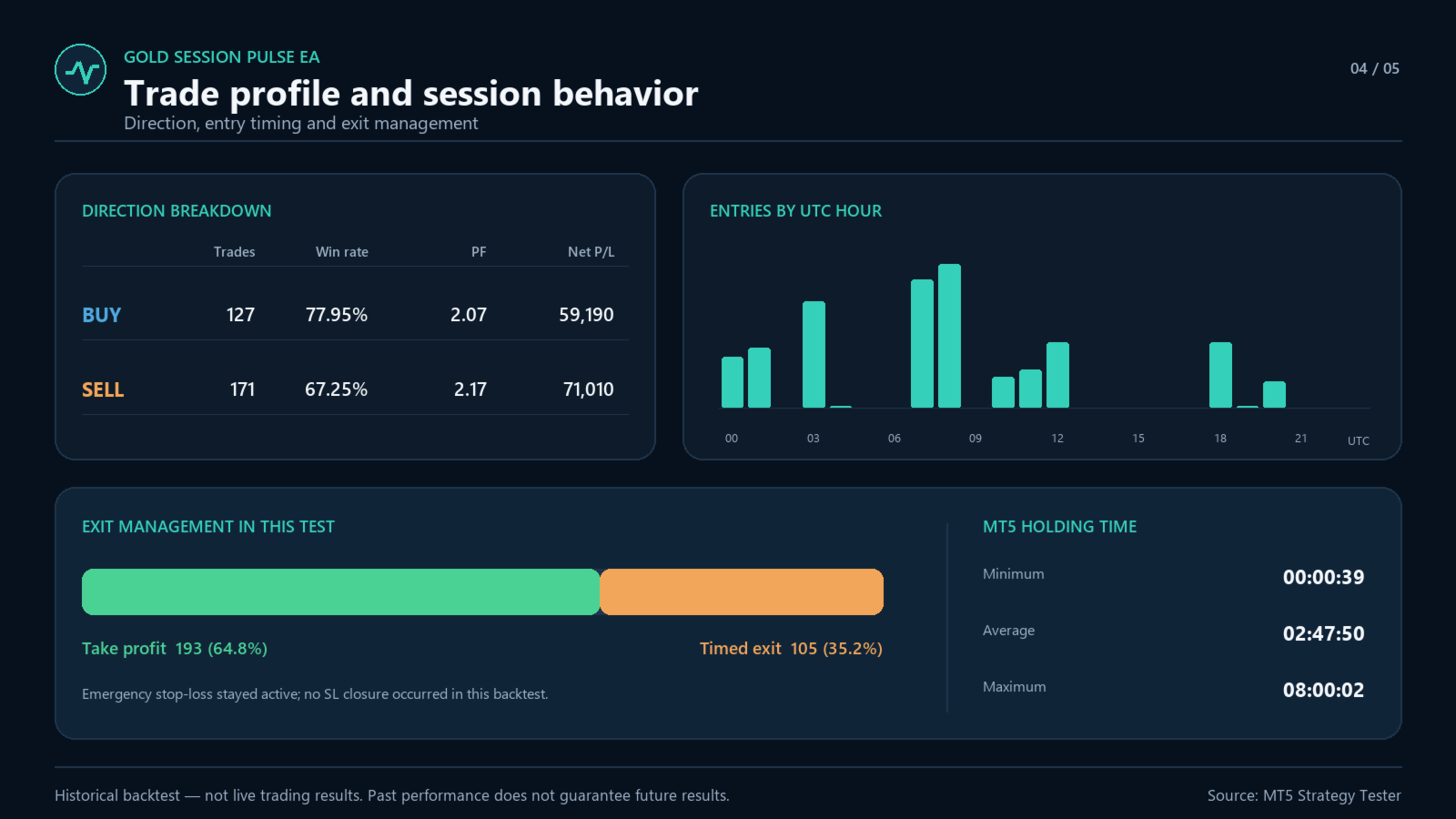
| Maximum holding time | 480 minutes | 240 minutes |
These distances are XAUUSD quote-price differences, not account-currency profit or loss amounts and not points. If the fixed SL/TP levels do not meet the broker's minimum stop distance or tick-size requirements, the EA skips the entry instead of widening them. An entry starts a 720-minute cooldown. Time-based closing requires MT5 to be running and receiving ticks; it is not a guaranteed close at an exact wall-clock time.
The stop-loss distance is substantially larger than the take-profit distance. One full-stop loss can outweigh several winning trades. A high historical win rate, a fixed lot and a single position do not make this a low-risk product. Gaps, slippage, commissions and swaps can increase losses. There is no built-in percentage-risk sizing or account-level drawdown limit.
Historical test: results with context
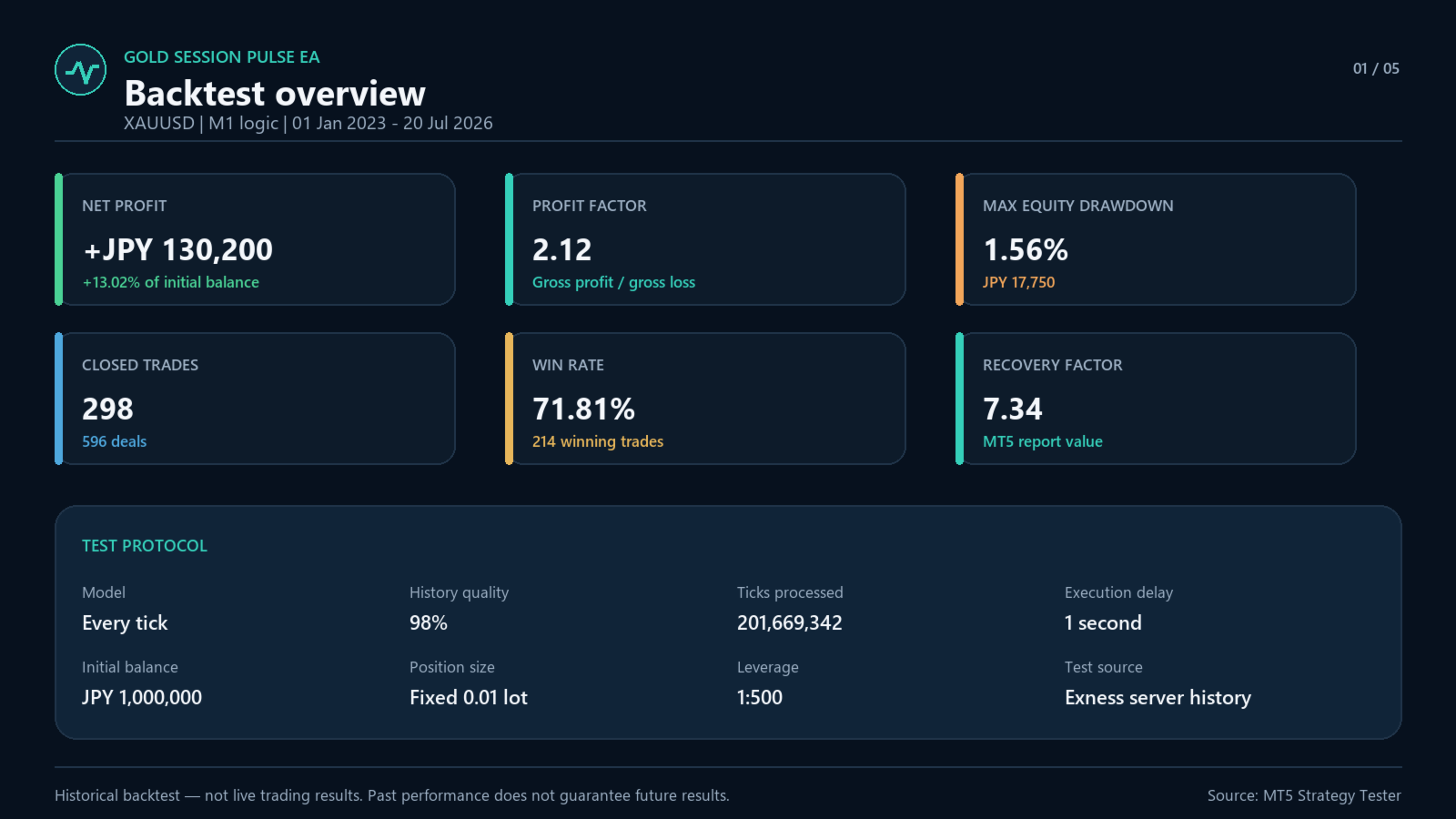
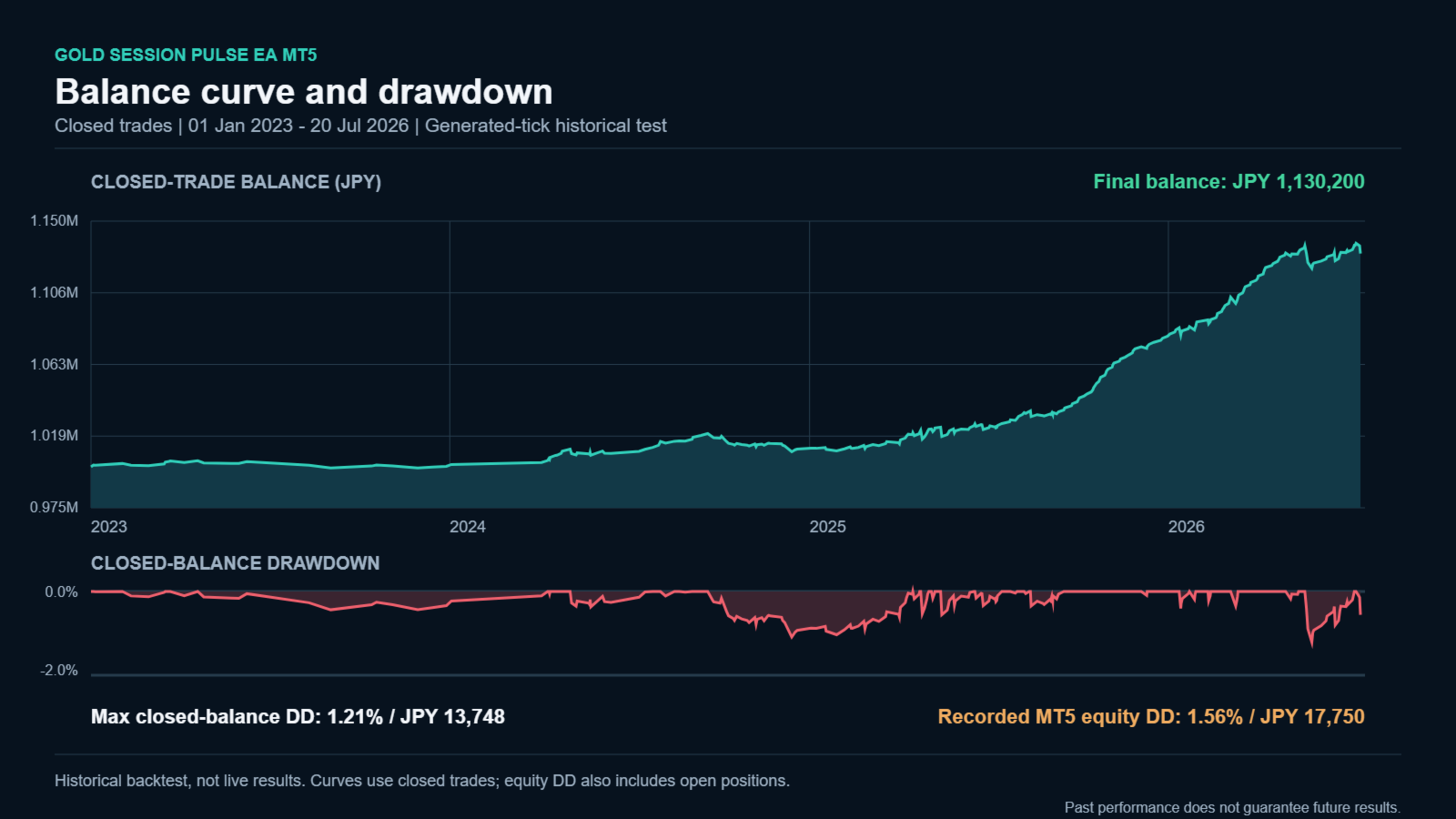
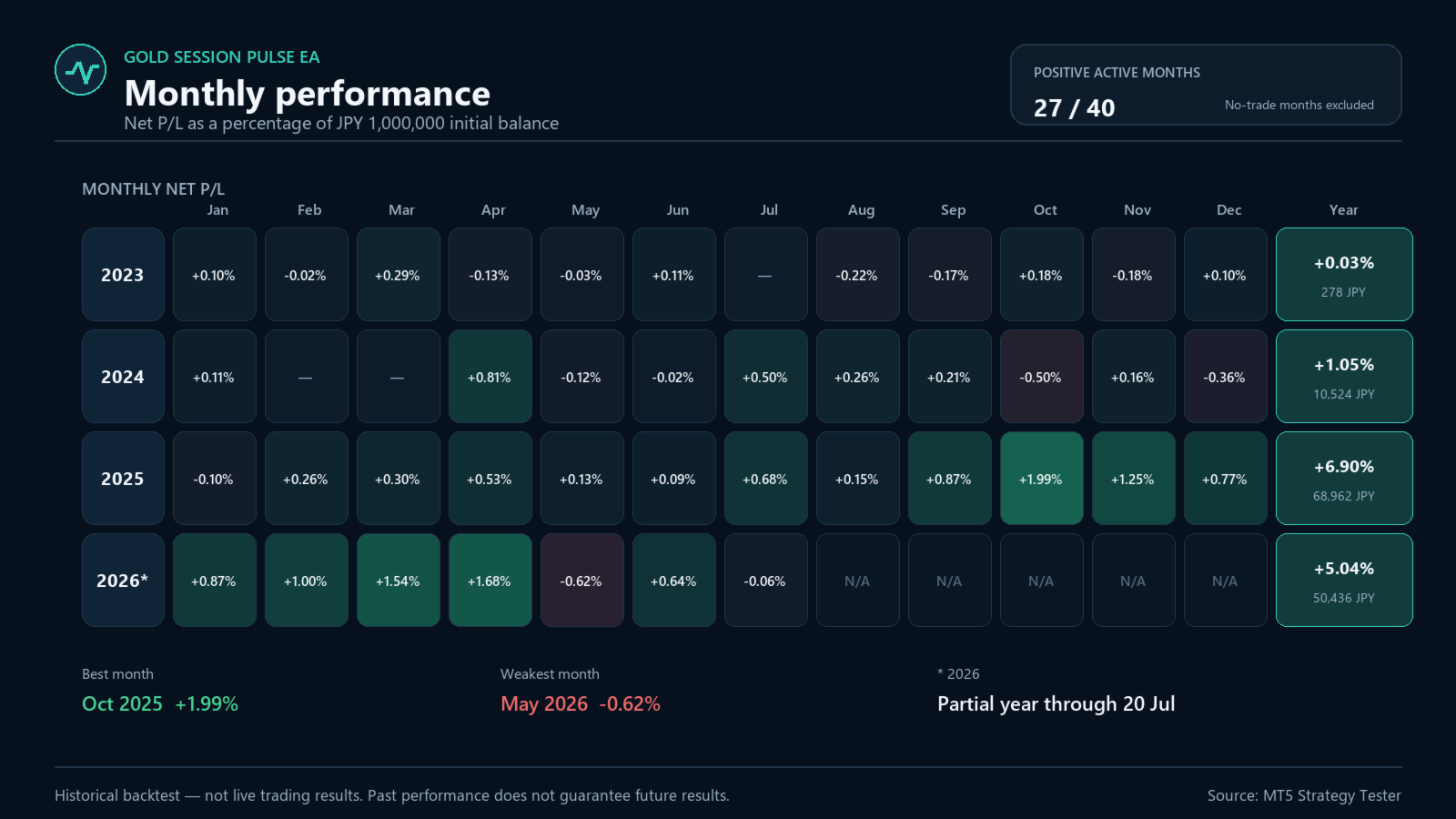
The screenshots document one MT5 Strategy Tester run on XAUUSD from 1 January 2023 to 20 July 2026. It used Every tick with generated ticks from historical bars, a 1-second execution delay, fixed 0.01 lot, JPY 1,000,000 initial balance and 1:500 leverage.
| Measure | Result in that test |
|---|---|
| Closed trades | 298 |
| Net profit | JPY 130,200 |
| Profit factor | 2.12 |
| Win rate | 71.81% |
| Recorded MT5 maximal equity drawdown | JPY 17,750 (1.56%) |
This is a historical generated-tick test, not real-tick testing, live results or unseen out-of-sample performance. The drawdown percentage applies to the stated initial capital and lot size, not a future loss limit or a basis for assuming a smaller account is safe. The 2026 results are partial, through 20 July.
Getting started
- Choose the environment: Use desktop MT5 on a connected PC or VPS. Attach one instance to the broker's XAUUSD or equivalent gold-versus-US-dollar M1 chart.
- Choose the position size: Set the fixed lot and a unique magic number. Check the actual volume, contract size, margin and potential stop-loss amount before real trading.
- Verify the clock and behavior: Confirm the broker UTC offset, test the Market demo in the Strategy Tester, and check your broker environment before using real funds.
A symbol name alone does not establish compatibility: confirm the quote format, minimum volume, volume step and minimum stop distance. The tested reference environment is Exness MT5; equivalent results on other brokers are not guaranteed.
Start with a broker-specific demo test. Check the actual order volume before real use: the requested lot is normalized to the broker's allowed volume range and step, and a requested 0.01 lot can become larger if the broker minimum is larger. Select capital and lot size based on the contract's potential loss, margin requirements and your own loss tolerance, not on the historical drawdown percentage.
Use a unique magic number if you run other EAs. Do not attach duplicate instances with the same symbol and magic number. On a netting account, do not share the same gold symbol with other EAs or manual trading; positions merge by symbol. Keep MT5 connected for time-based management. An offline terminal cannot perform the time exit.
Input parameters
| Input | Default | Purpose |
|---|---|---|
| Fixed lot size (InpLots) | 0.01 | Requested fixed volume; subject to broker volume normalization. |
| Magic number (InpMagic) | 260901001 | Identifies this Market version's trades. Use a unique value when needed. |
| Trade direction (InpTradeDirection) | Buy and sell | Buy and sell, buy only, or sell only. |
| Maximum spread (XAUUSD price) (InpMaxSpreadUsd) | 0.40 | Maximum Ask minus Bid, measured in the gold quote price, not account money. |
| Maximum deviation (points) (InpSlippagePoints) | 30 | Requested order deviation in broker points; not a guarantee of realized slippage. |
| Auto-detect broker UTC offset in live trading (InpAutoDetectBrokerUtcOffset) | true | Detects the live server offset. Keep the PC/VPS clock accurate. |
| Broker UTC offset for tester/manual mode (InpManualBrokerUtcOffsetHours) | 0.0 | Server minus UTC, in hours, for the tester or when automatic detection is disabled. |
| Add one hour during US DST in Strategy Tester (InpTesterUseUsDstSchedule) | false | Tester-only seasonal adjustment; use only if the history follows that schedule. |
The strategy schedule is UTC-based. The tester does not automatically reproduce the live broker offset. For the tested Exness UTC+0 history, leave manual offset at 0.0 and US DST off. For other history, verify its clock first. A winter UTC+2/summer UTC+3 feed may require 2.0 and US DST on only when its seasonal change actually follows the US schedule.
Questions before purchase
Why might there be no trades? A valid price signal must also pass the weekday, time, spread and position checks, with an entry cooldown of 720 minutes. Quiet periods can occur. If trading appears inactive, also check algorithmic trading permission, connectivity, time settings and the Experts/Journal messages.
Do I need to subscribe to the live signal? No. The Market EA runs its own strategy on your MT5 account. The signal is a separate service for viewing monitoring data or subscribing to trade copying; a subscription is not included in the EA purchase.
Is this a prop-firm drawdown protection tool? No. It has no account-level or daily drawdown stop. A single position and fixed lot do not ensure compliance with a firm's rules.
Evaluate first, then choose your setup
Review the live account, test the Market demo with your broker's history, and compare the entry frequency and stop-loss profile with what you want from a gold EA. Use the product Comments tab or MQL5 private messages for setup questions.
For support, include the EA version, broker/server, symbol specifications, input settings and relevant Experts/Journal messages. Do not send account passwords or other credentials.
Trading gold and leveraged CFDs involves substantial risk of loss. Past performance does not guarantee future results. Test the Market demo in the Strategy Tester before purchasing, then evaluate your own broker environment before real trading. The EA and its controls do not guarantee profit or prevent losses.