RavenBreak Algorithmic EA
- Experts
- Versão: 1.0
- Ativações: 19

Raven Range Momentum EA
Raven Range Momentum EA is an automated MetaTrader 5 Expert Advisor designed to combine range structure, momentum analysis, volatility conditions and directional confirmation into a systematic trading process.
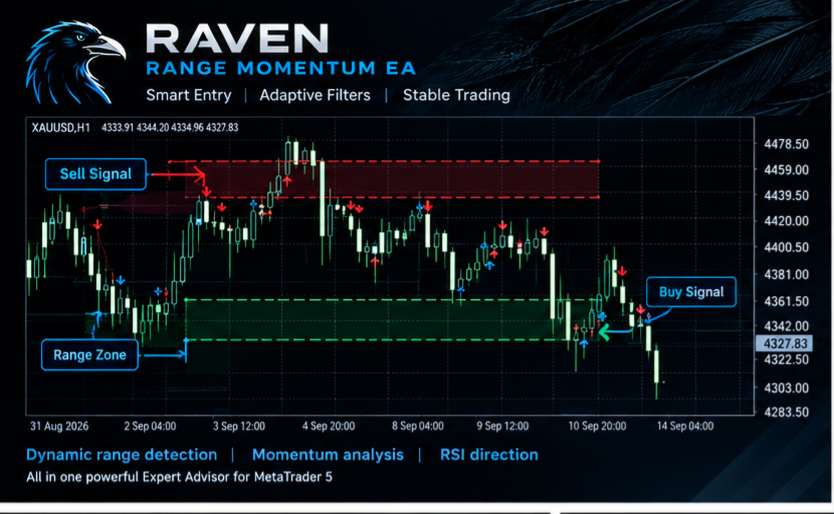
The EA is designed to identify potential pullback entries inside a defined price range while using multiple independent conditions to confirm market direction.
The system does not rely on manual chart analysis. All signal processing, position management and risk-control operations are performed automatically by the Expert Advisor.
Trading Concept
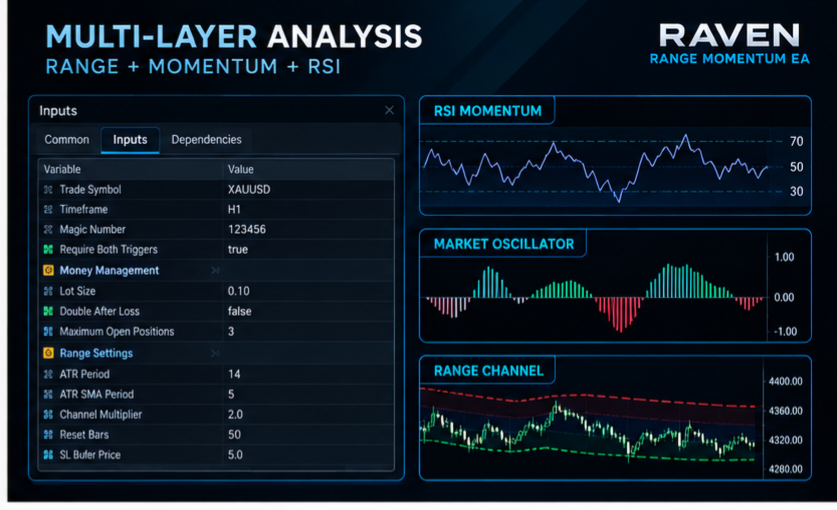
Raven Range Momentum EA uses three complementary analytical components:
- Dynamic range structure
- Multi-factor market oscillator
- RSI-based momentum direction
The range component establishes a dynamic price channel using ATR-based volatility measurements.
The momentum component evaluates several market characteristics, including:
- trend strength;
- directional movement;
- RSI momentum;
- volatility;
- volume pressure.
The directional component determines whether the market has established positive or negative momentum.
A trading signal is generated only when the configured conditions are satisfied.
Entry Logic
The EA supports two signal confirmation modes.
Dual Confirmation
When "Require Both Triggers" is enabled, a position requires:
- directional momentum confirmation;
- oscillator confirmation;
- range-zone touch confirmation.
This mode is designed to reduce the number of entries by requiring agreement between the independent signal components.
Flexible Confirmation
When "Require Both Triggers" is disabled, either the oscillator condition or the range-touch condition can trigger an entry while the directional momentum filter remains active.
This allows the user to adjust the signal frequency according to the selected market and timeframe.
Dynamic Range Detection
The range structure is calculated from Average True Range data and dynamically adapts to current market volatility.
The EA monitors:
- upper range boundary;
- lower range boundary;
- range center;
- range resets;
- directional breakouts;
- first-touch conditions.
A range touch is detected as an actual transition into the defined zone rather than simply checking whether price is already beyond the level.
This distinction helps prevent repeated entries from the same price condition.
Momentum Analysis
The momentum module combines several normalized market measurements into a single oscillator.
The calculation considers:
- ADX directional strength;
- positive and negative directional movement;
- RSI momentum;
- ATR-based volatility;
- Chaikin Money Flow-style volume pressure.
Adaptive weighting can modify the contribution of trend, momentum and volatility according to the current market regime.
This allows the signal model to react differently during relatively quiet and more active market conditions.
Position Management
Raven Range Momentum EA uses a structure-based exit model.
For a Buy position, the EA monitors for an opposite bearish range breakout.
For a Sell position, the EA monitors for an opposite bullish range breakout.
The position can therefore remain open while the directional structure continues to support the trade.
An additional RSI momentum flip protection is included.
When the detected directional bias changes:
- Buy positions can be closed when the bias becomes negative;
- Sell positions can be closed when the bias becomes positive.
The EA also places a protective Stop Loss beyond the relevant range boundary with an adjustable price buffer.
Risk Management
The EA provides configurable position sizing and position limits.
Available controls include:
- fixed lot size;
- maximum number of simultaneous positions;
- Stop Loss buffer;
- optional position increase after a losing trade;
- Magic Number;
- symbol selection;
- timeframe selection.
The position size is automatically normalized according to the trading symbol's minimum volume, maximum volume and volume step.
Broker-specific minimum Stop Level requirements are also taken into account when placing protective stops.
News Filter
The EA includes an optional high-impact economic news filter using the MetaTrader 5 economic calendar.
When enabled, the Expert Advisor can temporarily prevent new entries around relevant economic events.
The user can configure:
- minutes before the event;
- minutes after the event;
- minimum news importance level.
The filter checks the currencies associated with the traded symbol.
Existing positions are managed according to the normal position-management rules.
Symbol and Timeframe
The EA can operate using the chart symbol or a manually specified symbol.
The analytical timeframe is configurable through the Expert Advisor settings.
The default configuration is designed around short-term market analysis, but the parameters can be adjusted for different instruments and trading approaches.
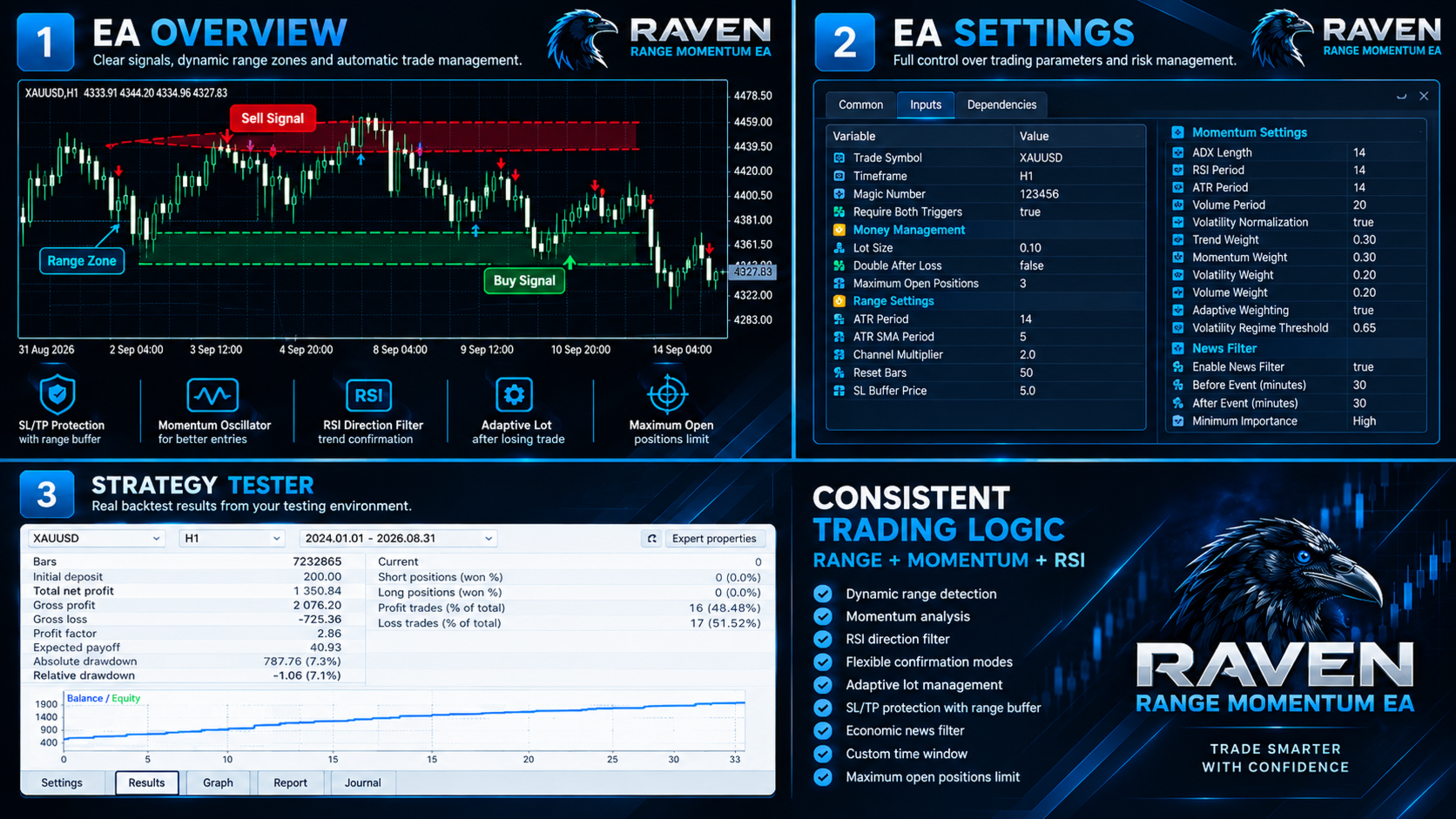
Main Parameters
General
"Trade Symbol"
Select the trading symbol. Leave empty to use the current chart symbol.
"Timeframe"
Timeframe used for signal calculations.
"Magic Number"
Unique identifier used to distinguish positions created by the EA.
"Require Both Triggers"
Requires both range and oscillator confirmation when enabled.
Money Management
"Lot Size"
Base position volume.
"Double After Loss"
Allows the next signal to use two positions after a losing closed trade.
"Maximum Open Positions"
Safety limit for simultaneous EA positions.
Range Settings
"ATR Period"
ATR calculation period used for the range model.
"ATR SMA Period"
Smoothing period applied to ATR.
"Channel Multiplier"
Controls the width of the dynamic range.
"Reset Bars"
Number of bars outside the range before a forced range reset.
"SL Buffer Price"
Additional distance beyond the range boundary used for Stop Loss placement.
Momentum Settings
The momentum module provides configurable parameters for:
- ADX length;
- RSI period;
- ATR period;
- volume-pressure period;
- volatility normalization;
- trend weight;
- momentum weight;
- volatility weight;
- volume weight;
- adaptive weighting;
- volatility regime threshold.
RSI Momentum Trend
The directional model provides configurable:
- RSI period;
- positive momentum threshold;
- negative momentum threshold;
- momentum EMA period.
News Filter
The economic-calendar filter can be enabled or disabled.
The user can configure the blackout period before and after an event and the minimum event importance.
Suitable Use
The EA is intended for traders who want a systematic approach to short-term market analysis without manually monitoring every signal.
It can be used on different instruments and timeframes, subject to the characteristics of the selected broker, symbol and trading environment.
Before using a new configuration on a live account, users should test the selected settings in MetaTrader 5 Strategy Tester and on a demo account.
Important Information
Trading financial markets involves substantial risk.
Past backtest results do not guarantee future performance.
Market conditions can change, and the behavior of a trading system can vary depending on the symbol, broker, spread, execution conditions, liquidity and timeframe.
The EA does not guarantee profits and should be used with appropriate risk management.
The product does not use DLL libraries or external licensing systems.
Installation
1. Purchase and activate the product through MQL5 Market.
2. Open MetaTrader 5.
3. Install the Expert Advisor through the Navigator.
4. Attach Raven Range Momentum EA to the desired chart.
5. Select the trading symbol and timeframe.
6. Configure the position size and risk parameters.
7. Enable or disable the news filter according to your requirements.
8. Test the configuration before using it on a live account.
Support
Product support is provided through the MQL5 Market product page and MQL5 messaging system.
When requesting support, provide the MetaTrader 5 version, broker, symbol, timeframe and relevant Expert Advisor Journal or Experts log information.
Risk Notice
Raven Range Momentum EA is a software tool for automated trading. It is not financial advice and does not guarantee any specific trading result.
The user is responsible for selecting appropriate settings, position size and trading conditions.