Gold Multi Timeframe EA
- Experts
-
Angelus Meichel Vana
 Independent algorithmic trading developer focused on designing, developing, testing, and optimizing Expert Advisors for MetaTrader 5.
My focus is on systematic trading, multi-timeframe strategies, risk management, execution logic, backtesting, and robust EA architecture. - Versão: 1.90
- Atualizado: 28 agosto 2026
- Ativações: 5
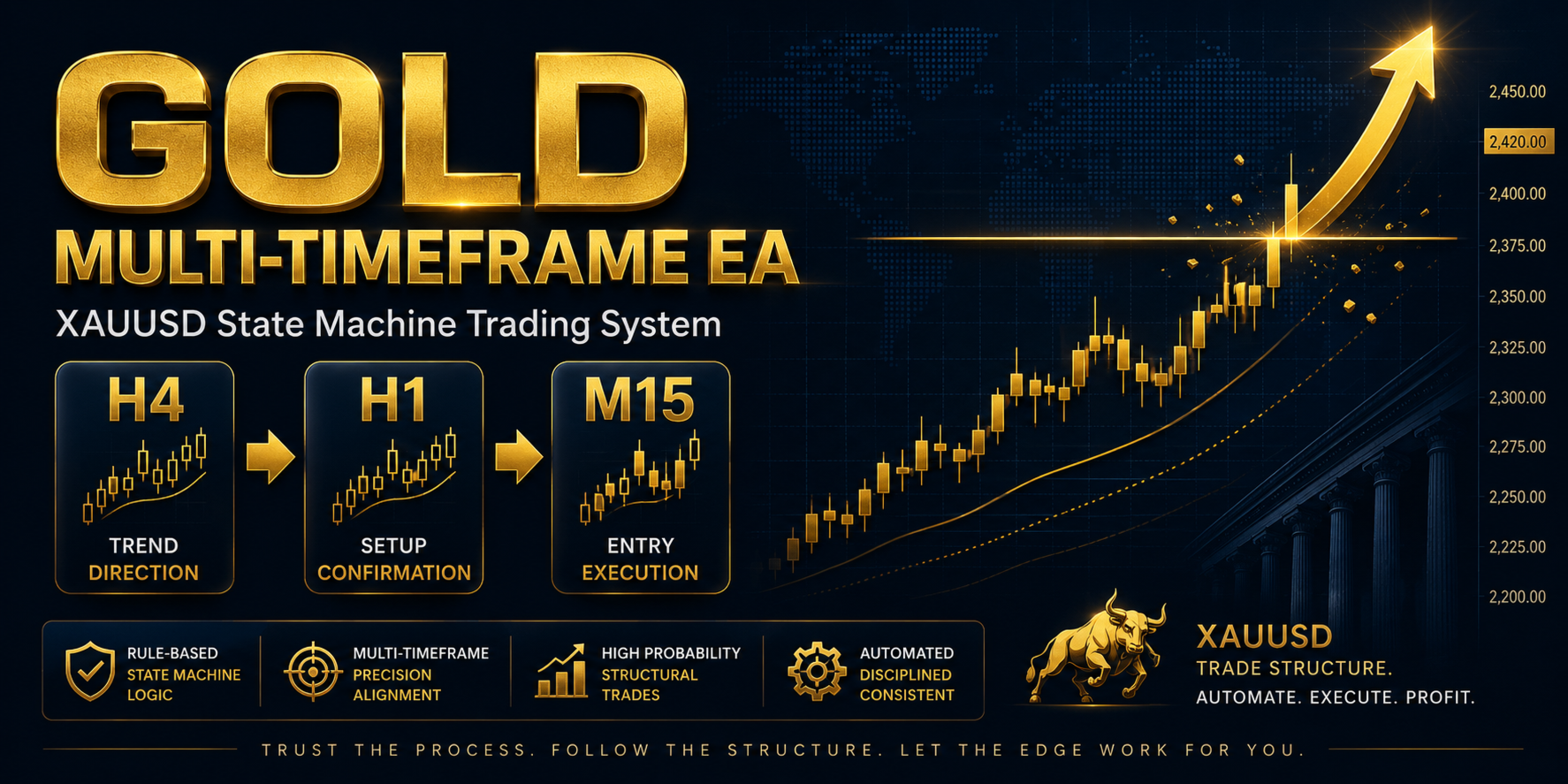
XAUUSD State Machine Trading System
Structured Analysis • Controlled Risk • Broker-Aware Execution
Gold Multi-Timeframe EA is a professional Expert Advisor designed specifically for XAUUSD (Gold) using a structured multi-timeframe trading system.
Unlike simple indicator-based EAs, the system evaluates a potential trade through several stages before allowing execution.
TREND → STRUCTURE → LIQUIDITY → ENTRY → RISK → EXECUTION
MULTI-TIMEFRAME STRATEGYThe EA combines three market perspectives:
H4 — Trend
Identifies the broader market direction and trend strength.
H1 — Structure
Analyzes market structure, structural breaks and directional changes.
M15 — Entry
Searches for liquidity conditions, price displacement, Fair Value Gap and volatility-based entry opportunities.
The different timeframes work together through a State Machine, so an incomplete setup does not immediately become a trade.
SMART ENTRY VALIDATIONThe EA does not rely on a single indicator.
A potential setup must progress through multiple validation stages before reaching the execution stage.
The system evaluates:
-
Market direction
-
Market structure
-
Liquidity
-
Fair Value Gap
-
Volatility
-
Risk
-
Margin
-
Broker conditions
This helps separate signal generation from trade execution.
BROKER-AWARE RISK MANAGEMENTGold trading conditions can vary significantly between brokers.
The EA reads the actual XAUUSD trading specifications from MetaTrader 5 and uses them when evaluating:
-
Position size
-
Stop Loss
-
Margin
-
Volume limits
-
Volume steps
-
Trading restrictions
-
Stop-distance requirements
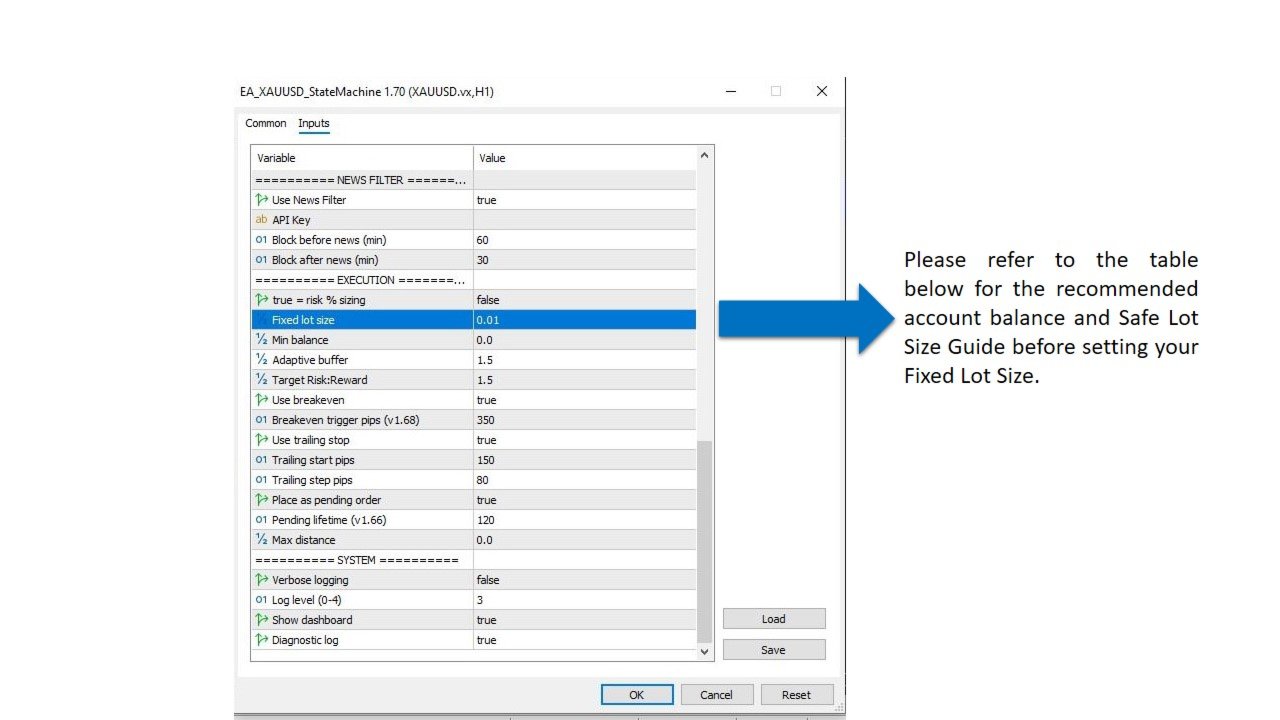
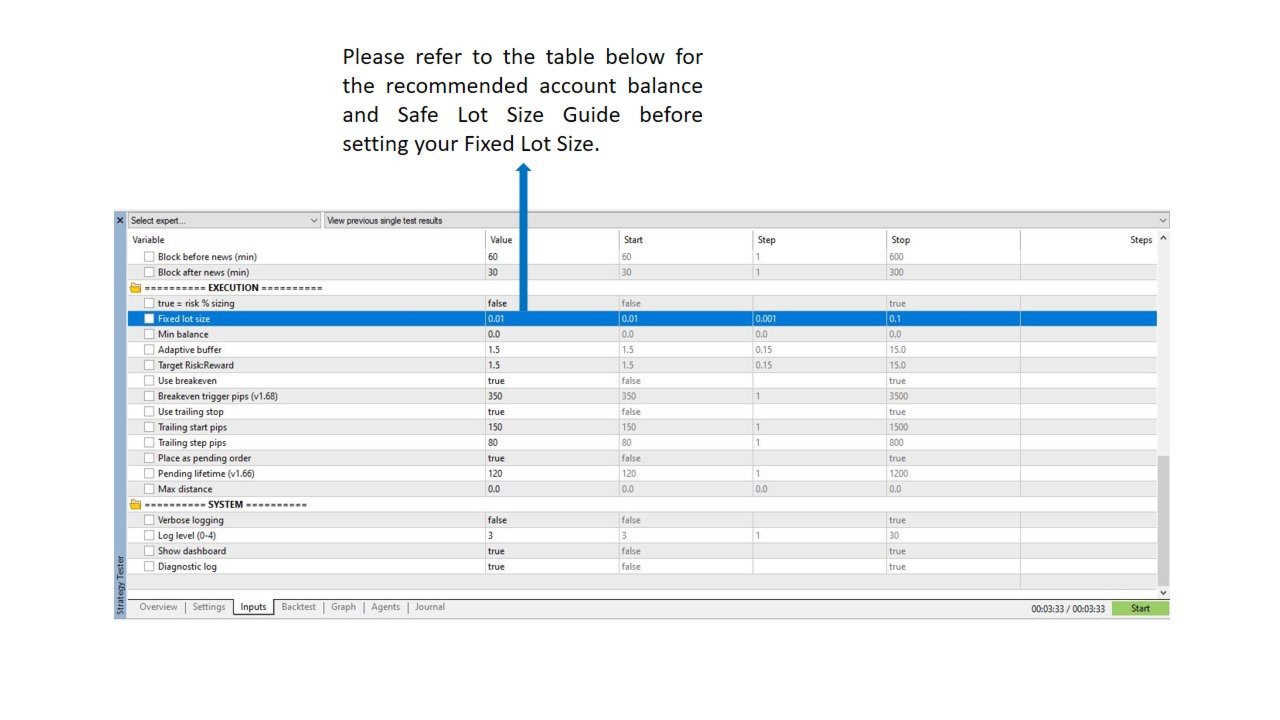
The system supports both risk-based sizing and fixed-volume trading.
It also includes account protection such as:
-
Daily drawdown control
-
Weekly drawdown control
-
Consecutive-loss protection
-
Trading cooldown
-
Maximum position control
-
Margin protection
The EA does not use:
-
Martingale
-
Grid trading
-
Averaging Down
The system is based on structured trade validation and controlled exposure.
TRADE MANAGEMENTAfter execution, the EA can manage positions automatically using:
-
Stop Loss
-
Take Profit
-
Breakeven
-
Trailing Stop
The execution engine also supports pending-order management and broker-condition validation.
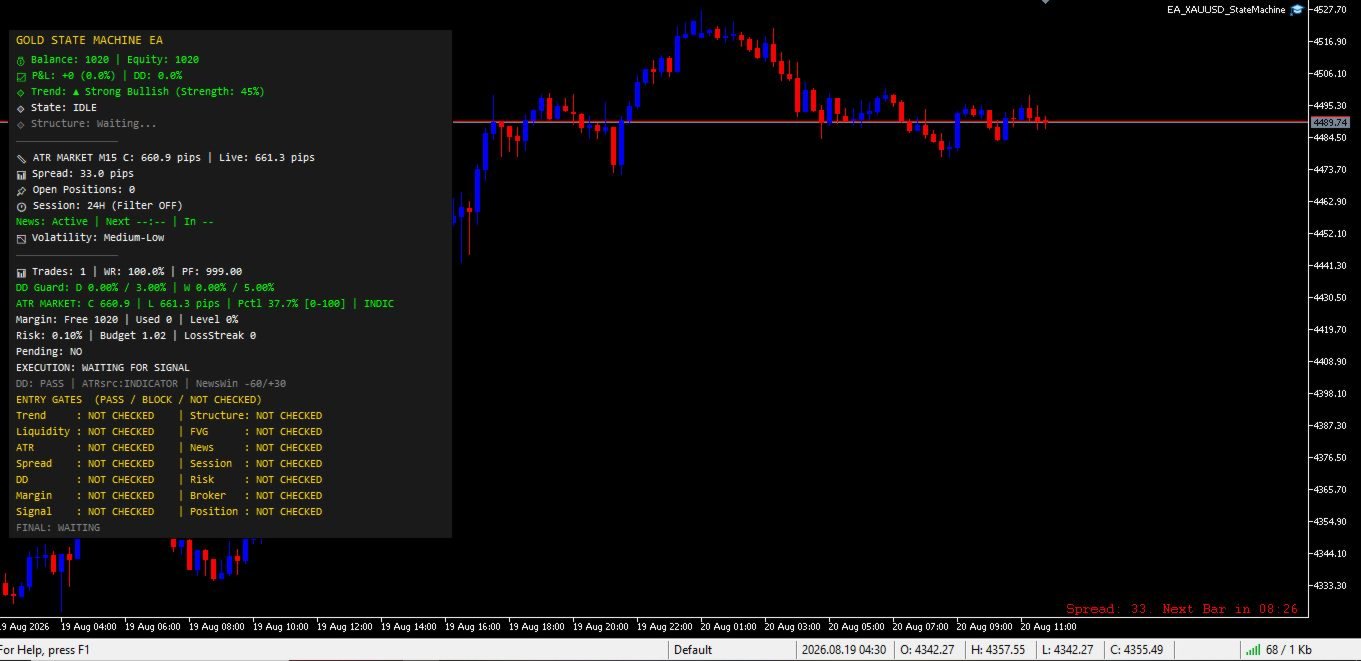
REAL-TIME DASHBOARDThe integrated dashboard provides visibility into the EA's current decision process.
It can display information related to:
-
Trend
-
Structure
-
Liquidity
-
FVG
-
Volatility
-
Spread
-
News
-
Risk
-
Drawdown
-
Margin
-
Position status
-
Execution status
This makes it easier to understand why the EA entered, is waiting, or rejected a potential trade.
OPTIONAL NEWS FILTERThe EA includes an optional external economic News Filter.
When enabled, it can prevent new trades around important economic events that may significantly affect Gold.
To use the News Filter:
-
Obtain an API key from the supported news-data provider.
-
Enable the News Filter in the EA settings.
-
Enter your API key.
-
Allow WebRequest in:
MT5 → Tools → Options → Expert Advisors
-
Add the required news-data provider domain.
-
Check the News status on the EA dashboard.
The News Filter includes caching and API-failure handling.
The News Filter is optional.
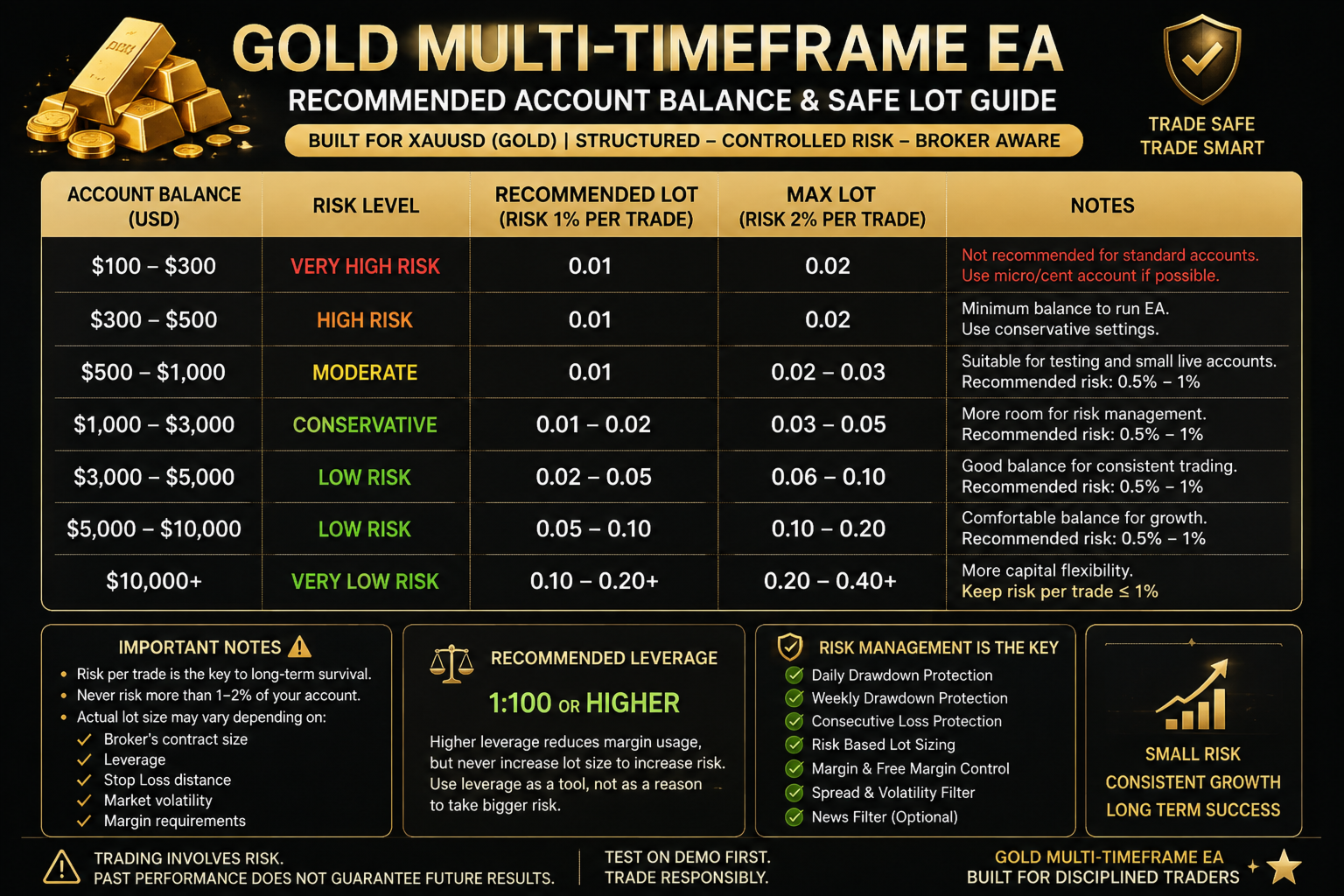
RECOMMENDED BALANCEThere is no universal minimum balance for XAUUSD because broker specifications are different.
As a practical guideline:
| Account Balance | Recommendation |
|---|---|
| Below $500 | Not recommended for standard XAUUSD |
| $500–$1,000 | Suitable for controlled testing |
| $1,000+ | Recommended operating range |
| $5,000+ | More operating room for risk and margin |
These are guidelines, not guarantees.
The actual required balance depends on the broker's minimum lot, contract size, leverage, margin requirements, Stop Loss distance and selected risk.
RECOMMENDED LEVERAGEA leverage of approximately 1:100 or higher is generally suitable for the EA.
Higher leverage can reduce the margin required for a position, but it does not reduce trading risk.
Higher leverage should never be used as a reason to increase position size.
The EA still performs risk and margin validation based on the actual broker environment.
BACKTESTING — IMPORTANTBecause the EA uses multiple timeframes, data quality is extremely important.
The EA should be tested with complete historical data for:
H4 + H1 + M15
For serious testing:
-
Use the actual broker's XAUUSD symbol.
-
Use M15 as the test timeframe.
-
Ensure H4, H1 and M15 history is synchronized.
-
Use Real Ticks whenever reliable data is available.
-
Use realistic spread, commission and execution conditions.
-
Test sufficiently long periods.
-
Include different market conditions, not only strong trends.
Incomplete historical data can materially affect the result.
HOW TO EVALUATE A BACKTESTDo not judge the EA only by Net Profit.
Also review:
-
Profit Factor
-
Maximum Drawdown
-
Number of trades
-
Win Rate
-
Average trade
-
Consecutive losses
-
Commission
-
Spread
-
Slippage
-
Execution behavior
For optimization, use separate in-sample and out-of-sample periods to reduce overfitting.
A strong historical result should always be followed by forward demo testing before live deployment.
IMPORTANT BROKER CONSIDERATIONThe same EA can produce different results on different brokers.
Differences may come from:
-
Contract specification
-
Spread
-
Commission
-
Tick data
-
Slippage
-
Liquidity
-
Margin
-
Execution speed
-
Server conditions
For this reason, backtest results from one broker should not automatically be considered representative of another broker.
RECOMMENDED SETUPSymbol: XAUUSD / supported Gold symbol
Chart: M15
Analysis: H4 + H1 + M15
Platform: MetaTrader 5
Testing: Real Ticks where available
News Filter: Optional
Demo testing: Strongly recommended before live deployment
Does the EA use Martingale?
No.
Does it use Grid?
No.
Does it average down?
No.
Does it support risk-based lot sizing?
Yes.
Does it support fixed lot sizing?
Yes.
Does it use Breakeven and Trailing Stop?
Yes.
Does it support Pending Orders?
Yes.
Is the News Filter mandatory?
No. It is optional.
Why did the EA not open a trade even though the setup looked valid?
A market setup can pass the signal stage but still be rejected by risk, margin, drawdown protection, position limits or broker execution conditions.
The dashboard helps identify the current blocking condition.
Can it be used with XAUUSD broker suffixes?
Yes, provided the broker's Gold symbol is supported by its MetaTrader 5 specifications.
Is the EA guaranteed to make money?
No.
No Expert Advisor can guarantee future profits.
RISK DISCLAIMERTrading Forex, Gold and CFDs involves substantial risk.
You can lose some or all of your invested capital.
Past performance, backtest results and simulated results do not guarantee future performance.
Live results may differ because of market conditions, spread, slippage, liquidity, commission, broker execution and account specifications.
This EA is a software tool and does not constitute financial or investment advice.
Always test on a demo account before using real funds.
Trade only with capital you can afford to lose.
GOLD MULTI-TIMEFRAME EASTRUCTURED ANALYSIS
CONTROLLED RISK
BROKER-AWARE EXECUTION
TRANSPARENT DIAGNOSTICS
TREND → STRUCTURE → LIQUIDITY → ENTRY → RISK → EXECUTION
Built for Gold. Designed for disciplined trading.
Test with quality data. Trade responsibly.