Aurex Kiwi
- Experts
- Versão: 1.1
- Atualizado: 14 agosto 2026
- Ativações: 10

Three Trading Modes. One Gold Trading System.
Aurex Kiwi is an automated Gold trading Expert Advisor for MetaTrader 5, developed specifically around the behavior of XAUUSD / GOLD.
Instead of relying on a single trading profile, Aurex Kiwi gives the trader three distinct operating modes, each designed with a different balance of trade frequency, exposure and risk.
Choose the mode that matches the way you want the EA to trade.
Minimum starting balance: $100
Recommended balance: $1,000 or more
A larger account gives the risk-management engine more flexibility when calculating position size. It can also increase absolute profit potential, but naturally increases the amount of capital exposed.
━━━━━━━━━━━━━━━━━━━━━━━━━━━━━━━━━━━━
Why Aurex Kiwi?
Gold is fast, volatile and highly sensitive to execution quality.
Aurex Kiwi was built specifically for that environment.
The EA combines:
- Structured Gold entries
- Automatic position sizing
- Three independent trading modes
- Active trade management
- News protection
- Holiday protection
- Daily risk controls
- Spread protection
- Trading-session controls
- Restart recovery
- Broker-safe order handling
- Interactive on-chart controls
The objective is simple:
Automate Gold trading while keeping execution, position sizing and risk management under strict rules.
━━━━━━━━━━━━━━━━━━━━━━━━━━━━━━━━━━━━
Three Trading ModesMode 1 - Selective
Mode 1 is the most measured Aurex Kiwi configuration.
It focuses on selective setups and lower trading activity, making it suitable for users who prefer a more restrained trading profile.
Best suited for:
- Lower trading frequency
- Simpler position management
- Traders who prefer a more measured approach
━━━━━━━━━━━━━━━━━━━━━━━━━━━━━━━━━━━━
Mode 2 - Active
Mode 2 increases participation when qualified Gold setups appear.
It uses its own entry behaviour and position-sizing profile while remaining inside the Aurex Kiwi risk-management framework.
This mode is designed for traders who want stronger participation without moving to the full Mode 3 engine.
Best suited for:
- More active Gold trading
- Higher participation in qualifying moves
- Traders comfortable with increased exposure
━━━━━━━━━━━━━━━━━━━━━━━━━━━━━━━━━━━━
Mode 3 - Full System
Mode 3 activates the complete Aurex Kiwi trading architecture.
Alongside the main strategy engine, Mode 3 can use additional Turbo and Micro components to participate in more qualifying opportunities.
This is the most active configuration and may also experience greater drawdown than Modes 1 and 2.
Best suited for:
- Maximum strategy participation
- Higher trade activity
- Traders comfortable with a more aggressive risk profile
━━━━━━━━━━━━━━━━━━━━━━━━━━━━━━━━━━━━
Automatic Risk ManagementAurex Kiwi supports two position-sizing methods.
Dynamic Risk
The EA calculates volume automatically using:
- Account balance
- Selected mode
- Configured risk percentage
- Stop distance
- Broker minimum volume
- Symbol specifications
- Available margin
The position size therefore adapts as the account changes.
Fixed Lot
Prefer complete manual control?
Enable fixed-lot mode and define the exact lot size you want Aurex Kiwi to use.
━━━━━━━━━━━━━━━━━━━━━━━━━━━━━━━━━━━━
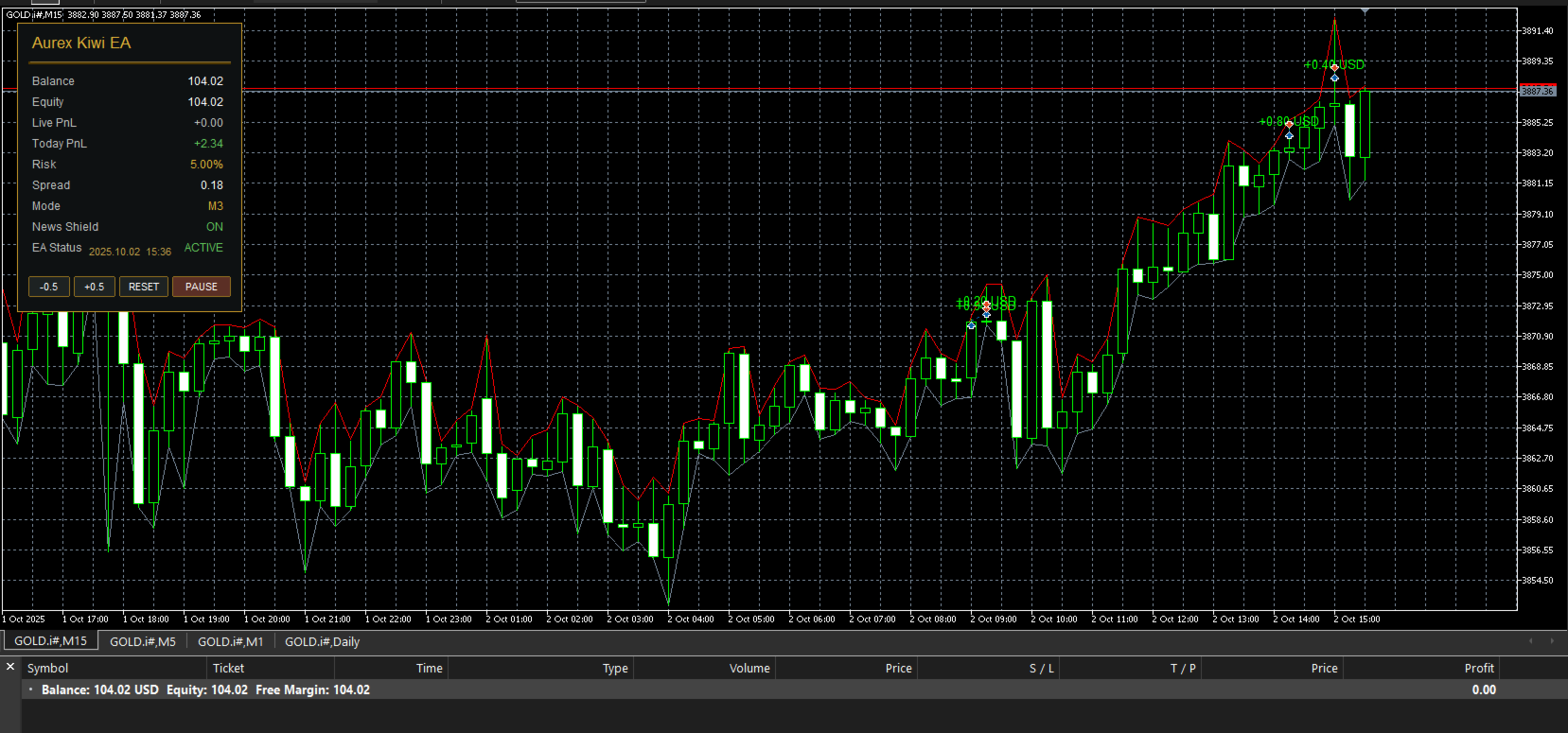
Interactive Aurex Kiwi DashboardAurex Kiwi includes an integrated on-chart dashboard so important information is available without constantly opening the EA settings.
The dashboard displays:
- Balance
- Equity
- Live PnL
- Today PnL
- Current risk
- Current spread
- Trading mode
- News Shield status
- EA status
- Broker date and time
You can also control risk directly from the chart:
-0.5 | +0.5 | RESET
And temporarily stop new entries using:
PAUSE / RESUME
Risk adjustments affect new trades only.
Existing positions continue to be managed by the EA.
━━━━━━━━━━━━━━━━━━━━━━━━━━━━━━━━━━━━
News ShieldMajor economic releases can dramatically change Gold volatility, spreads and execution conditions.
Aurex Kiwi includes an integrated high-impact USD News Shield.
When the configured news window becomes active, the EA can:
- Block new main entries
- Remove existing Aurex Kiwi pending entry orders
- Block Mode 3 Turbo additions
- Block Mode 3 Micro entries
- Continue managing existing open positions
- Resume normal operation automatically after the protection window
The time blocked before and after news can be adjusted by the user.
━━━━━━━━━━━━━━━━━━━━━━━━━━━━━━━━━━━━
Daily ProtectionAurex Kiwi gives users additional control over how much trading activity they allow.
Available protection features include:
Daily Loss Protection
Define a maximum daily equity-loss threshold.
Once reached, Aurex Kiwi stops initiating new positions for the remainder of the broker day.
Daily Trade Limit
Set the maximum number of filled Aurex Kiwi entries allowed during one trading day.
Spread Protection
Prevent new trades when the Gold spread exceeds the configured maximum.
Trading Hours Filter
Restrict new entries to your preferred broker-time trading window.
Holiday Filter
Avoid new trading activity during configured holiday conditions.
These controls are optional and can be enabled or disabled by the user.
━━━━━━━━━━━━━━━━━━━━━━━━━━━━━━━━━━━━
Built for Real Broker ConditionsAurex Kiwi includes execution safeguards designed for differences between brokers.
The EA handles:
- Broker volume limits
- Minimum lot sizes
- Lot-step normalization
- Price normalization
- Margin checks
- Symbol specifications
- Execution differences
- Slippage adaptation
- Pending-order management
Results can still vary between brokers because Gold trading is sensitive to:
spread, commission, leverage, liquidity, latency, slippage and execution speed.
━━━━━━━━━━━━━━━━━━━━━━━━━━━━━━━━━━━━
Restart RecoveryTrading platforms and VPS systems can restart.
Aurex Kiwi includes runtime recovery logic designed to reconstruct its management state after initialization.
This allows the EA to recover information related to:
- Main positions
- Virtual trailing management
- Mode 3 Turbo positions
- Mode 3 Micro positions
Aurex Kiwi also includes protection against accidentally running duplicate instances with the same strategy identity.
━━━━━━━━━━━━━━━━━━━━━━━━━━━━━━━━━━━━
Recommended SetupPlatform: MetaTrader 5
Instrument: XAUUSD / GOLD
Recommended timeframe: M15
Account type: Hedging recommended
Account currency: USD recommended
Minimum starting balance: $100
Recommended balance: $1,000+
VPS: Recommended
Execution: Low latency preferred
Gold symbols differ between brokers.
Examples may include:
XAUUSD
GOLD
GOLD.i
GOLD#
Always test Aurex Kiwi with your broker before increasing risk.
━━━━━━━━━━━━━━━━━━━━━━━━━━━━━━━━━━━━
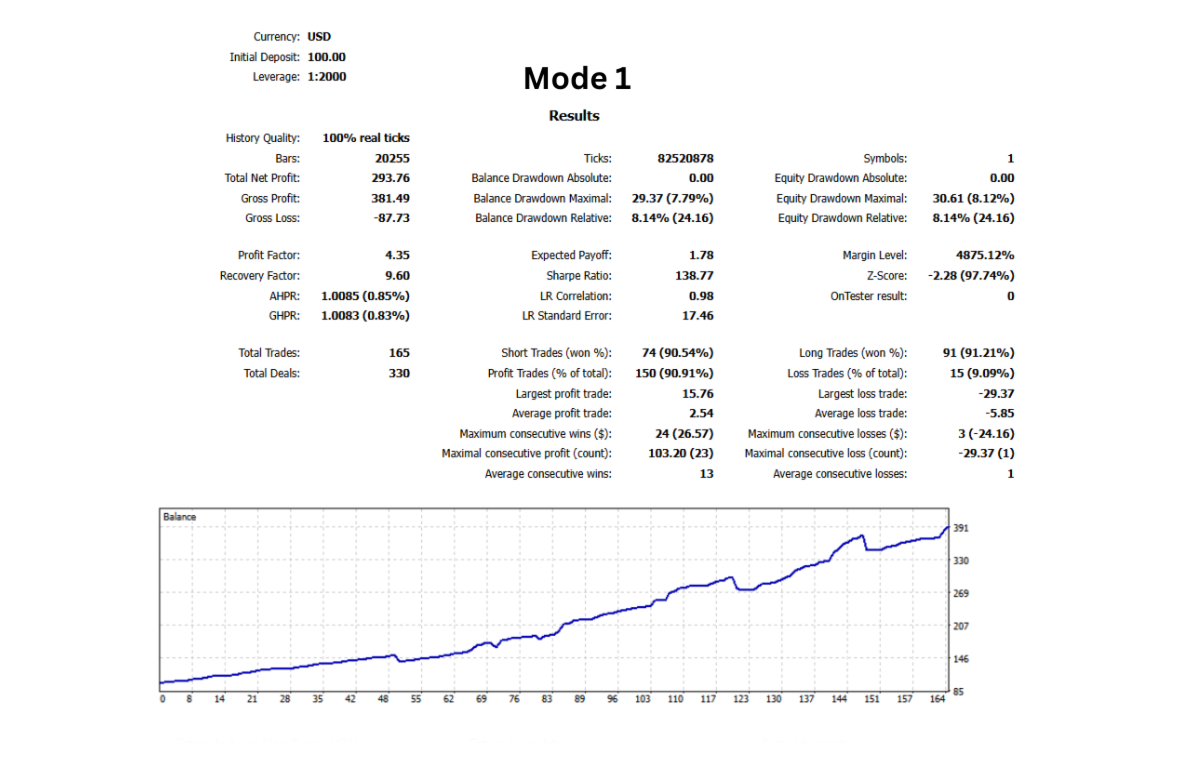
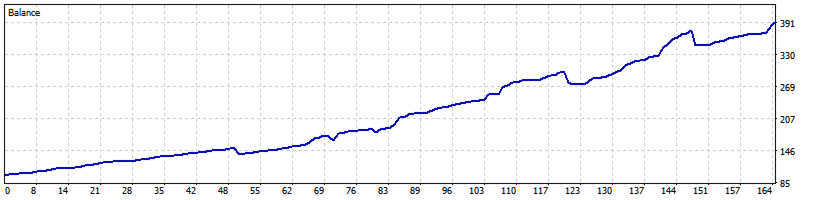
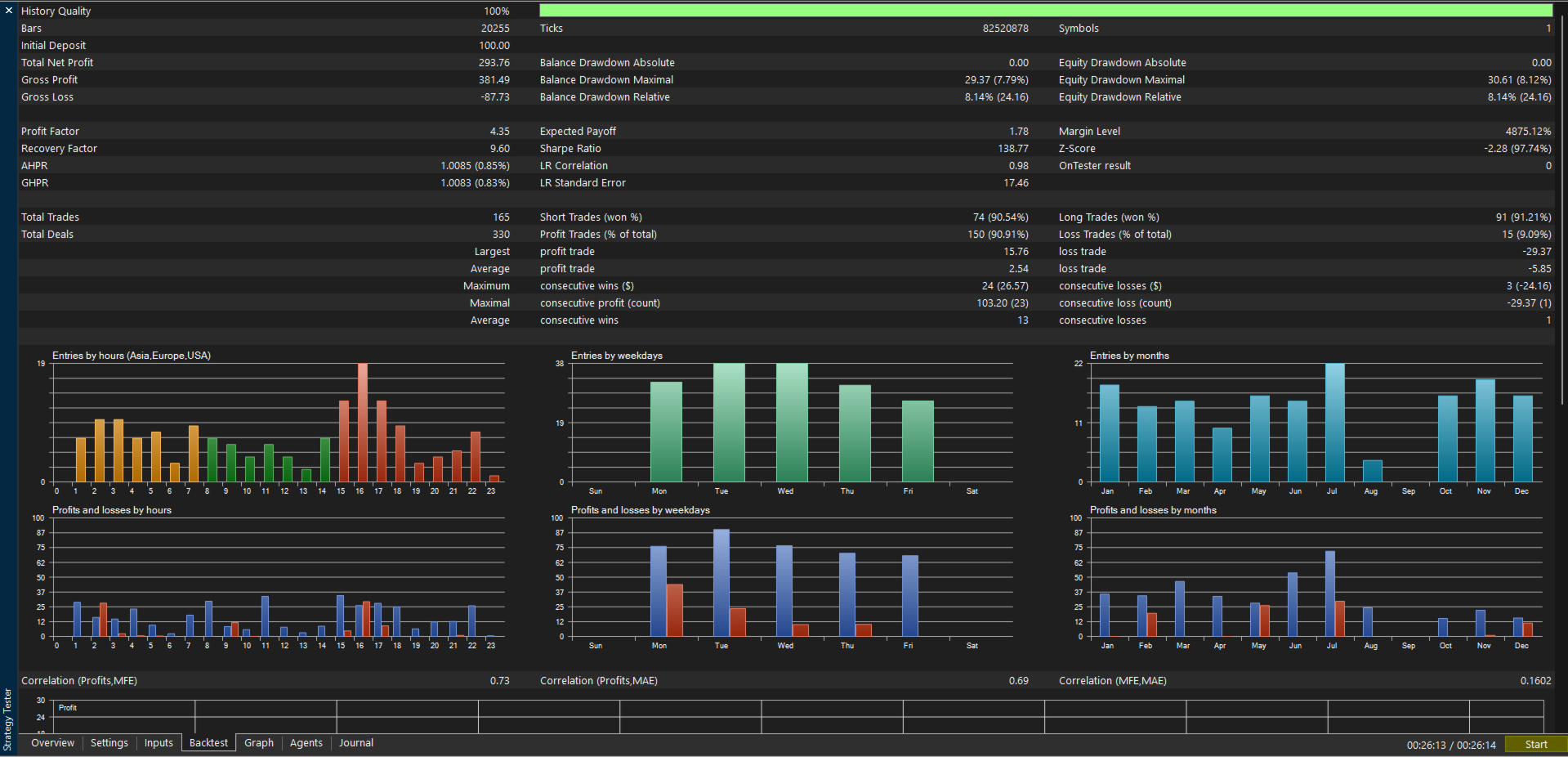
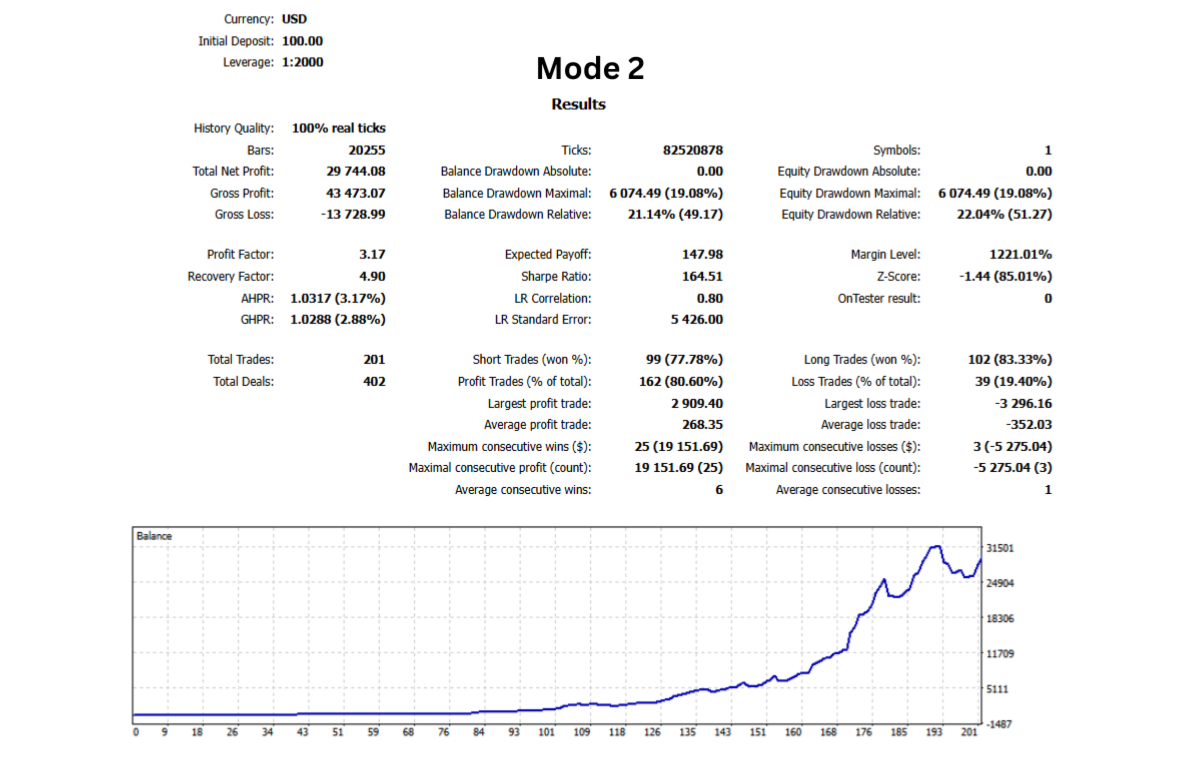
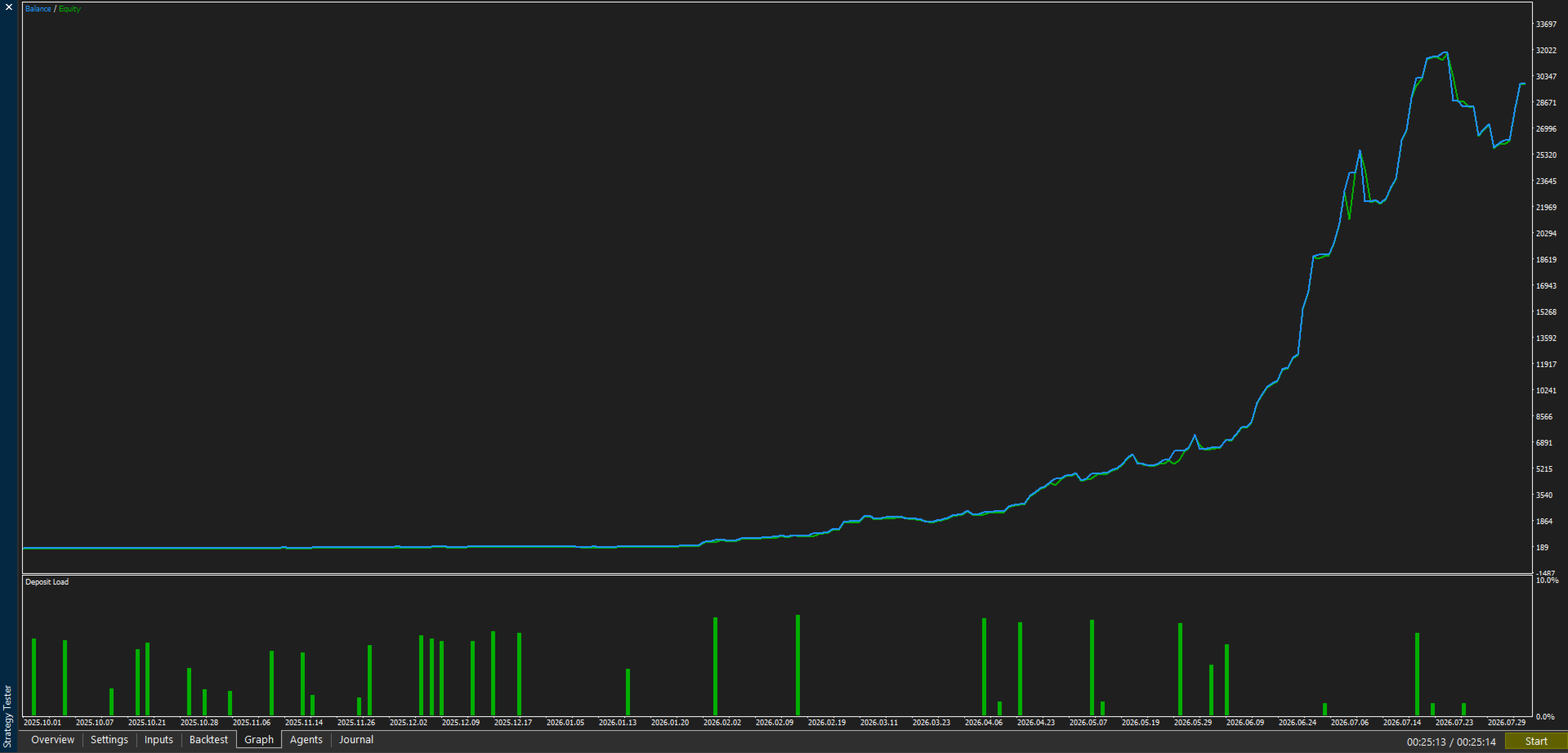
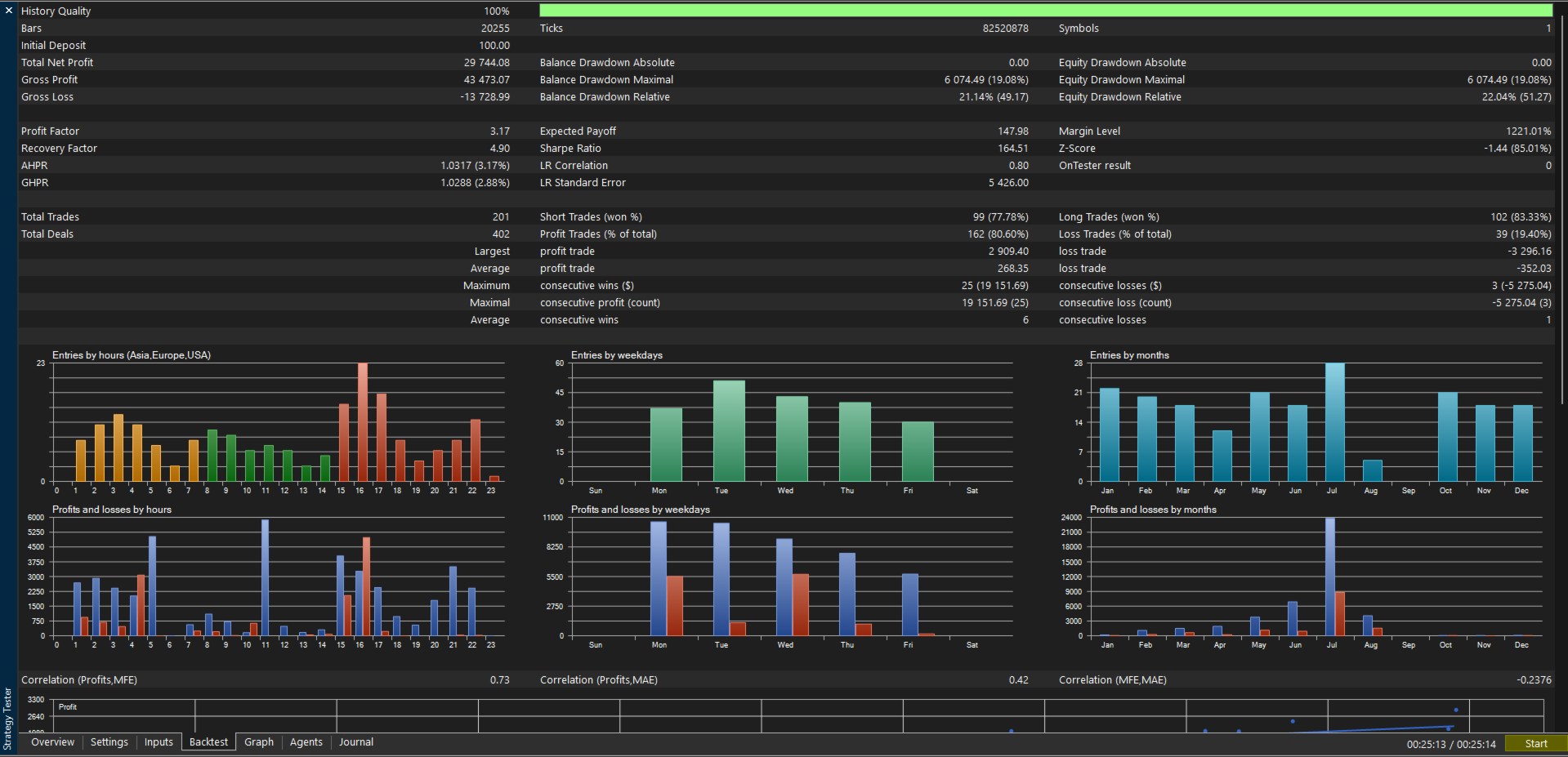
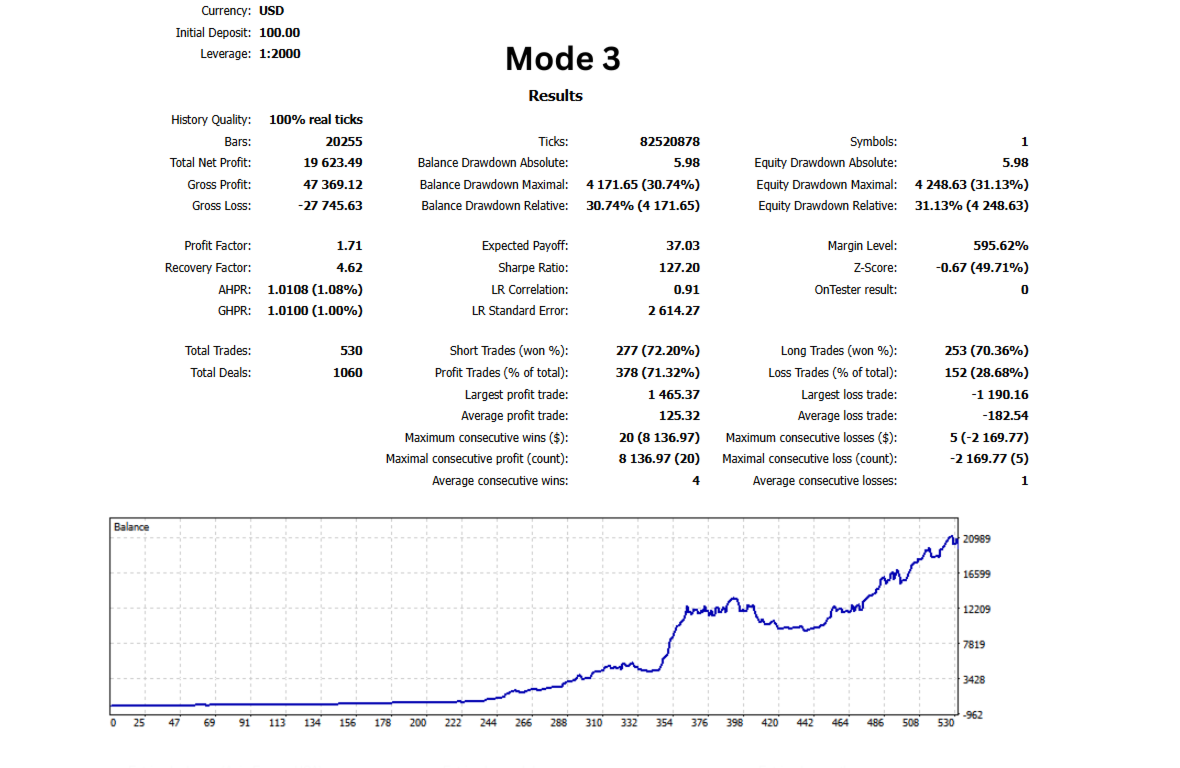
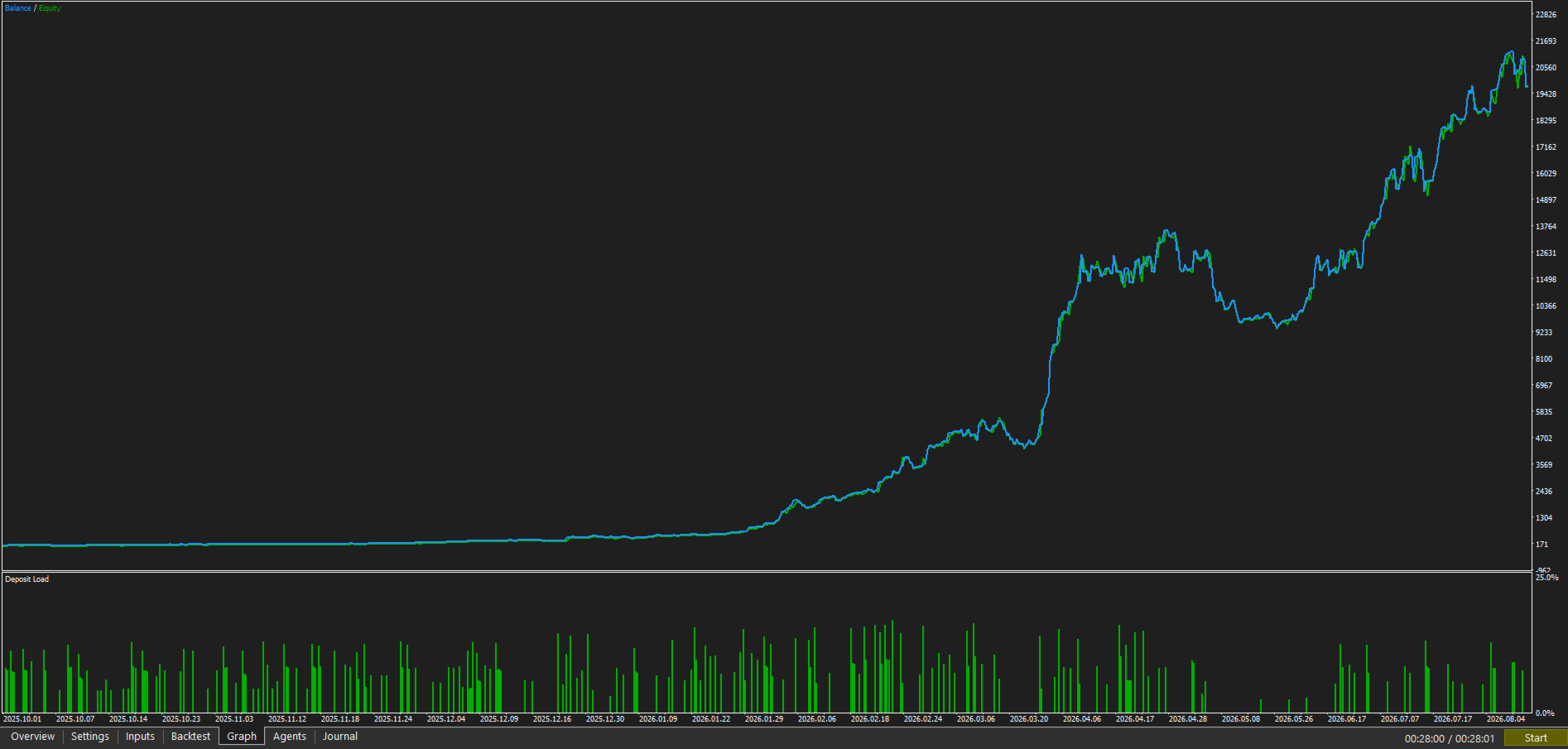
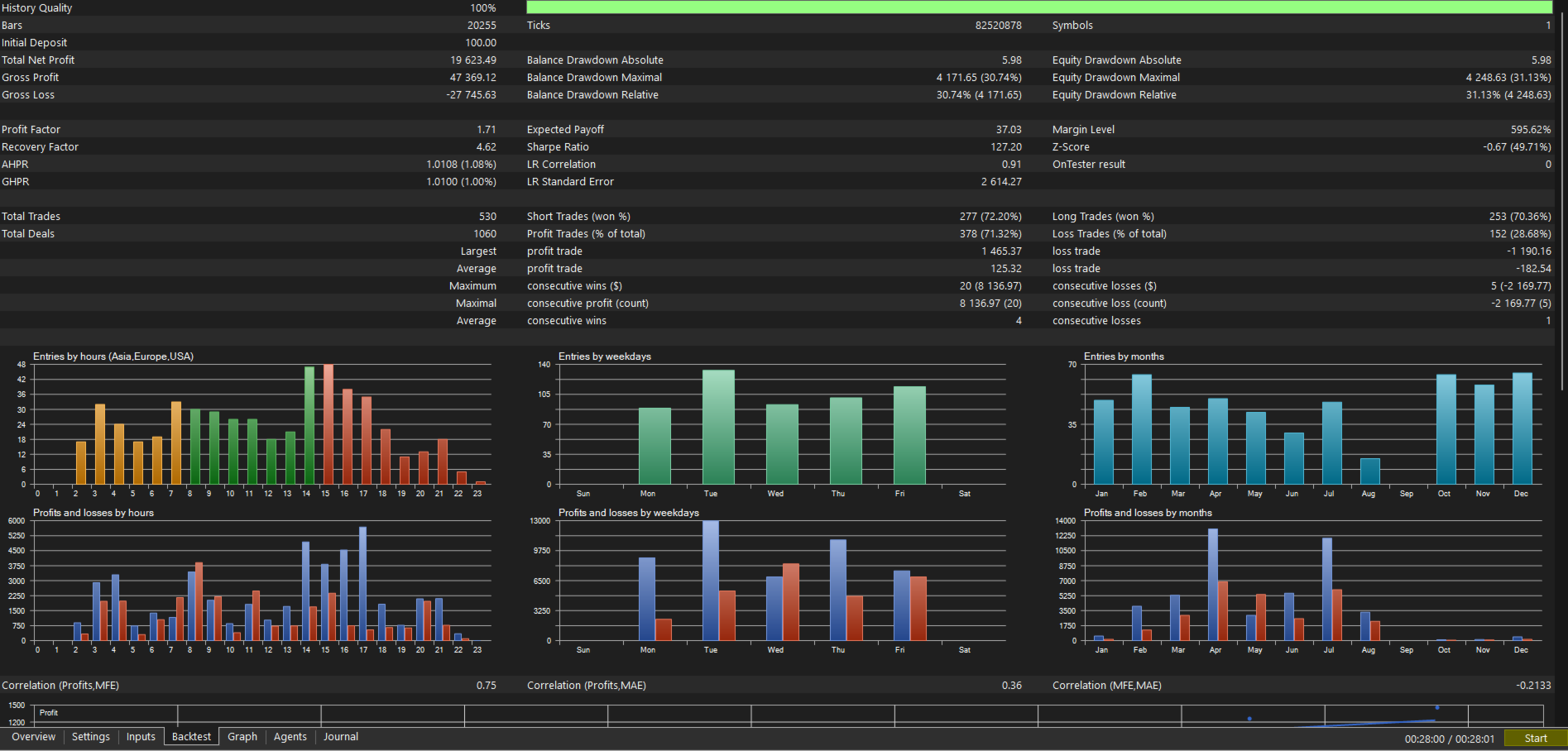
BacktestingThe product screenshots show Aurex Kiwi tested using MetaTrader 5 Strategy Tester under the displayed conditions.
Where indicated, tests use:
Every tick based on real ticks
100% History Quality
XAUUSD / GOLD
M15
$100 initial deposit
The three modes should be evaluated separately because each mode has a different risk and trading profile.
Backtesting is useful for understanding historical strategy behaviour, but it cannot reproduce every condition encountered in live execution.
━━━━━━━━━━━━━━━━━━━━━━━━━━━━━━━━━━━━
Before Using Aurex KiwiFor new users, the recommended approach is:
- Test the EA in Strategy Tester.
- Run it on a demo account.
- Start with conservative risk.
- Observe how your broker handles Gold execution.
- Increase risk only after understanding the EA's behaviour.
Do not select a risk level simply because a historical backtest produced a strong result.
━━━━━━━━━━━━━━━━━━━━━━━━━━━━━━━━━━━━
Important Risk NoticeAurex Kiwi does not guarantee profits.
Automated trading involves financial risk and can result in partial or complete loss of trading capital.
Historical results, simulations and previous performance do not guarantee future results.
Actual trading performance can be affected by:
- Market conditions
- Spread
- Commission
- Slippage
- Liquidity
- Broker execution
- Leverage
- Latency
- Account size
- User-selected risk
The purchaser remains responsible for selecting appropriate trading settings and risk.
━━━━━━━━━━━━━━━━━━━━━━━━━━━━━━━━━━━━
SupportAurex Kiwi buyers can receive assistance with installation and setup through:
MQL5 Product Comments
and
MQL5 private messaging
━━━━━━━━━━━━━━━━━━━━━━━━━━━━━━━━━━━━
Aurex Kiwi
The Gold Scalper
Three modes. Automated execution. User-controlled risk. Built specifically for Gold.