Account Info Panel NEON
- Experts
-
Muxlisa Gofurova
 🚀 MQL4 & MQL5 Algorithmic Trading Specialist | Expert Advisor Developer
I build institutional-grade automated trading systems for XAUUSD, US100/NASDAQ, and EURUSD,
specializing in Smart Money Concepts (SMC), Order Block, Fair Value Gap (FVG), and
Supply & Demand strategies. - Versão: 1.0
Account Info Panel Neon (MT5)
All-in-one live account telemetry, smart lot calculator and one-click trade execution panel.
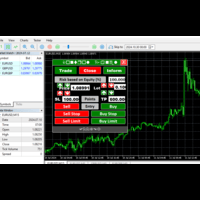
Account Info Panel Neon is a utility for MetaTrader 5 that combines account monitoring, spread tracking, custom lot sizing and one-click trade management in a single on-chart panel with a neon-styled interface. The panel does not place trades automatically and does not use any external signals. All actions are performed manually by the user through the on-chart controls.
Account telemetry
The panel displays account status (real or demo account), balance, equity with color coding based on profit and loss, and credit. It shows the broker name and leverage, the symbol's minimum lot, maximum lot and lot step, server ping, and the current spread in points.
Trade execution
A lot size field on the panel lets the user enter a custom lot size, which is automatically rounded to the broker's lot step. Buy and sell buttons send a market order at the selected lot size with a single click.
Trade management
Three buttons allow the user to close all open positions and pending orders at once, close only positions currently in profit, or close only positions currently in loss.
Trailing stop
The panel includes an optional trailing stop system. For Forex pairs, the trailing distance and step are set in pips. For XAUUSD, the trailing distance and step are set in US dollars per 1.0 lot, which adapts to different broker tick sizes for gold.
Design and performance
The panel is written in native MQL5 with no DLL calls, uses lightweight timers to keep CPU usage low, and is compatible with all current MT5 builds. The interface uses a dark background with aqua and magenta accent colors.
Input parameters
- DefaultLot (double): initial lot size loaded into the panel
- NeonColor (color): primary panel accent color, default Aqua
- NeonColor2 (color): secondary panel accent color, default Magenta
- PanelBgColor (color): panel background color
- UseTrailingStop (bool): enables or disables the trailing stop system
- TrailingStartPips (double): distance in pips to start trailing, for Forex pairs
- TrailingStepPips (double): trailing step in pips, for Forex pairs
- GoldTrailingDollars (double): trailing distance in US dollars, for XAUUSD
- GoldTrailingStepDollars (double): trailing step in US dollars, for XAUUSD
Installation
Attach the panel to any MetaTrader 5 chart. Enable "Allow Algo Trading" in the terminal settings. Use the on-screen panel to monitor the account and manage trades.
The panel works with any account type and any broker, and can be reviewed in the Strategy Tester's visual mode.