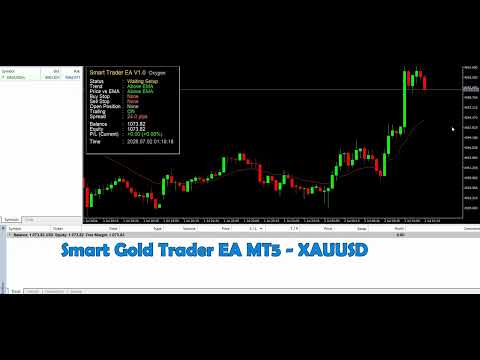
Oxygen Smart Gold Trader MT5
- Experts
- Versão: 1.45
- Atualizado: 10 agosto 2026
- Ativações: 10

BEST WORKS IN XAUUSD TIMEFRAME 5 MIN SETTINGS DEFAULT
Overview
Oxygen Smart Trader MT5 is an automated Expert Advisor developed for the MetaTrader 5 platform. It analyzes market direction using Moving Average-based signals and automatically executes trades when the configured trading conditions are satisfied.
The Expert Advisor is designed primarily for intraday trading. It combines automatic market analysis, trade execution, Stop Loss, Take Profit and money-management controls in one trading system.
Oxygen Smart Trader MT5 is intended for traders who prefer systematic trade execution instead of manually monitoring charts and opening every position themselves.
The Expert Advisor does not promise guaranteed profits. Trading results depend on market conditions, broker execution, selected parameters, trading instrument, timeframe and risk settings. MQL5 Market rules also prohibit guaranteed-profit claims and recommend using a clear, factual product description without emojis or external contact links.
Main Features
Fully Automated Trading
The Expert Advisor automatically:
- Monitors the selected trading symbol
- Analyzes Moving Average conditions
- Detects potential trading opportunities
- Opens trades when the entry conditions are confirmed
- Applies Stop Loss and Take Profit
- Manages position size according to the selected money-management mode
After installation and configuration, the EA can perform its trading operations without requiring the user to place every order manually.
Moving Average-Based Trading Logic
Oxygen Smart Trader MT5 uses Moving Average analysis to identify market direction and generate trading signals.
Moving Averages help the EA evaluate whether the market is showing bullish or bearish conditions. Trades are opened only when the programmed signal requirements are satisfied.
The EA does not open positions randomly. Every entry is based on its internal Moving Average trading conditions.
Automatic Stop Loss
Every position can be protected by a predefined Stop Loss.
The Stop Loss helps control the maximum planned risk of an individual position. Traders can configure the Stop Loss according to their preferred strategy, symbol and account risk.
A Stop Loss cannot guarantee execution at the exact requested price during gaps, extreme volatility or abnormal broker conditions.
Automatic Take Profit
The EA automatically places a Take Profit level according to the configured settings.
Take Profit allows a position to close automatically when the selected profit target is reached.
Stop Loss and Take Profit should be adjusted according to:
- Symbol characteristics
- Number of digits
- Average volatility
- Selected timeframe
- Broker conditions
- User risk tolerance
Money Management
Oxygen Smart Trader MT5 includes money-management functionality to help users control position sizing.
Depending on the available EA inputs, traders can use a fixed trading volume or an automatic lot calculation based on their selected risk settings.
Money management does not remove trading risk. It helps the user apply a structured position-sizing method.
Trading Strategy
Oxygen Smart Trader MT5 follows a systematic Moving Average-based strategy.
The EA continuously reads market data and evaluates the relationship between price and the configured Moving Average conditions. When a valid signal appears, the Expert Advisor checks its internal trade requirements before opening a position.
Frequently Asked Questions
Is Oxygen Smart Trader MT5 fully automatic?
Yes. The EA analyzes Moving Average conditions, opens trades and applies its trade-management settings automatically.
What platform is required?
MetaTrader 5 is required.
Does it work on MetaTrader 4?
No. This product is developed for MetaTrader 5.
What type of strategy does it use?
It uses Moving Average-based trading signals for intraday trading.
Does it use Stop Loss?
Yes. The EA includes configurable Stop Loss management.
Does it use Take Profit?
Yes. Take Profit is applied according to the selected settings.
Can I change the lot size?
Yes. The trading volume can be configured through the available lot and money-management settings.
Does it support automatic money management?
Yes, according to the money-management options included in the EA.
Is profit guaranteed?
No. No trading system can guarantee future profit.
Will the EA trade every day?
Not necessarily. Trades are opened only when the programmed conditions are satisfied. The number of signals depends on the market, symbol, timeframe and parameters.
Can it be used on any symbol?
It may be tested on MetaTrader 5 instruments supported by the broker, but each symbol should be tested and configured separately.
Can I use the same settings on every symbol?
This is not recommended. Symbols have different volatility, spreads, point values and contract specifications.
Is a VPS compulsory?
No. However, it may be useful for uninterrupted operation.
Can I close a trade manually?
A position can generally be closed manually, but the EA may open another position later if a new valid signal occurs.