StrBTV Pro MTF
- Indicadores
-
Marian Beceanu
 Atlas Enterprise Matrix:
https://www.mql5.com/en/market/product/183575
ZigZag Maturity — Multi-Timeframe Swing Maturity & Reversal Probability Dashboard - Versão: 2.10
- Ativações: 10
STRBTV Pro MTF — Detailed Description
STRBTV stands for "Sell The Rally, Buy The Valley" — an MT5 indicator (v2.10, by Marian Beceanu) built around multi-timeframe MACD convergence/divergence, with a "sniper entry" logic based on Support/Resistance and a built-in risk-management dashboard.
General Concept
The indicator works on two levels:
- Higher timeframe (HTF) — looks for convergence between price and MACD on the swing highs/lows of that timeframe. A confirmed HTF convergence is treated as the valid "trend context" (this is the core idea the code itself labels as "the book's sniper principle").
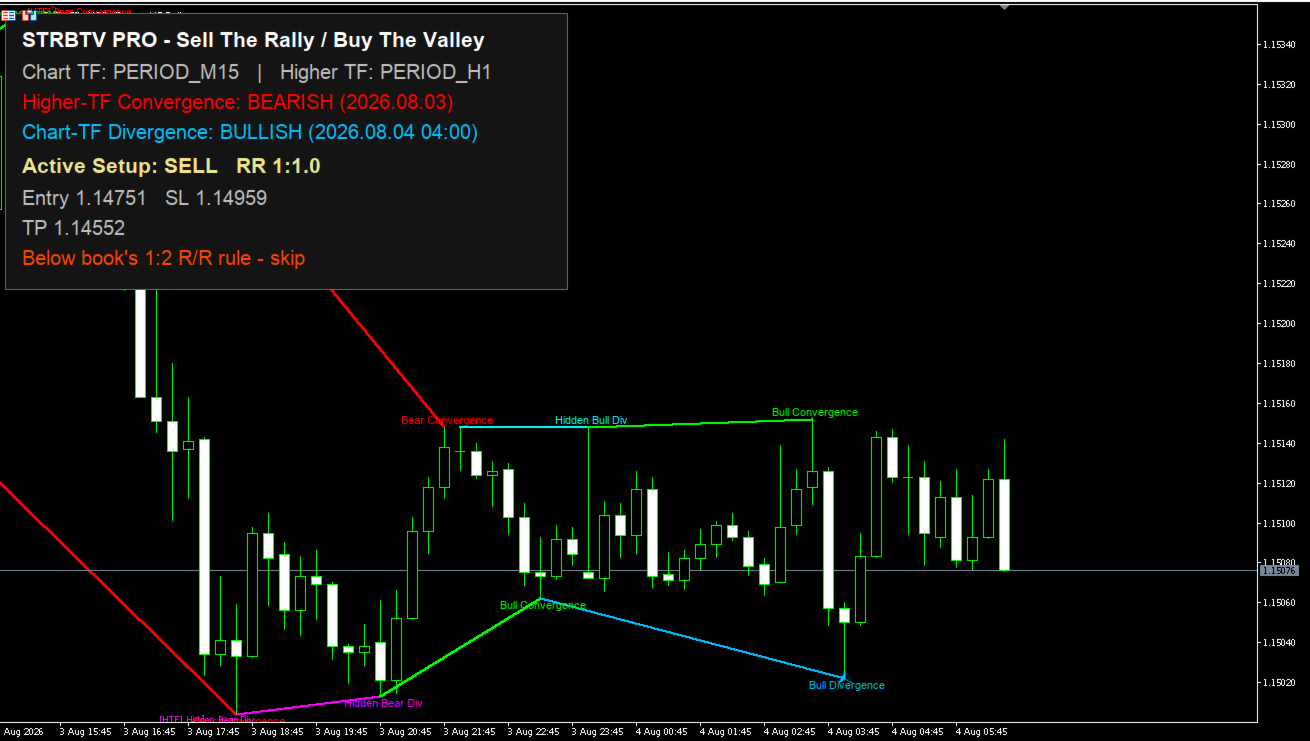
- Chart timeframe (LTF) — looks for MACD divergence on its own pivots. When an LTF divergence appears in the same direction as the currently active HTF convergence, a SNIPER signal (buy/sell) fires, with SL calculated from the nearest S/R level and TP calculated from the last relevant HTF pivot, plus a displayed Risk/Reward (RR) ratio.
In short: the HTF tells you "the big trend confirms this direction," the LTF tells you "right now, at the micro level, the pullback is exhausting" → that's the sniper entry.
Key Features
- Dual MACD engine — one iMACD handle on the current chart timeframe and one on the higher timeframe (auto-calculated or fixed).
- Swing pivot detection (highs/lows) with configurable depth, on both LTF and HTF.
- Convergence vs. Divergence classification (including "hidden divergence") on both timeframes.
- 6 drawing buffers (arrows): Bull Divergence, Bear Divergence, Hidden Bull Divergence, Hidden Bear Divergence, Sniper Buy, Sniper Sell.
- Auto Support/Resistance — finds the nearest N swing levels (from LTF pivots) relative to the entry price, used for SL calculation.
- Automatic risk management — calculates SL (S/R level + buffer in points), TP (last opposite pivot before the correction that produced the HTF convergence), and the resulting RR; visually warns if RR is below the minimum threshold (default 1:2).
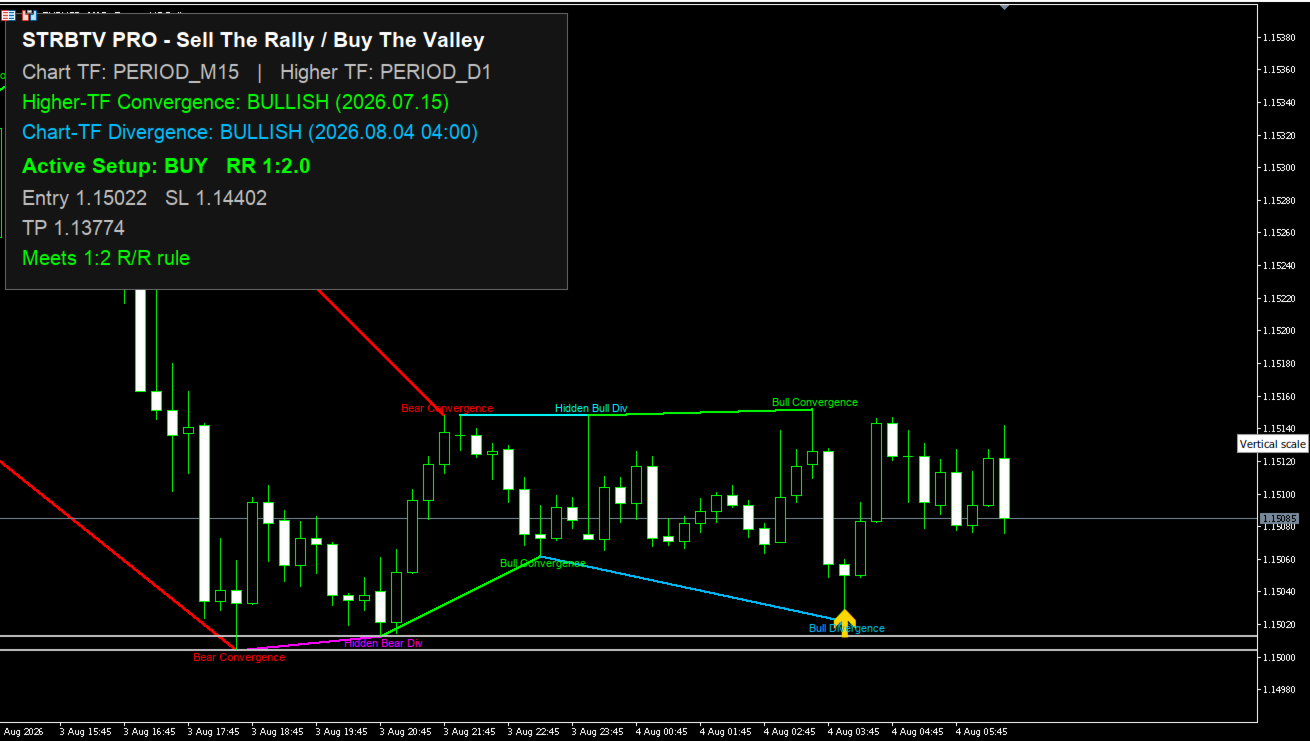
- On-chart dashboard — panel showing: chart TF/HTF, HTF convergence status, LTF divergence status, active setup (BUY/SELL), Entry/SL/TP, RR, and whether the 1:2 rule is met.
- Live horizontal lines for SL, TP, and S/R levels, updated (moved, not accumulated) with each new setup.
- Alert system (popup, push, sound) — automatically suppressed during the initial history load so attaching the indicator doesn't spam alerts.
- Performance optimizations — object drawing capped to the last N bars (the underlying calculation still runs on the full history), unique object names per chart instance (so you can run multiple instances on the same chart without conflicts), automatic retry if HTF data isn't yet available.
- Full input validation at OnInit , with clear messages in the Experts log if something is misconfigured.
Explanation of Every Input
=== MACD settings ===
- InpFastEMA (12) — Fast EMA period of MACD (used on both timeframes).
- InpSlowEMA (26) — Slow EMA period. Must be greater than FastEMA (validated).
- InpSignalSMA (9) — MACD signal line period.
- InpAppliedPrice (PRICE_CLOSE) — Price type used for MACD calculation (close, open, high, low, etc.).
=== Multi-timeframe ===
- InpHTFMode — how the higher timeframe is chosen:
- HTF_AUTO_1_UP — one standard timeframe above the chart (e.g. M15→M30);
- HTF_AUTO_2_UP — two standard timeframes above (e.g. M15→H1);
- HTF_FIXED — uses the fixed timeframe set below.
- InpHigherTF_Fixed (H4) — the timeframe used only if mode is Fixed.
- InpHTFBars (400) — how many historical HTF bars are scanned for pivots/convergence.
- InpHTFValidityBars (20) — an HTF convergence stays "active" (valid for triggering a sniper signal) for this many HTF bars only; after that it becomes stale and is ignored.
=== Swing / pivot detection ===
- InpSwingDepth (5) — bars on each side required to confirm a swing high/low.
- InpMinTrendBars (8) — minimum distance (in bars) between two compared pivots, a crude "after a trend" filter to avoid comparing pivots that are too close together.
=== What to display ===
- InpShowConvergence — shows convergence markers (bull/bear) on the chart.
- InpShowDivergence — shows "classic" divergences (bearish on highs, bullish on lows).
- InpShowHiddenDivergence (false by default) — shows hidden divergences, typically trend-continuation signals.
- InpShowHTFMarkers — draws the HTF convergence/divergence context on the chart (labeled with the "[HTF]" prefix).
- InpDrawConnectorLines — draws the lines connecting the two compared pivots.
- InpDrawLabels — shows text labels next to the markers.
- InpShowDashboard — enables/disables the info panel.
- InpDashCorner — chart corner where the dashboard is anchored.
- InpDashFontSize (8) — dashboard font size (title is +1); the whole panel (including background) scales automatically with this value.
=== Auto Support/Resistance & Risk Management ===
- InpSRLevelsToFind (3) — how many nearest S/R levels to find (the book's rule: "the 3 closest supports/resistances").
- InpSLBufferPoints (150) — extra buffer (in points) beyond the last S/R level used for SL.
- InpMinRR (2.0) — minimum acceptable RR (the book's rule: "never below 1:2"); if the setup falls below this, it's visually flagged as "skip."
=== Performance ===
- InpMaxMarkersHistory (5000) — draws chart objects only for the last N bars (0 = unlimited); calculation logic is unaffected, only the drawing is limited, to keep the chart lighter.
=== Alerts ===
- InpAlertPopup — MT5 popup on a new signal.
- InpAlertPush — push notification to your phone (via a linked MQL5 account).
- InpAlertSound — sound alert on signal.
- InpSoundFile ("alert.wav") — the sound file used.
How to Trade With This Indicator
1. Pick your working timeframe and let the indicator determine the HTF. For example, if you trade on M15 with HTF_AUTO_2_UP , it will analyze convergence on H1.
2. Check the dashboard for HTF context. The "Higher-TF Convergence" line must read BULLISH or BEARISH (green/red). This is the "big picture" — you don't trade without it, because the sniper signal only fires when an LTF divergence confirms in the same direction as the active HTF convergence.
3. Wait for LTF divergence in the direction of the HTF convergence:
- If HTF is BULLISH, wait for a bullish divergence on the chart TF (price makes a lower low, but MACD makes a higher low) — signals the downward correction is exhausting within the larger uptrend.
- If HTF is BEARISH, wait for a bearish divergence on the chart TF (price makes a higher high, but MACD makes a lower high) — signals the corrective rally is exhausting within the larger downtrend.
This is literally "Sell The Rally" (selling the up-pullback within a downtrend) / "Buy The Valley" (buying the down-pullback within an uptrend) — hence the indicator's name.
4. When the condition is met, a SNIPER BUY (gold) or SNIPER SELL (dark orange) arrow appears, along with:
- An SL line (red, dashed) — placed beyond the furthest of the N nearby S/R levels, plus an extra buffer.
- A TP line (green, dashed) — placed at the last opposite pivot before the correction that produced the HTF convergence (an approximation of "the swing before the correction," as noted in the code comments).
- S/R levels (dotted gray/silver lines) — the nearest levels used for the SL calculation.
5. Check the RR ratio shown on the dashboard. If it's below InpMinRR (default 1:2), the panel flags the setup in red/orange with "Below book's 1:2 R/R rule - skip" — the strategy's rule is to skip that setup.
6. Actual execution:
- BUY: enter at the price marked by the Sniper Buy arrow, SL at the red line, TP at the green line.
- SELL: enter at the price marked by the Sniper Sell arrow, SL at the red line (above), TP at the green line (below).
- The indicator does not place orders automatically — it's an analysis/signaling tool; actual execution (manual, or via a separate EA reading the SniperBuy / SniperSell buffers) is up to you.
7. Signal validity — an HTF convergence stays active only for InpHTFValidityBars HTF bars; if too much time passes without a matching LTF divergence, the context resets to NONE and a new HTF convergence must form.
8. Optional extra filtering — you can enable InpShowHiddenDivergence to also see trend-continuation signals (these don't trigger a sniper entry directly in the current code, but add extra visual context), and adjust InpSwingDepth / InpMinTrendBars to filter out noise on more volatile symbols.
Caution: like any MACD/divergence-based indicator, it can generate false signals in ranging or low-volatility markets; the built-in RR ≥ 1:2 filter is useful but doesn't guarantee profitability — I'd recommend testing on a demo account/backtest before live use.